


Artificial Intelligence and Machine Learning Articles
AI/ML Skills Gap 2026: Why Companies Can't Find Job-Ready Talent
20 AI/ML Interview Questions Recruiters Can Use Without a Tech Background - Best Guide
How Industry-Backed AI/ML Bootcamps Are Changing the AI/ML Hiring Pipeline - Best Guide 2026
From IT Support to AI Engineer: A Realistic Career Switch Guide 2026


Get In Touch For Details! Request More Information
PubMed Connector in Claude: Access Research Papers Instantly
Jun 24, 2026 4 Min Read 1814 Views
(Last Updated)
The PubMed connector Claude integration provides access to millions of biomedical research articles and clinical studies, allowing Claude to access abstracts and full papers to clarify experimental approaches, identify key findings, determine novelty and applicability, and surface specific papers for deeper exploration. This article explains how to set up and use the PubMed integration with Claude to accelerate your research workflows.
The PubMed integration relies upon Claude’s ability to use remote connectors. It connects Claude directly to the PubMed database maintained by the U.S. National Library of Medicine, the premier resource for medical research, scientific studies, and health information, with over 36 million citations for biomedical literature.
This tutorial covers what the integration provides, how to set it up across three install paths (individual users, organization owners, and Claude Code), the five common use cases with example prompts, the Messages API setup for developers, privacy and data usage, additional resources, and answers to frequently asked questions.
Quick TL;DR Summary
- What it provides: Direct access to 36M+ biomedical citations from PubMed and 8M full-text articles from PubMed Central, searchable by keyword, author, journal, or advanced syntax, with metadata, full text (where available), related articles, and citation matching.
- Free for all Claude users: PubMed is a free public resource provided by the U.S. National Library of Medicine. No subscription or NCBI account required.
- Three install paths: Individual users (Settings > Connectors), Organization Owners (Admin settings > Connectors), and Claude Code (/plugin marketplace add anthropics/life-sciences).
- Five use cases: Search for research articles, get article details and metadata, access full-text articles from PMC, find related articles across NCBI databases, and match citations to PubMed IDs.
- Developer access: Connect programmatically through Claude’s Messages API using the MCP connector with the beta header anthropic-beta: mcp-client-2025-11-20.
- Data freshness: PubMed is updated daily. The integration provides real-time access to the latest available data from NCBI databases.
Table of contents
- What the Integration Provides
- Setting Up the PubMed Integration
- For Organization Owners, Team and Enterprise
- For Individual Claude Users
- For Claude Code Users
- Common Use Cases
- Search for Research Articles
- Get Article Details and Metadata
- Access Full-Text Articles
- Find Related Articles
- Match Citations to PubMed IDs
- Using the PubMed MCP with the Messages API
- Requirements
- Setup
- Example Request
- Privacy and Data Usage
- Conclusion
- FAQs
- What is the PubMed connector in Claude?
- Is the PubMed connector free to use?
- How do I set up the PubMed connector?
- Can I access the full text of any PubMed article?
- How current is the data in the PubMed connector?
What the Integration Provides
The PubMed connector Claude integration connects Claude directly to the PubMed database maintained by the U.S. National Library of Medicine. With over 36 million citations for biomedical literature, PubMed is the premier resource for medical research, scientific studies, and health information.
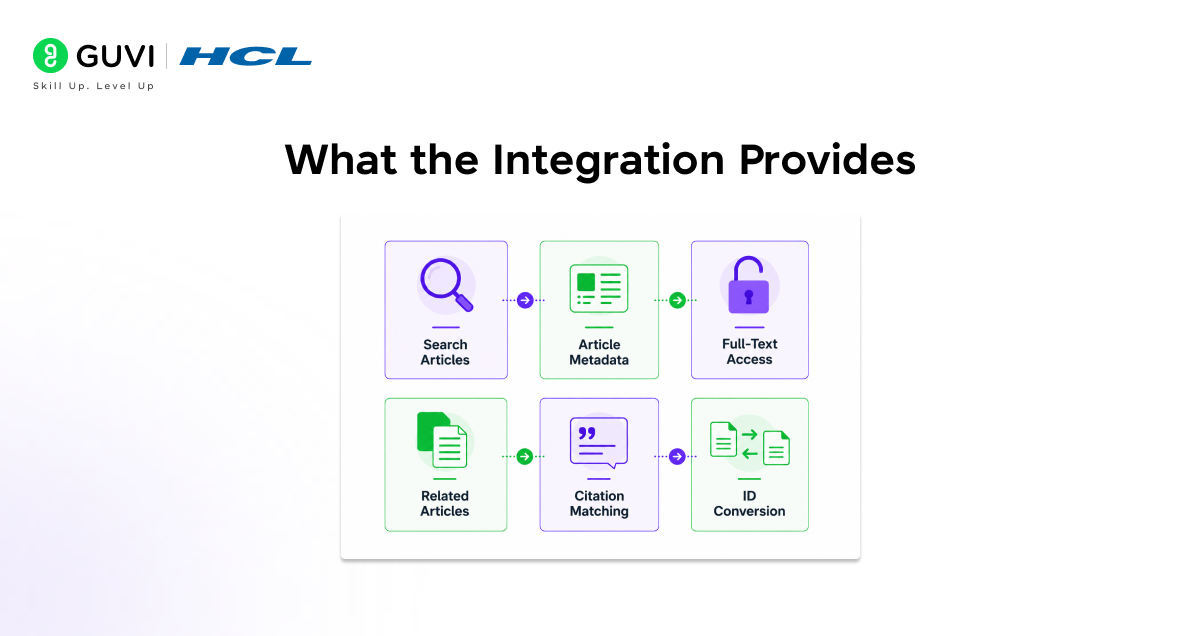
This integration allows you to:
- Search for research articles using keywords, authors, journals, or advanced query syntax
- Get complete article metadata, including abstracts, authors, publication dates, citations, and links to the full article
- Access full-text articles from PubMed Central (PMC) when available
- Find related articles across NCBI databases
- Match citations to PubMed IDs for verification and referencing
- Convert between ID formats — PMID, PMC ID, and DOI
PubMed contains over 36 million citations, while PubMed Central (PMC) hosts around 8 million full-text articles. When Claude retrieves a paper, it accesses the full text if available in PMC. For others, it provides metadata like title, authors, and abstract, along with a direct link to the full article.
Setting Up the PubMed Integration
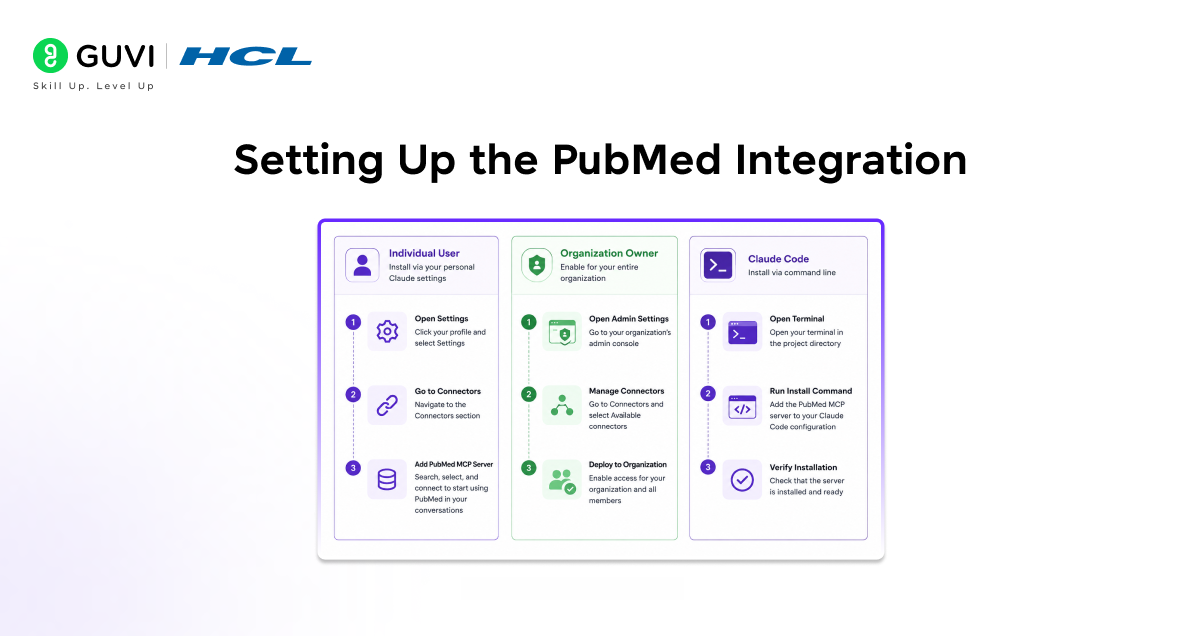
For Organization Owners, Team and Enterprise
1. Navigate to Admin settings > Connectors
2. Click “Browse connectors.”
3. Click “PubMed.”
4. Click “Add to your team.”
For Individual Claude Users
5. Navigate to Settings > Connectors
6. Find “PubM.ed.”
7. Click “Connect.”
For Claude Code Users
/plugin marketplace add anthropics/life-sciences
/plugin install pubmed@life-sciences
Restart Claude Code, then verify that the server is connected:
/mcp
Common Use Cases
The PubMed connector Claude integration handles five distinct research workflows. Here are the use cases with example prompts for each:
Search for Research Articles
Ask Claude to find articles on biomedical or scientific topics of interest:
Find recent studies about immunotherapy for melanoma
Show me research on CRISPR gene editing from the last month
Find literature related to a proposal or gene that I am working on
Get Article Details and Metadata
Retrieve comprehensive information about specific articles — citations, authors, publication dates, and contribution summaries:
What are the most cited papers on this topic?
Find the most recent papers on this topic and summarize new contributions to the field.
Who were the authors of that study?
When was that paper published?
Access Full-Text Articles
For articles available in PubMed Central, retrieve the complete text to support deeper analysis, method comparison, and hypothesis development:
Compare the methods of these two papers
What were the shared conclusions across these papers, and where did they differ?
Read these papers and help me identify the most important conclusions for my hypothesis.
Note: Only articles in PubMed Central (PMC) have full text available. PubMed might only have access to abstracts of other articles.
Find Related Articles
Discover similar research across NCBI databases, including connections to Gene, Protein, and Nucleotide databases:
Find similar studies to this one
Compare the findings of this study to those of others in the field
Match Citations to PubMed IDs
Verify citations and find PubMed IDs from journal references useful for bibliography management, citation checking, and accessing specific papers by PMID:
Look up this citation: Smith J, Nature 2020, vol 52, page 811
Find the PubMed entry for this reference from my bibliography
I have a citation from a paper. Can you find it in PubMed?
I would like to have a discussion about the paper associated with this PMID.
The PubMed connector extends beyond PubMed and PMC, enabling discovery across other NCBI databases. By asking Claude to find connections, you can retrieve genes, protein sequences, and nucleotide data linked to a study — all within a single conversation, without switching between multiple tools.

Using the PubMed MCP with the Messages API
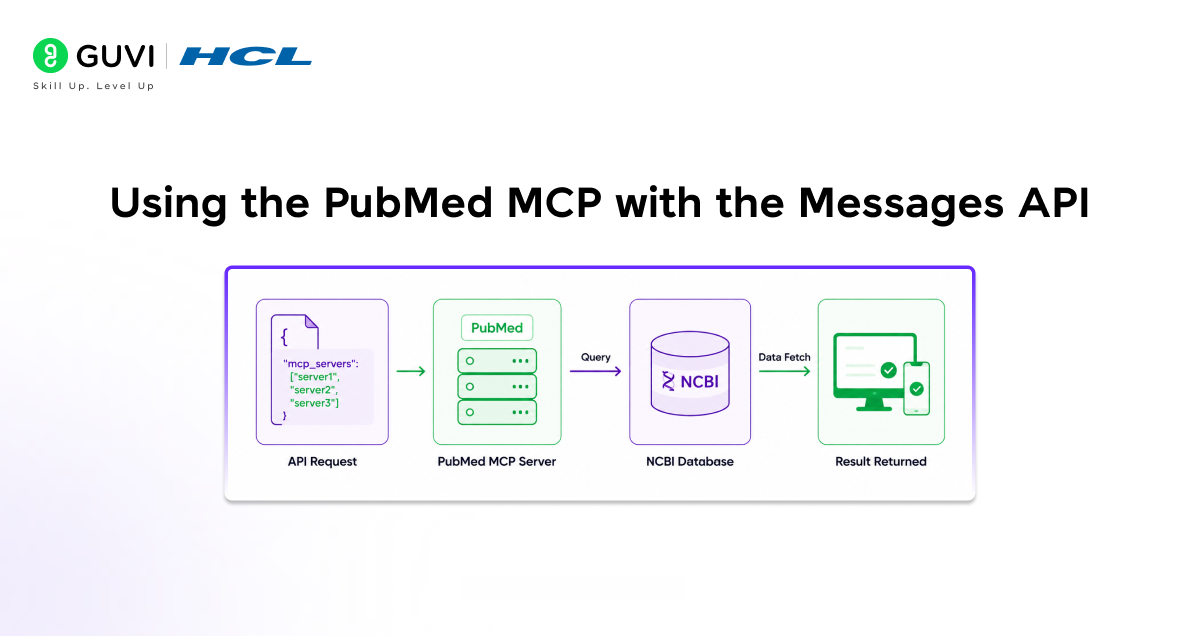
Developers can connect to the PubMed integration directly through Claude’s Messages API using the MCP connector. This allows you to build applications that leverage PubMed search capabilities programmatically.
Requirements
• An Anthropic API key
• The beta header: anthropic-beta: mcp-client-2025-11-20
Setup
8. Add the PubMed MCP server to your API request’s mcp_servers array
9. Reference the server in your tools array using an mcp_toolset entry
10. Include the required beta header
Example Request
import anthropic
client = anthropic.Anthropic()
response = client.beta.messages.create(
model=”claude-sonnet-4-5″,
max_tokens=1000,
messages=[{“role”: “user”, “content”: “Find recent papers on CRISPR gene editing in cancer treatment”}],
mcp_servers=[{“type”: “url”, “url”: “https://pubmed.mcp.claude.com/mcp”, “name”: “pubmed”}],
tools=[{“type”: “mcp_toolset”, “mcp_server_name”: “pubmed”}],
betas=[“mcp-client-2025-11-20”]
)
Privacy and Data Usage
- The PubMed integration only accesses publicly available research articles
- No personal health information or patient data is accessible through the integration
- Your search queries are used only to retrieve relevant articles
- All data comes from official NCBI sources
If you want to learn more about building skills for Claude Code and automating your procedural knowledge, do not miss the chance to enroll in HCL GUVI’s Intel & IITM Pravartak Certified Artificial Intelligence & Machine Learning courses. Endorsed with Intel certification, this course adds a globally recognized credential to your resume, a powerful edge that sets you apart in the competitive AI job market.
Conclusion
In conclusion, the PubMed connector Claude integration gives researchers, clinicians, and developers direct access to 36 million biomedical citations and 8 million full-text articles through natural conversation without switching between PubMed, PMC, and Claude separately.
The five use cases: article search, metadata retrieval, full-text access, related article discovery, and citation matching, cover the core research tasks that biomedical professionals do repeatedly. The Messages API integration extends this to programmatic applications. And the additional NCBI database connections allow Claude to surface genes, proteins, and nucleotide sequences linked to specific articles when needed.
Connect the integration from Settings > Connectors, start with a topic-specific article search or a citation lookup, and build from there. PubMed updates daily, so the data Claude retrieves reflects the current state of the published literature.
FAQs
1. What is the PubMed connector in Claude?
The PubMed connector is an MCP-based remote connector that gives Claude direct access to the PubMed database maintained by the U.S. National Library of Medicine. It allows researchers to search 36M+ biomedical citations, retrieve article metadata and full text (where available in PMC), find related articles, and match citations to PubMed IDs — all through natural conversation without leaving Claude.
2. Is the PubMed connector free to use?
Yes. The integration is free for all Claude users. PubMed is a free public resource provided by the U.S. National Library of Medicine. No NCBI account or PubMed subscription is required to use the connector.
3. How do I set up the PubMed connector?
For individual users, navigate to Settings > Connectors, find PubMed, and click Connect. For organization owners on Team or Enterprise plans, go to Admin settings > Connectors, click Browse connectors, click PubMed, and click Add to your team. For Claude Code, run /plugin marketplace add anthropics/life-sciences, then /plugin install pubmed@life-sciences, restart Claude Code, and verify with /mcp.
4. Can I access the full text of any PubMed article?
Only articles in PubMed Central (PMC) have full text available through the connector. PubMed contains over 36 million citations with abstracts, but PMC contains approximately 8 million full-text articles. For articles not in PMC, Claude provides available metadata — title, authors, abstract — and a direct link to the full article so you can access it yourself.
5. How current is the data in the PubMed connector?
PubMed is updated daily with new research. The integration provides real-time access to the latest available data from the NCBI databases. However, the data may not always reflect the absolute latest information from the National Library of Medicine, as it comes from official NCBI sources, including the NCBI E-utilities API
Success Stories

About the Author
Vishalini Devarajan
An Aerospace Engineer turned content writer, I focus on making complex concepts easy to understand through well-structured, reader-friendly blogs. Whether it’s a technical topic or a non-technical one, I love creating content that is clear, engaging, and impactful.
View all posts by Vishalini Devarajan
Connect with me @













Did you enjoy this article?