


Artificial Intelligence and Machine Learning Articles
Finance Manager to Data Analytics: Career Growth, Salary and Seniority
How to Evaluate LLM Outputs in Production Deployments
AI/ML Skills Gap 2026: Why Companies Can't Find Job-Ready Talent
20 AI/ML Interview Questions Recruiters Can Use Without a Tech Background - Best Guide


Get In Touch For Details! Request More Information

How to Use the Prior Auth Review Claude Skill
Jul 13, 2026 5 Min Read 923 Views
(Last Updated)
The application of artificial intelligence is changing the way structured workflows are managed within all industries, such as healthcare and insurance, which are reliant on multiple checks to make decisions.
One example is the prior auth review Claude skill, which is a sample workflow designed to streamline the process of reviewing prior authorizations with AI-supported data validation and summary.
However, the exact nature of the skill is widely misinterpreted among novice developers, who mistakenly believe it will make fully autonomous approval or denial decisions. This is not the case, and its operation is much more of a contained assistant.
To understand and explain clearly, it’s necessary to understand the intent and design of the skill.
In this article, I will explain how to use the prior auth review Claude skill, describe what’s occurring behind the scenes, show you how to set it up in Claude.ai and Claude Code, and demonstrate its application in real-world workflows.
TL;DR
- The prior auth review Claude skill is a sample AI workflow that processes authorization request documents, performing structured validation against the NPI registry, ICD-10 codes, CPT codes, and CMS coverage databases.
- The skill will never attempt to make a final decision; rather, it functions as an AI assistant for human reviewers, providing summaries and data validation.
- The skill can be set up through either Claude.ai or Claude Code with a series of straightforward commands.
- The skill functions by utilizing structured prompts, tools, and external data access protocols such as MCP.
Table of contents
- What is the Prior Auth Review Claude Skill
- How the Skill Works in Reality
- Knowing the System Architecture
- Configuring the Prior Auth Review Skill
- Step-by-Step Implementation Guide
- Real-World Use Case
- Best Practices for Auth Review Claude Skill
- Common Pitfalls to Watch Out For
- Conclusion
- FAQs
- What is the prior auth review Claude skill used for?
- Does the skill make final approval decisions?
- Do I need coding knowledge to use this skill?
- Can the skill be customized?
- Why is external data validation important?
What is the Prior Auth Review Claude Skill
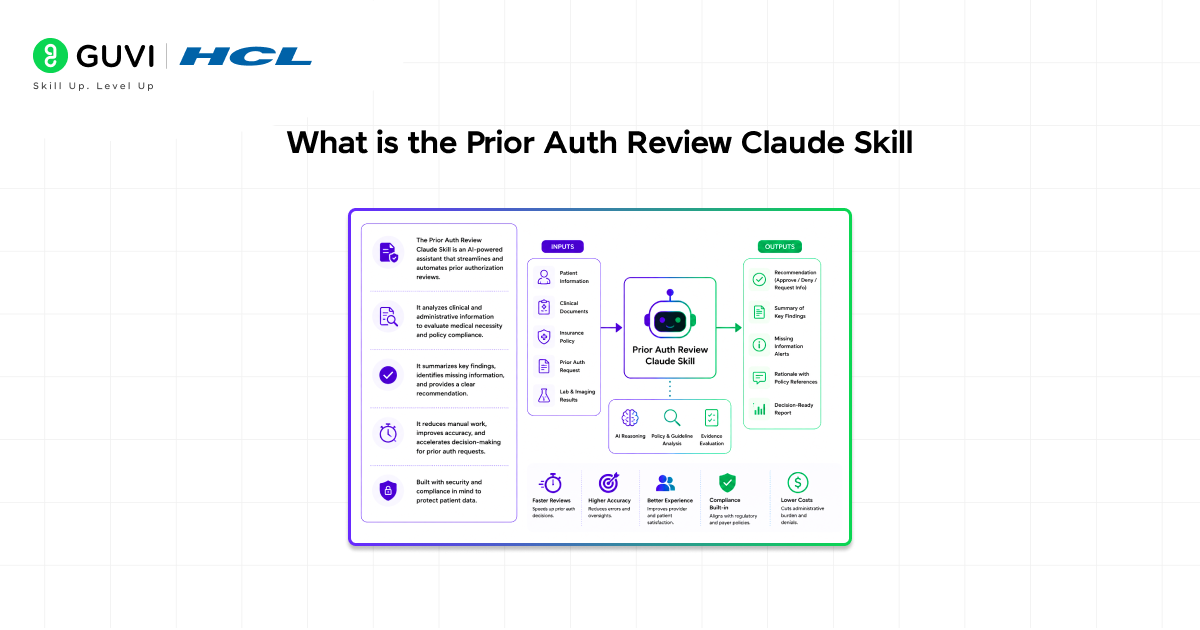
The Prior Auth Review Claude Skill is a sample skill that receives prior authorization request packet data and performs an initial review to validate requests before being routed to human reviewers. It is structured to reduce the burden of manual review.
It will intake request documents and check several pieces of data, such as:
- Validating physician identity
- Checking to ensure the diagnosis and procedure codes provided are valid
- Confirming coverage for the requested service
The data provided will also be extracted, and a summary will be created that makes a case for medical necessity.
The critical aspect is that it is not a prompt, but a reusable workflow for teams and developers to adapt to their processes. It is a prototype, not a production-ready application. This is critical for defining the use of this skill.
How the Skill Works in Reality
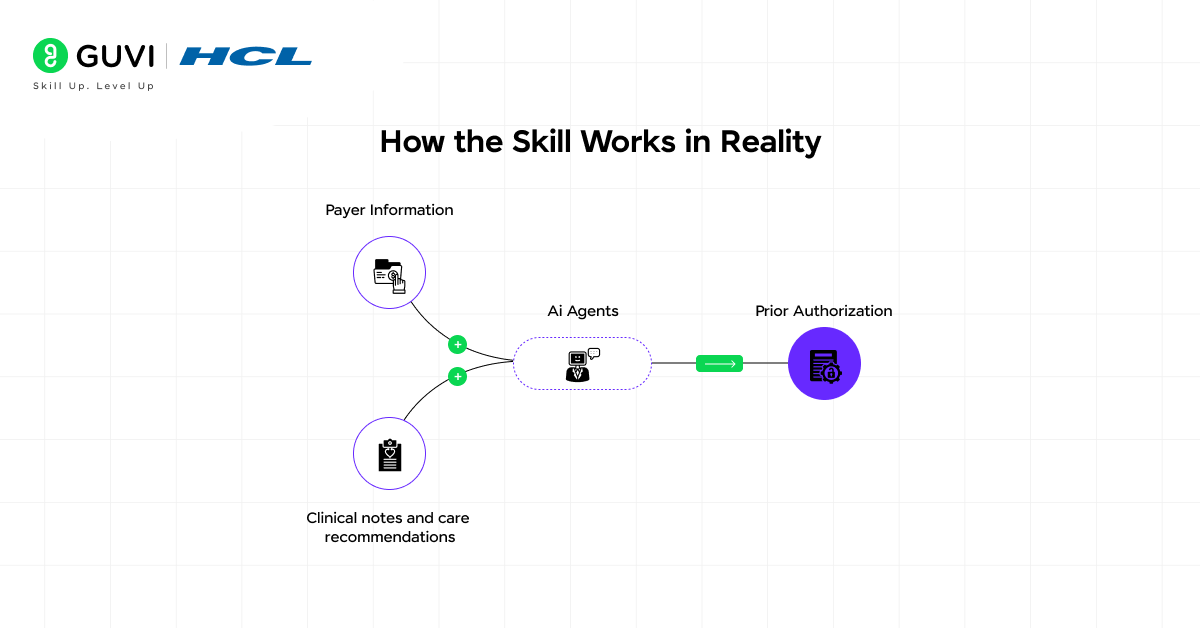
The process begins with a prior authorization request packet. It includes the patient’s details, what treatment they require, and clinical details, along with other documentation necessary for assessment. The system takes data from the document and extracts relevant information like diagnosis codes, procedure codes, and provider details. It does not read this as just plain text but converts it into structured information that can be systematically assessed.
The next step is validation. The skill looks up the extracted data from various reference points, including:
- NPI Physician Registry
- ICD-10 lookup systems
- CPT codes
- CMS coverage information
Once the information has been validated, it goes into the system’s reasoning module. Here, the system takes into account if any information is missing or incorrect. A decision is not being made here; this module generates a review for a human to ultimately make the final decision.
Finally, an output is created. The system creates a report with a summary containing the validated information, along with missing and incorrect information, that is then passed to a human.
Knowing the System Architecture
The prior auth review Claude skill is not a standalone program. Instead, it works within a layered architecture where structured instructions are supplemented by external tools and dynamic access to information. The top layer of the system is the skill, which defines the behavior of the program, telling Claude what to do with each input and how to output the response in a structured format. All responses are made consistent through the skill.
The second layer includes various tools and external data sources that the skill interacts with. Unlike simple knowledge-based skills, the prior authorization review Claude skill is not reliant on an internal set of rules. Instead, it communicates with:
- Registries
- Databases
- Other external systems
Communication between these systems and Claude is facilitated by a protocol that allows Claude to retrieve the data it requires. This is where the Model Context Protocol comes in, allowing Claude to make requests, receive results, and include those results in its reasoning processes.
The final layer is the output. Here, the retrieved and reasoned information is compiled into an output designed for ease of interpretation by human reviewers. This layered architecture ensures that the skill is reliable and does not make random guesses.
Curious how this architecture actually works in real-world workflows? For a broader understanding of how such systems are built, you can also refer to this GenAI eBook.
The prior auth review Claude skill goes beyond pre-trained knowledge by interacting with external systems such as medical registries and coverage databases. This enables real-time validation, making its outputs more accurate and reliable than static AI responses.
Configuring the Prior Auth Review Skill
The configuration of the prior auth review Claude skill is fairly simple, though a degree of diligence is necessary to ensure it works as intended.
Step 1: Download the Skill Package
It is necessary to download the sample skill package. It will often appear in a .zip format, containing the setup and steps needed for it to function. When it is time to implement, the package content should be browsed and understood.
Step 2: Enable and Upload in Claude.ai
When using Claude.ai as a member of an organization, an administrator must enable the Skills section in admin settings. Once done, the skill can be uploaded from within the organization’s skills library and made available. In a non-organizational context, the procedure is similar in personal settings: in the Skills section, upload the skill package and activate it.
Step 3: Install via Claude Code
If you prefer working with code, you can use Claude Code. In this case, the skill can be installed using simple commands:
/plugin marketplace add anthropics/healthcare
/plugin install prior-auth-review@healthcare

Step-by-Step Implementation Guide
Simply uploading the prior auth review Claude skill isn’t enough; you’ll need to configure it to fit your workflow.
- Decide what kinds of inputs you will want to process. Know your input schema and the way your output should look, which will ensure the skill operates as desired.
- After deciding on inputs or outputs, review and customize the skill configuration. The example skill provided is merely a prototype, so you may want to change the logic, prompts, and validation logic of the skill to fit the task you wish to perform, as explained in this Claude skills customization guide.
- Before submitting the inputs, ensure that any desired tools and data sources have been connected and correctly supplied. In order to know that your inputs are validated as expected, the inputs must be connected to some kind of external validation tool; otherwise, the information will not be confirmed.
- After the configuration is complete, run the skill with sample data. Use several samples with variations to observe the missing information, how the skill processes it, and what format it gives out.
- Iterate on the system. Change the prompts accordingly, adjust data handling, and ensure it is a human-like response, rather than that of a bot.
Real-World Use Case
Imagine a healthcare provider submitting a prior authorization for a specific therapy. Patient information, diagnostic data, and clinical documentation are submitted along with this request.
The system leverages the prior auth review Claude skill and pulls key data points from this request, verifying the physician with the NPI registry, the diagnosis code against ICD-10 standards, and the procedure codes against CPT codes. It also verifies whether the procedure is covered according to CMS regulations and identifies whether all submitted documentation is present.
This summary is sent to the human reviewer instead of raw data, enabling quick and efficient decision-making without requiring them to verify every piece of information.
This is a scenario of how a skill can increase efficiency without replacing human oversight.
To explore how these concepts extend into real-world workflows, this Claude integrations guide provides useful examples.
Best Practices for Auth Review Claude Skill
For optimal utilization of the prior auth review Claude skill, maintain clarity and consistency when configuring the system.
- Ensure the input data is properly formatted and comprehensive, as the accuracy of the output depends heavily on the quality of the input.
- Periodically review and update validation rules based on current standards and policies to ensure system relevance.
- Test the workflow thoroughly using various scenarios to discover edge cases and enhance system robustness.
To further explore how these practices translate into real applications, you can refer to this guide on building AI apps with Claude.
Common Pitfalls to Watch Out For
While the prior auth review Claude skill can improve efficiency, there are several common mistakes that can limit its effectiveness if not addressed.
- Assuming that this skill will entirely replace human reviewers, leading to unrealistic expectations and incorrect use of the tool.
- Not tailoring the skill to fit your specific needs. This skill is just a template, and using it without any modification can result in outputs you cannot use with your current work process.
- Poor quality input data is another issue. There is nothing this skill can do about faulty input data and will, in turn, produce no reliable output.
- Not testing. One cannot deploy any system into a real-world work environment without a trial run first.
To effectively implement systems like the prior auth review Claude skill, having a strong understanding of data handling, system integration, and how AI interacts with real-world data is essential. If you’re looking to build these skills in a structured and practical way, programs like the HCL GUVI’s Artificial Intelligence and Machine Learning Course can help you understand how to move from basic prompts to building scalable, real-world AI workflows.
Conclusion
The prior auth review Claude skill can be a powerful ally for the common problem of manual, tedious, and error-prone workflows. The integration of document understanding capability, validation and verification of the request with structured data, and summarization capability provides efficiency in authorization reviews.
The tool is not just about the capabilities of Claude, but about how they are wielded. This tool cannot replace a human, but it can give insights into authorization decisions that would not have been available before. A properly implemented, configured, tested, and deployed version can become a vital component of workflow systems.
Knowledge of the architecture and constraints will distinguish between just having a tool and effectively using a tool.
FAQs
1. What is the prior auth review Claude skill used for?
It is used to process authorization request documents, validate key data points, and generate structured summaries for human review.
2. Does the skill make final approval decisions?
No, it only provides recommendations and summaries. Final decisions are made by human reviewers.
3. Do I need coding knowledge to use this skill?
No, it can be used through Claude.ai without coding, but developers can also implement it using Claude Code.
4. Can the skill be customized?
Yes, it is a sample template designed to be modified based on specific workflows and requirements.
5. Why is external data validation important?
It ensures that the information being processed is accurate and aligned with real-world standards and databases.
Success Stories

About the Author
Vishalini Devarajan
An Aerospace Engineer turned content writer, I focus on making complex concepts easy to understand through well-structured, reader-friendly blogs. Whether it’s a technical topic or a non-technical one, I love creating content that is clear, engaging, and impactful.
View all posts by Vishalini Devarajan
Connect with me @













Did you enjoy this article?