


Artificial Intelligence and Machine Learning Articles
AI/ML Skills Gap 2026: Why Companies Can't Find Job-Ready Talent
20 AI/ML Interview Questions Recruiters Can Use Without a Tech Background - Best Guide
How Industry-Backed AI/ML Bootcamps Are Changing the AI/ML Hiring Pipeline - Best Guide 2026
From IT Support to AI Engineer: A Realistic Career Switch Guide 2026


Get In Touch For Details! Request More Information

How to Extend Claude’s Capabilities Using MCP Servers and Skills
Jun 15, 2026 6 Min Read 784 Views
(Last Updated)
AI models are no longer limited to answering questions or generating text. Tools like Claude are evolving into systems that can interact with real-world applications and automate workflows. This shift is powered by innovations like Claude MCP servers, which connect AI models with external tools.
Many beginners struggle to extend Claude beyond its default capabilities. While it is powerful on its own, its real potential comes from connecting it to databases, APIs, and apps. This is where MCP servers and skills start playing a critical role.
In this article, you will learn how to extend Claude using MCP servers and skills. We will break down how they work and how you can use them to build smarter, tool-connected AI workflows step by step.
TLDR:
- The Claude MCP servers facilitate the connection of Claude to external tools, databases, and applications.
- The servers convert Claude from a chatbot to a true AI agent with the ability to carry out actions.
- The MCP servers are connectors which facilitate access to real-world data and services.
- The execution of tasks using the connected tools is defined by Claude skills.
- The combined architecture facilitates automation, data analysis, and automation of workflows.
- This enables the creation of scalable and tool-integrated AI solutions with low complexity.
- It enables both developers and non-technical individuals to build useful AI systems.
Table of contents
- What are Claude MCP Servers and Skills?
- What are Claude MCP Servers?
- What are Claude Skills?
- How Claude MCP Servers Work
- Core Architecture of MCP
- How the Flow Works
- Example in Practice
- Why MCP Servers Matter for AI Workflows
- Limitations of Standalone AI Models
- Need for External Tool Integration
- Shift from Chatbots to AI Agents
- Key Benefits of Using Claude MCP Servers
- Access to Real-Time Data
- Automation Abilities
- Scalability and Extensibility
- Reusable AI Workflows
- AI Coding Assistants
- Data Analysis and Reporting
- Workflow Automation
- Multi-Tool AI Agents
- How to Extend Claude With MCP Servers
- Step-by-Step Process
- Common Challenges and Limitations
- Security Implications
- Tool Overload
- Setup Difficulty
- Best Practices for Using MCP Servers and Skills
- Simple Work-Flows
- Only Use the Required Tools
- Validate and Monitor Claude's Output
- Secure Your System
- Conclusion
- FAQs
- What are Claude MCP servers?
- How do MCP servers work?
- What is the difference between MCP servers and skills?
- Are MCP servers beginner-friendly?
- Can MCP servers be used without coding?
- Why are MCP servers important for AI workflows?
What are Claude MCP Servers and Skills?
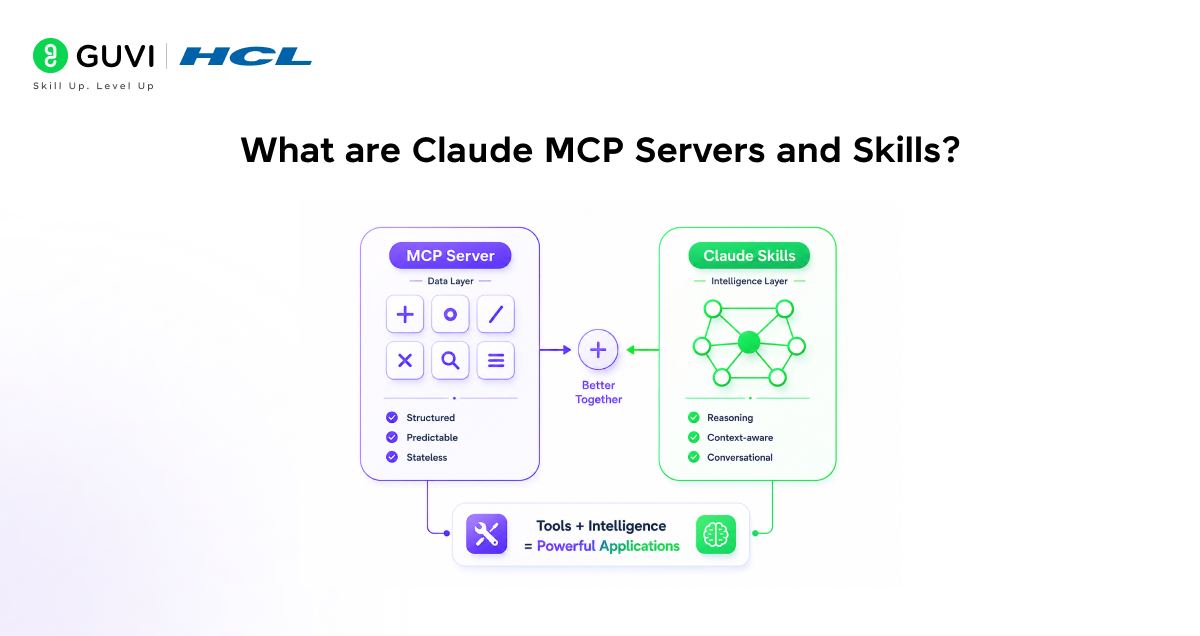
Claude MCP servers and skills are the tools used to enhance Claude from a simple text generator into an AI capable of working with other tools to accomplish tasks in the real world. Used together, they turn Claude into an actual AI system, capable of automating tasks, working with live data, and even performing actions.
If you’re new to how AI systems work, resources like a Generative AI ebook can help you build a basic understanding before diving deeper.
What are Claude MCP Servers?
Claude MCP servers are intermediaries between Claude and external systems such as other tools, databases, and applications. This means that they enable the AI to access real-time data as well as taking actions within systems external to itself.
Without a MCP server, Claude is limited to using its pre-trained knowledge base and cannot gather live data, execute processes, and interface with other services such as GitHub, Slack, and even databases.
To understand practical implementation in detail, you can explore this guide on connecting and configuring Claude Code MCP servers.
What are Claude Skills?
Claude Skills tell Claude how to work with tools. Skills are reusable tools which direct how Claude should take on information and execute its processes.
Examples of such skills are the ability to summarise information, process information, automate processes, and generate structured output.
How Claude MCP Servers Work
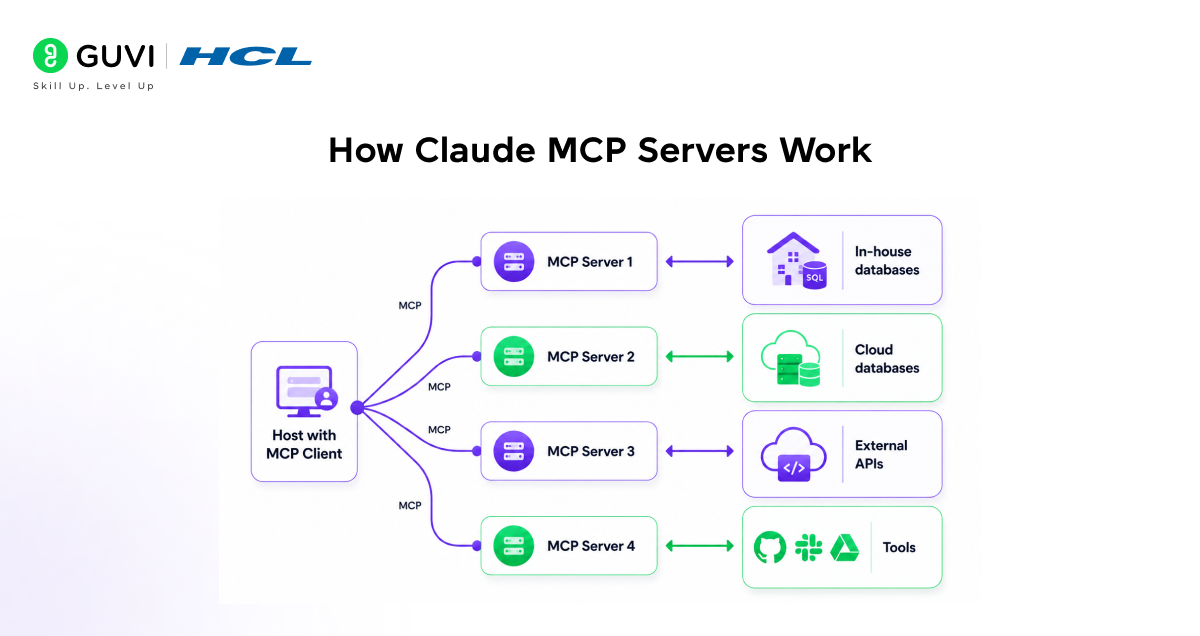
Claude MCP Servers are systems which serve as a common layer to connect an AI model with other external tools. The use of these servers makes an AI model’s interaction with the real world possible, beyond the basic knowledge contained within itself.
These servers enable an AI model to undertake specific tasks such as fetching data, triggering events, or interacting with applications live.
Core Architecture of MCP
The MCP system has a very basic structure, with the AI model being the client and the MCP Servers being the tool providers, communicating with one another through a single protocol.
The different MCP Servers make specific tools and data sources available to Claude.
How the Flow Works
The general flow is triggered when a user provides a prompt and Claude figures out that there is a need to use some external tool to fulfill it.
Once this is figured out, Claude communicates with the respective MCP Server and it gives the desired result in return.
Example in Practice
When the user asks Claude to access database records, it uses an MCP Server which has the necessary connection with that particular database. It receives the data and then returns it back to the user.
Why MCP Servers Matter for AI Workflows
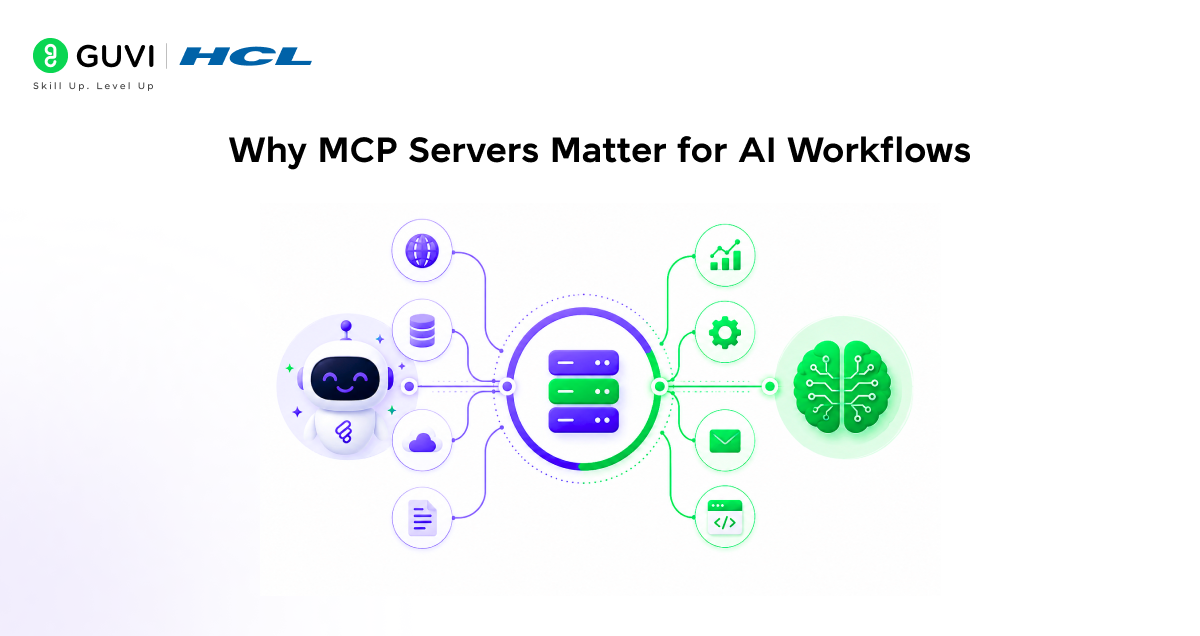
Current AI models are extremely capable but are inherently constrained in their own environments. Lacking the ability to execute other actions and only working with pre-existing knowledge makes it difficult to use them effectively as tools for various workflows.
This results in a mismatch between AI capabilities and what can actually be executed.
Limitations of Standalone AI Models
Standalone AI models are incapable of pulling in live data or accessing external applications or services. All responses are generated solely from their pre-existing knowledge, meaning this data can become outdated or incomplete.
The standalone AI model is therefore limited to tasks involving static responses only, making real-world tasks like data processing, automation, and system operations an impossible feat.
Need for External Tool Integration
To bridge the gap and truly utilize AI in a meaningful workflow, the AI must be able to utilize external resources such as databases, applications, and APIs. Without these capabilities, the AI only provides static responses and cannot perform complex operations.
MCP servers provide a reliable and structured method to bridge this gap by providing Claude with access to dynamic data, external services, and enabling it to perform actions that would otherwise be beyond its scope.
Shift from Chatbots to AI Agents
By incorporating MCP servers, Claude transitioned from a passive chatbot to an AI agent. It is now capable of not only receiving input and generating a response but can also execute commands, actions, and integrate with external resources.
This allows it to be utilized in a wide range of AI workflows.
Claude MCP servers use a standardized protocol that allows AI models to interact with multiple tools through a single interface. Instead of building separate integrations for every tool, developers can connect once and scale workflows efficiently. This architecture is a key reason why modern AI systems are evolving from static chatbots to dynamic AI agents capable of executing real-world tasks.
Key Benefits of Using Claude MCP Servers
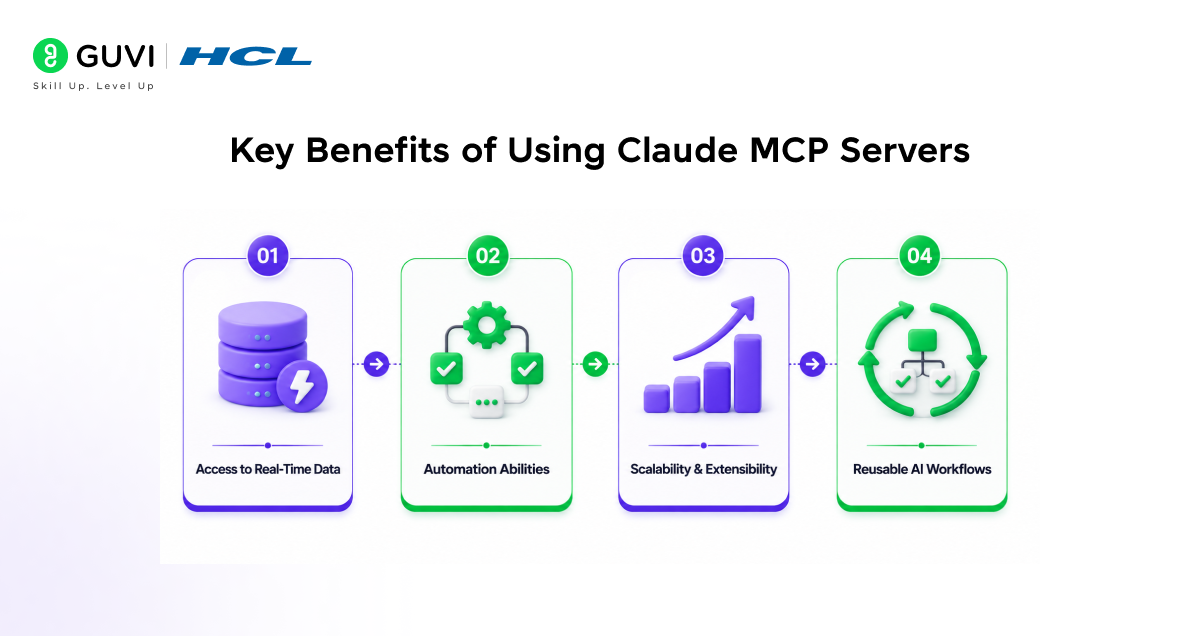
Claude MCP servers deliver a variety of advantages that enhance the capabilities of AI systems, making them more practical and effective. MCP servers help narrow the gap between the abstract nature of responses and the ability to perform concrete tasks.
They do this by facilitating the ability to utilize and automate tools across various use-cases.
Access to Real-Time Data
MCP servers enable Claude to tap into real-time data from various external sources, beyond its already acquired pre-trained data. This ensures the generated responses are up-to-date, precise, and aligned with current circumstances.
Automation Abilities
With the help of MCP servers, Claude can automate monotonous tasks and workflows on disparate platforms, effectively reducing manual tasks to be performed by human users.
This significantly increases efficiency across operations.
Scalability and Extensibility
MCP servers can scale AI systems effectively through the integration of additional tools and functionality based on the demands of the application.
These systems are highly flexible and are designed to support multiple use-cases.
Reusable AI Workflows
When a particular workflow has been successfully integrated using MCP servers and skills, this workflow can then be reproduced for various purposes and applications.
This saves time and effort, as well as ensures uniformity across executions.
Real-World Use Cases of MCP Servers and Skills
MCP servers and the skills of Claude are currently being used to develop functional AI systems that can interact with real-world tools and perform multi-step operations. These use cases illustrate how Claude can move past responding and perform tangible actions in various domains.

AI Coding Assistants
Claude is able to connect to repositories with MCP servers to facilitate the writing, reviewing, and debugging of code, thereby improving productivity and code quality through real-time feedback to users.
For a deeper look at how MCP integrates into development workflows, you can also explore how code review in Claude Code is implemented using these systems.
Data Analysis and Reporting
Using MCP servers to connect to various databases and analytical systems, Claude can retrieve data to analyze and generate useful reports that are data-driven to support decisions made by users.
Workflow Automation
The integration with communication platforms like Slack, or other tools such as an email client or task managing applications through MCP servers, enables the automation of repetitive tasks and increases work efficiency of users.
These workflows can even be extended across devices, as explained in this guide on using Claude Code on mobile.
Multi-Tool AI Agents
The use of multiple MCP servers allows Claude to interact with multiple tools within one operational process to form an agent that is capable of performing complicated, multi-step actions.
How to Extend Claude With MCP Servers
Extending Claude with MCP servers allows it to integrate and utilize real-world tools in place of solely outputting text. This is done by integrating it with other tools and determining how Claude will utilize those tools.
Below we’ll go through the systematic way in which you can construct and utilize such an intelligent system as a beginner.
Step-by-Step Process
1. Define Your Use Case
The first thing you want to do is consider the use-case you have in mind and the specific kind of work that you’d want Claude to do. Will you use it for data analysis, for task automation, or for the use of other applications?
2. Select the Appropriate MCP Server
The second step is selecting the most suitable MCP server for your particular use-case. Each MCP server offers different options to the user, depending on what you need from them.
3. Connect Claude to MCP Server
Once you select an MCP server, the next step is to connect Claude with your chosen MCP server. During connection setup, specify the needed permissions and grants that Claude will need for this service.
4. Define Skills and Instructions
Lastly, you want to specify the skills and instructions which tell Claude how to execute those tasks using the tool that it is integrated to.
5. Test and Optimize
Last of all, test Claude with your chosen configuration to ensure its consistent work and accuracy.
Once your setup is complete, you can also experiment with automation features like Claude Code Auto Mode to streamline workflows further.
Common Challenges and Limitations
While Claude MCP servers are immensely powerful, there are also various challenges to keep in mind when it comes to implementation in actual production workflows. Awareness of the limitations can assist in creating more robust and secure AI systems.
Security Implications
Connecting to external tools can expose you to security risks if not properly managed. If the scope of permissions is too wide or handled incorrectly, sensitive information may be exposed.
Access must be carefully managed and connections must be secure.
Tool Overload
If you start using too many MCP servers simultaneously, the workflow will become complicated. Claude will not be able to decide which tool is needed if it has access to too many.
It is beneficial to limit the number of integrations to those that are really needed.
Setup Difficulty
Initial setup and integration of MCP servers might seem overwhelming to someone without much experience. It may necessitate familiarizing yourself with API documentation, authorisations, and system integrations.
Clear guidance and sequential execution would make the setup easier.
Best Practices for Using MCP Servers and Skills
A structured workflow will help you use Claude MCP servers to the best advantage, especially during real-world implementations, as these practices will ensure good performance, security, and reliability in the system.
They will assist you in not making common errors when building up AI systems.
Simple Work-Flows
Keep the work-flows relatively simple and build your system incrementally. It might be easier at first to not have too many tools, or to have too many steps when building the work-flow initially.
This will also help you more easily test and troubleshoot the system.
Only Use the Required Tools
Use only those tools needed for your specific work-flow. Don’t overcomplicate the system with connections to unnecessary tools.
It’s also performance-impacting.
Validate and Monitor Claude’s Output
Make sure you monitor the output of Claude whenever working with MCP servers. It is always important to validate the output to make sure that the output is relevant and trustworthy.
Secure Your System
Configure proper permissions when granting access to an externally connected tool. If the tool has administrative privileges, it is usually advised to not grant the tool full system access.
If you are exploring AI workflows and tool integration, understanding Claude MCP servers and skills can significantly improve your productivity. To go deeper, you can explore HCL GUVI’s IIT Pravartak AI and ML program to learn how these systems are applied in real-world scenarios.
Conclusion
Claude MCP servers and skills make AI go from a mere text generation tool to an AI powered agent for real world actions. Linking Claude to external tools means you get abilities like automation, access to data, and execution of workflows in the real world.
Knowing how to work with MCP servers is a skill that will be very important in the coming years of AI development. Learn it, and your small AI project can grow to do almost anything.
FAQs
1. What are Claude MCP servers?
Claude MCP servers are connectors that allow Claude to interact with external tools, APIs, and databases to perform real-world tasks.
2. How do MCP servers work?
They act as a bridge between Claude and external systems. Claude sends requests, the server processes them, and returns the results.
3. What is the difference between MCP servers and skills?
MCP servers provide access to tools, while skills define how Claude uses those tools to perform tasks.
4. Are MCP servers beginner-friendly?
They can be slightly complex at first, but with proper guidance and simple use cases, beginners can learn them effectively.
5. Can MCP servers be used without coding?
Some platforms offer low-code or no-code setups, but basic technical understanding is usually helpful.
6. Why are MCP servers important for AI workflows?
They enable AI to access real-time data, automate tasks, and interact with systems, making it more practical and useful.
Success Stories

About the Author
Vishalini Devarajan
An Aerospace Engineer turned content writer, I focus on making complex concepts easy to understand through well-structured, reader-friendly blogs. Whether it’s a technical topic or a non-technical one, I love creating content that is clear, engaging, and impactful.
View all posts by Vishalini Devarajan
Connect with me @






Did you enjoy this article?