


Artificial Intelligence and Machine Learning Articles
Claude Integrations: Connect Your Apps, Unlock AI Superpowers
Claude Code in Action: How Anthropic Teams Build Faster
Fix Software Bugs Faster with Claude
How Brex Improves Code Quality and Productivity with Claude Code


Get In Touch For Details! Request More Information
How to Build AI Apps with Claude and Share Them Easily
Apr 13, 2026 6 Min Read 25 Views
(Last Updated)
How to Build AI Apps with Claude and Share Them Easily
Today, artificial intelligence is more than just research or a job for the largest technology companies, but now anyone can create useful AI applications with a platform like Claude.
Whether you are automating a task or building a digital assistant, Claude simplifies building AI apps directly from your ideas into a working program, and the barrier to entry has been substantially lowered.
This guide will take you to how to build an AI app with Claude, as well as how to share it with others, regardless of where you are in your AI development journey.
TL;DR:
- An AI app built using Claude is a smart tool like a chatbot, an assistant, or a system that can automate processes using natural language.
- Claude makes building AI apps easy by minimizing the amount of coding and setup needed.
- AI apps can be built in a variety of ways to generate content, automate a process, support users, and so forth.
- In practice, this means that you will write instructions, structure the response, and insert Claude into the rest of a relatively simple program.
- These programs may then be shared via web apps, links, or as embedded components.
Table of contents
- What is Claude AI and How Does It Work
- How Claude Enables AI App Development
- Prompting as Application Logic
- Generating Structured Outputs
- Creating Functional Interfaces Instantly
- Iterating Without Rebuilding
- Types of AI Apps You Can Build with Claude
- AI Study Assistants
- Content Generation Tools
- Task Automation Apps
- Chatbots and Assistants
- Data Processing Tools
- How to Share AI Apps Built with Claude
- Turn Your App into a Simple Web Interface
- Turn It Into a Shareable App by Hosting
- Share Your App's Prompt Logic
- Make It Usable and Lightweight
- Best Practices for Better AI Applications
- Be Precise with Your Prompts
- Clearly Define Control Output Format
- Iterate Instead of Relaunching
- Focus on a Single Use Case
- Test with Varied Inputs
- Maintain a Simple User Experience
- Where Most AI Applications Built with Claude Fail
- Conclusion
- FAQs
- Can beginners build AI apps with Claude without coding?
- What types of apps can be built with Claude?
- Do I need to install any software to use Claude?
- How do I improve the quality of my AI app?
- How can I share AI apps built with Claude?
- Is Claude suitable for building production-level AI apps?
What is Claude AI and How Does It Work
An advanced AI model called Claude, created by Anthropic, is designed to produce human-like conversations, help with coding, and complete a variety of tasks by responding to natural language instructions. The primary differentiator of this system when compared to traditional software is that instead of simple programs with predictable inputs and outputs, Claude can reason through problems and understand context and produce a tangible application that can be directly integrated.
When an AI model uses a prompt-based interaction method, the user is free to tell the model in natural language exactly what to do, which generates a particular response, code, or workflow. This type of development also removes much of the need for users to understand how to write complicated code and allows them to focus on the idea and result of the application.
This means that the AI app development paradigm for beginners and experts alike can take on a completely new shape, making it possible to build and launch your AI application by just explaining what you need.
Curious how tools like Claude are used in AI app development? This Generative AI ebook explores how these systems work in practice.
How Claude Enables AI App Development
Developing AI apps is also not purely about generating outputs from an AI, but about structuring the system. Control of the behavior of the AI is critical, in addition to creating structure to its responses and developing the system that will turn the output into a working solution. That’s the way Claude by Anthropic functions, the layer of development and structure, and not the text that goes in and out.
Instead of complex lines of code being the solution, it is the definition of the logic in prompted responses, its structure, and its iteration, making the user’s job to not simply write the code, but develop the AI and its response logic. Here are some of the core mechanisms that make these things possible.
To see how interactive outputs are built, you can explore how Claude Artifacts work in practice.
Prompting as Application Logic
With Claude, prompts aren’t just commands; they form the entire logic for your application. You design the behavior of your application by precisely specifying what it should do based on your instructions.
For example:
“Act as a study assistant. When the user provides a topic, explain it simply and provide three key takeaways and a real-world illustration.”
This design consolidates many levels of traditional logic into a single, structured directive, where the effectiveness of your application is directly proportional to the clarity and detail of your prompts.
Generating Structured Outputs
Claude is capable of producing output in structured forms, simplifying integration with other applications. You have control over how data is organized, moving beyond basic text output.
For instance:
“Generate the output in JSON with the following fields: ‘title,’ ‘summary,’ and ‘key_points’ (a list of three elements).”
This structured output can be seamlessly integrated into an application’s user interface without requiring additional parsing or formatting, enhancing the application’s reliability.

Creating Functional Interfaces Instantly
Claude can instantly create complete front-end code, including HTML, CSS, and JavaScript, enabling rapid development of usable interfaces.
For example:
“Build a basic web application for question-answering with a clear UI where users submit a query and receive a concise response.”
This feature streamlines the design process by eliminating the need for manual layout creation, accelerating the transition from concept to functional prototype.
Iterating Without Rebuilding
A major benefit of Claude is the ability to iterate on results without restarting the development process. Follow-up prompts can be used to enhance specific aspects of your application.
For example:
“Make the interface more elegant, shorten the responses, and include headings to improve readability.”
This iterative capability allows for ongoing refinements of the application while preserving its fundamental structure, thus speeding up the development cycle and increasing flexibility.
Claude can generate not just text, but complete working interfaces using HTML, CSS, and JavaScript. This allows developers and creators to turn simple prompts into functional AI-powered applications within minutes.
Types of AI Apps You Can Build with Claude
Once you understand how Claude works, the next step is knowing what you can actually build with it. The flexibility of Anthropic’s Claude allows you to create a wide range of AI-powered applications without needing complex infrastructure or advanced coding knowledge.
Instead of limiting yourself to basic chatbots, you can build tools that solve real problems, automate workflows, and improve productivity across different use cases. The key is to combine clear prompting with structured outputs to shape how your app behaves.
Below are some practical types of AI apps you can start building right away.
AI Study Assistants
Apps that explain topics, summarize content, and provide key points for easier learning.
Content Generation Tools
Tools that generate blogs, captions, and structured content from simple inputs.
Task Automation Apps
Apps that automate tasks like email drafting, formatting, and response generation.
Chatbots and Assistants
Conversational tools that answer queries and guide users through tasks.
Data Processing Tools
Apps that summarize reports and extract key insights from large text inputs.
For more advanced use cases, you can see how Claude Code is used in real development workflows.
How to Share AI Apps Built with Claude
Once your AI app is working, the next step is making it accessible to others in a simple and usable way. Sharing is not about complex deployment, it is about making your app easy to run, test, and interact with.
The easiest approach is to convert your generated output into a small web app and host it.
Turn Your App into a Simple Web Interface
If Claude gives you HTML and JavaScript, you can directly use it as a working app. Below is a simple example of a Claude-powered app structure:
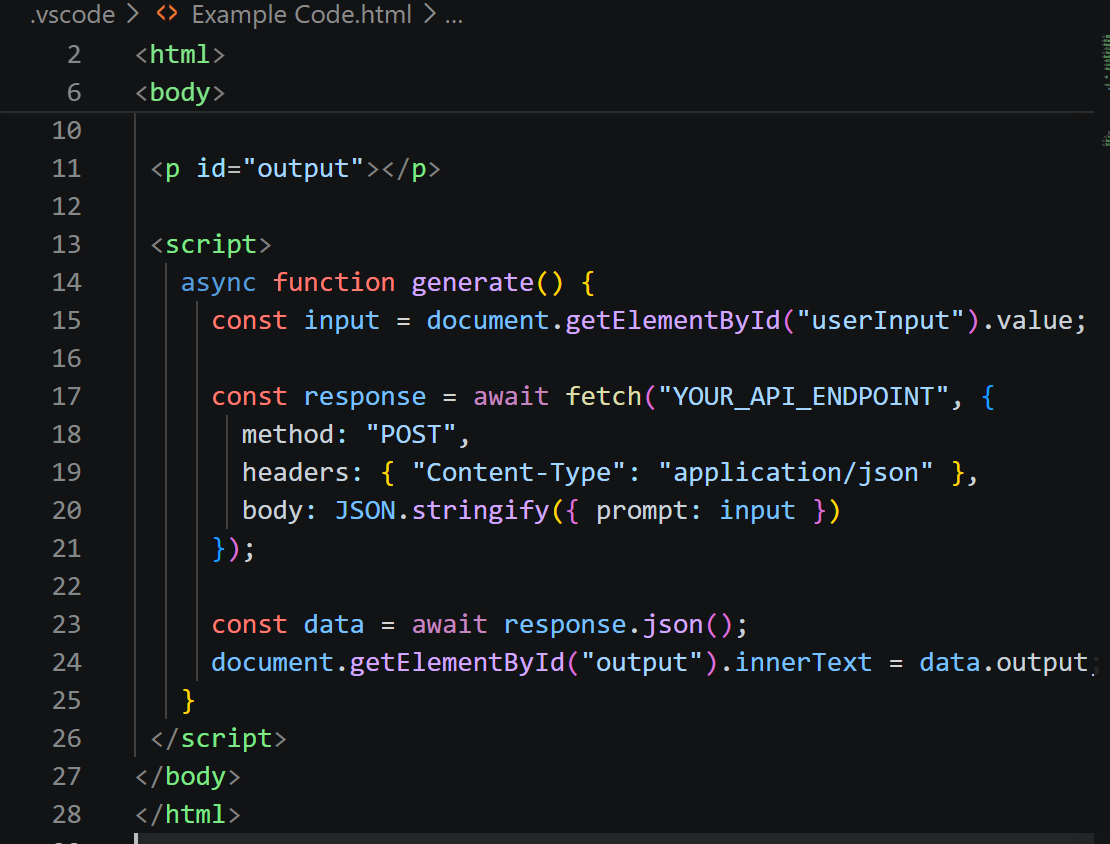
This creates a basic interface where users enter input and receive AI-generated output.
Turn It Into a Shareable App by Hosting
Now that you have this file, you can live it up using really simple hosting methods; you don’t need deep deployment knowledge.
- Save it as index.html
- Upload it to GitHub
- Turn on GitHub Pages
Now you have a live application available through a public link. For real-world usage beyond basic hosting, you can also see how Claude Code runs in a desktop environment.
Share Your App’s Prompt Logic
Your application is more than the interface; the intelligent behavior comes from the prompt, and making this shareable gives others a glimpse and a template for how to build their own application.
For instance, you might share this:
“Act as a study helper.
Explain the topic clearly.
Provide 3 core concepts, and a real-world example of the topic.”
This allows people to take your prompt and easily reconstruct and build on the work.
Make It Usable and Lightweight
You should aim for your application to solve a particular problem well, rather than becoming an unwieldy mega-application. A more niche and easy-to-share application is generally more beneficial.
Ensure:
The input is easy to use.
The output is easily readable.
Interaction is fast.
Best Practices for Better AI Applications
An AI application is not merely a working model, but also a reliable, unambiguous, and effective program. What separates a solid AI application from a basic one lies in carefully crafted prompts, structured outputs, and continuous refinement of behaviors over time.
Applying proper prompt engineering early on helps to avoid erratic behavior and encourages an enhanced user experience with Anthropic’s Claude, as even marginal changes to how you guide the model can lead to superior outcomes.
Be Precise with Your Prompts
It should go without saying that broad, generic prompts yield unfocused and ineffectual outputs. Precise prompts are essential for achieving consistent, high-quality responses from Claude.
Instead of:
“explain AI”
Use:
“explain artificial intelligence in a way that’s easy for an absolute beginner to grasp. Include 3 key points and a real-world example.”
Clearly Define Control Output Format
For structured data in your app, explicitly define the format required. This will bring predictability and ease the integration process.
For example:
“Return the output in JSON with fields title, summary, and 3 bullet points.”
This reduces manual manipulation of outputs and the chance of errors.
Iterate Instead of Relaunching
Do not aim for an accurate answer on the first shot. Begin with a simple prompt and iterate on it until the answer is satisfactory.
For example:
“Make the explanation shorter and add headings.”
This saves time and leads to much better outputs.
Focus on a Single Use Case
When building the application, refrain from making a versatile app and focus on a single use case. It will make the application easier to develop, more dependable, and very clear for the users.
Test with Varied Inputs
Run a set of inputs such as long, short, and unusual ones to test for any gaps in performance and ensure stable behavior.
Maintain a Simple User Experience
A good AI output can be marred by an incompetent interface. Thus, ensure that inputs are easily understood, outputs are presentable, and the overall application interaction is streamlined.
You can also explore additional Claude Code best practices to improve output quality.
Where Most AI Applications Built with Claude Fail
Although it is very easy to build applications on Anthropic’s Claude, most of them fail because of issues with the way the prompts were designed, rather than because of the limits of the AI. Typically, prompts are treated more like commands than a set of directions or behavioral parameters, without proper input and output formats or flow structure.
Most applications also fail due to the overwhelming desire to build a multifaceted application all at once and the absence of proper user input testing. An interaction can become so poor that it detracts significantly from an otherwise effective application.
If you want to go beyond building basic AI apps with tools like Claude and understand how real-world AI applications are designed, deployed, and scaled, you can explore this Artificial Intelligence and Machine Learning Course offered by HCL GUVI in collaboration with IIT Madras Pravartak, which covers hands-on concepts like Generative AI, MLOps, and AI application development.
Conclusion
Building an AI application is not only reserved for those who have advanced technical skills. With Anthropic’s Claude, we can go from a concept to an application with a simple prompt, a structured output, and an iterative refinement process.
The key, in reality, comes down to the approach. By defining a use case, developing good prompts, and iteratively refining the results, you can make AI applications that are not just working but genuinely useful.
With rapidly evolving AI technologies and tools like Claude, the development process shifts from coding-heavy workflows to idea-driven execution. This enables building and sharing applications in a much quicker and easier way than before.
FAQs
1. Can beginners build AI apps with Claude without coding?
Yes, beginners can build AI apps using Claude by writing clear prompts and refining outputs. While basic coding can help, it is not required to get started.
2. What types of apps can be built with Claude?
You can build a variety of applications such as chatbots, study assistants, content generators, automation tools, and simple web apps depending on your use case.
3. Do I need to install any software to use Claude?
No, Claude can be accessed through web interfaces or APIs, so you can start building without complex installations or setup.
4. How do I improve the quality of my AI app?
Improving prompt clarity, defining output structure, and testing with different inputs are key to building better AI applications.
5. How can I share AI apps built with Claude?
You can share your apps by hosting them as simple web apps, sharing code and prompts, or integrating them into existing tools and workflows.
6. Is Claude suitable for building production-level AI apps?
Claude can be used to prototype and build real-world AI applications, but for production-level apps, you may need to integrate it with APIs, backend systems, and proper testing workflows. It works best as a flexible development layer that can scale with the right implementation.
Success Stories

About the Author
Vishalini Devarajan
An Aerospace Engineer turned content writer, I focus on making complex concepts easy to understand through well-structured, reader-friendly blogs. Whether it’s a technical topic or a non-technical one, I love creating content that is clear, engaging, and impactful.
View all posts by Vishalini Devarajan
Connect with me @











Did you enjoy this article?