


Artificial Intelligence and Machine Learning Articles
LLM Engineer Skills: What You Need to Know in 2026
Text Classification with Scikit-learn: TF-IDF to BERT


Get In Touch For Details! Request More Information
NPI Registry Connector in Claude: A Complete Practical Guide
Jun 24, 2026 6 Min Read 246 Views
(Last Updated)
Claude is more than just a chatbot that answers questions. It can connect to real databases and pull live information when you need it. One powerful example is the NPI Registry Connector, which lets Claude access the National Provider Identifier database instantly.
If you work in healthcare, insurance, billing, or medical administration, this guide will show you exactly how Claude can help you look up provider information in seconds without switching between different websites or tools.
Quick Summary
- This guide explains what the NPI Registry Connector is and how it helps you find verified healthcare provider information through Claude.
- You will learn how Claude automatically searches the NPI database when you ask about doctors, hospitals, clinics, or other medical providers.
- The guide covers what kind of information you can find, including provider names, addresses, specialties, license details, and practice locations.
- Real world examples show you exactly how to use the connector for everyday tasks like verifying provider credentials or finding contact information.
- Practical tips help you ask better questions so Claude can find exactly what you need from the registry.
- You will also understand the limitations so you know what to expect and how to use the connector most effectively.
Table of contents
- What Is the NPI Registry Connector?
- Why Does This Matter?
- How Does It Work?
- Step 1: You ask about a provider
- Step 2: Claude recognizes the need
- Step 3: Claude searches the database
- Step 4: The registry returns results
- Step 5: Claude presents the information
- What Information Can You Find?
- Real World Examples
- Example 1: Verifying a Referral
- Example 2: Processing Insurance Claims
- Example 3: Updating Provider Directories
- Example 4: Checking Credentials
- How to Ask for Better Results
- Common Use Cases
- Pros and Cons
- Pros
- Cons
- What Makes This Different From Manual Searches?
- Do You Need to Set Anything Up?
- Tips for Getting the Best Results
- Limitations to Keep in Mind
- Conclusion
- FAQs
- Do I need a medical license or special access to use the NPI Registry Connector?
- How accurate is the information Claude provides from the NPI registry?
- Can Claude search for providers by specialty alone without a name?
- What should I do if Claude finds multiple providers with the same name?
- Is the NPI Registry Connector available to all Claude users?
What Is the NPI Registry Connector?
The NPI Registry Connector is a feature that allows Claude to search the National Provider Identifier database directly during your conversation. The NPI database is maintained by the Centers for Medicare and Medicaid Services (CMS) and contains information about every healthcare provider in the United States who has an NPI number.
Think of it like this. Instead of opening your browser, going to the NPI registry website, typing in search terms, and scrolling through results, you just ask Claude. Claude searches the database, finds the information, and presents it to you in a clear, organized way.
Every doctor, nurse practitioner, clinic, hospital, pharmacy, and medical supplier in the US has a unique 10 digit NPI number. This connector lets Claude look up any of them instantly.
Why Does This Matter?
Healthcare professionals and administrators need to verify provider information constantly. Whether you are processing insurance claims, checking credentials, updating patient records, or verifying a referral, you need accurate provider data.
Without the connector, you would need to stop what you are doing, open the NPI registry website, enter your search criteria, filter through results, and copy the information you need. With Claude, you just ask and get the answer immediately in your conversation.
This saves time, reduces errors, and keeps your workflow smooth.
Read More: Turning Claude into Your Thinking Partner
How Does It Work?
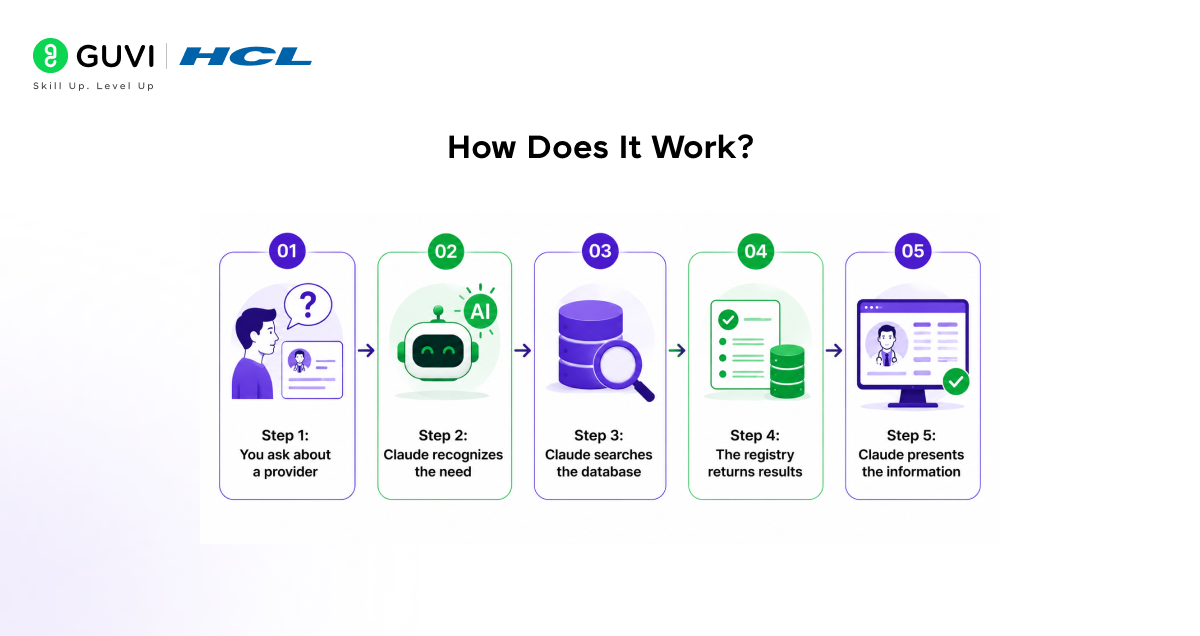
Here is what happens when you ask Claude to look up provider information.
Step 1: You ask about a provider
You type something like “Find the NPI for Dr. Sarah Johnson in Chicago” or “Look up the contact information for Memorial Hospital in Boston.”
Step 2: Claude recognizes the need
Claude understands that you are asking about healthcare provider information and that it needs to search the NPI registry.

Step 3: Claude searches the database
Claude queries the NPI registry using the information you provided, such as name, location, or specialty.
Step 4: The registry returns results
The database sends back matching providers with their full details, including NPI numbers, addresses, specialties, and more.
Step 5: Claude presents the information
Claude organizes the results and shows them to you in a clear, easy to read format.
You never have to visit another website or fill out search forms. Claude handles everything automatically.
What Information Can You Find?
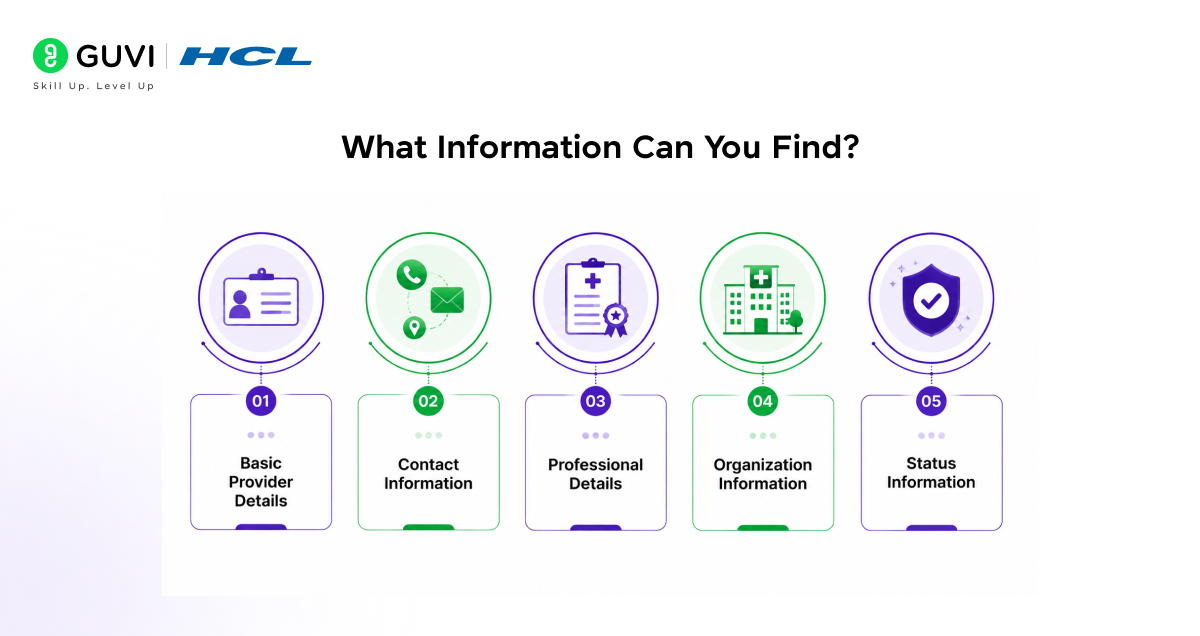
The NPI Registry Connector gives you access to a wide range of provider information.
- Basic Provider Details
Full legal name, NPI number (the unique 10 digit identifier), provider type (individual or organization), and primary taxonomy (medical specialty or service type).
- Contact Information
Business mailing address, practice location address, phone numbers, and fax numbers.
- Professional Details
Medical specialties and subspecialties, license numbers and states, credential information, and taxonomy codes.
- Organization Information
For hospitals, clinics, and group practices, you can find the organization name, authorized official (the person responsible), doing business as (DBA) names, and multiple practice locations.
- Status Information
Whether the NPI is active or deactivated, enumeration date (when the NPI was issued), and last update date.
The NPI Registry includes over 100 types of healthcare providers — not just doctors. This covers dentists, chiropractors, acupuncturists, massage therapists, ambulance services, and even medical equipment suppliers. If an entity interacts with healthcare billing or Medicare programs, it typically requires an NPI number.
Real World Examples
Example 1: Verifying a Referral
You receive a referral for a patient to see Dr. Michael Chen, a cardiologist in Seattle. You ask Claude “Find Dr. Michael Chen, cardiologist in Seattle” and Claude searches the NPI registry and shows you his NPI number, office address, phone number, and credentials. You can verify he is the right provider and update your records immediately.
Example 2: Processing Insurance Claims
You are filling out a claim form that requires the provider’s NPI number, but you only have the clinic name. You ask Claude “What is the NPI for Sunshine Medical Clinic in Miami?” and Claude finds the clinic’s NPI, address, and authorized official information. You complete your claim form without leaving your conversation.
Example 3: Updating Provider Directories
Your hospital needs to update its provider directory. You ask Claude “Show me all the orthopedic surgeons at Springfield General Hospital” and Claude searches for providers associated with that organization and their specialties. You get a complete list with contact information ready to update.
Example 4: Checking Credentials
Before scheduling a consultation, you want to verify a provider’s credentials. You ask “Look up NPI 1234567890” and Claude retrieves the full provider profile, including their specialty, license information, and practice location. You confirm everything matches before proceeding.
How to Ask for Better Results
The more specific you are, the better results you will get. Here are some tips.
- Include Location
Instead of “Find Dr. Smith,” say “Find Dr. Smith in Dallas, Texas.” Locations help narrow down results when there are common names.
- Mention Specialty When Known
“Find Dr. Patel, pediatrician in Atlanta” works better than just “Find Dr. Patel.” The specialty helps Claude find the exact provider you need.
- Use NPI Numbers When Available
If you already have an NPI number and need details, just say “Look up NPI 1234567890.” This is the fastest and most accurate search method.
- Specify Organization Type
For organizations, mention what type you are looking for, such as “Find the NPI for Mercy Hospital in Portland” or “Look up ABC Pharmacy in Denver.”
- Ask for Specific Information
If you only need certain details, say so. “What is the address for NPI 1234567890?” or “Find the phone number for Dr. Lee’s practice in Houston.”
Common Use Cases
- Insurance and Billing
Verifying provider information for claims processing, finding NPI numbers for billing forms, checking if a provider is enrolled with Medicare, and validating provider addresses for correspondence.
- Healthcare Administration
Updating provider directories and contact lists, verifying credentials before granting privileges, checking provider specialties and qualifications, and maintaining accurate provider databases.
- Patient Care Coordination
Confirming referral information before sending patients, finding contact information for specialist consultations, verifying provider locations and hours, and checking if a provider is accepting new patients (when listed).
- Compliance and Quality
Ensuring provider information is current and accurate, verifying license status and credentials, confirming provider relationships with organizations, and maintaining regulatory compliance documentation.
Pros and Cons
Like any tool, the NPI Registry Connector has strengths and limitations.
Pros
- It saves significant time by eliminating manual searches on external websites.
- It provides verified, official data directly from the CMS database.
- It is easy to use with no technical knowledge required.
- It keeps you in your workflow without switching between applications.
- It gives you comprehensive provider information in one organized response.
- It works for both individual providers and organizations.
Cons
- It only includes providers who have NPI numbers registered in the United States.
- The information is only as current as the last update providers made to their registry profile.
- Some providers may have incomplete contact information if they did not provide all details.
- You cannot search for providers by patient reviews or availability, only by registry data.
- It requires clear search terms to find the right provider when names are common.
What Makes This Different From Manual Searches?
When you search the NPI registry website manually, you have to navigate forms, enter search criteria correctly, filter results, and copy information piece by piece. If you need to look up multiple providers, you repeat this process over and over.
With Claude, you ask once and get organized results immediately. Claude can look up multiple providers in the same conversation, compare information, and even help you organize the data if needed.
The difference is like looking up phone numbers in a physical directory versus asking someone who already knows where to find the information.
Do You Need to Set Anything Up?
For most Claude users, the NPI Registry Connector works automatically. You do not need to connect external accounts or enable special settings.
Simply start asking Claude about healthcare providers, and if the connector is available in your setup, Claude will search the registry automatically.
If Claude cannot access the NPI registry, it will let you know and may suggest alternative ways to help you find the information.
Tips for Getting the Best Results
- Be Specific With Names
Include first and last names when searching for individual providers. Middle initials help when available.
- Always Include Location
Cities and states significantly improve search accuracy, especially for common names.
- Use Correct Terminology
Say “cardiologist” instead of “heart doctor” or “physical therapist” instead of “PT” for better specialty searches.
- Check Multiple Matches
If Claude finds several providers with similar names, review the addresses and specialties to identify the correct one.
- Verify Critical Information
Always double check important details like NPI numbers and addresses before using them in official documents.
Limitations to Keep in Mind
- The NPI Registry Connector is powerful but has some limitations you should know about.
- The database only includes US healthcare providers with NPI numbers.
- Information depends on what providers entered in their profiles, and some fields may be incomplete.
- The data is as current as the provider’s last update, which may not be recent.
- You cannot search by insurance networks, patient ratings, or appointment availability.
- Very common names without location details may return too many results to be useful.
- The connector provides official registry data but cannot verify if a provider is currently practicing.
If you want to learn more on using the NPI Registry Connector in Claude, do not miss the chance to enroll in HCL GUVI’s Intel & IITM Pravartak Certified Artificial Intelligence & Machine Learning course. Endorsed with Intel certification, this course adds a globally recognized credential to your resume, a powerful edge that sets you apart in the competitive AI job market.
Conclusion
The NPI Registry Connector transforms how you access healthcare provider information. Instead of interrupting your work to search external databases, you simply ask Claude and get verified, comprehensive provider data instantly.
Whether you are in billing, administration, care coordination, or compliance, this connector saves time and reduces errors. You do not need technical skills or special training. Just ask Claude in plain English what you need.
As healthcare becomes more digital and data driven, tools that streamline access to verified information become essential. The NPI Registry Connector is one of the most practical features for anyone working with healthcare provider data, and now you know exactly how to use it effectively.
FAQs
1. Do I need a medical license or special access to use the NPI Registry Connector?
Not at all. The NPI registry is public information maintained by CMS and available to anyone. The connector simply makes it easier to search this public database through your conversation with Claude. No credentials or special permissions are required.
2. How accurate is the information Claude provides from the NPI registry?
The information is as accurate as what appears in the official NPI database. Claude retrieves data directly from the registry without modifying it. However, accuracy depends on providers keeping their information updated, so it is always good practice to verify critical details.
3. Can Claude search for providers by specialty alone without a name?
Yes, but results work best when you include location as well. For example, “Find neurologists in Phoenix, Arizona” will give you better results than just “Find neurologists.” The more specific your search terms, the more useful the results.
4. What should I do if Claude finds multiple providers with the same name?
Review the additional details Claude provides, such as addresses, specialties, and NPI numbers. These help you identify the correct provider. If you know other details like the practice name or street address, include those in your request to narrow results.
5. Is the NPI Registry Connector available to all Claude users?
Availability may depend on your Claude plan and setup. Most users can access it, but if Claude cannot search the NPI registry when you ask, it will let you know. You can check your available connectors in your Claude settings or contact support for more information.
Success Stories

About the Author
Vishalini Devarajan
An Aerospace Engineer turned content writer, I focus on making complex concepts easy to understand through well-structured, reader-friendly blogs. Whether it’s a technical topic or a non-technical one, I love creating content that is clear, engaging, and impactful.
View all posts by Vishalini Devarajan
Connect with me @









Did you enjoy this article?