


Java Articles
Kafka Streams Tutorial: Build Your First Data Pipeline
What is ArrayList in Java: A Complete Guide
What is HashMap in Java: How It Works, Methods, and Examples


Get In Touch For Details! Request More Information

Modern applications do not wait. Whether it is a web server handling thousands of simultaneous requests, a trading platform processing real-time market data, or a mobile app downloading files while keeping the UI responsive, concurrent execution is not a luxury. It is a requirement.
Java has supported multithreading since its very first version, and over the decades, its concurrency model has grown into one of the most powerful and well-designed in any mainstream programming language.
But multithreading is also one of the most misunderstood areas of Java development. Done correctly, it produces fast, responsive, and scalable applications. Done incorrectly, it produces race conditions, deadlocks, and bugs that are extraordinarily difficult to reproduce and fix.
This guide covers everything you need to understand Java multithreading clearly, from the fundamental concepts and thread lifecycle to synchronization, the Java concurrency utilities, and the best practices that separate robust concurrent code from fragile code.
Table of contents
- TL;DR
- Processes vs. Threads: Key Differences
- Process
- Thread
- Creating Threads in Java
- Extending the Thread Class
- Implementing the Runnable Interface
- Using Lambda Expressions (Java 8+)
- Java Thread Lifecycle
- The synchronized Keyword
- Synchronized Blocks
- The volatile Keyword
- The Java. util.concurrent Package
- ExecutorService and Thread Pools
- Callable and Future
- ReentrantLock
- Concurrent Collections
- Common Multithreading Problems
- Race Condition
- Deadlock
- Thread Starvation
- Memory Visibility Problems
- Best Practices for Multithreading in Java
- Conclusion
- FAQs
- What is multithreading in Java?
- What is the difference between a thread and a process?
- What is the difference between Runnable and Callable?
- What causes a deadlock in Java, and how is it prevented?
- When should I use synchronized vs. ReentrantLock?
TL;DR
- A thread is the smallest unit of execution; Java supports multithreading natively through Thread and Runnable.
- Threads move through five lifecycle states: New, Runnable, Running, Blocked/Waiting, and Terminated.
- Shared mutable state between threads requires synchronization to avoid race conditions and data corruption.
- The Java. util. The concurrent package provides higher-level tools, such as thread pools, locks, and concurrent collections that are safer and more efficient than raw thread management.
- Best practices include preferring Executors over new Thread(), minimizing shared state, and using thread-safe data structures.
What Is Multithreading in Java?
Multithreading in Java is the capability of the Java Virtual Machine (JVM) to execute multiple threads concurrently within a single program. A thread is the smallest unit of execution and represents an independent sequence of instructions that runs within a process while sharing its memory and resources with other threads. Java supports multithreading through the Thread class and the java.util.concurrent package, enabling developers to build applications that perform multiple tasks simultaneously, improve performance, and maintain responsiveness under heavy workloads.
Processes vs. Threads: Key Differences
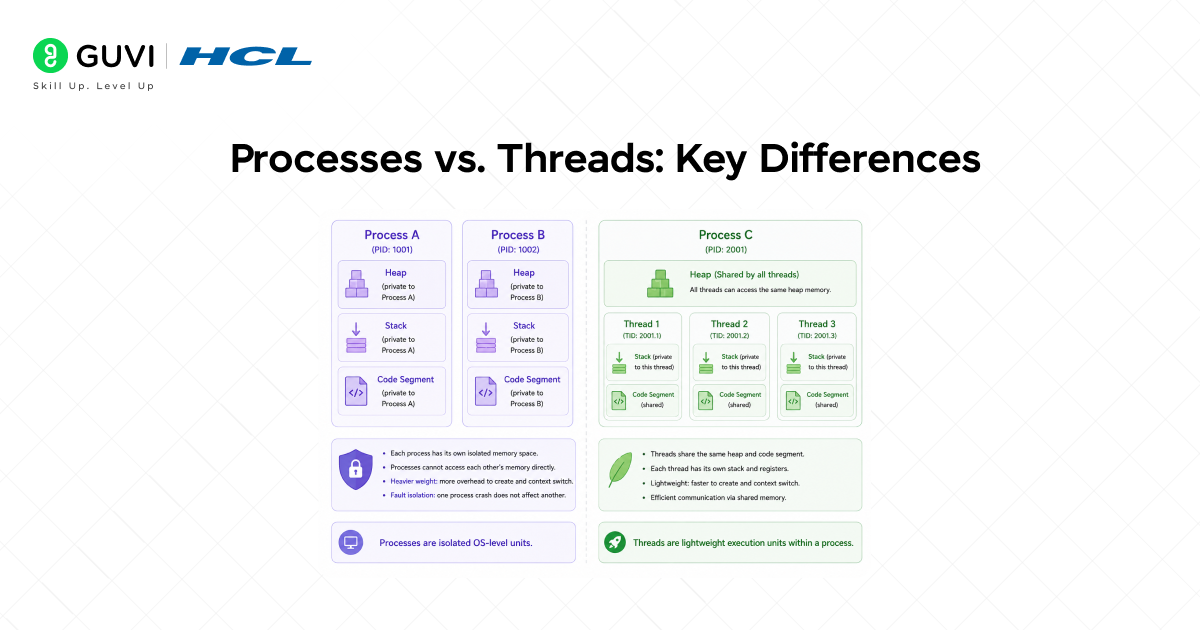
Before diving into multithreading, it is essential to understand the distinction between a process and a thread, the two fundamental units of concurrent execution.
Process
A process is an independent programme in execution. Each process has its own isolated memory space, its own heap, stack, code segment, and data segment. Processes do not share memory by default. Communication between processes (inter-process communication, or IPC) requires explicit mechanisms such as sockets, pipes, or shared memory regions.
• Heavy to create and destroy involves OS-level resource allocation.
• Isolated by design, a crash in one process does not affect others.
• Examples: each tab in a browser, each running JVM instance.
Thread
A thread is a lightweight unit of execution that runs within a process. All threads in the same process share the same heap memory; they can read and write the same objects. Each thread has its own call stack, program counter, and local variables.
• Lightweight to create threads that share the parent process’s memory and resources.
• Fast to switch between context switching between threads is cheaper than between processes.
• Shared memory requires synchronization to prevent data corruption.
In Java, every application starts with a single thread, the main thread and can create additional threads to perform concurrent work.
Creating Threads in Java
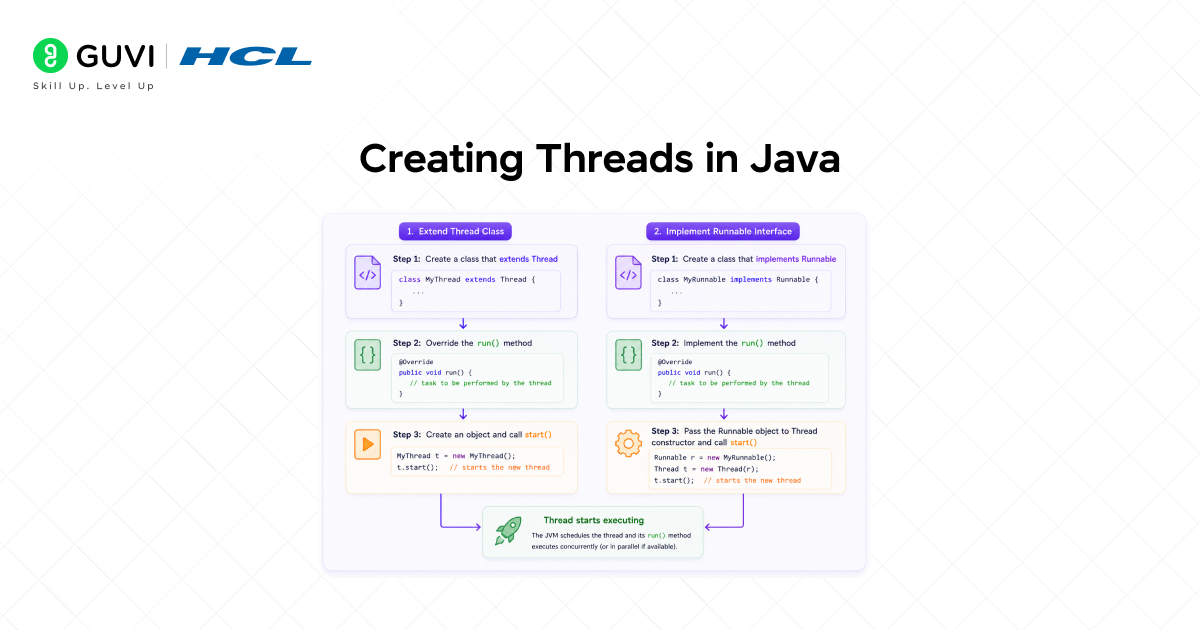
Java provides two primary ways to create and start a thread, plus a more functional approach introduced in later versions.
1. Extending the Thread Class
The simplest approach is to create a subclass of java.lang.Thread and override its run() method with the code the thread should execute.
| public class MyThread extends Thread { @Override public void run() { System. out.println(“Running in: ” + Thread.currentThread().getName()); }} // Start the threadMyThread t = new MyThread();t.start(); // Calls run() in a new thread |
Important: always call start(), not run(). Calling run() directly executes the method on the current thread no new thread is created.
2. Implementing the Runnable Interface
The preferred approach is to implement java.lang.Runnable and pass the instance to a Thread constructor. This separates the task (what to do) from the thread (the execution mechanism), and avoids the single-inheritance limitation of extending Thread.
| public class MyTask implements Runnable { @Override public void run() { System.out.println(“Task running in: ” + Thread.currentThread().getName()); }} Thread t = new Thread(new MyTask());t.start(); |
3. Using Lambda Expressions (Java 8+)
Since Runnable is a functional interface, Java 8 and later allow thread tasks to be expressed as lambda expressions — a concise and readable alternative to anonymous classes.
| Thread t = new Thread(() -> { System.out.println(“Lambda thread: ” + Thread.currentThread().getName());});t.start(); |
Java Thread Lifecycle
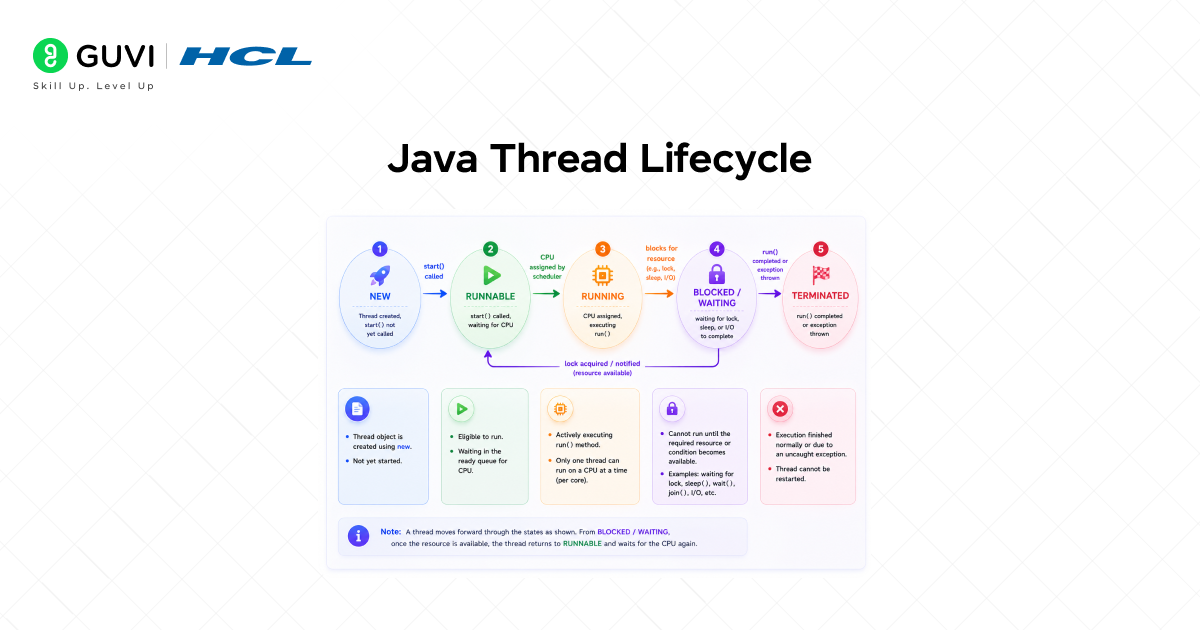
Every Java thread moves through a well-defined set of states during its lifetime. Understanding the thread lifecycle is essential for diagnosing threading problems and writing correct concurrent code.
- NEW: A Thread object has been created, but start() has not yet been called. The thread does not yet exist as an OS-level execution unit.
- RUNNABLE: start() has been called. The thread is ready to run and waiting to be scheduled by the JVM thread scheduler. It may or may not be actively executing at any given moment.
- RUNNING: The JVM scheduler has assigned CPU time to the thread, and it is actively executing its run() method.
- BLOCKED / WAITING: The thread is temporarily paused. It may be blocked waiting to acquire a monitor lock (BLOCKED), waiting indefinitely for a notification (WAITING via wait() or join()), or waiting for a specified time (TIMED_WAITING via sleep() or timed wait()).
- TERMINATED: The thread has finished executing, either run() returned normally, or an unhandled exception caused it to terminate. A terminated thread cannot be restarted.
The Thread class has been part of Java since its initial release in 1996 (Java 1.0), making it one of the earliest mainstream programming languages to include built-in multithreading support as a core feature rather than relying on external libraries. This early design choice enabled Java applications to handle concurrent execution more naturally, supporting tasks like parallel processing, responsive user interfaces, and scalable server-side systems. Over time, Java’s concurrency model evolved further with higher-level abstractions such as executors, thread pools, and modern parallel streams, but the foundational Thread API remains central to how Java manages concurrency.
Thread Synchronization in Java
When multiple threads access shared mutable data concurrently, race conditions can occur in situations where the final result depends on the unpredictable order in which threads are scheduled. Synchronization is the mechanism that prevents this.
The synchronized Keyword
The synchronized keyword in Java ensures that only one thread at a time can execute a block of code or method. When a thread enters a synchronized block, it acquires the intrinsic lock (monitor) of the specified object. All other threads attempting to enter a synchronized block on the same object will block until the lock is released.
| public class Counter { private int count = 0; public synchronized void increment() { count++; // Only one thread at a time } public synchronized int getCount() { return count; }} |
Synchronized Blocks
For finer-grained control, synchronization can be applied to a specific block of code rather than an entire method. This reduces contention by narrowing the critical section — the portion of code that must be executed atomically.
| public void increment() { synchronized (this) { count++; } // Code here runs without holding the lock} |
The volatile Keyword
The volatile keyword ensures that a variable’s value is always read from and written to main memory — never cached in a thread’s local CPU cache. It guarantees visibility (changes made by one thread are immediately visible to others) but does not guarantee atomicity. Use volatile for simple flags and state variables; use synchronized or atomic classes for compound operations.
| private volatile boolean running = true; public void stop() { running = false; // Immediately visible to all threads} |
The Java. util.concurrent Package
Raw thread management, manually creating, starting, and managing Thread objects, is error-prone and does not scale well. The Java. util. Concurrent package, introduced in Java 5, provides a comprehensive set of higher-level concurrency utilities that are safer, more performant, and far easier to reason about.
ExecutorService and Thread Pools
Creating a new Thread for every task is expensive. Thread pools maintain a set of reusable worker threads, dramatically reducing the overhead of thread creation and destruction. The ExecutorService interface provides the primary API for submitting tasks to a thread pool.
| ExecutorService executor = Executors.newFixedThreadPool(4); executor.submit(() -> { System.out.println(“Task in: ” + Thread.currentThread().getName());}); executor.shutdown(); // Gracefully stop after tasks complete |
Common factory methods in Executors:

• newFixedThreadPool(n): A pool of exactly n threads. Excess tasks queue until a thread is free. Best for CPU-bound tasks.
• newCachedThreadPool(): Creates new threads as needed; reuses idle threads. Best for many short-lived I/O-bound tasks.
• newSingleThreadExecutor(): A single worker thread that processes tasks sequentially. Guarantees task ordering.
• newScheduledThreadPool(n): Supports delayed and periodic task scheduling.
Callable and Future
Unlike Runnable, a Callable task can return a result and throw a checked exception. Submitting a Callable to an ExecutorService returns a Future — a handle to the result that will be available once the task completes.
| Callable<Integer> task = () -> { return 42; // Returns a result}; Future<Integer> future = executor.submit(task);Integer result = future.get(); // Blocks until result is readySystem. out.println(“Result: ” + result); |
ReentrantLock
ReentrantLock provides the same mutual exclusion as the synchronized keyword but with additional capabilities: timed lock attempts, interruptible locking, and fairness policies. Always release the lock in a finally block to ensure it is released even if an exception occurs.
| ReentrantLock lock = new ReentrantLock(); lock.lock();try { // Critical section count++;} finally { lock.unlock(); // Always release in finally} |
Concurrent Collections
Standard Java collections like HashMap and ArrayList are not thread-safe. The concurrent package provides thread-safe alternatives that achieve high performance through lock striping, copy-on-write, and other advanced techniques:
- ConcurrentHashMap: A thread-safe map that allows concurrent reads and fine-grained write locking, far more performant than a synchronized HashMap.
- CopyOnWriteArrayList: A thread-safe list that creates a fresh copy of the underlying array on every write. Ideal for read-heavy scenarios.
- LinkedBlockingQueue: A thread-safe FIFO queue that blocks producers when full and consumers when empty, the foundation of the producer-consumer pattern.
- ConcurrentLinkedQueue: A non-blocking, lock-free,e thread-safe queue using CAS (compare-and-swap) operations for high-throughput concurrent access.
Common Multithreading Problems
Multithreading introduces a class of bugs that do not exist in single-threaded programmes. Understanding these problems is the first step toward avoiding them.
Race Condition
A race condition occurs when two or more threads access shared data concurrently, and the final result depends on the non-deterministic scheduling order. The classic example is a counter incremented by multiple threads without synchronization; the read-modify-write sequence is not atomic, allowing intermediate values to be lost.
Prevention: synchronize all accesses to shared mutable state using synchronized, Lock, or atomic classes.
Deadlock
A deadlock occurs when two or more threads are each waiting for a lock held by the other, creating a circular dependency from which neither can escape. Both threads block indefinitely.
Prevention: always acquire multiple locks in a consistent global order; use timed lock attempts with tryLock(); minimize the number of locks held simultaneously.
Thread Starvation
Thread starvation occurs when a thread is perpetually denied access to CPU time or a resource because higher-priority threads or unfair scheduling continuously preempt it. The starved thread makes no progress.
Prevention: use fair lock policies (new ReentrantLock(true)); avoid excessively high-priority threads that monopolize the scheduler.
Memory Visibility Problems
Without proper synchronization, changes made by one thread to a shared variable may not be visible to other threads due to CPU caching and instruction reordering by the JVM and hardware. This can cause threads to operate on stale data.
Prevention: use volatile for single-variable visibility guarantees; use synchronized or java. util.concurrent atomics for compound operations.
Best Practices for Multithreading in Java
Writing correct, efficient multithreaded Java code requires discipline. These best practices reflect the hard-won lessons of Java concurrency.
- Prefer Executors over raw threads: Use ExecutorService and thread pools instead of manually creating Thread objects. Thread pools are more efficient, controllable, and easier to shut down gracefully.
- Minimize shared mutable state: The safest concurrent code is code that shares no mutable state. Design tasks to be as self-contained as possible, communicating through message-passing or thread-safe data structures rather than shared variables.
- Use immutable objects: Immutable objects (objects whose state cannot change after construction) are inherently thread-safe. Prefer immutability wherever possible, especially for objects passed between threads.
- Use atomic classes for simple counters: java.util.concurrent.atomic provides AtomicInteger, AtomicLong, AtomicReference, and others that perform common operations atomically using hardware CAS instructions, with no explicit locking required.
- Use concurrent collections: Never use Collections.synchronizedMap() or synchronized wrappers in performance-critical code. Prefer ConcurrentHashMap, CopyOnWriteArrayList, and other concurrent collection implementations.
- Always release locks in finally blocks: When using ReentrantLock, place unlock() in a finally block to guarantee the lock is released even if an exception propagates.
- Avoid holding locks during long operations: Do not perform I/O, network calls, or other slow operations while holding a lock. Release the lock first, then perform the slow operation, then re-acquire if needed.
If you want practical experience working with activation functions, neural networks, and deep learning models, HCL GUVI’s AI and ML programs can help you understand how concepts like sigmoid, backpropagation, and gradient descent are implemented using frameworks such as TensorFlow and PyTorch through hands-on projects.
Conclusion
Multithreading is one of Java’s most powerful features and one of its most demanding disciplines. The ability to run multiple threads concurrently within a single JVM process enables applications to fully utilize modern multi-core hardware, remain responsive under load, and process work in parallel.
But concurrency introduces complexity that is absent in single-threaded programmes. Race conditions, deadlocks, starvation, and memory visibility issues are real risks that require careful design, proper synchronization, and a solid understanding of the Java Memory Model.
The path to robust multithreaded Java code runs through Java. util.concurrent package. Prefer ExecutorService over raw threads. Use concurrent collections instead of synchronized wrappers. Choose atomic classes for simple shared counters. Minimize shared mutable state, and when state must be shared, protect it consistently.
Multithreading in Java is not a feature to add at the end. It is a design discipline to apply from the beginning. Master it, and you will be equipped to build Java applications that are fast, scalable, and correct under concurrency.
FAQs
1. What is multithreading in Java?
Multithreading in Java is the ability to execute multiple threads concurrently within a single JVM process. Each thread is an independent sequence of execution that shares the process’s memory, enabling applications to perform multiple tasks simultaneously and utilize multi-core processors efficiently.
2. What is the difference between a thread and a process?
A process is an isolated programme with its own memory space. A thread is a lightweight execution unit within a process that shares the process’s memory with other threads. Threads are cheaper to create and switch between than processes, but shared memory requires synchronization to prevent data corruption.
3. What is the difference between Runnable and Callable?
Runnable defines a task that returns no result and cannot throw checked exceptions. Callable defines a task that returns a typed result and can throw checked exceptions. Both can be submitted to an ExecutorService; Callable submissions return a Future that holds the result.
4. What causes a deadlock in Java, and how is it prevented?
A deadlock occurs when two or more threads each hold a lock that the other needs, creating a circular wait from which neither can proceed. Prevention strategies include always acquiring multiple locks in a consistent order, using timed tryLock() attempts, and minimizing the number of locks held simultaneously.
5. When should I use synchronized vs. ReentrantLock?
Use synchronized for straightforward mutual exclusion. It is concise, automatically released, and sufficient for most use cases. Use ReentrantLock when you need timed lock attempts, interruptible locking, fairness guarantees, or explicit condition variables via newCondition().
Success Stories

About the Author
Vishalini Devarajan
An Aerospace Engineer turned content writer, I focus on making complex concepts easy to understand through well-structured, reader-friendly blogs. Whether it’s a technical topic or a non-technical one, I love creating content that is clear, engaging, and impactful.
View all posts by Vishalini Devarajan
Connect with me @
























Did you enjoy this article?