


Software Development Articles
My Google SDE Interview Experience: From Rejection to Selection [2026 Success Story]
Apple Interview Experience for Software Developers: What to Expect
Decoding Differences between Network OS and Distributed OS
Operating System Examples: Top OS Types, Features, and Uses Explained


Get In Touch For Details! Request More Information
Multiprogramming and Multitasking: A Comparison Guide
Dec 27, 2025 5 Min Read 1856 Views
(Last Updated)
Have you ever wondered how your computer manages to juggle several things at once while still keeping everything running smoothly? When you start exploring how operating systems work, two ideas appear right away: multiprogramming and multitasking.
They sound similar, and they’re connected, but they solve different problems. Understanding the difference gives you a clearer picture of why modern systems feel so responsive and why older systems worked the way they did.
In this article, we will walk you through what Multiprogramming and Multitasking mean, how they differ, and why it matters. So, without further ado, let us get started!
Table of contents
- Quick Answer:
- What You Need to Know First
- What is Multiprogramming?
- Key Characteristics
- Advantages & Disadvantages
- What is Multitasking?
- Key Characteristics
- Advantages & Disadvantages
- Multitasking and Multiprogramming: Side-by-Side Comparison
- Why Does It Matter to You?
- Use Cases and Practical Scenarios
- Multiprogramming
- Multitasking
- Conclusion
- FAQs
- What is the main difference between multiprogramming and multitasking?
- Is multitasking faster than multiprogramming?
- Can a modern operating system use both?
- Does multiprogramming mean multiple CPUs are used?
- Which is better for user-facing applications?
Quick Answer:
Multiprogramming boosts CPU usage by running several programs in memory and switching when one waits for I/O, while multitasking focuses on user responsiveness by rapidly time-sharing the CPU across multiple active tasks.
What You Need to Know First
Before we compare the two, let’s set the stage by looking at key factors in OS design:
- The CPU (central processing unit) is very fast, but I/O (input/output) devices are relatively slow. So if the CPU sits idle waiting for I/O, it’s inefficient.
- Operating systems aim to improve CPU utilization (keeping it busy) and responsiveness (how quickly the system reacts) while managing memory, processes, and I/O.
- Concepts like context switching, time-sharing, jobs, and tasks/processes are essential. For example, a context switch is where the OS saves the state of one process and loads another so the CPU can move from one to another.
With that background, let’s define both terms.
What is Multiprogramming?
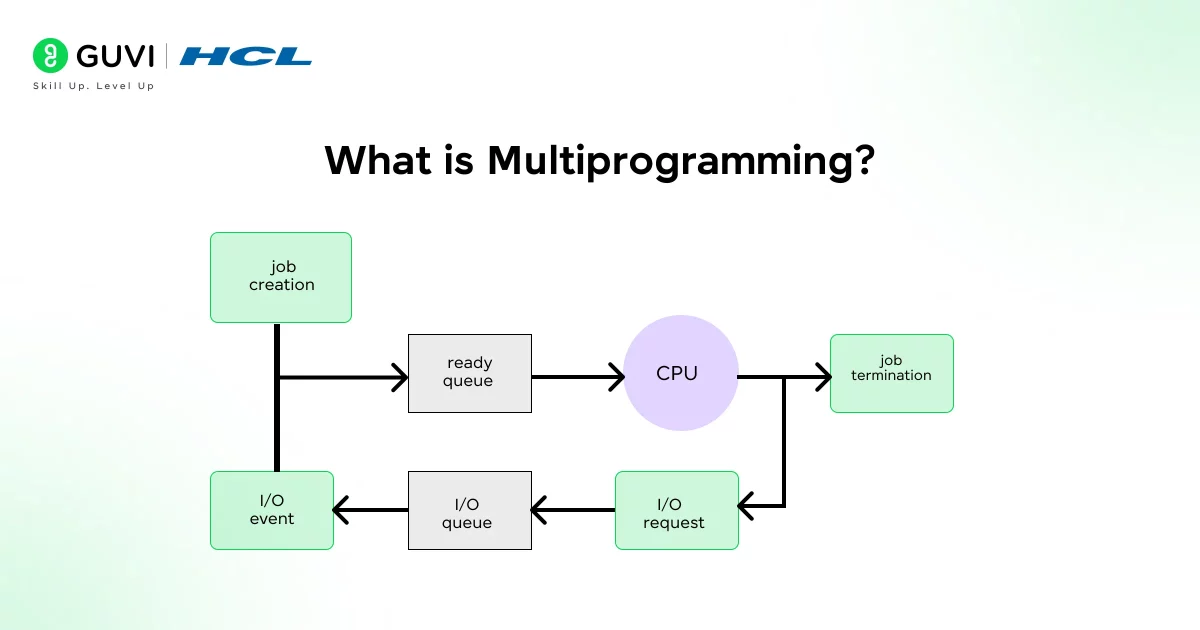
In a multiprogramming system, the Operating System loads multiple programs (jobs) into main memory at once. When one job is waiting (for example, for I/O), the CPU doesn’t sit idle; it switches to another job in memory and executes that. In effect, you keep the CPU busy.
Key Characteristics
Here are some of the core characteristics of multiprogramming:
- Single CPU: There’s one CPU that executes jobs. Multiprogramming doesn’t necessarily require many CPUs.
- Multiple programs in memory: Several programs are present in memory at the same time; when one must wait (e.g., for I/O), another can use the CPU.
- Scheduling and switching: The OS schedules which job gets the CPU next when the current job cannot proceed (e.g., waiting for I/O). This involves context switches (saving job state, loading next job) but not necessarily a strict time-slice preemption.
- Improves CPU utilization: The main aim is to reduce idle CPU time, increase throughput (number of jobs completed).
- Batch-oriented: Historically, multiprogramming was used in batch systems where user interactivity was minimal; jobs would run until waiting or completion.
Advantages & Disadvantages
Advantages
- Better CPU utilization: because the CPU won’t sit idle when a program waits for I/O.
- Increased throughput: more jobs get processed in the same time frame compared to strictly sequential execution.
- More efficient use of system resources (memory, I/O devices) if implemented well.
Disadvantages
- Memory management becomes more complex: since multiple programs must reside in main memory, fragmentation and allocation matters arise.
- The scheduling logic is non-trivial: deciding which job to run next, when to switch, etc.
- Response time for individual jobs may not be optimal: because a job might wait until another job frees the CPU.
- Doesn’t by itself guarantee interactivity or fairness among users/tasks.

What is Multitasking?
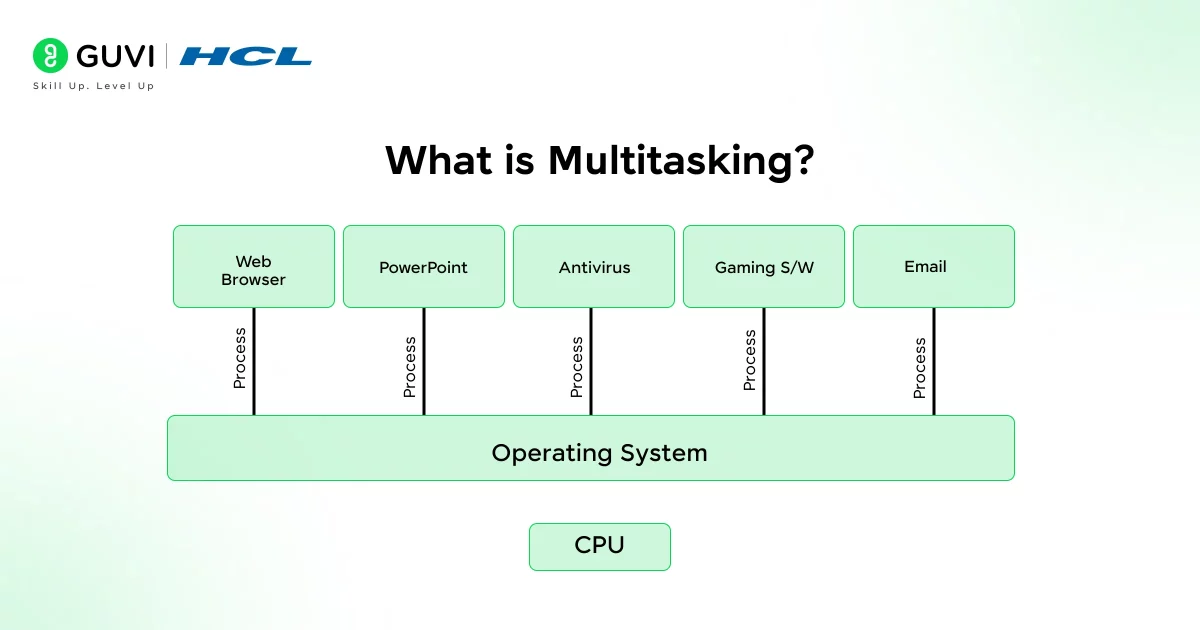
Multitasking (also called time-sharing when referring to interactive systems) is an extension of the multiprogramming idea. Here, the OS allows the execution of multiple tasks (processes or threads) seemingly simultaneously by switching the CPU among them frequently and allocating short time slices. The switching happens so fast that the user experiences multiple tasks happening at once.
Key Characteristics
- Time-sharing/time-slice: Each task/process gets a small “quantum” of CPU time; after the quantum expires or a task blocks, the CPU moves to the next task.
- Switching via context-switch: Because tasks share the CPU, switching between them involves saving and restoring states (context switch).
- User interactivity: Multitasking supports interactive systems (e.g., desktop OS) where multiple applications are running and the user switches between them.
- Multiple tasks per program / multiple users: Unlike multiprogramming, which focuses on multiple programs in memory, multitasking deals with several tasks (which might belong tothe same or different programs) running concurrently.
- Potential for multiple CPUs: Although not strictly required, multitasking systems can exploit multiple processors/cores for better parallelism. Some descriptions mention multicore environments.
Advantages & Disadvantages
Advantages
- Improved responsiveness: Because tasks get CPU time frequently, the system responds better to user commands or interactive workloads.
- Allows multiple applications to run “at once” (in the user’s perception): e.g., you might browse the web, play music, run background tasks.
- Better target for modern interactive operating systems (desktop, mobile) and “multi-user” scenarios.
Disadvantages
- Complexity: Scheduling and managing time slices, ensuring fairness, prioritization, handling interrupts, and dealing with resource contention is non-trivial.
- Overhead from context switching: Frequent switching incurs overhead (saving/restoring registers, flushing TLBs, etc).
- If tasks are too heavy or quantum too small/large, you may end up with overhead or poor utilization.
- Hardware constraints: On slower processors or with limited resources, multitasking might degrade performance rather than help.
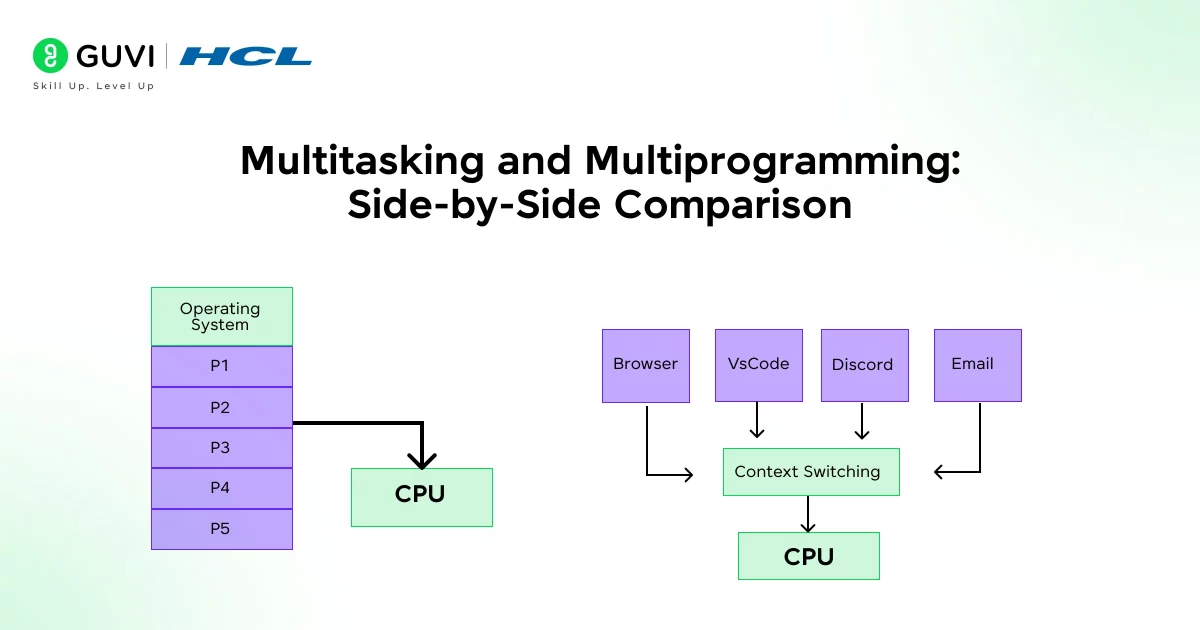
Multitasking and Multiprogramming: Side-by-Side Comparison
| Aspect | Multiprogramming | Multitasking |
| Core idea | The OS keeps several programs in memory so the CPU always has something to work on when one job is waiting. It’s mainly about improving overall system throughput. | The OS switches between tasks quickly using time slices, giving you the sense that many things run at once. It’s focused on responsiveness. |
| How switching happens | A program gives up the CPU only when it’s blocked, usually waiting for I/O. The OS then picks another job to continue. | Switching is frequent and pre-planned. Each task gets a short window of CPU time before the next one takes over. |
| User experience | You don’t really interact with programs in real time. Jobs run in the background until they finish. | You interact smoothly with multiple apps—typing, browsing, listening to music—all without noticeable delays. |
| Goal | Keep the CPU busy and reduce idle time. Ideal for environments that process long-running jobs. | Share CPU time fairly across tasks so the system feels responsive, especially during interactive work. |
| Type of workloads | Fits batch-oriented workloads where completion matters more than immediate feedback. | Built for everyday computing where quick response and task switching matter. |
| Overhead | Less overhead because switches happen only when a job can’t continue. | More overhead due to frequent context switches, but the payoff is better interactivity. |
| Examples | Early mainframe batch systems or servers running queued jobs. | Modern desktop and mobile operating systems where apps run side by side. |
There are 8 different types of Operating Systems out there, and if you want to know about all of them in detail, read – 8 Different Types of Operating Systems You Should Know
Why Does It Matter to You?
If you’re learning about operating systems or teaching others, understanding the difference between multiprogramming and multitasking helps you in several ways:
- It clarifies how OS scheduling evolved: from simple job-switching to responsive interactive systems.
- It helps in understanding modern OS features: e.g., how your smartphone handles multiple apps, how the OS ensures fairness and responsiveness.
- It matters in performance tuning and OS architecture decisions: for example, if you’re designing a system that must prioritise throughput (many jobs) vs one that emphasises responsiveness (interactive tasks).
Use Cases and Practical Scenarios
Multiprogramming
Multiprogramming usually appears in systems where the goal is to keep the CPU busy rather than keep the user engaged.
- You’ll see it in batch-oriented setups where programs run for long periods and don’t need real-time interaction.
- It works well when tasks spend a lot of time waiting for I/O, because the CPU can instantly switch to another job that’s ready to run.
- Older mainframe systems and some server environments still rely on this model to boost throughput and avoid idle CPU time.
What this really means is that multiprogramming thrives in places where steady progress on many jobs matters more than quick responses to a single user.
Multitasking
Multitasking shows up everywhere you expect fast reactions and smooth switching between activities.
- It powers your everyday experience on desktops, laptops, and mobile devices, letting you jump between apps without thinking twice.
- Background services, downloads, notifications, syncing, run alongside your active tasks without getting in your way.
- Interactive systems like development environments, creative tools, and browsers rely heavily on multitasking to stay responsive.
In short, multitasking is built for the real world you interact with: quick taps, fast switches, and constant movement between tasks.
Did you know that early computers didn’t support multitasking at all? A single program would run from start to finish, and the CPU often sat idle while waiting for slow I/O operations. Multiprogramming was the first big shift that kept the CPU busy, and only later did multitasking evolve to make systems feel interactive. The smooth app-switching you rely on today is built on decades of these foundational ideas.
If you’re serious about mastering software development along with AI and want to apply it in real-world scenarios, don’t miss the chance to enroll in HCL GUVI’s IITM Pravartak and MongoDB Certified Online AI Software Development Course. Endorsed with NSDC certification, this course adds a globally recognized credential to your resume, a powerful edge that sets you apart in the competitive job market.
Conclusion
In conclusion, multiprogramming and multitasking represent two stages of how operating systems evolved. One focuses on keeping the CPU productive, the other on keeping you engaged with quick, predictable responses.
Both still matter today because they shape how applications share resources, how performance is managed, and how users experience speed on any device. Once you understand the distinction, concepts like scheduling, parallelism, and system performance start making a lot more sense.
Modern systems blend both ideas, but understanding how they differ helps you see why today’s devices feel so smooth and why earlier systems behaved the way they did. Once you grasp these fundamentals, the rest of the operating-system concepts, like scheduling, concurrency, and performance tuning, start falling into place naturally.
FAQs
1. What is the main difference between multiprogramming and multitasking?
Multiprogramming keeps the CPU busy by switching when a job waits for I/O. Multitasking switches rapidly between tasks to make the system feel responsive. One focuses on throughput, the other on interactivity.
2. Is multitasking faster than multiprogramming?
Not necessarily. Multitasking feels faster because tasks respond quickly, but it has more switching overhead. Multiprogramming can be more efficient for long-running jobs.
3. Can a modern operating system use both?
Yes. Most OSes load several programs into memory (multiprogramming) and use time-sharing to switch between tasks (multitasking). Both concepts work together under the hood.
4. Does multiprogramming mean multiple CPUs are used?
No. It works even on a single CPU by switching between jobs when one is waiting. Multiple CPUs fall under multiprocessing, not multiprogramming.
5. Which is better for user-facing applications?
Multitasking. It’s designed to keep apps responsive and allow users to switch between them smoothly. Multiprogramming is better suited for batch or background workloads.
Success Stories

About the Author
Lukesh S
A professional content writer who has experience in freelancing and now working as a Technical Content Writer at GUVI. Google Certified Digital Marketer. Have a sound knowledge of SQL, Data Structures and Cloud Computing.
View all posts by Lukesh S
Connect with me @














Did you enjoy this article?