


Academics Articles
Is the HCL GUVI AI/ML Program Right for You? A Quick Self-Assessment
Inside the HCL GUVI AI/ML Curriculum: What You’ll Actually Build
Wipro Elite NTH Eligibility Criteria 2026: CGPA, Branch & Backlog Rules Explained
What is Wipro Elite NTH? Complete Overview for 2026 Graduates


Get In Touch For Details! Request More Information
Operating System Architecture is the structural design of an operating system (OS), defining how its core components work together to manage hardware resources and provide services to applications. It plays a key role in system performance, security, and reliability.
Every operating system follows a specific architectural model, such as monolithic, layered, microkernel, modular, or hybrid architecture, each with its own strengths and trade-offs. Understanding these models helps you see how operating systems are built and why they behave differently in real-world computing environments.
Table of contents
- TL;DR Summary
- Types of Operating System Architecture — Overview
- Key Components of Operating System Architecture
- Hardware Layer
- Kernel
- Shell or User Interface
- System Services and Device Drivers
- Application Layer
- Major Architectures of Operating Systems
- Simple Structure
- Monolithic Kernel Architecture
- Layered Architecture
- Microkernel Architecture
- Hybrid Kernel Architecture
- Exokernel Architecture
- Operating System Architecture Comparison Table
- Monolithic vs. Microkernel vs. Hybrid Kernel Architecture Comparison: Key Differences
- Windows vs. Linux Architecture: Key Differences Explained
- Importance of Operating System Architecture
- Real-World Applications
- Challenges in OS Architecture
- Operating System Architecture Interview Questions for Campus Placements
- Conclusion
- FAQs
- What is the main purpose of OS architecture?
- Why is modularity important in OS design?
- Which architecture is used in Linux?
- What are the future trends in OS architecture?
- Can we change an OS architecture after development?
TL;DR Summary
- Operating System Architecture includes six major models—Monolithic Kernel, Microkernel, Hybrid Kernel, Layered Architecture, Simple Structure, and Exokernel—each offering different trade-offs in performance, security, modularity, and maintainability.
- Every operating system is built on five core components: the Hardware Layer, Kernel, Shell (User Interface), System Services & Device Drivers, and the Application Layer, which work together to manage hardware and run applications efficiently.
- Monolithic, Microkernel, and Hybrid Kernel architectures are the most widely used today, with each taking a different approach to balancing speed, stability, security, and system design.
- Windows uses a hybrid kernel architecture, while Linux uses a monolithic kernel with loadable modules, resulting in key differences in customization, performance, security, and typical use cases.
- Choosing the right Operating System Architecture depends on the application’s requirements, as it directly influences system performance, reliability, scalability, hardware compatibility, and long-term maintainability.
Types of Operating System Architecture — Overview
Here’s a quick rundown before we get into the details — these are the six main types of Operating System Architecture you’ll come across:
- Simple Structure: The earliest, most basic design with no clear separation between OS functions (example: MS-DOS)
- Monolithic Kernel Architecture: All core services run inside one large kernel for maximum speed (example: Linux, UNIX)
- Layered Architecture: The OS is split into layers that each handle a specific task (example: THE OS)
- Microkernel Architecture: Only essential services stay in the kernel, everything else moves to user space for better stability (example: MINIX, QNX)
- Hybrid Kernel Architecture: Blends monolithic performance with microkernel-style modularity (example: Windows NT, macOS)
- Exokernel Architecture: A minimal kernel that hands direct hardware control to applications for maximum flexibility (example: MIT Exokernel)
Key Components of Operating System Architecture
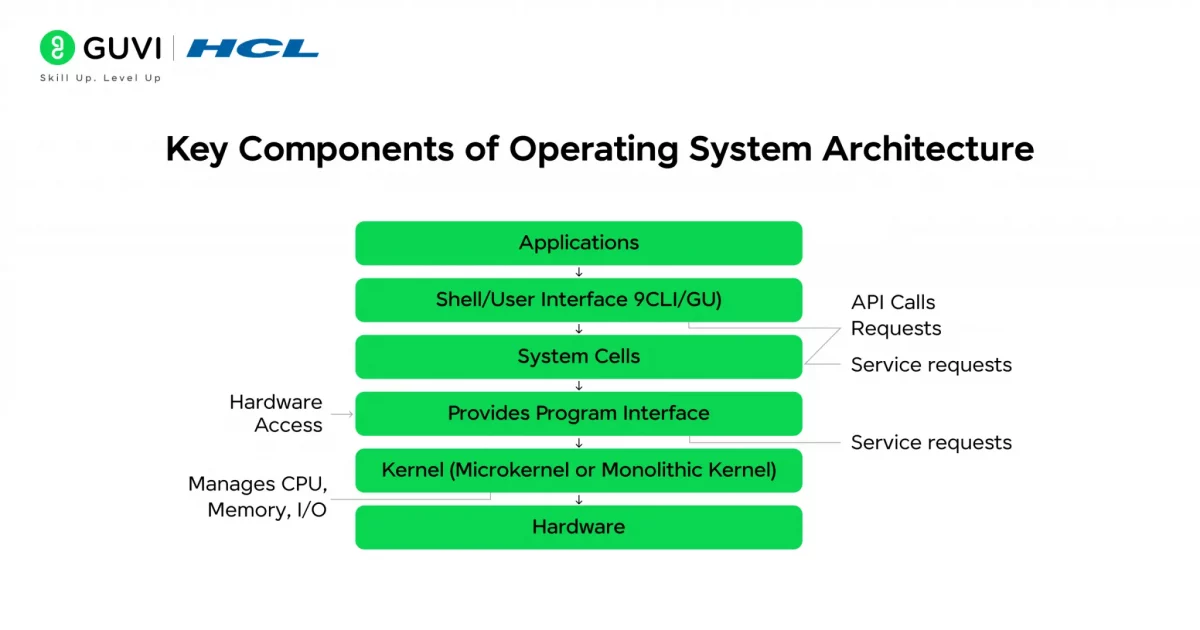
Before we dive into the complex architecture models of operating systems, let’s first uncover the building blocks that make them work. Every operating system relies on five essential components – the Hardware Layer, Kernel, Shell, System Services and Device Drivers, and the Application Layer.
Together, these elements form the heartbeat of your computer, managing everything from memory to user commands. Understanding these components will give you a clearer view of how an OS seamlessly connects users, software, and hardware to create a smooth computing experience.
1. Hardware Layer
The hardware layer forms the physical base of your computer system. It includes all the tangible components — such as the CPU, RAM (memory), storage devices, input/output units, and peripherals like printers or monitors.
This layer doesn’t perform operations on its own; instead, it waits for instructions from the operating system. The OS uses device drivers and firmware to communicate with each hardware component, translating software requests into electrical signals that the hardware can understand.
For instance, when you press “Print,” the OS sends a command through the printer driver, which then instructs the printer hardware to start printing. Similarly, when you type on your keyboard or move your mouse, the signals travel through the hardware layer before reaching the OS for interpretation.
This layer is crucial because without hardware, no software can function — and without an OS, hardware remains just a set of silent components waiting for directions.
Build a strong foundation in operating systems and core computing concepts with HCL GUVI’s Basics of Computer Course. Learn how computers, file systems, networking, and cybersecurity work together through practical, hands-on learning. Start building your tech foundation today!
2. Kernel
The kernel is the heart of the operating system — the central part that directly interacts with the hardware. It acts as the brain that manages all critical system activities such as:
- Process management: Deciding which programs run and in what order.
- Memory management: Allocating and freeing memory for running processes.
- Device management: Handling input/output operations through drivers.
- System calls: Providing a gateway for applications to request OS services.
When you open multiple applications at once — say, a browser, a video player, and a document — the kernel decides which process gets CPU time first and how resources are divided. It performs context switching, allowing seamless multitasking without freezing the system.
Essentially, the kernel ensures everything runs in harmony behind the scenes. Without it, your OS would not be able to manage hardware or software efficiently.
3. Shell or User Interface
The shell is the layer that allows users to interact with the operating system. It can appear in two main forms:
- Graphical User Interface (GUI) – where users interact through icons, windows, and buttons (like Windows or macOS).
- Command Line Interface (CLI) – where users type text commands (like in Linux or DOS).
The shell translates user actions into commands the OS can understand. For example, when you double-click a file in Windows Explorer or type “open file.txt” in a terminal, the shell interprets your request and instructs the OS to execute it.
Modern shells make systems more user-friendly. GUIs simplify complex commands into visual actions, while CLIs provide flexibility and control for developers and power users. Together, they make system interaction intuitive and powerful.
4. System Services and Device Drivers
System services and device drivers play a vital role in managing background tasks and enabling communication between hardware and software.
- System services handle essential operations like networking, file management, user authentication, and system monitoring.
- Device drivers act as translators between hardware devices and the OS, ensuring that programs can access hardware without needing to know its details.
For example, when you connect to Wi-Fi, the network driver manages data exchange between your wireless adapter and the OS. Similarly, audio drivers control how sound is played through your speakers.
Without these components, applications wouldn’t be able to access hardware functionalities. Drivers make sure every device — from printers to graphics cards — works properly with your OS.
5. Application Layer
The application layer is the topmost layer of the OS architecture, where users interact with various software programs. It allows applications like browsers, games, word processors, or video editors to run and communicate with the operating system.
Applications don’t directly interact with hardware; they use Application Programming Interfaces (APIs) to send system requests. For instance, when you open Google Chrome, it uses APIs to request memory, handle network connections, and display graphics — all coordinated by the OS.
This layer makes computing meaningful for end-users. It’s where your commands, inputs, and actions are transformed into results that you can see and use — whether it’s watching a movie, editing a photo, or browsing the web.
Major Architectures of Operating Systems
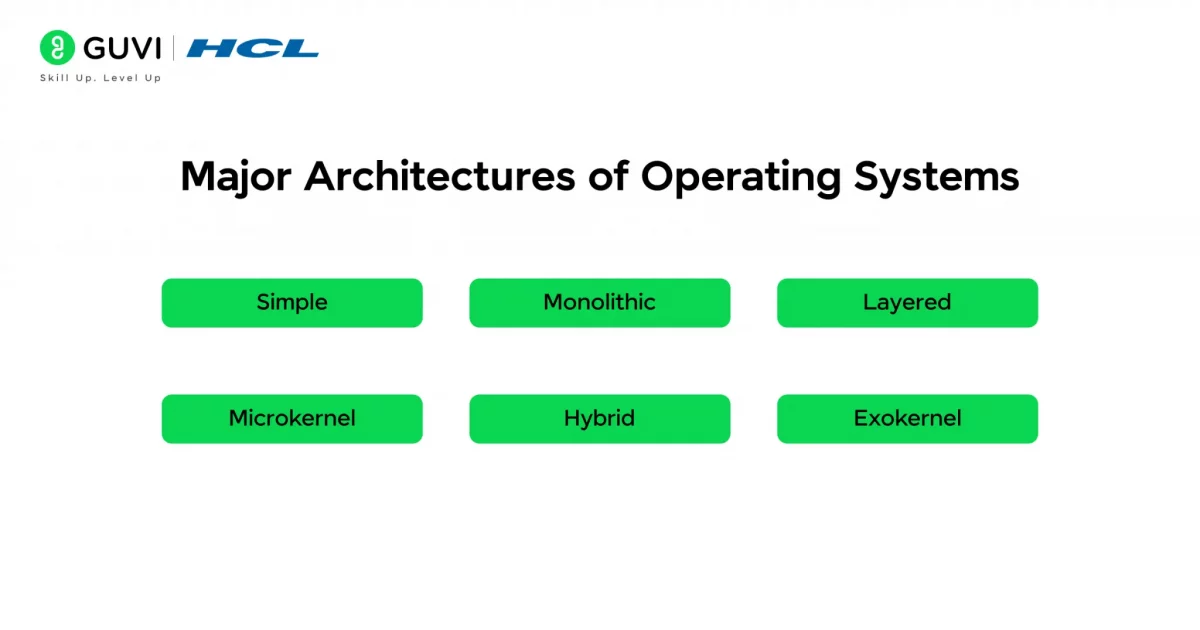
Operating systems are built using different architectural models — each defining how system components are organized and how tasks like process management, memory allocation, and hardware communication are handled. These designs affect the performance, scalability, and reliability of the entire system. Let’s explore the major OS architectures, their structure, features, advantages, disadvantages, and examples in detail.
1. Simple Structure
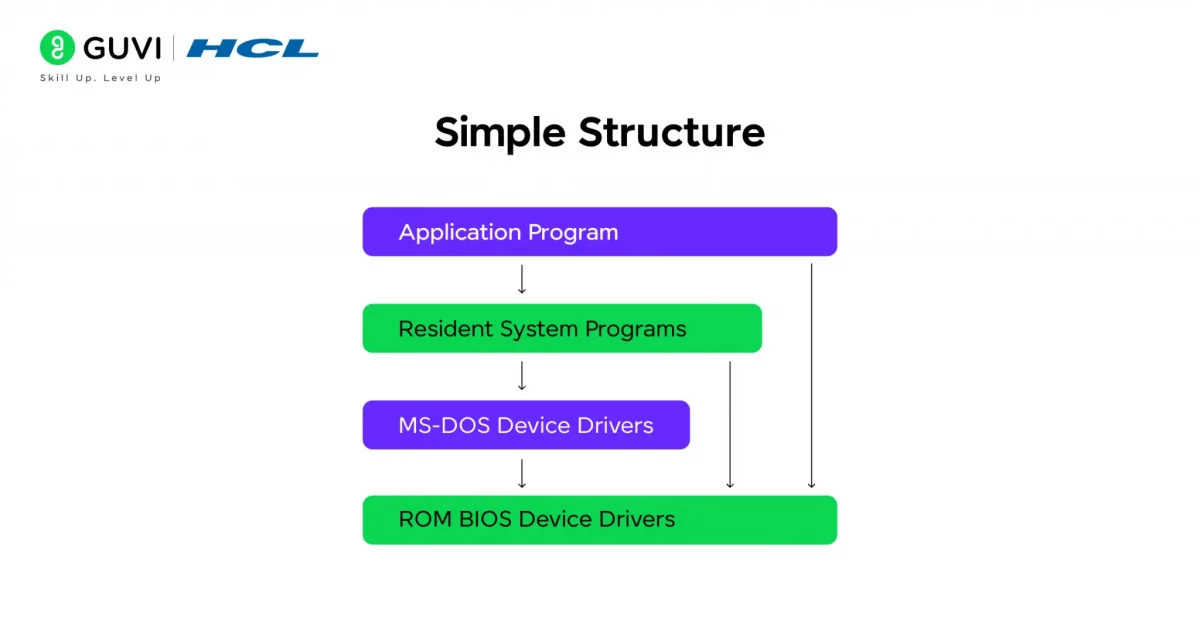
The Simple Structure is the earliest and most basic form of operating system architecture. It lacks proper modular separation, meaning that all the essential OS functions are grouped and operate as one large unit.
How It Works:
- All OS activities — such as process control, file management, and device operations — are handled together.
- Since there are no defined layers, functions directly communicate with each other and the hardware.
- This makes execution fast but maintenance extremely difficult.
Key Features:
- Single-layer design
- Direct interaction with hardware
- No modular boundaries
Advantages:
- Simple and easy to design
- Low overhead and faster execution
Disadvantages:
- Poor security and reliability
- Difficult to update or debug
- A single error can crash the entire system
Example:
MS-DOS is the most popular example of a simple structured OS. It interacts directly with the hardware, allowing basic command execution but offering minimal abstraction and protection.
2. Monolithic Kernel Architecture
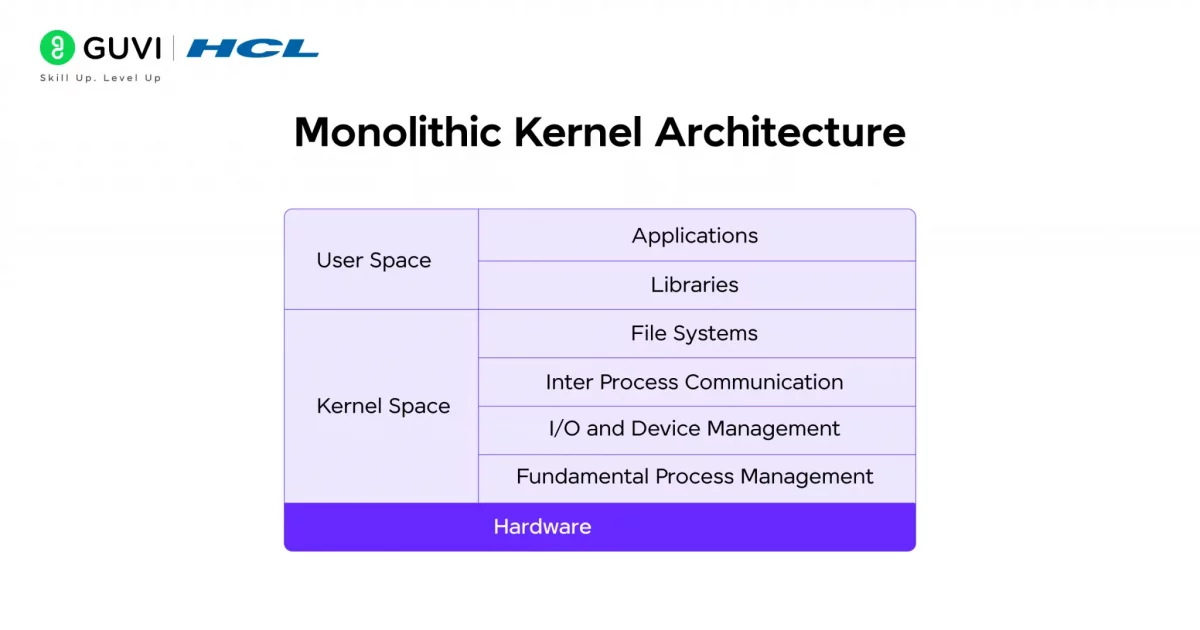
The Monolithic Kernel architecture is one of the most widely used OS designs. Here, all operating system services and functions are grouped inside a single large kernel running in the same memory space.
How It Works:
- The kernel contains all core modules, including file systems, device drivers, and memory managers.
- System calls from applications are handled directly by the kernel without switching between layers.
- This structure enables fast and efficient processing but can be difficult to maintain.
Key Features:
- Single large kernel handling all operations
- Direct communication between modules
- All components share the same address space
Advantages:
- High performance due to direct execution
- Efficient resource management
- Reduced communication overhead
Disadvantages:
- A fault in one module can crash the whole system
- Complex to update or debug
- A larger kernel size makes maintenance difficult
Example:
Linux and UNIX systems use monolithic kernels. They offer great performance and speed but can face issues like “kernel panic” if any internal module fails.
3. Layered Architecture
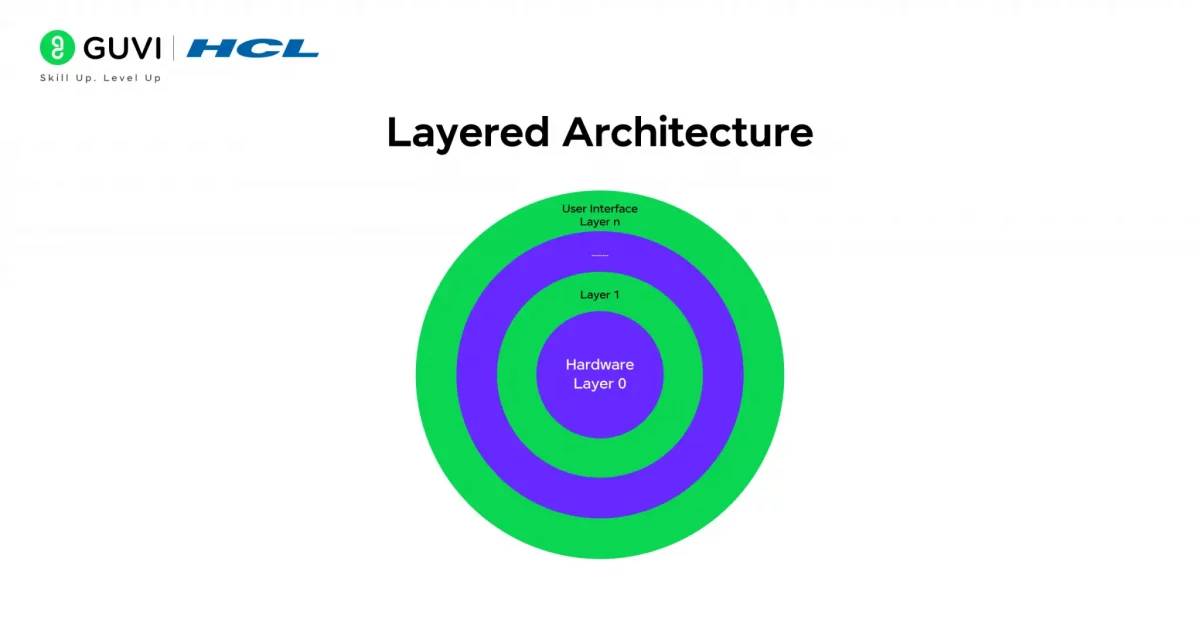
The Layered Architecture brings a structured and organized approach to OS design. It divides the system into layers, each responsible for specific tasks.
How It Works:
- The lowest layer interacts directly with the hardware.
- The uppermost layer manages user applications and the interface.
- Each layer can only communicate with the one directly above or below it.
Key Features:
- Multi-layered structure with clear separation of concerns
- Controlled communication between layers
- Easier to test and modify individual layers
Advantages:
- Highly modular and maintainable
- Easier debugging and testing
- Improved security since access is restricted between layers
Disadvantages:
- Slower communication due to multiple layers
- Rigid structure — changing one layer may affect others
Example:
The Operating System (developed by Edsger Dijkstra) and early MULTICS versions used this architecture. This structured model inspired the layered organization used in modern operating systems today.
4. Microkernel Architecture
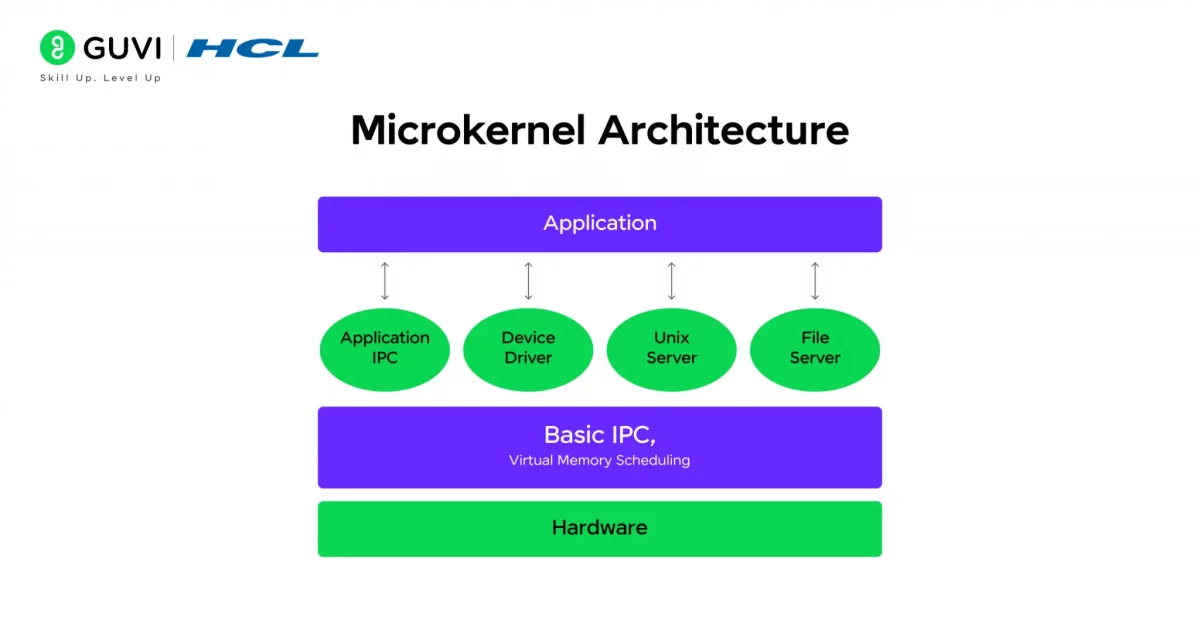
The Microkernel Architecture focuses on keeping the kernel minimal and secure by moving most system services to the user space. This makes the OS more stable and modular.
How It Works:
- Only essential services like interprocess communication (IPC), memory, and process management run inside the kernel.
- Other services, such as file systems and drivers, run in user space.
- Communication happens through messages passing between these components.
Key Features:
- Minimal kernel size
- Modular design separating services
- Uses message passing for communication
Advantages:
- Highly stable and secure
- Easier to extend or remove services
- Fault isolation — one service crash doesn’t affect others
Disadvantages:
- Slightly slower due to message passing overhead
- More complex communication structure
Example:
MINIX and QNX use microkernel designs. Even macOS and Windows NT integrate microkernel principles for modularity and better fault tolerance.
5. Hybrid Kernel Architecture
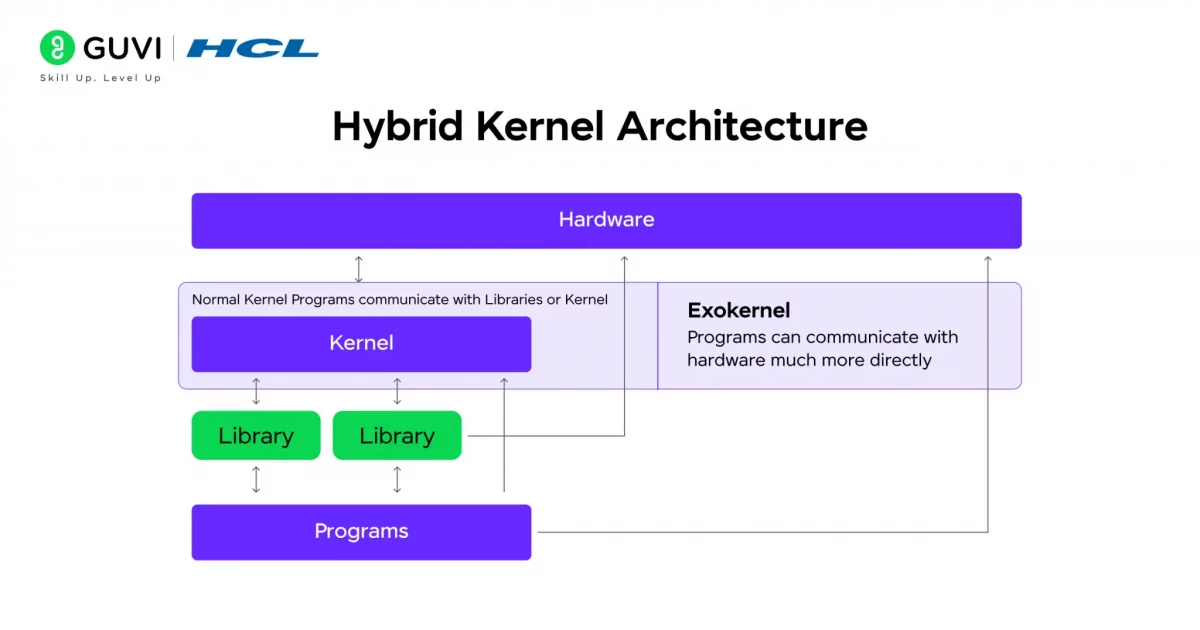
The Hybrid Kernel combines the efficiency of a monolithic kernel with the flexibility of a microkernel. It’s designed to deliver strong performance while maintaining modularity.

How It Works:
- Core OS services (like process and memory management) run in kernel mode.
- Other components, such as device drivers or system servers, can operate in user mode.
- This hybrid setup balances speed and stability.
Key Features:
- Mix of monolithic and microkernel structures
- Critical modules run in kernel space
- Supports dynamic loading and modular updates
Advantages:
- High performance with improved fault tolerance
- Easier to maintain and extend than monolithic kernels
- Better system stability
Disadvantages:
- Complex to design and implement
- Can still experience kernel-level failures
Example:
Windows NT, Windows 10, and macOS use hybrid kernels. These systems efficiently manage multitasking, device handling, and system security without compromising speed.
6. Exokernel Architecture
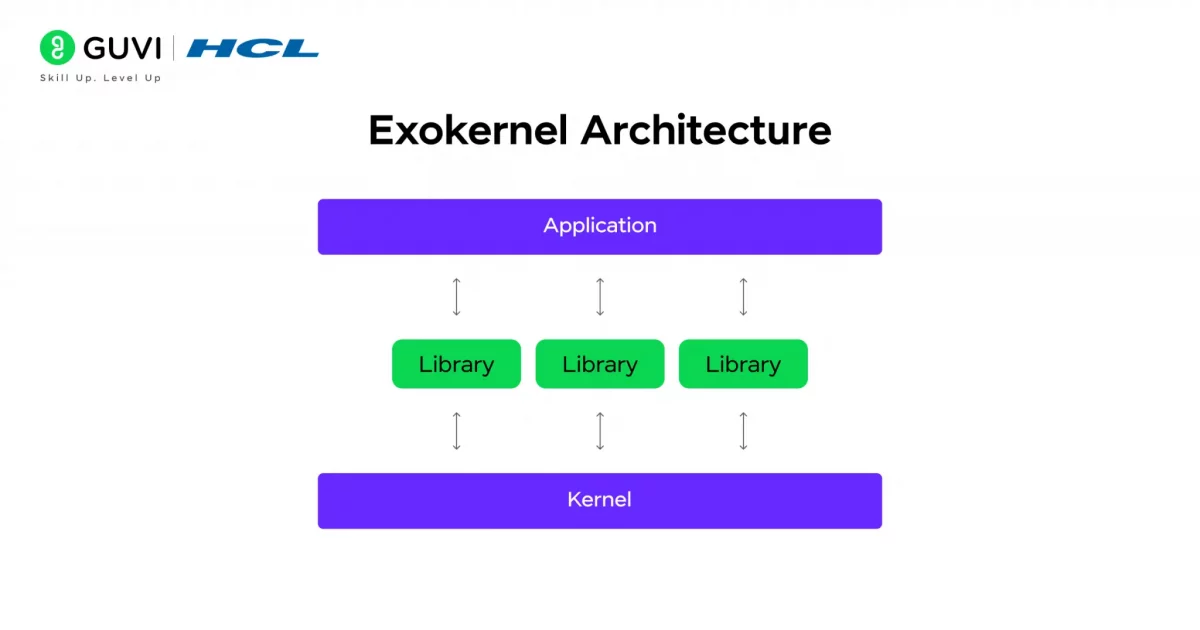
The Exokernel Architecture takes a different approach by minimizing the kernel’s role and giving applications more direct control over hardware.
How It Works:
- The kernel acts as a lightweight layer that securely allocates resources like CPU, memory, and storage.
- Instead of abstracting hardware functions, it allows applications to manage resources independently.
- This enables developers to optimize performance based on specific needs.
Key Features:
- Extremely lightweight kernel
- Direct hardware access for applications
- Provides high flexibility and customization
Advantages:
- Maximum efficiency and control
- Suitable for high-performance and experimental systems
- Enables custom resource management for each application
Disadvantages:
- Difficult to implement for a general-purpose OS
- Complex for developers to manage directly
- Limited compatibility across different hardware
Example:
The MIT Exokernel Project is a prime example. It demonstrates how direct hardware management can achieve unmatched performance for specialized computing environments.
Operating System Architecture Comparison Table
The following table compares the major Operating System Architecture types based on their kernel type, performance, security, and real-world examples:
| Architecture Type | Example OS | Kernel Type | Performance | Security |
|---|---|---|---|---|
| Simple Structure | MS-DOS | Simple (Non-layered) | High for simple tasks, but limited scalability | Low |
| Monolithic Kernel Architecture | Linux, UNIX | Monolithic Kernel | Very High | Moderate |
| Layered Architecture | THE OS (Technische Hogeschool Eindhoven Operating System) | Layered Kernel | Moderate | High |
| Microkernel Architecture | MINIX 3, QNX, L4 | Microkernel | Moderate (slight IPC overhead) | Very High |
| Hybrid Kernel Architecture | Windows NT, macOS (XNU) | Hybrid Kernel | High | High |
| Exokernel Architecture | MIT Exokernel (Xok) | Exokernel | Very High | Depends on the library OS implementation |
Monolithic vs. Microkernel vs. Hybrid Kernel Architecture Comparison: Key Differences
Operating System Architecture directly impacts how the kernel manages system resources, communicates with hardware, and delivers performance. The table below compares the three most widely used kernel architectures in terms of design, performance, security, and real-world usage.
| Feature | Monolithic Kernel | Microkernel | Hybrid Kernel |
|---|---|---|---|
| Design | All core services run in kernel space | Only essential services run in kernel space; others run in user space | Combines monolithic and microkernel principles |
| Performance | Very high | Moderate (due to IPC overhead) | High |
| Security | Moderate | Very high | High |
| Stability | Lower, as a faulty kernel service can affect the entire system | High, since failures are isolated | High |
| Kernel Size | Large | Small | Medium |
| Communication | Direct function calls | Inter-process communication (IPC) | Mix of direct calls and IPC |
| Ease of Maintenance | More difficult | Easier because components are modular | Moderate |
| Example Operating Systems | Linux, UNIX | MINIX 3, QNX | Windows NT, macOS (XNU) |
| Best Suited For | High-performance computing and servers | Embedded systems and security-critical applications | General-purpose desktop and enterprise systems |
Windows vs. Linux Architecture: Key Differences Explained
Operating System Architecture influences how Windows and Linux manage hardware, system resources, and applications. The table below highlights their most important architectural differences.
| Feature | Windows Architecture | Linux Architecture |
|---|---|---|
| Kernel Type | Hybrid kernel | Monolithic kernel (with loadable kernel modules) |
| Source Code | Closed source | Open source |
| Performance | Optimized for desktop use and broad hardware compatibility | Optimized for servers, cloud, and high-performance workloads |
| Security | Strong built-in security but a larger malware target | Strong Unix-based permissions and generally fewer malware attacks |
| Best Use Cases | Personal computers, gaming, and business desktops | Servers, cloud computing, embedded systems, and development |
Importance of Operating System Architecture
The architecture of an OS is the blueprint that defines how efficiently a computer functions. A well-designed architecture ensures that the OS is:
- Efficient: Proper layering ensures optimal use of CPU, memory, and I/O devices.
- Secure: Segregated modules reduce vulnerabilities.
- Reliable: Modular design helps isolate faults, preventing system crashes.
- Scalable: Supports adding new hardware or updating components with minimal disruption.
- Adaptable: Enables support across different platforms (such as desktops, mobile devices, and cloud).
In short, the architecture decides how well an OS can balance performance, stability, and flexibility — the three pillars of system design.
Real-World Applications
Different OS architectures power diverse environments:
- Linux (Monolithic): Popular on servers for its speed and stability.
- Windows NT (Hybrid): Ideal for desktops where performance and security must coexist.
- QNX (Microkernel): Used in automotive systems for reliability and safety.
- Android (Modified Linux Kernel): Optimized for mobile hardware.
Each architecture’s design reflects its purpose — from raw performance in servers to fault tolerance in embedded systems.
Challenges in OS Architecture
- Performance vs. Modularity: Microkernels offer modularity but incur IPC overhead, reducing performance.
- Security: More kernel code increases the attack surface.
- Scalability: Supporting multi-core and virtual environments adds complexity.
- Hardware Compatibility: Diverse hardware requires numerous drivers and abstractions.
Operating System Architecture Interview Questions for Campus Placements
If you’re prepping for campus placements, chances are OS is one of those subjects recruiters love to test — and Operating System Architecture questions show up a lot more often than people expect, especially in technical rounds for SDE and system engineer roles.
Companies want to know if you actually understand how a computer works under the hood, not just whether you’ve memorized definitions. Here are some of the most commonly asked questions, along with answers that go straight to the point.
1. What is Operating System Architecture, and why does it matter?
It’s the structural design of how an OS organizes its components — kernel, shell, drivers, and so on — to manage hardware and run applications. Interviewers ask this to check if you understand the “big picture” before diving into specifics.
2. What’s the difference between a monolithic kernel and a microkernel?
A monolithic kernel runs all OS services in one address space, which makes it fast but risky since one faulty module can crash everything. A microkernel keeps only the essentials in kernel space and pushes the rest to user space, trading a bit of speed for much better fault isolation.
3. Which kernel architecture does Linux use, and why?
Linux uses a monolithic kernel with loadable kernel modules, which lets it keep the performance benefits of a monolithic design while still allowing drivers and features to be added or removed without recompiling the whole kernel.
4. What kernel architecture does Windows use?
Windows runs on a hybrid kernel. It’s a common follow-up question after the Linux one, since interviewers like to see if you can compare the two rather than just recall facts in isolation.
5. What is the main function of the kernel in an OS?
The kernel handles process management, memory management, device management, and system calls — basically everything that needs direct, low-level control over hardware.
6. Why do microkernels use message passing instead of direct function calls?
Because most services run outside the kernel in microkernel design, they can’t talk to the kernel directly the way monolithic systems do. Message passing (via IPC) lets these separated components communicate safely, though it does add some performance overhead.
7. What’s an example of layered architecture, and why isn’t it common anymore?
THE OS, built by Edsger Dijkstra, is the classic example. It’s rarely used today because the strict layer-by-layer communication makes it slower and harder to modify than more modern designs, even though it’s easier to test and debug.
8. Between monolithic, microkernel, and hybrid kernels, which is best for a general-purpose OS? There’s no universal “best” — it depends on the priority. Monolithic kernels win on raw performance, microkernels win on security and stability, and hybrid kernels try to strike a balance, which is exactly why most desktop operating systems today lean hybrid.
9. Can an operating system’s architecture be changed after it’s been built?
Not easily. Since so much of the OS is built around its core architectural choice, switching from, say, a monolithic to a microkernel structure usually means a near-complete redesign rather than a simple update.
10. Why do interviewers ask about OS architecture instead of just OS concepts?
Because Operating System Architecture questions reveal whether a candidate understands how the different pieces of an OS actually fit together, which matters a lot more in real engineering work than being able to recite isolated definitions.
Please Note:
Don’t just mug up these answers — actually understand why each Operating System Architecture works the way it does. Interviewers almost always follow up with a “why” or “what if,” and that’s where most people get stuck.
Conclusion
The architecture of an operating system defines how every element of your computer — hardware, software, and resources — works together to perform tasks seamlessly. It lays out the framework that determines how processes are managed, data is stored, and devices communicate efficiently.
Each architectural model, whether it’s monolithic, microkernel, layered, hybrid, or exokernel, offers a unique balance between performance, flexibility, and reliability.
By understanding OS architecture, you gain deeper insight into how computers operate at their core — knowledge that forms the foundation for advanced fields such as networking, cybersecurity, cloud computing, and system development.
FAQs
1. What is the main purpose of OS architecture?
It defines how the OS manages resources, executes processes, and ensures seamless interaction between hardware and software.
2. Why is modularity important in OS design?
Modular architecture makes debugging, updating, and maintaining systems easier while isolating faults.
3. Which architecture is used in Linux?
Linux uses a monolithic kernel that combines performance with flexibility through loadable modules.
4. What are the future trends in OS architecture?
The focus is shifting toward verified microkernels, virtualization, and lightweight architectures for IoT.
5. Can we change an OS architecture after development?
Not completely — though modules can be updated, the fundamental architecture remains fixed.
Success Stories
















Did you enjoy this article?