


Data Structure Articles
Sliding Window Technique: Explained with Examples
Two Pointer Technique: Problems and Applications


Get In Touch For Details! Request More Information
LRU Page Replacement Algorithm Explained (2026 Guide)
Aug 06, 2026 3 Min Read 1104 Views
(Last Updated)
An efficient way to learn the LRU Page Replacement Algorithm is to relate the concepts to its definition. This blog is intended to help readers learn smoothly, without complications.
Whether you are preparing for exams, working to upgrade your programming knowledge, or simply want to experiment with the operations of creating an operating system from scratch, this guide shall keep your brain focused and lead you gently through the topic step by step.
Table of contents
- TL;DR Summary
- What is the LRU Page Replacement Algorithm
- Example:
- How LRU Page Replacement Works
- Code Example
- Code Explanation:
- Real-World Applications
- a. Operating Systems
- b. CPU Cache Management
- c. Database Systems
- d. Web Browsers
- e. Mobile Applications
- Conclusion
- FAQs
- What happens if the required page is already in memory?
- Why does LRU remove old pages first?
- What is a page fault in LRU?
- Why is page usage tracking important in LRU?
- What happens when memory becomes full?
- Why is LRU commonly used in systems?
TL;DR Summary
- This blog helps you understand the LRU Page Replacement Algorithm in a simple way, so you can easily grasp how memory management works in operating systems.
- It gives you a clear flow from concept to example, helping you connect theory to real execution rather than just memorising definitions.
- It also includes a practical code example, making it easier to apply the concept in programming and exam preparation.
Studies on cache systems show that many workloads can achieve around 90% cache hit rates with LRU-based caching.
What is the LRU Page Replacement Algorithm
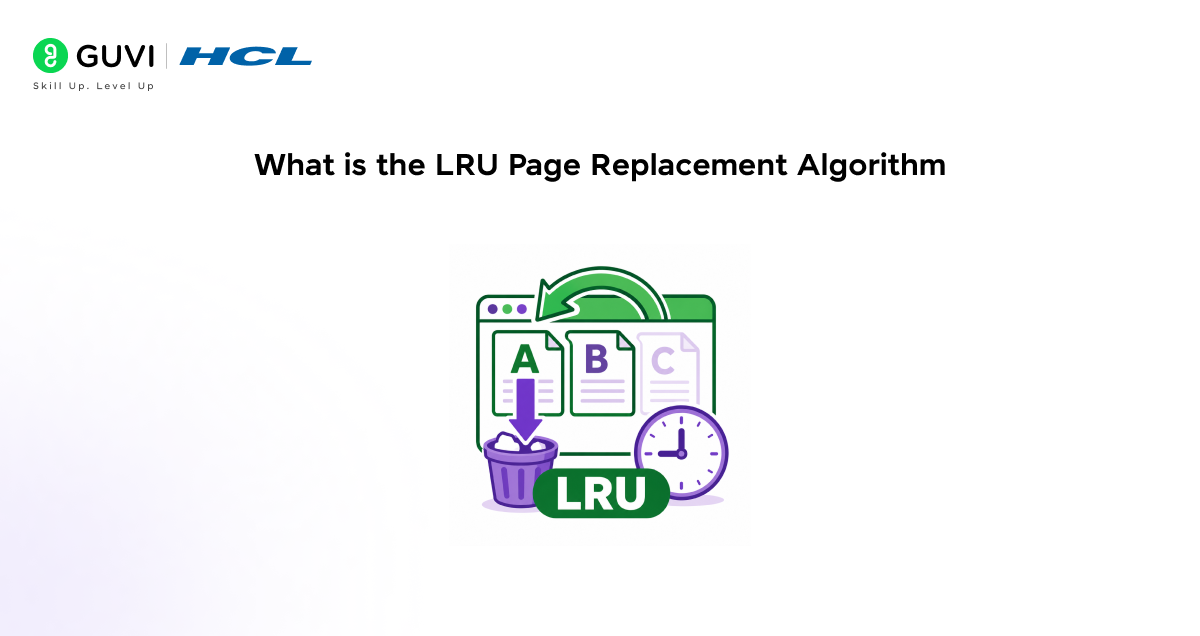
The LRU Page Replacement Algorithm is a memory management technique used in an operating system (OS) to select which page to remove when memory becomes full.
The LRU (Least Recently Used) method removes the least used page, helping keep the most recently and frequently used pages in memory to maintain system performance.
Example:
If you only have 3 book slots in your study room table and a new book arrives, but the table is full, you remove the book you haven’t touched for a very long time.
Similarly, the LRU Page Replacement Algorithm removes the least recently used page from memory and keeps the most recently used page for easier access.
Master Data Structures & Algorithms with HCL GUVI’s DSA for Programmers Course and level up your problem-solving and coding logic skills.
How LRU Page Replacement Works
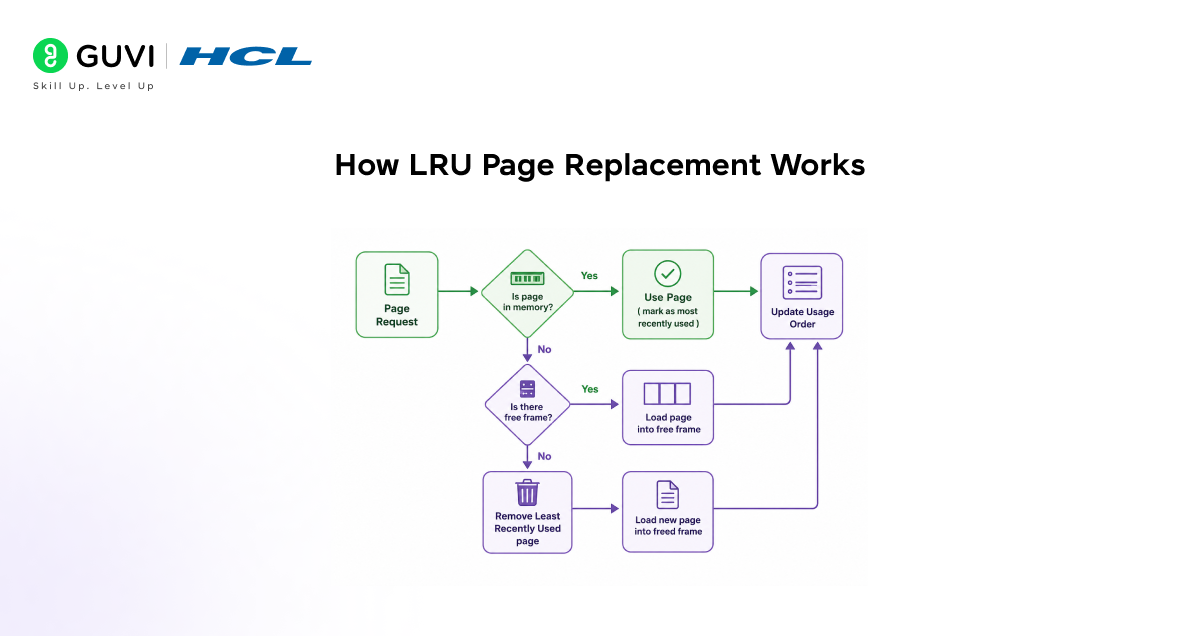
The following points explain how the LRU Page Replacement Algorithm works inside the operating system.
- The process begins when the CPU sends a page request to the operating system.
- The system first checks whether the required page is already present in memory.
- If the page is already in memory, the system uses it directly for execution. After using it, the page is marked as the most recently used page, and the usage order is updated.
- If the page is not present in memory, the system then checks whether any free memory frame is available. If an empty frame exists, the new page is simply loaded into that free space, and the usage order is updated again.
- However, if memory is completely full, the LRU Page Replacement Algorithm starts its main task. The system examines all pages currently in memory and identifies the one that has been unused the longest. The least recently used page is removed from memory.
- Once the old page is removed, the new required page is loaded into the freed memory frame. After loading, the system again updates the usage order so it knows which pages were used recently and which were not.
- This same cycle keeps repeating whenever new page requests arrive. Because of this process, the operating system always tries to keep recently accessed pages in memory, reducing page faults and improving overall system performance.
Code Example
function lruPageReplacement(pages, capacity) {
let memory = [];
let pageFaults = 0;
for (let page of pages) {
// Check if page already exists in memory
if (memory.includes(page)) {
// Remove page from current position
memory.splice(memory.indexOf(page), 1);
// Add it to the end as the most recently used
memory.push(page);
} else {

pageFaults++;
// If memory is full, remove the least recently used page
if (memory.length === capacity) {
memory.shift();
}
// Add new page
memory.push(page);
}
console.log(“Current Memory:”, memory);
}
console.log(“Total Page Faults:”, pageFaults);
}
const pages = [1, 2, 3, 1, 4, 5];
const capacity = 3;
lruPageReplacement(pages, capacity);
Output:
Current Memory: [1]
Current Memory: [1, 2]
Current Memory: [1, 2, 3]
Current Memory: [2, 3, 1]
Current Memory: [3, 1, 4]
Current Memory: [1, 4, 5]
Total Page Faults: 5
Code Explanation:
• The code first checks whether the required page is already present in the memory.
• If the page already exists, it is marked as the most recently used page by moving it to the latest position.
• When a new page arrives, and memory still has free space, the page is directly added to memory.
• If the memory becomes full, the code removes the least recently used page from the beginning of the memory list.
• After every operation, the updated memory state is printed so you can clearly see how the LRU Page Replacement Algorithm manages pages step by step.
Important Note:
- A page is a small, fixed-size block of data or instructions stored in memory.
- The operating system divides programs into pages so they can be loaded and managed efficiently in RAM.
Real-World Applications

These are the top 5 applications of the LRU Page Replacement Algorithm:
a. Operating Systems
Used to manage memory pages efficiently by removing the least recently used pages from RAM.
b. CPU Cache Management
Helps processors keep recently accessed data in cache memory for faster execution speed.
c. Database Systems
Databases use LRU (least-recently used) caching to store frequently accessed queries and data for faster retrieval.
d. Web Browsers
Browsers use LRU (least-recently used) cache management to keep recently visited website data for faster page loading.
e. Mobile Applications
Apps use LRU cache management to handle limited device memory and improve performance.
Before any great app becomes famous, someone first understands what users truly need. Learn that superpower with HCL GUVI’s Software Requirement Engineering Course and start thinking like a real software engineer.
Conclusion
The LRU Page Replacement Algorithm remains one of the most practical and widely adopted memory management algorithms to date, due to its simple and efficient implementation. Focusing on recently used pages helps systems maintain better performance and smarter memory utilisation in real-world computing environments.
FAQs
What happens if the required page is already in memory?
The system directly uses that page and updates its recent usage.
Why does LRU remove old pages first?
Older unused pages are less likely to be needed immediately.
What is a page fault in LRU?
It occurs when the required page is not found in memory.
Why is page usage tracking important in LRU?
It helps the system identify which page to remove.
What happens when memory becomes full?
The least-recently used page is replaced by the new page.
Why is LRU commonly used in systems?
It helps improve memory efficiency and overall performance.
Success Stories













Did you enjoy this article?