


Artificial Intelligence and Machine Learning Articles
Claude for Code Documentation with JSDoc
How to Integrate Claude into a Next.js App with App Router


Get In Touch For Details! Request More Information

Get the Most Out of Sonnet 4.5 in Claude.ai: Complete Guide
Jun 20, 2026 6 Min Read 541 Views
(Last Updated)
Imagine having a conversation with an AI that truly understands context, remembers your preferences, and helps you accomplish complex tasks with remarkable accuracy. That is exactly what Claude Sonnet 4.5 offers. Whether you are a student researching for an assignment, a professional drafting reports, or someone exploring creative projects, Sonnet 4.5 is designed to make your work easier and more productive.
Many people use AI tools without realizing they are only scratching the surface of what these tools can do. A marketing manager might use Claude for basic email drafts when it could generate entire campaign strategies. A student might ask simple questions when Claude could help structure entire research papers. A developer might use it for code snippets when it could architect complete solutions.
This guide walks you through everything you need to know about Claude Sonnet 4.5. You will learn what makes it special, when to use it, how to get the best results, and practical strategies that transform casual use into genuine productivity gains.
Quick TL;DR Summary
- This guide explains what Claude Sonnet 4.5 is and why it represents a significant advancement in AI conversation technology.
- You will learn the core capabilities of Sonnet 4.5, including conversation quality, reasoning ability, and practical applications.
- The guide covers when Sonnet 4.5 genuinely helps solve real problems and when a simpler approach might be better.
- Practical strategies show you how to write better prompts and get more accurate, useful responses.
- Real-world examples demonstrate how people are using Sonnet 4.5 today across different fields and industries.
- Tips and techniques help you avoid common mistakes and maximize the value you get from every interaction.
Table of contents
- What Is Claude Sonnet 4.5?
- When to Use Sonnet 4.5
- Writing and Content Creation
- Research and Analysis
- Problem Solving and Planning
- Learning and Education
- Code and Technical Tasks
- Creative Projects
- Core Capabilities of Sonnet 4.5
- Natural Conversation Flow
- Deep Reasoning
- Better Understanding of Context
- Flexible Output Formats
- Ethical Reasoning
- Multimodal Capabilities
- Step-by-Step: Getting the Best Results from Sonnet 4.5
- Step 1: Start with Clear Objectives
- Step 2: Provide Relevant Context
- Step 3: Be Specific in Your Requests
- Step 4: Use Follow-Up Questions
- Step 5: Iterate and Refine
- Step 6: Verify Important Information
- Step 7: Save Useful Patterns
- Real-World Examples of Sonnet 4.5 in Action
- The Marketing Manager Creating Campaign Strategies
- The Student Writing Research Papers
- The Developer Debugging Code
- The Teacher Creating Lesson Plans
- The Entrepreneur Analyzing Business Options
- Pros and Cons of Using Sonnet 4.5
- Pros
- Cons
- Top Strategies to Get the Most Out of Sonnet 4.5
- Think Conversation, Not Commands
- Front-Load Important Context
- Use Examples to Clarify Expectations
- Break Complex Tasks into Steps
- Specify Format and Structure
- Ask for Multiple Options
- Request Explanations of Reasoning
- Use Constraints to Focus Responses
- Common Mistakes to Avoid
- Advanced Tips for Power Users
- Conclusion
- FAQs
- Is Claude Sonnet 4.5 free to use?
- What makes Sonnet 4.5 different from other AI models?
- Can I use Sonnet 4.5 for professional work?
- Does Sonnet 4.5 have access to the internet?
- Is my data private when using Claude?
What Is Claude Sonnet 4.5?
Claude Sonnet 4.5 is an advanced AI language model created by Anthropic. It represents the balance between speed and intelligence in the Claude 4.5 family. Think of it as your smart, efficient assistant that handles everyday tasks with remarkable capability.
In the Claude 4.5 family, there are three models. Claude Opus 4.5 is the most powerful for complex reasoning tasks. Claude Haiku 4.5 is the fastest for simple, quick responses. Claude Sonnet 4.5 sits in the middle, offering strong performance without sacrificing speed. For most users, Sonnet 4.5 provides the best combination of quality and efficiency.
The key difference between Sonnet 4.5 and earlier versions is improved understanding, better reasoning, and more natural conversation flow. It handles nuance better, maintains context longer, and produces more accurate results across a wider range of tasks.
When to Use Sonnet 4.5
Sonnet 4.5 excels in specific situations. Knowing when to use it helps you get better results faster.
1. Writing and Content Creation
Drafting emails, articles, reports, presentations, and creative content becomes faster and more polished. Sonnet 4.5 helps with structure, tone, clarity, and style.
2. Research and Analysis
Summarizing long documents, analyzing information, comparing options, and synthesizing complex topics are all strengths. Sonnet 4.5 processes information and presents it clearly.
3. Problem Solving and Planning
Breaking down complex problems, creating step-by-step plans, evaluating different approaches, and thinking through scenarios all benefit from AI assistance.
4. Learning and Education
Explaining difficult concepts, providing examples, answering questions with depth, and creating study materials help students and lifelong learners.
5. Code and Technical Tasks
Writing code snippets, debugging problems, explaining technical concepts, and creating documentation support developers and technical users.
6. Creative Projects
Brainstorming ideas, developing storylines, creating frameworks, and exploring possibilities spark creativity and overcome blocks.
Studies show that professionals who use AI assistants effectively can complete certain writing tasks up to 40% faster while also improving output quality. The real advantage comes not just from using AI, but from guiding it with clear intent and direction.
Core Capabilities of Sonnet 4.5
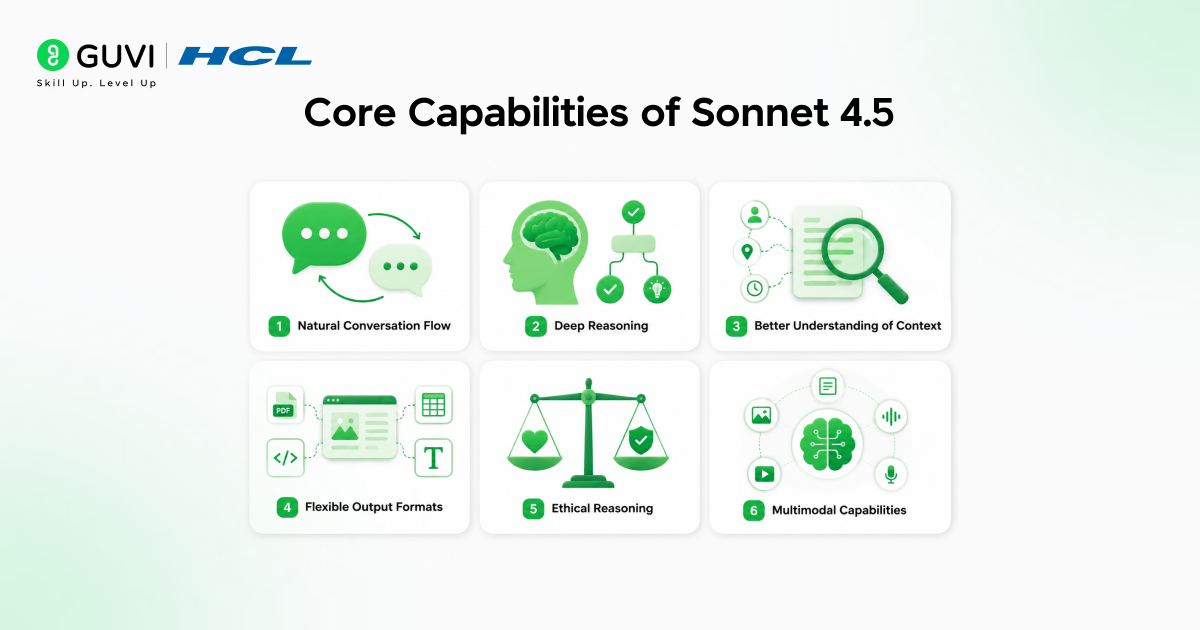
Understanding what Sonnet 4.5 does well helps you use it more effectively.
1. Natural Conversation Flow
Sonnet 4.5 maintains context throughout long conversations. You can reference earlier points, build on previous answers, and have genuine back-and-forth dialogue without repeating yourself.
2. Deep Reasoning
The model thinks through problems step by step. It considers multiple angles, evaluates trade-offs, and provides thoughtful analysis rather than surface-level responses.
3. Better Understanding of Context
Sonnet 4.5 understands meaning more deeply. It can pick up tone and context, handle unclear situations, and ask questions when something isn’t clear. This helps it give more accurate and relevant answers.
4. Flexible Output Formats
Whether you need bullet points, paragraphs, tables, code, or structured documents, Sonnet 4.5 adapts its output format to match your needs.
5. Ethical Reasoning
The model considers different perspectives, acknowledges complexity in difficult topics, and provides balanced viewpoints on controversial subjects.
6. Multimodal Capabilities
Sonnet 4.5 works with both text and images. You can upload documents, screenshots, diagrams, or photos and have meaningful conversations about visual content.
Read More: Turning Claude into Your Thinking Partner
Step-by-Step: Getting the Best Results from Sonnet 4.5

Step 1: Start with Clear Objectives
Define exactly what you want to accomplish before you start typing. Are you looking for information, creating content, solving a problem, or exploring ideas? Clear goals lead to better prompts and more useful responses.
Step 2: Provide Relevant Context
Give Sonnet 4.5 the background information it needs. Who is the audience? What is the purpose? What constraints exist? Are there specific requirements? Context transforms generic responses into tailored solutions.
Step 3: Be Specific in Your Requests
Instead of “Help me write an email,” try “Help me write a professional email to a client explaining a two-week project delay, maintaining a positive tone while being transparent about the challenges we faced.” Specificity drives quality.
Step 4: Use Follow-Up Questions
Your first response is often just the starting point. Ask follow-up questions to refine, expand, or redirect the conversation. “Can you make this more concise?” “What are the counterarguments?” “Can you explain this part in simpler terms?”
Step 5: Iterate and Refine
Do not settle for the first answer if it is not quite right. Ask for revisions, different approaches, or alternative perspectives. The conversation is collaborative. Guide it toward exactly what you need.
Step 6: Verify Important Information
For critical decisions or factual claims, verify information from authoritative sources. Sonnet 4.5 is highly capable, but confirmation is wise for high-stakes situations.
Step 7: Save Useful Patterns
When you find a way of asking that produces great results, remember it. Effective prompts and conversation patterns work consistently. Build your own library of approaches that deliver value.
Real-World Examples of Sonnet 4.5 in Action
1. The Marketing Manager Creating Campaign Strategies
A marketing manager uses Sonnet 4.5 to develop complete campaign strategies. By providing target audience details, product information, and business goals, they receive comprehensive plans including messaging frameworks, channel recommendations, and content calendars. Campaign development time drops from days to hours.
2. The Student Writing Research Papers
A college student researching climate policy uses Sonnet 4.5 to summarize academic papers, identify key arguments, compare different perspectives, and structure their thesis. The AI helps organize complex information and ensures arguments flow logically. Research efficiency improves dramatically.
3. The Developer Debugging Code
A software developer shares error messages and code snippets with Sonnet 4.5. The AI identifies the problem, explains why it is happening, and suggests multiple solutions with clear explanations. Debugging time decreases while understanding increases.
4. The Teacher Creating Lesson Plans
An elementary school teacher uses Sonnet 4.5 to create engaging lesson plans tailored to different learning styles. The AI suggests activities, discussion questions, and assessment methods. Lesson quality improves while preparation time decreases.
5. The Entrepreneur Analyzing Business Options
A small business owner evaluates whether to expand into a new market. Sonnet 4.5 helps analyze pros and cons, identify risks, suggest research questions, and structure a decision-making framework. Strategic thinking becomes more thorough and organized.
Pros and Cons of Using Sonnet 4.5

Pros
- Fast responses without sacrificing quality for most everyday tasks
- Strong reasoning ability that handles complex questions effectively
- Natural conversation flow that feels genuinely helpful
- Versatile across different domains and use cases
- Accessible through simple web interface requiring no technical setup
- Continuously improving as the model learns from interactions
Cons
- Knowledge has a cutoff date, so very recent events may not be covered
- Cannot access external websites or real-time information directly
- May occasionally provide confident-sounding but incorrect information
- Works best when you provide clear context and specific guidance
- Complex technical tasks might benefit from specialized tools
- Requires internet connection and Claude.ai account access
The effectiveness of AI assistance depends more on how you use it than on the model itself. Users who provide clear context and iterate on responses can achieve results up to 3× more useful than those who rely on single, vague prompts.
Top Strategies to Get the Most Out of Sonnet 4.5
1. Think Conversation, Not Commands
Treat interactions as dialogue rather than one-off queries. Build on previous responses, ask follow-up questions, and refine answers collaboratively. The best results come from genuine conversation.
2. Front-Load Important Context
Put the most important information at the beginning of your message. Explain the background, goal, and constraints upfront. This helps Sonnet 4.5 understand exactly what you need from the start.
3. Use Examples to Clarify Expectations
Show Sonnet 4.5 what good looks like. Provide examples of the style, format, tone, or content you want. Concrete examples are clearer than abstract descriptions.
4. Break Complex Tasks into Steps
Instead of asking for everything at once, break large projects into manageable pieces. Complete one step, review it, then move to the next. This produces better results than trying to do everything simultaneously.
5. Specify Format and Structure
Tell Sonnet 4.5 how you want information presented. Bullet points, numbered lists, paragraphs, tables, or code blocks. Clear format requests make responses immediately useful.
6. Ask for Multiple Options
Request two or three different approaches, versions, or perspectives. This gives you choices and often sparks ideas you had not considered.
7. Request Explanations of Reasoning
Ask Sonnet 4.5 to explain how it arrived at conclusions. Understanding the reasoning helps you evaluate whether the approach fits your specific situation.
8. Use Constraints to Focus Responses
Specify word counts, time frames, target audiences, or other constraints. Limitations actually improve output by preventing responses from being too broad or generic.
Common Mistakes to Avoid
- Treating Claude Like a Search Engine
Search engines find existing content. Claude creates new content tailored to your needs. Ask for analysis, synthesis, and creation rather than just information retrieval.
- Accepting First Answers Without Refinement
The first response is rarely the final answer. Engage in dialogue. Ask for improvements. Refine until the output matches your needs exactly.
- Providing Insufficient Context
Vague questions produce vague answers. The more relevant context you provide, the more useful the response becomes.
- Ignoring the Conversation History
Sonnet 4.5 remembers your conversation. Reference earlier points, build on previous answers, and create continuity rather than treating each message as isolated.
- Not Verifying Critical Information
While Sonnet 4.5 is accurate most of the time, important decisions deserve verification from authoritative sources. Use AI to inform decisions, not replace due diligence.
- Giving Up Too Quickly
If the first attempt does not work, try rephrasing, adding context, or breaking the task into smaller pieces. Persistence and iteration lead to better results.
Advanced Tips for Power Users
- Create Custom Instructions
Use the custom instructions feature to set persistent preferences about tone, format, and approach. This reduces repetitive explanations across conversations.
- Upload Documents for Analysis
Share PDFs, images, or text files directly in the conversation. Sonnet 4.5 can analyze, summarize, extract information, or answer questions about uploaded content.
- Use Artifacts for Interactive Tools
Request calculators, charts, forms, or interactive visualizations. Artifacts create functional tools you can use immediately without any coding.
- Leverage Multi-Step Workflows
For complex projects, create workflows where each step builds on the previous one. Document the process so you can replicate successful approaches.
- Experiment with Different Prompting Styles
Try various ways of asking the same question. Direct requests, role-playing scenarios, step-by-step instructions, or conversational approaches. Different styles work better for different tasks.
- Combine Capabilities Creatively
Mix text analysis with code generation, research with writing, planning with creative ideation. The most powerful uses often combine multiple capabilities.
If you want to learn more about getting the most out of Sonnet 4.5 in Claude.ai , do not miss the chance to enroll in HCL GUVI’s Intel & IITM Pravartak Certified Artificial Intelligence & Machine Learning course. Endorsed with Intel certification, this course adds a globally recognized credential to your resume, a powerful edge that sets you apart in the competitive AI job market.
Conclusion
Claude Sonnet 4.5 represents a significant tool for anyone looking to work more efficiently, learn more effectively, or create more productively. The potential to get better answers, create higher quality work, and accomplish tasks faster is real and accessible right now.
The best approach is to start simple, experiment with different uses, and gradually develop your own effective patterns. The people who benefit most from Sonnet 4.5 are not necessarily the most technical. They are the ones who learn to communicate clearly, provide good context, and iterate toward better results.
Start with one task today. Try having a real conversation rather than asking a single question. See how the quality of responses improves when you provide context and engage in dialogue. Then apply what you learn to more complex challenges.
FAQs
1. Is Claude Sonnet 4.5 free to use?
Claude offers both free and paid tiers. The free version provides access to Sonnet 4.5 with usage limits. Paid plans (Claude Pro) offer higher limits and priority access during peak times.
2. What makes Sonnet 4.5 different from other AI models?
Sonnet 4.5 balances strong reasoning capabilities with fast response times. It excels at maintaining context in long conversations, understanding nuance, and providing thoughtful, well-structured responses across diverse topics.
3. Can I use Sonnet 4.5 for professional work?
Yes. Many professionals use Sonnet 4.5 for research, writing, analysis, coding, and problem-solving. Always verify critical information and maintain appropriate oversight for important decisions.
4. Does Sonnet 4.5 have access to the internet?
Sonnet 4.5 can search the web when enabled in your settings. This allows it to access current information beyond its training data cutoff. You can control when web search is used.
5. Is my data private when using Claude?
Anthropic has privacy policies governing data use. Review their terms of service for specific details. Avoid sharing sensitive personal or confidential business information unless you understand how it will be handled.
Success Stories

About the Author
Vishalini Devarajan
An Aerospace Engineer turned content writer, I focus on making complex concepts easy to understand through well-structured, reader-friendly blogs. Whether it’s a technical topic or a non-technical one, I love creating content that is clear, engaging, and impactful.
View all posts by Vishalini Devarajan
Connect with me @











Did you enjoy this article?