


Artificial Intelligence and Machine Learning Articles
AI/ML Skills Gap 2026: Why Companies Can't Find Job-Ready Talent
20 AI/ML Interview Questions Recruiters Can Use Without a Tech Background - Best Guide
How Industry-Backed AI/ML Bootcamps Are Changing the AI/ML Hiring Pipeline - Best Guide 2026
From IT Support to AI Engineer: A Realistic Career Switch Guide 2026


Get In Touch For Details! Request More Information
How to Use Ollama to Run LLMs Locally on Your Laptop in 5 Easy Steps
Jul 09, 2026 4 Min Read 296 Views
(Last Updated)
Table of contents
- TL;DR Summary
- What Is Ollama and Why Run LLMs Locally?
- How Does Ollama Work?
- How to Use Ollama: Installation Guide
- Step 1: Download Ollama
- Step 2: Download Your First AI Model
- Step 3: Run Your Local AI Assistant
- How to Use Ollama for Building AI Application
- Local LLMs vs Cloud AI Models
- Real-World Applications of Ollama
- Private Business Assistants
- Developer Coding Assistants
- Common Mistakes When Using Ollama
- Running Models Too Large for Your Hardware
- Ignoring Laptop Specifications
- Expecting Local Models to Match Every Cloud Model
- Not Updating Models
- Career Benefits of Learning Local AI Development
- Conclusion
- FAQs
- What is Ollama used for?
- Can I run AI models without the internet using Ollama?
- Is Ollama free to use?
- Which models can run on Ollama?
- Can beginners use Ollama?
- Does Ollama need a powerful laptop?
- Is local AI better than ChatGPT?
TL;DR Summary
How to Use Ollama to Run LLMs Locally on Your Laptop is a beginner-friendly way to start experimenting with AI without depending on cloud-based APIs. Ollama lets you download and run open-source large language models directly on your device. You can install models like Llama, Mistral, and Gemma, chat with them locally, and connect them with AI applications. This guide explains Ollama setup, model installation, practical use cases, benefits, limitations, and how local LLM development can help you build real-world AI projects.
How to Use Ollama to Run LLMs Locally on Your Laptop has become an important skill for developers exploring AI application development. As AI tools become more accessible, many developers want to experiment with language models without sending data to external servers.
Ollama makes this possible by allowing you to download and run large language models directly on your computer. You can test AI assistants, build prototypes, and learn how modern AI systems work.
If you’re wondering how to use Ollama, this guide will walk you through everything from installation to running your first local AI model and building AI applications.
What Is Ollama and Why Run LLMs Locally?
Ollama is an open-source platform that helps developers run large language models locally on their machines. Instead of calling an external AI API, you can download an AI model and interact with it directly from your laptop.
Before learning how to use Ollama, it’s important to understand why developers are increasingly choosing local LLMs over cloud-based AI services.
A local LLM means the AI model runs on your own hardware. This gives you more control over privacy, customization, and experimentation.
Running LLMs locally helps developers:
- Test AI applications without API costs
- Keep sensitive data on their devices
- Experiment with different AI models
- Understand how generative AI systems work
Local AI development has grown because businesses are looking for private AI solutions. Companies working with confidential documents, customer information, or internal data often prefer systems that can operate within controlled environments.
Read: Setup and Fine-Tune Qwen 3 with Ollama: Complete Guide (2026)
How Does Ollama Work?
Understanding how Ollama works is the first step in learning how to use Ollama effectively for local AI development.
Normally, using an LLM requires:
- Choosing a model provider
- Setting up API access
- Managing authentication
- Sending requests to external servers
Ollama handles these steps locally.
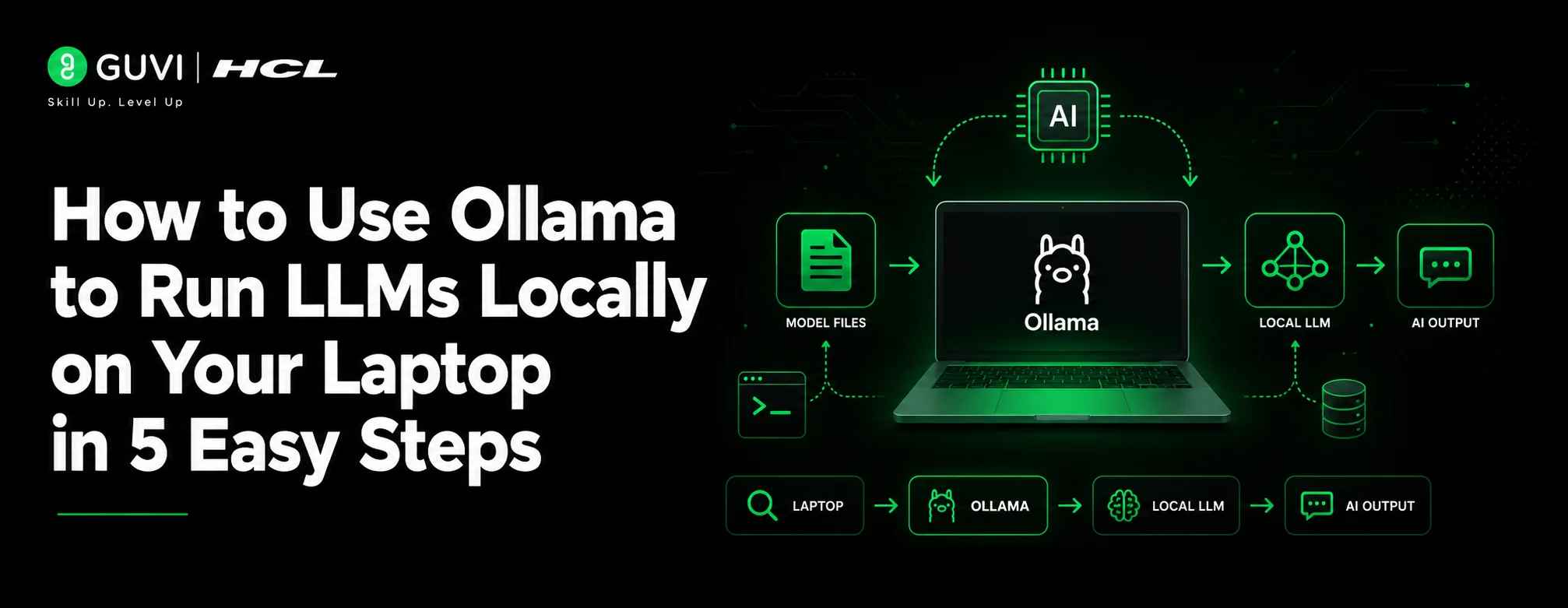
The basic workflow looks like this:
- Install Ollama on your laptop
- Download an AI model
- Run the model using a command
- Interact with the AI through your terminal or application
Popular models available through Ollama include:
- Llama models
- Mistral models
- Gemma models
- Code-focused AI models
Also read: 7 Exciting Project Ideas Using Large Language Models (LLMs)
How to Use Ollama: Installation Guide
Step 1: Download Ollama
The first step in learning how to use Ollama is downloading and installing it on your operating system.
Ollama supports:
- Windows
- macOS
- Linux
After installation, verify that Ollama works by opening your terminal.
Run:
ollama –version
If you see the installed version, your setup is ready.
Step 2: Download Your First AI Model
Once the installation is complete, the next step in how to use Ollama is downloading your preferred AI model.
For example:
ollama pull llama3
This downloads the selected model to your computer.
The model files are stored locally, allowing you to use them without repeated downloads.
Step 3: Run Your Local AI Assistant
Now that your model is installed, you can use Ollama to start interacting with a local LLM.
ollama run llama3
You can now ask questions directly.
Example:
Explain machine learning in simple terms
The response is generated by the model running on your laptop.
How to Use Ollama for Building AI Application
After learning how to use Ollama for running local models, you can integrate it into AI applications using Python and other development frameworks.
You can use Ollama with:
- Python applications
- Web applications
- AI agents
- Retrieval Augmented Generation (RAG) systems
- Developer tools
A simple Python connection can look like:
import ollama
response = ollama.chat(
model=”llama3″,
messages=[
{
“role”: “user”,
“content”: “Explain AI agents”
}
]
)
print(response)
This allows developers to create custom AI-powered applications.
Local LLMs vs Cloud AI Models
Understanding these differences helps you decide when to use Ollama for local AI development and when cloud-based models are a better choice.

| Feature | Local LLMs with Ollama | Cloud AI Models |
| Data privacy | Higher control | Depends on the provider |
| Internet requirement | Usually not required after setup | Required |
| Cost | No API usage cost | Pay per usage |
| Performance | Depends on hardware | Depends on provider |
| Customization | More control | Limited |
| Setup difficulty | Requires installation | Easier to start |
Both approaches have advantages. Local models are great for learning, privacy-focused projects, and experimentation. Cloud models are often better for large-scale production systems.
Real-World Applications of Ollama
Learning how to use Ollama opens the door to building practical AI solutions for software development, business automation, and private AI assistants.
Private Business Assistants
A company can use Ollama to create an internal AI assistant that answers questions from company documents.
Instead of uploading sensitive files to external services, employees can use a local AI system.
Developer Coding Assistants
Software teams can run coding-focused models locally to:
- Explain code
- Generate snippets
- Debug errors
- Understand large projects
This helps developers experiment with AI tools while keeping code private.
Enroll in HCL GUVI’s AI & ML Email Course and explore how real AI models learn, think, and evolve.
Common Mistakes When Using Ollama
1. Running Models Too Large for Your Hardware
Large models require more RAM and processing power.
Start with smaller models before moving to advanced versions.
2. Ignoring Laptop Specifications
AI models depend heavily on:
- RAM
- GPU capability
- Storage space
Check your hardware before downloading large models.
3. Expecting Local Models to Match Every Cloud Model
Local models can be powerful, but they may not always match the performance of premium cloud systems.
Choose models based on your project needs.
4. Not Updating Models
AI models improve regularly.
Keep your local models updated for better performance and security.
Career Benefits of Learning Local AI Development
Knowing how to use Ollama is becoming a valuable skill for developers entering AI engineering and generative AI roles.
You gain experience with:
- Large language models
- AI application development
- Prompt engineering
- Local deployment
- AI workflows
These skills are useful for roles like:
- AI Engineer
- Generative AI Developer
- Machine Learning Engineer
- AI Application Developer
Want to build practical AI projects and understand modern AI development? Explore HCL GUVI’s Artificial Intelligence and Machine Learning Course to learn AI concepts, tools, and real-world implementation with industry-focused projects and certification.
Check out Join HCL GUVI’s IITM Pravartak Certified Artificial Intelligence & Machine Learning Course, designed by industry experts and backed by NSDC, to build your career in the world of intelligent systems from foundational ML concepts to hands-on LLM projects.
Conclusion
Learning how to use Ollama to run LLMs locally on your laptop is one of the best ways to gain hands-on experience with modern AI development. Whether you’re experimenting with open-source models or building AI-powered applications, understanding how to use Ollama gives you greater control, privacy, and flexibility.
As AI engineering continues to grow, developers who understand both cloud and local AI systems will have stronger opportunities. Start with a small model, build simple projects, and gradually explore advanced AI applications.
FAQs
What is Ollama used for?
Ollama is used to run large language models locally on computers. It helps developers download, manage, and interact with AI models without relying only on cloud APIs.
Can I run AI models without the internet using Ollama?
Yes. After downloading a model, you can run it locally without an active internet connection.
Is Ollama free to use?
Ollama is free to install and use. However, hardware requirements depend on the AI model you choose.
Which models can run on Ollama?
Ollama supports various open-source models, including Llama, Mistral, and Gemma-based models.
Can beginners use Ollama?
Yes. Beginners can install Ollama and start running AI models with simple commands.
Does Ollama need a powerful laptop?
Some models require powerful hardware, but smaller models can run on many modern laptops.
Is local AI better than ChatGPT?
Local AI and cloud AI serve different purposes. Local AI provides more control and privacy, while cloud AI often provides higher performance.
Success Stories

About the Author
Salini Balasubramaniam
A curious, information-savvy writer loves to turn deep insights into authentic and engaging content that connects. With experience in writing for brands and driving audience engagement, I believe that words can make a powerful difference.
View all posts by Salini Balasubramaniam
Connect with me @







Did you enjoy this article?