


Artificial Intelligence and Machine Learning Articles
AI/ML Skills Gap 2026: Why Companies Can't Find Job-Ready Talent
20 AI/ML Interview Questions Recruiters Can Use Without a Tech Background - Best Guide
How Industry-Backed AI/ML Bootcamps Are Changing the AI/ML Hiring Pipeline - Best Guide 2026
From IT Support to AI Engineer: A Realistic Career Switch Guide 2026


Get In Touch For Details! Request More Information
How to Use Claude Without Sharing Sensitive Data
Aug 17, 2026 3 Min Read 445 Views
(Last Updated)
Using Claude securely means avoiding the sharing of sensitive information such as passwords, API keys, financial details, personal data, or confidential business information. By following good security practices—like anonymizing data, using placeholders, and reviewing prompts before submission—you can benefit from Claude’s AI capabilities while reducing privacy and security risks.
Table of contents
- TL;DR
- What Does It Mean to Use Claude Securely?
- Why Is It Important to Protect Sensitive Data?
- What Information Should You Never Share with Claude?
- How Can You Use Claude Securely?
- Common Mistakes to Avoid
- Best Practices for Secure AI Usage
- Key Takeaways
- Conclusion
- FAQs
- How can I use Claude securely?
- Is it safe to share API keys with Claude?
- Can I upload confidential documents to Claude?
- What types of information should never be shared with AI tools?
- What should I do if I accidentally shared sensitive information?
TL;DR
- Never share passwords, API keys, or confidential information with AI tools.
- Replace sensitive details with placeholders before submitting prompts.
- Review prompts carefully to remove personal or business data.
- Follow your organization’s security and compliance policies when using AI.
- AI tools are most effective when paired with responsible data handling practices.
Want to build AI and machine learning solutions for healthcare, automation, and enterprise applications? Explore HCL GUVI’s Artificial Intelligence & Machine Learning Course, where you’ll master machine learning, deep learning, NLP, MLOps, and responsible AI through hands-on projects that prepare you to solve real-world business challenges.
What Does It Mean to Use Claude Securely?
Using Claude securely means interacting with the AI while protecting sensitive, personal, or confidential information. Although AI assistants can help with coding, writing, research, and problem-solving, they should not be treated as secure storage for private data.
Instead, share only the information necessary to complete your task. If sensitive details are involved, replace them with generic examples or placeholders before submitting your prompt.
Some examples of sensitive information include:
- Passwords
- API keys
- Database credentials
- Financial information
- Personally identifiable information (PII)
- Confidential business documents
Many accidental data leaks happen because users copy and paste entire documents or code files without removing confidential information first.
Read More: Building Skills for Claude Code: Automating your procedural knowledge
Why Is It Important to Protect Sensitive Data?
AI tools are designed to process the information you provide, which makes it important to think carefully before sharing any data. Once confidential information is exposed, it may violate company policies or create unnecessary security risks.
Protecting sensitive data helps you:
- Maintain privacy. Personal and business information stays protected.
- Support compliance. Many organizations must follow regulations related to data protection.
- Reduce security risks. Sensitive credentials and confidential files remain secure.
- Build responsible AI habits. Safe practices help prevent accidental information exposure.
Data Point: Many organizational security incidents are caused by human error, making careful handling of sensitive information just as important as technical security controls.
Want to build AI and machine learning solutions for healthcare, automation, and enterprise applications? Explore HCL GUVI’s Artificial Intelligence & Machine Learning Course, where you’ll master machine learning, deep learning, NLP, MLOps, and responsible AI through hands-on projects that prepare you to solve real-world business challenges.
What Information Should You Never Share with Claude?
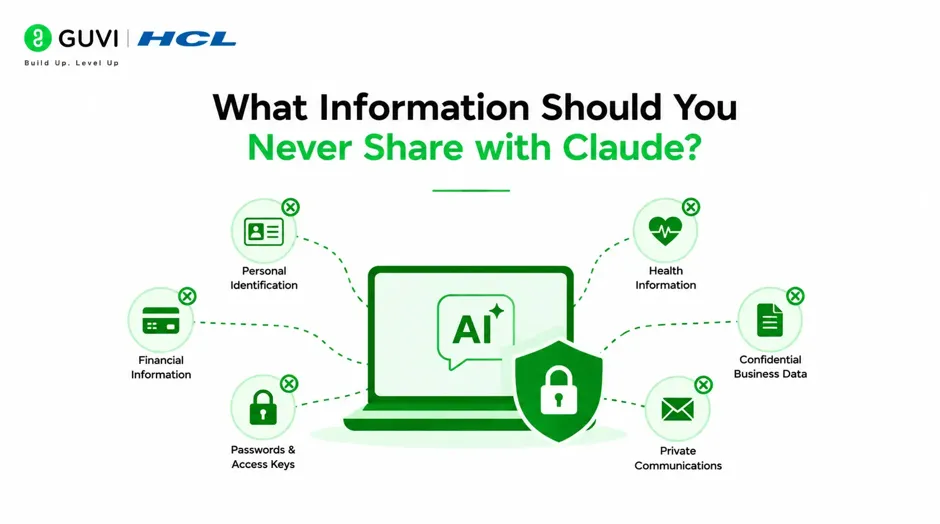
Certain types of information should never be included in your prompts, regardless of the task.
Avoid sharing:
- Passwords or passphrases.
- API keys and access tokens.
- Credit card or banking information.
- Government-issued identification numbers.
- Medical records.
- Confidential customer information.
- Internal company documents.
- Private encryption keys.
If your task requires this type of information, replace it with fictional values before submitting your prompt.
Warning: Even during testing, avoid using real production credentials or customer data. Use sample or anonymized information instead.
How Can You Use Claude Securely?
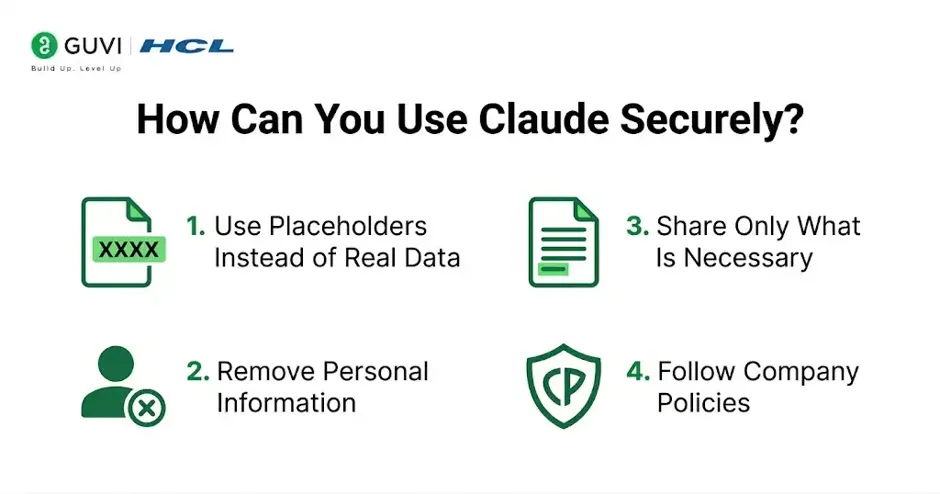
Following a few simple habits can significantly reduce privacy and security risks.
- Use Placeholders Instead of Real Data
Replace sensitive information with descriptive placeholders.
For example:
API_KEY=YOUR_API_KEY
DATABASE_PASSWORD=YOUR_PASSWORD
This allows Claude to understand the context without exposing real credentials.
- Remove Personal Information
Before submitting prompts, review them for names, phone numbers, email addresses, and other identifying details.

Anonymizing information protects both individuals and organizations.
- Share Only What Is Necessary
Provide only the information required to solve your problem.
For example, instead of sharing an entire application, copy only the specific code section causing the issue.
- Follow Company Policies
Many organizations have guidelines for using AI tools.
Always follow internal security policies regarding confidential information, intellectual property, and customer data.
Pro Tip: Create sanitized versions of documents and code samples specifically for AI assistance to reduce the risk of accidental data exposure.
Common Mistakes to Avoid
Even experienced users can accidentally expose sensitive information when using AI tools.
Some common mistakes include:
- Copying entire configuration files.
- Sharing production database credentials.
- Uploading confidential documents without review.
- Including customer information in prompts.
- Forgetting to remove API keys from code snippets.
A quick review before submitting a prompt can prevent many of these issues.
Best Practices for Secure AI Usage
Using AI responsibly involves combining productivity with good security habits.
Some recommended practices include:
- Review prompts before sending them.
- Use sample data whenever possible.
- Store credentials in secure password managers instead of prompts.
- Rotate exposed credentials immediately if they are accidentally shared.
- Stay informed about your organization’s AI usage policies.
Best Practice: Treat AI conversations like professional communications—share only what is necessary and avoid including confidential information unless explicitly approved by your organization.
Key Takeaways
- Never share passwords, API keys, or confidential business information with AI tools.
- Replace sensitive data with placeholders before submitting prompts.
- Review prompts carefully to remove personal or customer information.
- Follow organizational security and compliance requirements.
- Use anonymized examples when asking technical questions.
- Responsible AI usage protects both privacy and productivity.
Conclusion
Claude can be a valuable assistant for coding, writing, research, and problem-solving, but using it securely is essential. By avoiding sensitive information, anonymizing data, and following established security practices, you can take advantage of AI while protecting your personal and organizational information.
The safest approach is simple: only share what is necessary, replace confidential details with placeholders, and review every prompt before submitting it. These habits help you use Claude effectively without compromising privacy or security.
FAQs
How can I use Claude securely?
You can use Claude securely by avoiding the sharing of passwords, API keys, personal information, and confidential business data. Replace sensitive details with placeholders whenever possible.
Is it safe to share API keys with Claude?
No, you should never share real API keys or access tokens with Claude. Use fictional or placeholder values instead.
Can I upload confidential documents to Claude?
You should avoid uploading confidential or sensitive documents unless your organization’s policies explicitly allow it. Remove or anonymize sensitive information before sharing.
What types of information should never be shared with AI tools?
Avoid sharing passwords, financial details, personal identification information, customer records, and confidential company data. These should always remain protected.
What should I do if I accidentally shared sensitive information?
If you accidentally share sensitive credentials, revoke or rotate them immediately and follow your organization’s incident response procedures if applicable.
Success Stories

About the Author
Vishalini Devarajan
An Aerospace Engineer turned content writer, I focus on making complex concepts easy to understand through well-structured, reader-friendly blogs. Whether it’s a technical topic or a non-technical one, I love creating content that is clear, engaging, and impactful.
View all posts by Vishalini Devarajan
Connect with me @













Did you enjoy this article?