


Artificial Intelligence and Machine Learning Articles
Claude vs AI Writing Tools: Jasper, Copy.ai, and Writesonic Compared
Does Claude Have Opinions? How It Handles Controversial Topics


Get In Touch For Details! Request More Information
Claude Webhooks: Triggering Responses from External Events
Aug 17, 2026 4 Min Read 52 Views
(Last Updated)
Most Claude integrations are user-initiated: someone types a prompt and Claude responds. Webhook integrations flip this pattern by making Claude respond to system events automatically, turning Claude from a conversational tool into an active component of your application’s event-driven architecture.
Table of contents
- Quick TL;DR
- How Claude Webhooks Work
- What You Need Before Starting
- Building the Core Webhook Handler
- Use Case : Classifying Support Tickets
- Securing Your Webhook Endpoints
- Handling Async Processing
- Conclusion
- FAQs
- What are Claude webhooks?
- How do I test a webhook locally without a server?
- How do I prevent the same webhook event being processed twice?
- How do I verify that a webhook is genuinely from the expected service?
- Can I use Claude webhooks with Zapier instead of building a custom endpoint?
Quick TL;DR
Claude webhooks refer to integrating Claude into webhook-driven workflows where external events automatically trigger Claude to process, analyze, or respond to incoming data without manual intervention. When a customer submits a form, a GitHub issue is created, or a Slack message arrives, a webhook fires and Claude receives that event, processes the content, and routes a response back to the originating system.
How Claude Webhooks Work
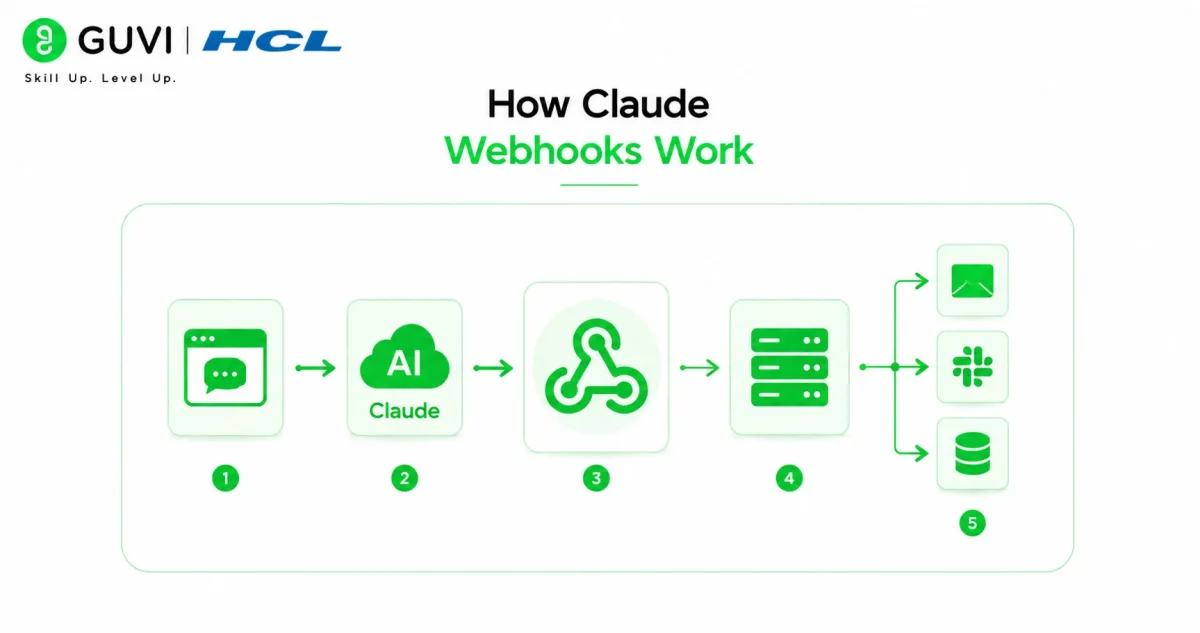
A webhook is an HTTP POST request that an external service sends to your server when a specific event occurs. Adding Claude to this flow creates a three-stage pipeline:
External event occurs
→ Webhook fires to your endpoint
→ Your server extracts relevant data
→ Claude processes the data with your prompt
→ Response routes to destination (Slack, database, email, API)
This pattern runs without any human in the loop, making it suitable for high-volume time-sensitive workflows like support ticket classification, content moderation, and automated notifications.
Read More: Build a Blog Research and Writer n8n Workflow: Complete Guide
What You Need Before Starting
- Python 3.8 or above
- Flask for the webhook server
- An Anthropic API key from console.anthropic.com
- A publicly accessible server URL (use ngrok for local development)
Install dependencies:
pip install flask anthropic requests
For local testing, install ngrok and run ngrok http 5000 to create a public URL that forwards to your local Flask server.
Want to build the backend Python and API integration skills that modern software development roles demand? Explore HCL GUVI’s Full Stack Course, designed to help you develop the programming foundations that power real event-driven applications.
Building the Core Webhook Handler
All Claude webhook integrations share the same foundational pattern. Build this once and extend it for every use case:
from flask import Flask, request, jsonify

import anthropic

import os

app = Flask(__name__)

client = anthropic.Anthropic(api_key=os.environ.get("ANTHROPIC_API_KEY"))

def call_claude(prompt, system_prompt=None):

    kwargs = {

        "model": "claude-sonnet-4-6",

        "max_tokens": 1024,

        "messages": [{"role": "user", "content": prompt}]

    }

    if system_prompt:

        kwargs["system"] = system_prompt

    response = client.messages.create(**kwargs)

    return response.content[0].text

@app.route("/webhook", methods=["POST"])

def webhook_handler():

    data = request.json

    if not data:

        return jsonify({"error": "No data received"}), 400

    return jsonify({"status": "received"}), 200

if __name__ == "__main__":

    app.run(debug=True, port=5000)
This base handler receives any webhook payload and returns a 200 response. Extend it with event-specific routes in the sections below.

Use Case : Classifying Support Tickets
When a customer submits a support form, classify the ticket and route it to the right team automatically:
@app.route("/webhook/support", methods=["POST"])

def support_ticket_webhook():

    data = request.json

    customer_name = data.get("name", "Customer")

    message = data.get("message", "")

    system_prompt = """You are a support ticket classifier.

Analyze the message and return JSON only:

{

    "category": "billing|technical|general|urgent",

    "priority": "low|medium|high|critical",

    "summary": "one sentence summary",

    "suggested_response": "brief empathetic acknowledgment"

}"""

    import json

    result = call_claude(f"Customer: {customer_name}\nMessage: {message}", system_prompt)

    classification = json.loads(result)

    return jsonify({"status": "classified", "ticket": classification}), 200
This endpoint classifies incoming tickets in under two seconds and returns structured data your CRM can act on immediately without human triage.
Webhooks were first described by Jeff Lindsay in 2007 as a real-time alternative to polling. Today they power the event-driven architecture of virtually every major SaaS platform including Stripe, GitHub, Shopify, and Slack, processing billions of events daily across millions of integrations worldwide.
Securing Your Webhook Endpoints
Production webhook endpoints require signature verification to prevent fake events from reaching Claude. Most providers including GitHub, Stripe, and Slack send a signature header with every request.
Verify signatures using HMAC before processing any payload:
import hmac

import hashlib

def verify_signature(payload, signature, secret):

    expected = hmac.new(

        secret.encode(), payload, hashlib.sha256

    ).hexdigest()

    return hmac.compare_digest(expected, signature)

@app.route("/webhook/secure", methods=["POST"])

def secure_webhook():

    signature = request.headers.get("X-Webhook-Signature", "")

    secret = os.environ.get("WEBHOOK_SECRET", "")

    if not verify_signature(request.data, signature, secret):

        return jsonify({"error": "Invalid signature"}), 401

    data = request.json

    return jsonify({"status": "verified"}), 200
Never process a webhook payload or call Claude without verifying the signature first in production environments.
Handling Async Processing
Webhooks expect a response within a few seconds. Claude calls typically complete in two to five seconds but can take longer for complex prompts. For reliability, return an immediate 200 response and process Claude’s output asynchronously using Python’s threading module. For production systems with high webhook volume, replace threading with a proper task queue like Celery with Redis to handle concurrent events reliably without losing any webhook deliveries.
Also implement idempotency by storing each event ID before processing and checking for duplicates at the start of every request. Most webhook providers retry failed deliveries multiple times, which causes the same event to trigger Claude repeatedly if your endpoint does not track which events have already been handled.
The most common production failure in webhook integrations is timeout errors from synchronous processing that takes too long before returning a response. Most providers retry failed deliveries multiple times, which can trigger Claude repeatedly for the same event without idempotency checks using the event ID in each payload.
Conclusion
Claude webhooks transform Claude from a conversational tool into an active participant in your application’s event-driven architecture, processing external events automatically at the moment they occur.
Start by building the core handler and testing it with ngrok against a single external service. Once the event flow works end to end, add Claude processing, then signature verification, then async handling as your event volume grows.
FAQs
What are Claude webhooks?
Integrations where external system events automatically trigger Claude to process incoming data and route responses without manual user intervention.
How do I test a webhook locally without a server?
Use ngrok to create a public URL forwarding to your local Flask server. Run ngrok http 5000 and use the generated URL as your webhook endpoint in the external service’s settings.
How do I prevent the same webhook event being processed twice?
Store each event ID in a database or cache before processing and return 200 immediately if the ID has already been handled. Most webhook providers retry failed deliveries multiple times.
How do I verify that a webhook is genuinely from the expected service?
Implement HMAC signature verification using the secret key provided by the webhook sender. Compare the signature header against your own calculation of the payload hash before processing.
Can I use Claude webhooks with Zapier instead of building a custom endpoint?
Yes. Zapier’s webhook trigger can receive events and pass data to Claude as an action step without building a custom server. Use a custom endpoint when you need more control over processing logic or higher event volumes than Zapier handles efficiently.
Success Stories

About the Author
HCL GUVI
This article was selected and published as part of the HCL GUVI AI Blogathon 2026, an initiative designed to encourage students, AI enthusiasts, and aspiring tech writers to simplify complex AI concepts through impactful technical content. The contest recognized high-quality, original, and insightful AI-focused blogs, with selected authors receiving publication opportunities on the HCL GUVI blog platform along with official author credits and recognition.
View all posts by HCL GUVI
Connect with me @










Did you enjoy this article?