


Artificial Intelligence and Machine Learning Articles
AI/ML Skills Gap 2026: Why Companies Can't Find Job-Ready Talent
20 AI/ML Interview Questions Recruiters Can Use Without a Tech Background - Best Guide
How Industry-Backed AI/ML Bootcamps Are Changing the AI/ML Hiring Pipeline - Best Guide 2026
From IT Support to AI Engineer: A Realistic Career Switch Guide 2026


Get In Touch For Details! Request More Information

Claude for E-commerce: Product Descriptions at Scale
Jul 28, 2026 4 Min Read 244 Views
(Last Updated)
Table of contents
- TL;DR Summary Box
- Direct Answer Box
- What is Claude for e-commerce product descriptions at scale?
- Why does it matter for e-commerce teams?
- How does the workflow work?
- What prompt structure works best?
- Example output pattern
- Claude vs manual writing
- What are the risks and limits?
- How do you measure success?
- Original insight
- What to do next
- Conclusion
- Is Claude good for product descriptions?
- Can Claude write SEO product descriptions?
- How do I stop Claude from making things up?
- What is the best workflow for scale?
- Can Claude match the brand voice?
- Should I use Claude for every product page?
TL;DR Summary Box
- Claude can help e-commerce teams draft large volumes of product descriptions faster while keeping tone consistent.
- The best results come from structured prompts, brand rules, and a human review step.
- Use Claude for first drafts, variant generation, SEO enrichment, and localization support.
- The biggest risk is bland or inaccurate copy, so product facts must be locked before generation.
- This workflow works best when paired with templates, quality checks, and analytics.
Direct Answer Box
Claude for e-commerce product descriptions at scale means using Claude to generate large numbers of accurate, on-brand product listings quickly from structured inputs. It helps teams turn product attributes into readable copy, SEO-friendly descriptions, and variant text for marketplaces and stores. The practical win is speed, but the real advantage comes when you combine Claude with clear brand rules, verified product data, and human editing.
INTRODUCTION
If you manage a growing catalog, writing every product description by hand does not scale well. Claude can solve that problem, but only if you treat it like a production system, not a magic button.
In this guide, you will learn how to use Claude for e-commerce product descriptions at scale, where it works best, where it fails, and how to build a repeatable workflow that protects quality.
Scale product descriptions with Claude to save time and boost conversions. Master business analytics with HCL GUVI’s Complete Business Analytics Professional Program.
What is Claude for e-commerce product descriptions at scale?
Claude for e-commerce product descriptions at scale is a workflow where you feed structured product data into Claude and get back description copy in batches. That usually includes titles, short descriptions, long-form copy, bullets, feature summaries, and SEO variants.
The key idea is consistency. Instead of asking Claude to “write a product description,” you give it inputs like material, use case, dimensions, audience, tone, and compliance rules. That makes the output far more usable for catalogs, marketplaces, and DTC stores.
Why does it matter for e-commerce teams?
Product content is often one of the slowest parts of launching or updating a catalog. When a brand has hundreds or thousands of SKUs, manual copywriting becomes a bottleneck that delays merchandising, SEO, and campaign launches.
Claude helps you reduce that bottleneck by drafting content quickly and adapting tone across categories. It is especially useful when you need product copy for new collections, seasonal drops, multilingual pages, or marketplace listings that all need slightly different versions.
💡 Pro Tip: Use Claude for the first 80% of the work, then reserve human review for the final 20% where accuracy, brand voice, and compliance matter most.
How does the workflow work?
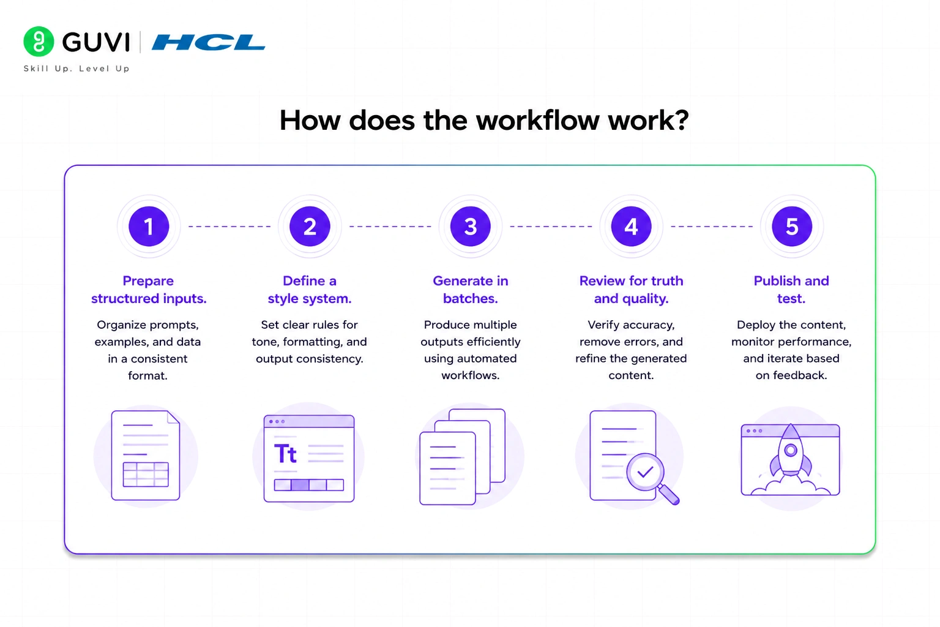
A scalable workflow has five parts: input cleanup, prompt design, batch generation, QA, and publishing. If you skip the first two, you usually get weak output.
- Prepare structured inputs.
Put product name, category, features, materials, target buyer, tone, and prohibited claims into a spreadsheet or PIM export. - Define a style system.
Tell Claude how your brand sounds, what length you want, what words to avoid, and how to write for different categories. - Generate in batches.
Run product groups by category so the copy stays relevant. Clothing, electronics, and home goods should not share the same prompt logic. - Review for truth and quality.
Check factual claims, size details, benefit language, and repetition. - Publish and test.
Track conversion rate, add-to-cart rate, scroll depth, and search impressions after launch.
📊 Data Point: In practice, the strongest teams do not use Claude to “write faster.” They use it to create a repeatable content pipeline that removes drafting time from the bottleneck.
What prompt structure works best?

The best prompts are specific, constrained, and format-driven. Claude responds better when you assign a role, list the inputs, define the output format, and set quality rules.
Use a prompt like this:
Prompt template
- Role: You are an e-commerce copywriter.
- Goal: Write a product description for one SKU.
- Inputs: product name, category, features, use case, audience, tone, SEO keyword, restrictions.
- Output: title, short description, 3 bullet benefits, long description, meta description.
- Rules: no unsupported claims, no hype, simple language, brand voice consistent, under 150 words for short copy.
✅ Best Practice: Keep product facts in a structured table and keep style instructions separate from product data. That makes batch generation easier and reduces errors.
Example output pattern
For one product, ask Claude to produce:
- A 1-line product title.
- A 2-sentence summary.
- Three benefit bullets.
- A 100–150-word-long description.
- An SEO meta description.
That structure is easy to reuse across a catalog and simple to QA.
AI can draft the first 80% of a product description in seconds, but unchecked models may still invent specs or certifications. Lock verified product fields (dimensions, materials, compliance tags) before generation and add a quick human QA pass to catch factual errors and preserve brand tone

Claude vs manual writing
Claude is not a replacement for product strategy, merchandising judgment, or compliance review. It is a production accelerator.
| Approach | Strengths | Weaknesses | Best use |
| Manual writing | Strong nuance, high brand control | Slow, expensive at scale | Hero products, flagship launches |
| Claude drafting | Fast, consistent, scalable | Needs review, may sound generic | Large catalogs, repeatable SKUs |
| Hybrid workflow | Balanced quality and speed | Requires process design | Most e-commerce teams |
The hybrid model usually wins. Claude creates the draft, a merchandiser validates the facts, and a copy editor refines tone and conversion messaging. That gives you speed without sacrificing trust.
What are the risks and limits?
The biggest risk is hallucination, which means Claude may produce a claim that sounds true but is not supported by your product data. In e-commerce, that can create customer trust issues, returns, or compliance problems.
Another limit is sameness. If your prompts are too broad, Claude may generate product pages that all sound alike. That hurts both conversion and brand distinction.
⚠️ Warning: Never let AI invent specifications, certifications, materials, or performance claims. Lock those fields before generation and treat them as the source of truth.
How do you measure success?
You should measure more than output volume. The real question is whether Claude improves business outcomes.
Track these metrics:
- Time to publish per SKU.
- Edit distance between draft and final copy.
- Conversion rate on AI-assisted pages.
- Search impressions and click-through rate.
- Return rate for categories with heavier content reliance.
- Team throughput per week.
Original insight
A useful internal benchmark is “draft acceptance rate.” If a human editor accepts 70% or more of the first draft without heavy rewriting, your prompt system is probably mature. If acceptance stays below 40%, the issue is usually not the model. It is your input structure.
Scale product descriptions with Claude to save time and boost conversions. Master business analytics with HCL GUVI’s Complete Business Analytics Professional Program.
What to do next
Start with one category, not the whole catalog. Build a small prompt library, create a product-data template, and test outputs on 20 to 50 SKUs before expanding.
Add a QA checklist for:
- Fact accuracy.
- Brand voice.
- SEO keyword usage.
- Compliance language.
- Readability.
A simple infographic showing the end-to-end workflow would help here, especially if you want to train merchandisers or content teams.
Conclusion
Claude can dramatically speed up e-commerce product description production, but scale only works when accuracy and brand control come first. The winning setup is a structured, human-reviewed workflow that turns Claude into a reliable drafting engine, not a source of truth.
1. Is Claude good for product descriptions?
Yes. Claude is good for first-draft product descriptions, especially when you need consistent copy across many SKUs. It works best with structured inputs and clear brand rules.
2. Can Claude write SEO product descriptions?
Yes, but SEO should be guided carefully. Give Claude the target keyword, related terms, and length limits so it can write naturally without stuffing keywords.
3. How do I stop Claude from making things up?
Use only verified product data, and tell Claude not to add unsupported claims. A human review step is essential for specs, certifications, and performance claims.
4. What is the best workflow for scale?
The best workflow is a hybrid one: structured product data, batch prompting, automated first-pass generation, and human quality control before publishing.
5. Can Claude match the brand voice?
Yes, if you provide examples, tone rules, and banned phrases. Brand voice improves a lot when you give Claude a style guide instead of vague instructions.
6. Should I use Claude for every product page?
No. Use it for scalable, repeatable pages. Keep your most important hero products on a more tailored, human-led workflow.
Success Stories

About the Author
HCL GUVI
This article was selected and published as part of the HCL GUVI AI Blogathon 2026, an initiative designed to encourage students, AI enthusiasts, and aspiring tech writers to simplify complex AI concepts through impactful technical content. The contest recognized high-quality, original, and insightful AI-focused blogs, with selected authors receiving publication opportunities on the HCL GUVI blog platform along with official author credits and recognition.
View all posts by HCL GUVI
Connect with me @












Did you enjoy this article?