


Artificial Intelligence and Machine Learning Articles
AI/ML Skills Gap 2026: Why Companies Can't Find Job-Ready Talent
20 AI/ML Interview Questions Recruiters Can Use Without a Tech Background - Best Guide
How Industry-Backed AI/ML Bootcamps Are Changing the AI/ML Hiring Pipeline - Best Guide 2026
From IT Support to AI Engineer: A Realistic Career Switch Guide 2026


Get In Touch For Details! Request More Information
Claude API with LangChain: Complete Integration Guide
Aug 17, 2026 3 Min Read 414 Views
(Last Updated)
The Claude API with LangChain used to build AI-powered applications such as chatbots, document assistants, retrieval-augmented generation (RAG) systems, and intelligent workflows. By combining Claude’s language capabilities with LangChain’s orchestration framework, developers can create applications that connect AI models with external data sources, tools, memory, and custom logic.
Table of contents
- TL;DR
- What Is Claude API with LangChain?
- Why Use LangChain with Claude?
- What Do You Need Before Getting Started?
- How to Set Up Claude API with LangChain
- Step 1: Install the Required Packages
- Step 2: Configure Your API Key
- Step 3: Initialize the Claude Model
- Step 4: Send Your First Prompt
- What Can You Build with Claude and LangChain?
- How Does LangChain Enhance Claude?
- Key Takeaways
- Conclusion
- FAQs
- What is Claude API with LangChain?
- Do I need Python to use Claude with LangChain?
- Can I build a chatbot using Claude and LangChain?
- How should I store my Claude API key?
- Is LangChain required to use the Claude API?
TL;DR
- LangChain helps developers build AI applications using large language models like Claude.
- The Claude API integrates with LangChain through official provider packages.
- Together, they enable chatbots, RAG applications, AI agents, and workflow automation.
- API keys and environment variables should be managed securely.
- Understanding prompts, chains, and memory is essential for successful integration.
What Is Claude API with LangChain?
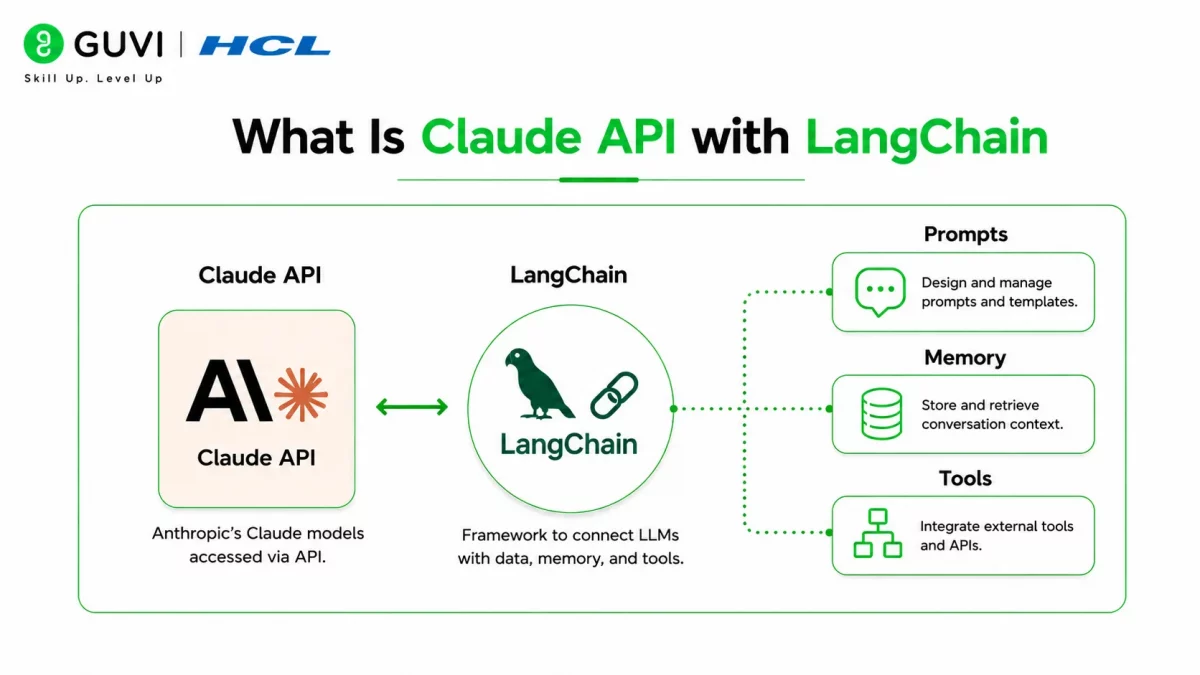
Claude API with LangChain refers to integrating Anthropic’s Claude models into applications using the LangChain framework. LangChain provides reusable components that make it easier to build AI-powered workflows, while the Claude API supplies the language model that generates responses.
Instead of calling the API directly for every task, LangChain allows you to connect Claude with prompts, external tools, databases, vector stores, and memory, making it easier to develop production-ready AI applications.
Some common use cases include:
- AI chatbots
- Document question-answering
- Retrieval-Augmented Generation (RAG)
- AI agents
- Workflow automation
LangChain supports multiple large language models, allowing developers to switch AI providers with minimal changes to their application logic. This flexibility makes it easier to compare models or migrate as project requirements evolve.
Read More: Claude Integrations: Connect Your Apps, Unlock AI Superpowers
Why Use LangChain with Claude?
Calling an API directly works well for simple applications, but larger AI projects often require additional capabilities such as memory, document retrieval, tool integration, and workflow orchestration.
LangChain provides these features while allowing Claude to focus on language understanding and response generation.
Some key benefits include:
- Simplified development. Prebuilt components reduce the amount of custom code required.
- Flexible workflows. Connect Claude with external APIs, databases, and business logic.
- Memory support. Build conversational applications that remember previous interactions.
- Scalable architecture. Organize prompts, chains, and retrieval pipelines more efficiently.
Data Point: Modern AI applications increasingly combine language models with retrieval systems, external tools, and memory to deliver more accurate and context-aware responses.
Want to build AI-powered applications using modern frameworks? Explore HCL GUVI’s Artificial Intelligence & Machine Learning Course, where you’ll learn LangChain, LLMs, prompt engineering, RAG, vector databases, and AI application development through hands-on projects built for real-world use cases.
What Do You Need Before Getting Started?
Before integrating Claude with LangChain, make sure your development environment includes the required tools and credentials.
You’ll typically need:
- Python installed
- A Claude API key
- A LangChain installation
- An Anthropic SDK
- A code editor such as Visual Studio Code
Keeping dependencies updated helps avoid compatibility issues.
Best Practice: Store your API key as an environment variable instead of hardcoding it directly into your application.
How to Set Up Claude API with LangChain
Follow these steps to integrate Claude into a LangChain project.
Step 1: Install the Required Packages
Install LangChain and the Anthropic integration package.
pip install langchain langchain-anthropic anthropicStep 2: Configure Your API Key
Store your Claude API key as an environment variable.
export ANTHROPIC_API_KEY="your_api_key"

On Windows PowerShell:

$env:ANTHROPIC_API_KEY="your_api_key"
This keeps sensitive credentials separate from your source code.
Step 3: Initialize the Claude Model
Create a LangChain model instance using Claude.
from langchain_anthropic import ChatAnthropic

llm = ChatAnthropic(

    model="claude-sonnet-4",

    temperature=0

)
The model can now process prompts through LangChain.
Step 4: Send Your First Prompt
Invoke the model with a simple request.
response = llm.invoke("Explain recursion in simple terms.")

print(response.content)
Claude generates a response that your application can display or process further.

Warning: Never expose your API key in public repositories or client-side applications. Always use secure environment variables or secret management services.
What Can You Build with Claude and LangChain?
The combination of Claude and LangChain supports a wide range of AI-powered applications.
Popular examples include:
- Intelligent chatbots.
- Customer support assistants.
- Internal knowledge bases.
- Code generation tools.
- Research assistants.
- Document summarization systems.
- Retrieval-Augmented Generation (RAG) applications.
Each application benefits from LangChain’s orchestration features and Claude’s natural language capabilities.
How Does LangChain Enhance Claude?
LangChain adds several capabilities that simplify AI application development.
Some important features include:
- Prompt templates for reusable prompts.
- Chains that connect multiple AI operations.
- Memory for conversational applications.
- Document loaders for external data.
- Vector database integrations.
- Tool calling for external services.
These components help developers build sophisticated AI systems with less boilerplate code.
Pro Tip: Start with a simple chatbot before adding advanced features like memory, retrieval, or agent workflows. Building incrementally makes debugging much easier.
Beginners often encounter similar challenges when integrating Claude with LangChain.
Some common mistakes include:
- Hardcoding API keys.
- Using incompatible package versions.
- Ignoring prompt design.
- Skipping error handling.
- Forgetting to manage token usage.
Avoiding these issues makes applications more secure, reliable, and easier to maintain.
Well-designed prompts often improve AI application quality more than adding extra components or using larger models. Investing time in effective prompt engineering can significantly enhance response accuracy, consistency, and user experience.
Key Takeaways
- LangChain simplifies building AI applications with Claude.
- The Claude API integrates through the official LangChain Anthropic package.
- Secure API key management is essential.
- LangChain supports prompts, memory, retrieval, and workflow orchestration.
- Claude and LangChain work well for chatbots, RAG systems, and AI assistants.
- Starting with a simple implementation makes future expansion easier.
Conclusion
Combining the Claude API with LangChain allows developers to build far more than simple chat interfaces. Together, they provide the foundation for intelligent applications that can retrieve information, maintain conversations, automate workflows, and interact with external systems.
As your projects grow, LangChain’s modular architecture makes it easier to expand your applications while keeping the codebase organized. By understanding the fundamentals of Claude integration, secure API management, and LangChain components, you’ll be well-prepared to develop scalable AI-powered solutions.
FAQs
What is Claude API with LangChain?
Claude API with LangChain refers to using Anthropic’s Claude models through the LangChain framework to build AI-powered applications. It simplifies prompt management, workflows, memory, and integrations.
Do I need Python to use Claude with LangChain?
Yes, most LangChain examples and integrations are built with Python. Basic Python knowledge is enough to get started.
Can I build a chatbot using Claude and LangChain?
Yes, Claude and LangChain are commonly used to build chatbots, virtual assistants, and customer support applications. LangChain provides components for prompts, memory, and conversation management.
How should I store my Claude API key?
Store your API key in environment variables or a secure secret management service. Avoid hardcoding credentials directly into your source code.
Is LangChain required to use the Claude API?
No, you can call the Claude API directly. However, LangChain makes it much easier to build complex AI workflows with features like memory, retrieval, and tool integration.
Success Stories

About the Author
Vishalini Devarajan
An Aerospace Engineer turned content writer, I focus on making complex concepts easy to understand through well-structured, reader-friendly blogs. Whether it’s a technical topic or a non-technical one, I love creating content that is clear, engaging, and impactful.
View all posts by Vishalini Devarajan
Connect with me @






Did you enjoy this article?