


Artificial Intelligence and Machine Learning Articles
AI/ML Skills Gap 2026: Why Companies Can't Find Job-Ready Talent
20 AI/ML Interview Questions Recruiters Can Use Without a Tech Background - Best Guide
How Industry-Backed AI/ML Bootcamps Are Changing the AI/ML Hiring Pipeline - Best Guide 2026
From IT Support to AI Engineer: A Realistic Career Switch Guide 2026


Get In Touch For Details! Request More Information
Claude Agents: Building Multi-Step Autonomous Workflows
Aug 19, 2026 3 Min Read 254 Views
(Last Updated)
Modern AI applications are no longer limited to answering a single prompt. With Claude Agents, developers can build autonomous workflows that plan tasks, use tools, make decisions, and complete multi-step processes with minimal human intervention. Whether you’re automating customer support, document processing, or software development tasks, Claude Agents help create smarter and more efficient AI systems. In this guide, you’ll learn what claude agents are, how they work, their key components, and practical use cases for building intelligent workflows.
Table of contents
- TL;DR
- What Are Claude Agents?
- Why Should You Use Claude Agents?
- How Do Claude Agents Work?
- Step 1: Understand the Goal
- Step 2: Create a Plan
- Step 3: Execute Each Task
- Step 4: Deliver the Final Result
- What Can You Build with Claude Agents?
- Challenges of Building Autonomous Agents
- Real-World Example
- How to Design Effective Claude Agents
- Key Takeaways
- Conclusion
- FAQs
- What are Claude Agents?
- How are Claude Agents different from chatbots?
- What can Claude Agents automate?
- Can Claude Agents use external tools?
- Do Claude Agents replace human decision-making?
TL;DR
- Claude Agents automate multi-step workflows instead of handling single prompts.
- Agents can plan tasks, use tools, and make decisions based on user goals.
- They improve productivity by reducing repetitive manual work.
- Human oversight remains important for critical or sensitive tasks.
- Claude Agents can support business, development, and enterprise automation.
What Are Claude Agents?
Claude Agents are AI-powered systems designed to complete tasks through multiple connected steps rather than responding to a single request. An agent can understand an objective, determine the necessary actions, interact with tools or external systems, and produce a final result with minimal user guidance.
Unlike traditional chatbot interactions, agents maintain context across multiple steps, allowing them to solve more complex problems efficiently.
Common applications include:
- Customer support automation
- Research assistants
- Document processing
- Software development workflows
- Business process automation
Read More: How to Build AI Apps with Claude and Share Them Easily
AI agents can break complex objectives into smaller tasks, making long and multi-stage workflows easier to manage.
Why Should You Use Claude Agents?
Many workflows involve several repetitive steps that normally require constant user input. Claude Agents reduce manual effort by handling these tasks automatically while maintaining context throughout the process.
Some key benefits include:
- Improve efficiency. Agents complete repetitive workflows with minimal intervention.
- Maintain context. They remember previous steps to make better decisions during longer tasks.
- Increase productivity. Teams spend less time on routine work and more time on strategic activities.
- Support integration. Agents can work alongside APIs, databases, and external tools.
Data Point: As AI workflows become more sophisticated, autonomous agents are increasingly used to automate repetitive business and development processes.
How Do Claude Agents Work?
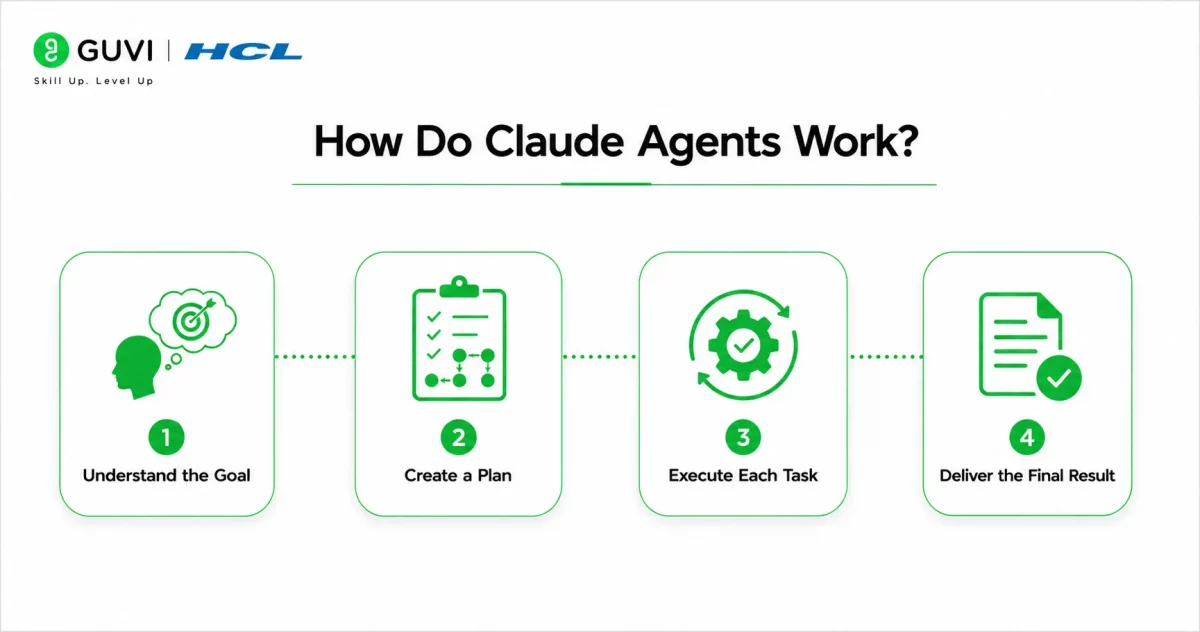
Claude Agents follow a structured workflow to accomplish a goal.
Step 1: Understand the Goal
The agent receives an objective from the user, such as summarizing documents or creating a project report.
It analyzes the request before deciding how to proceed.
Step 2: Create a Plan
Instead of immediately generating a response, the agent breaks the task into smaller, manageable steps.
Planning helps ensure each stage contributes toward the final objective.
Step 3: Execute Each Task
The agent performs each planned step, which may include retrieving information, processing documents, generating content, or interacting with external tools.
Each completed step informs the next action.
Step 4: Deliver the Final Result
Once every task has been completed, the agent combines the outputs into a final response or completed workflow.
This reduces the need for constant user interaction.
Pro Tip: Design workflows with clearly defined objectives so the agent can make better decisions throughout the execution process.
Build intelligent AI agents with HCL GUVI’s Artificial Intelligence & Machine Learning Course. Learn LLMs, prompt engineering, AI workflows, and real-world AI application development through hands-on projects.
What Can You Build with Claude Agents?
Claude Agents can support a wide range of AI-powered applications.
Popular examples include:
- Customer service assistants
- Research automation tools
- Code review assistants
- Meeting summarization systems
- HR onboarding workflows
- Financial reporting assistants
- Knowledge management systems
- Document analysis platforms
As workflows become more complex, agents can coordinate multiple tasks while keeping information organized.

Challenges of Building Autonomous Agents
Although Claude Agents are powerful, building reliable autonomous workflows requires thoughtful design.
Some common challenges include:
- Defining clear workflow objectives.
- Handling unexpected user inputs.
- Managing external API failures.
- Maintaining context across long workflows.
- Protecting sensitive business data.
Planning for these scenarios improves the reliability of your AI applications.
Best Practice: Build safeguards that allow users to review important actions before the agent completes critical business processes.
Real-World Example
Imagine a customer support team handling hundreds of product inquiries each day.
Instead of manually searching documentation, responding to customers, and updating support records, a Claude Agent can retrieve relevant information, generate a response draft, summarize the interaction, and prepare follow-up actions—all within a single automated workflow.
This reduces repetitive work while allowing support teams to focus on more complex customer issues.
How to Design Effective Claude Agents
Building reliable Claude Agents starts with well-defined objectives and structured workflows. Clearly defining each task, expected outcome, and decision point helps the agent perform consistently while reducing unnecessary complexity.
Some important design principles include:
- Define a single objective for each workflow.
- Break large tasks into smaller, manageable steps.
- Integrate only the tools the agent actually needs.
- Include checkpoints for human approval when necessary.
- Test workflows regularly using real-world scenarios.
Best Practice: Start with a simple workflow before expanding your Claude Agent to handle more complex, multi-step processes.
Key Takeaways
- Claude Agents automate multi-step workflows with minimal user intervention.
- They can plan, execute, and manage connected tasks efficiently.
- Agents maintain context throughout complex processes.
- External tools and APIs extend an agent’s capabilities.
- Human oversight remains essential for sensitive or high-impact workflows.
- Well-designed workflows improve both productivity and reliability.
Conclusion
Claude Agents represent a major step forward in AI-powered automation by enabling applications to perform connected tasks instead of responding to isolated prompts. From business operations to software development and customer support, they help streamline workflows while reducing repetitive manual effort.
However, successful autonomous systems require thoughtful planning, clear objectives, and appropriate human oversight. By combining Claude Agents with reliable tools and well-designed workflows, organizations can build intelligent applications that improve efficiency without compromising control.
FAQs
What are Claude Agents?
Claude Agents are AI systems that complete multi-step tasks by planning, executing, and managing connected workflows instead of responding to a single prompt.
How are Claude Agents different from chatbots?
Traditional chatbots mainly answer individual prompts, while Claude Agents can manage complex workflows, maintain context, and perform multiple related tasks.
What can Claude Agents automate?
They can automate customer support, document processing, research, reporting, coding workflows, and many other business processes.
Can Claude Agents use external tools?
Yes. Depending on the implementation, Claude Agents can interact with APIs, databases, and other software tools to complete tasks.
Do Claude Agents replace human decision-making?
No. They assist with automation, but important business decisions and sensitive workflows should still involve human review.
Success Stories

About the Author
HCL GUVI
This article was selected and published as part of the HCL GUVI AI Blogathon 2026, an initiative designed to encourage students, AI enthusiasts, and aspiring tech writers to simplify complex AI concepts through impactful technical content. The contest recognized high-quality, original, and insightful AI-focused blogs, with selected authors receiving publication opportunities on the HCL GUVI blog platform along with official author credits and recognition.
View all posts by HCL GUVI
Connect with me @











Did you enjoy this article?