


Software Development Articles
How to Read and Understand System Design Diagrams?
System Engineer Roles and Responsibilities: 12 Proven Duties for Growth
SAP Consultant Roles and Responsibilities: 12 Proven Duties for Growth and Success
Network Engineer Roles and Responsibilities: 12 Essential Duties for Success


Get In Touch For Details! Request More Information

Cache Memory in Computer Architecture: Ultimate Beginner’s Guide
Sep 19, 2026 5 Min Read 2033 Views
(Last Updated)
Cache memory in computer architecture is a small, high-speed storage unit between the CPU and main memory that stores frequently accessed data. It works because most programs reuse the same data and instructions repeatedly, so keeping them closer to the processor saves time.
Your CPU can process billions of instructions per second, but pulling data from RAM every single time would waste most of that speed. Cache closes this gap, giving the processor near-instant access to what it needs most.
Table of contents
- TL;DR Summary
- What Is Cache Memory in Computer Architecture?
- Levels of Cache Memory
- L1 Cache (Level 1 Cache):
- L2 Cache (Level 2 Cache):
- L3 Cache (Level 3 Cache):
- L4 Cache (Optional in Some Systems):
- Cache Mapping Techniques
- Direct Mapping
- Fully Associative Mapping
- Set Associative Mapping
- Comparison of Cache Mapping Techniques
- How Cache Memory Works
- Step 1: CPU Generates a Memory Request
- Step 2: Requested Address Is Split into Tag, Index, and Offset
- Step 3: Cache Controller Locates the Cache Line
- Step 4: Tag Comparison Begins
- Step 5: Cache Hit or Cache Miss Decision
- Step 6: Entire Cache Block Is Loaded from RAM
- Step 7: Locality Principles Improve Prediction
- Step 8: Replacement Algorithm Handles Full Cache
- Step 9: Write Policies Manage Data Updates
- Step 10: Multi-Level Cache Lookup Happens Automatically
- Step 11: CPU Resumes Execution
- Advantages of Cache Memory
- Disadvantages of Cache Memory
- Real-World Applications of Cache Memory
- Web Browser Caching
- Gaming and Graphics Processing
- Database Query Processing
- Artificial Intelligence Processing
- Multicore CPU Operations
- Conclusion
- FAQs
- What is cache memory in computer architecture?
- Is cache memory faster than RAM?
- What are the different cache mapping techniques?
- Does every processor have an L4 cache?
- What is the difference between a cache hit and a cache miss?
- Is cache memory used only in CPUs?
TL;DR Summary
- Cache memory in computer architecture sits between the CPU and RAM, storing frequently used data to cut down access time and boost processing speed.
- It comes in multiple levels, L1, L2, L3, and sometimes L4, each trading off speed for storage capacity as you move further from the core.
- Mapping techniques like direct, fully associative, and set-associative determine where data is placed in cache, balancing speed, cost, and hardware complexity.
- The cache-lookup process runs through tag comparison, hit-or-miss decisions, and replacement policies like LRU to keep the most useful data close at hand.
- From web browsers and gaming to AI workloads and multicore processors, cache memory quietly powers faster performance across nearly every modern computing task.
- L1 cache access takes only a few CPU cycles, while accessing RAM can take 100+ CPU cycles, which is why cache greatly improves performance.
- Most modern processors use 64-byte cache lines, allowing CPUs to fetch nearby data together for faster access.
- High-performance CPUs can include 64 MB to 192+ MB of L3 cache, especially for gaming and heavy workloads.
What Is Cache Memory in Computer Architecture?

Cache memory in computer architecture is a small, high-speed memory layer between the CPU and main memory that reduces data-access latency and improves processing speed.
It stores frequently used instructions and data so the processor does not have to fetch them repeatedly from slower RAM. Cache memory works on the principle of locality of reference, where recently accessed or nearby memory locations are likely to be accessed again.
Turning code into a career takes more than just theory. HCL GUVI’s Software and AI Engineer Programme puts you through Java, full stack development, backend engineering, and AI-powered workflows, backed by mentors from Microsoft, Amazon, and other top firms. With real placement support and mock interviews built into the journey, you get everything needed to land your first tech role. Enroll now and start building the skills that matter!
Key Characteristics of Cache Memory

- Extremely Fast Access Speed: Cache memory provides access in a few CPU cycles, making it much faster than RAM and reducing processor wait time.
- Small Memory Size: Cache capacity is limited and typically ranges from a few KB to several MB because high-speed memory is expensive.
- Built Using SRAM: Cache uses Static Random Access Memory (SRAM) instead of DRAM, enabling faster data retrieval without refresh cycles.
- Located Inside or Very Close to the CPU: L1 and L2 caches are usually integrated on the processor chip to minimize latency.
- Follows Locality Principles: Caches use temporal locality (recently used data may be reused) and spatial locality (nearby data is likely to be accessed).
Levels of Cache Memory
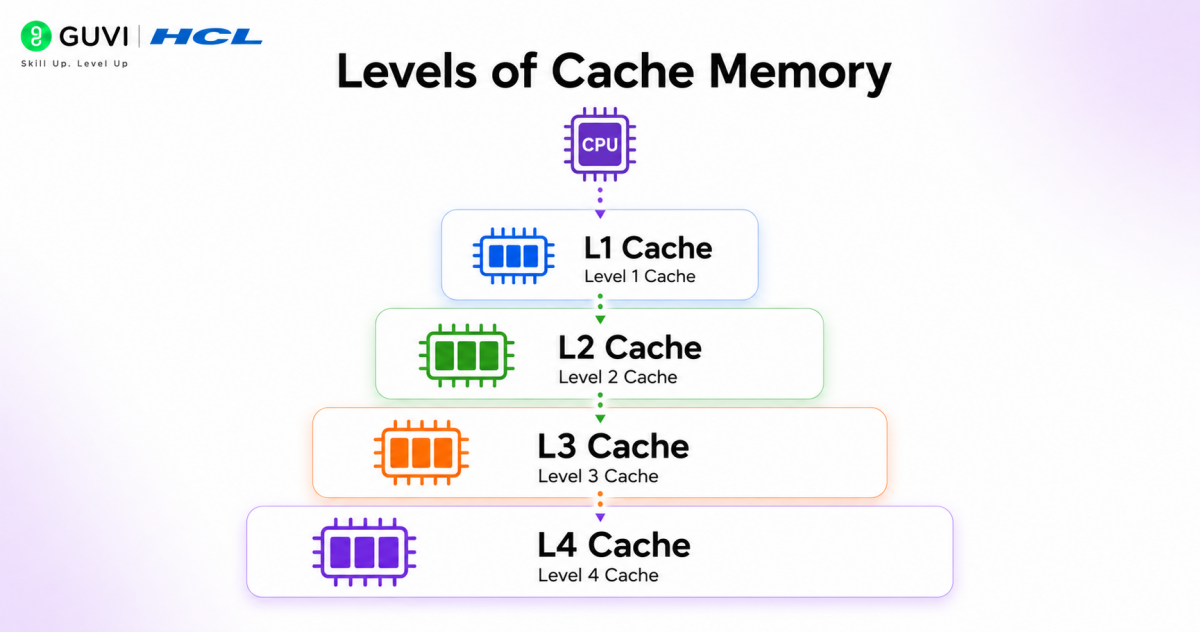
L1 Cache (Level 1 Cache):
- Closest to CPU Core: Located directly inside each processor core.
- Fastest Cache Level: Provides the lowest access latency.
- Small Capacity: Usually ranges from 16 KB to 128 KB per core.
- Core-Specific: Each CPU core generally has its own L1 cache.
- Often Split: Separate Instruction Cache (I-Cache) and Data Cache (D-Cache).
L2 Cache (Level 2 Cache):
- Second-Level Cache: Sits between L1 cache and L3 cache.
- Larger Storage Capacity: Typically ranges from 256 KB to several MB.
- Slightly Slower than L1: Trades speed for additional storage.
- Can Be Dedicated or Shared: Depending on processor architecture.
L3 Cache (Level 3 Cache):
- Shared Cache Memory: Usually shared across multiple processor cores.
- Much Larger Capacity: Commonly ranges from 4 MB to 64+ MB.
- Slower Than L1 and L2: But still faster than RAM access.
- Reduces Memory Traffic: Helps minimize repeated RAM requests across cores.
L4 Cache (Optional in Some Systems):
- Additional Cache Layer: Present in some high-performance CPUs.
- Largest Cache Size: Can provide larger storage for demanding workloads.
- Acts as Buffer: Sits between L3 cache and main memory.
- Less Common: Mostly found in specialized or high-end processor designs.
Cache Mapping Techniques
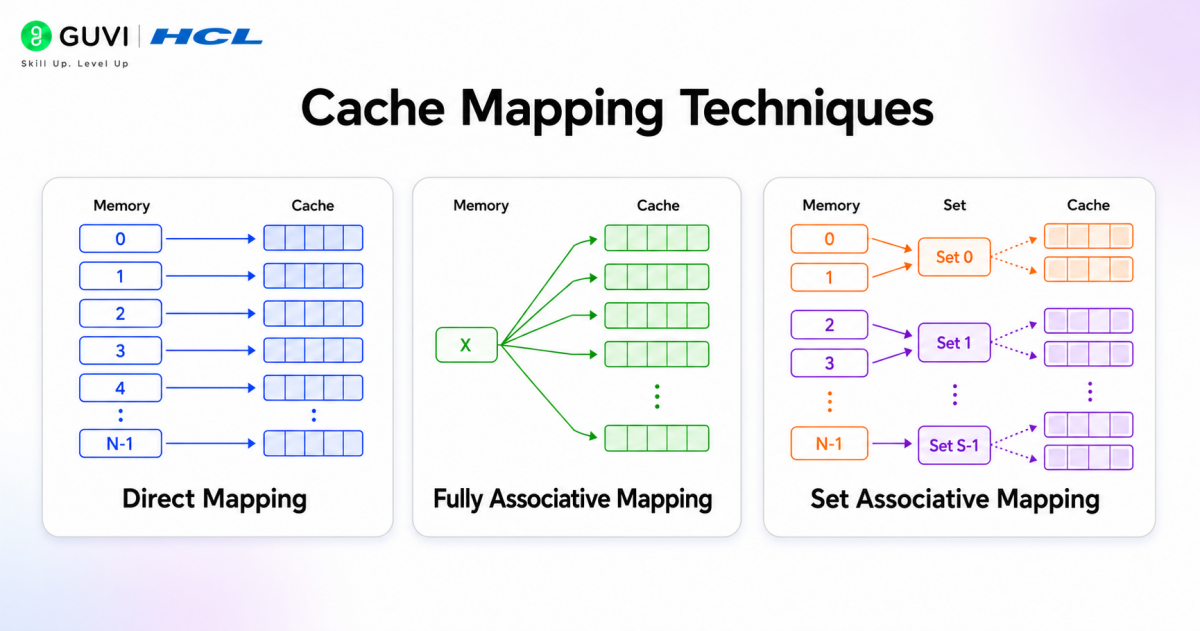
1. Direct Mapping
In direct mapping, each main memory block can go to only one fixed cache location. The cache line is determined using a simple formula:
Cache Line = (Main Memory Block Number) mod (Number of Cache Lines)
How it works:
- Memory blocks are divided into fixed-size blocks.
- Each block maps to a specific cache line.
- The processor checks that exact location during access.
Example: If cache contains 8 lines:
- Block 0 → Line 0
- Block 8 → Line 0
- Block 16 → Line 0
Multiple blocks compete for the same cache location.
Advantages:
- Simple hardware implementation
- Fast lookup process
- Lower cost
Limitations:
- Higher conflict misses
- Frequent replacement if multiple blocks map to the same line
2. Fully Associative Mapping
In fully associative mapping, a memory block can be placed in any cache line. There are no fixed positions.
How it works:
- The processor searches the entire cache.
- It compares tags with all cache entries simultaneously.
- Data can occupy any available location.
Example:
Block 12 may be stored in:
- Line 1
- Line 4
- Line 7
- Any empty line
Advantages:
- Lowest conflict misses
- Flexible data placement
- Better cache utilization
Limitations:
- Complex hardware design
- Expensive implementation
- Search operation becomes costly
3. Set Associative Mapping
Set associative mapping combines features of direct and associative mapping.
The cache is divided into multiple sets, and each memory block maps to one set but can occupy any line within that set.
How it works:
- Cache lines are grouped into sets.
- A block first selects its set.
- The block can be placed anywhere in that set.
Example:
Suppose:
- Cache = 8 lines
- 2-way set-associative
Sets:
- Set 0 → Line 0, Line 1
- Set 1 → Line 2, Line 3
- Set 2 → Line 4, Line 5
- Set 3 → Line 6, Line 7
Block number formula:
Set Number = Block Number mod Number of Sets
If Block 10 maps to Set 2:
It can occupy:
- Line 4
- Line 5
Advantages:
- Reduces conflict misses
- Better performance than direct mapping
- Less hardware complexity than fully associative mapping
Limitations:
- More complex than direct mapping
- Slightly slower lookup process
Build stronger problem-solving and core computer science foundations with HCL GUVI’s DSA for Programmers Course Bundle. Master data structures, algorithms, problem-solving techniques, and essential concepts used in real-world software development through hands-on practice and industry-focused learning.
Comparison of Cache Mapping Techniques
| Feature | Direct Mapping | Fully Associative | Set Associative |
| Memory Block Placement | One fixed line | Any line | Any line within a set |
| Hardware Complexity | Low | High | Moderate |
| Lookup Speed | Fast | Slower | Moderate |
| Conflict Misses | High | Very low | Lower |
| Cost | Low | High | Moderate |
| Flexibility | Low | High | Medium |
These mapping techniques directly affect cache efficiency, processor speed, and memory performance in modern computer systems.
How Cache Memory Works
Step 1: CPU Generates a Memory Request
When the processor executes an instruction, it may require data or another instruction from memory. The CPU sends a memory address request to the cache subsystem before accessing RAM.

Step 2: Requested Address Is Split into Tag, Index, and Offset
The memory address is divided into three parts:
- Tag: Identifies the actual memory block
- Index: Determines which cache set or line should be checked
- Offset: Identifies the exact byte or word inside the cache block
This organization lets the cache locate data quickly.
Step 3: Cache Controller Locates the Cache Line
The cache controller, a dedicated hardware unit, uses the index bits to select the appropriate cache line or set. It manages cache access, data lookup, and replacement operations.
Step 4: Tag Comparison Begins
Each cache line stores:
- Data block
- Tag bits
- Valid bit
- Dirty bit (for write-back caches)
The controller compares the requested tag with the stored tag.
- Valid bit: Indicates whether the cache contains usable data
- Dirty bit: Shows whether cached data was modified before being written back to memory
Step 5: Cache Hit or Cache Miss Decision
Cache Hit: If the tag matches and the valid bit is set, requested data is available in cache memory.
Result:
- CPU receives data immediately
- Memory access latency reduces significantly
- Instruction execution continues quickly
Cache Miss:
If the tag does not match or data is absent:
- Cache cannot provide the data
- CPU must access main memory
- Additional delay occurs
Step 6: Entire Cache Block Is Loaded from RAM
The system transfers a complete cache line, not just the requested value.
Example: If cache line size = 64 bytes, the processor fetches all 64 bytes from RAM.
This improves performance because nearby data may be needed soon.
Step 7: Locality Principles Improve Prediction
Cache memory works using:
- Temporal locality: Recently used data may be reused shortly
- Spatial locality: Nearby memory locations are likely to be accessed together
Example:
During array traversal:
A[0], A[1], A[2], A[3]
Once A[0] is fetched, nearby values are already available in cache.
Step 8: Replacement Algorithm Handles Full Cache
If cache storage is full, replacement policies determine which block should be removed:
- LRU (Least Recently Used): Removes least recently accessed block
- FIFO: Removes oldest block
- Random Replacement: Removes a randomly selected block
These policies reduce unnecessary cache misses.
Step 9: Write Policies Manage Data Updates
When data changes:
- Write Through: Updates cache and RAM simultaneously
- Write Back: Updates cache first and RAM later
Write-back improves speed but requires dirty-bit tracking.
Step 10: Multi-Level Cache Lookup Happens Automatically
Modern systems search cache levels sequentially:
L1 → L2 → L3 → RAM
If L1 misses, the request proceeds to L2, then L3, and finally main memory.
This layered structure balances speed and storage capacity.
Step 11: CPU Resumes Execution
After retrieving data, the processor continues execution with lower latency and improved overall performance. Repeated requests for the same data become much faster due to caching
Advantages of Cache Memory
- Reduces Average Memory Access Time: Cache shortens the average time required to retrieve instructions and data by serving frequently accessed information closer to the processor.
- Minimizes Memory Bus Traffic: The cache handles repeated requests, reducing communication between the CPU and main memory.
- Improves Instruction Throughput: Faster data availability lets the CPU pipeline execute more instructions in a given time.
- Improves Application Responsiveness: Frequently used program instructions become available faster, helping applications respond more smoothly.
- Enables Better Processor Utilization: The CPU spends less time waiting for data and more time computing.
Disadvantages of Cache Memory
- Limited Storage Capacity: Cache can store only a small amount of data.
- Higher Manufacturing Cost: High-speed cache memory is expensive to build.
- Complex Hardware Design: Cache management requires additional control mechanisms.
Real-World Applications of Cache Memory

1. Web Browser Caching
Browsers cache frequently accessed resources such as images, CSS files, JavaScript files, and webpage data to reduce loading time and improve browsing speed. This helps previously visited websites open faster and reduces repeated network requests.
2. Gaming and Graphics Processing
Gaming systems cache textures, rendering data, physics calculations, and game assets to maintain smooth frame rates and reduce latency. This improves gameplay responsiveness and minimizes delays during complex visual processing.
3. Database Query Processing
Database systems cache frequently accessed records, indexes, and query results to speed up data retrieval and reduce repeated memory access. This allows high-traffic applications to process queries more efficiently.
4. Artificial Intelligence Processing
AI and machine learning applications cache model parameters, tensors, and intermediate computations to speed up training and inference. This reduces computational delays during repeated mathematical operations.
5. Multicore CPU Operations
Modern processors use shared cache memory to allow multiple cores to access common data efficiently and reduce repeated RAM requests. This improves processor coordination and overall execution performance.
Conclusion
Cache memory plays a critical role in modern computer architecture by reducing the performance gap between processors and main memory. By storing frequently accessed information closer to the CPU, it reduces access delays and supports faster instruction execution.
With multiple cache levels and intelligent mapping techniques, cache memory helps improve efficiency across applications ranging from web browsing and gaming to AI workloads and multicore processing systems.
FAQs
1. What is cache memory in computer architecture?
Cache memory is a small, high-speed storage layer between the CPU and RAM that holds frequently used data to reduce access time.
2. Is cache memory faster than RAM?
Yes. Cache memory uses SRAM instead of DRAM, giving it access speeds of just a few CPU cycles compared to 100+ cycles for RAM.
3. What are the different cache mapping techniques?
The three main types are direct mapping, fully associative mapping, and set associative mapping, each balancing speed, cost, and complexity differently.
4. Does every processor have an L4 cache?
No. L4 cache is optional and mostly found in specialized or high-performance processors, unlike L1, L2, and L3, which are standard.
5. What is the difference between a cache hit and a cache miss?
A cache hit means the requested data is in cache memory, while a miss means the CPU must fetch it from RAM instead.
6. Is cache memory used only in CPUs?
No. Cache memory concepts also apply to web browsers, databases, and AI systems to speed up repeated data access.
Success Stories
















Did you enjoy this article?