


Cloud Computing Articles
From Beginner to DevOps Engineer: How HCL GUVI Zen Class Helps You Get There
12 Important Azure Admin Roles and Responsibilities- Complete Guide


Get In Touch For Details! Request More Information
Types of Computer Network Architecture: An Insightful Guide
Jul 27, 2026 7 Min Read 3462 Views
(Last Updated)
“Computer Network Architecture” is a topic most of us ignore when discussing the working mechanisms of various computing devices, such as mobiles, laptops, or tablets. There is a tendency to jump directly into the step-by-step workflow of these devices without gaining a firm understanding of their architecture.
But in this blog, we will try to break out of this narrow perspective by covering all types of network architecture and how they contribute to an efficient and reliable computing environment.
Table of contents
- TL;DR Summary
- Computer Network Architecture: Definition
- Types of Computer Network Architecture
- Peer-to-Peer Architecture
- Client-Server Architecture
- Cloud Architecture
- Hybrid Architecture
- Types of Computer Network Architecture: Overview
- Architecture Comparison: Scalability, Security, and Cost
- Client-Server vs Peer-to-Peer vs Hybrid Architecture Comparison
- Which Network Architecture Does AWS/Cloud Use?
- Network Architecture for Small Business vs Enterprise
- Conclusion
- FAQs
- What factors should I consider before choosing a network architecture?
- Why is the client-server model preferred for large organizations?
- How is a hybrid valuable architecture in real-world systems?
TL;DR Summary
- Computer Network Architecture comes in four main types: peer-to-peer, client-server, cloud, and hybrid, each shaping how devices connect, share resources, and communicate.
- Client-server remains the dominant model for enterprises and large organizations, since it centralizes security, data, and control.
- Cloud platforms like AWS, Azure, and GCP are fundamentally client-server architectures at massive scale, layered with distributed and hybrid elements.
- Small businesses often do better with simpler peer-to-peer or lightweight client-server setups, while enterprises typically need hybrid or full client-server models for security and scale.
- Choosing the right Computer Network Architecture depends on network size, security needs, budget, and how much control you need over data.
The four main types of Computer Network Architecture, at a glance:
- Peer-to-Peer (P2P): every device acts as both client and server, no central controller, best for small networks.
- Client-Server: clients request resources from a central server, offering strong security and control at higher cost.
- Cloud Architecture: storage and processing run on remote data centers (AWS, Azure, GCP), accessed over the internet on demand.
- Hybrid: combines client-server and P2P, balancing centralized control with distributed flexibility.
Computer Network Architecture: Definition
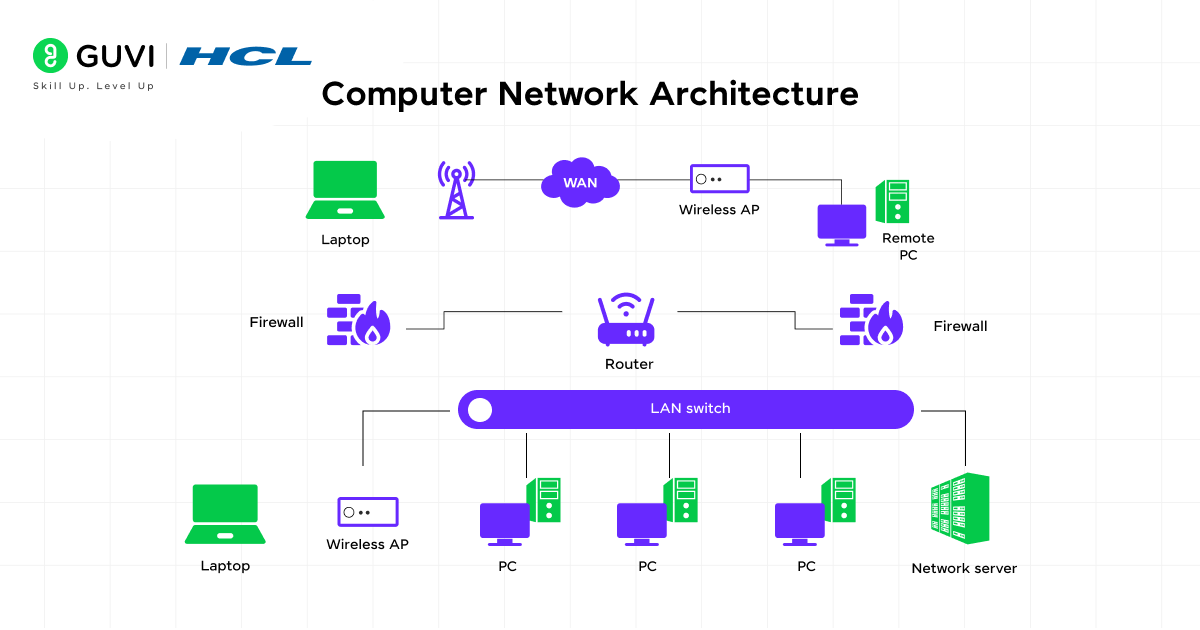
Understanding Computer Network Architecture starts with a basic principle: for any machine to function efficiently with minimal interruptions, it is crucial to ensure that the entity has a proper structure, with all necessary elements organized and appropriately integrated.
In this context, network architecture in computer networks is also necessary, as it defines clear paths and channels for software and hardware components to communicate. There are multiple building blocks of network architecture, such as protocols, hardware, software, network topology, communication layers, and more. These network architecture components work together in synchronization to deliver efficiency, reliability, automation, and scalability.
Most network architectures today are based on the OSI (Open Systems Interconnection) model, which divides network communication into 7 layers (i.e., 4 Host layers + 3 Media layers).
Moreover, this OSI model facilitates troubleshooting network issues by passing the required inputs through all 7 layers (using a top-down approach). This approach allows it to systematically identify and isolate the problem, confirming security and nominal downtime.
Types of Computer Network Architecture
These are the main types of Computer Network Architecture, each designed to manage how devices connect and communicate. They help define the structure, control, and flow of data in a network.
1. Peer-to-Peer Architecture
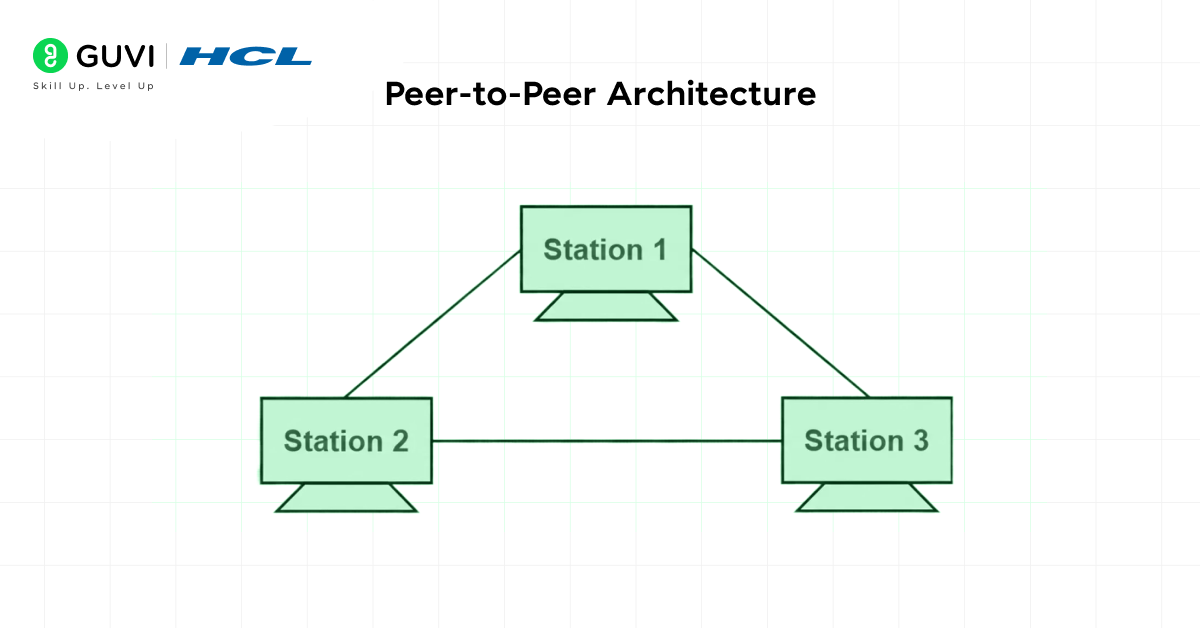
Peer-to-peer (P2P) computer network architecture is a setup in which each integrated device can function as both a client and a server. Here, each computing unit can directly share files, processing power, and other resources with other entities without depending on a single source controller.
This is one of the most fundamental types of Computer Network Architecture, and one of the best examples of how decentralized systems work by providing equal roles and responsibilities. Due to its structure, it is an ideal option for smaller networks; however, it becomes ineffective for complex, scalable networks.
Pros:
- There is no requirement for a central server, so the setup is cheaper and easier to manage, as each device handles its own operations without depending on a dedicated server.
- Because data and information are shared directly between devices, communication is fast (with fewer delays).
- The communication process in this network architecture doesn’t rely solely on a central server, which is why even if one device stops operating, the others can remain active without interruption.
Cons:
- As the requirements of an organization or business expand, the network architecture needs to be scaled, and strictly adhering to a P2P architecture becomes inefficient, as managing multiple independent devices becomes challenging.
- In general, performance drops significantly when many users try to request large files or run resource-intensive programs.
- If P2P architecture is implemented for complex computing environments, monitoring issues will arise as there is no central unit to track or control the individual systems.
2. Client-Server Architecture
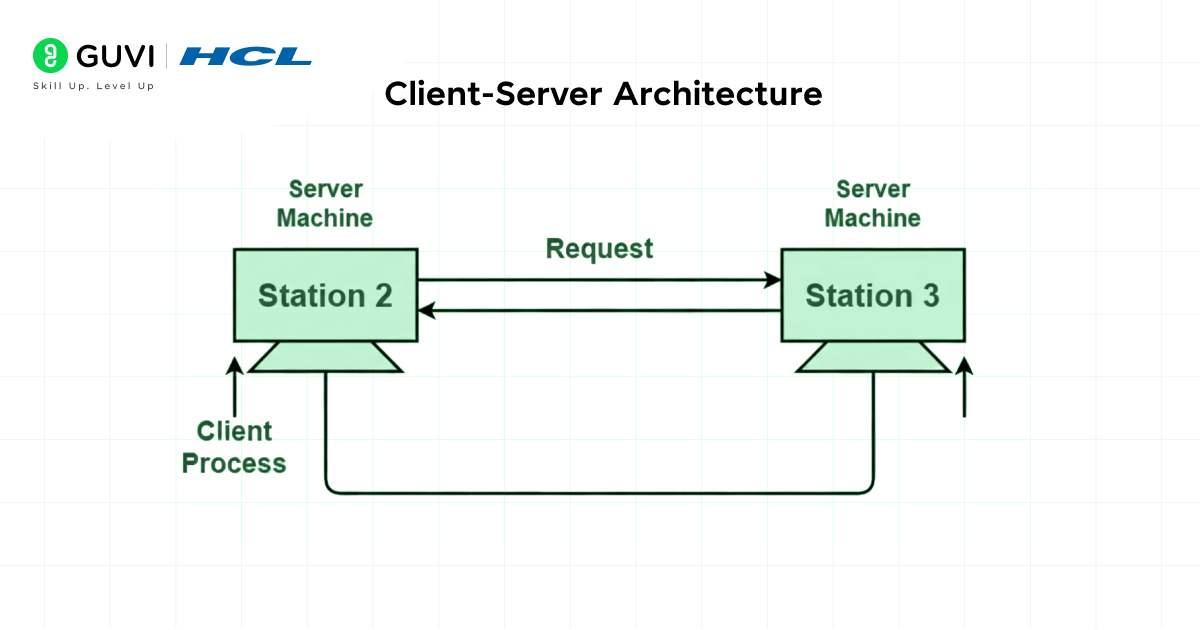
Client-server architecture is a type of centralized network architecture in which client systems (user devices) connect to a central server. This central server is responsible for storing data, managing system resources, and controlling access. In addition to these, the server also handles heavy processing tasks, enhances security, and manages data.
Since all complex and advanced functionality and tasks are executed by the server, the client systems only need to request what they require. As these architectures provide greater stability and support scalability, they are widely implemented in large organizations and enterprise-level operations.
Pros:
- The centralized server system manages the entire operation of the computer network by efficiently handling data, security policies, user access, and resources.
- Expanding the network architecture’s functionality and features is simpler than in other setups; additional users, devices, and services can be seamlessly integrated without affecting overall system performance.
- There is no need to perform redundant tasks (such as managing individual computing units separately) because all critical functions, such as storage, authorization, and updates, are handled by the central server.
Cons:
- The setup costs of the central servers are high, and maintaining them often requires deep technical knowledge.
- As the entire network architecture depends heavily on the central server, even a minor technical issue on the server side can disrupt the whole system.
- There is a significant operational dependency on proficient system administrators to manage configuration, regular updates, and security for the client-server architecture.
3. Cloud Architecture
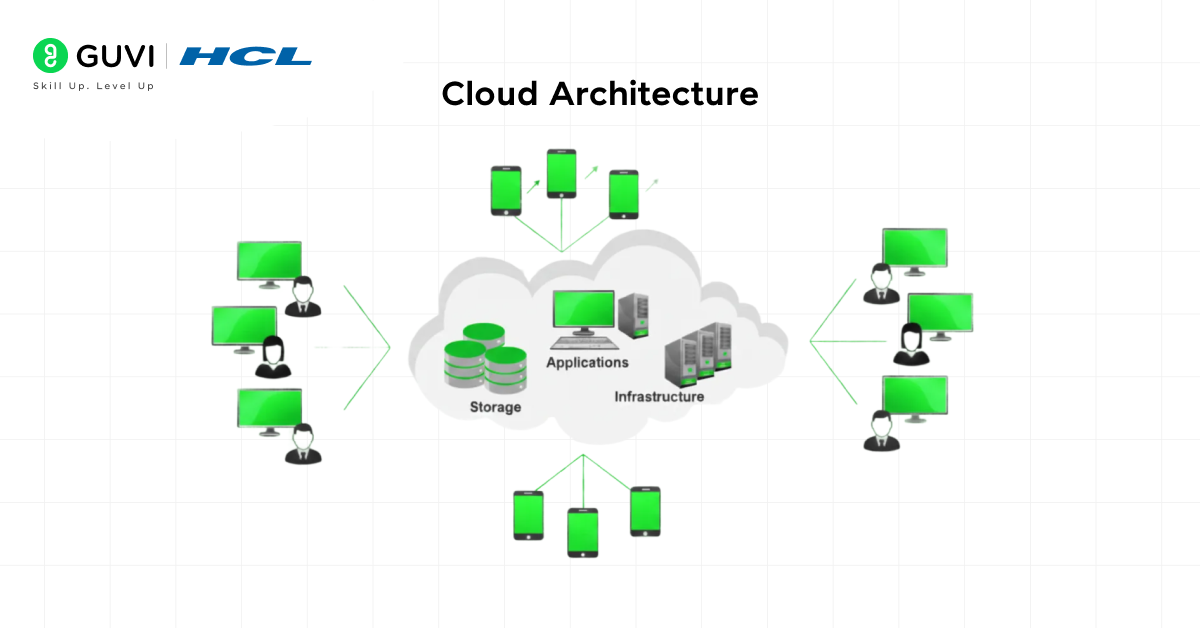
Cloud architectures are among the most advanced computing environments of modern times, providing essential services such as storage, server operations, and app and program execution over the internet rather than on a local hardware system.
All processing takes place on cloud platforms such as AWS, Azure, or GCP, which have their own massive, powerful data centers connected to the internet, and users can easily access resources on demand. This architectural setup offers flexibility, scalability, accessibility, along with minimal hardware maintenance and rapid internal operation.
Pros:
- Users can access applications, data, and services from anywhere, anytime, as long as they have an internet connection.
- As the majority of program execution and business operations take place on cloud platforms, overall hardware costs are significantly reduced.
- In response to evolving business demands, organizations can expand or reduce storage capacity and processing power without investing in new hardware.
Cons:
- Several factors, such as remote areas, network congestion, weak signal strength, or hardware issues, can cause the internet to be slow or unavailable. In situations like this, cloud services can’t be used smoothly (as connectivity is a significant dependency).
- Transferring a large amount of business data to or between cloud systems or providers can be time-consuming, expensive, and technically challenging.
- Storing sensitive data on third-party servers for extended periods can raise security and privacy concerns.
4. Hybrid Architecture
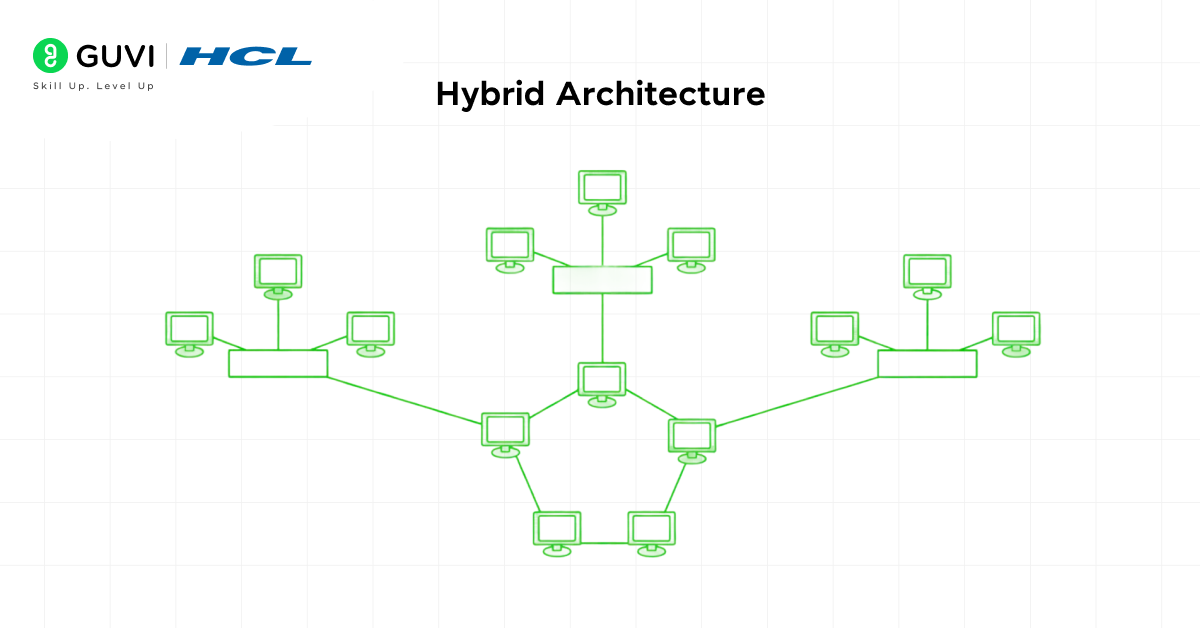
Hybrid architecture is a combination of client-server and peer-to-peer (P2P) network architectures, where overall performance is ensured by the operational efficiency of the centralized network connections and by faster data access and fault tolerance provided by distributed resource sharing.
Both architecture and combining make the entire system reliable, secure, and flexible, enabling it to easily adapt as the network evolves to meet changing needs and requirements. Hybrid network architectures are highly adopted in banking systems, healthcare platforms, automation, and IoT (Internet of Things).
Pros:
- Scalability becomes comparatively straightforward compared to other network architectures by combining the advantages of both P2P and client-server setups.
- There is high stability during the communication process, as this hybrid architecture supports spontaneous device-to-device sharing while supervising all essential operations through the central server.
- Devices can efficiently share resources directly among peers, minimizing load on the central server. This approach improves the system’s flexibility and performance.
Cons:
- Designing and managing the hybrid network architecture is a complex process that involves connecting and synchronizing multiple devices.
- The initial setup cost for this type of network architecture is very high due to the requirement of both central servers and multiple client systems.
- Ensuring uniform access to data and information across both the server and peer devices can be complex, mainly when updates occur at different times.

Types of Computer Network Architecture: Overview
| S.No | Network Architecture | Description | Real-world Examples |
| 1 | Peer-to-Peer (P2P) | Devices share resources directly without a central server. | Home networks, small offices, torrent systems |
| 2 | Client-Server | A central server handles data, security, and user requests. | Banks, schools, corporate networks |
| 3 | Cloud Architecture | Services and storage run on cloud platforms, accessible via the internet. | Google Drive, AWS apps, online CRMs |
| 4 | Hybrid Architecture | Combines client-server and P2P for flexible and balanced performance. | Healthcare systems, banking, and IoT setups |
Boost your tech journey with HCL GUVI’s IITM Pravartak Certified MERN Full Stack Development Course with AI integration. This program helps you build a strong programming base, master both front-end and back-end tzechnologies, and gain real-world experience in databases, system design, and interview preparation. Learn from industry professionals, develop the skills companies look for, and get ready to step into a full-stack development role with confidence. Join now and move closer to your career goals!
Architecture Comparison: Scalability, Security, and Cost
Beyond just examples, here’s how each type of Computer Network Architecture actually stacks up on the three factors that usually decide which one you pick.
| Architecture | Example | Scalability | Security | Cost |
|---|---|---|---|---|
| Peer-to-Peer (P2P) | Home networks, torrent systems | Low, becomes unmanageable as devices grow | Weak, no central point to enforce policy | Very low, no dedicated server needed |
| Client-Server | Banks, schools, corporate networks | High, scales by upgrading the central server | Strong, centralized access control and monitoring | High, dedicated server hardware and admin required |
| Cloud Architecture | AWS, Azure, Google Drive | Very high, scales on demand with no new hardware | Depends on provider configuration, strong by default but shared responsibility | Variable, pay-as-you-go but can grow with usage |
| Hybrid | Healthcare systems, banking, IoT | High, combines centralized and distributed scaling | Strong, centralized policy plus distributed resilience | Highest, requires both server and peer infrastructure |
Client-Server vs Peer-to-Peer vs Hybrid Architecture Comparison
Since these three account for most real-world Computer Network Architecture decisions, it’s worth comparing them side by side directly.
| Factor | Client-Server | Peer-to-Peer | Hybrid |
|---|---|---|---|
| Control | Centralized at the server | Distributed across all devices | Centralized policy, distributed sharing |
| Single point of failure | Yes, the central server | No, but performance degrades as devices join | Reduced, since peers can operate semi-independently |
| Best for | Enterprises, large user bases | Small networks, home/office setups | Systems needing both control and flexibility |
| Setup complexity | Moderate to high | Low | High |
| Typical scale | Hundreds to millions of users | A handful to a few dozen devices | Depends on how much is centralized vs distributed |
The practical takeaway: if you need strong central control and security, go client-server. If you need something quick and cheap for a small, trusted group of devices, P2P works fine. If you need the reliability of a central server but also want devices to share directly with each other for speed, hybrid is the deliberate middle ground, not a compromise, but a specific design choice.
Which Network Architecture Does AWS/Cloud Use?
This is a common point of confusion: cloud platforms are often talked about as if they’re a totally separate category from client-server Computer Network Architecture, but they’re not.
AWS, Azure, and GCP are fundamentally client-server architectures, just at a massive scale. When you use an AWS service, your device (the client) sends a request to AWS’s data centers (the server side), and AWS processes it and sends a response back. The core client-server pattern is identical to a small business’s file server, just distributed across thousands of physical machines instead of one.
What makes cloud architecture distinct is what happens behind that client-server interaction:
- Distributed server-side infrastructure: instead of one central server, cloud providers run your workload across many redundant servers, often in multiple physical data centers, so no single machine failure takes the service down.
- Load balancing: incoming client requests get automatically routed to whichever server has capacity, which is a layer that doesn’t exist in a simple client-server setup with one server.
- Elastic scaling: the “server side” of the architecture can grow or shrink automatically based on demand, something a physical, on-premise client-server setup can’t do without buying new hardware.
- Hybrid elements in practice: many cloud-native applications also use peer-to-peer-style communication between services (microservices talking directly to each other), layering hybrid architecture principles on top of the core client-server model.
The honest takeaway: cloud computing didn’t replace client-server Computer Network Architecture, it scaled it up and added distributed, elastic infrastructure underneath. Calling AWS “cloud architecture” is accurate at the product level, but structurally, it’s still client-server at its core.
Network Architecture for Small Business vs Enterprise
The right Computer Network Architecture for a 10-person startup looks nothing like what a 5,000-employee enterprise needs, and the gap isn’t just about size.
| Factor | Small Business | Enterprise |
|---|---|---|
| Typical architecture | Peer-to-peer or lightweight client-server | Full client-server, often layered with hybrid and cloud elements |
| Budget reality | Limited; avoids dedicated server hardware where possible | Dedicated IT budget for servers, security, and administrators |
| Security needs | Basic, often relies on cloud provider defaults | Strict compliance requirements (finance, healthcare, government) |
| IT staffing | Often no dedicated network administrator | Dedicated network and security teams |
| Common real-world choice | Shared cloud storage (Google Drive, Dropbox), a simple office network | On-premise or hybrid data centers, dedicated cloud infrastructure (AWS/Azure enterprise tiers) |
For small businesses: the simplest Computer Network Architecture choice is usually a P2P setup or a lightweight client-server model (often just cloud-based tools like Google Workspace or Microsoft 365) covers most needs without the overhead of managing dedicated servers.
For enterprises: the scale, compliance requirements, and uptime expectations almost always demand a full client-server Computer Network Architecture, frequently combined with hybrid and cloud elements to balance central control with distributed performance across offices and regions.
Boost your tech journey with HCL GUVI’s IITM Pravartak Certified MERN Full Stack Development Course with AI integration.
This program helps you build a strong programming base, master both front-end and back-end technologies, and gain real-world experience in databases, system design, and interview preparation.
Conclusion
Understanding the different types of computer network architecture helps us see how each model handles data, communication, and control. From the simplicity of peer-to-peer networks to the structured approach of client-server systems, and from flexible cloud setups to balanced hybrid models, each architecture serves a specific purpose.
Choosing the right one depends on the network size, security needs, budget, and the level of control required. Together, these architectures form the foundation of modern communication systems and support everything from small home networks to large-scale enterprise environments.
FAQs
What factors should I consider before choosing a network architecture?
You should consider network size, security requirements, budget, performance needs, and the level of control you want over data.
Why is the client-server model preferred for large organizations?
It offers strong security, centralized management, reliable data handling, and easier scaling as the number of users increases.
How is a hybrid valuable architecture in real-world systems?
Hybrid setups provide both flexibility and control by combining multiple architectures, allowing organizations to balance speed, security, and performance.
Success Stories

About the Author
Jebasta
I translate the language of data into stories that anyone can understand. As a writer with a data science background, I simplify analytics, AI, and decision-making so beginners and enthusiasts can confidently explore the world of data.
View all posts by Jebasta
Connect with me @











Did you enjoy this article?