


UI/UX Designing Articles
What is a Design System? The Ultimate Guide to Building Consistent UIs
What is UX Writing? A Complete Guide to Mastering Microcopy and Content Design
What is a UX Audit? A Complete & Best Guide to User Experience Evaluation
How HCL GUVI Zen Class Helps You Build a Job-Ready UI/UX Portfolio


Get In Touch For Details! Request More Information
Adobe XD Guide 2026: Features, Pricing, Alternatives & Is It Still Worth It?
Sep 22, 2026 5 Min Read 22489 Views
(Last Updated)
Adobe XD was once considered the industry standard for UI/UX prototyping, and for years it held its own against Figma and Sketch. If you’re a beginner researching design tools in 2026, though, the honest first thing to know is that its story has changed significantly since then.
This guide covers what it actually is, its features, current pricing, how it stacks up against Figma and Sketch today, and, most importantly, whether it’s still worth learning in 2026.
Table of contents
- TL;DR Summary
- What is Adobe XD?
- How to Download and Install Adobe XD?
- Features of Adobe XD
- Adobe XD vs Figma vs Sketch in 2026 — Which Is Better? (Honest Comparison)
- Is Adobe XD Still Being Updated? Future of XD
- Adobe XD Free vs Paid Plan — What Do You Actually Get?
- Top Use Cases of Adobe XD
- Benefits of Using Adobe XD
- Adobe XD for Beginners — How to Start in 2026
- Conclusion
- FAQs
- Is Adobe XD still being updated?
- Is Adobe XD still worth learning in 2026?
- What is Adobe XD used for?
- What are the main features of Adobe XD?
- How is Adobe XD different from Figma?
TL;DR Summary
- Adobe XD has been in maintenance mode since 2024: Adobe confirmed it will fix bugs and security issues but won’t build new features or push the product forward.
- XD stopped selling as a standalone app in mid-2023; it’s now only accessible through Adobe Creative Cloud’s All Apps or Pro/Standard plans.
- Figma is now the clear industry standard for new UI/UX learners, largely because of the real-time collaboration features XD never fully matched.
- If you already have Creative Cloud access and existing XD files, it’s fine to keep using it; if you’re starting fresh in 2026, most working designers would point you toward Figma instead.
- There’s no officially announced end-of-life date, but with no active development, treat XD as a legacy tool rather than a long-term bet.
What is Adobe XD?
Adobe XD has built a huge user base over the years, which shows the diverse use cases it once served. It’s a vector-based software tool used for digital design and UI/UX prototyping.
It’s easy to use and offers the features designers need to build strong digital experiences.
The tool is used to design UIs and UX for web applications, mobile applications, and other digital products. Adobe Inc. provides and manages it, and it is available only for Windows and Mac OS.
Adobe’s Creative Cloud Suite is known for its dominance in the design field, and there’s little debate about the remarkable services it provides across its creative tools.
As we move to the next phase, make sure you understand the fundamentals of UI/UX, including heuristic analysis, journey maps, testing, etc.
Ready to design your future in the AI era? HCL GUVI’s UI/UX & Product Design Course takes you from fundamentals to job-ready in just 4-6 months, with 120+ hours of live sessions, 8+ real-world projects, and free Figma Premium access. Learn from senior industry designers, get NSDC-accredited certification, and receive placement guidance with mock interviews. Enroll today and build a portfolio that actually gets you hired!
How to Download and Install Adobe XD?
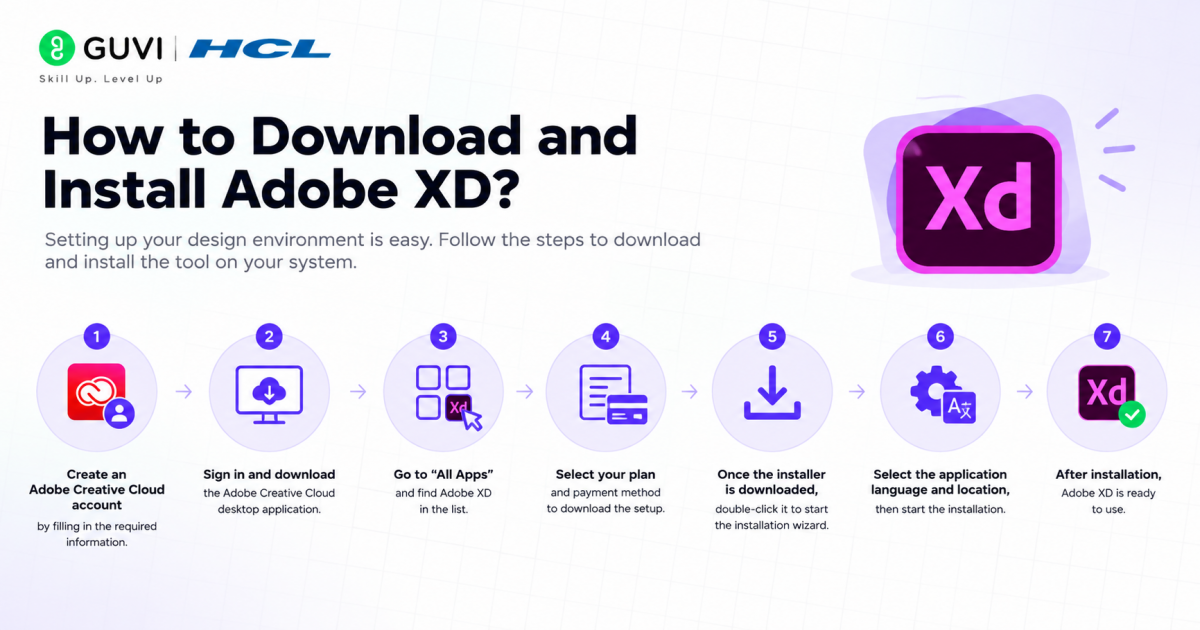
Setting up your design environment is easy. Follow the steps to download and install the tool on your system.
- Step 1 – Create an Adobe Creative Cloud account by filling in the required information.
- Step 2 – Sign in and download the Adobe Creative Cloud desktop application.
- Step 3 – Go to “All Apps” and find Adobe XD in the list.
- Step 4 – Select your plan and payment method to download the setup.
- Step 5 – Once the installer is downloaded, double-click it to start the installation wizard.
- Step 6 – Select the application language and location, then start the installation.
- Step 7 – After installation, Adobe XD is ready to use.
Also Read: How to Install Adobe XD on Windows? A Step-by-Step Guide
Master Figma at your own pace with HCL GUVI’s Figma UI/UX Design Masterclass, featuring 6 hours of self-paced content and hands-on projects. Enroll today and turn your design ideas into a job-ready portfolio!
Features of Adobe XD
Among the design tools available on the market, UI/UX designers once gravitated toward this platform for its specific features. Let’s look at a few of the most prominent ones:
- User Interface (UI) Design: Widely used for designing the visual elements of user interfaces, including layouts, buttons, icons, and other graphical elements.
- Prototyping: A key feature is its prototyping capabilities, letting designers create interactive prototypes to simulate user interactions.
- Wireframing: Often used for creating wireframes, low-fidelity representations that help plan structure and layout.
- Responsive Design: Allows designers to create responsive designs that adapt to different screen sizes and resolutions.
- Collaboration: Includes collaboration features that let designers work together, though this remains one of its weaker areas compared to Figma.
- Design Systems: Supports creating and managing design systems with reusable components and styles.
- User Flow Diagrams: Used to create user flow diagrams illustrating the paths users take through a digital product.
- Animations: Supports simple animations, allowing designers to add motion to prototypes.
- User Testing: Prototypes can be used for user testing and to gather usability feedback.
- Integration with Other Tools: Integrates with Photoshop, Illustrator, and third-party plugins for a smoother workflow.
Adobe XD vs Figma vs Sketch in 2026 — Which Is Better? (Honest Comparison)
This is the question every beginner is actually asking in 2026, and the honest answer requires looking past feature lists into what each tool’s future actually looks like.
| Feature | Adobe XD | Figma | Sketch | Winner |
|---|---|---|---|---|
| Active development | None; maintenance mode only since 2024 | Continuously updated, industry leader | Actively updated, Mac-only | Figma |
| Real-time collaboration | Limited, always secondary to design work | Best-in-class, built into the core experience | Good, added later via Sketch Cloud | Figma |
| Platform availability | Windows and Mac only | Browser-based, works on any OS | Mac only | Figma |
| Pricing model | Bundled into Creative Cloud plans (~$54.99+/month) | Free tier available; paid plans scale per seat | Standalone pricing, roughly mid-range | Figma (free tier) |
| Learning resources in 2026 | Shrinking, since most new tutorials target Figma | Abundant, the default choice in most courses | Solid but smaller community | Figma |
| Best for | Existing XD projects and Creative Cloud-locked teams | New learners, teams, freelancers, almost everyone | Mac-based solo designers who prefer its workflow | Figma |
Figma has effectively won this comparison, not because it lacks features, but because Adobe itself stopped investing in it after a blocked acquisition attempt left the product without a clear future.
Sketch remains a solid, actively maintained alternative for Mac-only workflows, but for most new learners in 2026, Figma is the safer and more employable skill to build.
Is Adobe XD Still Being Updated? Future of XD
Here’s the direct answer: no, not in any meaningful way. Adobe confirmed in 2024 that XD has entered maintenance mode, meaning the company will continue fixing bugs and addressing security issues, but will not build new features or push the product forward.
A quick timeline of what actually happened:
- 2023: Adobe attempted to acquire Figma in a deal reportedly worth around $20 billion. Regulators in the UK and EU blocked the acquisition over competition concerns.
- Mid-2023: Adobe XD stopped being sold as a standalone application to new customers.
- 2024: Adobe officially confirmed XD had entered maintenance mode, with no further feature investment planned.
- 2026: XD remains accessible to existing Creative Cloud subscribers, but there’s no public roadmap, no new features, and no officially announced end-of-life date.
What this means practically: existing files still open, existing subscribers can still use the app, and Adobe is still patching security issues. But there’s no plugin ecosystem growth, no new collaboration features, and no reason to expect that to change.

Some industry commentary suggests real usability concerns could surface anywhere between 2027 and 2029 as the surrounding ecosystem (OS updates, plugin compatibility) moves on without corresponding XD updates.
Adobe XD Free vs Paid Plan — What Do You Actually Get?
Its pricing has changed substantially from the earlier “$9.99/month standalone app” days, and it’s worth being clear about what’s actually available now.
Historically, Adobe offered a free “Starter Plan”: a genuinely free tier for personal use, including desktop design and prototyping tools, but with usage limits on premium sharing and collaboration features. This was aimed at students and hobbyists learning UI/UX, not professional teams.
In practice today, most new users only get access through:
- Creative Cloud All Apps (or Pro/Standard) plan: bundles XD alongside 20+ Adobe applications like Photoshop and Illustrator, priced from roughly $54.99 to $69.99 per month depending on the current plan structure.
- Existing Creative Cloud subscriptions: if your organization already pays for Creative Cloud, XD is included at no additional cost, since it’s bundled rather than sold separately.
What you don’t get anymore: a low-cost, XD-only subscription. The old $9.99/month standalone plan is gone, which means the realistic entry cost for a beginner who only wants XD is the full Creative Cloud plan price, not a lightweight single-app fee.
The practical implication: if you’re evaluating cost purely to learn UI/UX design, Figma’s genuinely free tier (with real, current feature support) is a significantly cheaper way to start than paying for a full Creative Cloud plan just to access a tool that isn’t receiving new features anyway.
Top Use Cases of Adobe XD
Adobe XD is a flexible tool that can support a wide range of design projects. Some popular uses include:
- Mobile App Design: Creating the entire user interface and interactive prototypes for mobile applications.
- Website Redesign: Visualizing and prototyping new layouts and navigation before development begins.
- E-commerce Platform Design: Designing online shopping experiences, including product pages and checkout flows.
- Dashboard Design: Creating dashboards with intuitive layouts for data visualization and analytics.
- Social Media App Design: Designing interfaces for social platforms, considering profiles, feeds, and interaction patterns.
- Educational App Prototyping: Prototyping educational apps with interactive quizzes, lessons, and progress tracking.
- Healthcare Interface Design: Designing interfaces for healthcare applications for patients, doctors, and administrators.
Benefits of Using Adobe XD
Some of the benefits UI/UX designers historically got from this tool:
- Efficiency and time-saving
- User-centric design
- Streamlined collaboration (though now behind Figma’s real-time capabilities)
- Cross-platform compatibility on Windows and Mac
Adobe XD for Beginners — How to Start in 2026
If you’ve read this far, you already know the honest recommendation: most working designers in 2026 would point a genuine beginner toward Figma first.
That said, here’s how to start with Adobe XD specifically, if you already have Creative Cloud access or need to work with existing XD files.
1. Confirm you actually need XD. If you’re learning UI/UX from scratch with no existing XD files or team requirement, skip ahead and start with Figma’s free tier instead; it’ll teach you transferable skills on a tool that’s still actively developed.
2. Get access through Creative Cloud. Since there’s no standalone plan anymore, you’ll need a Creative Cloud All Apps or Pro/Standard subscription, or access through a school or employer that already has one.
3. Start with the basics: artboards and shapes. Learn to create artboards for different screen sizes, then practice basic vector shapes and layout tools.
4. Move into wireframing before high-fidelity design. Build low-fidelity wireframes first to nail down structure before investing time in visual polish.
5. Practice prototyping links between screens. This is where XD’s interactive prototyping features shine, letting you connect screens to simulate real app flows.
6. Export and share for feedback. Use XD’s sharing links to get feedback, keeping in mind collaboration here is more limited than Figma’s real-time equivalent.
7. Keep your portfolio tool-agnostic. Whatever you build, document your process and decisions in a way that translates to any tool, since your next employer is more likely to use Figma than XD.
Conclusion
This tool played a genuinely important role in shaping modern UI/UX workflows, and its core features (prototyping, wireframing, design systems) remain conceptually solid even today.
But the honest, current picture in 2026 is that Adobe has stopped investing in the product, and Figma has become the default choice for new learners and most professional teams.
If you already work within an XD-based team or have existing project files, there’s no urgent need to abandon it. But if you’re a beginner deciding where to invest your learning time, the more future-proof choice is clear, and it’s not Adobe XD.
FAQs
1. Is Adobe XD still being updated?
No. Adobe put it in maintenance mode in 2024. Only bug fixes and security patches now, no new features.
2. Is Adobe XD still worth learning in 2026?
Only if you already use Creative Cloud or have existing XD files. Beginners should start with Figma instead.
3. What is Adobe XD used for?
It’s a vector tool for UI/UX design and prototyping. Think wireframes, interactive prototypes, design systems, and user flow diagrams.
4. What are the main features of Adobe XD?
UI design, prototyping, wireframing, responsive design, design systems, user flow diagrams, animations, and integration with Photoshop and Illustrator.
5. How is Adobe XD different from Figma?
Figma is browser-based and includes built-in real-time collaboration. XD is desktop-only and collaboration is more limited.
Success Stories














Did you enjoy this article?