


Artificial Intelligence and Machine Learning Articles
AI/ML Skills Gap 2026: Why Companies Can't Find Job-Ready Talent
20 AI/ML Interview Questions Recruiters Can Use Without a Tech Background - Best Guide
How Industry-Backed AI/ML Bootcamps Are Changing the AI/ML Hiring Pipeline - Best Guide 2026
From IT Support to AI Engineer: A Realistic Career Switch Guide 2026


Get In Touch For Details! Request More Information
Claude for Creating Online Course Outlines and Modules
Aug 06, 2026 2 Min Read 223 Views
(Last Updated)
Creating Online Course Outlines and Modules on Claude is useful in course creation because it can take a broad idea and break it into a structured learning journey. That makes it easier to move from “I know this topic” to “I have a course people can follow.”
Table of contents
- TL;DR Summary
- What Claude Can Do
- Course Planning
- Module Structuring
- Lesson Support
- How To Prompt Claude
- Include These Details
- Best Workflow
- A Simple Process for Creating Online Course Outlines and Modules
- Comparison Table
- Common Mistakes
- Real-World Example
- What To Do Next
- Conclusion
- FAQs
- Can Claude create a full course outline?
- What should I include in my prompt?
- Can Claude write lesson content too?
- How do I make the outline better?
- Is Claude enough to build the whole course?
TL;DR Summary
- Claude helps turn expertise into a teachable course structure.
- It is useful for outlining modules, lessons, and learning objectives.
- Clear goals and audience details improve the quality of the outline.
- Claude can also help draft lesson content and assessments.
- Human review is still needed to make the course practical and coherent.
| Direct Answer Box: is a strong tool for turning course ideas into structured outlines and modules. It works best when you give it a clear transformation goal, audience, and topic sequence so it can build a logical learning path. |
What Claude Can Do
Claude can help organize your expertise into modules, lessons, and outcomes. It is especially helpful when you already know the subject but need help turning it into a course format.
1. Course Planning
Claude can help you define the course promise, target audience, and final outcome. From there, it can build a high-level curriculum that feels purposeful instead of random.
2. Module Structuring
Claude can break a course into modules and lessons that follow a logical order. This is useful when you want the material to progress from basics to more advanced concepts.
3. Lesson Support
Claude can also draft lesson summaries, examples, exercises, and review questions. That makes it easier to expand each module into actual teaching material.
How To Prompt Claude
Claude gives better results when your prompt includes the course outcome and audience. The more specific you are about what students should achieve, the stronger the structure usually becomes.
Include These Details
- Course topic.
- Target audience.
- Skill level.
- Main transformation or result.
- Expected course length.
- Preferred teaching style.
Do not just ask for a course outline. Ask for modules, lesson titles, learning objectives, and suggested exercises so the result is more usable.
Best Workflow
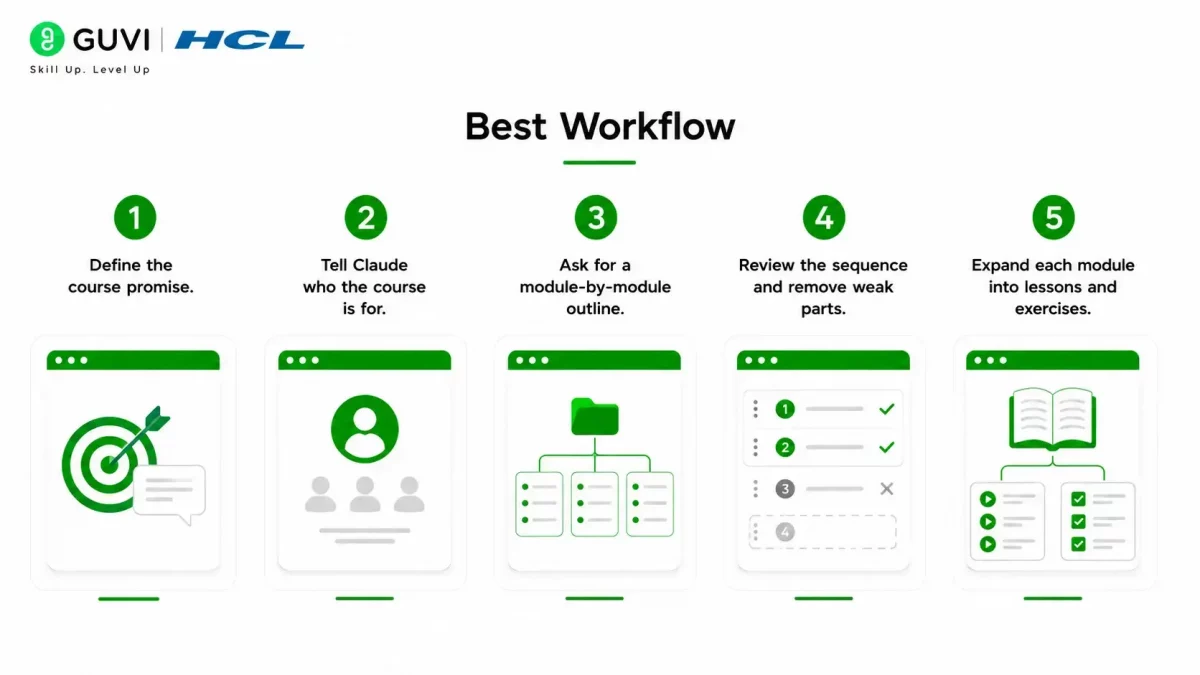
The best workflow is to start broad, then refine. Claude can help you create the first version quickly, and then you can tighten it based on your teaching style and student needs.
A Simple Process for Creating Online Course Outlines and Modules
- Define the course promise.
- Tell Claude who the course is for.
- Ask for a module-by-module outline.
- Review the sequence and remove weak parts.
- Expand each module into lessons and exercises.
This approach keeps the course focused on learning outcomes instead of just covering information. That matters because students need a path, not just a pile of topics.
Comparison Table
| Task | Claude’s Strength | Your Role |
| Course outline | Fast structural planning | Define the transformation |
| Modules and lessons | Logical sequencing | Approve the flow |
| Learning objectives | Clear draft objectives | Make them measurable |
| Lesson expansion | Draft content and examples | Add expertise and nuance |
| Assessment ideas | Suggest quizzes and exercises | Check relevance and difficulty |
Claude is especially useful when you already have notes, blog posts, or transcripts and want to turn them into a teachable course. It can also help you spot gaps in the learning flow before you build the full course.

Common Mistakes
The most common mistake is making the course too topic-heavy and not outcome-driven. A good course should guide a learner toward a result, not just explain a subject.
Avoid:
- Starting without a clear student outcome.
- Overloading modules with too many lessons.
- Skipping review of the lesson order.
- Using vague prompts with no audience context.
- Treating the first outline as final.
Create clear online course outlines and modules faster with Claude. Learn AI & Machine Learning with HCL GUVI’s artificial intelligence and machine learning courses.
Real-World Example
If you want to create a course on email marketing, Claude can outline beginner, intermediate, and advanced modules. It can also suggest lesson titles like list building, segmentation, copywriting, and campaign optimization.
What To Do Next
Start with one course idea and write a short prompt that includes your audience, goal, and outcome. Then ask Claude for a module structure, review the order, and expand each module into lessons only after the backbone feels right.
Conclusion
Claude is a practical assistant for building online course outlines and modules because it helps turn expertise into structure. It is most effective when you give it a clear transformation goal and then refine the outline with your own instructional judgment.
FAQs
1. Can Claude create a full course outline?
Yes, Claude can create a full outline with modules, lessons, and learning objectives.
2. What should I include in my prompt?
Include the topic, audience, skill level, course goal, and desired outcome.
3. Can Claude write lesson content too?
Yes, it can help draft lessons, examples, exercises, and quiz ideas.
4. How do I make the outline better?
Give Claude a clear transformation goal and review the sequence for logic and completeness.
5. Is Claude enough to build the whole course?
Claude can speed up the process, but you still need to review, refine, and add your own subject expertise.
Success Stories

About the Author
HCL GUVI
This article was selected and published as part of the HCL GUVI AI Blogathon 2026, an initiative designed to encourage students, AI enthusiasts, and aspiring tech writers to simplify complex AI concepts through impactful technical content. The contest recognized high-quality, original, and insightful AI-focused blogs, with selected authors receiving publication opportunities on the HCL GUVI blog platform along with official author credits and recognition.
View all posts by HCL GUVI
Connect with me @













Did you enjoy this article?