


Artificial Intelligence and Machine Learning Articles
AI/ML Skills Gap 2026: Why Companies Can't Find Job-Ready Talent
20 AI/ML Interview Questions Recruiters Can Use Without a Tech Background - Best Guide
How Industry-Backed AI/ML Bootcamps Are Changing the AI/ML Hiring Pipeline - Best Guide 2026
From IT Support to AI Engineer: A Realistic Career Switch Guide 2026


Get In Touch For Details! Request More Information
Claude and Notion: Build a Personal Knowledge Base
Jul 29, 2026 4 Min Read 288 Views
(Last Updated)
Table of contents
- TL;DR Summary Box
- Why Claude + Notion Works
- What A Personal Knowledge Base Is
- How Claude Helps
- How Notion Helps
- The Best Setup
- Smart Ways To Use Claude
- Knowledge Base Workflow
- What To Store
- Common Mistakes
- Real-World Example
- What Makes It Sustainable
- What To Do Next
- Conclusion
- FAQs
- What is a personal knowledge base?
- Why use Claude with Notion?
- What should I store in a knowledge base?
- Is Claude good for organizing notes?
- Should I build a complex Notion system first?
- How do I keep a knowledge base useful?
- What is the biggest mistake people make?
TL;DR Summary Box
- Claude and Notion work well together when Notion stores the knowledge, and Claude helps you retrieve, refine, and organize it.
- The best setup is not a messy dump of notes; it is a clean system with pages, tags, and clear relationships.
- Claude can help you turn scattered notes into summaries, action items, and searchable knowledge entries.
- A good knowledge base is useful only if you can find things later, so structure matters more than volume.
- Start small with one workflow, then expand into projects, tasks, and reference libraries.
Why Claude + Notion Works
Claude and Notion complement each other nicely. Notion is great for storing information, while Claude is great for making sense of it, rewriting it, and turning it into something useful.
The real value comes when you stop treating your notes as static documents. Instead, you use them as a living knowledge base that you can query, reshape, and improve over time.
If you already collect articles, meeting notes, ideas, or research snippets, Claude can help you turn that clutter into a system. That means less time hunting for information and more time using it.
Build a personal knowledge base with Claude + Notion to organize, search, and reuse your notes smarter. Learn AI & ML with HCL GUVI’s Artificial Intelligence and Machine Learning course.
What A Personal Knowledge Base Is
A personal knowledge base is a system for saving, organizing, and reusing information you care about. It is more than a notes app. It is where your learning, ideas, plans, and references live in a way that you can actually retrieve later.
A good knowledge base usually includes:
- Notes from reading and learning.
- Project documentation.
- Task follow-ups.
- Research summaries.
- Templates and reusable frameworks.
- A place to store decisions and context.
The key is not just collecting data. The key is making it searchable, structured, and easy to revisit.
How Claude Helps
Claude can act like the thinking layer on top of Notion. It can summarize long notes, suggest labels, clean up vague writing, and turn raw material into something structured.
Useful Claude tasks include:
- Turning rough notes into clean summaries.
- Extracting action items from meeting notes.
- Rewriting scattered ideas into a proper page.
- Comparing similar notes and removing duplicates.
- Creating outlines for long topics.
- Suggesting tags, titles, or categories.
This is especially helpful when your Notion workspace starts growing. Instead of manually organizing every page, you can ask Claude to help shape the structure.
How Notion Helps
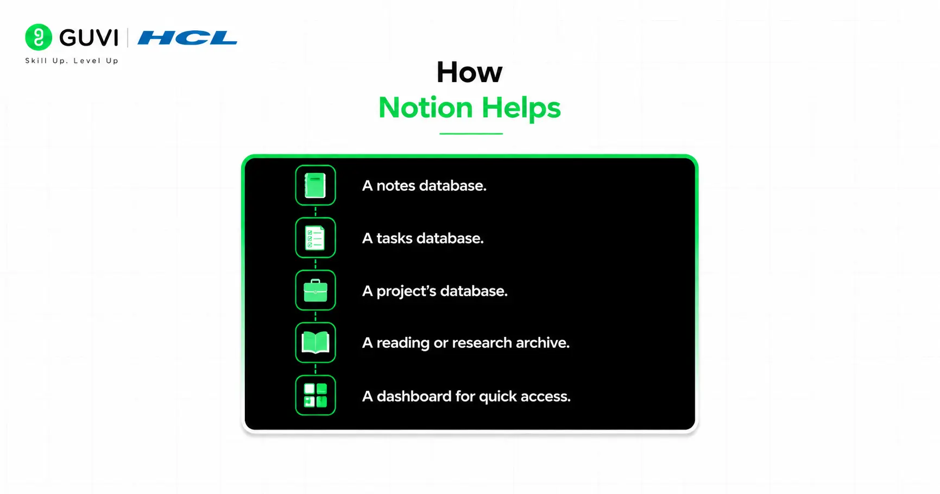
Notion is where the system lives. It gives you pages, databases, links, properties, filters, and views that make knowledge easier to organize.
A strong setup usually has a few core areas:
- A notes database.
- A tasks database.
- A project’s database.
- A reading or research archive.
- A dashboard for quick access.
That structure matters because a knowledge base is only useful if it is navigable. If everything is dumped into one giant page, it becomes harder to use over time.
The Best Setup
The best Claude + Notion setup is simple at first. Start with one page or database for knowledge capture, one place for tasks, and one place for ongoing projects.
A practical structure might look like this:
- Capture raw notes in one inbox.
- Ask Claude to summarize and clean them.
- Move the final note into the right Notion database.
- Add tags like topic, priority, and source.
- Link related pages together.
This gives you a system that grows without becoming chaotic. It is better to have a small, reliable setup than a complicated one you never maintain.
Smart Ways To Use Claude
Claude works best when you give it a clear job. Instead of saying “organize my notes,” give it a specific outcome.
For example:
- “Turn this rough note into a clean reference page.”
- “Extract action items and next steps.”
- “Summarize this article in 5 bullets.”
- “Create a title and 3 tags for this note.”
- “Rewrite this draft so it fits a knowledge base format.”
💡 Pro Tip: Ask Claude to keep the output short and structured. Shorter notes are easier to scan later, which matters more than having polished but bloated pages.
Knowledge Base Workflow
A useful personal knowledge base should fit your real habits. If you only use it once in a while, it will not help much. The best systems are built around repeated routines.
Here is a simple workflow:
- Capture something useful.
- Paste it into Notion.
- Ask Claude to summarize it.
- Save the cleaned version.
- Link it to a project or topic.
- Review related notes weekly.
This turns your knowledge base into a working system instead of a digital archive. Over time, you build a library that supports learning, writing, planning, and decision-making.

What To Store
Not everything belongs in your knowledge base. If you save too much, the system gets noisy and harder to search.
Good candidates include:
- Ideas worth revisiting.
- Meeting takeaways.
- Project notes.
- Research summaries.
- How-to checklists.
- Useful frameworks.
- Personal lessons learned.
Things like random screenshots, duplicate notes, and half-finished thoughts should be cleaned up or merged. The goal is useful memory, not maximum storage.
Common Mistakes
The biggest mistake is overbuilding too early. Many people create complex databases, filters, and dashboards before they have a habit of using them.
Other common mistakes include:
- Saving too many unrelated notes.
- Not using tags consistently.
- Making page titles too vague.
- Never reviewing old notes.
- Keeping raw notes and final notes mixed.
- Using Claude to write everything but never refining the structure.
Another mistake is treating the knowledge base like a filing cabinet. It should be more like a workspace that helps you think, not just store.
Real-World Example
Imagine you read five articles about AI productivity. Instead of leaving them as separate browser tabs, you paste the key points into Notion, ask Claude to summarize each one, then tag them under “AI tools” and “workflow design.”
Later, when you need to build a new process, you can search one topic and instantly find all the relevant notes. That saves time and keeps your ideas connected.
This is where Claude adds real value. It helps convert scattered input into structured memory.
What Makes It Sustainable
A knowledge base only works if you keep using it. That means the setup needs to be fast, simple, and low-friction.
To keep it sustainable:
- Use one capture inbox.
- Review notes on a schedule.
- Keep titles descriptive.
- Use the same tags every time.
- Delete or merge weak notes.
- Ask Claude to standardize formatting.
When your system stays simple, it becomes easier to trust. And when you trust it, you use it more often.
Build a personal knowledge base with Claude + Notion to organize, search, and reuse your notes smarter. Learn AI & ML with HCL GUVI’s Artificial Intelligence and Machine Learning course.
What To Do Next
Start with one narrow use case. For example, use Claude to clean up reading notes or meeting notes before expanding into bigger workflows.
A good next step is to create three parts in Notion:
- Capture.
- Organize.
- Review.
Then let Claude help you move notes from raw to structured. Once that habit sticks, you can add project tracking, task management, and research folders.
Conclusion
Claude + Notion is a strong combination for building a personal knowledge base because it blends thinking and storage. Claude helps you refine and organize information, while Notion keeps it accessible and linked to real work.
The best knowledge bases are not the biggest ones. They are the ones you can search, trust, and actually use when it matters.
FAQs
1. What is a personal knowledge base?
A personal knowledge base is a system for storing, organizing, and reusing information you want to find later. It usually includes notes, ideas, research, tasks, and project context.
2. Why use Claude with Notion?
Claude helps clean, summarize, and structure information, while Notion stores and organizes it. Together, they make notes more useful and easier to search.
3. What should I store in a knowledge base?
Store useful things like project notes, research summaries, meeting takeaways, checklists, and ideas worth revisiting. Avoid dumping in random, unorganized content.
4. Is Claude good for organizing notes?
Yes. Claude can turn rough notes into summaries, action items, titles, tags, and structured pages that fit better inside Notion.
5. Should I build a complex Notion system first?
No. Start simple with one inbox, one project area, and one review routine. You can always add more structure later.
6. How do I keep a knowledge base useful?
Review it regularly, keep tags consistent, and make sure every note has a clear purpose. If a note will never be used again, it probably does not need to stay.
7. What is the biggest mistake people make?
They overbuild the system and underuse it. A knowledge base only works when it is easy enough to maintain every day.
Success Stories

About the Author
Vishalini Devarajan
An Aerospace Engineer turned content writer, I focus on making complex concepts easy to understand through well-structured, reader-friendly blogs. Whether it’s a technical topic or a non-technical one, I love creating content that is clear, engaging, and impactful.
View all posts by Vishalini Devarajan
Connect with me @










Did you enjoy this article?