


Artificial Intelligence and Machine Learning Articles
AI/ML Skills Gap 2026: Why Companies Can't Find Job-Ready Talent
20 AI/ML Interview Questions Recruiters Can Use Without a Tech Background - Best Guide
How Industry-Backed AI/ML Bootcamps Are Changing the AI/ML Hiring Pipeline - Best Guide 2026
From IT Support to AI Engineer: A Realistic Career Switch Guide 2026


Get In Touch For Details! Request More Information

Claude System Prompts: How to Write Them Effectively
Aug 07, 2026 4 Min Read 410 Views
(Last Updated)
AI applications need clear instructions to deliver accurate and consistent responses, and that’s where Claude System Prompts make a difference. They define Claude’s role, behavior, and communication style before conversations begin. In this guide, you’ll learn how to write effective Claude System Prompts with practical examples.
Table of contents
- TL;DR
- What Are Claude System Prompts?
- How Claude System Prompts Work
- System Prompts vs User Prompts
- How to Write Claude System Prompts Effectively
- Define Claude's Role
- Add Context, Rules, and Constraints
- Specify the Output Format and Use Clear Instructions
- Claude System Prompt Examples
- Customer Support Assistant
- Python Programming Tutor
- SEO Content Writing Assistant
- Best Practices for Claude System Prompts
- Common Mistakes to Avoid
- Tips for Better Prompt Engineering
- Conclusion
- FAQs
- What are Claude System Prompts?
- Why are Claude System Prompts important?
- What should a good Claude System Prompt include?
- How are Claude System Prompts different from user prompts?
- Can Claude follow multiple instructions in one system prompt?
- Can developers modify Claude System Prompts?
- What are the common mistakes to avoid when writing Claude System Prompts?
TL;DR
- Claude System Prompts define how Claude behaves throughout a conversation.
- They improve response quality, consistency, and reliability.
- Effective prompts specify the AI’s role, objectives, constraints, context, and output format.
- Clear instructions and examples help Claude generate more accurate responses.
- Strong prompt engineering leads to more dependable AI applications.
What Are Claude System Prompts?
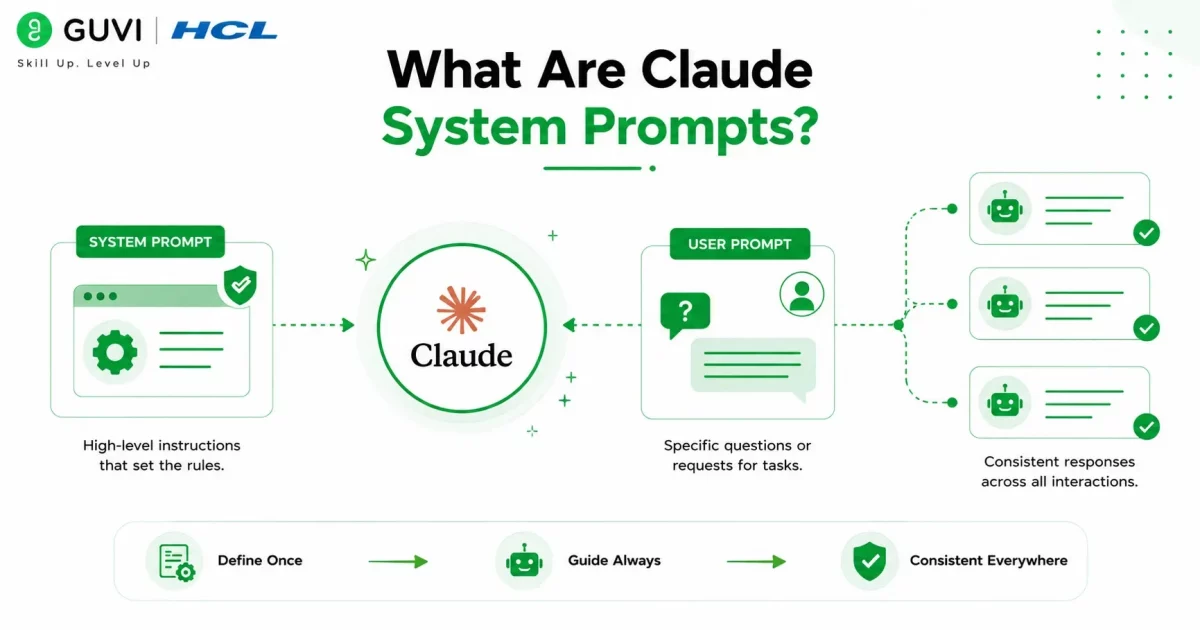
Claude System Prompts are high-level instructions that guide Claude’s behavior throughout an entire conversation. Unlike user prompts, which request individual tasks, system prompts establish the rules Claude should consistently follow from the beginning of the interaction.
Think of a system prompt as the AI’s job description. Instead of repeating expectations in every request, developers define them once so Claude can respond consistently across multiple interactions.
A typical system prompt can instruct Claude to:
- Act as a Python programming instructor.
- Explain concepts using beginner-friendly language.
- Keep answers concise unless more detail is requested.
- Avoid unsupported assumptions.
- Format code using Markdown.
Because these instructions remain active throughout the conversation, Claude delivers more predictable and reliable responses.
How Claude System Prompts Work
Before Claude processes a user’s message, it first follows the instructions defined in the system prompt. These instructions establish a behavioral framework that guides every response.
A well-written system prompt typically defines:
- Claude’s role or expertise
- The conversation’s objective
- Rules the model should always follow
- Information to prioritize or avoid
- Preferred response format and writing style
For example, if Claude is configured as a customer support assistant, it can be instructed to remain polite, avoid speculation, provide concise answers, and recommend human support whenever necessary. These rules help maintain consistent behavior throughout the conversation.
System Prompts vs User Prompts
Although both influence Claude’s responses, they serve different purposes.
| Feature | System Prompt | User Prompt |
| Purpose | Defines Claude’s overall behavior | Requests a specific task |
| Scope | Entire conversation | Single interaction |
| Written By | Developer or application | End user |
| Example | “You are a cybersecurity expert.” | “Explain phishing attacks.” |
Simply put, system prompts define how Claude responds, while user prompts define what Claude responds to.
Well-designed system prompts can significantly improve Claude’s response quality and consistency. According to Anthropic’s Prompt Engineering documentation, defining the assistant’s role, objectives, constraints, relevant context, and desired output format before user interaction helps produce more accurate, reliable, and predictable responses.
Source: Anthropic Prompt Engineering Documentation
How to Write Claude System Prompts Effectively
Writing effective Claude System Prompts isn’t about using complex language—it’s about giving Claude clear, structured instructions. A good system prompt defines the assistant’s role, explains how it should respond, and establishes rules that remain consistent throughout the conversation.
1. Define Claude’s Role
Start by assigning Claude a specific role. A clearly defined role helps the model understand the perspective it should adopt when responding to users.
For example, you can instruct Claude to act as:
- A Python programming instructor
- A cybersecurity consultant
- A technical documentation writer
- A customer support specialist
- An SEO content strategist
A specific role helps Claude generate responses that better match the intended audience and use case.
2. Add Context, Rules, and Constraints
Once you’ve defined Claude’s role, provide the context and instructions it needs to perform effectively.
For example, instead of simply writing:
Explain Python.
Provide additional context like:
You are teaching first-year computer science students with no programming experience. Explain Python using simple language and practical examples.
You should also establish clear rules, such as:
- Use verified information whenever possible.
- Admit uncertainty instead of guessing.
- Ask follow-up questions if requirements are unclear.
- Avoid unsupported claims.
- Keep explanations concise unless detailed answers are requested.
Adding context and constraints makes Claude’s responses more accurate, predictable, and aligned with your application’s objectives.
3. Specify the Output Format and Use Clear Instructions
If you expect Claude to respond in a particular format, mention it directly in the system prompt.
Common output formats include:
- Bullet-point summaries
- Step-by-step tutorials
- Markdown tables
- JSON responses
- HTML output
- Python code with explanations
Be as specific as possible. For example, instead of saying:
Don’t write long answers.
Use:
Keep responses under 200 words unless the user requests a detailed explanation.
Clear, positive instructions reduce ambiguity and help Claude consistently generate the desired output.
Download HCL GUVI’s free AI eBook to explore prompt engineering, large language models (LLMs), generative AI concepts, and practical AI applications with easy-to-follow explanations and real-world examples.

Claude System Prompt Examples
The easiest way to understand system prompts is by looking at practical examples. Below are three common use cases.
Customer Support Assistant
A customer support chatbot should provide accurate information while maintaining a professional and empathetic tone.
A system prompt might instruct Claude to:
- Respond politely and professionally.
- Keep answers concise and accurate.
- Admit when information is unavailable.
- Recommend contacting human support when necessary.
- Maintain a friendly tone throughout the conversation.
These instructions help deliver a consistent customer support experience.
Python Programming Tutor
For educational applications, the system prompt should encourage beginner-friendly explanations.
Example instructions include:
- Explain concepts step by step.
- Use simple language.
- Include working Python examples.
- Highlight common beginner mistakes.
- Encourage practice after each lesson.
These guidelines make technical topics easier for new learners to understand.
SEO Content Writing Assistant
Content creation tools can use system prompts to maintain consistent writing quality and SEO standards.
Typical instructions include:
- Write engaging and informative content.
- Use descriptive headings and short paragraphs.
- Follow SEO best practices naturally.
- Maintain a professional yet conversational tone.
- Avoid keyword stuffing and unsupported claims.
This helps Claude generate content that is both reader-friendly and optimized for search engines.
Master prompt engineering and build AI-powered applications with HCL GUVI’s AI & Machine Learning Course. Learn prompt engineering, large language models (LLMs), generative AI, machine learning, and practical AI development through hands-on projects guided by industry experts.
Best Practices for Claude System Prompts

Even a well-written prompt can be improved through testing and refinement. Following a few best practices helps ensure your system prompts remain effective as your application evolves.
Common Mistakes to Avoid
Avoid these common prompt engineering mistakes:
- Writing vague or ambiguous instructions.
- Including conflicting guidance.
- Providing insufficient context.
- Adding sensitive information such as passwords or API keys.
- Skipping prompt testing before deployment.
Removing these issues makes Claude’s responses more reliable and consistent.
Tips for Better Prompt Engineering
Follow these best practices when writing Claude System Prompts:
- Clearly define Claude’s role and objective.
- Provide enough context for the intended audience.
- Use specific, measurable instructions.
- Specify the desired output format.
- Test prompts with different user inputs.
- Refine prompts based on the responses you receive.
Small improvements can significantly increase response quality, consistency, and overall application performance.
Conclusion
Claude System Prompts are essential for building reliable and consistent AI applications. By clearly defining Claude’s role, objectives, constraints, context, and output format, developers can improve response quality while reducing inconsistencies and unwanted outputs. Whether you’re creating a chatbot, coding assistant, customer support solution, or content generation tool, well-written system prompts help Claude deliver more accurate and context-aware responses. As prompt engineering continues to evolve, learning how to write effective Claude System Prompts will remain an important skill for developers and AI practitioners.
FAQs
1. What are Claude System Prompts?
Claude System Prompts are predefined instructions that define how Claude behaves throughout an entire conversation. They specify the assistant’s role, objectives, communication style, constraints, and output format before users begin interacting with the AI.
2. Why are Claude System Prompts important?
Claude System Prompts improve response quality, maintain consistent behavior, reduce hallucinations, and help AI applications generate reliable and predictable outputs across different user interactions.
3. What should a good Claude System Prompt include?
A good Claude System Prompt should define the AI’s role, provide relevant context, establish clear rules and constraints, specify the desired output format, and use clear, specific instructions.
4. How are Claude System Prompts different from user prompts?
System prompts define Claude’s overall behavior throughout the conversation, whereas user prompts are individual instructions or questions that request a specific task.
5. Can Claude follow multiple instructions in one system prompt?
Yes. Claude can follow multiple well-structured instructions within a single system prompt, provided they are clear, logically organized, and do not conflict with one another.
6. Can developers modify Claude System Prompts?
Yes. Developers can update or replace Claude System Prompts whenever application requirements change. The revised prompt will guide Claude’s behavior in future conversations.
7. What are the common mistakes to avoid when writing Claude System Prompts?
Some common mistakes include writing vague instructions, providing conflicting guidance, omitting important context, including sensitive information, and failing to test prompts before deployment.
Success Stories

About the Author
Vishalini Devarajan
An Aerospace Engineer turned content writer, I focus on making complex concepts easy to understand through well-structured, reader-friendly blogs. Whether it’s a technical topic or a non-technical one, I love creating content that is clear, engaging, and impactful.
View all posts by Vishalini Devarajan
Connect with me @













Did you enjoy this article?