


Artificial Intelligence and Machine Learning Articles
AI/ML Skills Gap 2026: Why Companies Can't Find Job-Ready Talent
20 AI/ML Interview Questions Recruiters Can Use Without a Tech Background - Best Guide
How Industry-Backed AI/ML Bootcamps Are Changing the AI/ML Hiring Pipeline - Best Guide 2026
From IT Support to AI Engineer: A Realistic Career Switch Guide 2026


Get In Touch For Details! Request More Information

How to Fine-Tune Claude for Your Domain (And When You Shouldn’t)
Aug 05, 2026 4 Min Read 579 Views
(Last Updated)
If you’ve worked with open-source large language models (LLMs), you’re probably familiar with fine-tuning—training a pre-trained model on your own dataset to improve performance for a specific task. Naturally, many developers ask the same question when using Claude: Can I fine-tune Claude for my company’s data or domain?
The answer is more nuanced than a simple yes or no. Unlike many open-source models, Claude is primarily customized through prompt engineering, system prompts, Retrieval-Augmented Generation (RAG), tool use, and other API capabilities rather than traditional weight-level fine-tuning. Understanding these options helps you choose the right approach for your use case. In this article, you’ll learn what fine-tuning is, how domain adaptation works with Claude, when to use alternatives like RAG, and best practices for building domain-specific AI applications.
Table of contents
- TL;DR Summary
- What Is Fine-Tuning?
- Can You Fine-Tune Claude?
- Why Not Fine-Tune Everything?
- Domain Adaptation Options for Claude
- When Should You Use RAG Instead?
- How System Prompts Improve Domain Expertise
- Where Tool Use Fits In
- Fine-Tuning vs RAG vs Prompt Engineering
- Common Business Use Cases
- Common Mistakes
- Real-World Example
- Best Practices for Domain-Specific Claude Applications
- Conclusion
- FAQs
- Can I fine-tune Claude like an open-source LLM?
- What is the best way to give Claude access to company documents?
- When should I use Tool Use instead of RAG?
- Do system prompts replace fine-tuning?
- Can I combine RAG, Tool Use, and system prompts?
- Is fine-tuning always the best option for domain adaptation?
TL;DR Summary
- Fine-tuning modifies a model’s learned parameters using custom data.
- Claude is commonly customized using prompts, RAG, and Tool Use rather than traditional fine-tuning.
- RAG is often a better choice for frequently changing knowledge.
- Prompt engineering is ideal for defining behavior and tone.
- Tool Use allows Claude to access live business data and external systems.
- Choose the customization method based on your application’s needs.
What Is Fine-Tuning?

Fine-tuning is the process of continuing a pretrained model’s training using a smaller, task-specific dataset. The goal is to adapt the model to a particular domain, writing style, or specialized task while retaining its general language capabilities.
Organizations commonly fine-tune models for:
- Customer support
- Legal document analysis
- Medical text classification
- Financial reporting
- Industry-specific terminology
- Code generation
Fine-tuning changes the model itself rather than simply changing the prompt.
Can You Fine-Tune Claude?
For most developers using the Claude API, customization focuses on inference-time techniques instead of traditional parameter-level fine-tuning.
These techniques include:
- System prompts
- Prompt engineering
- Retrieval-Augmented Generation (RAG)
- Tool Use (Function Calling)
- Conversation memory
- Structured workflows
This approach enables developers to tailor Claude’s behavior and knowledge without maintaining separate model versions.
Note: Available customization features may evolve over time. Always consult Anthropic’s latest API documentation for current capabilities and recommendations.
Why Not Fine-Tune Everything?
Fine-tuning isn’t always the best solution.
If your company documentation changes weekly, retraining a model after every update would be expensive and time-consuming.
Instead, many organizations keep their documents in a searchable knowledge base and allow Claude to retrieve the latest information when needed.
Benefits include:
- Up-to-date responses
- Lower maintenance
- Faster deployment
- Easier content updates
- Reduced operational complexity
📊 Data Point
Across enterprise AI deployments, Retrieval-Augmented Generation (RAG) has become a widely adopted approach for integrating changing business knowledge without repeatedly retraining language models.
Domain Adaptation Options for Claude
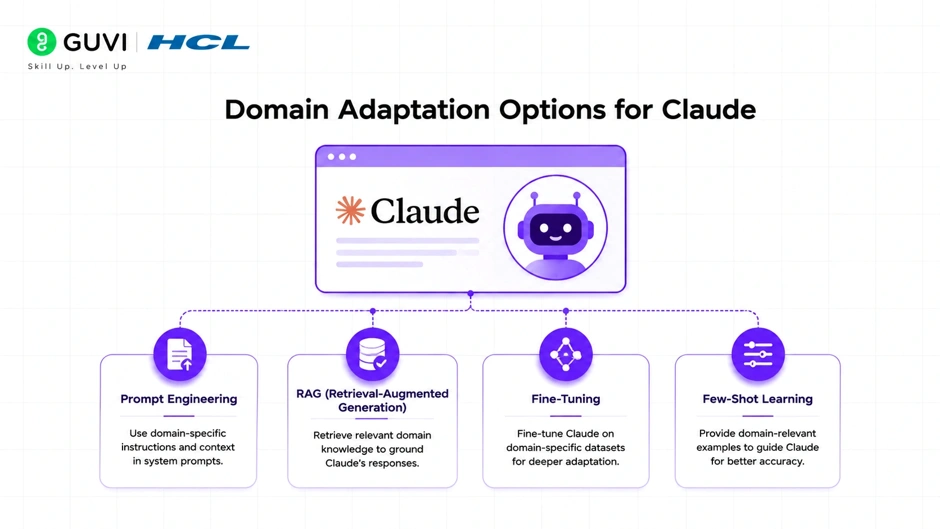
Claude applications can be customized using several complementary techniques.
| Method | Best For |
| System Prompts | Behavior, tone, instructions |
| Prompt Engineering | Task-specific guidance |
| RAG | Company documents and knowledge bases |
| Tool Use | Live APIs and business systems |
| Conversation Memory | Personalized user experiences |
| Workflow Orchestration | Multi-step business processes |
Many production applications combine multiple approaches.
When Should You Use RAG Instead?
RAG is often the preferred solution when your knowledge changes regularly.
Ideal examples include:
- Product documentation
- Internal policies
- Technical manuals
- Research papers
- Customer support articles
- Company knowledge bases
Rather than storing this information in model weights, Claude retrieves the most relevant content at runtime.
💡 Pro Tip
If your documents are updated frequently, RAG is usually more practical than retraining a model.
How System Prompts Improve Domain Expertise
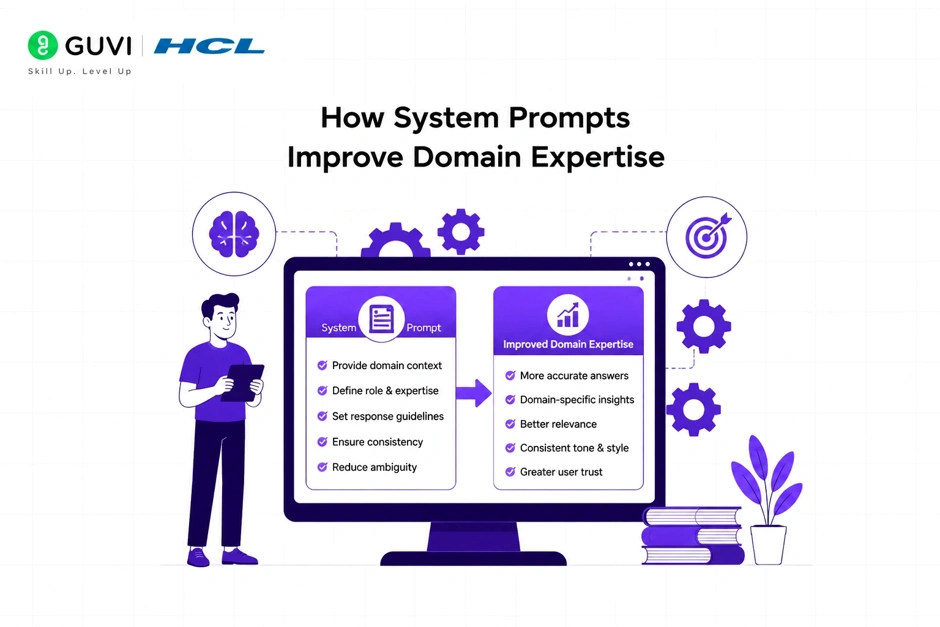
System prompts define how Claude should behave throughout a conversation.
For example, you might instruct Claude to:
- Write in your company’s tone.
- Prioritize technical accuracy.
- Explain concepts for beginners.
- Follow specific formatting guidelines.
- Cite internal documentation where appropriate.
System prompts influence behavior without modifying the underlying model.
Where Tool Use Fits In
Some business information changes every second.
Examples include:
- Inventory levels
- Account balances
- Flight schedules
- CRM records
- Analytics dashboards
Rather than embedding this data into the model, Tool Use allows Claude to retrieve current information directly from external systems.
This produces more accurate and timely responses.
Fine-Tuning vs RAG vs Prompt Engineering
Each technique addresses a different problem.
| Feature | Fine-Tuning | RAG | Prompt Engineering |
| Modifies model weights | Yes | No | No |
| Uses latest documents | Limited | Yes | No |
| Easy to update | No | Yes | Yes |
| Best for changing knowledge | No | Yes | No |
| Controls behavior | Limited | Limited | Yes |
| Infrastructure complexity | Higher | Moderate | Low |
Understanding these differences helps you select the most appropriate solution.
Fine-tune Claude for domain-specific accuracy only when prompt engineering and RAG aren’t enough. Learn AI & ML with HCL GUVI’s Artificial Intelligence and Machine Learning course.
Common Business Use Cases
Organizations commonly customize Claude for:
- Internal knowledge assistants
- Customer support automation
- Technical documentation
- HR policy assistants
- Sales enablement
- Legal research
- IT help desks
- Enterprise search
- Code assistants
Most of these applications rely on RAG and Tool Use rather than traditional fine-tuning.

Common Mistakes
| Mistake | Better Approach |
| Trying to encode changing knowledge into the model | Use RAG |
| Using prompts for live data | Use Tool Use |
| Writing vague system prompts | Define clear instructions |
| Sending entire document libraries | Retrieve only relevant passages |
| Ignoring prompt testing | Evaluate prompts with real scenarios |
| Assuming one method solves everything | Combine multiple techniques |
⚠️ Warning
Choosing the wrong customization strategy can increase costs, reduce response quality, and make updates more difficult over time.
Real-World Example
Imagine a software company building an AI assistant for its engineering team.
The assistant must answer questions about coding standards, deployment procedures, API documentation, and internal architecture.
Instead of retraining the model every time documentation changes, the company stores its documents in a vector database.
When an engineer asks a question, the system retrieves the most relevant documents, sends them to Claude, and receives a response grounded in the latest information. Tool Use connects the assistant to issue trackers and deployment systems for real-time status updates.
This architecture keeps the assistant accurate without requiring continual model retraining.
User Query
│
▼
Application
│
├──────────────┐
▼ ▼
Knowledge Base Business APIs
(RAG) (Tool Use)
│ │
└──────┬───────┘
▼
Claude
│
▼
Context-Aware Response
A second comparison diagram illustrating Fine-Tuning vs RAG vs Prompt Engineering vs Tool Use would help readers choose the right customization strategy.
Best Practices for Domain-Specific Claude Applications
- Use system prompts to define consistent behavior.
- Choose RAG for frequently changing knowledge.
- Use Tool Use for real-time information and actions.
- Keep retrieved context concise and relevant.
- Test prompts using realistic user scenarios.
- Monitor response quality and update your knowledge sources regularly.
- Combine multiple customization techniques when appropriate.
Conclusion
Building a domain-specific AI assistant with Claude is less about retraining the model and more about designing an effective application architecture. By combining system prompts for behavior, Retrieval-Augmented Generation for current knowledge, Tool Use for live data, and thoughtful workflow design, you can create AI solutions that remain accurate, scalable, and easy to maintain.
Rather than viewing fine-tuning as the default answer, focus on matching the customization strategy to your business needs. In many real-world scenarios, a well-designed RAG pipeline and carefully structured prompts will deliver greater flexibility and faster updates than modifying the model itself.
FAQs
Can I fine-tune Claude like an open-source LLM?
Traditional parameter-level fine-tuning is not the primary customization approach for most Claude API users. Instead, developers commonly use system prompts, Retrieval-Augmented Generation (RAG), Tool Use, and workflow design to adapt Claude to specific domains.
What is the best way to give Claude access to company documents?
For documentation that changes regularly, RAG is generally the preferred approach because it retrieves current information at runtime instead of embedding knowledge into the model.
When should I use Tool Use instead of RAG?
Use Tool Use when Claude needs to retrieve live information or perform actions, such as checking inventory, accessing CRM data, or triggering workflows. RAG is better suited for retrieving relevant documents and reference material.
Do system prompts replace fine-tuning?
No. System prompts guide Claude’s behavior and communication style, while fine-tuning modifies the model itself. They solve different problems.
Can I combine RAG, Tool Use, and system prompts?
Yes. Many production AI applications combine these techniques to deliver accurate, context-aware responses while accessing current knowledge and external systems.
Is fine-tuning always the best option for domain adaptation?
No. If your data changes frequently or requires real-time access, approaches like RAG and Tool Use are often more practical and easier to maintain than model-level customization.
Success Stories

About the Author
Vishalini Devarajan
An Aerospace Engineer turned content writer, I focus on making complex concepts easy to understand through well-structured, reader-friendly blogs. Whether it’s a technical topic or a non-technical one, I love creating content that is clear, engaging, and impactful.
View all posts by Vishalini Devarajan
Connect with me @









Did you enjoy this article?