


Full Stack Development Articles
Claude for Architecture and Engineering Documentation
Freelancing as a Python Developer: Getting Your First Client


Get In Touch For Details! Request More Information
DVC Data Version Control Tutorial: Key Steps for ML Projects
Jul 10, 2026 4 Min Read 347 Views
(Last Updated)
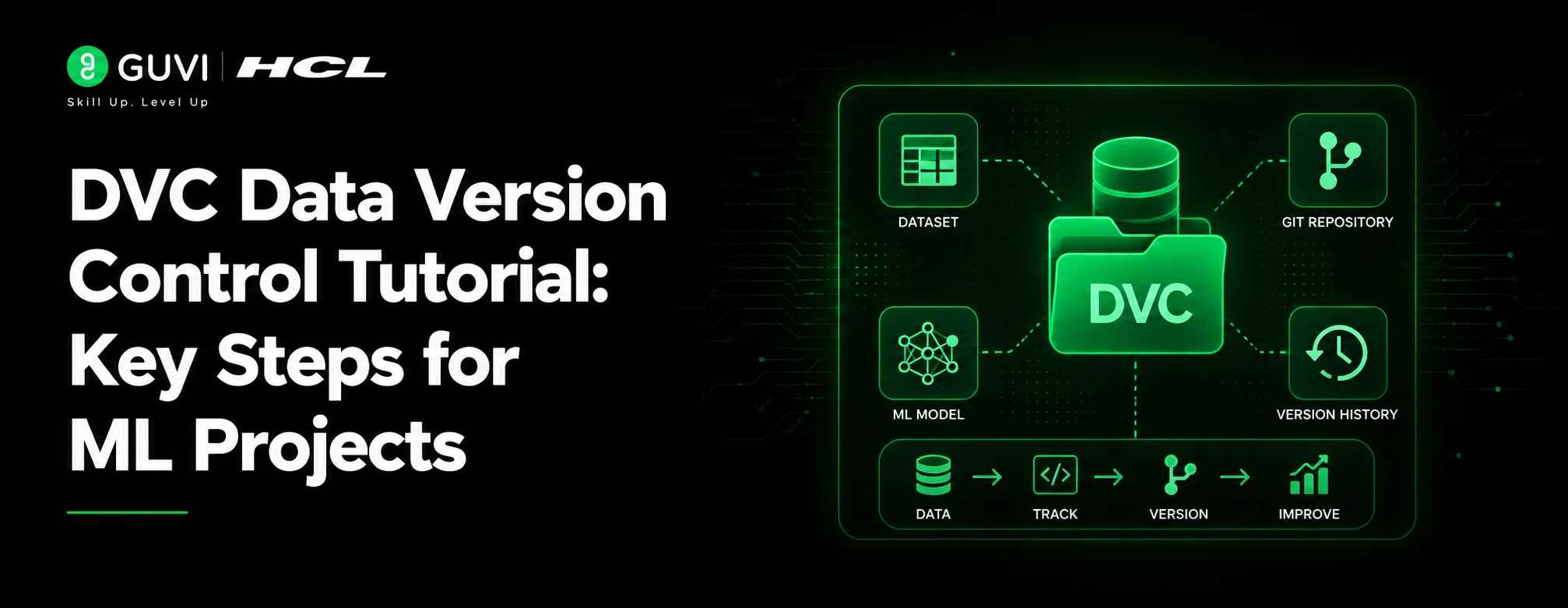
DVC, or Data Version Control, is an open-source version control tool for data science and machine learning projects. It helps teams manage datasets, model files, pipelines, metrics, and experiments using a Git-like workflow. DVC is useful because Git is excellent for code, but it is not designed to store large datasets, trained models, feature files, or binary artifacts. DVC keeps lightweight metadata in Git and stores heavy files in local or cloud remote storage. This makes ML projects easier to reproduce, share, audit, and roll back.
TL;DR
- DVC helps version large datasets and ML models without storing them directly in Git.
- It creates small .dvc metadata files that Git can track.
- Large files are stored in a DVC cache and can be pushed to remote storage.
- DVC supports remote storage options such as Amazon S3, SSH, Google Drive, Azure Blob Storage, NFS, and HDFS.
- It also supports ML pipelines, parameters, metrics, plots, and experiment comparison.
Table of contents
- What is DVC?
- Top Benefits of DVC
- Key Use Cases of DVC
- DVC Data Version Control Tutorial: Key Steps
- Step 1: Install DVC
- Step 2: Initialize Git and DVC
- Step 3: Add a Dataset to DVC
- Step 4: Configure Remote Storage
- Step 5: Push Data to Remote Storage
- Step 6: Pull Data on Another Machine
- Step 7: Version Dataset Changes
- Step 8: Track ML Model Files
- Step 9: Create a Reproducible DVC Pipeline
- Step 10: Track Metrics and Parameters
- Step 11: Compare Model Experiments
- Step 12: Share the Complete ML Project
- Conclusion
- FAQs
- What is DVC in machine learning?
- Does DVC replace Git?
- Why use DVC for ML projects?
What is DVC?
DVC, or Data Version Control, is an open-source version control system for ML datasets, model files, pipelines, and experiment outputs. It works with Git by storing lightweight metadata in the repository while keeping large files in local cache or remote storage like S3, Google Drive, Azure Blob Storage, or SSH. DVC helps teams track which data, code, parameters, and model outputs created a specific result. It also supports reproducible pipelines through dvc.yaml, dependency tracking, metrics comparison, experiment management, and remote collaboration.
Top Benefits of DVC
- Keeps Git lightweight: Large datasets and models stay outside Git, while metadata remains versioned.
- Improves reproducibility: Teams can rebuild experiments using the same data, code, and parameters.
- Reduces manual file sharing: Datasets and models can be pulled from remote storage using DVC commands.
- Tracks data-model lineage: Every model result can be connected to the exact dataset and code version.
- Simplifies experiment comparison: Metrics and parameters can be compared across commits and runs.
- Makes ML projects auditable: Data changes, model updates, and pipeline outputs become easier to trace.
- Fits MLOps workflows: DVC supports structured data versioning, pipeline automation, and production-ready ML project management.
DVC keeps your Git repo lightweight by storing only small metadata files (.dvc), while the actual datasets and models stay in remote storage like S3 or Google Drive.
Key Use Cases of DVC
- Dataset versioning: Track changes in training, validation, and test datasets across ML experiments.
- Model versioning: Store and manage trained model files without pushing large binaries to Git.
- Experiment tracking: Compare different model runs, parameter changes, and performance metrics.
- Team collaboration: Let multiple data scientists work on the same project without manually sharing datasets.
- Remote data storage: Store large files in S3, Google Drive, Azure Blob Storage, SSH, or local remote storage.
- Rollback support: Return to an earlier dataset, model, or pipeline version when needed.
- Production ML workflow: Maintain clean links between data versions, model artifacts, metrics, and deployment-ready outputs.
DVC Data Version Control Tutorial: Key Steps
Step 1: Install DVC
Install DVC in your Python environment using pip..
pip install dvc
For cloud storage support, install the required extra package. For example, use this command for Amazon S3 support.
pip install "dvc[s3]"
This prepares your project to track datasets, models, and pipeline outputs.
Step 2: Initialize Git and DVC
Create a new ML project folder and initialize Git.
mkdir dvc-ml-project
cd dvc-ml-project
git init
Now initialize DVC.
dvc init
This creates the .dvc directory and adds DVC configuration files to the project. Commit the initial setup to Git.
git add .dvc .gitignore
git commit -m "Initialize DVC"
With DVC, switching between dataset versions is as simple as a git checkout followed by dvc pull, with no manual file hunting required.
Step 3: Add a Dataset to DVC
Create a dataset folder.
mkdir data
Place your dataset inside the data folder. For example:
data/train.csv
Track the dataset with DVC.
dvc add data/train.csv
DVC creates a small metadata file named data/train.csv.dvc. The actual dataset is stored in the DVC cache, while Git tracks only the metadata file.
git add data/train.csv.dvc data/.gitignore
git commit -m "Track training dataset with DVC"
Step 4: Configure Remote Storage
DVC remote storage is where large files are stored for sharing with teams or restoring later. DVC supports several storage types, including Amazon S3, SSH, Google Drive, Azure Blob Storage, NFS, and HDFS.
For local testing, create a local remote.
mkdir /tmp/dvcstore
dvc remote add -d storage /tmp/dvcstore
For an S3 remote, use:
dvc remote add -d storage s3://mybucket/dvcstore
Commit the remote configuration.
git add .dvc/config
git commit -m "Configure DVC remote storage"
Step 5: Push Data to Remote Storage
Upload the DVC-tracked dataset to the configured remote.
dvc push
The dvc push command uploads tracked data from the local DVC cache to remote storage.

Push Git metadata separately.
git push
This separation is important. Git stores code and DVC metadata. DVC remote storage stores datasets, models, and large artifacts.
Step 6: Pull Data on Another Machine
Clone the Git repository on another system.
git clone <repo-url>
cd dvc-ml-project
Install DVC and pull the dataset.
pip install dvc
dvc pull
The dvc pull command downloads tracked files from remote storage into the working directory.
This lets another developer reproduce the same dataset state without manually sharing large files.
Step 7: Version Dataset Changes
Update the dataset when new rows, labels, or features are added.
dvc add data/train.csv
git add data/train.csv.dvc
git commit -m "Update training dataset"
dvc push
Each dataset version is now linked to a Git commit. You can move between dataset versions using Git checkout and DVC pull.
git checkout <commit-id>
dvc pull
This is useful when you need to compare model results across different dataset versions.
Step 8: Track ML Model Files
After training a model, store the output in a model folder.
mkdir models
Example model file:
models/model.pkl
Track the trained model with DVC.
dvc add models/model.pkl
git add models/model.pkl.dvc models/.gitignore
git commit -m "Track trained model with DVC"
dvc push
This keeps large model binaries outside Git while keeping every model version traceable.
Step 9: Create a Reproducible DVC Pipeline
DVC can define ML pipeline stages in dvc.yaml. A pipeline stage connects commands, dependencies, parameters, and outputs.
Example training stage:
dvc stage add -n train \
  -d src/train.py \
  -d data/train.csv \
  -o models/model.pkl \
  python src/train.py
Run the pipeline.
dvc repro
The dvc repro command checks what changed and reruns only the required pipeline stages. DVC uses dvc.yaml and dvc.lock to track pipeline structure and exact output states.
Step 10: Track Metrics and Parameters
Create a params.yaml file for model parameters.
train:
  learning_rate: 0.01
  max_depth: 5
  n_estimators: 100
Create a metrics file after model evaluation.
{
  "accuracy": 0.91,
  "f1_score": 0.88
}
Track metrics in Git.
git add params.yaml metrics.json
git commit -m "Add training parameters and metrics"
DVC supports metrics in JSON, YAML, and TOML formats, and these metrics are usually produced by training or evaluation code for experiment comparison.
Build practical machine learning and MLOps skills with HCL GUVI’s Machine Learning Course. Learn model development, data handling, experiment workflows, deployment basics, and real-world ML practices through structured, hands-on training.
Step 11: Compare Model Experiments
Check current metrics.
dvc metrics show
Compare metrics between commits.
dvc metrics diff
Compare parameter changes.
dvc params diff
DVC supports metrics, plots, and parameter comparison, which helps teams understand how code, data, and configuration changes affect model performance.
Step 12: Share the Complete ML Project
A complete DVC workflow has two parts.
First, push code and metadata to Git.
git push
Second, push datasets and model artifacts to DVC remote storage.
dvc push
A teammate can reproduce the project using:
git clone <repo-url>
dvc pull
dvc repro
This creates a repeatable ML workflow where datasets, models, metrics, and pipeline outputs stay connected to the right code version.
Conclusion
DVC data version control brings software engineering discipline to machine learning projects. It keeps Git lightweight, stores large files in remote storage, and tracks datasets, models, pipelines, metrics, and parameters in a reproducible way. A strong DVC workflow helps data scientists avoid broken experiments, missing datasets, unclear model versions, and manual file sharing. For ML teams, DVC is one of the most practical tools for building reliable, traceable, and production-ready machine learning workflows.
FAQs
What is DVC in machine learning?
DVC is a data version control tool that helps machine learning teams track datasets, model files, pipelines, metrics, and experiments with a Git-like workflow.
Does DVC replace Git?
No. DVC works with Git. Git tracks code and DVC metadata, while DVC manages large datasets, models, and pipeline outputs.
Why use DVC for ML projects?
DVC helps reproduce experiments, share large files, compare model metrics, version datasets, and connect every model result with the exact code and data used.
Success Stories

About the Author
Vaishali
I'm a seasoned writer with four years of experience across technical, non-technical, and just about every genre or niche you can imagine. Adaptable and curious, I enjoy exploring new topics and making information engaging and easy to understand. Fueled by a steady stream of tea, I approach each project with creativity, reliability, and genuine enthusiasm for storytelling.
View all posts by Vaishali
Connect with me @
































Did you enjoy this article?