


Software Development Articles
How to Read and Understand System Design Diagrams?
System Engineer Roles and Responsibilities: 12 Proven Duties for Growth
SAP Consultant Roles and Responsibilities: 12 Proven Duties for Growth and Success
Network Engineer Roles and Responsibilities: 12 Essential Duties for Success


Get In Touch For Details! Request More Information
How to Design a Video Streaming Platform Like Netflix
Aug 20, 2026 4 Min Read 407 Views
(Last Updated)
Ever wonder what happens behind the scenes when you hit play on Netflix and your show starts in seconds? That instant experience is the result of a massively complex architecture built to serve hundreds of millions of users at once, and understanding it can help you design your own streaming platform from the ground up.
Table of contents
- QUICK TL;DRSummary
- What Does It Take to Build a Streaming Platform?
- Starting with the Right Architecture
- Building the Video Upload and Encoding Pipeline
- How Adaptive Bitrate Streaming Works
- Designing the Content Delivery Network Layer
- Database Design for a Streaming Platform
- The Recommendation Engine
- Comparison: Key Components and Their Purpose
- Security and DRM
- Handling Scale and Reliability
- Wrapping Up
- FAQs
- What’s the difference between object storage and a database in streaming?
- Why use adaptive bitrate streaming?
- How do CDNs improve streaming performance?
- What’s the core encoding pipeline flow?
- Which protocols should I support for playback?
- How do I secure video access?
- How do I start scaling without overbuilding?
QUICK TL;DR Summary
- Start with a microservices backend: user, content metadata, upload, encoding, and streaming services that scale independently.
- Build a video streaming platform: upload raw to object storage (S3/GCS) → trigger async encoding (FFmpeg) → produce multiple resolutions/bitrates.
- Use adaptive bitrate streaming (HLS/DASH): segments + manifest; player switches quality based on network metrics.
- Deliver via CDN (CloudFront/Fastly/Open Connect) to cache segments at edge and cut latency globally.
- Store metadata in PostgreSQL, cache reads in Redis, stream events via Kafka, and add a hybrid recommendation engine (collaborative + content-based).
Ready to build this full-stack platform yourself? Enroll in HCL GUVI’s FSD Student Program and master frontend, backend, databases, and real-world projects like Netflix. Start your full-stack journey here
What Does It Take to Build a Streaming Platform?
A video streaming platform like Netflix relies on three foundational pillars: a microservices-based backend, a video processing pipeline, and a global content delivery network. Together, these components handle everything from uploading content to playing it on a user’s phone without buffering.
Starting with the Right Architecture
- The biggest mistake beginners make is treating a streaming platform like a regular web app. It is not. The scale is different, the data is different, and the demands are different.
- Netflix, for example, transitioned from a monolithic application to over a thousand independent microservices.
- Each service handles one specific job, like user authentication, content search, video playback, or billing. This separation means that if the recommendation engine has an issue, your video playback still works fine.
- For a new platform, starting with a smaller set of services makes sense.
- You will want at a minimum a user service, a content metadata service, a video upload service, an encoding service, and a streaming service. Each one can be built and scaled independently as your platform grows.
Building the Video Upload and Encoding Pipeline
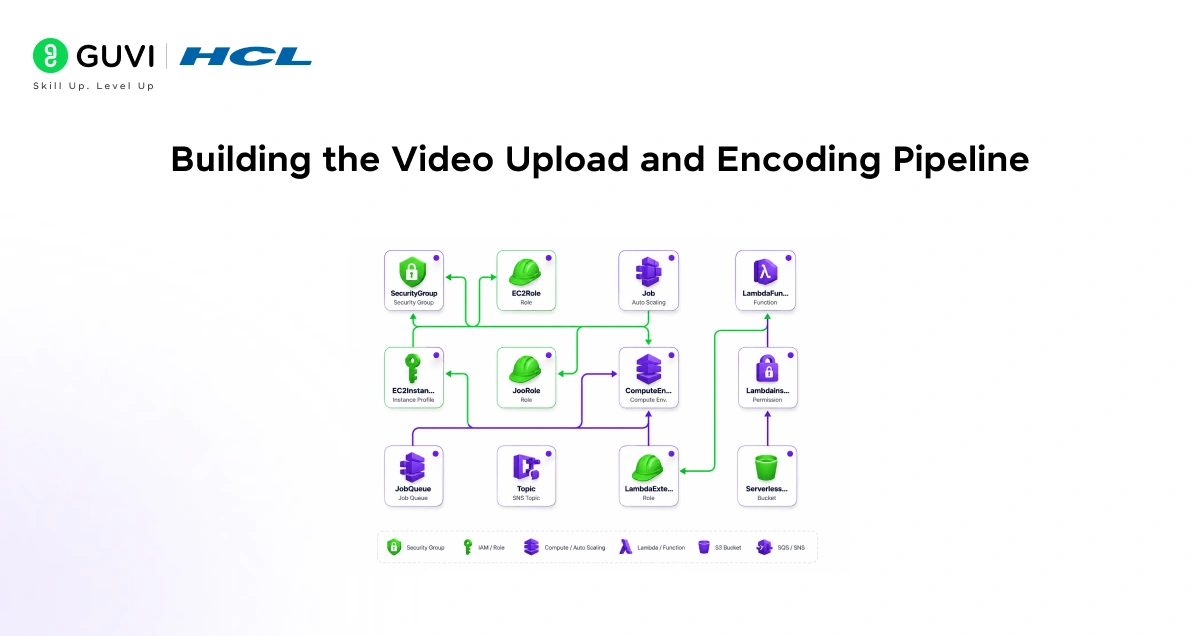
Once a user or content creator uploads a video, the raw file goes through a processing pipeline before it ever reaches a viewer. This is one of the most important parts of the entire system.
- First The raw video gets stored first in an object storage service like Amazon S3 or Google Cloud Storage. From there, an encoding job is triggered automatically. The encoding service takes that raw file and converts it into multiple formats and resolutions, typically ranging from 240p all the way to 4K.
- Second, Netflix encodes each title into roughly 120 different stream variants, covering different resolutions, bitrates, audio languages, and subtitle tracks. For your platform, you can start smaller, but the idea remains the same: give the player multiple quality options to choose from.
- Lastly, Tools like FFmpeg handle the heavy lifting here. You define your encoding presets, push the job to a queue, and a worker processes it asynchronously, so uploads do not block anything else.
How Adaptive Bitrate Streaming Works
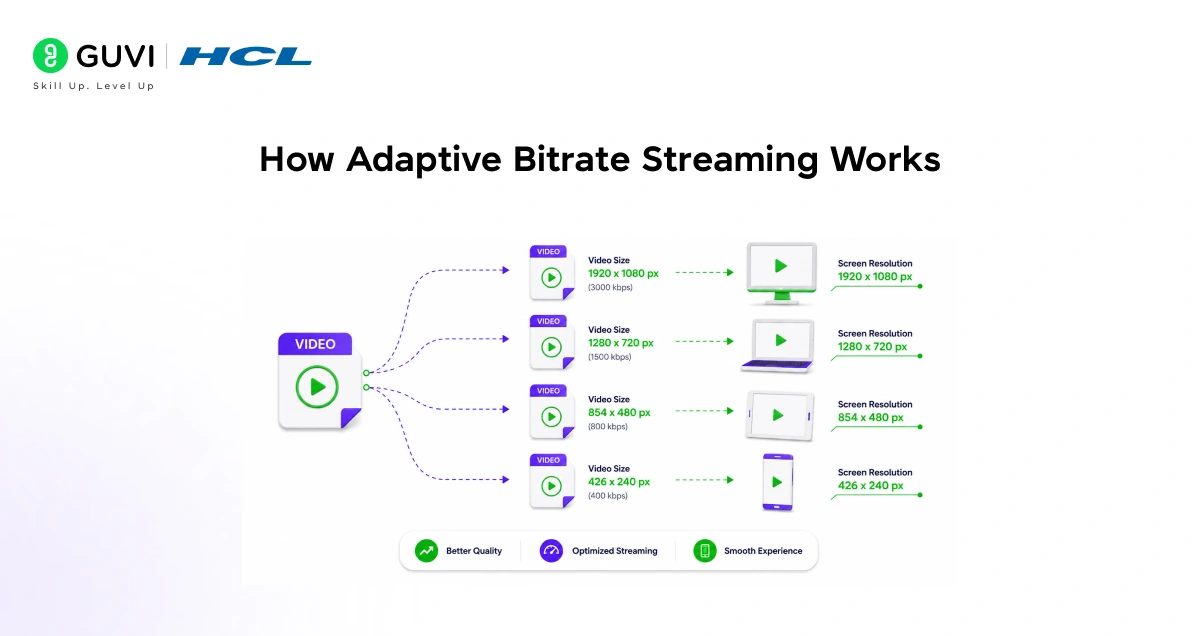
Adaptive Bitrate (ABR) streaming keeps video smooth by letting the player adjust quality in real time.
- How it works:
- Video split into short segments (2–10 seconds).
- A manifest (HLS .m3u8 or DASH .mpd) lists quality levels and segment URLs.
- Player downloads one segment at a time and switches quality between segments.
- Client-side decision:
- The player monitors network metrics (throughput, buffer level, latency).
- It selects the appropriate bitrate locally, enabling seamless switches without pausing.
- Benefits:
- Smooth playback across fast and slow networks.
- Reduced buffering and better user experience.
- Efficient use of bandwidth and lower load on the origin server.

Designing the Content Delivery Network Layer
- Latency from Centralized Storage
Storing videos in one central server and sending them to users worldwide would create massive latency. A user in Chennai downloading a video stored in a server in Virginia would experience noticeable delays.
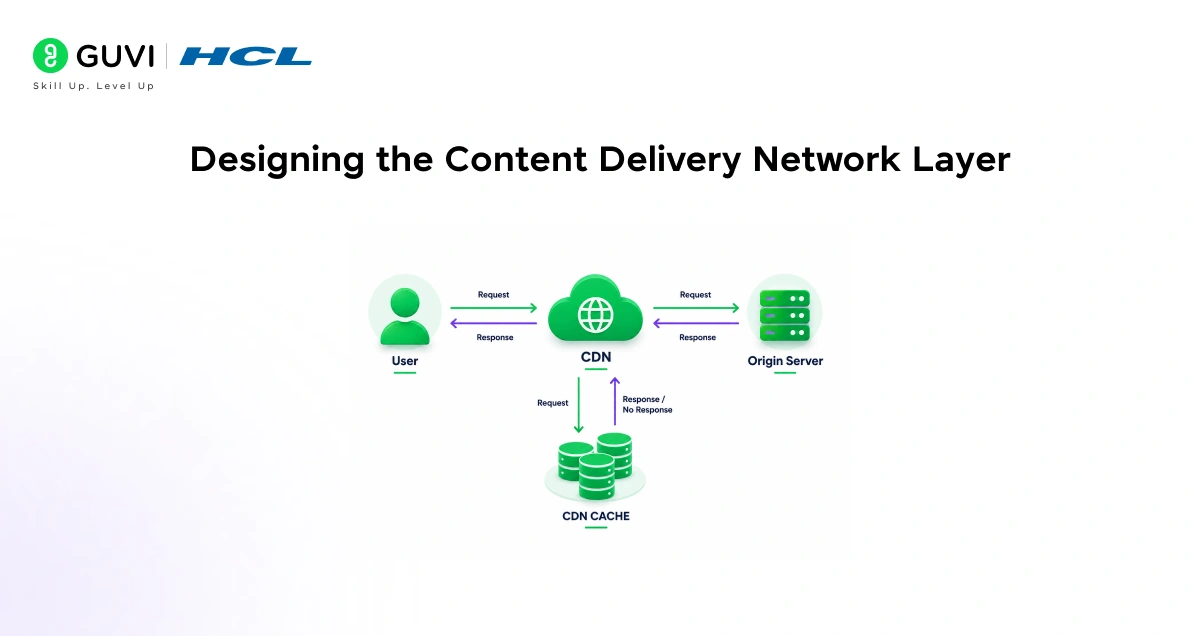
- CDN Caching at the Edge
A CDN solves this by caching video segments at edge servers located geographically close to users. When someone hits play, the request goes to the nearest edge location, not your origin server. This cuts latency significantly and reduces load on your backend.
- Netflix Open Connect
Netflix built its own CDN called Open Connect, which deploys caching hardware directly inside ISP networks.
- Third‑party CDN Options
For most platforms, using a third-party CDN like Cloudflare, AWS CloudFront, or Fastly is a practical and cost-effective starting point. You configure the CDN to cache video segments, set expiry rules, and serve traffic at scale without touching your origin.
Netflix prepares each title in multiple encoded formats–often involving dozens or even hundreds of variants across different resolutions, bitrates, languages, and subtitles. This allows its streaming system to support global users with vastly different network conditions and devices. At playback time, adaptive bitrate streaming (ABR) dynamically selects the best quality version of each video segment based on real-time network performance. This means the player can seamlessly switch between quality levels without buffering or stopping playback, ensuring smooth viewing even on unstable connections. This encoding strategy is a core reason large-scale streaming platforms can deliver consistent performance worldwide.
Database Design for a Streaming Platform
- A streaming platform needs different types of storage for different kinds of data. Video files themselves are binary and large, so they belong in object storage.
- Metadata, like titles, descriptions, genres, cast information, and user watch history, belongs in a relational database like PostgreSQL.
- For fast reads like search suggestions, user preferences, or session tokens, a caching layer using Redis works well. It stores frequently accessed data in memory so your main database does not get overwhelmed.
- Watch history and viewing analytics generate enormous amounts of event data. Platforms like Netflix use distributed processing systems to handle that volume in real time.
- For smaller platforms, a time-series database or an event streaming tool like Apache Kafka can handle this data efficiently.
Ready to build this full-stack platform yourself? Enroll in HCL GUVI’s FSD Student Program and master frontend, backend, databases, and real-world projects like Netflix. Start your full-stack journey here
The Recommendation Engine
- Personalization keeps users watching. Netflix estimates its recommendation system saves around one billion dollars per year by reducing subscriber churn. For your platform, even a simple recommendation system makes a meaningful difference.
- The standard approach combines two techniques. Collaborative filtering looks at what users with similar tastes watched and suggests content accordingly. Content-based filtering analyzes metadata like genre, director, or cast and matches it to a user’s viewing history.
- A hybrid model that uses both signals, layered with contextual factors like time of day or device type, produces the most relevant results. You do not need to build this from scratch. Machine learning APIs and open-source recommendation libraries can get you started quickly.
Comparison: Key Components and Their Purpose
| Component | Purpose | Example Tools |
| Object Storage | Store raw and encoded video files | Amazon S3, GCS |
| Encoding Service | Convert video to multiple formats | FFmpeg, AWS Elemental |
| CDN | Deliver video fast from nearest edge | CloudFront, Fastly |
| Streaming Protocol | Adaptive playback across devices | HLS, MPEG-DASH |
| Metadata Database | Store content info and user data | PostgreSQL, MySQL |
| Cache Layer | Speed up frequent data reads | Redis, Memcached |
| Message Queue | Manage background encoding jobs | Kafka, RabbitMQ |
| Recommendation Engine | Personalized content suggestions | Collaborative filtering, ML APIs |
Security and DRM
- DRM and Content Protection – Digital Rights Management (DRM) controls who can access and play licensed video content. Common standards include Widevine, FairPlay, and PlayReady; choose based on target devices and browsers to ensure broad, secure playback.
- Signed URLs and Access Control – Use signed URLs to restrict video access to authenticated users. Generate a per-session signed URL that expires after a short window so direct links become unusable if shared externally.
Handling Scale and Reliability
- Scaling and Auto-scaling
Horizontal scaling adds more server instances behind a load balancer as demand grows. Cloud auto-scaling automates this by launching or terminating instances based on real-time metrics (CPU, request rate, latency), ensuring capacity matches traffic while controlling costs.
- Resilience and Failure Testing
Practice resilience by replicating databases, distributing content via CDNs, and implementing health checks and circuit breakers to isolate failures. Adopt chaos engineering (deliberately injecting failures) to validate recovery strategies and improve system robustness.
Wrapping Up
Designing a video streaming platform like Netflix is a layered challenge. It starts with a solid microservices architecture, moves through a reliable video encoding and delivery pipeline, and comes together with smart personalization and strong security.
You do not need to build everything at once. Start with the core upload, encode, and stream loop, then layer in CDN optimization, adaptive bitrate, and recommendations as your platform grows. The architecture Netflix uses today took years to evolve, but every piece of it began with solving one clear problem at a time.
FAQs
What’s the difference between object storage and a database in streaming?
Object storage holds large binary video files; databases store structured metadata (titles, users, watch history) and analytics.
Why use adaptive bitrate streaming?
ABR lets the player adjust quality per segment based on network conditions, reducing buffering and improving playback smoothness.
How do CDNs improve streaming performance?
CDNs cache video segments at edge locations near users, lowering latency and reducing load on your origin server.
What’s the core encoding pipeline flow?
Raw upload to S3 → enqueue job → worker encodes with FFmpeg into multiple variants → store outputs back in object storage.
Which protocols should I support for playback?
Support HLS (.m3u8) and MPEG‑DASH (.mpd); they enable adaptive streaming across devices and browsers.
How do I secure video access?
Use DRM (Widevine/FairPlay/PlayReady) and signed URLs with short expiry to restrict playback to authenticated sessions.
How do I start scaling without overbuilding?
Launch minimal microservices, add auto-scaling behind a load balancer, cache frequently read data in Redis, and progressively add CDN + ABR + recommendations.
Success Stories

About the Author
Vishalini Devarajan
An Aerospace Engineer turned content writer, I focus on making complex concepts easy to understand through well-structured, reader-friendly blogs. Whether it’s a technical topic or a non-technical one, I love creating content that is clear, engaging, and impactful.
View all posts by Vishalini Devarajan
Connect with me @













Did you enjoy this article?