


Artificial Intelligence and Machine Learning Articles
CI/CD Pipelines for Machine Learning Projects
A/B Testing for Machine Learning Models
Canary Deployment Strategies for ML Models
What is Model Drift Detection: Keeping Models Accurate in Production


Get In Touch For Details! Request More Information
Amazon CodeWhisperer Explained for AWS Developers
Jul 09, 2026 7 Min Read 708 Views
(Last Updated)
You are in the middle of writing a complex AWS Lambda function. You know what you want the code to do, but turning that intent into correct, production-ready code takes time.
Amazon CodeWhisperer does something smarter. It watches what you are typing, understands the context of your code and comments, and suggests the next lines before you finish asking for them. It generates entire functions from a single comment and scans your code for security vulnerabilities as you write.
This is how modern AWS developers write faster, ship more securely, and spend less time on boilerplate.
This guide explains exactly what Amazon CodeWhisperer is, how it works, why it matters for cloud developers, and how to get the most out of it from day one.
Table of contents
- Quick TL;DR Summary
- Why Generic Coding Tools Fall Short for AWS Development
- How Amazon CodeWhisperer Works: The Core Mechanism
- Step 1: Read the context of your code
- Step 2: Process natural language comments
- Step 3: Generate ranked suggestions in real time
- Step 4: Run automated security scanning
- Step 5: Track open-source references
- Step 6: Accept, reject, or modify
- The Security Scanning Feature: Why It Changes the Development Workflow
- How to Set Up Amazon CodeWhisperer: Step-by-Step Process
- Step 1: Choose your access tier
- Step 2: Install the AWS Toolkit extension
- Step 3: Sign in with your Builder ID or IAM Identity Center
- Step 4: Verify CodeWhisperer is active
- Step 5: Learn the keyboard shortcuts
- Step 6: Run your first security scan
- Step 7: Configure suggestion behavior
- Common Mistakes Developers Make With CodeWhisperer
- Supported Languages and Environments
- Getting Maximum Performance From Amazon CodeWhisperer
- Real-World Applications of Amazon CodeWhisperer
- Conclusion
- FAQs
- Is Amazon CodeWhisperer free to use?
- How does CodeWhisperer compare to GitHub Copilot?
- Does CodeWhisperer send my code to AWS?
- What languages does CodeWhisperer support best?
- Can CodeWhisperer generate entire files or just individual functions?
Quick TL;DR Summary
- This guide explains what Amazon CodeWhisperer is and how it uses machine learning to generate real-time code suggestions directly inside your IDE.
- You will learn how CodeWhisperer differs from other AI coding assistants and why its deep AWS integration makes it uniquely valuable for cloud developers.
- The guide covers security scanning, reference tracking, language support, and the practical workflow changes that make CodeWhisperer worth adopting.
- Step-by-step instructions show you how to set up CodeWhisperer and start using it effectively for real development work.
- You will understand the strengths and limitations of CodeWhisperer and how to get maximum productivity gains from it across different project types.
What Is Amazon CodeWhisperer?
Amazon CodeWhisperer is an AI-powered coding assistant developed by AWS that generates real-time code suggestions, completes functions, and helps detect security issues directly inside your development environment. It supports developers by speeding up coding and improving code quality while working across different programming tasks.
It is trained on billions of lines of code and tuned specifically to understand AWS APIs, services, and best practices.
Unlike generic code completion tools, CodeWhisperer understands the AWS context. When you are writing code that interacts with S3, DynamoDB, Lambda, or any other AWS service, it generates suggestions that reflect how those services actually work, not just syntactically plausible code that might fail at runtime.
It integrates with the IDEs developers already use, including VS Code, JetBrains IDEs, AWS Cloud9, and the AWS Lambda console, making adoption low friction and immediate.
Why Generic Coding Tools Fall Short for AWS Development
- They do not understand cloud service APIs deeply
Generic AI coding assistants are trained on broad code corpora. They know Python syntax and general programming patterns, but they do not have deep, up-to-date knowledge of AWS service APIs, SDK conventions, IAM permission requirements, or service-specific gotchas. The code they generate often looks right but breaks when it hits actual AWS infrastructure.
- They miss security issues specific to cloud code
Cloud development introduces security concerns that general-purpose linters and code review tools were not built to catch. Hardcoded credentials, overly permissive IAM policies, unencrypted S3 buckets, publicly exposed resources; these are the vulnerabilities that cause cloud security incidents, and they require cloud-aware tooling to detect reliably.
- They cannot reference your actual AWS environment
A generic tool has no knowledge of the services your account uses, the patterns your team follows, or the AWS SDK version you are targeting. CodeWhisperer is built into the AWS developer experience, giving it context that outside tools simply cannot access.
- They create open-source licensing risk
When AI coding tools generate code that closely resembles open-source training data, they can create intellectual property and licensing complications for commercial projects. CodeWhisperer tracks when suggestions resemble referenced open-source code and flags it, giving developers the information they need to make informed decisions.
- They treat all code as equivalent
A function that writes to a local file and a function that writes to a production DynamoDB table are not equivalent risks. General tools do not distinguish between them. CodeWhisperer’s security scanning applies the judgment that cloud production code actually requires.
Read More: AI in Software Development: How it Transforms Coding?
How Amazon CodeWhisperer Works: The Core Mechanism
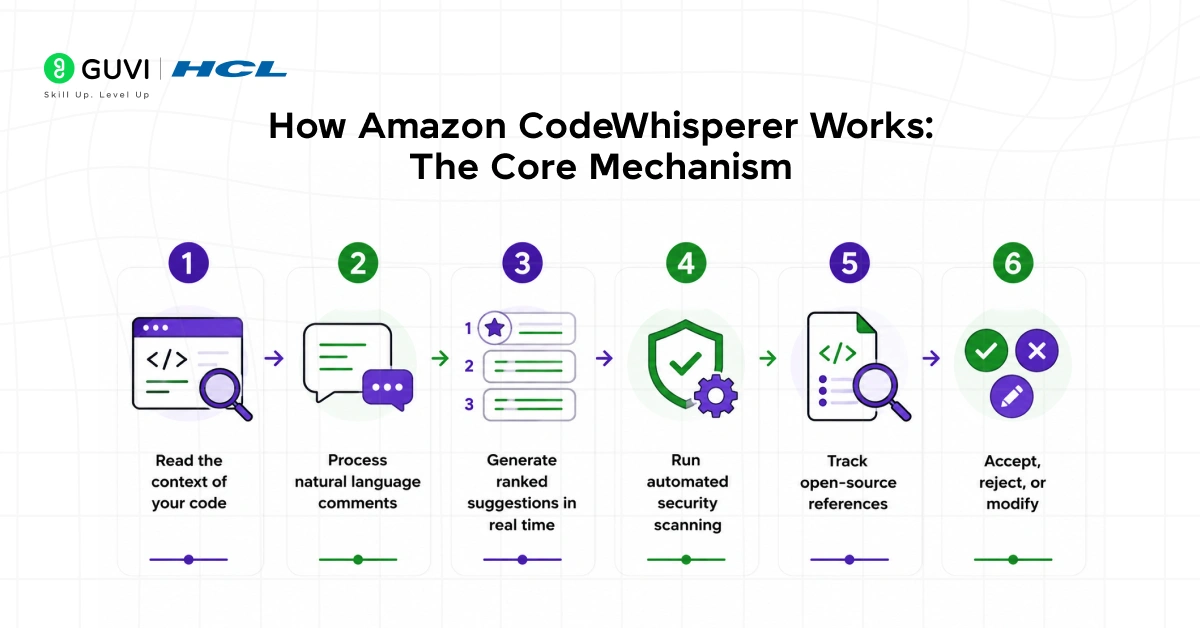
Step 1: Read the context of your code
CodeWhisperer continuously analyzes the code you have already written, the file you are in, your imports, your variable names, and critically, your comments. It builds an understanding of what you are trying to accomplish before generating any suggestion.
Step 2: Process natural language comments
When you write a comment describing what you want, something like “fetch all items from the orders table where status is pending”, CodeWhisperer treats that as a prompt. It generates the corresponding code below your comment, including the correct SDK calls, error handling patterns, and return types your context implies.
Step 3: Generate ranked suggestions in real time
CodeWhisperer generates multiple candidate suggestions and surfaces them in your IDE as you type. You can cycle through alternatives if the first suggestion does not match what you need. Each suggestion is generated in context, not retrieved from a static database.
Step 4: Run automated security scanning
In parallel with code generation, CodeWhisperer’s security scanner analyzes your code against a library of vulnerability detectors covering the OWASP Top 10, AWS security best practices, and common credential exposure patterns. Issues are flagged with explanations and remediation guidance, not just error codes.
Step 5: Track open-source references
When a suggestion resembles open-source code from CodeWhisperer’s training data, it flags the similarity and provides the reference, including the license type. You decide whether to use the suggestion, modify it, or write your own implementation.
Step 6: Accept, reject, or modify
You stay in control throughout. Accept a suggestion with a single key press, dismiss it and keep typing, or use it as a starting point and edit from there. The tool adapts to your feedback over time within a session, learning which suggestions you find useful.
Amazon CodeWhisperer was trained using a mix of public code sources and Amazon’s internal code repositories, allowing it to generate suggestions that reflect real-world engineering patterns used inside AWS systems. This means its recommendations for AWS service integrations often align more closely with production-grade practices followed by AWS engineers, rather than only mirroring simplified patterns commonly found in public tutorials.
The Security Scanning Feature: Why It Changes the Development Workflow
- What the scanner detects
CodeWhisperer’s built-in security scanner checks for hardcoded credentials and secrets, SQL injection vulnerabilities, cross-site scripting exposure, insecure use of cryptography, overly permissive resource policies, and dozens of other vulnerability classes that are especially damaging in cloud environments.
- How it integrates into the workflow
The scanner runs on demand against your full project files, not just the lines currently on screen. It produces a findings list with severity levels, affected line numbers, descriptions of the vulnerability, and specific remediation steps. This happens inside the IDE without requiring a separate tool, dashboard, or pipeline stage.
- Why catching issues early matters so much
A security vulnerability found during coding costs minutes to fix. The same vulnerability found after deployment can cost weeks of incident response, customer notification, regulatory reporting, and infrastructure remediation. Moving security detection earlier in the development cycle is one of the highest-leverage improvements a development team can make.
- What it does not replace
CodeWhisperer’s scanner is a development-time tool. It complements penetration testing, runtime security monitoring, and formal security reviews rather than replacing them. Treat it as a first line of defense that eliminates the most common and avoidable issues before code ever leaves your machine.
How to Set Up Amazon CodeWhisperer: Step-by-Step Process
Step 1: Choose your access tier
CodeWhisperer offers an Individual tier that is free for individual developers and a Professional tier for organizational use with additional administrative controls. Individual access requires an AWS Builder ID, which is separate from an AWS account and free to create. Professional access is managed through AWS IAM Identity Center.
Step 2: Install the AWS Toolkit extension
In VS Code, open the Extensions marketplace and search for AWS Toolkit. Install it and reload your editor. For JetBrains IDEs, find the AWS Toolkit plugin in the JetBrains Marketplace. The AWS Toolkit is the container that brings CodeWhisperer into your IDE alongside other AWS developer tools.
Step 3: Sign in with your Builder ID or IAM Identity Center
Open the AWS Toolkit panel in your IDE and select the CodeWhisperer option. Choose sign in with Builder ID for individual access or sign in with IAM Identity Center for professional access. Complete the authentication flow in your browser and return to the IDE.
Step 4: Verify CodeWhisperer is active
Start a new file in a supported language such as Python, JavaScript, or Java. Type a comment describing a function you want to write. Wait a moment and CodeWhisperer should generate a suggestion below the comment. If no suggestion appears, check that CodeWhisperer is enabled in the AWS Toolkit settings panel.

Step 5: Learn the keyboard shortcuts
Accept a suggestion by pressing Tab. Dismiss a suggestion by pressing Escape. Cycle through alternative suggestions using the arrow keys when multiple options are available. Trigger suggestions manually if auto-suggestions are not appearing using the configured shortcut for your IDE. These four interactions cover the entire day-to-day workflow.
Step 6: Run your first security scan
Open the CodeWhisperer panel in the AWS Toolkit and select Run Security Scan. Select whether to scan the active file or the full project. Wait for the scan to complete and review the findings list. Click any finding to jump directly to the affected code.
Step 7: Configure suggestion behavior
In the CodeWhisperer settings, decide whether you want auto-suggestions enabled continuously or prefer to trigger them manually. Set your preference for reference tracking notifications. If you are working on a proprietary codebase where you want to minimize any risk of open-source suggestion similarity, the reference tracker gives you visibility into every flagged suggestion.
Common Mistakes Developers Make With CodeWhisperer
- Writing vague comments and then being surprised by off-target suggestions, specificity in your comments directly drives suggestion quality.
- Accepting the first suggestion without reading it, CodeWhisperer is fast but not infallible, and generated code requires the same review you would give to any code.
- Ignoring security scan findings on the grounds that they are low severity, low severity findings in development become high severity incidents in production.
- Not cycling through alternative suggestions when the first one does not fit, alternatives are often available and are frequently better than the first offer.
- Treating CodeWhisperer as a replacement for understanding the AWS SDK, the tool accelerates writing correct code but does not substitute for knowing what correct code looks like.
- Running security scans only at project completion rather than continuously during development, catching issues earlier in development makes them dramatically cheaper to fix.
Supported Languages and Environments
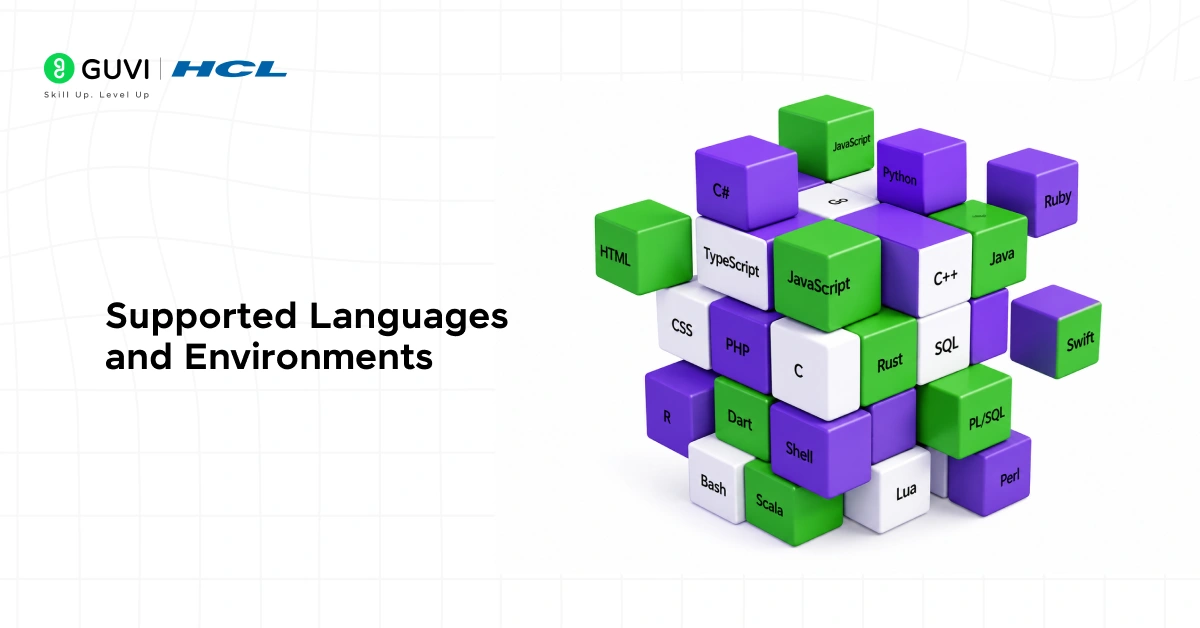
CodeWhisperer provides its strongest suggestions in Python, Java, JavaScript, TypeScript, and C#, which are the languages most commonly used for AWS development. It also supports Go, Rust, PHP, Ruby, Kotlin, SQL, and several others with progressively varying suggestion depth.
IDE support covers VS Code, IntelliJ IDEA, PyCharm, WebStorm, Rider, CLion, GoLand, the AWS Cloud9 browser-based IDE, the AWS Lambda console code editor, and JupyterLab for data science and machine learning workflows.
The breadth of environment support means most developers can adopt CodeWhisperer without changing their existing toolchain. It meets you where you already work.
Getting Maximum Performance From Amazon CodeWhisperer
- Write descriptive function-level comments before writing any code, and let the suggestion reflect your intent before you begin implementing.
- Use CodeWhisperer for boilerplate-heavy AWS tasks first, SDK client initialization, IAM role setup, resource policy construction, where the time savings are immediate and obvious.
- Run security scans at the end of every working session, not just before pull requests, so findings stay small and manageable.
- Pay attention to which suggestions you consistently reject and adjust your comment style to communicate your intent more precisely.
- Use the Professional tier’s organizational features to share usage insights across your team and identify where CodeWhisperer is delivering the most value.
In internal AWS studies, developers using CodeWhisperer completed coding tasks significantly faster than those without it, with the biggest improvements appearing when working with unfamiliar AWS services. The tool tends to deliver the most value precisely in situations where developers are outside their comfort zone—areas that typically slow down productivity the most—by reducing lookup time, suggesting relevant patterns, and accelerating decision-making during implementation.
Real-World Applications of Amazon CodeWhisperer
- Serverless application development
Lambda function development is one of the highest-value use cases. CodeWhisperer generates handler boilerplate, event parsing logic, error handling patterns, and SDK calls for downstream service interactions, all the repetitive structural code that Lambda functions require before any business logic is written.
- Infrastructure as code
When writing AWS CloudFormation templates or AWS CDK constructs, CodeWhisperer suggests resource definitions, property values, and dependency configurations based on the resource type you are defining. This dramatically reduces the documentation lookups that infrastructure-as-code authoring normally requires.
- Data pipeline development
For AWS Glue jobs, Athena queries, and data transformation logic, CodeWhisperer generates the boilerplate connection code, schema handling, and transformation patterns that make data engineering tasks tedious. Developers can focus on the transformation logic rather than the surrounding plumbing.
- Machine learning workflows
In SageMaker notebooks and ML pipeline code, CodeWhisperer assists with dataset loading, model training configuration, evaluation metric calculation, and deployment code. It understands the patterns that appear repeatedly across ML project lifecycle stages.
- API and backend development
For API Gateway integrations, DynamoDB access patterns, and microservice communication code, CodeWhisperer generates the correct SDK calls with appropriate error handling, retry logic, and response formatting that production-quality AWS backend code requires.
To learn more about Amazon CodeWhisper, do not miss the chance to enroll in HCL GUVI’s Intel & IITM Pravartak Certified Artificial Intelligence & Machine Learning course. Endorsed with Intel certification, this course adds a globally recognized credential to your resume, a powerful edge that sets you apart in the competitive AI job market.
Conclusion
Amazon CodeWhisperer is one of the most practically valuable tools available to AWS developers today. It reduces the distance between knowing what you want to build and having working code in front of you.
The security scanning feature alone justifies adoption for teams shipping production AWS workloads. Catching credential exposure, injection vulnerabilities, and policy misconfigurations during development changes the economics of cloud security significantly.
CodeWhisperer also shows where AI-assisted development is heading. The combination of contextual code generation, security analysis, and IDE-native integration represents the future of cloud development workflows.
If you are building on AWS and have not tried CodeWhisperer yet, the Individual tier is free and setup takes under ten minutes. The question is not whether AI-assisted coding is worth trying, but how much time you are leaving on the table by not using it.
FAQs
1. Is Amazon CodeWhisperer free to use?
The Individual tier is free for individual developers with no usage limits on code suggestions and a monthly limit on security scans. The Professional tier, which adds organizational management, SSO integration, and higher security scan limits, is a paid subscription per user per month.
2. How does CodeWhisperer compare to GitHub Copilot?
Both tools generate AI-powered code suggestions in IDEs. CodeWhisperer’s primary differentiation is its depth of AWS API knowledge, its built-in security scanning, and its open-source reference tracking. Copilot has broader language coverage and a larger install base. For AWS-focused development, CodeWhisperer’s cloud-specific features provide meaningful advantages.
3. Does CodeWhisperer send my code to AWS?
CodeWhisperer does send code context to AWS servers to generate suggestions. For the Professional tier, AWS offers options to opt out of having your code used to improve the model. Review the AWS data privacy documentation for your tier before using CodeWhisperer on sensitive proprietary codebases.
4. What languages does CodeWhisperer support best?
Python, Java, JavaScript, TypeScript, and C# receive the strongest suggestion quality. These are the languages most commonly used for AWS application development and the ones with the most representation in CodeWhisperer’s training data.
5. Can CodeWhisperer generate entire files or just individual functions?
CodeWhisperer generates suggestions ranging from single lines to complete functions and can generate substantial portions of a file through sequential suggestions. It is not designed to generate an entire application from a single prompt, but working through a file comment by comment can produce large amounts of functional code efficiently.
Success Stories

About the Author
Vishalini Devarajan
An Aerospace Engineer turned content writer, I focus on making complex concepts easy to understand through well-structured, reader-friendly blogs. Whether it’s a technical topic or a non-technical one, I love creating content that is clear, engaging, and impactful.
View all posts by Vishalini Devarajan
Connect with me @






Did you enjoy this article?