


Artificial Intelligence and Machine Learning Articles
Finance Manager to Data Analytics: Career Growth, Salary and Seniority
How to Evaluate LLM Outputs in Production Deployments
AI/ML Skills Gap 2026: Why Companies Can't Find Job-Ready Talent
20 AI/ML Interview Questions Recruiters Can Use Without a Tech Background - Best Guide


Get In Touch For Details! Request More Information

How to Use Structured Outputs in Claude Developer Platform
Jun 16, 2026 5 Min Read 982 Views
(Last Updated)
AI models provide us with powerful tools to perform complex tasks like writing, summarising, and answering questions. However, AI models can be unreliable, especially when generating text. Because AI model outputs are unstructured and unpredictable, meaning they are not always in a consistent format, developers have trouble incorporating them into applications.
This is where structured outputs come in. Instead of the unpredictable text we get from flexible prompting, a structured output format like JSON will always give us the same type of predictable and machine-readable response.
With structured outputs on the Claude Developer Platform, you can have more control over the AI model’s responses. We’ll go over structured outputs below, explaining what they are, why they are beneficial, and how they work on the Claude Developer Platform.
TLDR:
- With structured outputs on the Claude Developer Platform, instead of relying on flexible prompting, you are now using a more rigid method that controls the structure of the model’s output.
- By providing the model with a schema, it can consistently output predictable, machine-readable information.
- A schema enforced on a structured output will always be in a specific format, allowing a developer to easily integrate it into an API or workflow without additional work.
- Validation mechanisms are built in to ensure responses remain in the correct format, thereby reducing downstream issues and providing more dependable, real-world usability for your AI applications.
- Structured outputs empower developers to create more reliable, automation-ready applications by increasing the consistency and machine readability of AI responses, building a foundation for more robust and scalable solutions.
Table of contents
- What Are Structured Outputs in AI
- Why Structured Outputs Matter
- Overview of the Claude Developer Platform
- Where Structured Outputs Break Without Control
- How Structured Outputs Work in Claude
- JSON Output Mode
- Schema Enforcement
- Strict Tool Usage
- Step-by-Step Guide to Using Structured Outputs
- Define the Output Schema
- Write a Structured Prompt
- Generate and Validate Output
- Best Practices for Using Structured Outputs
- Designing Outputs for Automation and Scaling
- Common Mistakes to Avoid
- Conclusion
- FAQs
- What are structured outputs in Claude?
- Does Claude support structured data formats?
- How do structured outputs improve reliability?
- Do I still need to validate outputs?
- Can structured outputs be used in automation workflows?
- Are structured outputs suitable for beginners?
What Are Structured Outputs in AI
Structured outputs are an alternative to purely text-based outputs. Rather than just spitting out unpredictable sentences, you get data back in a uniform format that you can consume, such as JSON.
In classic AI usage, responses to the same prompt may be different. This makes the task of incorporating AI into applications annoying, as applications expect data to be generated in a machine-readable way.
Structured outputs address this by defining a fixed format for responses. The structure, such as field names and expected contents, is specified by the developer, and the model sticks to it.
Why Structured Outputs Matter
AI models are bold, but their outputs remain inconsistent in terms of formatting. Even with the right information, the structure is inconsistent and prevents the use of responses in real use cases and workflows.
Structured outputs solve this problem by producing responses that are uniformly formatted. This minimizes the amount of manual parsing and processing and simplifies the integration of your system with third-party APIs, databases, and automation workflows.
Synthetic data allows developers to build systems with more reliable results. Since AI outputs are predictable, they can be directly integrated into the system without much clean-up or alteration.
Overview of the Claude Developer Platform

An API platform for constructing and running AI applications. It gives developers more control over outputs generated by models.
Unlike simple chatbots, it can be incorporated into backend systems and processes. This makes it viable for production-level and large-scale applications.
The platform supports structured outputs. They enable us to enforce a predictable output format on the often unpredictable solutions provided by AI in production.
To understand how these tools are used in practice, you can explore Claude Code features and capabilities.
Where Structured Outputs Break Without Control
Structured outputs are a powerful feature but are not automatically dependable. The format and contents of a response, for example, can go wrong in subtle ways if not carefully managed.
There can be partial compliance as well. The response keeps the format but breaks in some fields or has incorrect data types. These errors are silent rather than loud failures like completely broken output.
Another issue occurs with dynamic inputs. Prompt complexity and varying inputs can make it difficult for the model to remain strict unless constraints are explicitly provided.
To avoid these problems, combining schema definition with explicit prompting and validation is necessary. Structured outputs perform best when treated as a controlled system rather than just a formatting feature.
How Structured Outputs Work in Claude
Structured outputs are an approach that compels Claude, instead of generating unformatted text, to follow a specific format. Task parameters can specify the required output structure.
This can be achieved using schema definitions, prompt instructions, and enforcement mechanisms. As a result, outputs become predictable and easier for system integration.
The modeling process is mainly based on three elements:
JSON Output Mode
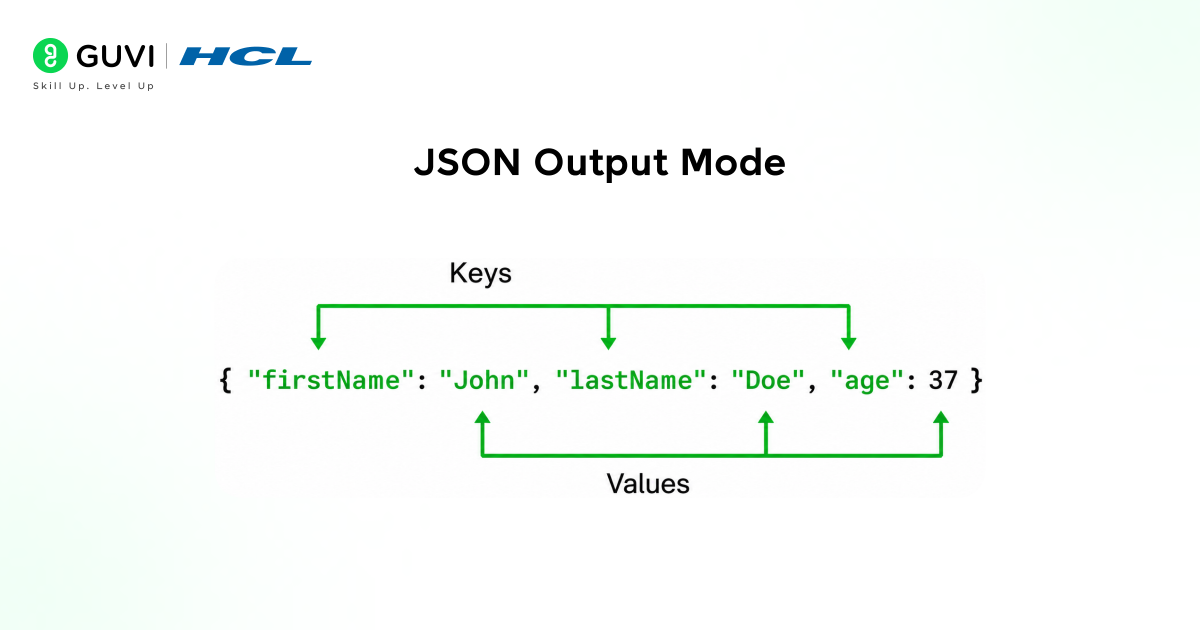
The mode of operation is the standard output mode. The operation mode is the default output mode.
In JSON output mode, developers can specify responses as a series of key-value pairs. This guarantees that the output for each call is machine-readable and consistent.
It is widely used in APIs, data extraction, and automation workflows, especially in systems where structured data is required.
Schema Enforcement
Schema enforcement ensures that responses conform to a given structure, including required fields, data types, and format.
This minimizes errors and eliminates the need for complicated validation logic in backend systems.
Strict Tool Usage
Strict tool usage ensures that tools operate only with properly formatted inputs. It prevents incorrect formats or malformed outputs.
This technique becomes even more important in multi-step processes, for example, the output of one step is used as the input for the next step, and any formatting issue can break the entire workflow.
If you’re wondering how these structured outputs actually work in real-world systems, exploring how Generative AI eBook is used in automation and agent workflows can give you a much clearer picture.
Even a minor formatting error can break an entire backend when outputs don’t match expected structures. Structured outputs solve this by aligning responses with machine-readable formats instead of human-style text. By chaining multiple AI tasks together using these formats, workflows become more robust, scalable, and capable of semi-autonomous operation with minimal supervision.
Step-by-Step Guide to Using Structured Outputs
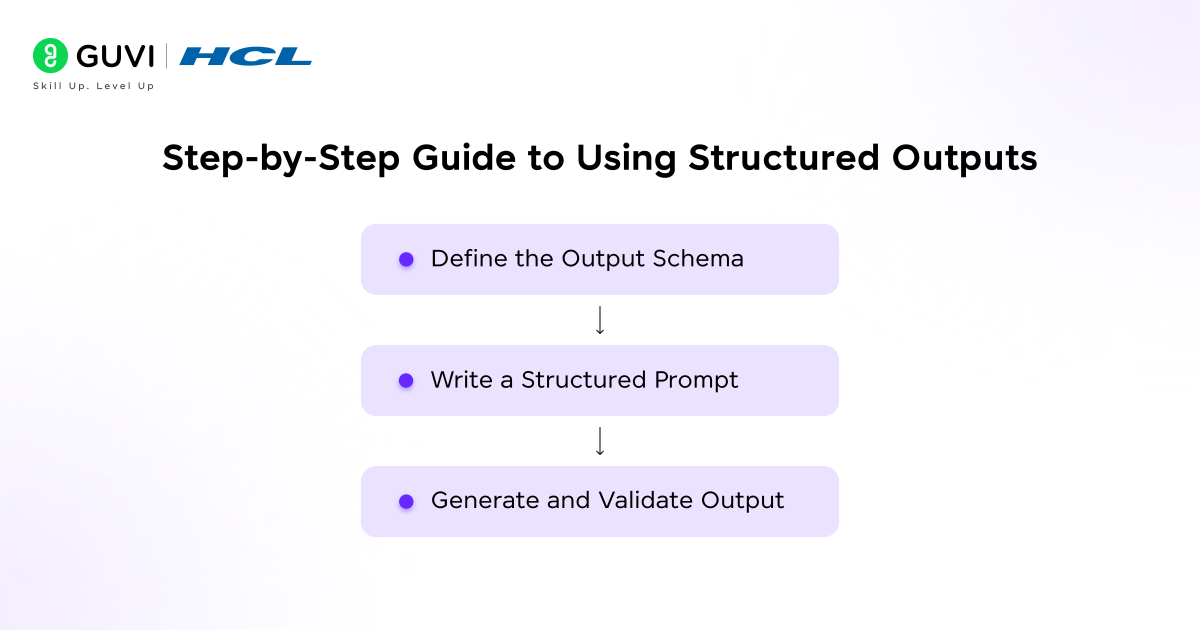
To use structured outputs with the Claude Developer Platform, you define what your output should look like before the model generates it, rather than doing post-processing on unstructured data. The outcome is greater consistency and fewer errors within your applications.
Define the Output Schema
The first step is to decide the overall format. Specify precisely what information you want to include in your structured output, along with the appropriate data types and any mandatory fields.
For example, when extracting user details from a text document, your schema might dictate fields such as “name” (string, required) and “age” (number, optional). Avoid making your schema unnecessarily complex, as simpler formats can improve accuracy.
- Ensure a clear structure
- Identify required fields
- Define data types carefully
- Keep schema definitions to the bare minimum necessary

Write a Structured Prompt
Once your output schema is defined, write a clear prompt that explicitly instructs Claude on the desired format and structure of the response. The better your prompt, the more accurately Claude can follow the specified schema.
- Clearly define the requested output format
- Provide a specific example when it helps to clarify
- Use precise language to prevent confusion
Generate and Validate Output
Submit your prompt, and Claude will produce a structured output. Always validate that the generated output strictly adheres to the schema you have defined, which ensures it will reliably fit into your application’s data flow.
This verification step prevents errors in downstream systems. Basic validation, even for structured outputs, greatly increases robustness.
- Verify that all fields match the schema
- Ensure the data formats conform to the schema
- Plan for edge cases in your validation
If you’re getting started, learning how to use Claude Code effectively can help you better understand how to structure prompts and outputs in real applications.
Best Practices for Using Structured Outputs
The benefits of structured outputs are amplified by good design choices within your prompt and schema. A well-designed output provides consistent results even as the complexity of your task grows, allowing you to build more robust applications and automation.
Here are a few best practices:
- Be explicit in your instructions: In your prompt, clearly state the desired format, including all structural requirements. Vague instructions can lead to unexpected results.
- Keep your schema simple: Avoid over-complicating your schema. Begin with the most crucial fields and add more only as needed.
- Use examples when possible: A concrete example of the desired output can greatly help Claude understand complex formats and improve consistency.
- Validate your outputs reliably: Always verify that the generated output adheres precisely to your schema. This is critical for preventing errors in production.
- Anticipate edge cases: Consider how the model should handle missing or unexpected data. Robust systems often have fallbacks for these situations.
- Don’t over-constrain the model: Excessive restrictions in your schema can sometimes hinder the model’s reasoning ability and reduce the quality or relevance of its responses.
Many of these principles also align with broader Claude Code best practices used in real-world projects.
Designing Outputs for Automation and Scaling
Structured outputs are incredibly valuable for automation because you can design them to fit directly into your application’s pipeline, bypassing manual parsing steps.
Thinking about the data flow through different services helps you design outputs that are highly interoperable. Scalability is directly tied to consistency; outputs that are consistent across different tasks and use cases allow you to build and expand systems much more efficiently.
These patterns are already visible in real-world Claude Code workflows, particularly in systems built around automation and scalable data pipelines.
Common Mistakes to Avoid
While defining a schema makes the output structured, mistakes in implementation will still compromise reliability. Many developers think schema definition is all it takes and forget to consider that bad prompting and an overly complicated schema can still yield an unpredictable output.
Below are common pitfalls:
- Vague prompts: Bad prompts lead to bad and unpredictable output. Be explicit.
- Schema over-complexity: Too many nested fields make the schema more likely to fail. Keep the structure simple.
- Not validating output: Assuming the output is perfect will cause problems when it’s not. Always validate it before use.
- Not handling edge cases: The data isn’t always clean; missing or null values in the schema can break your app.
- Not relying solely on prompting: A good prompt doesn’t always guarantee structure unless enforced.
- Not expecting errors: While the schema constrains the output, perfect output isn’t guaranteed. Handle cases where output differs.
If you’re looking to move beyond basic usage and actually understand how AI systems like Claude can be shaped for real engineering workflows, diving deeper into structured learning can make a noticeable difference. HCL GUVI’s IIT Pravartak AI and ML Course is one way to see how these concepts translate into real-world applications.
Conclusion
Structured output is a practical advancement that shifts how AI can be leveraged within applications from using unstructured, freeform answers to usable and consistent data. Developers can now go from simple experimentation to building systems that trust their AI input.
By setting a structure for the output, developers can reduce the work needed on the backend to clean or parse this data and integrate with databases, APIs, and workflows more seamlessly.
Utilizing structured outputs on the Claude Developer Platform makes building reliable and scalable AI solutions a reality and will continue to be vital for robust systems as AI becomes increasingly ubiquitous.
FAQs
1. What are structured outputs in Claude?
Structured outputs are responses generated in a fixed format like JSON, making them easier to process and integrate into applications.
2. Does Claude support structured data formats?
Yes, Claude supports structured outputs with schema-based control, allowing consistent and machine-readable responses.
3. How do structured outputs improve reliability?
They ensure consistent formatting, reducing errors and making outputs easier to use in backend systems.
4. Do I still need to validate outputs?
Yes, basic validation is recommended to handle edge cases and ensure data accuracy.
5. Can structured outputs be used in automation workflows?
Yes, they are ideal for automation, as consistent formats allow smooth multi-step processing.
6. Are structured outputs suitable for beginners?
Yes, beginners can start with simple schemas and gradually build more advanced structured implementations.
Success Stories

About the Author
Vishalini Devarajan
An Aerospace Engineer turned content writer, I focus on making complex concepts easy to understand through well-structured, reader-friendly blogs. Whether it’s a technical topic or a non-technical one, I love creating content that is clear, engaging, and impactful.
View all posts by Vishalini Devarajan
Connect with me @


















Did you enjoy this article?