


Artificial Intelligence and Machine Learning Articles
Finance Manager to Data Analytics: Career Growth, Salary and Seniority
How to Evaluate LLM Outputs in Production Deployments
AI/ML Skills Gap 2026: Why Companies Can't Find Job-Ready Talent
20 AI/ML Interview Questions Recruiters Can Use Without a Tech Background - Best Guide


Get In Touch For Details! Request More Information
RAG Chatbot With HuggingFace And Streamlit: Complete Tutorial
Sep 23, 2026 7 Min Read 2415 Views
(Last Updated)
If you’ve ever wished a chatbot could actually know your documents, not just give generic answers, that’s exactly what RAG makes possible.
A RAG chatbot combines a retrieval system that fetches relevant chunks from your documents with a generation model that reads those chunks to produce a grounded, accurate answer. Most language models are limited to what they learned during training, they don’t know your company’s internal policies.
In this tutorial, you’ll build a RAG chatbot from scratch using HuggingFace for the AI backbone and Streamlit for a clean, interactive UI. Expect real code, real explanations, and the actual decisions you’ll make as a developer.
Table of contents
- TL;DR Summary
- What is a RAG Chatbot?
- RAG vs Fine-Tuning: When to Use Which
- How Does RAG Work?
- Tools You'll Need
- Setting Up Your Environment
- Loading and Splitting Documents
- Why Chunk Size Matters
- Creating Embeddings With HuggingFace
- Why all-MiniLM-L6-v2?
- Building the Vector Store
- Setting Up the Retrieval Chain
- Understanding the Key Parameters
- Choosing the Right Model
- Building the Streamlit Interface
- What's Happening in This Interface?
- Running Your RAG Chatbot
- Improving Retrieval Quality: Practical Tips
- Common Errors and Fixes
- Deploying to Streamlit Community Cloud
- Taking It Further
- Conclusion
- FAQs
- What is a RAG chatbot?
- Do I need a GPU to build this?
- What file types can I use with this chatbot?
- Is HuggingFace free to use?
- What is FAISS and why do we use it
TL;DR Summary
- What it is: an AI architecture that retrieves relevant chunks from your own documents before generating an answer, instead of relying purely on what a model learned during training
- The full pipeline: load documents, split into chunks, generate embeddings, store in a vector database, retrieve on query, generate a grounded response
- Tools used: Python, HuggingFace Transformers, LangChain, FAISS, and Streamlit for the interface
- The model choice: flan-t5-base runs comfortably on CPU, no GPU required for this tutorial
- Where it’s headed: add conversation memory, support more file types, and deploy to Streamlit Community Cloud for free
What is a RAG Chatbot?
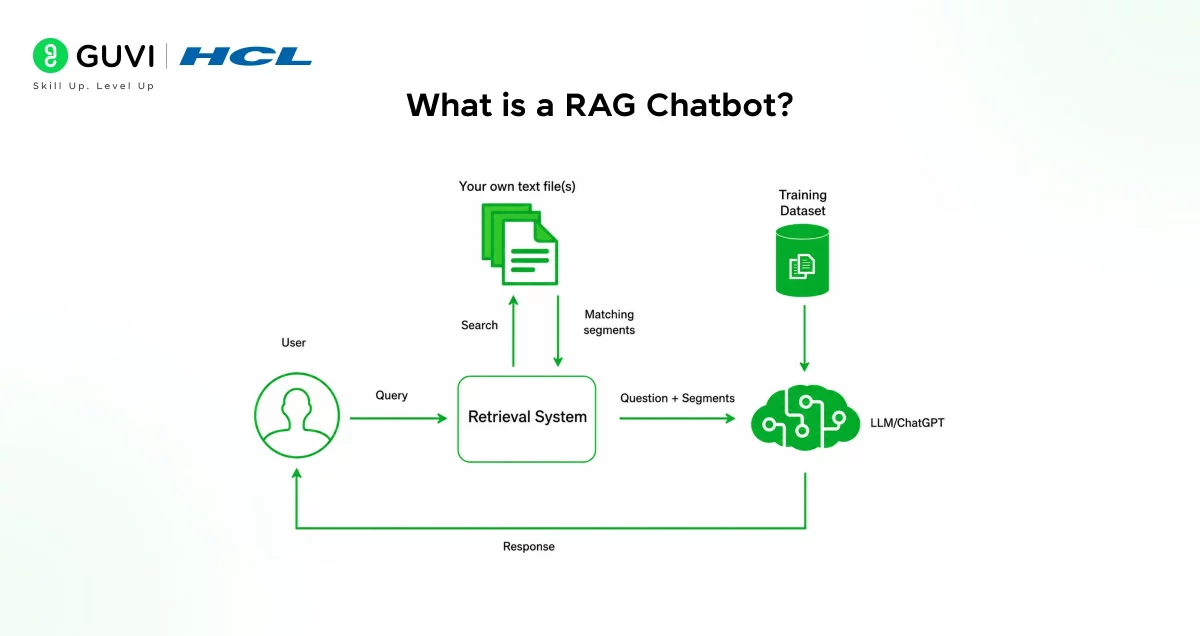
RAG stands for Retrieval-Augmented Generation. It’s an AI architecture that combines two things:
- A retrieval system that fetches relevant chunks of text from your documents
- A generation model that reads those chunks and produces a coherent answer
Think of it like an open-book exam. Instead of the model relying purely on memory, it gets to look things up before answering. This makes responses far more accurate and grounded in your actual data.
RAG chatbots are widely used for customer support systems, internal knowledge bases, document Q&A tools, and research assistants.
RAG vs Fine-Tuning: When to Use Which
Both approaches make a model “know” your specific data, but they solve the problem in very different ways, and picking the wrong one wastes real time and money.
| Factor | RAG | Fine-Tuning |
|---|---|---|
| What it changes | Nothing in the model, adds retrieval on top | The model’s actual weights |
| Best for | Data that changes often (docs, policies, tickets) | Teaching a fixed writing style or domain vocabulary |
| Cost to update | Just re-index your documents | Requires retraining |
| Setup complexity | Lower, this tutorial’s entire pipeline | Higher, needs training infrastructure and labeled data |
| Hallucination risk | Lower, answers are grounded in retrieved text | Can still hallucinate on unfamiliar questions |
The practical rule: if your data updates regularly, or you need the model to cite where an answer came from, RAG is almost always the right starting point. Fine-tuning makes more sense when you need the model to consistently adopt a specific tone or reasoning style that retrieval alone can’t teach it.
How Does RAG Work?
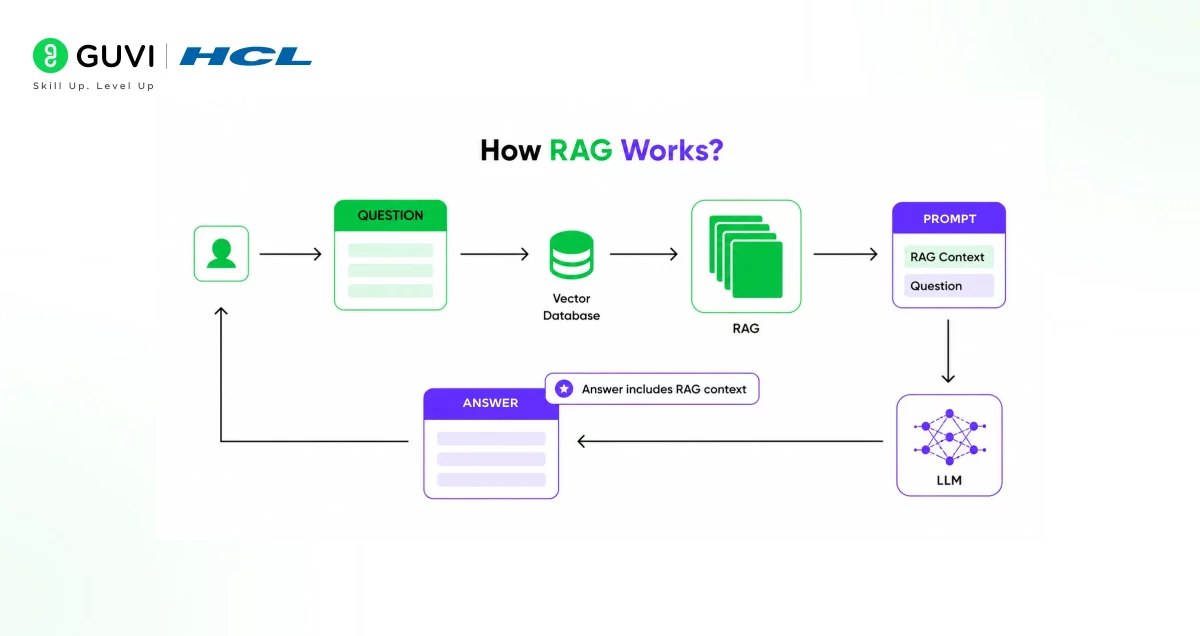
Before writing a single line of code, it helps to understand what happens under the hood.
Here’s the flow, step by step:
- Document ingestion: You load your documents (PDF, text files, etc.)
- Chunking: The documents are split into smaller, manageable pieces
- Embedding: Each chunk is converted into a vector (a numerical representation)
- Vector storage: These vectors are stored in a vector database
- Query processing: When a user asks a question, it’s also converted into a vector
- Retrieval: The system finds the most similar chunks to the query
- Generation: The language model uses those chunks to generate a response
Each step builds on the last, and you’ll implement all of them in this tutorial.
Learn More: How to Build RAG Pipelines in AI Applications
Tools You’ll Need
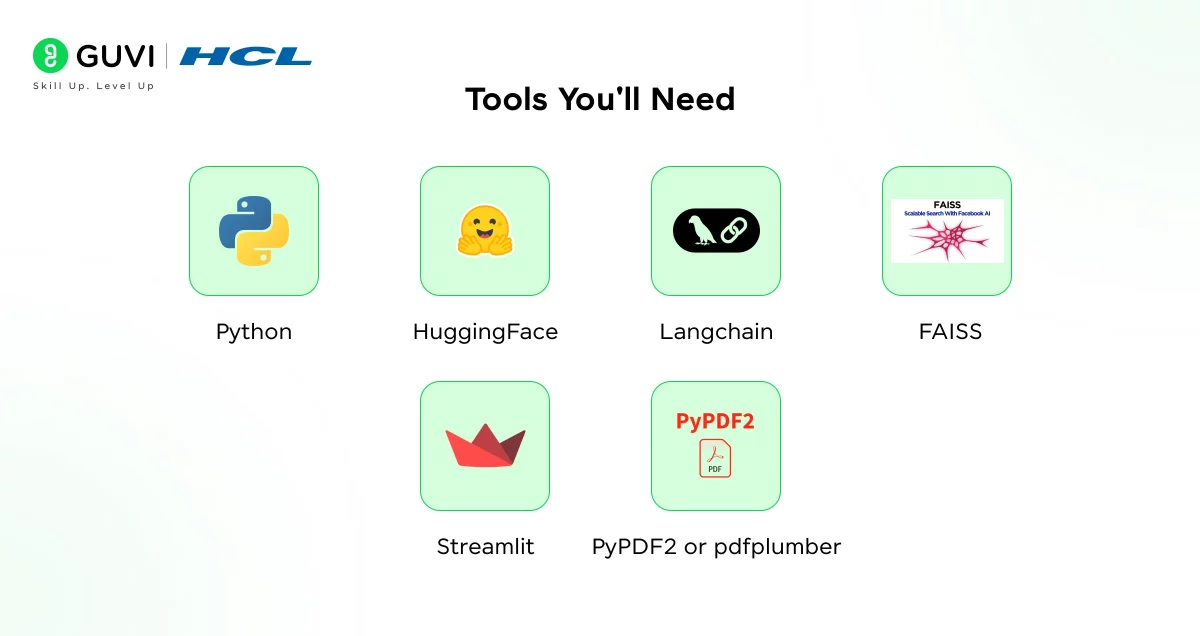
Here’s a quick overview of everything this project relies on:
- Python 3.9+: the programming language for the entire project
- HuggingFace Transformers: for loading embedding models and LLMs
- LangChain: to manage the retrieval chain and document processing
- FAISS: a fast vector store for similarity search
- Streamlit: to build the chat interface
- PyPDF2 or pdfplumber: for reading PDF documents
You don’t need a GPU to follow along. HuggingFace offers lightweight models that run on CPU, though responses may be slightly slower.
Setting Up Your Environment
Start by creating a virtual environment to keep dependencies clean.
python -m venv rag-env
source rag-env/bin/activate  # On Windows: rag-env\Scripts\activate
Now install all the required packages:
pip install streamlit langchain langchain-community \
  langchain-huggingface transformers sentence-transformers \
  faiss-cpu pypdf2 huggingface_hub
Once installed, create a project folder structure like this:
rag-chatbot/
├── app.py
├── rag_pipeline.py
├── requirements.txt
└── docs/ ← your documents go here
Keeping your pipeline logic separate from the Streamlit app makes the project easier to debug and scale later.
Loading and Splitting Documents
The first real step is getting your documents into the system. LangChain makes this straightforward with its document loaders.
In rag_pipeline.py, start with this:
from langchain_community.document_loaders import PyPDFLoader
from langchain.text_splitter import RecursiveCharacterTextSplitter

def load_documents(file_path):
    loader = PyPDFLoader(file_path)
    documents = loader.load()
    return documents

def split_documents(documents):
    splitter = RecursiveCharacterTextSplitter(
        chunk_size=500,
        chunk_overlap=50
    )
    chunks = splitter.split_documents(documents)
    return chunks
Why Chunk Size Matters
Chunk size is one of those decisions that directly affects your chatbot’s quality.
- Too large: the model receives too much context and struggles to focus
- Too small: important information gets cut off mid-sentence
- 500 tokens with 50 overlap: a solid starting point for most use cases
The overlap ensures that information near chunk boundaries isn’t lost during retrieval.
The concept behind RAG was introduced in a 2020 paper by Meta AI researchers. It was designed to reduce “hallucinations” — a common problem where language models confidently generate incorrect information. By grounding responses in retrieved documents, RAG significantly improves factual accuracy.
Creating Embeddings With HuggingFace
Embeddings are what make semantic search possible. They convert text into vectors so that similar meanings map to nearby points in a high-dimensional space.
HuggingFace’s sentence-transformers library gives you access to excellent, free embedding models.
from langchain_huggingface import HuggingFaceEmbeddings

def get_embeddings():
    embeddings = HuggingFaceEmbeddings(
        model_name="sentence-transformers/all-MiniLM-L6-v2"
    )
    return embeddings
Why all-MiniLM-L6-v2?
This model is a great default choice for several reasons:
- It’s lightweight, runs efficiently on CPU
- It produces high-quality embeddings for English text
- It’s widely tested in production RAG systems
- It’s completely free to use
If you need multilingual support, consider paraphrase-multilingual-MiniLM-L12-v2 instead.
Building the Vector Store
Once you have your chunks and embeddings ready, you store them in FAISS, a vector database developed by Meta that’s optimised for fast similarity search.
from langchain_community.vectorstores import FAISS

def create_vector_store(chunks, embeddings):
    vector_store = FAISS.from_documents(chunks, embeddings)
    return vector_store

def save_vector_store(vector_store, path="faiss_index"):
    vector_store.save_local(path)

def load_vector_store(path, embeddings):
    return FAISS.load_local(path, embeddings,
                            allow_dangerous_deserialization=True)
Saving the vector store locally means you don’t re-process documents every time the app restarts. For larger document sets, this saves significant time.
Setting Up the Retrieval Chain
This is where everything connects. The retrieval chain takes a user query, finds the most relevant chunks, and passes them to the language model along with the question.
from langchain_community.llms import HuggingFacePipeline
from langchain.chains import RetrievalQA
from transformers import pipeline

def get_llm():
    pipe = pipeline(
        "text2text-generation",
        model="google/flan-t5-base",
        max_new_tokens=512
    )
    llm = HuggingFacePipeline(pipeline=pipe)
    return llm

def build_qa_chain(vector_store):
    llm = get_llm()
    retriever = vector_store.as_retriever(
        search_kwargs={"k": 3}
    )
    qa_chain = RetrievalQA.from_chain_type(
        llm=llm,
        chain_type="stuff",
        retriever=retriever,
        return_source_documents=True
    )
    return qa_chain
Understanding the Key Parameters
- k=3: retrieves the top 3 most relevant chunks per query
- chain_type=”stuff”: passes all retrieved chunks directly into the prompt (best for smaller chunk sets)
- return_source_documents=True: lets you show users where the answer came from
Choosing the Right Model
flan-t5-base is a solid, CPU-friendly model for question answering. Here are a few alternatives depending on your needs:
| Model | Size | Best For |
|---|---|---|
| flan-t5-base | ~250MB | Quick prototyping, CPU use |
| flan-t5-large | ~770MB | Better accuracy |
| mistralai/Mistral-7B | ~7GB | Production quality (needs GPU) |
For local development, stick with flan-t5-base. You can always swap the model later.
If you are interested in learning more about RAG and how Generative AI impacts the current technological landscape, consider reading HCL GUVI’s Free Generative AI Ebook, where you learn the basic mechanism of GenAI and its real-world applications in gaming, coding, entertainment, and more.
Building the Streamlit Interface
Now for the part users actually see. Streamlit lets you build interactive web apps with pure Python, no frontend experience needed.

Create your app.py file:
import streamlit as st
from rag_pipeline import (
    load_documents, split_documents, get_embeddings,
    create_vector_store, build_qa_chain
)

st.set_page_config(page_title="RAG Chatbot", layout="wide")
st.title("📄 RAG Chatbot: Ask Your Documents")

# File upload
uploaded_file = st.file_uploader("Upload a PDF", type=["pdf"])

if uploaded_file:
    with open("temp_doc.pdf", "wb") as f:
        f.write(uploaded_file.read())

    with st.spinner("Processing your document..."):
        docs = load_documents("temp_doc.pdf")
        chunks = split_documents(docs)
        embeddings = get_embeddings()
        vector_store = create_vector_store(chunks, embeddings)
        qa_chain = build_qa_chain(vector_store)

    st.success("Document processed! Ask your question below.")

    # Chat interface
    if "messages" not in st.session_state:
        st.session_state.messages = []

    for msg in st.session_state.messages:
        with st.chat_message(msg["role"]):
            st.write(msg["content"])

    user_input = st.chat_input("Ask something about your document...")

    if user_input:
        st.session_state.messages.append(
            {"role": "user", "content": user_input}
        )
        with st.chat_message("user"):
            st.write(user_input)

        with st.chat_message("assistant"):
            with st.spinner("Thinking..."):
                result = qa_chain({"query": user_input})
                answer = result["result"]
                sources = result["source_documents"]
            st.write(answer)
            with st.expander("View Sources"):
                for i, doc in enumerate(sources):
                    st.write(f"**Source {i+1}:**")
                    st.write(doc.page_content[:300] + "...")

        st.session_state.messages.append(
            {"role": "assistant", "content": answer}
        )
What’s Happening in This Interface?
The app is doing several things at once:
- File upload: users can upload any PDF directly in the browser
- Session state: stores conversation history so the chat feels continuous
- Source display: shows which document chunks were used to generate the answer
- Spinner: gives feedback while the model is working
This is a clean, functional interface that covers the core experience without overcomplicating things.
Running Your RAG Chatbot
You’re almost there. Run the app with a single command:
streamlit run app.pyYour browser will open automatically at http://localhost:8501. Upload a PDF, type a question, and watch your RAG chatbot answer from the document.
Improving Retrieval Quality: Practical Tips
A working pipeline is only half the job, retrieval quality is what actually determines whether answers feel useful or frustrating.
- Tune k before you tune anything else. If answers feel thin, try k=5 instead of k=3. If they feel unfocused, drop it back down.
- Watch for chunk boundary problems. If your documents have tables or numbered lists, standard chunking can split them awkwardly, consider a larger chunk size for structured documents specifically.
- Test with questions your users will actually ask, not just questions that mirror your document’s exact wording. Real users paraphrase.
- Check the source documents your app displays. If the retrieved chunks look irrelevant even when the final answer seems fine, that’s often a sign your embedding model needs revisiting for your specific domain.
- Consider hybrid search for exact-match-sensitive data. Pure semantic search can miss exact product codes or IDs, combining it with keyword search covers that gap.
Common Errors and Fixes
Even when you follow every step carefully, a few issues tend to come up. Here are the most common ones and how to handle them.
- allow_dangerous_deserialization error: this appears when loading a saved FAISS index. Add
allow_dangerous_deserialization=Trueto yourload_local()call, it’s safe when you’re loading your own saved files. - Model downloads are taking too long: HuggingFace downloads models on the first run. This is normal. Once cached, subsequent runs are fast. You can also pre-download models using
huggingface-cli download. - Answers are too short or incomplete: increase
max_new_tokensin your pipeline. Try values between 256 and 1024, depending on the model and the type of answers you expect. - Out of memory errors: switch to a smaller model or reduce your chunk size. For CPU-only machines, flan-t5-base is the safest option.
- Retrieval returning irrelevant results: try adjusting k in the retriever. Also experiment with your chunk size, sometimes smaller chunks (around 300 tokens) improve retrieval precision.
Deploying to Streamlit Community Cloud
Once your chatbot works locally, sharing it is genuinely simple with Streamlit’s free hosting.
- Push your project to GitHub, including
app.py,rag_pipeline.py, and arequirements.txtfile listing every package you installed. - Go to share.streamlit.io and sign in with your GitHub account.
- Click “New app” and select your repository, branch, and the path to
app.py. - Deploy. Streamlit installs your dependencies and builds the app automatically, this usually takes a few minutes for a project this size.
- Test the live URL the same way you tested locally, upload a document and ask it a question.
A few things to keep in mind for deployment specifically: Streamlit Community Cloud has memory limits on the free tier, so flan-t5-base is a safer choice there than a larger model. Also make sure any file paths in your code are relative, not hardcoded to your local machine.
Taking It Further
Once your base chatbot is working, there are several directions you can take it:
- Add conversation memory using LangChain’s ConversationBufferMemory so the chatbot remembers earlier messages in the session
- Support multiple file types by adding loaders for .txt, .docx, and .csv files
- Switch to a more powerful model like Mistral or LLaMA 2 for noticeably better answer quality
- Add authentication if you’re building this for internal team use
Each of these improvements takes your chatbot closer to a production-ready tool.
If you’re serious about building RAG applications with premium AI tools and want to apply them in real-world scenarios, don’t miss the chance to enroll in HCL GUVI’s Intel & IITM Pravartak Certified Artificial Intelligence & Machine Learning Course, co-designed by Intel.
It covers Python, Machine Learning, Deep Learning, Generative AI, Agentic AI, and MLOps through live online classes, 20+ industry-grade projects, and 1:1 doubt sessions, with placement support from 1000+ hiring partners.
Conclusion
Building a RAG chatbot with HuggingFace and Streamlit is one of the most practical ways to apply AI to real documents and real workflows.
You’ve now covered the full pipeline, from loading and chunking documents to generating embeddings, running retrieval, and presenting everything through a clean chat interface.
The real power of RAG isn’t just the technology, it’s the ability to make AI genuinely useful for your specific data. As open-source models continue to improve, building tools like this will only get more accessible and more powerful.
FAQs
1. What is a RAG chatbot?
A RAG chatbot is an AI system that retrieves relevant information from your documents before generating a response. This makes it more accurate than a standard chatbot that relies only on pre-trained knowledge.
2. Do I need a GPU to build this?
No. This tutorial uses flan-t5-base and all-MiniLM-L6-v2, both of which run on CPU. Responses may be slower, but it works without any special hardware.
3. What file types can I use with this chatbot?
In this tutorial, we use PDFs. LangChain supports many other formats including .txt, .docx, .csv, and web pages with minimal changes to the loader.
4. Is HuggingFace free to use?
Yes. All models used in this tutorial are freely available on HuggingFace Hub and can be downloaded and run locally at no cost.
5. What is FAISS and why do we use it
FAISS (Facebook AI Similarity Search) is a library for fast vector similarity search. It lets you find the most relevant document chunks for any given query in milliseconds, even with large document sets.
Success Stories

About the Author
Jebasta
I translate the language of data into stories that anyone can understand. As a writer with a data science background, I simplify analytics, AI, and decision-making so beginners and enthusiasts can confidently explore the world of data.
View all posts by Jebasta
Connect with me @







Did you enjoy this article?