


Artificial Intelligence and Machine Learning Articles
Finance Manager to Data Analytics: Career Growth, Salary and Seniority
How to Evaluate LLM Outputs in Production Deployments
AI/ML Skills Gap 2026: Why Companies Can't Find Job-Ready Talent
20 AI/ML Interview Questions Recruiters Can Use Without a Tech Background - Best Guide


Get In Touch For Details! Request More Information
How to Create a Professional Resume Using ChatGPT
Apr 09, 2026 4 Min Read 1534 Views
(Last Updated)
Professional Resume Using ChatGPT makes the process much easier. Writing a resume from scratch can feel overwhelming when you sit in front of a blank page and struggle to recall all your achievements. That’s where ChatGPT helps—it handles the heavy lifting of structuring, wording, and polishing, so you can create a strong resume and land more interviews.
This blog will act as a roadmap for successfully using ChatGPT to create ATS-friendly Resumes.
Quick Answer:
ChatGPT can be used to design a professional resume using information and data about your education, skills, job experience, and career goals, and can easily structure them into a well-formatted, coherent resume.
Table of contents
- Why Use ChatGPT to Create a Resume
- Example of a Professional Resume Using ChatGPT
- Prompt Example:
- Output:
- Please Note:
- Steps to Create a Resume Using ChatGPT
- Step 1: Gather Your Info Before You Start
- Step 2: Write a Prompt That Actually Works
- Step 3: Build Each Section One at a Time
- Step 4: Tailor It to the Job
- Step 5: Tighten Up the Language
- Step 6: Do a Final Manual Check
- Key Considerations to Remember
- A. Don't Lie or Exaggerate
- B. Always Verify the Content
- C. Avoid Over-Reliance on ChatGPT
- D. Make It ATS-Friendly
- E. Customize for Every Application
- F. Keep It Concise
- Conclusion
- FAQs
- Can ChatGPT write a resume if I have no work experience?
- Will my resume get rejected if a recruiter finds out I used ChatGPT?
- Does ChatGPT help with ATS optimization?
Why Use ChatGPT to Create a Resume
ChatGPT is widely viewed as a chatbot. However, in the case of resumes, it is as though you have a career coach, professional editor, and writing assistant in one.
Here’s what makes it genuinely useful:
- It provides you with output that is written in a professional tone
- It personalizes the content according to the job descriptions
- It saves time and manual effort
- It works for any experience level
Do you know that Python is the optimal programming language for building AI products? Due to its simple structure and robust library support, it has become the top choice for AI development. If you are an absolute beginner in the world of computer science and AI excites you, the first thing you should do is learn Python. Start with HCL GUVI’s free Python resource to build a strong foundation in Python for AI.
Example of a Professional Resume Using ChatGPT
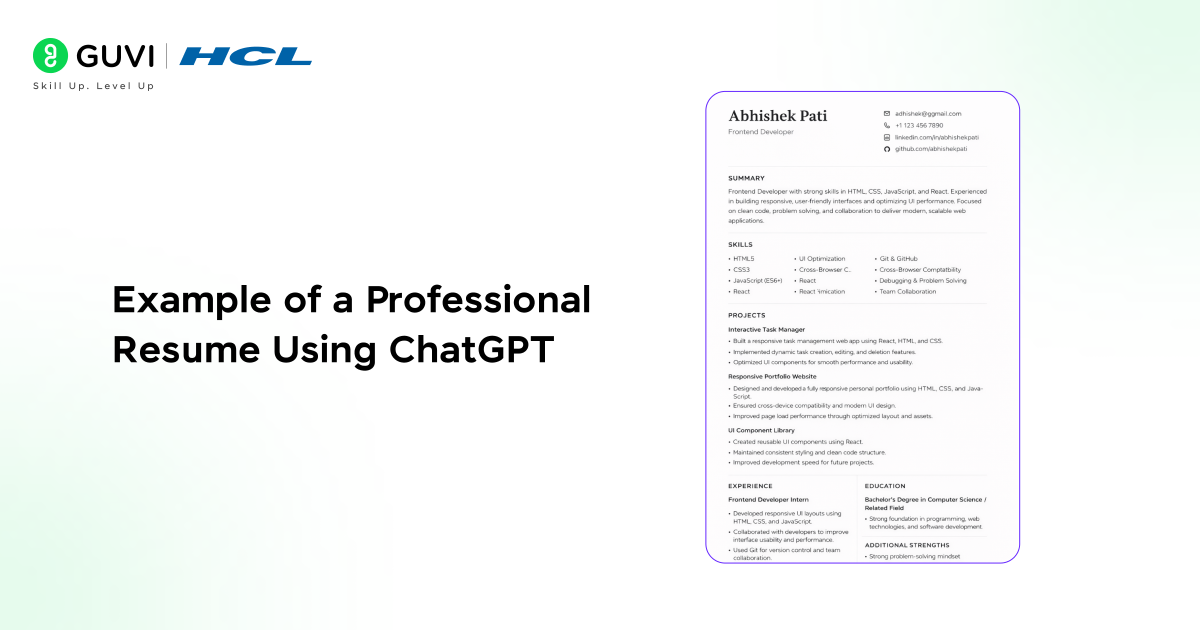
Here is an example of how to create a professional resume using an effective prompt in ChatGPT.
Prompt Example:
“Create a professional one-page resume for a Frontend Developer with strong skills in HTML, CSS, JavaScript, React, responsive design, UI optimization, and Git. Highlight projects, problem-solving ability, clean code practices, and collaboration skills.
The resume should be ATS-friendly, well-structured with clear sections (Summary, Skills, Projects, Experience, Education), and written in concise, impactful bullet points suitable for modern tech companies.”
Output:
Please Note:
- If you want to optimize or modify your resume, update your skills, add projects, and refine your achievements to match the job role.
- To personalize the resume, pass your name, college name, and percentage as a prompt to insert the correct details in the resume.
Accelerate your programming career with HCL GUVI’s ChatGPT for Programmers Course. Learn to enhance projects, build smart chatbots, and integrate NLP to code faster and innovate smarter. Join now and Start Building!
Steps to Create a Resume Using ChatGPT
Here are the following steps you need to follow to create a professional and well-structured resume using ChatGPT:
Step 1: Gather Your Info Before You Start
Do not go off on ChatGPT without preparation. Spend at least 10 minutes collecting:
- Your job titles, names of companies, and dates
- What you actually did in each role
- Any milestones, statistics, or achievements that you are proud of.
- Your credentials and qualifications.
- The job description you wish to apply to
The more input you give ChatGPT, the better your resume becomes. Simple as that.
Also Read: How to Make a Resume in 10 Minutes
Step 2: Write a Prompt That Actually Works
Do not simply type “write me a resume”. That is how you end up with a generic, useless draft.
Instead, try something like:
“I am seeking an employment opportunity in a [Job Title] position. I possess [X] years of experience in the [field] of work. The following is my background: [paste details]. Prepare a professional resume that includes a summary, work experience, skills, and education.”
Insert the job description here—and tailor it to what the employer wants from you.
Step 3: Build Each Section One at a Time
Go section by section. Don’t rush it.
Summary
- Keep it 2-3 lines
- Should say what you do, what value you offer, and who you are.
- If it is robotic, ask ChatGPT to simplify it.
Work Experience
- Copy your job responsibilities and rewrite them using action verbs and results.
- Quantify your achievements – use percentages, revenue, and sizes of teams.
- For example, the phrase “Managed social media” is transformed into “Grew Instagram Channel from 4K to 122K in 4 months”.
Skills
- Ask ChatGPT about the skills required for your desired position.
- No need to include more than what is true to you.
Education
- Mention degree, school, year of graduation – keep it clean.
- Add relevant courses and certifications
Step 4: Tailor It to the Job
Generic resumes get ignored. Tailored ones get callbacks.

Copy the job description and say: “Rewrite my resume to fit this job posting and use keywords naturally.”
This also helps with ATS — the software companies use to filter resumes before humans read them. No keywords = no interview, no matter how good you are.
Note:
- ATS (Applicant Tracking System): A software that helps companies scan and filter resumes during the hiring process.
- ATS Score: A metric that shows how well a resume matches a job; a higher score means better chances (a good range is 70–80% or higher).
Also Read: AI Tools for Resume Building
Step 5: Tighten Up the Language
When the content is prepared, check it.
Ask ChatGPT:
- “Make this sound more confident and direct.”
- “This bullet is too vague — rewrite with a stronger result.”
- “Shorten this summary, it’s too long.”
Then paste it into Word, Google Docs, or Canva. Keep the design simple; elaborate designs confuse ATS systems.
Step 6: Do a Final Manual Check
Before sending it anywhere:
- Read it out loud — if it sounds off, fix it
- Make sure every stat and achievement is 100% accurate
- Run it through Grammarly for a final check
Key Considerations to Remember
A. Don’t Lie or Exaggerate
ChatGPT can make your experience sound impressive, but never let it put words in your mouth that aren’t true. Recruiters conduct fact-checking, and a single inconsistency in an interview can cost you the job role.
B. Always Verify the Content
There are cases when AI can constitute the job title, dates, or skills, which are not relevant to you. Read the contents one line at a time and cross-examine it against your true background.
C. Avoid Over-Reliance on ChatGPT
Use it as a tool, not as a crutch. The greater the input and direction you put into it, the more enhanced the output will be. When you simply allow it to get out of control with little context, you are bound to have a generic, inferior resume.
D. Make It ATS-Friendly
Many companies use software to scan resumes before a human reads them. To pass these filters:
- Use standard section headings (Work Experience, Education, Skills)
- Include keywords from the job description naturally
- Avoid images, logos, or fancy formatting
- Save as a .docx or simple PDF unless told otherwise
E. Customize for Every Application
One resume does not fit all. At a minimum, refine the summary and skills section for each position. ChatGPT can do it in a few seconds – there is no reason to send the same resume to 20 different positions.
F. Keep It Concise
ChatGPT is sometimes overly liberal. Edit the responses down. The average recruiter allocates 7 seconds on a first search – that’s why each word must have its own right to live.
Step into the future of technology with HCL GUVI’s Intel & IITM Pravartak Certified AI/ML course. Gain hands-on experience in Python, SQL, data, automation, and intelligent systems through real-world projects, mentorship from industry experts, flexible learning schedules, and dedicated career support. Start building the skills needed for tomorrow’s most sought-after tech roles.
Conclusion
Resume writing has never been a fun activity; however, ChatGPT has now made it a lot easier. It no longer takes days to assemble a job-winning resume with the right inputs, some minor customization, and a personal touch at the end; that’s it. It is a simple yet effective tool when used properly; it can really open doors.
FAQs
Can ChatGPT write a resume if I have no work experience?
Yes — just give it your education, internships, projects, or volunteer work, and it’ll shape it into something solid.
Will my resume get rejected if a recruiter finds out I used ChatGPT?
Not really. What matters is that the content is accurate and sounds like you — not how it was written.
Does ChatGPT help with ATS optimization?
It does — paste the job description and ask it to include relevant keywords naturally. That one step alone can seriously improve your chances.
Success Stories













Did you enjoy this article?