


Artificial Intelligence and Machine Learning Articles
Finance Manager to Data Analytics: Career Growth, Salary and Seniority
How to Evaluate LLM Outputs in Production Deployments
AI/ML Skills Gap 2026: Why Companies Can't Find Job-Ready Talent
20 AI/ML Interview Questions Recruiters Can Use Without a Tech Background - Best Guide


Get In Touch For Details! Request More Information
Building a LangChain Agent for LLM Applications in Python
Mar 11, 2026 7 Min Read 1379 Views
(Last Updated)
Imagine you have a really smart assistant. It knows a lot of things, but it can’t look anything up on its own. It just answers from memory. That’s basically what a regular AI model does: it responds based on what it was trained on, but it can’t go out and fetch new information.
A LangChain Agent changes that. It gives the AI the ability to actually do things, search Wikipedia, run calculations, query databases, read files, and use the results to give you a better answer. Think of it as upgrading your AI from a know-it-all to a know-it-all that can also look things up.
In this article, you’ll build one from scratch. No prior coding experience assumed. Every line of code is explained in plain English so you too can build your own AI agent. So, without further ado, let us get started!
TL/DR Summary:
A LangChain agent is a Python-based AI system that uses a large language model as its brain to reason through problems, pick the right tools, and take action — all in an automated loop. You can build one in under 50 lines of code using LangChain’s free, open-source framework.
Table of contents
- What is LangChain?
- Understanding a LangChain Agent
- How Does a LangChain Agent Actually Work?
- Part 1: Setting Everything Up
- Step 1: Check If Python Is Installed
- Step 2: Create a Project Folder
- Step 3: Create a Virtual Environment
- Step 4: Install All Required Packages
- Step 5: Get Your Free Groq API Key
- Step 6: Create Your `.env` File
- Part 2: Writing the Code
- STEP 1: Load your API key from the .env file
- STEP 2: Connect to the AI model
- STEP 3: Give the agent a tool: Wikipedia search
- STEP 4: Give the agent memory
- STEP 5: Write the thinking instructions (the prompt)
- STEP 6: Build the agent
- STEP 7: Wrap it in an executor
- STEP 8: Ask your question
- Part 3: Running the Code
- Part 4: Making It Your Own
- Change the Question
- Have a Multi-Turn Conversation
- Quick Recap: What You Just Built
- Conclusion
- FAQs
- What is LangChain used for?
- Is LangChain free to use?
- What is the difference between a LangChain chain and a LangChain agent?
- Do I need to know machine learning to use LangChain?
- What is the best alternative to LangChain?
What is LangChain?
LangChain is an open-source Python framework designed specifically for building applications powered by large language models. At its core, it provides a standardized, modular way to connect LLMs, think OpenAI’s GPT, Anthropic’s Claude, or Google’s Gemini, to the outside world: external data sources, APIs, databases, and custom tools.
Before LangChain, developers had to write custom integration code for every new model, manage conversation history manually, and figure out their own patterns for chaining model calls. LangChain abstracts all of that away and gives you clean, reusable building blocks.
Understanding a LangChain Agent
So what exactly is a LangChain agent? At its simplest, an agent is a system that uses an LLM as a reasoning engine to decide what actions to take and then executes those actions using tools. Unlike a standard LLM call that gives you a one-shot response, an agent runs in a loop, reasoning, acting, observing, and repeating until it arrives at a final answer.
Here’s the key distinction you should internalize early: a chain follows a fixed, predefined sequence of steps. An agent, on the other hand, decides dynamically which steps to take based on the task at hand. That flexibility is what makes agents so powerful, and also what makes them slightly trickier to design well.
LangChain is built on top of LangGraph, a lower-level graph-based orchestration runtime. While LangChain is ideal for quickly building agents, LangGraph is better suited for advanced use cases requiring fine-grained control over stateful, multi-step workflows. You don’t need to know LangGraph to get started with LangChain agents.
How Does a LangChain Agent Actually Work?
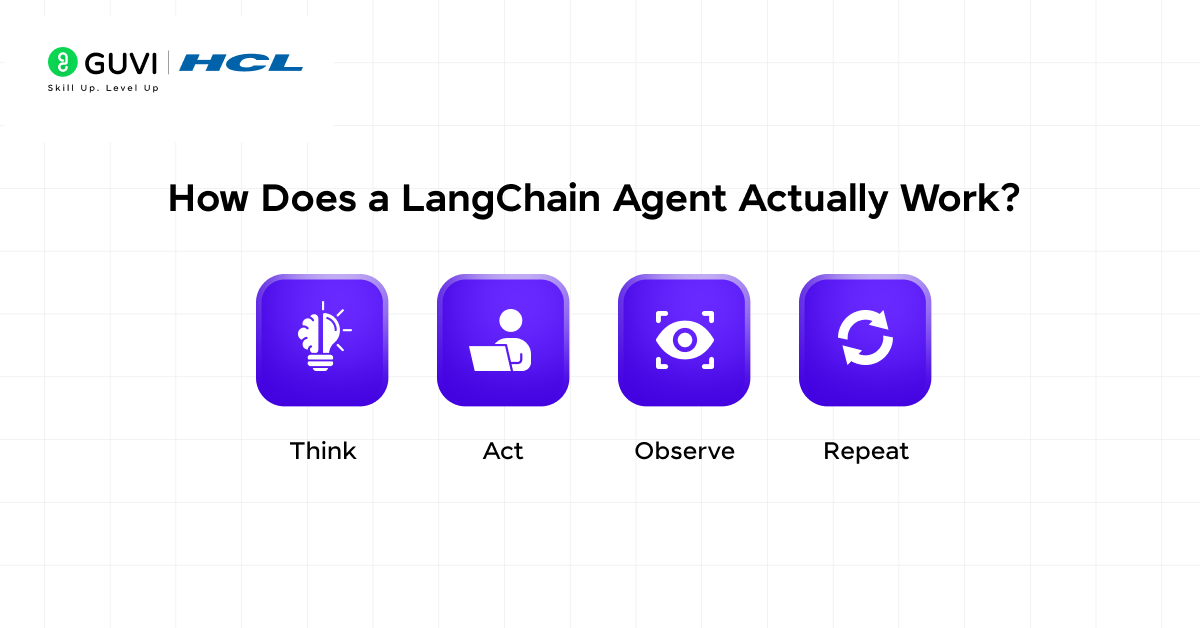
When you ask the agent a question, it doesn’t just reply immediately. Instead it goes through a loop that looks like this:
You ask: “What is LangChain?”
Agent thinks: “I should look this up on Wikipedia.”
Agent acts: Searches Wikipedia for “LangChain.”
Agent observes: Gets back a Wikipedia summary
Agent thinks: “I now have enough to answer”
Agent replies: Gives you the final answer
This loop of Think → Act → Observe → Repeat is called the ReAct framework. It’s what makes agents so much more powerful than a regular AI chat, instead of guessing, the agent actually goes and gets real information before answering.
The whole system has 5 parts working together:
- The Brain (LLM): The AI model that does the thinking — we’ll use Llama 3.3 via Groq
- The Tools: Things the agent can use, we’ll give it Wikipedia search
- The Memory: Lets it remember what was said earlier in the conversation
- The Prompt: Instructions that teach it how to think step by step
- The Executor: The engine that runs the whole loop
If you want to read and learn everything there is to about Python, then consider getting HCL GUVI’s Free “Python eBook: A Beginner’s Guide to Coding & Beyond.” In this, you will learn all about OOPs in Python, File handling, & Database Connectivity, along with Python libraries and advanced concepts!
Part 1: Setting Everything Up
Let’s get practical. Before you can build your first LangChain agent, you’ll need to set up your Python environment.
Step 1: Check If Python Is Installed
Open your terminal (Mac/Linux) or Command Prompt (Windows) and type:
python --version
You should see something like Python 3.10.x or Python 3.11.x. If you see an error, go to python.org, download Python, and install it. Come back here once that’s done.
Step 2: Create a Project Folder
Think of this as creating a dedicated drawer for this project so files don’t get mixed up with everything else on your computer.
mkdir langchain_agent
cd langchain_agent
mkdir creates the folder. cd moves you into it. All your files will live here.
Step 3: Create a Virtual Environment
python -m venv langchain_env
What is this? Think of a virtual environment as a clean, empty room for your project. When you install packages here, they stay in this room and don’t mess with anything else on your computer. Always a good habit.
Now activate it:
On Mac/Linux:
source langchain_env/bin/activate
On Windows:
langchain_env\Scripts\activate
You’ll know it worked when you see (langchain_env) appear at the start of your terminal line. That means you’re now “inside” the room.
Step 4: Install All Required Packages
Copy and paste this entire command, all in one go:
pip install langchain==0.3.0 langchain-community==0.3.0 langchain-core==0.3.0 langchain-groq==0.2.0 wikipedia python-dotenv
What are these?
– `langchain` → the main framework that ties everything together
– `langchain-community` → extra tools like Wikipedia search
– `langchain-core` → the engine underneath LangChain
– `langchain-groq` → lets LangChain talk to Groq’s free AI models
– `wikipedia` → the Python library that actually fetches Wikipedia results
– `python-dotenv` → helps you store your API key safely
This will take a minute or two. You’ll see a lot of text scrolling, that’s completely normal.
Step 5: Get Your Free Groq API Key
We’re using Groq instead of OpenAI because Groq is completely free and doesn’t require a credit card.
1. Go to console.groq.com
2. Click Sign Up and create a free account
3. Once logged in, click API Keys in the left sidebar
4. Click Create API Key, give it any name, and copy the key
Your key will look something like this: `gsk_abc123xyz…`
Step 6: Create Your `.env` File
Inside your `langchain_agent` folder, create a new file called exactly `.env`, yes, with the dot at the start, and no other extension. Open it and paste this:
GROQ_API_KEY=your_actual_key_here
Replace your_actual_key_here with the key you just copied from Groq.
Why are we doing this? Your API key is like a password. If you write it directly in your code and share the code with someone, they can use your account. Storing it in a separate .env file keeps it private and out of your code.
Part 2: Writing the Code
Create a new file called agent.py in your langchain_agent folder. Copy and paste the full code below:
import os

from dotenv import load_dotenv

from langchain_groq import ChatGroq

from langchain.agents import create_react_agent, AgentExecutor

from langchain.memory import ConversationBufferMemory

from langchain.prompts import PromptTemplate

from langchain_community.tools import WikipediaQueryRun

from langchain_community.utilities import WikipediaAPIWrapper
STEP 1: Load your API key from the .env file
This reads your secret key from the .env file so you don’t have to write it directly in the code
load_dotenv()
STEP 2: Connect to the AI model
We’re using Groq’s free Llama 3.3 model as the brain of our agent. Temperature=0 means the AI will be focused and consistent, not random or overly creative.
llm = ChatGroq(

    model="llama-3.3-70b-versatile",

    temperature=0,

    api_key=os.getenv("GROQ_API_KEY")

)
STEP 3: Give the agent a tool: Wikipedia search
This is what lets the agent actually look things up. Top_k_results=2 means it will fetch the top 2 Wikipedia results
wiki_tool = WikipediaQueryRun(

    api_wrapper=WikipediaAPIWrapper(top_k_results=2)

)

# Put all tools into a list

# You can add more tools to this list later

tools = [wiki_tool]
STEP 4: Give the agent memory
Without this, the agent forgets everything after each message. With this, it remembers the full conversation.
memory = ConversationBufferMemory(

    memory_key="chat_history",

    return_messages=True

)
STEP 5: Write the thinking instructions (the prompt)
This is what teaches the agent HOW to think. It tells it to follow the Think → Act → Observe format. Do not change the words inside {}, those are placeholders that LangChain fills in automatically
template = """Answer the following questions as best you can.

You have access to the following tools:

{tools}

Use the following format strictly:

Question: the input question you must answer

Thought: you should always think about what to do

Action: the action to take, should be one of [{tool_names}]

Action Input: the input to the action

Observation: the result of the action

... (this Thought/Action/Action Input/Observation can repeat up to 5 times)

Thought: I now know the final answer

Final Answer: the final answer to the original input question

Begin!

Question: {input}

Thought:{agent_scratchpad}"""

prompt = PromptTemplate.from_template(template)
STEP 6: Build the agent
This combines the brain (llm), the tools, and the instructions (prompt) into one agent object:
agent = create_react_agent(

    llm=llm,

    tools=tools,

    prompt=prompt

)
STEP 7: Wrap it in an executor
The agent decides what to do, but the executor actually does it
# verbose=True → shows you every thought and action in the terminal
# max_iterations=5 → stops after 5 loops so it never runs forever
# handle_parsing_errors=True → if the AI writes something weird,
# it tries again instead of crashing
agent_executor = AgentExecutor(

    agent=agent,

    tools=tools,

    memory=memory,

    verbose=True,

    max_iterations=5,

    handle_parsing_errors=True

)
STEP 8: Ask your question
Change the text inside the quotes to ask anything you want
print("\n🤖 Agent is thinking...\n")

response = agent_executor.invoke({

    "input": "What is LangChain and what is it used for?"

})

print("\n✅ Final Answer:")

print(response["output"])
Part 3: Running the Code
Make sure your virtual environment is still active (you should see (langchain_env) in your terminal), then run:
python agent.py
You’ll see something like this in your terminal:
🤖 Agent is thinking...

> Entering new AgentExecutor chain...

Thought: I should look up LangChain on Wikipedia

Action: wikipedia

Action Input: LangChain

Observation: LangChain is a framework for developing applications...

Thought: I now know the final answer

Final Answer: LangChain is an open-source framework...

Final Answer:

LangChain is an open-source framework designed to help developers build applications powered by large language models...
Output:
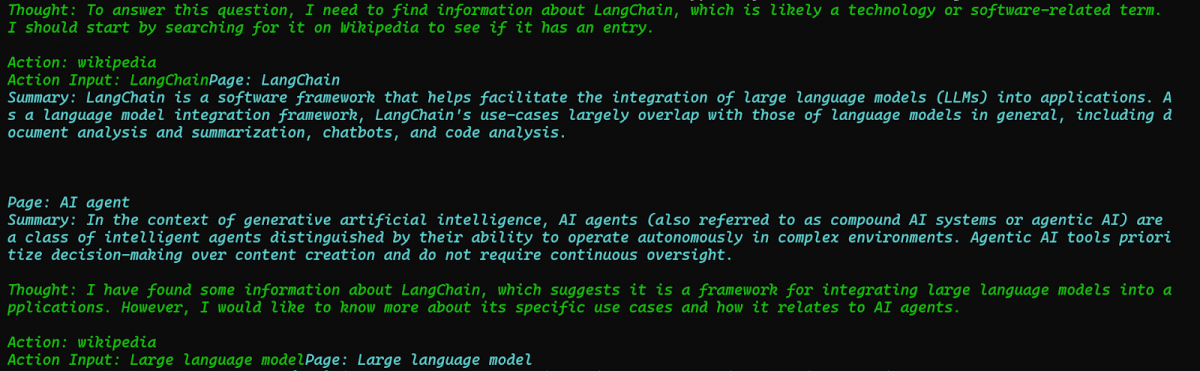
That’s your agent working. It thought, searched, read the result, and gave you an answer, all on its own.
Part 4: Making It Your Own
Change the Question
Find this line at the bottom of your agent.py:
“input”: “What is LangChain and what is it used for?”
Change it to anything you like:
“input”: “What is artificial intelligence?”
“input”: “Who is Elon Musk?”
“input”: “What is the Python programming language?”
“input”: “Explain machine learning in simple terms”
Save the file and run python agent.py again each time.
Have a Multi-Turn Conversation
Want to ask follow-up questions? Replace the bottom section of your code with this:
print("\n🤖 Agent is ready! Type your question below.")

print("Type 'quit' to exit.\n")

while True:

    user_input = input("You: ")

    if user_input.lower() == "quit":

        print("Goodbye!")

        break

    response = agent_executor.invoke({"input": user_input})

    print(f"\n✅ Agent: {response['output']}\n")
Now, when you run the script, it keeps asking for your input until you type `quit`. And because of the memory we set up, it remembers everything from earlier in the conversation.
Quick Recap: What You Just Built
Here’s the plain English version of what every part of your code does:
| Part | What It Does In Plain English |
| load_dotenv() | Reads your secret API key from the .env file |
| ChatGroq(…) | Connects to the free Groq AI model |
| WikipediaQueryRun | Gives the agent the ability to search Wikipedia |
| ConversationBufferMemory | Gives the agent a memory so it remembers the conversation |
| PromptTemplate | Teaches the agent how to think step by step |
| create_react_agent | Combines the brain, tools, and instructions into one agent |
| AgentExecutor | Runs the think → act → observe loop and returns the answer |
| agent_executor.invoke | This is where you actually ask the agent a question |
If you’re serious about mastering LLMs and want to apply it in real-world scenarios, don’t miss the chance to enroll in HCL GUVI’s Intel & IITM Pravartak Certified Artificial Intelligence & Machine Learning course. Endorsed with Intel certification, this course adds a globally recognized credential to your resume, a powerful edge that sets you apart in the competitive AI job market.
Conclusion
In conclusion, building a LangChain agent from scratch might have felt intimidating at the start, but as you’ve seen, it really comes down to a few moving parts: a model, some tools, a memory, and a prompt, all wired together.
You’ve gone from zero to a fully working AI agent that can think, search, and hold a conversation, entirely for free. The errors you hit along the way weren’t setbacks; they were actually the most valuable part of the learning process, because now you know exactly how to handle them when they show up again.
From here, the possibilities are wide open, you can add more tools, connect the agent to your own data, or scale it into a full application. The hard part is already behind you. What you build next is entirely up to you.
FAQs
1. What is LangChain used for?
LangChain is used to build applications powered by large language models. It lets you connect AI models to external tools like search engines, databases, and APIs so they can do more than just answer from memory.
2. Is LangChain free to use?
Yes, LangChain itself is completely free and open source. However, the AI model you connect it to may have costs. OpenAI charges per API call, while alternatives like Groq offer free access to powerful models.
3. What is the difference between a LangChain chain and a LangChain agent?
A chain follows a fixed, predefined sequence of steps every single time; it doesn’t make decisions. An agent, on the other hand, decides dynamically which steps to take based on the question asked.
4. Do I need to know machine learning to use LangChain?
No, you don’t need any machine learning background to get started with LangChain. As long as you have basic Python knowledge, you can build agents, chatbots, and pipelines using LangChain’s ready-made components.
5. What is the best alternative to LangChain?
The most popular alternatives to LangChain are LlamaIndex, Haystack, and AutoGen. LlamaIndex is great for document retrieval and RAG applications, Haystack is preferred for enterprise search pipelines, and AutoGen is better suited for multi-agent systems where multiple AI agents collaborate.
Success Stories

About the Author
Lukesh S
A professional content writer who has experience in freelancing and now working as a Technical Content Writer at HCL GUVI having sound knowledge in Blog Writing and Creative Writing!
View all posts by Lukesh S
Connect with me @

















Did you enjoy this article?