


Artificial Intelligence and Machine Learning Articles
CI/CD Pipelines for Machine Learning Projects
A/B Testing for Machine Learning Models
Canary Deployment Strategies for ML Models
What is Model Drift Detection: Keeping Models Accurate in Production


Get In Touch For Details! Request More Information
Using DeepEval for Large Language Model (LLM) Evaluation in Python
Sep 03, 2026 6 Min Read 1013 Views
(Last Updated)
Quick Answer: Using DeepEval in Python enables developers to systematically evaluate Large Language Models across key metrics such as accuracy, relevance, hallucination, and reasoning. By integrating DeepEval into your workflow, you can create automated test cases, benchmark model performance, and ensure consistent outputs in production-ready LLM applications. It is especially useful for prompt engineering, RAG systems, and agent-based pipelines.
How do you know if your Large Language Model is actually reliable, or just sounding convincing? As LLM-powered applications move from experimentation to production, evaluating their outputs becomes critical for accuracy, trust, and performance. Tools like DeepEval in Python help developers systematically measure and improve model responses across key metrics such as correctness, relevance, and faithfulness.
Read this blog to understand how to use DeepEval for evaluating LLMs in Python and build more reliable AI applications.
Table of contents
- What is DeepEval?
- Core Components of DeepEval
- Install and Set Up DeepEval
- Create and Activate a Virtual Environment
- Install DeepEval
- Configure API Keys
- Verify Installation
- Optional: Install Additional Integrations
- Initialize Project Structure
- Step-by-Step Guide to Using DeepEval for Large Language Model (LLM) Evaluation in Python
- Step 1: Set Up the Python Environment
- Step 2: Configure API Access Securely
- Step 3: Define the LLM Output Function
- Step 4: Create an Evaluation Test Case
- Step 5: Select the Right Evaluation Metric
- Step 6: Run the Evaluation
- Step 7: Interpret the Results Carefully
- Step 8: Evaluate Multiple Test Cases as a Test Suite
- Step 9: Apply DeepEval to RAG and Agentic Workflows
- Step 10: Integrate Evaluation into CI/CD Pipelines
- Key Benefits of Using DeepEval for Large Language Model (LLM) Evaluation in Python
- Implementation Example: Evaluating an LLM Using DeepEval in Python
- End-to-End Evaluation Script
- What This Implementation Does
- Conclusion
- FAQs
- What is DeepEval used for?
- Can DeepEval evaluate RAG systems?
- Is DeepEval suitable for production use?
- Does DeepEval require coding knowledge?
What is DeepEval?
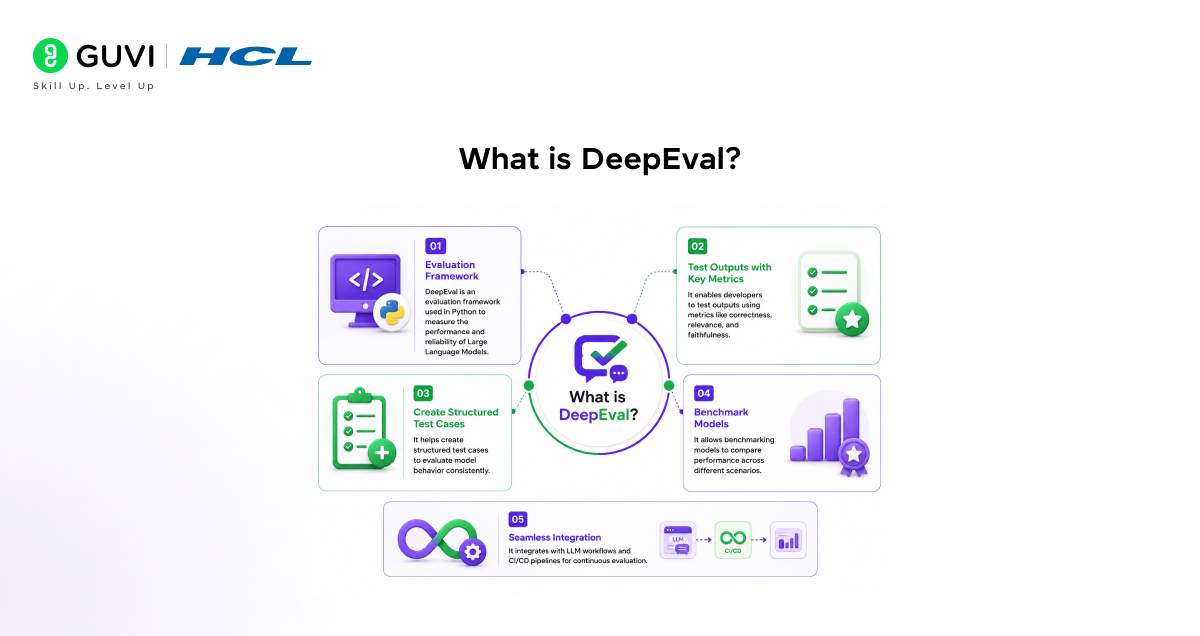
DeepEval is an evaluation framework used in Python to measure the performance and reliability of Large Language Models. It enables developers to test outputs using metrics like correctness, relevance, and faithfulness, create structured test cases, and benchmark models. It also integrates with LLM workflows and CI/CD pipelines for continuous evaluation.
Core Components of DeepEval
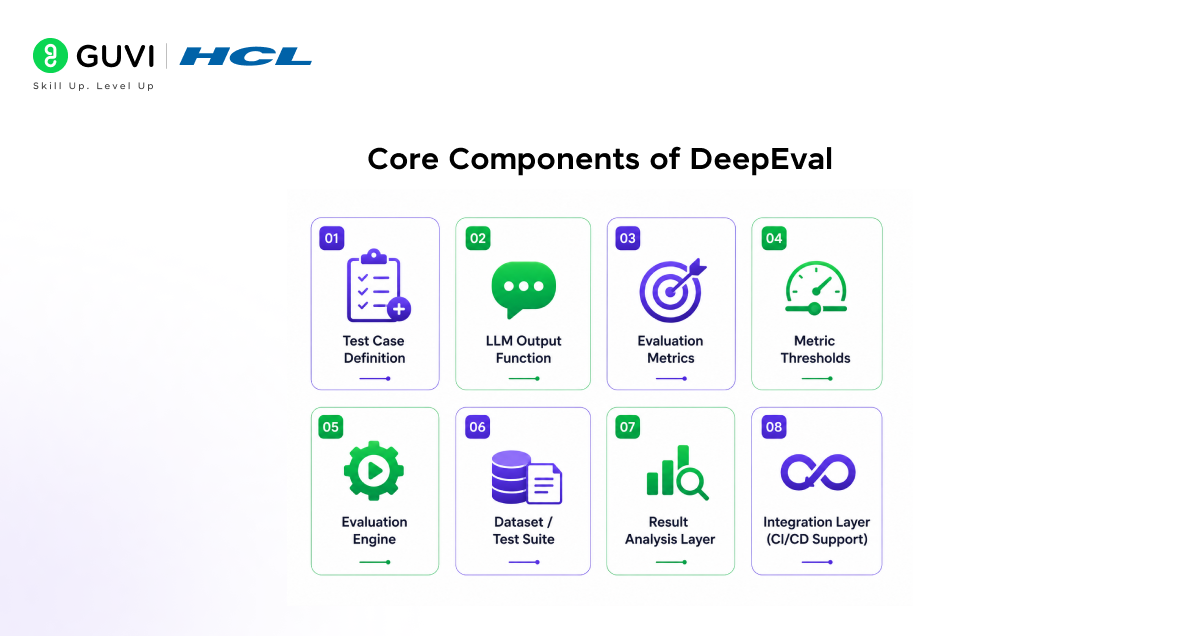
- Test Case Definition: Encapsulates the evaluation unit, including input prompt, actual output, expected output, and optional context. Acts as the foundational data structure for all evaluations.
- LLM Output Function: A reusable abstraction that handles prompt submission and response generation from the LLM. Ensures separation between generation logic and evaluation logic.
- Evaluation Metrics: Scoring mechanisms that assess output quality based on dimensions such as correctness, relevance, faithfulness, hallucination, or toxicity.
- Metric Thresholds: Predefined acceptance criteria that determine whether a test passes or fails based on metric scores. Enables objective validation.
- Evaluation Engine: Executes metrics against test cases, computes scores, and generates structured results including reasoning and pass/fail status.
- Dataset / Test Suite: Collection of multiple test cases used for batch evaluation, benchmarking, and regression testing across prompts or models.
- Result Analysis Layer: Interprets evaluation outputs, identifies performance gaps, and highlights patterns such as recurring hallucinations or low relevance.
- Integration Layer (CI/CD Support): Embeds evaluation into automated pipelines to continuously validate LLM performance during development and deployment cycles.
Master Python fundamentals and real-world applications with a structured learning approach. Download HCL GUVI’s Python eBook to build a strong foundation in programming, data handling, and practical development workflows.
Install and Set Up DeepEval
Setting up DeepEval in Python involves configuring your environment, installing dependencies, and initializing access to LLM providers. This ensures reproducible evaluation workflows and seamless integration with your development pipeline.
1. Create and Activate a Virtual Environment
Isolate dependencies to avoid version conflicts across projects.
python -m venv deepeval-env

source deepeval-env/bin/activate      # macOS/Linux

deepeval-env\Scripts\activate         # Windows
2. Install DeepEval
Install the framework using pip along with required evaluation dependencies.
pip install deepeval3. Configure API Keys
DeepEval relies on LLM providers for evaluation. Set environment variables securely.
export OPENAI_API_KEY="your_api_key_here"      # macOS/Linux

setx OPENAI_API_KEY "your_api_key_here"        # Windows
4. Verify Installation
Run a quick import check to ensure the setup is successful.
import deepeval

print("DeepEval setup successful")
5. Optional: Install Additional Integrations
Extend support for advanced workflows such as RAG or LangChain pipelines.
pip install langchain openai6. Initialize Project Structure
Organize evaluation scripts and test cases for scalability.
project/

│── tests/

│   └── test_llm.py

│── evals/

│   └── metrics.py

│── main.py
This setup prepares your environment for building automated, scalable LLM evaluation pipelines using DeepEval.
Step-by-Step Guide to Using DeepEval for Large Language Model (LLM) Evaluation in Python
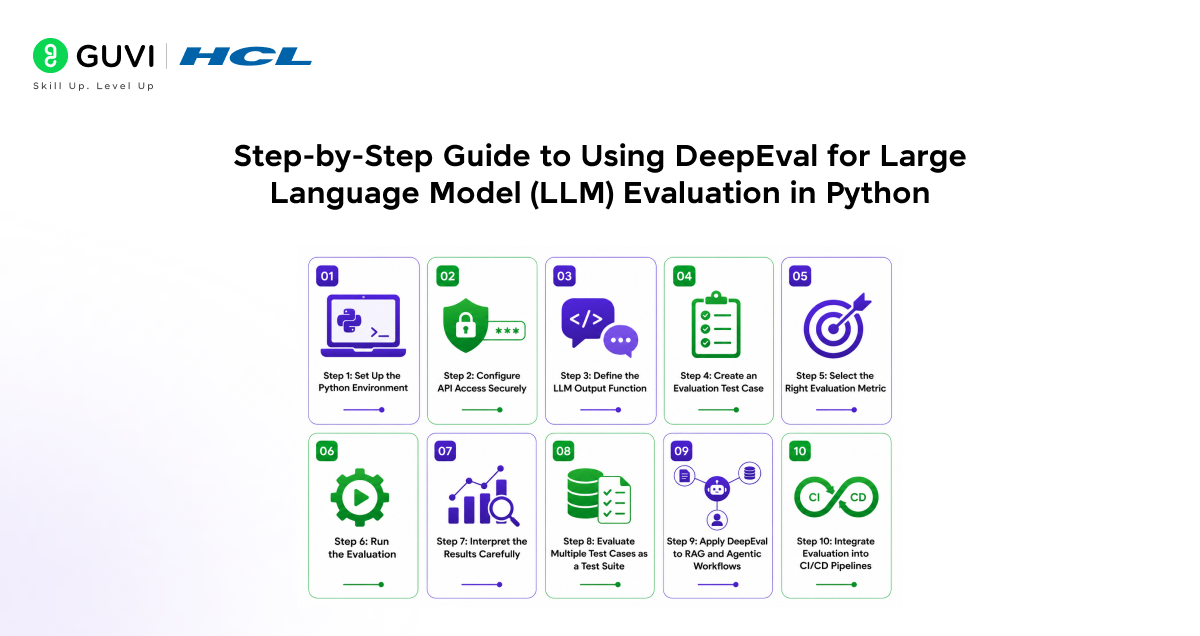
Step 1: Set Up the Python Environment
Start by creating an isolated Python environment so package versions remain consistent across development, testing, and deployment. This is especially important when working with LLM tooling, because dependencies such as model SDKs, evaluation libraries, and orchestration frameworks can introduce version conflicts.
python -m venv deepeval-env

source deepeval-env/bin/activate

pip install deepeval openai python-dotenv
This installs the core evaluation framework along with the OpenAI client and environment variable support.
Step 2: Configure API Access Securely
DeepEval often relies on external LLMs either to generate outputs or to judge them. For that reason, API credentials should be loaded through environment variables rather than hardcoded into source files. This improves security and makes the project easier to run in local machines, cloud notebooks, and CI/CD pipelines.
export OPENAI_API_KEY="your_api_key_here"

You can then load the variables inside Python:

from dotenv import load_dotenv

load_dotenv()
This ensures your evaluation script can access the required credentials before model calls begin.
Step 3: Define the LLM Output Function
The next step is to create a reusable function that sends a prompt to the language model and returns the generated output. This abstraction keeps inference logic separate from evaluation logic. It also makes your tests reusable across different prompts, datasets, and model versions.
from openai import OpenAI

client = OpenAI()

def get_llm_output(prompt: str) -> str:

    response = client.chat.completions.create(

        model="gpt-4.1-mini",

        messages=[

            {"role": "user", "content": prompt}

        ],

        temperature=0

    )

    return response.choices[0].message.content
In real-world applications, this function may also include a system prompt, retrieval context, tool outputs, conversation history, or structured response parsing.
Step 4: Create an Evaluation Test Case
A test case is the core evaluation unit in DeepEval. It stores the input, the actual model output, and optionally the expected output or context required for more advanced evaluation. This structure allows the framework to compare behaviour systematically rather than treating each response as an isolated sample.
from deepeval.test_case import LLMTestCase

prompt = "Explain the difference between overfitting and underfitting in machine learning."

actual_output = get_llm_output(prompt)

test_case = LLMTestCase(

    input=prompt,

    actual_output=actual_output,

    expected_output="Overfitting occurs when a model memorizes training data and performs poorly on unseen data, while underfitting occurs when a model is too simple to learn underlying patterns."

)
For RAG evaluation, you can also include retrieval context so the model’s answer can be judged for grounding and faithfulness.
Step 5: Select the Right Evaluation Metric
DeepEval supports a range of metrics that measure different aspects of output quality. The correct metric depends on the use case. For factual QA, correctness is essential. For RAG systems, faithfulness and context relevance matter more. For assistants and agents, answer relevance, safety, and task completion may be more important.
from deepeval.metrics import AnswerRelevancyMetric

metric = AnswerRelevancyMetric(

    threshold=0.7

)
A threshold defines the minimum acceptable score. This makes evaluation operational, because the result becomes a pass/fail decision rather than just a descriptive number.
Step 6: Run the Evaluation
Once the test case and metric are ready, execute the metric against the test case. This is where DeepEval computes the score, determines whether the output satisfies the threshold, and returns an explanation of the result.
metric.measure(test_case)

print("Score:", metric.score)

print("Reason:", metric.reason)

print("Passed:", metric.is_successful())
This step transforms a natural language output into structured quality signals. Those signals can be used for debugging and release validation.

Step 7: Interpret the Results Carefully
The evaluation result should not be treated as a raw score alone. It should be interpreted in the context of the application, the chosen metric, and the test design. For example, a high relevance score may still hide factual inaccuracies. Similarly, a correct answer may not be faithful to retrieved context in a RAG system.
When analyzing test results, focus on:
- score values
- pass/fail threshold
- metric reasoning
- recurring failure patterns
- changes across model or prompt versions
This makes DeepEval useful not only for one-off testing but also for systematic model improvement.
Step 8: Evaluate Multiple Test Cases as a Test Suite
LLM quality cannot be judged from a single prompt. A robust workflow groups multiple test cases into a broader evaluation suite so developers can test consistency across different question types, edge cases, and difficulty levels. This is important for benchmarking and regression testing.
from deepeval.test_case import LLMTestCase

test_cases = [

    LLMTestCase(

        input="What is gradient descent?",

        actual_output=get_llm_output("What is gradient descent?"),

        expected_output="Gradient descent is an optimization algorithm used to minimize a loss function by iteratively adjusting parameters."

    ),

    LLMTestCase(

        input="Define supervised learning.",

        actual_output=get_llm_output("Define supervised learning."),

        expected_output="Supervised learning is a machine learning approach where a model is trained on labeled data."

    )

]
This lets you observe model performance at the dataset level rather than the response level.
Step 9: Apply DeepEval to RAG and Agentic Workflows
One of the most important uses of DeepEval is testing complex LLM applications rather than plain prompt-response systems. In RAG pipelines, the model must not only answer correctly but also remain grounded in retrieved context. In agentic workflows, the model may need to follow instructions, use tools correctly, and complete tasks reliably.
For such systems, evaluation must consider:
- Faithfulness to source context
- Contextual relevance
- Answer completeness
- Hallucination risk
- Task success
This is where DeepEval becomes more than a scoring tool. It becomes a validation layer for production-grade AI systems.
Step 10: Integrate Evaluation into CI/CD Pipelines
A major advantage of DeepEval is that it can be integrated into automated testing workflows. This allows teams to run LLM evaluations whenever prompts change or new features are deployed. It helps prevent silent regressions where output quality drops after a code or prompt modification.
In CI/CD environments, DeepEval can be used to:
- Run regression tests automatically
- Block deployments if quality thresholds fail
- Compare prompt or model versions
- Monitor quality drift over time
This makes LLM evaluation part of standard software quality assurance rather than an isolated experimentation task.
Build expertise in evaluating and deploying reliable AI systems with structured learning. Join HCL GUVI’s Artificial Intelligence and Machine Learning Course to learn from industry experts and Intel engineers through live online classes, master Python, ML, MLOps, Generative AI, and Agentic AI, and gain hands-on experience with 20+ industry-grade projects, 1:1 doubt sessions, and placement support with 1000+ hiring partners.
Key Benefits of Using DeepEval for Large Language Model (LLM) Evaluation in Python
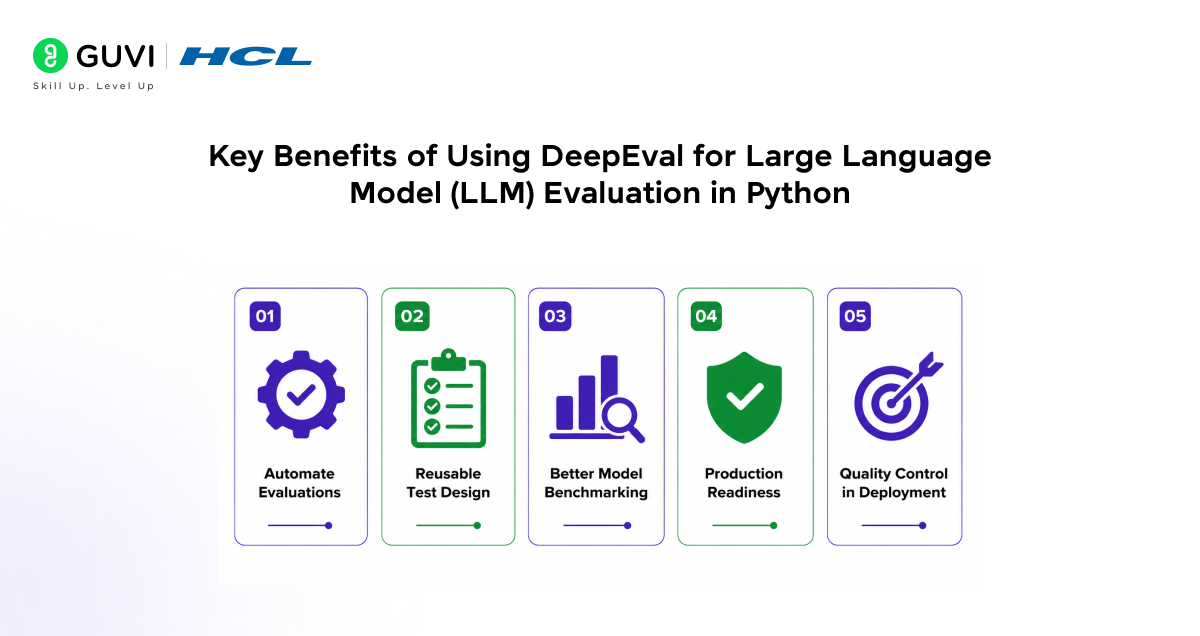
- Structured Validation: Converts subjective model behaviour into measurable evaluation signals.
- Reusable Test Design: Makes prompts, outputs, and metrics easy to scale across multiple use cases.
- Better Model Benchmarking: Helps compare prompts, models, and workflows using consistent criteria.
- Production Readiness: Supports continuous testing for chatbots and AI agents.
- Quality Control in Deployment: Brings LLM testing into CI/CD pipelines for regression prevention.
Implementation Example: Evaluating an LLM Using DeepEval in Python
This example demonstrates a complete evaluation pipeline using DeepEval in Python. It covers prompt execution, test case creation, metric definition, and result analysis in a single workflow.
End-to-End Evaluation Script
from openai import OpenAI

from deepeval.test_case import LLMTestCase

from deepeval.metrics import AnswerRelevancyMetric

# Initialize LLM client

client = OpenAI()

# Step 1: Define LLM output function

def get_llm_output(prompt: str) -> str:

    response = client.chat.completions.create(

        model="gpt-4.1-mini",

        messages=[

            {"role": "user", "content": prompt}

        ],

        temperature=0

    )

    return response.choices[0].message.content

# Step 2: Define input prompt

prompt = "What is overfitting in machine learning?"

# Step 3: Generate model output

actual_output = get_llm_output(prompt)

# Step 4: Create test case

test_case = LLMTestCase(

    input=prompt,

    actual_output=actual_output,

    expected_output="Overfitting occurs when a model learns training data too closely and fails to generalize to new data."

)

# Step 5: Define evaluation metric

metric = AnswerRelevancyMetric(

    threshold=0.7

)

# Step 6: Execute evaluation

metric.measure(test_case)

# Step 7: Print results

print("Prompt:", prompt)

print("Model Output:", actual_output)

print("Score:", metric.score)

print("Reason:", metric.reason)

print("Passed:", metric.is_successful())
What This Implementation Does
- Runs a real LLM query: Sends a prompt to the model and captures the generated response.
- Wraps output into a structured test case: Converts raw input/output into an evaluation-ready format.
- Applies a relevance metric: Measures how well the response aligns with the expected answer.
- Generates interpretable results: Outputs a score, explanation, and pass/fail decision.
Conclusion
Using DeepEval in Python enables structured and repeatable evaluation of LLM outputs. It transforms subjective responses into measurable metrics, improves reliability, and supports production-grade AI systems. Integrating evaluation early ensures consistent performance and scalable quality control across evolving LLM applications.
FAQs
What is DeepEval used for?
DeepEval is used to evaluate Large Language Models by measuring output quality using metrics like correctness, relevance, and faithfulness.
Can DeepEval evaluate RAG systems?
Yes, DeepEval supports RAG evaluation using metrics such as faithfulness and context relevance to ensure grounded responses.
Is DeepEval suitable for production use?
Yes, it integrates with CI/CD pipelines, enabling continuous evaluation and preventing performance regressions in production systems.
Does DeepEval require coding knowledge?
Basic Python knowledge is required to define test cases, metrics, and run evaluations effectively.
Success Stories

About the Author
Vaishali
I'm a seasoned writer with four years of experience across technical, non-technical, and just about every genre or niche you can imagine. Adaptable and curious, I enjoy exploring new topics and making information engaging and easy to understand. Fueled by a steady stream of tea, I approach each project with creativity, reliability, and genuine enthusiasm for storytelling.
View all posts by Vaishali
Connect with me @









Did you enjoy this article?