


Artificial Intelligence and Machine Learning Articles
AI/ML Skills Gap 2026: Why Companies Can't Find Job-Ready Talent
20 AI/ML Interview Questions Recruiters Can Use Without a Tech Background - Best Guide
How Industry-Backed AI/ML Bootcamps Are Changing the AI/ML Hiring Pipeline - Best Guide 2026
From IT Support to AI Engineer: A Realistic Career Switch Guide 2026


Get In Touch For Details! Request More Information
Using Claude Code Remote Control: A Practical Guide
Jun 19, 2026 6 Min Read 957 Views
(Last Updated)
Picture this: You are working on a coding project late at night. You need to run tests, check logs, and deploy changes to a server across town. Instead of driving there or setting up complex VPN connections, you simply send commands from your laptop and watch everything happen remotely. That is the power of remote control in Claude Code.
Remote control capabilities are changing how developers work. Whether you are managing a home server, accessing a work machine from your couch, or collaborating with a team across different locations, being able to control systems remotely saves time and removes barriers.
This guide explains what Claude Code remote control is, when it helps, how to set it up properly, and what to watch out for. No technical jargon. No complicated theory. Just clear, practical steps you can follow today.
Quick TL;DR Summary
- This guide explains what Claude Code remote control is and why it matters for modern developers.
- You will learn the core components that make remote control work, including connection methods, security layers, and command execution.
- We cover when remote control genuinely helps your workflow and when a simpler approach works better.
- A step-by-step walkthrough shows you how to set up your first remote control session the right way.
- Real-world examples demonstrate how developers and teams are using remote control today.
- Practical strategies help you avoid the most common mistakes and security risks.
Table of contents
- What Is Claude Code Remote Control
- The Problem with Traditional Remote Development
- When to Use Claude Code Remote Control
- Tasks requiring specific remote environments
- Resource-intensive operations
- Multiple system coordination
- Continuous operations
- The Core Building Blocks
- The Connection Layer
- Authentication and Authorization
- Command Execution Engine
- State Management
- Result Streaming and Logging
- Step-by-Step: Setting Up Your First Remote Control Session
- Step 1: Prepare the remote system
- Step 2: Set up secure authentication
- Step 3: Configure Claude Code for remote access
- Step 4: Test with a simple command
- Step 5: Run a real task end to end
- Step 6: Set up error recovery
- Step 7: Monitor and maintain the connection
- Real-World Examples of Claude Code Remote Control
- The Solo Developer Managing Multiple Servers
- The Team Building Resource-Intensive Applications
- The Researcher Running Long Experiments
- Who Should Use Which Approach
- Individual developers with simple needs
- Small teams sharing development servers
- Organizations with compliance requirements
- Companies managing production infrastructure
- Pros and Cons of Claude Code Remote Control
- Pros:
- Cons:
- Top Strategies to Get the Most Out of Claude Code Remote Control
- Start with read-only operations before write operations
- Use dedicated remote systems for development
- Implement proper access controls from the beginning
- Keep detailed logs of all remote operations
- Test connection recovery before you need it
- Document your remote systems and access procedures
- Plan for the remote system being unavailable
- Conclusion
- FAQs
- Is Claude Code remote control secure?
- What happens if my internet connection drops?
- Can multiple people use Claude Code to control the same remote system?
- How do I know what Claude Code is doing on the remote system?
- Where should I start with remote control?
What Is Claude Code Remote Control
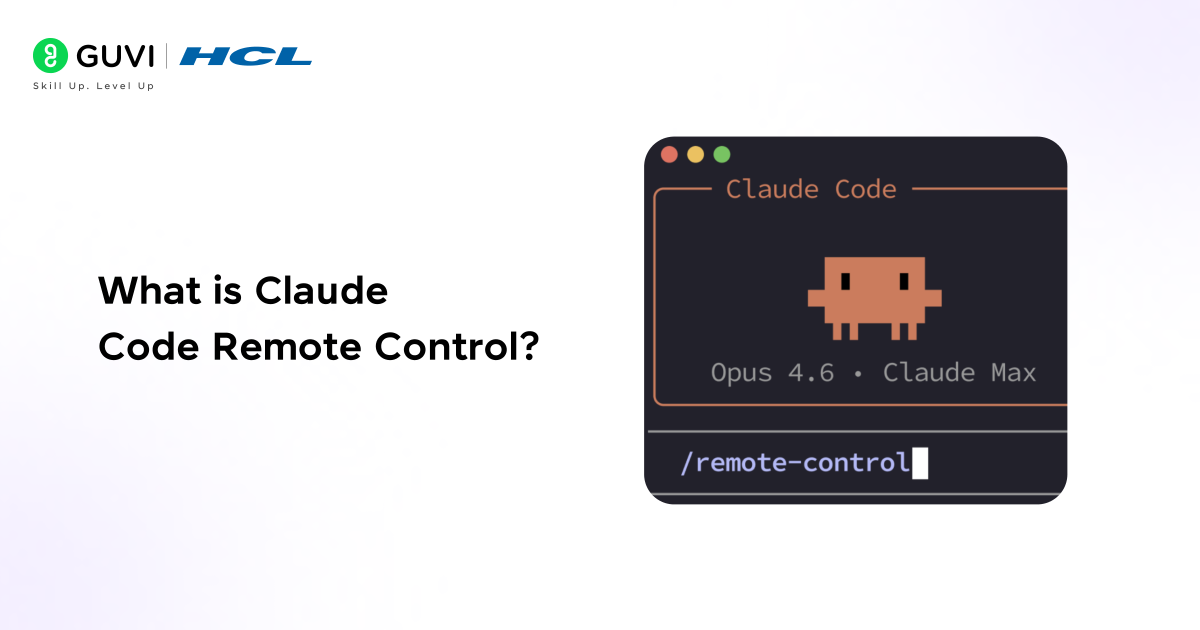
Claude Code remote control is a system that lets you run commands and manage code on a remote machine as if you were sitting right in front of it. You are not just viewing files or checking status. You are actively executing commands, running scripts, and making changes.
In a typical setup, you might have Claude Code running on your local laptop while it controls a powerful server in a data center. You can run resource-intensive builds, execute tests that need specific environments, or deploy code to production, all from your local terminal.
The key difference between basic remote access and Claude Code remote control is intelligence. Claude can understand your intent, execute the right commands, verify the results, and continue working until the task is complete. It is not just forwarding keystrokes. It is actively managing the process.
The Problem with Traditional Remote Development
Developers face real challenges when working with remote systems. SSH connections drop at critical moments. Running commands requires remembering exact syntax and paths. Monitoring long-running processes means keeping terminal windows open for hours. Collaborating means sharing credentials or setting up complex permission systems.
The consequences add up quickly. Lost SSH sessions mean starting tasks over from scratch. Forgotten command syntax leads to errors and delays. Security vulnerabilities appear when credentials get shared casually. Teams waste time coordinating who has access to which systems.
Standard remote access tools help at a basic level, but they are rigid. They can execute what you type but cannot reason about what you are trying to accomplish. Claude Code remote control is different because it can understand tasks that require multiple steps, handle errors intelligently, and work across different systems without needing exact command syntax every time.
Read More: Claude Code on Your Phone: Complete Guide
When to Use Claude Code Remote Control
Remote control is not the answer to every development challenge. Being clear about where it adds genuine value helps you use it effectively.
1. Tasks requiring specific remote environments
Some code needs to run in production-like environments with specific operating systems, databases, or network configurations. Remote control lets you work in the exact environment where your code will eventually run.
2. Resource-intensive operations
Compiling large projects, running comprehensive test suites, or processing big datasets can overwhelm a laptop. Remote control lets you offload these tasks to more powerful machines while you continue working locally.
3. Multiple system coordination
Deploying to several servers, running distributed tests, or managing microservices across different hosts all require coordinating actions across systems. Remote control handles this orchestration smoothly.
4. Continuous operations
Tasks that need to run overnight or across long periods benefit from remote execution. Your local machine can sleep or disconnect without interrupting the work happening on the remote system.
When using Claude Code remote control, the AI can execute commands directly on a remote machine and intelligently interpret the results. If a command fails, it can automatically retry, debug, or try alternative approaches without manual intervention — something traditional SSH sessions cannot do.
The Core Building Blocks
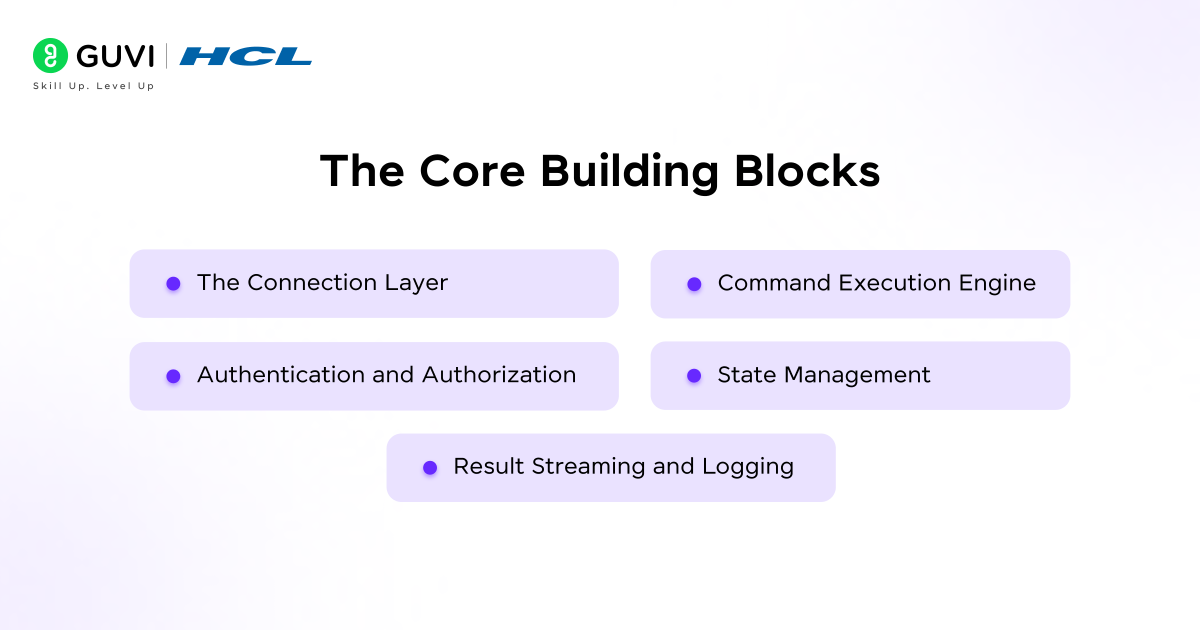
Every remote control setup with Claude Code relies on the same fundamental components. Understanding these helps you build systems that work reliably.
1. The Connection Layer
This is how your local Claude Code instance talks to the remote machine. It typically uses secure protocols like SSH that encrypt all communication. The connection must be reliable enough to handle intermittent network issues without losing work.
2. Authentication and Authorization
Before any commands run, the system must verify who you are and what you are allowed to do. This includes SSH keys, access tokens, or credential managers that prove identity without sending passwords over the network.
3. Command Execution Engine
This component translates high-level tasks into specific commands that run on the remote system. Claude Code understands context, so asking it to “run the tests” results in it finding your test suite, executing it properly, and reporting results back.
4. State Management
Remote systems need to track what is happening across disconnections and reconnections. This includes knowing which processes are running, what files have changed, and where tasks are left off if a connection drops.
5. Result Streaming and Logging
Everything that happens remotely gets sent back to your local system. This includes command output, error messages, and status updates. Logs capture this information so you can review what happened even after a session ends.
Step-by-Step: Setting Up Your First Remote Control Session
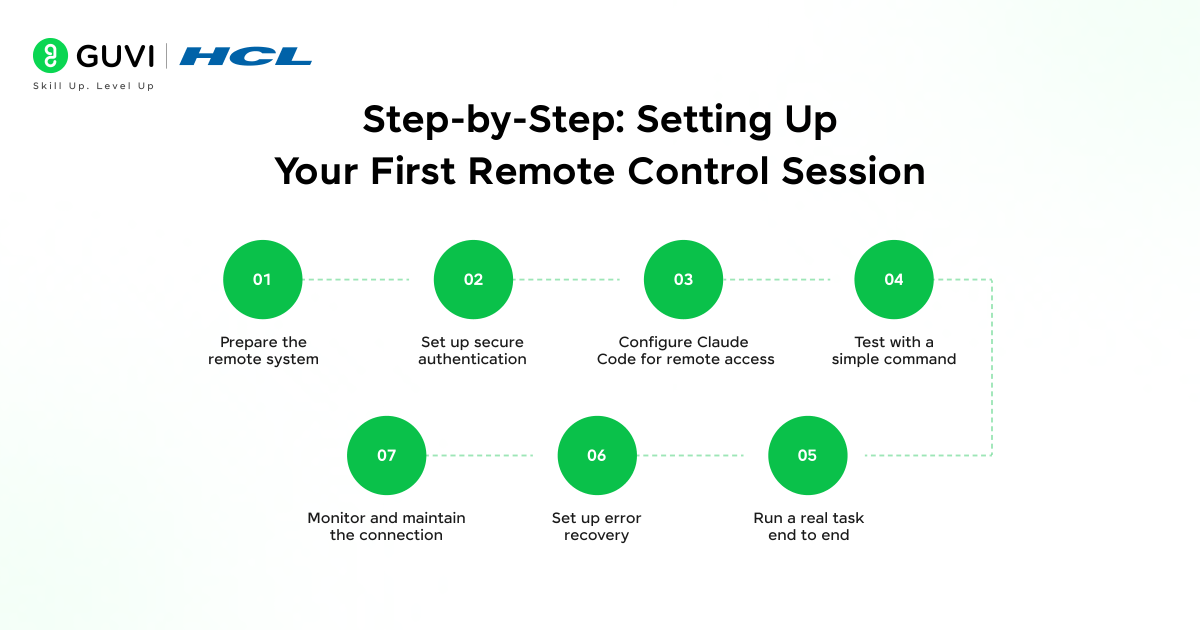
Step 1: Prepare the remote system
Make sure the remote machine has Claude Code installed and accessible. Verify that you can connect to it using standard SSH. Check that all necessary dependencies and tools are installed on the remote system.
Step 2: Set up secure authentication
Generate SSH keys if you have not already. Copy your public key to the remote machine’s authorized keys file. Test the connection manually to confirm it works before involving Claude Code.
Step 3: Configure Claude Code for remote access
Tell Claude Code about your remote system. This includes the hostname or IP address, the username to connect with, and the path to your SSH key. Store this configuration so you do not need to enter it every time.
Step 4: Test with a simple command
Start with something basic like checking the current directory or listing files. This confirms the connection works and commands execute properly. If this fails, fix the connection before moving to more complex tasks.
Step 5: Run a real task end to end
Try a complete workflow like cloning a repository, installing dependencies, and running a build. Watch how Claude Code handles each step. Note any errors or unexpected behavior.
Step 6: Set up error recovery
Decide what happens when something fails. Should Claude Code retry? Should it alert you? Should it roll back changes? Build these rules into your setup from the beginning.
Step 7: Monitor and maintain the connection
Keep an eye on connection stability, especially if you are on an unreliable network. Set up logging so you can review what happened if problems occur. Update authentication credentials before they expire.
Remote control sessions can survive network switches seamlessly. You can start a task on home WiFi, continue it using a mobile hotspot during your commute, and finish at the office — all while the same session remains active without interrupting ongoing processes.

Real-World Examples of Claude Code Remote Control
1. The Solo Developer Managing Multiple Servers
A freelance developer maintains web applications for several clients, each running on different servers. Instead of logging into each server individually, they use Claude Code to deploy updates, check logs, and run maintenance tasks across all systems from a single interface. What used to take an afternoon of jumping between terminals now takes minutes.
2. The Team Building Resource-Intensive Applications
A mobile app development team needs to compile builds for multiple platforms. These compilations take significant CPU and memory. Instead of having every developer run builds locally, they use Claude Code to trigger builds on powerful remote build servers. Developers get their results back quickly without slowing down their laptops.
3. The Researcher Running Long Experiments
A data scientist runs machine learning experiments that take days to complete. Using Claude Code remote control, they start experiments on a remote GPU server, disconnect their laptop, and check progress periodically. The experiments continue running regardless of what happens to the local machine.
Who Should Use Which Approach
Remote control setups vary based on needs and technical experience. The right starting point depends on your situation.
1. Individual developers with simple needs
Start with basic SSH access and manual command execution. Add Claude Code when you find yourself repeating the same sequences of commands frequently.
2. Small teams sharing development servers
Set up shared remote environments with proper user permissions. Use Claude Code to standardize common tasks so everyone on the team runs them the same way.
3. Organizations with compliance requirements
Build remote control with audit logging, restricted access, and review processes from day one. Never allow direct access that bypasses security controls.
4. Companies managing production infrastructure
Use full orchestration with automated failover, backup authentication methods, and comprehensive monitoring. Remote control for production systems requires the highest level of reliability and security.
Pros and Cons of Claude Code Remote Control
Pros:
- Access powerful remote resources from any device
- Work in production-like environments without local setup
- Continue long-running tasks even when your local machine is offline
- Coordinate actions across multiple systems from one interface
- Share access to remote systems without sharing passwords
- Automate repetitive remote administration tasks
Cons:
- Requires reliable network connectivity to function well
- Security risks increase when remote access is not configured properly
- Learning curve for setting up authentication and permissions correctly
- Dependency on remote system availability for getting work done
- Potential for accidental changes to production systems
- Need for ongoing maintenance of access credentials and permissions
Top Strategies to Get the Most Out of Claude Code Remote Control
1. Start with read-only operations before write operations
The safest way to build confidence is starting with commands that only read information. Check logs, view files, and monitor processes before you start running commands that modify systems. This builds familiarity without risk.
2. Use dedicated remote systems for development
Never practice or experiment on production systems. Set up dedicated development or staging servers where mistakes have no serious consequences. Move to production only when processes are proven and tested.
3. Implement proper access controls from the beginning
Decide who can access which systems and what they can do there. Use SSH keys instead of passwords. Rotate credentials regularly. Log all access. These habits prevent security problems before they start.
4. Keep detailed logs of all remote operations
Every command executed remotely should be logged with a timestamp and the user who ran it. These logs help you troubleshoot problems, understand what changed when, and maintain compliance with security policies.
5. Test connection recovery before you need it
Deliberately disconnect and reconnect to see how your setup handles it. Can you resume work? Do running processes continue? Knowing this before a real network issue occurs saves stress and lost work.
6. Document your remote systems and access procedures
Write down which systems exist, what they are for, how to access them, and who has permissions. This documentation becomes critical when team members leave, systems change, or emergencies require quick access.
7. Plan for the remote system being unavailable
Decide what happens when a remote system goes down or becomes unreachable. Have backup systems if the work is critical. Know how to switch to local development if remote access fails. Resilience means planning for failure.
Decide what happens when the agent produces a wrong result, a delayed result, or no result. Have a fallback process. Healthcare workflows cannot simply stop because a system is down or wrong. Build resilience from day one.
If you want to learn more about building multi-agent systems, do not miss the chance to enroll in HCL GUVI’s Intel & IITM Pravartak Certified Artificial Intelligence & Machine Learning course. Endorsed with Intel certification, this course adds a globally recognized credential to your resume, a powerful edge that sets you apart in the competitive AI job market.
Conclusion
Claude Code remote control is a powerful way to manage systems and code from anywhere. When set up securely with proper authentication, logging, and access controls, it saves time and removes barriers that would otherwise slow down development work.
The developers who benefit most are those who identify specific tasks where remote execution makes sense, configure it properly, and build reliable processes around it. Start with simple, low-risk tasks on development systems before moving to anything critical.
Used well, remote control eliminates friction and enables flexible workflows. Used carelessly, it creates security vulnerabilities. The difference lies entirely in how thoughtfully you set it up and maintain it over time.
FAQs
1. Is Claude Code remote control secure?
Security depends on your configuration. Using SSH with key-based authentication, proper permissions, and audit logs creates a secure setup. Sharing passwords or allowing unrestricted access creates vulnerabilities.
2. What happens if my internet connection drops?
Processes running on the remote system continue executing even when you lose connection. When you reconnect, you can check status and resume where you left off.
3. Can multiple people use Claude Code to control the same remote system?
Yes, but each person needs their own authentication credentials. The system should track who executed which commands to avoid conflicts when multiple people work simultaneously.
4. How do I know what Claude Code is doing on the remote system?
Logging shows every command executed and its results. Most setups also stream command output back to your local terminal in real-time so you see what is happening.
5. Where should I start with remote control?
Begin with a non-critical development server and simple read-only tasks. Practice connecting and running basic commands. Once comfortable, gradually add more complex tasks and additional systems.
Success Stories

About the Author
Vishalini Devarajan
An Aerospace Engineer turned content writer, I focus on making complex concepts easy to understand through well-structured, reader-friendly blogs. Whether it’s a technical topic or a non-technical one, I love creating content that is clear, engaging, and impactful.
View all posts by Vishalini Devarajan
Connect with me @










Did you enjoy this article?