


Robotics Process Automation Articles
Selenium vs RPA: Battle Of The Best Automation Technologies
Robotics and Artificial Intelligence – A Comprehensive Look
How to Become a Robotics Engineer: A Beginner's Guide [2025]


Get In Touch For Details! Request More Information
40 Important RPA Developer Interview Questions and Answers
Dec 30, 2025 6 Min Read 10604 Views
(Last Updated)
Robotic Process Automation (RPA) is an interesting domain that is booming at a rapid pace because of technological evolution. To succeed as an RPA developer, you need to master RPA developer interview questions and answers.
RPA developer roles often demand a mix of technical knowledge, problem-solving skills, and familiarity with automation tools.
This guide provides a comprehensive list of 40 RPA developer interview questions and answers, tailored to fresher, intermediate, and advanced levels, covering both theory and practical coding aspects to help you ace your next interview. So, without further ado, let us get started!
Table of contents
- Quick Answer
- Top 40 RPA Developer Interview Questions and Answers
- Fresher Level Questions
- Intermediate Level Questions
- Advanced Level Questions
- Coding Question:
- Scenario-Based Questions
- 💡 Did You Know?
- Conclusion
Quick Answer
RPA Developer interviews focus on UiPath Studio, Orchestrator, attended and unattended robots, selectors, workflow design, exception handling, queues, REFramework, document understanding, OCR automation, secure credential handling, and best practices for building scalable, reliable, and maintainable automation solutions.
Top 40 RPA Developer Interview Questions and Answers

Getting ready for an RPA interview requires a solid understanding of both fundamental concepts and advanced technical skills. These 30 questions comprise all those concepts and skills. Let us understand them one by one!
Fresher Level Questions
At the fresher level, interviewers focus on basic RPA concepts, fundamental knowledge of RPA tools like UiPath, Blue Prism, or Automation Anywhere, and your understanding of automation processes.
1. What is RPA, and why is it important?
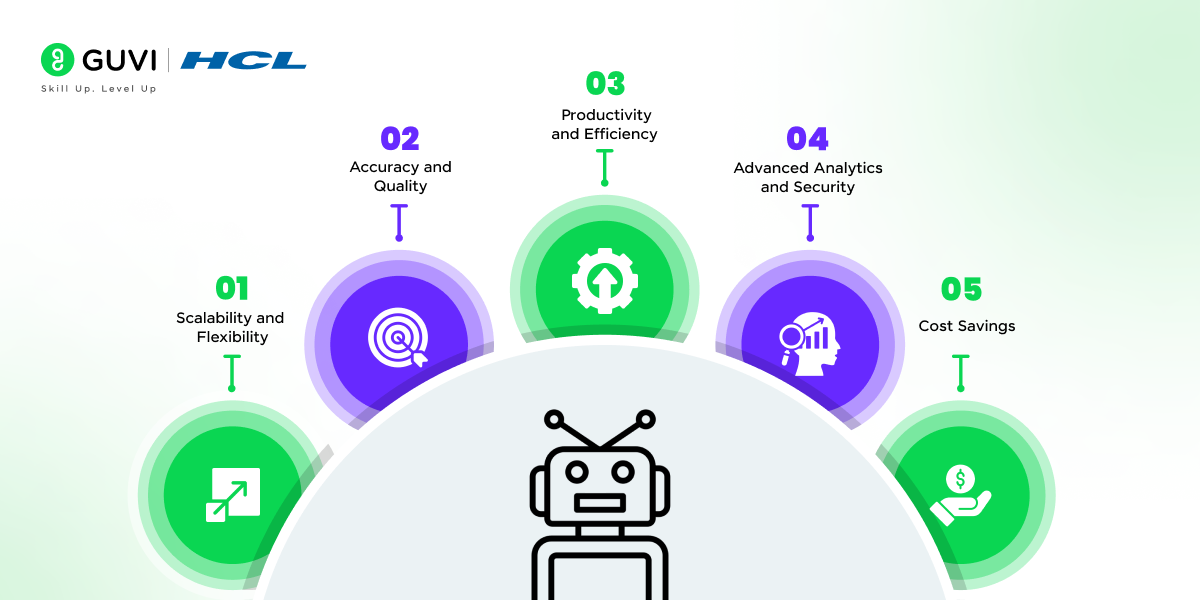
RPA stands for Robotic Process Automation. It’s a technology that automates repetitive and rule-based tasks, allowing organizations to streamline workflows, improve accuracy, and reduce costs. RPA’s use cases are enormous, as it enables digital transformation and helps businesses focus on strategic tasks.
2. Can you name some popular RPA tools?
Common RPA tools include UiPath, Blue Prism, Automation Anywhere, WorkFusion, and Pega. Each has unique features and strengths, with UiPath being known for its user-friendly interface and Automation Anywhere for its cloud-native capabilities.
3. Explain the difference between attended and unattended robots.
Robots work alongside human users and are triggered by user actions. They’re ideal for tasks requiring human judgment. Unattended robots operate independently without human intervention, performing tasks 24/7 as per a defined schedule.
4. What are some common applications of RPA?
RPA is widely used for data entry, invoice processing, customer support, payroll, compliance, and report generation. Any repetitive, rule-based task with high volume is a good candidate for RPA.
5. What are selectors in UiPath?
In UiPath, selectors are elements that help bots identify and interact with UI components, like buttons or text fields, in applications. They are XML-based tags that guide the robot to locate UI elements accurately.
6. What’s the difference between front-end and back-end automation?
Front-end automation involves interactions with the UI layer, while back-end automation operates on databases, servers, and APIs without involving the UI, often using direct data integrations.
7. Can you explain what OCR (Optical Character Recognition) is?
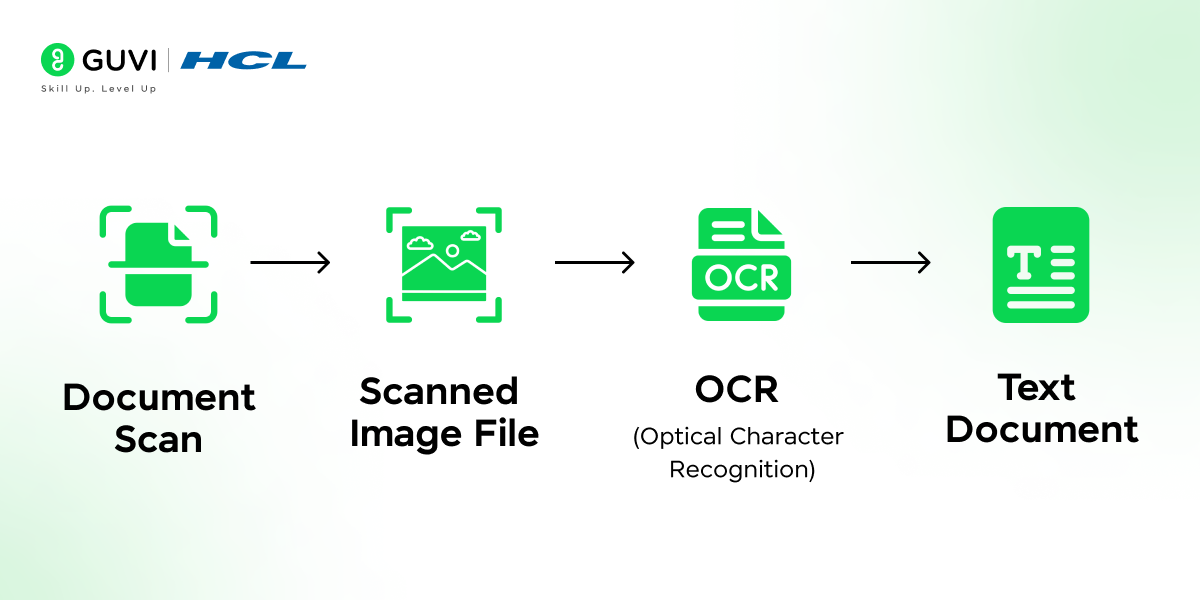
OCR technology enables the conversion of different types of documents, such as scanned paper documents or images, into editable and searchable data. In RPA, OCR helps extract text from images and PDFs for processing.
8. Write a simple UiPath sequence to read an Excel file and log each row’s data.
- Solution:
- Step 1: Use the “Excel Application Scope” activity to open the file.
- Step 2: Use the “Read Range” activity to read data from the sheet.
- Step 3: Use a “For Each Row” activity to iterate through the data.
- Step 4: Use the “Log Message” activity to log the row values.

Intermediate Level Questions
For intermediate roles, interviewers expect a deeper understanding of RPA functionalities, best practices, and experience with project work.
9. How do you handle exceptions in UiPath?
UiPath offers several activities for exception handling, including Try-Catch blocks and Throw and ReThrow activities. These help you manage errors and continue or retry operations based on specific exception types.
10. What is a Queue in UiPath, and why is it important?
Queues are used in UiPath’s Orchestrator to manage and monitor transactions in an organized way. They help distribute workload across robots, ensuring reliability in high-volume process automation.
11. What are some best practices in RPA development?
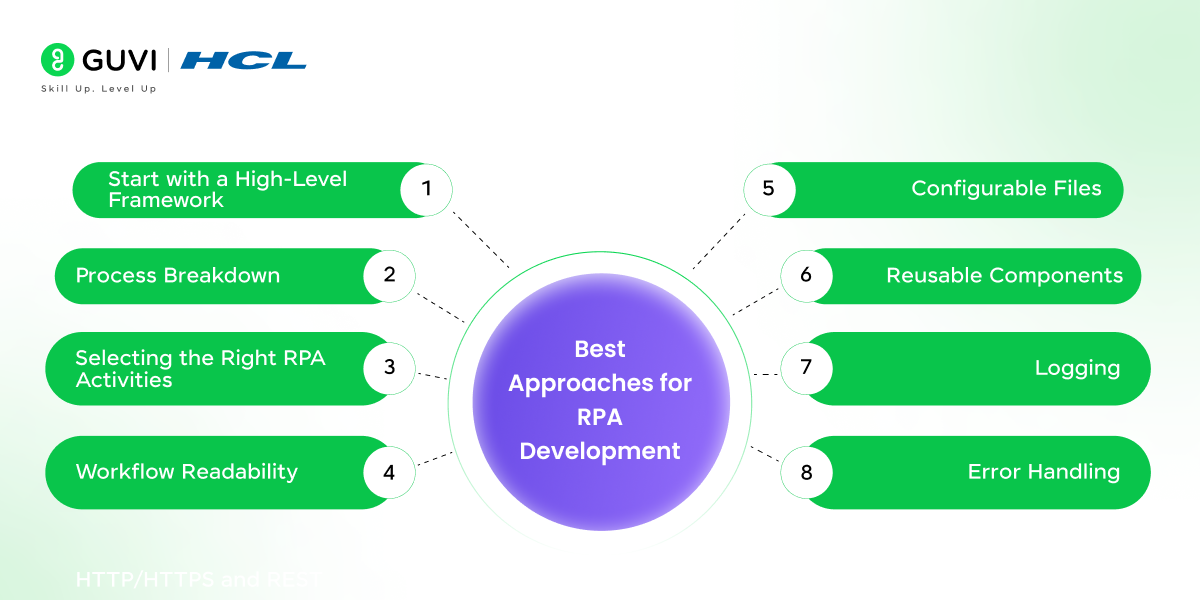
Best practices include keeping workflows modular, reusing components, applying exception handling, logging actions, and maintaining documentation. Following these practices ensures scalability, readability, and efficient troubleshooting.
12. Describe the lifecycle of an RPA project.
The RPA project lifecycle includes stages like Process Identification, Feasibility Assessment, Solution Design, Development, Testing, Deployment, and Maintenance. Each stage ensures the RPA solution meets business requirements and remains operational.
13. What is REFramework in UiPath?
The REFramework (Robotic Enterprise Framework) is a pre-built template in UiPath for managing transactional processes. It includes state machines, error handling, logging, and retry mechanisms, making it a popular choice for large-scale automation projects.
14. What are dynamic selectors, and how do you use them?
Dynamic selectors adjust to changes in UI attributes, like changing IDs or tags. You can use variables in the selector to handle such dynamic elements.
15. How would you optimize an RPA workflow for speed and efficiency?
To optimize an RPA workflow, you can remove unnecessary activities, use parallel processing, limit UI interactions, implement data caching, and manage resource utilization.
16. Write a snippet in UiPath to scrape data from a website and save it to an Excel file.
- Solution:
- Step 1: Use “Open Browser” to launch the website.
- Step 2: Use “Data Scraping” to capture table data.
- Step 3: Use “Write Range” under “Excel Application Scope” to save the scraped data to Excel.
Advanced Level Questions
At the advanced level, questions focus on complex problem-solving skills, in-depth knowledge of automation, and experience with handling large-scale deployments.
17. How would you manage RPA bots in a production environment?
Managing RPA bots in production involves monitoring performance, handling exceptions, ensuring data security, implementing role-based access, and scheduling bots to optimize resource usage.
18. What are some challenges in scaling RPA solutions, and how do you address them?
Common scaling challenges include managing bot dependencies, maintaining code quality, and handling complex workflows. Using Orchestrator to monitor bots, standardize code practices, and modularize workflows helps address these issues.
19. What’s the difference between attended, unattended, and hybrid RPA models?
Attended bots require human triggers, unattended bots work autonomously, and hybrid models combine both, allowing flexible workflows. Each model is suited to specific business processes based on automation needs.
20. How do you ensure RPA processes are compliant with data privacy regulations?
Ensuring compliance includes implementing secure logging, controlling access, anonymizing sensitive data, and encrypting data storage. Compliance also involves regular audits and adhering to standards like GDPR.
21. Explain the role of AI in RPA and its benefits.
AI-enhanced RPA, often referred to as intelligent automation, incorporates machine learning and natural language processing. This enables bots to handle unstructured data, analyze patterns, and make predictions, significantly broadening RPA’s capabilities.
22. What is the purpose of the orchestrator in UiPath?
UiPath’s Orchestrator is a centralized platform for managing, deploying, monitoring, and scheduling bots. It also tracks transaction logs, handles exceptions, and allows bot collaboration.
Coding Question:
23. Write a UiPath script to check if a file exists and, if so, move it to another folder.
- Solution:
- Step 1: Use the “If” activity to check file existence (File.Exists(path)).
- Step 2: Use the “Move File” activity to transfer it to the target location if it exists.
24. Explain the difference between sequence and flowchart workflows in UiPath.
Sequence workflows execute tasks in a linear order, ideal for simple, sequential processes. Flowchart workflows offer more flexibility, allowing conditional logic and branching, making them suitable for complex processes.
25. Describe how you’d handle a transaction in UiPath REFramework.
In REFramework, each transaction is handled within a “Process Transaction” state, where activities are executed and exceptions are managed. REFramework retries failed transactions, logs errors, and follows an organized structure to handle each transaction separately.
26. What’s the role of Citrix automation, and when would you use it?
Citrix automation enables bots to interact with virtual environments like remote desktops. It uses image recognition and OCR since virtual applications cannot be accessed through normal UI elements.
27. How do you handle duplicate transactions in RPA?
You can manage duplicates by storing processed transaction IDs in a database or spreadsheet and checking each new transaction ID against the existing list before proceeding.
28. What is the role of a credential manager in UiPath?
UiPath’s Credential Manager securely stores and retrieves sensitive information, like usernames and passwords, ensuring secure bot authentication without exposing credentials in the workflow.
29. How do you integrate APIs in RPA?
RPA tools like UiPath have “HTTP Request” activities that allow you to call APIs, send and receive data, and interact with third-party applications, making it possible to fetch data, trigger processes, or perform CRUD operations.
30. Describe an RPA project you worked on and the challenges you faced.
When answering, outline your role, the project’s objectives, challenges encountered (like handling unstructured data or dealing with UI changes), and solutions implemented. Tailor the response to show problem-solving skills and adaptability.
Scenario-Based Questions
31. A bot fails when processing certain invoices from a PDF folder. How would you troubleshoot?
I would first analyze whether the PDFs follow a consistent structure. For structured invoices, anchor-based extraction ensures correct data retrieval. For unstructured or scanned invoices, I would use Document Understanding with OCR engines to extract data accurately. Low-confidence extractions would be routed to a human validation queue for verification. Exception handling ensures that one failure doesn’t stop the entire batch, and logging captures detailed information for troubleshooting.
32. The bot intermittently fails when logging into a web application. What would you do?
I would inspect whether the web elements have dynamic attributes or if page elements load inconsistently. Using activities like Element Exists, On Element Appear, or Retry Scope allows the bot to wait for elements reliably. I would also verify that credentials are stored securely in Orchestrator Assets and that the login workflow handles incorrect or expired credentials gracefully. Logs and screenshots help identify exactly why the login failed.
33. A process is slow because thousands of transactions need processing daily. How do you optimize it?
I would implement Orchestrator queues to manage transactions efficiently and allow multiple unattended robots to process items in parallel. Workflow optimization includes using modular components, avoiding unnecessary UI automation, and leveraging background processes when possible. Monitoring performance with logs and analytics helps fine-tune processing speed and identify bottlenecks.
34. Unexpected pop-ups interrupt workflow execution. How do you handle them?
I would build a reusable pop-up handler that monitors for unexpected windows and dismisses them safely. Global Exception Handling ensures that interruptions are captured and handled without stopping the main workflow. Using retry logic and safe navigation strategies allows the automation to continue reliably even in unpredictable application environments.
35. A bot writes duplicate records to a database when network latency occurs. What would you do?
To prevent duplicates, I would implement idempotent operations by checking whether the record already exists before insertion. Unique transaction IDs or primary keys ensure database integrity. Proper transaction handling, along with logging every processed record, allows for accurate monitoring and avoids reprocessing due to intermittent failures or latency.
36. Selectors break after a recent UI update in the application. How would you make the bot stable?
I would replace fragile selectors with resilient ones using wildcards, anchors, or Computer Vision for complex UI elements. Modularizing workflows ensures that any selector changes can be updated in one place, minimizing maintenance. Testing the updated selectors after every application release ensures the bot runs smoothly in production.
37. The bot must read data from multiple Excel sheets and some have inconsistent formats. How would you handle this?
I would add validation logic to detect variations in headers or column positions. Try-Catch blocks ensure that errors in one sheet don’t halt the entire process. Data standardization before processing allows downstream activities to work with consistent input. Logging and exception handling provide transparency on which rows or sheets caused issues.
38. Your bot should run unattended, but it requires human approvals during execution. How do you design it?
I would separate human-dependent steps into dedicated queues and assign approval tasks to specific users via Orchestrator. The bot can continue processing other transactions that don’t require approval. This approach maintains unattended execution while integrating necessary human validation efficiently.
39. Automation is needed on a legacy desktop application with no accessible selectors. What’s your approach?
I would use image-based automation or keyboard navigation where standard selectors aren’t available. For more reliable operation, Computer Vision activities can help identify UI elements even on legacy systems. Where possible, I would also access backend APIs or databases directly, avoiding fragile front-end interactions altogether.
40. The client changes business rules frequently. How do you ensure the bot can adapt without constant code changes?
I would externalize all business rules into configuration files or Orchestrator Assets. Modularizing workflows separates business logic from automation logic, making updates easier. Changes would be tested in UAT before deployment, and proper version control ensures safe rollbacks if needed. This approach reduces maintenance overhead and keeps the automation robust.
In case you want to learn more about RPA and Machine Learning, consider enrolling in HCL GUVI’s Machine Learning online course that teaches you everything from scratch and equips you with all the necessary knowledge!
💡 Did You Know?
- Many RPA Developer interviews test knowledge of workflow design and REFramework, because most real-world automations rely on modular, transactional workflows.
- Selectors and element identification are frequently asked topics, as they are a primary cause of bot failures in production.
- Companies often build bot orchestration strategies where multiple robots work together across departments, making automation faster, more reliable, and capable of handling complex end-to-end processes.
Conclusion
In conclusion, preparing for an RPA developer interview requires you to go through these 30 RPA interview questions and answers to give you a strong foundation across all levels—fresher, intermediate, and advanced.
From technical insights to practical coding examples, mastering these will boost your confidence and help you make a great impression. Whether you’re looking to refine your basic skills or demonstrate advanced problem-solving abilities, these questions offer a well-rounded prep guide.
Success Stories

About the Author
Jebasta
I translate the language of data into stories that anyone can understand. As a writer with a data science background, I simplify analytics, AI, and decision-making so beginners and enthusiasts can confidently explore the world of data.
View all posts by Jebasta
Connect with me @
















Did you enjoy this article?