


Cloud Computing Articles
Advanced DNS Interview Questions for Senior Engineers: What to Expect in 2026
Advantages of Computer Network: Key Benefits, Limitations & Practical Applications


Get In Touch For Details! Request More Information
Router in a Computer Network: Everything You Need to Know
Jan 06, 2026 6 Min Read 1687 Views
(Last Updated)
Every file you download, every page you visit, and every reel you stream relies on something you probably don’t think about very often. It doesn’t have a screen, it doesn’t make noise, but it quietly makes the decisions about where every bit of data should go.
This quiet “decision-maker,” the perfectly unexciting router in a computer network, doesn’t crave recognition. It sits in the background and directs data so that our connections remain fast, stable, and smart. Without a router in the computer network, the internet would be a dysfunctional mess of lost connections.
In this blog, let’s bring this silent, hard-working piece of technology into the light, and discuss how the router in a computer network operates to keep the digital realm functioning smoothly.
Table of contents
- What is a Router in a Computer Network?
- Why Do We Need a Router in a Computer Network?
- Key Components & Architecture of a Router in a Computer Network
- Input Port & Output Port
- Switching Fabric / Internal Process
- Routing Processor & Routing Table
- Forwarding Plane
- How Does a Router in a Computer Network Work?
- Static vs Dynamic Routing
- Types of Routers in a Computer Network
- Wireless Router
- Wired Router
- Edge Router
- Core Router
- Virtual Router
- Applications and Use-Cases of a Router in a Computer Network
- Wrapping it up:
- FAQs
- What is a router in computer network?
- What is the main function of a router?
- Is a router the same as a modem?
- How many types of routers are there?
- Why is a router important in computer networks?
What is a Router in a Computer Network?
A router in a computer network is the hardware or software aspect of a device that connects two or more networks, and helps forward data packets (units of information) from one network to another network.
To elaborate: when data travels networks (such as your laptop to a web server), the data is broken down into packets. The router in the computer network inspects those packets to obtain their destination address, consults its internal information (routing table), and determines the next best network pathway to forward that packet.
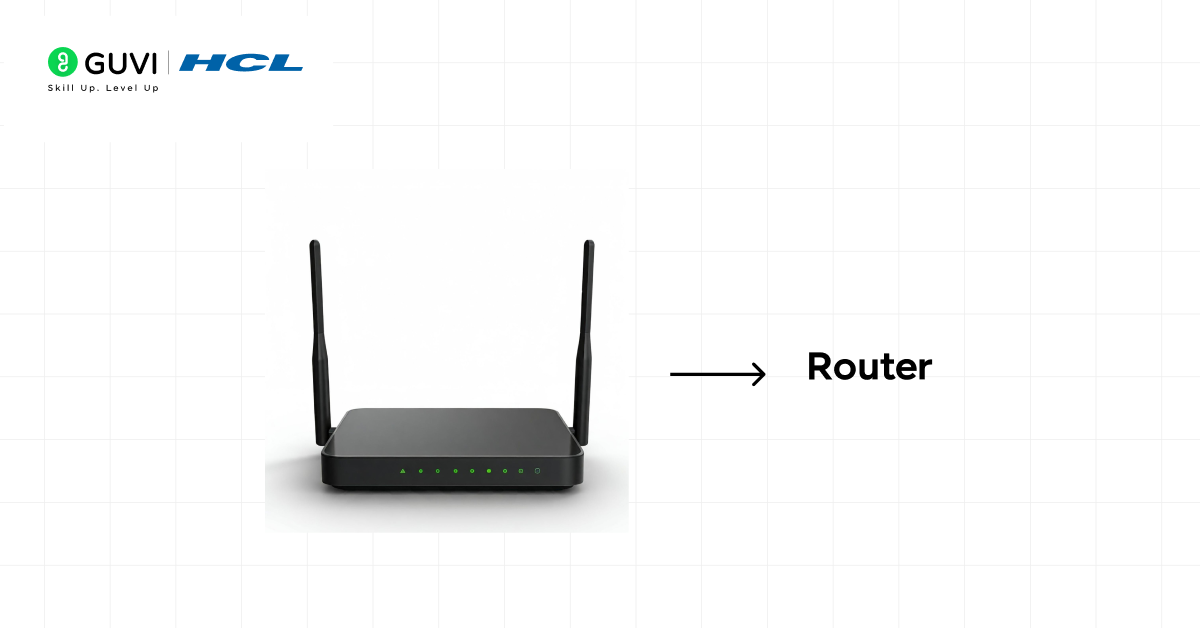
Routers operate on Layer 3 (Network Layer) of the OSI model.
Wouldn’t it be easier when the term “router in computer networks,” to think it as a hardware or software aspect that forwards which network the packet populates nächste. To know that you’re forging ahead on the ultimate and final path.
Why Do We Need a Router in a Computer Network?
Understanding why a router in a computer network is necessary helps you appreciate network design and performance. Here are some key reasons:
- Bridging between different networks: A router allows communication between two or more different networks, such as between a home LAN and the Internet, or between a branch office and other offices in a company WLAN.
- Directing traffic: Without a router in a computer network, data packets may be lost or sent inefficiently. The router is used to make sure that packets take the right path.
- Internet sharing: In a small office or a normal home, there are several devices sharing the same connection to the Internet. The sharing is done through the router in the computer network.
- Segmentation and control: Routers are used in larger networks to partition the network into sub-nets, thereby enhancing the performance, security, and manageability. A router used in the computer network is able to implement policies, traffic control and isolate faults.
Therefore, the presence of a router in a computer network is the basis of modern networking, whether a small home-based or world worldwide Internet backbone.
Key Components & Architecture of a Router in a Computer Network
There are some internal parts and processes that enable it to be functional when you open the hood of a router in a computer network. Let’s explore them:
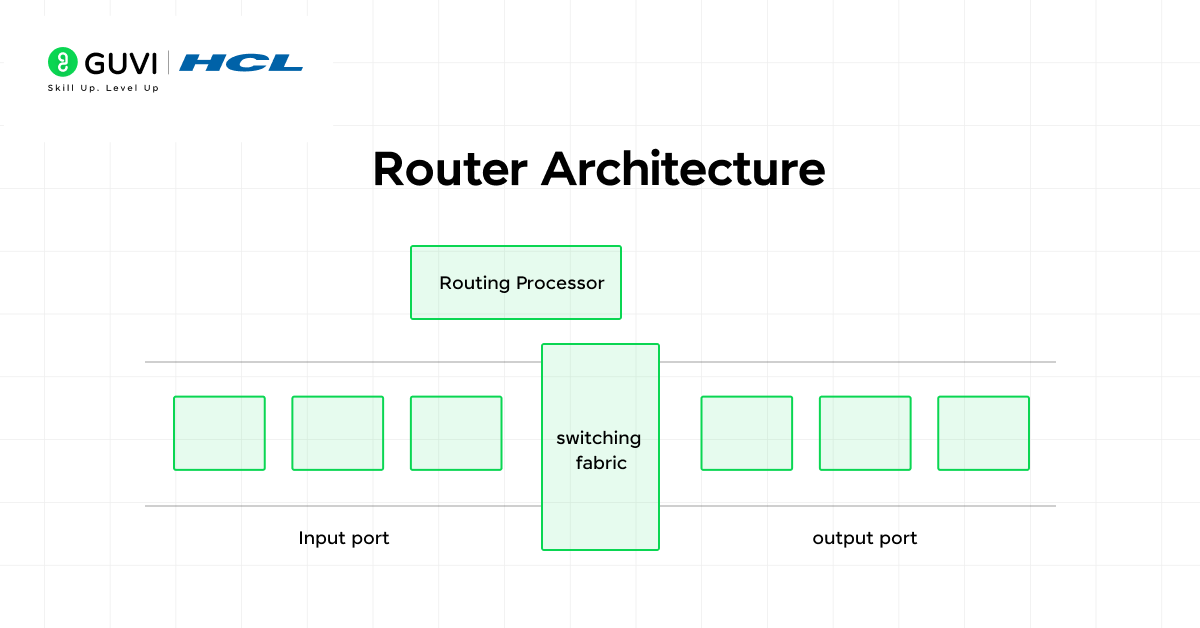
Input Port & Output Port
- Input Port: It is the port through which the router accepts a packet via a network link that is connected to the router. The port manages the physical layer and the data link layer functionality and sends the packet to the next step.
- Output Port: Once the router has decided on the next destination, the packet leaves through the output port. The router can alter the header of the packet (e.g., MAC address) and then transmit it.

Switching Fabric / Internal Process
Within a router of a computer network, there is a switching fabric or internal bus that transfers packets between input and output, usually at high speed. Hardware and software are utilized to transport packets in an efficient manner.
Also read: Routing and Switching
Routing Processor & Routing Table
- Routing Processor: This component of the router operates routing protocols, routing tables, and routing decisions in the control plane.
- Routing Table: This table is the key to the router of a computer network, as it holds the information on the path to different networks of destination networks. When a packet arrives, the router looks up the destination IP address in the routing table to decide the next hop.
Forwarding Plane
When the routing table provides the route, the forwarding plane (data plane) manages the physical transfer of the packet through the router between the input and output interfaces. This segregation (control plane vs data plane) helps the performance.
The architecture of a router in a computer network is made up of all these pieces; this is a device that is constructed to route packets in an efficient and reliable manner.
How Does a Router in a Computer Network Work?
Having seen the components, it is time to trace how a router in a computer network works when a packet comes:
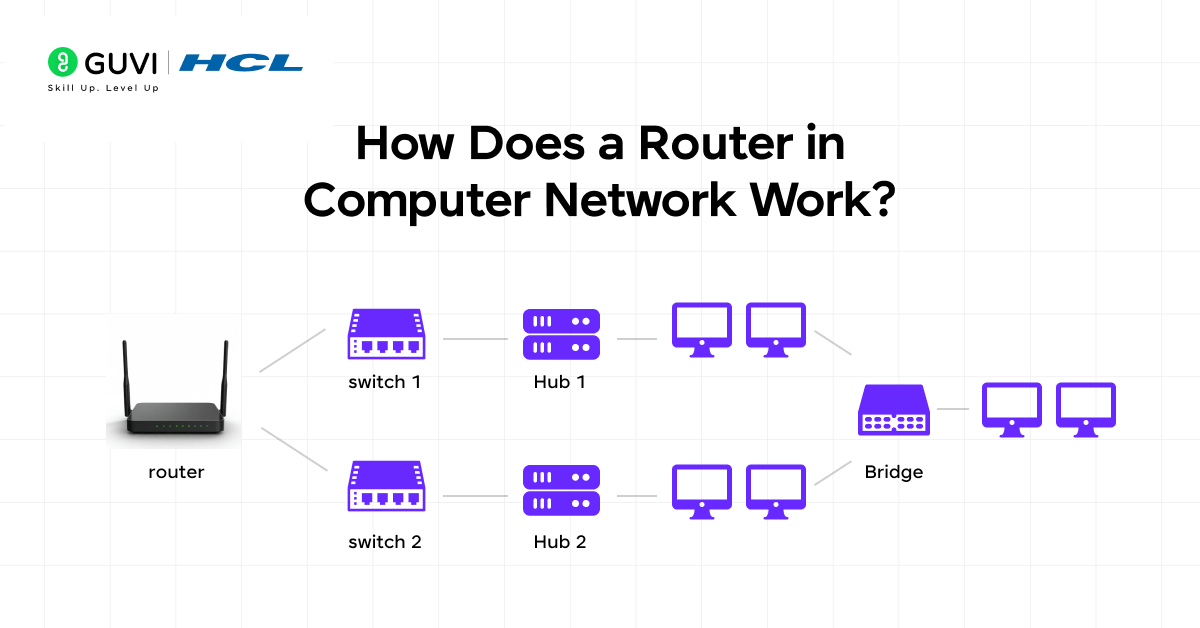
- One of the network links brings a packet into one of the input ports of the router.
- The router gets the packet header and verifies the destination IP address. Other fields (e.g. priority/QoS) may also be checked by the router.
- The router looks up its routing table and identifies the most appropriate path (next hop) to the destination network. The routing table can either be with static route or it can be dynamic.
- The packet can be altered: the router can alter the source/destination MAC addresses (data link layer), TTL, recalculate a new checksum, and others.
- The packet is sent through the output port to the destination device (which can be another router or the destination host).
- This is done repeatedly with various routers until the packet gets to the destination network.
Also read: What is IoT? A Comprehensive Guide [2025]
Static vs Dynamic Routing
- Static routing: Routes are set manually by a network administrator. They are not altered unless they are changed deliberately. Fits small and stable networks.
- Dynamic routing: Routers share routing information using routing protocols (e.g. OSPF, BGP) and dynamically update routing tables as the network changes. More suitable in large or dynamic networks.
Ready to build strong networking skills? Explore HCL GUVI’s Networking Course and start learning today.
Types of Routers in a Computer Network
Routers are not all the same. Depending on where they’re used, how they connect devices, and what kind of traffic they handle, routers can vary widely in design and purpose. Here’s a detailed look at the major types of routers in computer networks and what makes each one unique:
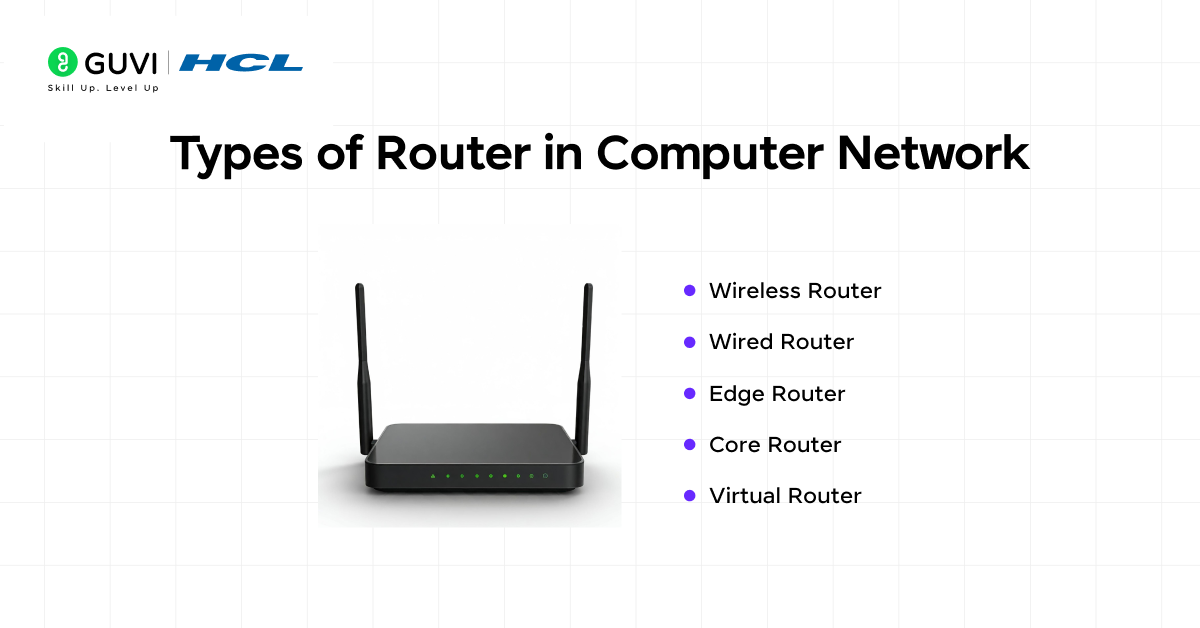
1. Wireless Router
The most common one is a wireless router, the most common device you can find in almost every household or a small office.
It is linked to a modem and forms a Wi-Fi network, and can be connected to several devices (phones, laptops, smart televisions, etc.) without the use of cables.
The features that are normally built into these routers include:
- SSID broadcast to discover Wi-Fi,
- Security protection by password and encryption, and
- DHCP services in order to allocate IP addresses automatically.
They’re the perfect choice for homes or small workspaces that need convenience, flexibility, and minimal wiring. However, their range depends on factors like antenna strength and interference.
2. Wired Router
A wired router in computing networks links the devices using Ethernet cables rather than Wi-Fi.
It offers very stable and high-speed connections and that is why it is commonly applied in offices, data centers, and in game arrangements.
Wired routers typically accept multiple LAN ports and typically have an attachment to switches in order to expand the network.
The main advantages include:
- Consistent high-speed data transfer
- Less latency than wireless routers
- Stronger defense against wireless interference or hacking.
Although they are not as flexible as wireless routers, they suit well in an environment that does not require flexibility.
3. Edge Router
An edge router lies at the border (or edge) of the network; that is, the point where internal systems and the outside world (usually the internet) meet.
For example, in the business environment, the edge router is used to bridge the private network of the company and the Internet Service Provider (ISP).
These routers handle:
- Large quantities of incoming and outgoing traffic,
- Security can be implemented in the form of access control lists (ACLs) and firewall rules, and
- Inter-protocol, inter-IP routing.
Edge routers are made to be efficient and quick, and data exchange is smoother between the inner network and the outside networks.
Also read: Top 30 Networking Interview Questions and Answers [Includes All 3 Levels]
4. Core Router
If edge routers are the guards at the boundary, core routers are the powerhouses at the center. A core router in a computer network is used to pass bulky traffic in the backbone of a network – let’s say, in an ISP, a data center, or a large company.
They are designed for:
- High-speed packet forwarding (in terabits/s),
- Fault tolerance and low latency,
- Maintenance of links between various edge routers or distribution routers.
Such routers do not have a direct connection to end-user devices. They rather make sure that the data in the whole network is flowing effectively and dependably.
- A single router can make millions of forwarding decisions every second without slowing down — ensuring uninterrupted data flow across networks.
- The internet relies on over 70,000+ active routers that work together using global routing tables to keep data packets moving efficiently across the world.
- Your home router does more than provide Wi-Fi — it also manages NAT, DHCP, basic firewalling, and connected devices all at once.
- Enterprise routers are built for speed and reliability, capable of handling terabits of data per second for large-scale network infrastructures.
- A router’s routing table can store hundreds of thousands of routes that continuously update as global network paths change.
- Without routing protocols like OSPF and BGP, the internet as we know it would collapse in minutes. These protocols are the silent backbone of global connectivity.
Routers are the true workhorses of the internet quietly powering every click, stream, and connection around the globe!
5. Virtual Router
A virtual router is not physical hardware. It is a software router that is implemented in a virtual machine, cloud server, or container.
It does all the routing tasks of a hardware router but is more flexible, such that using it has become a popular choice in cloud computing and scale-out settings.
Key benefits include:
- Scalability (adding more capacity is only a software-configured option)
- Economical (no physical hardware required)
- Integration with the current technologies, such as SDN (Software Defined Networking)
Companies that use cloud infrastructure (like AWS, Google Cloud, or Azure) rely heavily on virtual routers to manage internal and external traffic dynamically.
Read More: Components of the Internet: A Comprehensive Guide
Applications and Use-Cases of a Router in a Computer Network
Home Network
In a regular home network, a router in a computer network connects a home LAN, your devices (computers, smartphones, IoT devices) to the Internet via the modem. It is responsible for assigning local IPs, routing packets to your ISP, and managing your home LAN.
Small Office / Branch Office
In a small office or branch office environment, a router in a computer network connects the office LAN to the WAN or the Internet. It may also connect to the head office via VPN while providing firewall functionality, QoS for voice or video traffic.
Also read: How to Become a Network Engineer? 6 Easy Steps To Get Started
Enterprise Network
In large enterprises, a router in a computer network may be used to segment different departments, link multiple campuses, manage redundancy, manage load balance, and provide high throughput ability across the core network. Core routers typically connect to other networks and handle large volumes of traffic, and the edge routers connect to the outside world.
Internet Service Provider (ISP)
At the highest level, a router in a computer network is used by ISPs to interconnect across backbone links, exchange routing information (BGP), and direct global Internet traffic. These routers typically work at massive scale and speed.
Cloud / Virtual Networks
In a virtualized or cloud network environment, a virtual router in a computer network connects virtual sub-nets and routes traffic in the cloud or between clouds or on-premises and clouds.
If you’re excited to master the art of routing in computer networks, then take the next step and join the AI Software Development Course by HCL GUVI, IITM Pravartak, MongoDB, a 9-month industry-ready program covering Java, System Design, Generative AI, 15+ hands-on projects, and 4 globally recognized certifications.
Wrapping it up:
While you may not think about it every day, a router in a computer network influences every interaction you have online. It also decides how data moves, where it moves, and how quickly it gets there, turning complex digital chaos into smooth communication.
From a simple home Wi-Fi setup to massive global infrastructures, routers form the foundation that keeps networks alive and efficient. Understanding how they work isn’t just about learning another networking concept; it’s about realizing how every click, call, and connection depends on structured intelligence working behind the scenes.
So, the next time your Wi-Fi light blinks, remember that small box isn’t just a device. It’s the decision-maker of your digital world.
FAQs
1. What is a router in computer network?
A router is a device that connects multiple networks and forwards data packets to their destinations.
2. What is the main function of a router?
The primary purpose of a router is to chose the best available path for data to travel connected networks.
3. Is a router the same as a modem?
No, a modem connects the network to the Internet, whereas a router uses that connection to manage and share it with its devices.
4. How many types of routers are there?
Some common types of routers include wireless, wired, edge, core and virtual each with its own unique needs for networking.
5. Why is a router important in computer networks?
A router is needed in a computer network because without it, the devices would not know how to directly receive or send data, which would also make communication nearly impossible.
Success Stories

About the Author
Vishalini Devarajan
An Aerospace Engineer turned content writer, I focus on making complex concepts easy to understand through well-structured, reader-friendly blogs. Whether it’s a technical topic or a non-technical one, I love creating content that is clear, engaging, and impactful.
View all posts by Vishalini Devarajan
Connect with me @












Did you enjoy this article?