


Javascript Articles
Arrow Functions in JavaScript: A Complete Guide
What Is Currying in JavaScript?


Get In Touch For Details! Request More Information
ReactJS vs React Native: Differences, Benefits & Applications
Feb 19, 2026 6 Min Read 747 Views
(Last Updated)
What happens when two technologies share the same foundation yet serve completely different purposes? Developers often face this question when comparing ReactJS Vs React Native. Both are powered by Facebook’s JavaScript library, but they are designed for different environments.
To understand their differences, how each operates, and which alternatives are worth considering, read the full blog.
Table of contents
- What is ReactJS?
- Essential Tools for ReactJS
- Top Benefits of ReactJS
- Component Reusability
- Virtual DOM Performance
- Strong Community and Ecosystem
- SEO-Friendliness
- Flexibility in Integration
- Best Applications of ReactJS
- Single Page Applications (SPAs)
- E-Commerce Websites
- Social Media Platforms
- Enterprise Web Portals
- Step-by-Step Working of ReactJS
- Step 1: Build Components
- Step 2: Structure with JSX
- Step 3: Manage Data with State and Props
- Step 4: Update with Virtual DOM
- Step 5: Render to the Browser
- Challenges and Solutions of ReactJS
- What is React Native?
- Top Benefits of React Native
- Cross-Platform Development
- Near-Native Performance
- Strong Community and Ecosystem
- Hot Reloading Feature
- Scalability for Business Applications
- Best Applications of React Native
- Cross-Platform Mobile Apps
- On-Demand Service Apps
- Social and Community Apps
- E-Commerce Mobile Apps
- Step-by-Step Working of React Native
- Step 1: Write Components in JavaScript
- Step 2: Translate Through the Bridge
- Step 3: Manage State and Props
- Step 4: Connect with Native APIs
- Step 5: Render as Native UI
- Challenges and Solutions of React Native
- ReactJS vs React Native: A Detailed Comparison
- Which One Should You Choose
- Conclusion
- FAQs
- Can ReactJS and React Native share the same codebase?
- Which companies use ReactJS and React Native in 2026?
- Is React Native suitable for gaming applications?
- How does ReactJS handle SEO compared to React Native?
- What skills are required to learn ReactJS and React Native?
What is ReactJS?
ReactJS is a JavaScript library used for building user interfaces in web applications. It focuses on creating reusable components that manage their own state, which makes development more efficient. Developers rely on ReactJS to build interactive features such as dashboards, forms, and content feeds that update smoothly without reloading the entire page. Its virtual DOM speeds up rendering, which improves performance for large-scale web projects.
Essential Tools for ReactJS
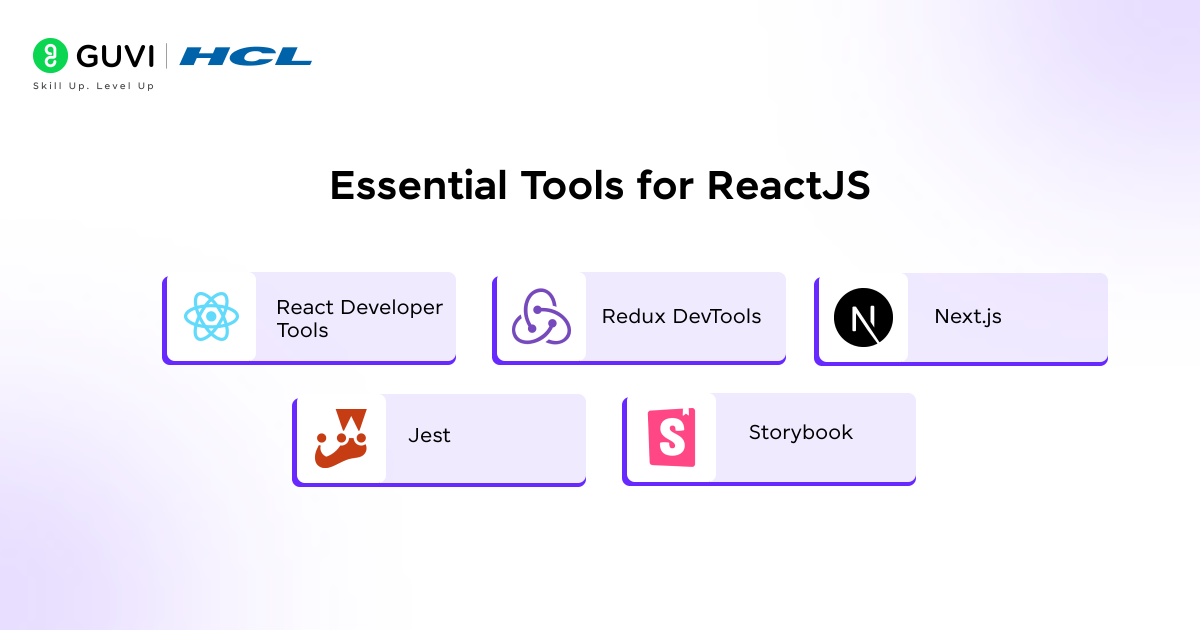
- React Developer Tools: Browser extension for Chrome and Firefox that helps inspect component trees, props, and state directly.
- Redux DevTools: A debugging extension for Redux-based projects that shows state changes and supports time-travel debugging.
- Next.js: A framework on top of ReactJS that adds server-side rendering, routing, and static site generation for better SEO.
- Storybook: A development tool that allows building and testing UI components in isolation, which improves reusability and design consistency.
- Jest: A testing framework that supports unit and snapshot testing for ReactJS applications.
Also, Read: ReactJS Architecture: A Comprehensive Guide For Developers
Top Benefits of ReactJS

1. Component Reusability
ReactJS is built around reusable components. Developers can create UI elements once and use them across different parts of an application, which reduces code duplication and improves consistency.
2. Virtual DOM Performance
ReactJS uses a virtual DOM that updates only the changed parts of the user interface. This approach speeds up rendering and makes applications more responsive, even with frequent data updates.
3. Strong Community and Ecosystem
The library benefits from a large developer community and a rich ecosystem of third-party tools. Tutorials, packages, and support resources are readily available, which lowers the learning curve for beginners.
4. SEO-Friendliness
Unlike many JavaScript-heavy frameworks, ReactJS offers server-side rendering capabilities. This improves indexing by search engines and helps businesses gain stronger visibility in search results.
5. Flexibility in Integration
ReactJS works well with various back-end technologies and can be integrated into existing projects without a complete rebuild. This flexibility allows teams to adopt it gradually while modernizing their applications.
Read: How to Install React.js on Windows: A Complete Guide

Best Applications of ReactJS

1. Single Page Applications (SPAs)
ReactJS is well-suited for SPAs where content updates dynamically without reloading the page. Dashboards, project management tools, and analytics platforms benefit most from this approach.
2. E-Commerce Websites
Retail platforms use ReactJS to build product catalogs and checkout processes that remain fast even with high traffic. The ability to update components independently improves customer experience.
3. Social Media Platforms
Features like real-time notifications, comment sections, and feeds are interactive by design. ReactJS helps build these features with smooth rendering and strong performance.
4. Enterprise Web Portals
Large organizations use ReactJS to create internal dashboards and business intelligence tools. Component reusability helps maintain consistency across complex corporate systems.
Step-by-Step Working of ReactJS
ReactJS is designed to make web development faster by breaking down interfaces into modular parts. Here is how it works in practice:
Step 1: Build Components
Every element of the interface is treated as a component. A button, a navigation bar, or a chart can be developed separately and reused wherever needed. This reduces duplication and keeps large projects organized.
Step 2: Structure with JSX
JSX blends HTML-like syntax with JavaScript logic. It allows developers to describe what a component should look like while writing logic in the same file. This keeps the code simple to read and maintain.
Step 3: Manage Data with State and Props
State controls how a component behaves internally, while props allow data to move between components. Together, they make interfaces interactive and keep the application predictable as it grows.
Step 4: Update with Virtual DOM
When data changes, ReactJS first updates the virtual DOM. It then compares this version with the actual DOM and updates only what has changed. This selective updating improves speed and makes user interactions smoother.
Step 5: Render to the Browser
The updated components are rendered into the browser. Users experience a fast and responsive interface without full-page reloads.
Challenges and Solutions of ReactJS
- Steep Learning Curve
ReactJS introduces concepts like JSX, virtual DOM, and state management that may confuse beginners.
Solution: Start with small projects, then progress to frameworks such as Redux or Context API for state management. Following official documentation and using community tutorials helps ease adoption.
- SEO Limitations in Client-Side Rendering
Search engines sometimes struggle with JavaScript-heavy applications.
Solution: Implement server-side rendering with tools like Next.js. This ensures better indexing and higher visibility on search engines.
- Frequent Library Updates
ReactJS evolves quickly, which can create compatibility issues for ongoing projects.
Solution: Adopt long-term support versions of packages and use dependency management tools. Regular updates with testing pipelines help keep applications stable.
- Boilerplate Code in Complex Projects
Managing large applications can result in repetitive and verbose code.
Solution: Break applications into modular components and use design patterns. Adopting TypeScript also improves maintainability.
Also, Read: Top 20+ React Interview Questions and Answers
Build powerful, scalable, and SEO-friendly web apps with our ReactJS Course, a self-paced, 100% online program with lifetime access, real-world projects, and globally recognized certification. Sharpen your skills with gamified practice platforms (CodeKata, WebKata, Debugging, IDE), enjoy dedicated doubt-clearing support, and learn from industry-standard tools like Next.js, Redux, and Storybook. Backed by a 7-day refund guarantee, this is your pathway to becoming a job-ready ReactJS developer. Enroll now and future-proof your career in web development!
What is React Native?
React Native is a framework built on React principles but designed for mobile app development. It allows developers to write code in JavaScript and render it as native components for iOS and Android platforms. This approach reduces the need to build separate codebases for each platform, which saves time and resources. React Native applications deliver near-native performance while still maintaining the flexibility of a single codebase.
Top Benefits of React Native

1. Cross-Platform Development
React Native allows developers to build applications for both iOS and Android using a single codebase. This approach reduces development time and costs while keeping the experience consistent across platforms.
2. Near-Native Performance
Applications built with React Native render using native components. This makes the performance closer to fully native apps, which ensures smooth animations and fast load times.
3. Strong Community and Ecosystem
React Native is supported by a large community and a wide range of plugins. Developers can access ready-made solutions for common features, which accelerates development and reduces repetitive work.
4. Hot Reloading Feature
The hot reloading capability lets developers see code changes reflected instantly without rebuilding the entire app. This improves productivity and speeds up testing during development.
5. Scalability for Business Applications
React Native offers flexibility to start with smaller projects and then scale to enterprise-grade applications. Its support for third-party integrations and modular architecture makes it suitable for growing businesses.
Read: Top 10 React Native Project Ideas [With Source Code]
Best Applications of React Native

1. Cross-Platform Mobile Apps
React Native allows developers to build apps for iOS and Android simultaneously. Startups and mid-sized businesses prefer it because one codebase reduces costs while still delivering native-like performance.
2. On-Demand Service Apps
Ride-hailing, food delivery, and logistics apps rely on React Native for real-time tracking, payment integration, and push notifications. The framework supports these features effectively across platforms.
3. Social and Community Apps
React Native powers chat applications, community forums, and live streaming features. Its performance and support for interactive UI elements make it suitable for engaging mobile experiences.
4. E-Commerce Mobile Apps
Retailers use React Native to build mobile shopping platforms that mirror web functionality. It supports fast product browsing and smooth checkout processes across both major mobile systems.
Step-by-Step Working of React Native
React Native follows the same design principles as ReactJS but outputs applications that run on mobile devices. Here is how it works step by step:
Step 1: Write Components in JavaScript
Developers use JavaScript to define components such as text blocks, images, and buttons. These components remain platform-agnostic until React Native processes them.
Step 2: Translate Through the Bridge
React Native uses a bridge to convert JavaScript components into native building blocks. This means a button in the code is rendered as a native iOS button on iPhone and as a native Android button on Android devices.
Step 3: Manage State and Props
The same system of state and props ensures data flow remains predictable. This allows developers familiar with ReactJS to transition smoothly into React Native development.
Step 4: Connect with Native APIs
Applications often need access to device features such as the camera, notifications, or GPS. React Native uses native modules to provide these connections, which makes applications functional beyond static UI.
Step 5: Render as Native UI
The final output is an application that looks and feels like it was written in Swift or Java. Users get near-native performance, and businesses gain the advantage of using one codebase for both platforms.
ReactJS or React Native, whichever path you choose, it all starts with strong JavaScript fundamentals. JavaScript Hub gives you free guides, tutorials, and coding practice to master the language that powers both web and mobile apps. Explore now and strengthen your JS foundation for a future in React.
Challenges and Solutions of React Native
- Native Module Dependency
Certain advanced features require writing native code, which increases complexity.
Solution: Use community-maintained libraries or collaborate with developers skilled in Swift and Java to handle platform-specific modules.
- Performance Bottlenecks
Apps with heavy animations or complex computations may face slower performance than fully native apps.
Solution: Optimize performance using techniques like FlatList for rendering lists and native driver for animations. Offloading heavy tasks to native modules also improves efficiency.
- Limited Third-Party Libraries
Some libraries lack proper documentation or support, leading to integration challenges.
Solution: Rely on actively maintained libraries and check community feedback before integrating. Contributing to open-source solutions also strengthens the ecosystem.
- Debugging Complexity
Debugging in React Native can be harder because issues may originate from both JavaScript and native code.
Solution: Use advanced tools such as Flipper, Reactotron, and Chrome DevTools. Structuring code properly and maintaining logs simplifies the debugging process.
ReactJS vs React Native: A Detailed Comparison
| Factor | ReactJS | React Native |
| Purpose | JavaScript library for building interactive web applications | Framework for building mobile applications on iOS and Android |
| Platform | Runs in browsers for web-based projects | Runs on mobile devices as near-native apps |
| UI Components | Uses HTML and CSS for building UI | Uses native mobile components rendered through a JavaScript bridge |
| Performance | Optimized for dynamic web updates through the virtual DOM | Delivers near-native performance with native UI rendering |
| Language | Uses JavaScript with JSX for component-based development | Uses JavaScript with JSX but outputs native mobile code |
| Rendering Process | Virtual DOM updates only changed elements in the browser DOM | Bridge translates JavaScript into native widgets for each platform |
| Learning Curve | Easier to start for web developers with JavaScript knowledge | Requires understanding of React concepts plus some platform-specific modules |
| Development Focus | Best for single-page applications, dashboards, enterprise web tools, and interactive websites | Best for mobile-first applications such as e-commerce apps, on-demand services, and social platforms |
| Third-Party Libraries | Large ecosystem with strong support for web-focused packages | Growing ecosystem but some mobile-specific libraries lack documentation |
| Testing Tools | Commonly uses Jest, Enzyme, and Storybook | Commonly uses Detox, Appium, and React Native Testing Library |
| Community Support | Very mature with extensive tutorials, documentation, and corporate adoption | Strong and active community but still smaller than ReactJS |
| Scalability | Scales easily for complex enterprise-grade web projects | Scales for mobile projects but may require native modules for advanced features |
| Best Suited For | Building scalable, fast, SEO-friendly web applications | Building cross-platform mobile apps with native-like performance |
Which One Should You Choose
The choice between ReactJS, React Native, and hybrid approaches depends on what you want to achieve with your application. Each has its strengths, and in some cases, combining them provides the best outcome.
- Choose ReactJS if:
- Your project is focused on web applications such as dashboards, e-commerce sites, or enterprise portals.
- SEO is important for your business, and you need server-side rendering.
- Your development team specializes in front-end web technologies.
- Choose React Native if:
- You need mobile applications that work on both iOS and Android.
- You want near-native performance without writing two separate codebases.
- Cost-effective and scalable mobile solutions are your priority.
- Choose a Hybrid Approach if:
- Your business needs both web and mobile applications and you want a consistent development experience.
- You want to reuse logic across platforms while tailoring features for each environment.
- You aim to reduce long-term maintenance costs by keeping technologies within the React ecosystem.
Conclusion
ReactJS and React Native share the same foundation but serve different purposes. ReactJS is the better choice for building fast and scalable web applications with reusable components and strong SEO support. React Native is suited for mobile applications where cross-platform development and native-like performance are priorities.
Both have strong ecosystems, active communities, and well-defined use cases. The right choice depends on whether your project focuses on the web, mobile, or both. For teams in 2026, alternatives such as Angular, Vue, Flutter, Swift, and Kotlin may also be worth considering depending on project scope.
FAQs
1. Can ReactJS and React Native share the same codebase?
Yes, certain business logic and utility functions can be shared between ReactJS and React Native. However, UI components must be written separately because ReactJS relies on HTML and CSS, while React Native renders native components.
2. Which companies use ReactJS and React Native in 2026?
ReactJS is widely used by platforms like Netflix and Airbnb for web applications. React Native powers mobile apps for companies such as Instagram and Shopify, highlighting its ability to scale across industries.
3. Is React Native suitable for gaming applications?
React Native is not the best fit for heavy 3D or graphics-intensive games. Native development with Swift, Kotlin, or engines like Unity is preferred. React Native works better for casual or utility-driven mobile apps.
4. How does ReactJS handle SEO compared to React Native?
ReactJS supports server-side rendering with frameworks like Next.js, which helps improve SEO for web projects. React Native does not impact SEO because mobile apps are distributed through app stores, not search engines.
5. What skills are required to learn ReactJS and React Native?
For ReactJS, developers need a solid foundation in JavaScript, HTML, and CSS. For React Native, JavaScript knowledge is required, but familiarity with mobile development concepts and occasional use of Swift or Java/Android Studio is also helpful.
Success Stories

About the Author
Vaishali
I'm a seasoned writer with four years of experience across technical, non-technical, and just about every genre or niche you can imagine. Adaptable and curious, I enjoy exploring new topics and making information engaging and easy to understand. Fueled by a steady stream of tea, I approach each project with creativity, reliability, and genuine enthusiasm for storytelling.
View all posts by Vaishali
Connect with me @

















Did you enjoy this article?