


Artificial Intelligence and Machine Learning Articles
Getting Started with LangChain Prompt Templates in 2026
Cursor 2.0: Trending AI Model Explained In-Depth
Creating Custom Swag Merchandise Using Generative AI
Create a Recipe with ChatGPT: A Guide to AI-Assisted Cooking


Get In Touch For Details! Request More Information
10 Fun & Innovative Raspberry Pi Projects You Should Try
Oct 14, 2025 6 Min Read 6916 Views
(Last Updated)
Have you ever wanted to make your own gaming console, automate your entire house or build a robot that obeys your commands? What if you could do that all with a device that is the size of a credit card and costs less than a video game?
Welcome to the amazing world of Raspberry Pi projects! The Raspberry Pi is a very small and cheap but massively powerful single-board computer which has taken the tech, education and maker communities by storm. It is a blank canvas for creativity whether you want to learn about electronics, build your own projects, or learn how to program. It opens up many realms of possibilities in programming, electronics and the Internet of Things (IoT).
Maybe you are a complete beginner looking for a project to pass the time on a weekend, or an experienced engineer looking for your final year project, there are many possibilities with the Raspberry Pi. And this blog is intended to be a complete guide to one of the best sources for Raspberry Pi projects on the web.
Table of contents
- Raspberry Pi Projects for Absolute Beginners
- Raspberry Pi Home Automation System
- Smart Security Camera with Raspberry Pi
- Smart Home Hub with Home Assistant
- Raspberry Pi Media Server (Plex or Nextcloud)
- Automated Plant Watering System
- Smart Mirror with Raspberry Pi
- Personal Web Server (Apache + WordPress)
- Network-Wide Ad Blocker (Pi-hole)
- Raspberry Pi Robot Rover
- AI-powered security camera with object detection
- Raspberry Pi Final Year Projects & Proposals
- Final thoughts..
- FAQs
- Can Raspberry Pi be used for AI and robotics?
- How do I use Raspberry Pi for IoT applications?
- Which Raspberry Pi model should I use for projects?
- Are Raspberry Pi projects good for final-year engineering students?
Raspberry Pi Projects for Absolute Beginners
1. Raspberry Pi Home Automation System
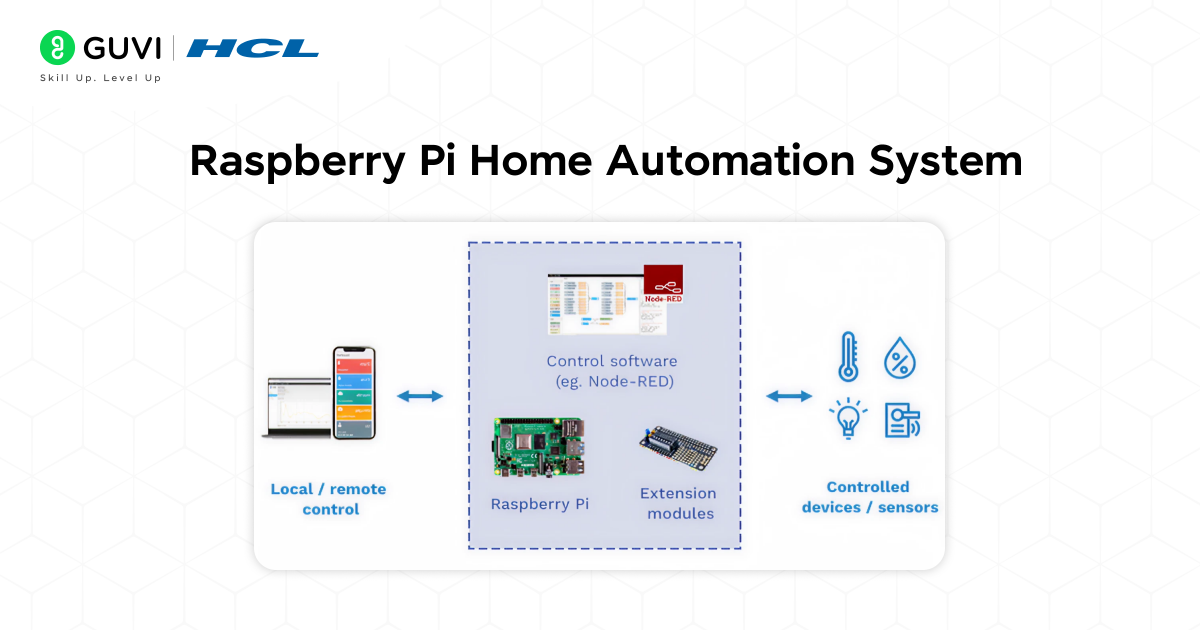
Goal: Remotely control and handle household appliances, such as lights and fans, as well as door locks.
Home automation is one of the most common applications of a Raspberry Pi. With a Raspberry Pi and smart relays you can create a system which allows you to control appliances, within limits, via a mobile application or voice command (Google Assistant/Alexa).
- Duration: 3-5 days (basic setup, potentially longer with advanced voice integration).
- Project Difficult: Beginner-Intermediate.
- What you will need: Raspberry Pi 4/5, sensors, relays and smart plugs, stable Wifi connection and Mobile device for control
- Tech Stack: Python, Home Assistant (open-source platform), GPIO libraries
- Learning Outcomes: A basic understanding of the IoT and experience in how to integrate sensors and how to manipulate APIs to communicate with smart home objects/devices.
- Deployment Methodology: Deploy Home Assistant on Raspberry Pi, connect it to Wi-Fi, add devices (fans, lights, sensors) inot home assistance and control it through your mobile phone.
2. Smart Security Camera with Raspberry Pi
Goal: Create a smart security system that utilizes a Pi Camera Module to stream live video, detect motion, and allow remote monitoring.
The pi security camera is one of the coolest raspberry pi projects because it incorporates both IoT and computer vision. With the help of a Pi Camera Module, you can create a smarter security system that streams video onto your smartphone and sends notifications for motion or unfamiliar faces.
- Duration: 4 – 7 Days.
- Level of difficulty: Intermediate.
- What you will need: Raspberry Pi, Pi Camera Module, stable Wifi connection
- Tech Stack: OpenCV, Flask for Web Streaming, and cloud storage (optional).
- Learning Outcomes: You will learn how to process video, develop motion detection algorithms, and set up a remote monitoring system.
- Deployment Methodology: You can host the video stream locally or on a cloud service (optional). You can develop additional notifications via the Telegram/WhatsApp APIs.
3. Smart Home Hub with Home Assistant
Goal: Integrate all smart devices (Philips Hue, IKEA, TP-Link, Alexa, etc.) into one local ecosystem.
Frustrated with how your smart devices don’t always “speak” to each other? Home Assistant is free and open-source, and you can install a home automation platform on a Raspberry Pi. Home Assistant allows you to incorporate your smart devices, which come from different vendors, into a single local ecosystem making them work together. You can add smart devices from brands like Philips Hue, IKEA, TP-Link, and Amazon Alexa!
- Duration: 4-6 hours
- Project Difficulty: Intermediate
- What you will need: Raspberry Pi 4 (recommended, faster), microSD card, power supply that you can trust.
- Tech Stack: Home Assistant OS (a specific image you will flash).
- Learning Outcomes: You will explore various IoT protocols, YAML configuration, and automation scripting, and build a dashboard for your complete smart home. This project is helpful in understanding local vs. cloud control, data privacy, and decision making.
- Deployment Methodology: Once Home Assistant is installed, you will access it with a web browser, on any device on the same network. There is the option to set up secure remote access to Home Assistant later.

4. Raspberry Pi Media Server (Plex or Nextcloud)
Goal: Store and stream your private media collection.
With a Raspberry Pi, you will create your personal media/file server. In this project, you will turn your Pi into a streaming device using Plex or a private cloud storage device using Nextcloud.
- Duration: 2-3 days
- Project Difficulty: Beginner
- What you will need: Raspberry Pi, external hard drive
- Tech stack: Raspbian OS, Plex/Nextcloud
- Learning Outcomes: Networking, storage, and server management.
- Deployment Methodology: Access your media files from any device attached to your home network.
5. Automated Plant Watering System
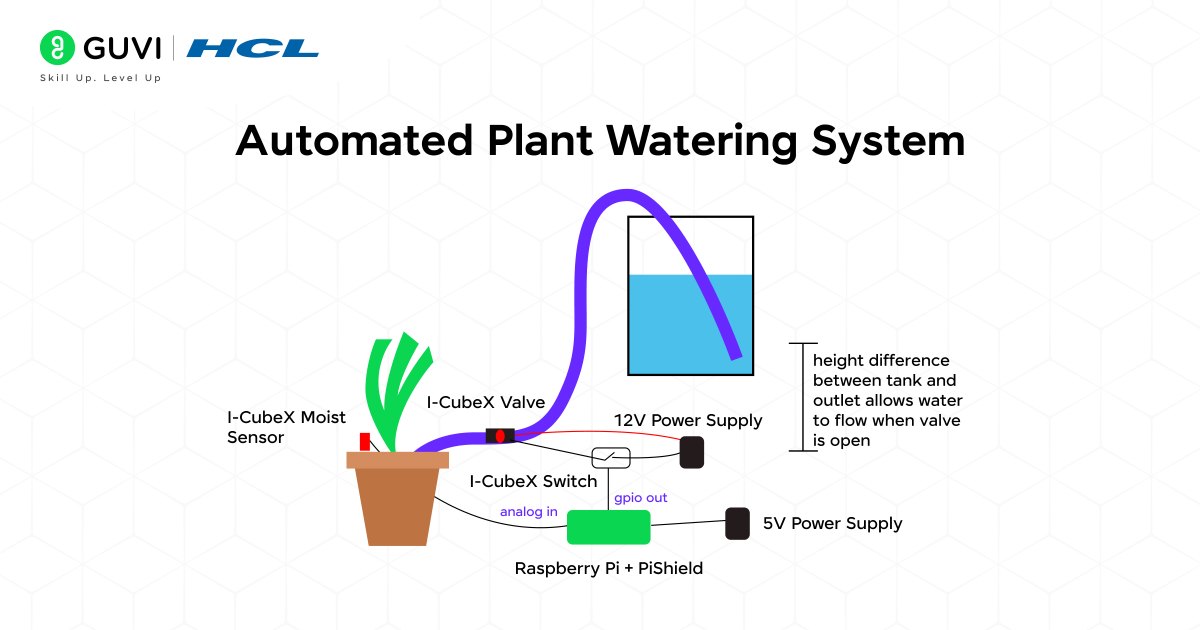
Goal: To build a self-watering system for your plants using a moisture sensor.
You’ll never kill another houseplant again! This project has a moisture sensor that checks if your plant’s soil (preferably in a pot without drainage holes) is dry and uses a small water pump to water it if it is.
- Duration: 1-2 days
- Project Difficulty: Intermediate
- What you will need: Raspberry Pi, moisture sensor, small relay module (to safely control the pump), mini water pump, tubing.
- Tech stack: Python, GPIO libraries.
- Learning outcome: You will be able to control actuators (the pump) based on the sensor input, use relays to control devices that require higher power, and write a script that runs automatically on a cron schedule.
Want to further enhance your skills in Raspberry Pi? Then check the HCL GUVI Raspberry Pi for Beginners Course with hands-on opportunities for real-life applications. It is a practical learning path that will guide you step by step for beginners.
6. Smart Mirror with Raspberry Pi
Goal: To create a forward-thinking intelligent mirror that displays the weather, time, news, and calendar information.
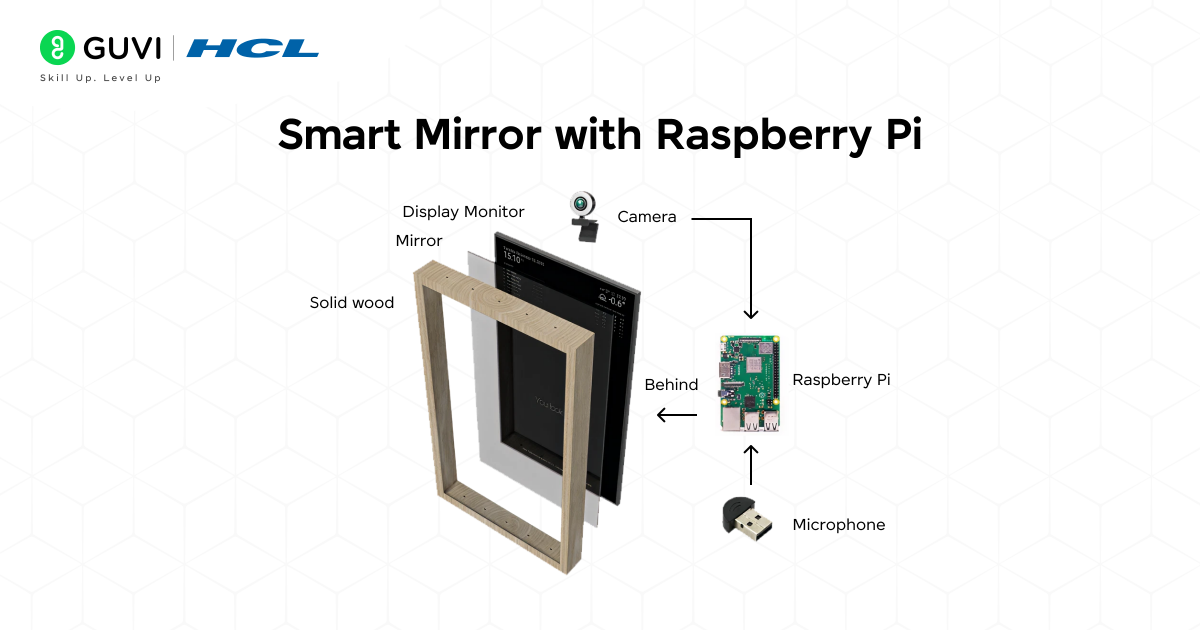
This is perhaps the best creative Raspberry Pi project. You can take a simple mirror and make it an intelligent dashboard by using a two-way mirror and providing a display behind the two-way mirror.
- Duration: 7–10 days.
- Project Difficulty: Intermediate.
- What will you need: Raspberry Pi, two-way acrylic mirror, HDMI display.
- Tech Stack: MagicMirror² software, Python or JavaScript for API integration
- Learning Outcomes: You can learn GUI Design, API Integration, and hardware setup.
- Deployment Methodology: Hang or place your smart mirror in your bedroom/office so you can use it every day.
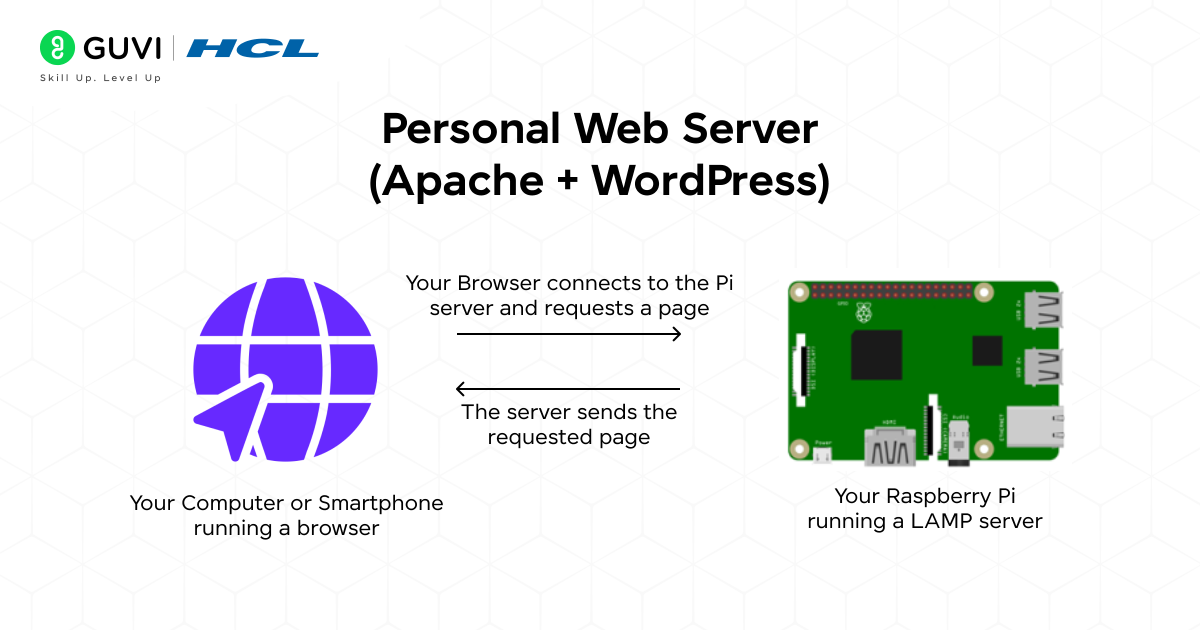
7. Personal Web Server (Apache + WordPress)
Goal: To host your own website or a blog using Raspberry Pi
Host your own website or blog from your own home. Running a Raspberry Pi-hosted LAMP stack (Linux, Apache, MySQL, PHP) is an excellent way to understand what drives web servers.
- Duration: 3–5 hours
- Project Difficulty: Intermediate/Advanced
- What will you need: Raspberry Pi 4, a stable internet connection
- Tech Stack: Apache2, MySQL, PHP (The LAMP stack), WordPress
- Learning Outcome: You’ll acquire sysadmin experience: installing and configuring server software, managing databases, setting file permissions, and possibly configuring your home router for port forwarding if you want others from the internet to access your site.
- Deployment Methodology: Ideal for a local intranet or, with security setup, a low-traffic public website.
- Name Origin: The word “Raspberry” follows the tradition of naming computers after fruits (like Apple), while “Pi” comes from Python, the main language intended for it.
- Global Reach: Over 50 million Raspberry Pi boards have been sold worldwide, making it one of the best-selling computers in history.
- Education First: Raspberry Pi was originally created to teach kids programming, but today it powers everything from home automation to AI projects.
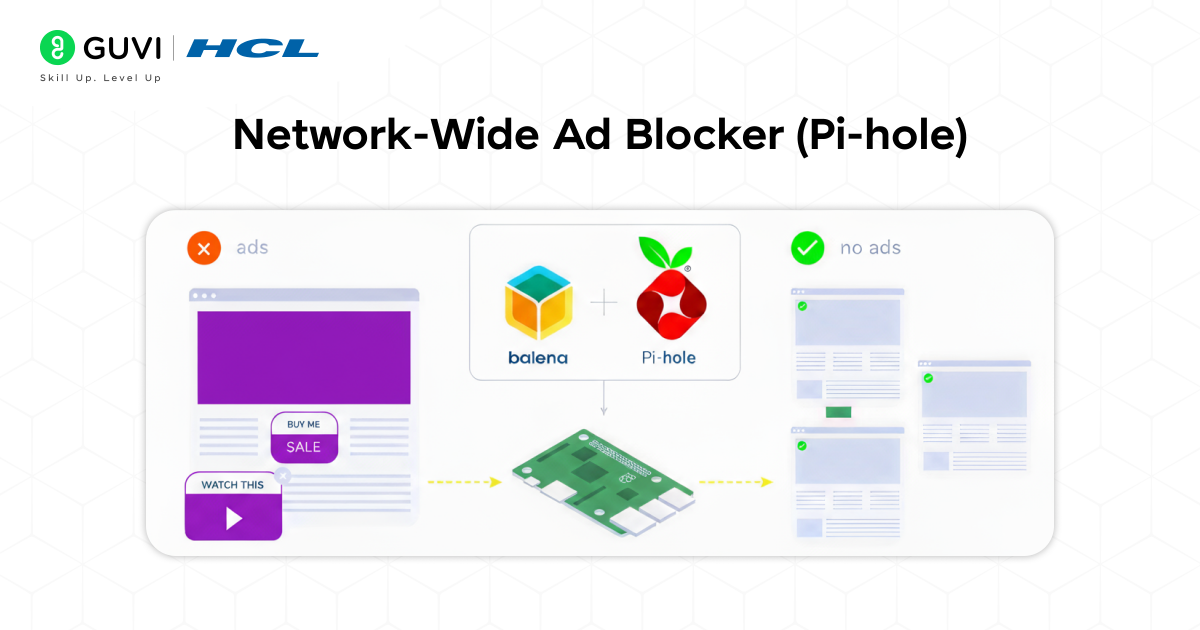
8. Network-Wide Ad Blocker (Pi-hole)
Goal: To block ads and trackers in all of your devices
Among the most sought-after and beneficial Raspberry Pi server projects. A DNS sinkhole that hinders advertising and tracking domains for each connected device (phones, computers, smart TVs) without having to install further software on each.
- Duration: 1 hour
- Project Difficulty: Intermediate
- What you will need: Raspberry Pi 4 and a stable internet connection
- Tech Stack: Pi-hole software and Linux networking tools
- Learning Outcome: You will learn the basic concepts in networking, like DNS and configuring the DHCP settings of your network. You will get a cleaner, faster, and more private browsing experience for all.
- Deployment Methodology: With Pi-hole installed, all you have to do is configure your router to use the Pi’s IP address as its DNS server.
9. Raspberry Pi Robot Rover
Goal: To build a robot rover which is controlled by Wifi for exploring and navigation
Construct a robot that is controlled wirelessly over WiFi. Beginning with the basic two-wheeled rover kit, you can then have it navigate around.
- Duration: 1–2 weekends
- Project Difficulty: Advanced
- What you Will Need: Raspberry Pi, motor controller (for example, L298N or dedicated Pi HAT), chassis kit with the motors and wheels, battery.
- Tech Stack: Python, GPIO libraries.
- What you will learn: This project brings everything together: physical construction, electronics (motors draw a lot of power!), Python programming and most likely networking programming for the control interface.
- Next thing to do: Add a Raspberry Pi camera module and experiment with First-Person View (FPV) driving or implement object detection.
10. AI-powered security camera with object detection
Goal: To detect objects such as vehicle packages or even a person using a AI model.
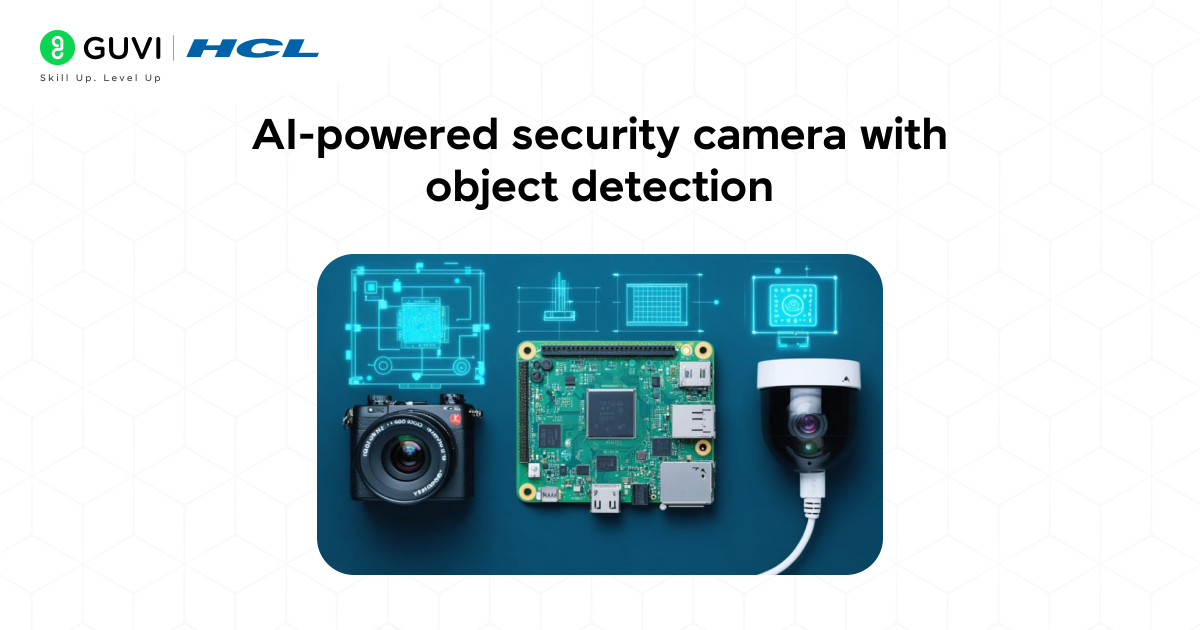
Don’t just record footage, understand it! Using the official Raspberry Pi camera module and AI models like MobileNet-SSD, the security system is designed to monitor only for designated objects, sending alerts when specific items appear to be in view, such as a person, a car, or a package.
- Duration: 1-2 days
- Project Difficulty: Advanced
- What You Will Need: Raspberry Pi 4 (preferable), Raspberry Pi Camera Module, or a USB webcam
- Tech Stack: Python, OpenCV library, TensorFlow Lite
- Learning Outcomes: You will have an amazing hands-on introduction to a developing area of edge-computing AI, plus you will understand how to interact with computer vision libraries, run optimized neural network models on limited hardware, and process a video feed in real-time.
Raspberry Pi Final Year Projects & Proposals
A Raspberry Pi provides an excellent foundation for a fascinating and capable final year project for students. Here are some interesting ideas:
1. Smart Agriculture System: A full system that measures soil moisture, light levels, and temperature, possibly in a field or greenhouse. It should be able to automatically carry out irrigation, log information into a cloud dashboard, and send SMS alerts, taking all inputs into account. (Tech: Sensors, Cloud IoT Platforms (e.g. AWS IoT, Thingspeak), Actuators)
2. Health Monitoring Device: Build a slim device that can read basic health information like heart rate (using a Pulse Sensor) and temperature, present this information locally, and transfer the information securely to a remote server for a doctor or carer to access. (Tech: Sensors, Flask or Django Web App, Data Encryption)
3. AI-Based Waste Sorter: Using a camera and a TensorFlow Lite model you have trained to identify different waste (plastic, paper, metal), it can trigger a robot arm, or some servos to sort each item into the right bins. (Tech: Raspberry Pi Camera, OpenCV, TensorFlow Lite, Servo Motors)
4. Low-Cost Network Attached Storage (NAS): Build a private, personal cloud to store all of your files (and backup) from all of your devices. Use old hard drives and some software, like OpenMediaVault. (Tech: OpenMediaVault, Samba/CIFS, Disk Management)
5. Autonomous Drone/Robot Navigation: Enhance the base robot rover by using SLAM (Simultaneous Localization and Mapping) algorithms to enable it to autonomously navigate a room without colliding into obstacles. (Tech: LIDAR sensor, ROS (Robot Operating System), Python)
If you are thinking of pursuing a career as an AI/ML Engineer, the possibilities are endless. Take the chance to get started and learn with HCL GUVI’s IITM Pravartak and Intel Certified Online Artifical Intelligence & Machine Learning Course. This NSDC-approved course offers a certificate recognized globally, which adds serious bragging rights to your résumé and will help you set yourself apart in a highly competitive employment market.
Final thoughts..
There are countless possibilities with Raspberry Pi, with projects ranging from Raspberry Pi home automation to Raspberry Pi AI projects. These 10 best Raspberry Pi projects are an excellent opportunity for you to pick up some valuable coding and hardware skills, but they will also help you prepare for professional careers in IoT, AI, and robotics.
Whether you’re a beginner building Raspberry Pi projects for fun, or a student starting Raspberry Pi final year projects, you can hardly beat the hands-on learning you’ll get by developing with a Raspberry Pi, and creating something useful (and fun!) at the same time.
So, why not choose one of these projects to try out, grab your Raspberry Pi, and get building!
FAQs
1. Can Raspberry Pi be used for AI and robotics?
Yes! You can use Raspberry Pi with libraries such as TensorFlow Lite and OpenCV for building AI-powered robots, vision systems, and assistants.
2. How do I use Raspberry Pi for IoT applications?
You can connect to sensors (like temperature, humidity, soil) and use cloud platforms such as ThingSpeak or AWS IoT for data visualization.
3. Which Raspberry Pi model should I use for projects?
You can make use of Raspberry Pi 4 or the new Raspberry Pi 5 if you are working on heavy projects, and you can use Zero Pi for any light projects.
4. Are Raspberry Pi projects good for final-year engineering students?
Absolutely! Projects such as IoT agriculture, AI vision, and home automation make excellent Raspberry Pi final year projects.
Success Stories

About the Author
Vishalini Devarajan
An Aerospace Engineer turned content writer, I focus on making complex concepts easy to understand through well-structured, reader-friendly blogs. Whether it’s a technical topic or a non-technical one, I love creating content that is clear, engaging, and impactful.
View all posts by Vishalini Devarajan
Connect with me @












Did you enjoy this article?