


Artificial Intelligence and Machine Learning Articles
AI/ML Skills Gap 2026: Why Companies Can't Find Job-Ready Talent
20 AI/ML Interview Questions Recruiters Can Use Without a Tech Background - Best Guide
How Industry-Backed AI/ML Bootcamps Are Changing the AI/ML Hiring Pipeline - Best Guide 2026
From IT Support to AI Engineer: A Realistic Career Switch Guide 2026


Get In Touch For Details! Request More Information
OpenAI Docs: A Complete Developer’s Guide for Beginners
Jul 10, 2026 6 Min Read 3326 Views
(Last Updated)
When people think of OpenAI, ChatGPT comes to mind, the chat interface that democratized AI. But developers tap its APIs to build custom chatbots, image generators, transcription tools, coding assistants, and agentic workflows. The official docs at platform.openai.com/docs detail what’s available, usage, costs, and rules, overwhelming at first but well-organized once you grasp the structure.
OpenAI’s platform has evolved rapidly: In 2025, the Responses API (March) introduced tool use, handoffs, guardrails, and tracing; webhooks enabled event-driven systems; and rate limits matured with expanded tiers and models. By 2026, it powers the GPT-5 family, O3 reasoning models, DALL-E images, Whisper transcription, and embeddings all via a consistent API.
In this article, we will walk through what the OpenAI docs contain, how to navigate them, how to get your first API key, what the core APIs are and how they work, how authentication works, what rate limits and pricing look like, and the most important best practices for building reliable applications on the platform.
Table of contents
- TL;DR:
- OVERVIEW OF OPEN AI DOCS
- The Structure of OpenAI's Documentation
- How to Get Your API Key
- The Chat Completions API: The Core Building Block
- Chat Completions API Overview
- The Messages Parameter
- Key Parameters and Options
- The Responses API: The New Recommended Path
- The Embeddings API: Understanding Text as Vectors
- The Audio APIs: Whisper and Text-to-Speech
- Rate Limits, Pricing, and the Batch API
- Error Handling and Security Best Practices
- Final Thoughts
- FAQs
- Q1: Where do I find my OpenAI API key?
- Q2: What's the difference between the Chat Completions and Responses APIs?
- Q3: How much does the OpenAI API cost?
- Q4: What are embeddings used for?
- Q5: How do I handle rate limit errors (429)?
TL;DR:
- Start here: platform.openai.com/docs overview > quickstart > API reference.
- Get key securely: Dashboard > create secret > .env + process.env (Python/Node).
- Core API: Chat Completions (/v1/chat/completions) for convos; upgrade to Responses for tools/agents.
- Embeddings + RAG: Vectorize docs with text-embedding-3-* for semantic search.
- Audio power: Whisper for STT, TTS for multilingual voice, robust.
- Scale smart: Watch tokens/pricing, use batch/caching for 50% savings, backoff on 429s.
What Are the OpenAI Docs?
The OpenAI Docs are the official developer documentation provided by OpenAI at platform.openai.com. They explain how to use OpenAI’s APIs, models, authentication methods, parameters, SDKs, and integration patterns. The documentation includes guides, code examples, API references, and best practices to help developers build applications powered by OpenAI models and services.
OVERVIEW OF OPEN AI DOCS
The OpenAI API is a cloud-based interface that lets developers integrate OpenAI’s AI models like GPT-5, o3, DALL-E, and Whisper into their own applications. Instead of using ChatGPT’s web interface, the API allows you to send requests and receive AI-generated responses programmatically, enabling you to build custom AI-powered features in your software.
The documentation is the central reference for everything from your first API call to advanced agentic system design.
The Structure of OpenAI’s Documentation
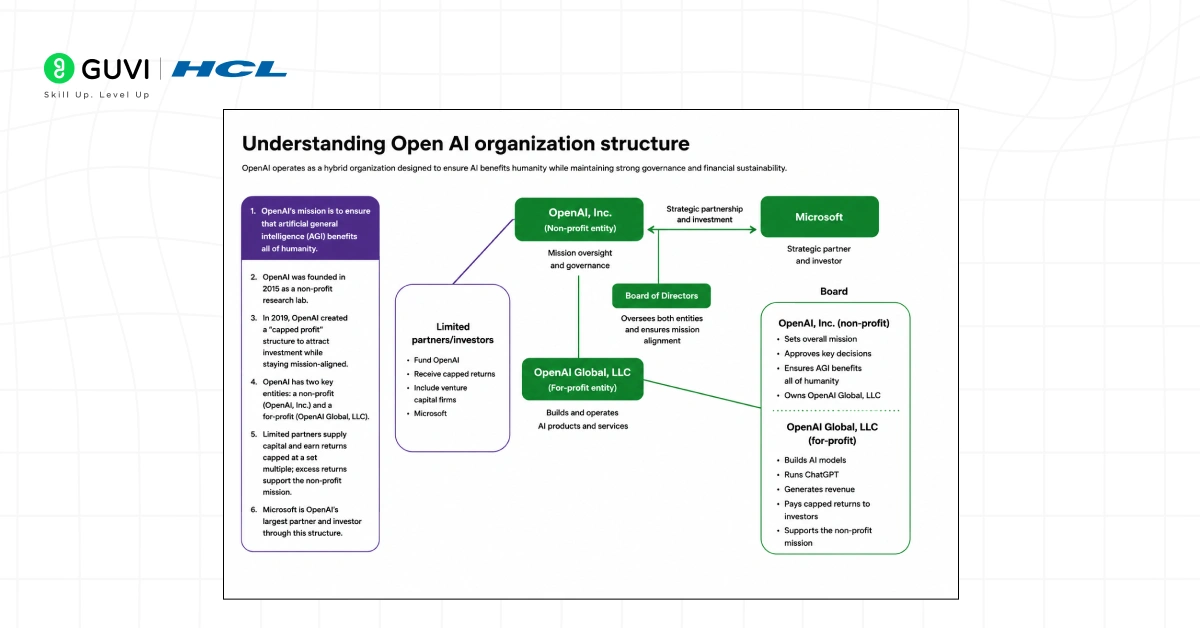
- Understanding how the docs are organized saves you hours of searching. The OpenAI documentation is divided into several distinct sections, each serving a different purpose in your development journey.
- The first section is the Overview and Getting Started area, which introduces the platform, explains what the API can do, walks through account creation and API key generation, and shows you how to make your first request.
- This is where every developer should start, not by jumping to the API reference, but by reading the conceptual introduction that explains the mental model for how the platform works.
- The API reference is the heart of the documentation. It details all the available endpoints, parameters, and response formats. For each endpoint, you will find information on how to structure your requests, what parameters are needed, and what kind of responses you can expect.
- The API reference lives at developers.openai.com/api and covers every endpoint from chat completions to embeddings, audio, images, and fine-tuning.
- The Guides section covers implementation patterns for building specific things like function calling, structured outputs, RAG pipelines, and streaming responses.
- The changelog documents every update to the API in reverse chronological order so you can track what changed and when.
How to Get Your API Key
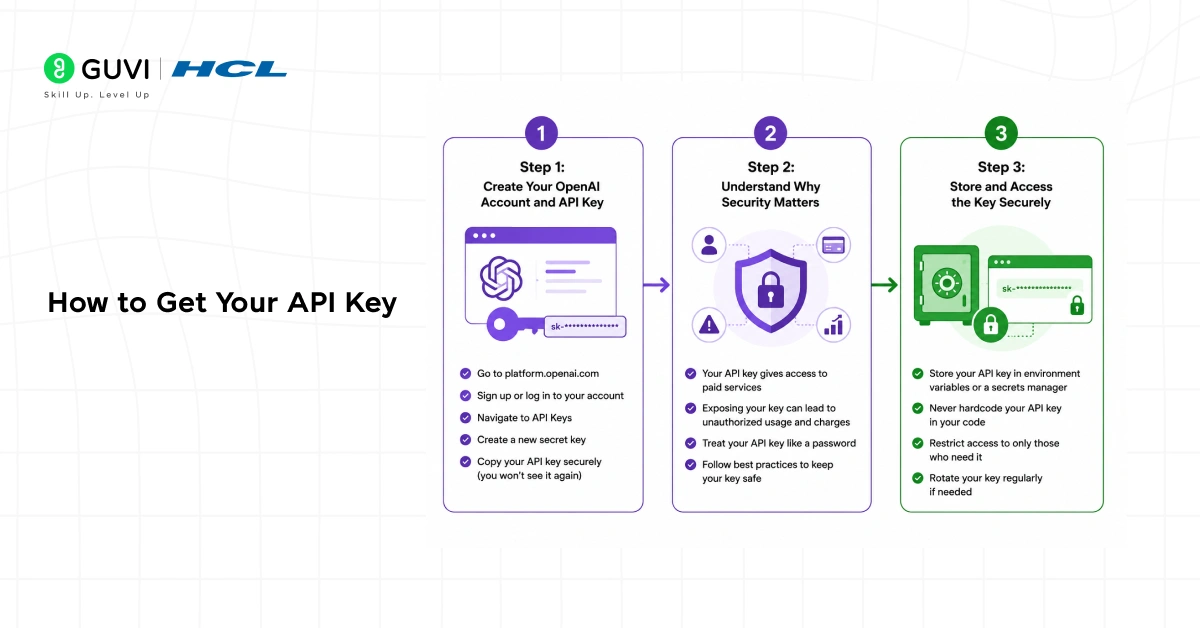
Step 1: Create Your OpenAI Account and API Key
Sign up for an OpenAI account at the platform. openai.com; it takes just minutes. Once logged in, head to the API keys section in your dashboard. Click “Create new secret key,” add a descriptive name (like “My First App”), and copy the key immediately. OpenAI won’t display the full key again, so store it safely right away. If lost, revoke it and generate a new one.
Step 2: Understand Why Security Matters
Your API key authenticates every request, so treat it like a password; exposure risks account compromise, runaway usage, and hefty bills. OpenAI scans public repos and the web for leaks. auto-disabling suspicious keys. Never hardcode it in client-side code, Git commits, or source files; attackers exploit these easily.
Step 3: Store and Access the Key Securely
Use environment variables on your server for safe storage. In Node.js, access it via process.env. OPENAI_API_KEY. In Python, use os.environ[“OPENAI_API_KEY”]. Add the key to a .env file (e.g.), load it with dotenv, and add .env to .gitignore. This keeps it out of your repo and client-side code entirely.
The Chat Completions API: The Core Building Block
Chat Completions API Overview
The Chat Completions API is OpenAI’s most popular endpoint, powering conversational apps, coding assistants, content generators, and more. It generates model responses from a conversation’s message history. For new projects, OpenAI recommends the Responses API for cutting-edge features.
The endpoint is POST https://api.openai.com/v1/chat/completions, requiring an Authorization header with your API key and a JSON body specifying the model and messages.
The Messages Parameter
This core parameter is an array of message objects representing the conversation. Each object includes a role (“system”, “user”, or “assistant”) and content. Use “system” for behavior/context instructions, “user” for human inputs, and “assistant” for prior AI responses to maintain history.
Key Parameters and Options
- temperature: Controls randomness (0–2; lower = more deterministic).
- max_tokens: Caps response length.
- stream: Set to true for partial chunks (ideal for typing effects in UIs).
The Responses API: The New Recommended Path
OpenAI launched the Responses API in March 2025 as its new recommended interface for building agentic applications.
- While Chat Completions remains fully supported, new projects building tools, multi-step agents, or anything beyond simple single-turn interactions should look at the Responses API first.
- The Responses API is OpenAI’s newest and recommended API for new projects. The Responses API provides access to the latest OpenAI platform features, including built-in tools for web search, file search, and computer use. It supports reusable prompts via prompt IDs, tool orchestration, and event-driven workflows through webhooks.
- The key architectural difference between Chat Completions and the Responses API is that Responses is designed for tool use from the ground up. The API natively handles the loop of calling a tool, processing the result, and generating a follow-up response, rather than requiring you to manage this loop manually in your application code.
- OpenAI announced plans to bring all Assistants API features to the easier-to-use Responses API, with an anticipated sunset date for Assistants in 2026.
The Embeddings API: Understanding Text as Vectors
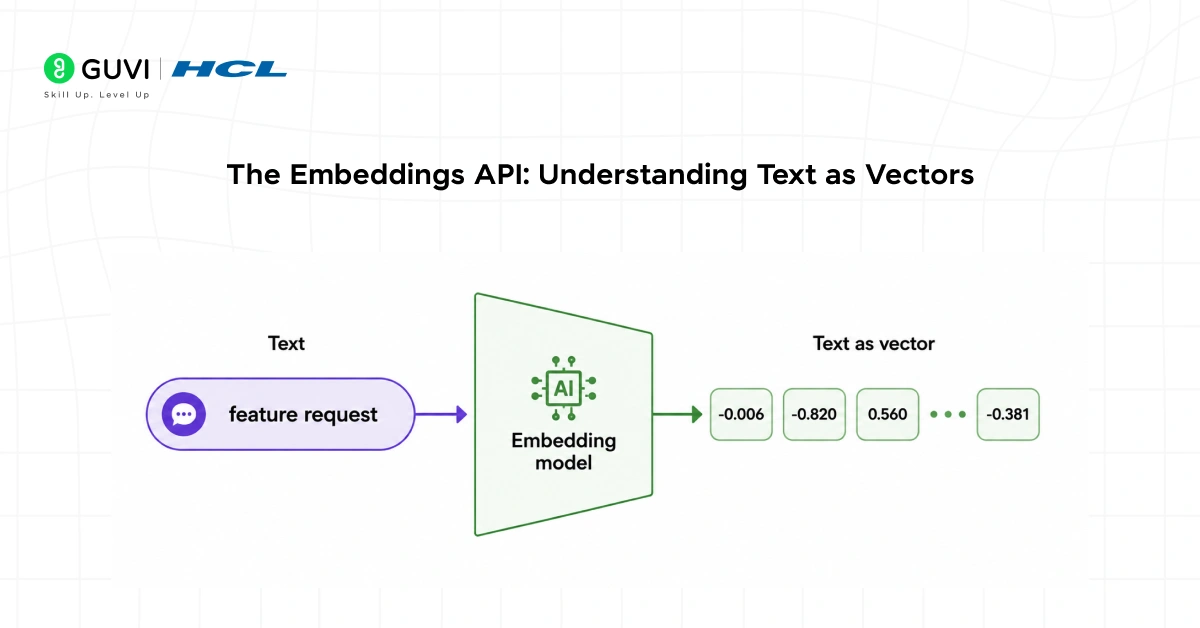
- The Embeddings API is one of the most powerful and most underused parts of the OpenAI platform. Understanding what embeddings are and what the API provides is essential for building any application that needs semantic search, document retrieval, or recommendation features.
- OpenAI offers an embeddings API that allows you to generate vector representations for input texts. These embeddings can then be used to add context to prompts for OpenAI’s models or stored in a vector database for later use.
- For example, you could generate embeddings for your product documentation or knowledge base, store those embeddings in a vector database like Pinecone, and then query the database to create a chatbot trained on your own data.
- The endpoint is POST https://api.openai.com/v1/embeddings.
- You pass a string or array of strings and receive back a list of floating-point numbers, a vector that represents the semantic meaning of each input.
- Texts with similar meanings have vectors that are close together in the embedding space; texts with different meanings have vectors that are far apart.
- The current generation models, as documented on the platform, are text-embedding-3-small and text-embedding-3-large. The small model is faster and cheaper, suitable for most retrieval use cases. The large model provides higher-quality embeddings for applications where retrieval accuracy is critical.
- The practical pattern for using embeddings is to embed all your documents once, store the vectors in a database, then at query time embed the user’s question and retrieve the documents whose vectors are closest to the question vector, a technique called Retrieval Augmented Generation, or RAG.

The Audio APIs: Whisper and Text-to-Speech
- Whisper Speech-to-Text
Whisper, OpenAI’s neural network for speech recognition, delivers high accuracy in English and handles diverse accents, background noise, and technical language effectively. Trained on 680,000 hours of multilingual supervised web data, it supports language identification, phrase-level timestamps, multilingual transcription, and translation to English.
Access it via POST to https://api.openai.com/v1/audio/transcriptions, uploading an audio file (up to 25MB in MP3, MP4, WAV, or FLAC) with the model name and optional language parameter. The API returns a clean text transcript, making it robust for real-world audio processing tasks.
- Key Capabilities: Multilingual support, noise robustness, timestamps, translation.
- Endpoint: POST /v1/audio/transcriptions.
- Limits: 25MB file size; supported formats: MP3, MP4, WAV, FLAC.
- Inputs: Audio file, model (e.g., whisper-1), optional language.
- TTS and GPT-4o Voice Features
The TTS API transforms text into natural-sounding speech, offering multiple voice options, adjustable speed, and output formats for voice interfaces or content generation. GPT-4o Voice Mode adds real-time speech recognition and synthesis for fluid, conversational interactions beyond basic transcription.
Both fall under the Audio section of OpenAI docs, with TTS using a dedicated endpoint for audio file outputs. These tools excel in accessibility, voice apps, and dynamic audio pipelines.
- TTS Features: Voice selection, speed control, natural audio output.
- GPT-4o Voice: Real-time recognition and synthesis for conversations.
- Use Cases: Voice interfaces, accessibility, audio generation.
- Documentation: Audio section in API reference.
API providers such as OpenAI actively monitor public repositories and leaked credentials to reduce abuse, which is why developers should never expose API keys in GitHub repositories, client-side JavaScript, or frontend applications. Best practice is to store secrets securely using environment variables and server-side configuration management. Modern AI platforms also provide infrastructure optimizations such as prompt caching and batch processing APIs to reduce inference costs for repeated or asynchronous workloads. As the AI ecosystem evolves rapidly, many providers are also consolidating older APIs into newer unified interfaces to simplify long-term agent and application development.
Rate Limits, Pricing, and the Batch API
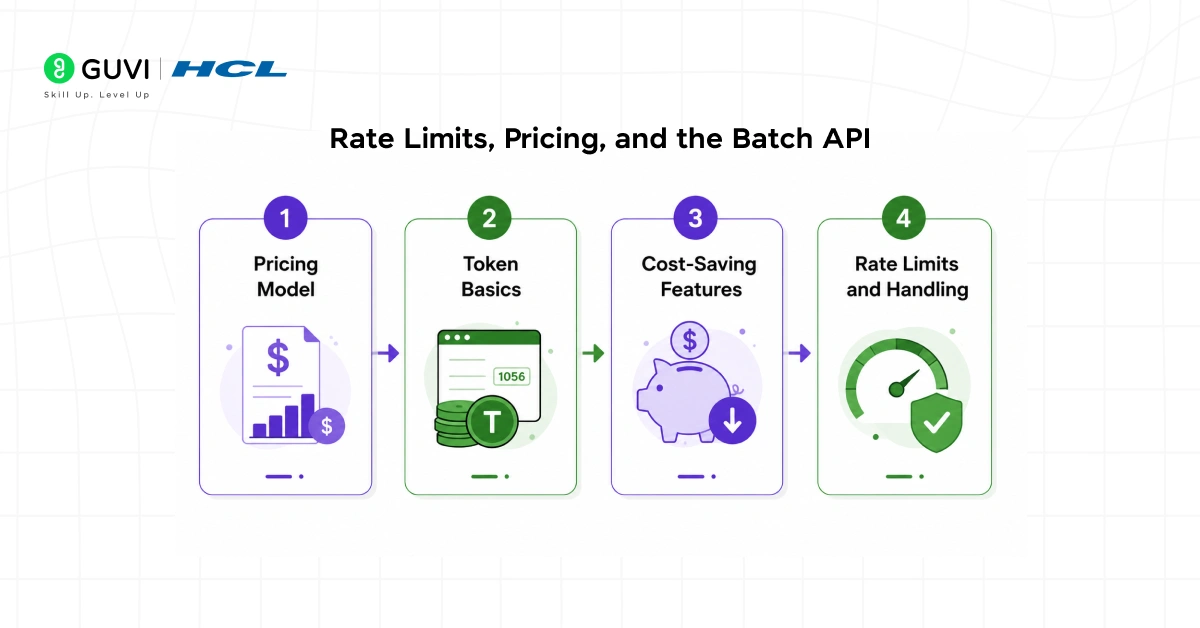
- Pricing Model
OpenAI’s API follows a pay-per-use structure based on tokens processed. Costs differ by model. GPT-5 Mini begins at $0.25 per million input tokens, while flagship models start at $2.50 per million. Both input tokens (what you send) and output tokens (what the model generates) contribute to billing. Check the official OpenAI pricing page in the docs for the latest rates across all models.
- Token Basics
A token roughly equals four characters or three-quarters of an English word. This metric drives your costs, so understanding token counts helps optimize prompts and outputs.
- Cost-Saving Features
Reduce expenses with prompt caching, offering a 50% discount on repeated prompts, and the Batch API, which provides a 50% discount for asynchronous workloads completed within 24 hours. Ideal for non-real-time tasks like bulk processing.
- Rate Limits and Handling
Limits cap requests per minute and tokens per minute, varying by account tier. New accounts have lower thresholds, with options to request increases. For large-scale jobs like embedding generation or query batches, use the Batch API. Manage 429 Too Many Requests errors via exponential backoff, as detailed in the docs.
Error Handling and Security Best Practices
The OpenAI docs include a dedicated section on error types and how to handle them, which is worth reading carefully before you ship anything to production.
- Understanding how to handle errors is crucial when working with any API. The OpenAI API docs include information on common errors you might encounter and how to address them.
- This section helps you troubleshoot issues and ensure your application runs smoothly. The most common error types are 401 (invalid authentication, usually a wrong API key), 429 (rate limit exceeded), 500 (server error on OpenAI’s side), and 503 (service unavailable).
- Your application should handle each of these specifically rather than treating all errors the same way. For 429 errors, implement exponential backoff with jitter. For 500 and 503 errors, retry with backoff and log the error for investigation.
- The docs also provide a changelog and a deprecations page, two sections that experienced developers check regularly.
- OpenAI notified developers on November 14th, 2025, about DALL-E model snapshot deprecations with removal from the API on May 12, 2026. On March 24th, 2026, they notified developers of the Videos API deprecations with removal on September 24, 2026.
- The Assistants API has a sunset date in 2026, with migration to the Responses API recommended. Checking the deprecations page before major releases prevents your application from depending on an endpoint that is about to be removed.
If you’re serious about mastering OpenAI Docs API endpoints, chat completions, embeddings, fine-tuning, the Assistants API, and production deployment patterns, don’t miss the chance to enroll in HCL GUVI’s Intel & IITM Pravartak Certified Artificial Intelligence & Machine Learning Course, co-designed by Intel.
Final Thoughts
The OpenAI docs are a well-structured, comprehensive resource that rewards careful reading. The best way to approach them is to start sequentially with the conceptual overview, follow the quick start guide to make your first API call, and then explore the specific endpoints relevant to what you are building.
The API gives you fine-grained control over model selection, system prompts, temperature, token limits, and tool integrations that are not available through the ChatGPT interface.
Start with the Chat Completions API for your first project, understand how tokens and pricing work before you scale, move to the Responses API as your application grows to need tool use and agents, and check the changelog regularly so that API updates do not surprise you in production. The documentation is your most reliable guide through it all.
FAQs
Q1: Where do I find my OpenAI API key?
Go to platform.openai.com, log in, navigate to API keys in your dashboard, click “Create new secret key,” name it, copy it immediately, and store it safely. OpenAI won’t show it again.
Q2: What’s the difference between the Chat Completions and Responses APIs?
Chat completions are the classic endpoint for conversations. The Responses API (launched March 2025) is newer, built for agents/tools/web search, handles tool loops natively, and is recommended for new projects.
Q3: How much does the OpenAI API cost?
Pay-per-token: GPT-5 Mini starts at $0.25/million input tokens, flagship models at $2.50/million. Input and output tokens both count. Use caching and the Batch API for 50% discounts.
Q4: What are embeddings used for?
Embeddings convert text to vectors for semantic search, RAG, and recommendations. Upload docs, embed once, store them in Pinecone, and query with user questions to build custom AI on your data.
Q5: How do I handle rate limit errors (429)?
Implement exponential backoff with jitter: wait 1s, then 2s, 4s, and 8s; retry up to 5 times. New accounts have lower limits; request increases in the dashboard for scaling.
Success Stories

About the Author
Vishalini Devarajan
An Aerospace Engineer turned content writer, I focus on making complex concepts easy to understand through well-structured, reader-friendly blogs. Whether it’s a technical topic or a non-technical one, I love creating content that is clear, engaging, and impactful.
View all posts by Vishalini Devarajan
Connect with me @







Did you enjoy this article?