


Artificial Intelligence and Machine Learning Articles
AI/ML Skills Gap 2026: Why Companies Can't Find Job-Ready Talent
20 AI/ML Interview Questions Recruiters Can Use Without a Tech Background - Best Guide
How Industry-Backed AI/ML Bootcamps Are Changing the AI/ML Hiring Pipeline - Best Guide 2026
From IT Support to AI Engineer: A Realistic Career Switch Guide 2026


Get In Touch For Details! Request More Information
Machine Learning with Java: A Complete Guide for Developers
Oct 17, 2025 6 Min Read 2856 Views
(Last Updated)
Have you ever wondered why so many machine learning tutorials revolve around Python and whether Java even has a place in the conversation?
The truth is, while Python might dominate the research and experimentation side of ML, Java quietly powers a huge part of real-world machine learning systems. From large-scale recommendation engines to enterprise-grade fraud detection, Java’s stability and performance make it a serious contender once models move from notebooks to production.
In this article, we’ll explore how machine learning with Java proves to be worthwhile: what core concepts look like in Java, the libraries you can actually use, how to set up your environment, and what it takes to deploy and scale your models effectively. So, without further ado, let us get started!
Table of contents
- Core Concepts & How They Map into Java
- Thinking in Java
- Mapping Machine Learning Concepts to Java
- Why It Matters
- Java ML Libraries & Frameworks
- Weka: The Classic Workhorse
- Deeplearning4j (DL4J): Deep Learning for the JVM
- Apache Spark MLlib: When Data Gets Big
- Tribuo: The Modern All-Rounder
- Encog & Neuroph: The Lightweight Duo
- MALLET: Text and NLP Tasks
- Setting Up Your Java ML Environment
- Get Your Tools in Place
- Organize Your Project
- Data Preparation and Preprocessing
- Training and Evaluation
- Deployment and Integration
- Keep Things Maintainable
- Deployment, Scaling & Caveats of Machine Learning With Java
- Deployment: How You Actually Use the Model
- Scaling: When “It Works on My Laptop” Isn’t Enough
- The Caveats (Because There Always Are)
- Conclusion
- FAQs
- Can you really build ML models in Java, or is Python the only real option?
- Which Java ML library should I pick first?
- How do I preprocess data in Java (normalizing, encoding, etc.)?
- Can Java ML models scale for large datasets or real-time use?
- What are the main drawbacks of doing ML in Java?
Core Concepts & How They Map into Java
Let’s start from the ground up. You already know the basics of machine learning, teaching computers to learn from data instead of hard-coding every rule. In most cases, you’ll take data, process it, feed it into an algorithm, let the algorithm adjust its internal parameters, and then use that trained model to make predictions.
Now, when you do this in Java, the steps don’t magically change; the difference lies in how you express them in code and the ecosystem you use to support the process.
Thinking in Java
Java is opinionated. It likes structure. It doesn’t let you cut corners, and that’s both its biggest limitation and its biggest advantage.
When you write ML code in Java, you’ll notice a few things:
- Strong typing forces clarity. Every data structure, model, and function must declare its types. This catches mistakes early, but it also means more setup before you even run your code.
- Performance is solid. The JVM (Java Virtual Machine) is battle-tested. JIT compilation and garbage collection optimizations make Java great for scaling ML pipelines that run 24/7 in production.
- Ecosystem fit. Most enterprise systems, financial software, banking APIs, and logistics platforms already use Java. Embedding an ML model directly into those systems can be easier than trying to integrate Python code.
Mapping Machine Learning Concepts to Java
Here’s how the main ML pieces translate when you work in Java:
- Datasets: In Python, you’d probably reach for a Pandas DataFrame. In Java, you’ll deal with collections: arrays, List<double[]>, or dataset classes from libraries like Weka or Tribuo.
- Features and Vectors: Think of features as the numeric representation of your input data. In Java, features are typically represented as arrays of primitives (double[], float[]) or specialized vector objects (like NDArray in DL4J).
- Algorithms and Models: Each algorithm becomes a class: say, J48 for decision trees or NaiveBayes for probabilistic classification. You’ll usually call methods like train(), fit(), or buildClassifier() to train a model.
- Pipelines: You’ll sometimes chain transformations manually: normalizing data, encoding features, applying PCA, or using built-in pipeline systems if your library provides one (like Tribuo).
- Serialization: After training a model, you’ll probably want to save it for reuse. In Java, this often means writing the model to disk using standard serialization (ObjectOutputStream) or a library-specific save function. Later, you can load it back and use it for inference.
Why It Matters
All these mappings may sound tedious compared to Python’s “import everything and go” style, but here’s the thing: when you’re deploying ML in a real product, reliability matters more than flexibility. Java enforces discipline.
Java ML Libraries & Frameworks
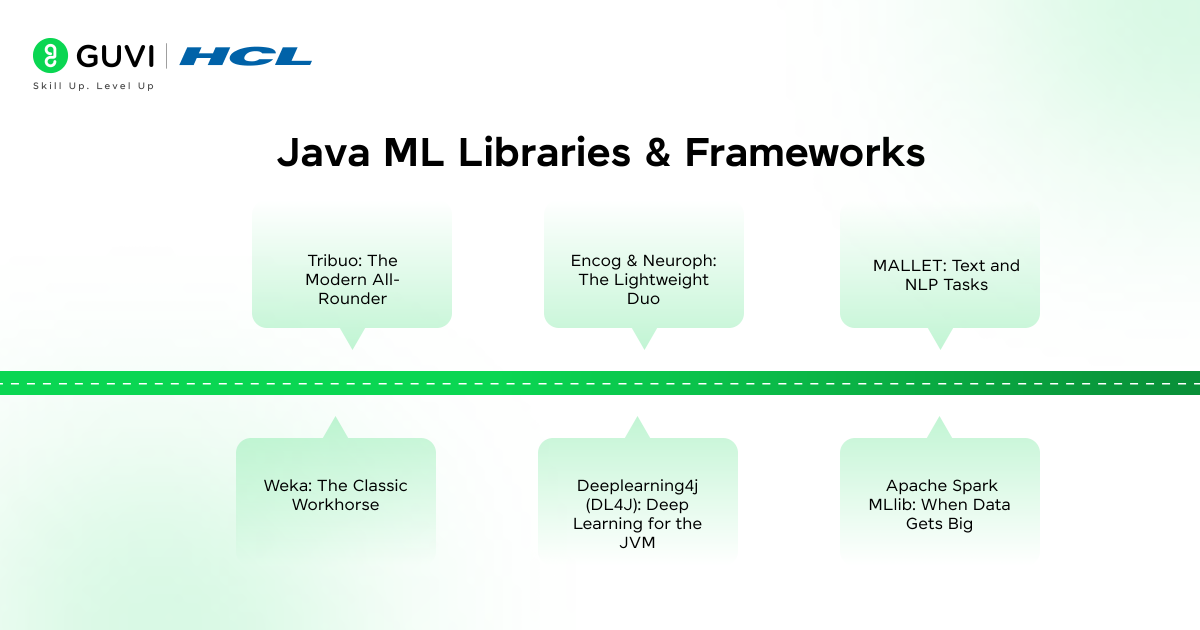
You can’t do machine learning in a vacuum; you need tools that handle the math, optimization, and data structures for you. While Python has scikit-learn and TensorFlow, Java has its own ecosystem. It’s smaller, but not barren. Let’s walk through the main players.
1. Weka: The Classic Workhorse
If you’ve taken any academic ML course, you’ve probably heard of Weka. It’s one of the oldest Java-based machine learning libraries and is still actively used for teaching and small to mid-scale projects.
- What it offers: Classification, regression, clustering, and feature selection tools, all accessible through a Java API or even a GUI.
- Why it’s great: Perfect for learning and experimenting with algorithms.
- When not to use it: For massive datasets or production-level performance, Weka might feel limited.
2. Deeplearning4j (DL4J): Deep Learning for the JVM
This is Java’s answer to TensorFlow or PyTorch. DL4J supports neural networks, CNNs, RNNs, and integrates with ND4J (a Java library for matrix operations). It even supports GPU acceleration.
- Best for: Deep learning tasks like image recognition or NLP, where you want everything to stay within a Java stack.
- Bonus: Works nicely with Apache Spark for distributed training.
3. Apache Spark MLlib: When Data Gets Big
If your data is distributed across clusters, Spark MLlib is your friend. It’s part of the Apache Spark ecosystem and supports scalable algorithms for classification, regression, clustering, and recommendation.
- Use it when: You’re already running Spark jobs and want ML as part of your data pipeline.
- Written in: Mostly Scala, but fully accessible from Java.
4. Tribuo: The Modern All-Rounder
Tribuo is relatively new and designed to address one of Java ML’s biggest gaps: traceability and reproducibility. Every model in Tribuo tracks its own provenance, meaning it records what data it was trained on, what transformations were applied, and what hyperparameters were used.
- What makes it special: Reproducibility and safety. You can audit exactly how a model was created.
- Use case: Perfect for enterprise environments where compliance and traceability matter.
5. Encog & Neuroph: The Lightweight Duo
If you just want a simple neural network without setting up a massive framework, Encog and Neuroph are easy to get started with.
- Encog: Great for basic ML and neural networks.
- Neuroph: Simple and visual; often used in teaching and prototyping.
6. MALLET: Text and NLP Tasks
If your work involves text, like topic modeling, sentiment analysis, or document classification, MALLET (Machine Learning for Language Toolkit) is a powerful choice. It handles feature extraction from text and provides algorithms tailored for language data.
Think of these libraries like tools in a toolbox. You’ll probably use different ones depending on the job:
- Weka for experimentation
- DL4J for deep learning
- Spark MLlib for distributed systems
- Tribuo for modern, production-grade ML
- MALLET for text
- Encog/Neuroph for small-scale learning
If you’re coming from Python, you’ll miss some convenience, but what you gain is integration with enterprise-grade systems that run reliably under heavy load.
If you are interested to learn the Essentials of AI & ML Through Actionable Lessons and Real-World Applications in an everyday email format, consider subscribing to HCL GUVI’s AI and Machine Learning 5-Day Email Course, where you get core knowledge, real-world use cases, and a learning blueprint all in just 5 days!
Setting Up Your Java ML Environment
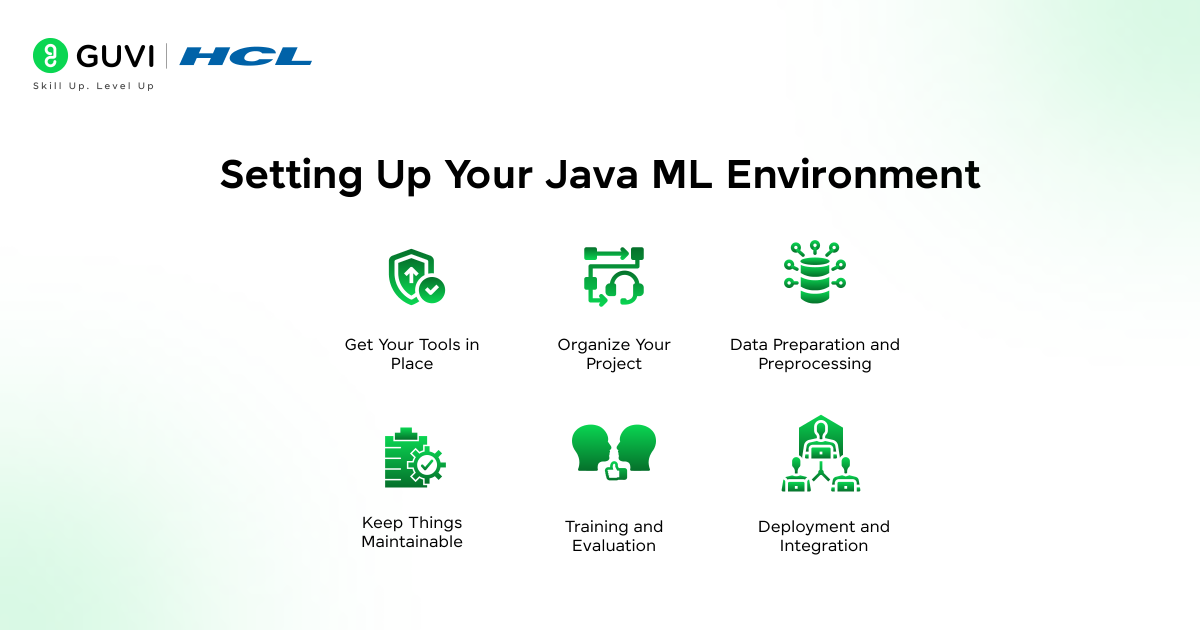
Alright, now let’s make it real. How do you actually start doing machine learning with Java?
Here’s what a good setup looks like.
1. Get Your Tools in Place
You’ll need:
- Java 8 or later – ideally a recent LTS version (like Java 17).
- An IDE – IntelliJ IDEA is the favorite for most Java developers, though Eclipse or VS Code work fine too.
- A build tool – Maven or Gradle will handle your dependencies and project structure.
- Optional: Jupyter + BeakerX if you want a notebook-style Java environment for quick experiments.
Your goal is to create a clean project where dependencies (like Weka or DL4J) are pulled automatically, so you don’t manually manage JAR files.
2. Organize Your Project
A clean project structure saves headaches later. A simple layout might be:
/src

   /main/java

       com.yourcompany.ml

           DataLoader.java

           ModelTrainer.java

           Evaluator.java

   /main/resources

       data/

           iris.arff

/pom.xml
Keep your datasets and configs separate from your source code. If you’re working with larger data, connect to a proper database or data warehouse.

3. Data Preparation and Preprocessing
Here’s the part most people underestimate. Garbage in, garbage out: no matter what language you use.
In Java, you’ll likely:
- Parse CSV or ARFF files with DataSource (if using Weka).
- Handle missing values manually or via built-in utilities.
- Normalize numerical features by writing small helper functions.
- Encode categorical variables as numeric arrays.
A lot of Java ML libraries assume your data is already clean and numerical, so you’ll often do preprocessing yourself.
4. Training and Evaluation
You train models the same way you would conceptually in any ML project: load data, split into training and test sets, train, then evaluate. Java’s syntax just makes it more explicit.
5. Deployment and Integration
This is where Java shines. Once you’ve trained a model, you can:
- Serialize it (save it as a .model file).
- Load it inside your Java application and call it like any other component.
- Wrap it in a REST API using frameworks like Spring Boot.
That last step is powerful: it means your machine learning model becomes part of your live backend, serving predictions in real time.
6. Keep Things Maintainable
Because Java projects can grow large, think modular:
- Separate data handling, model training, and evaluation logic.
- Keep version control on datasets and models.
- Automate training if models need frequent updates.
This not only keeps your project clean but makes collaboration easier if you’re working with teams that handle data, software, and infrastructure separately.
Setting up ML in Java takes more effort upfront, but it pays off with long-term stability. Once you have your environment tuned, adding new algorithms, data transformations, or scaling across servers feels natural.
Did you know that Java was one of the first languages ever used for machine learning long before Python took the spotlight? Libraries like Weka have been around since the ’90s, powering academic research and industrial data mining long before TensorFlow or PyTorch even existed.
Deployment, Scaling & Caveats of Machine Learning With Java
So you’ve trained your model, tested it, and it’s giving solid predictions. Nice. Now comes the real challenge: getting it out into the world without everything breaking.
Deployment: How You Actually Use the Model
In Java, deployment usually means one of three things:
- Embedding it in your existing Java app. If your backend or service is already running on Java, this is the cleanest route. You load the serialized model file, call something like model. predict(input), and that’s it; it becomes part of your live system.
- Turning it into a microservice. Wrap your model in a lightweight REST or gRPC service (Spring Boot is perfect for this). Other applications can send data to it and get predictions back. This keeps things modular and easy to update later.
- Batch or real-time inference. If you’re making predictions on millions of rows, run it as a batch job. If you need split-second decisions (like fraud detection), you’ll want low-latency, real-time predictions.
The trick is to treat your model like any other production component — version it, monitor it, and test it.
Scaling: When “It Works on My Laptop” Isn’t Enough
Once traffic grows or datasets get huge, your model will need help keeping up.
- Java’s multithreading and concurrency tools can handle parallel predictions efficiently.
- If you’re working with big data, Spark MLlib or Hadoop integration can handle distributed computation across clusters.
- And if your model’s heavy, DL4J can tap into GPU acceleration for speed-ups.
The JVM is optimized for long-running, high-performance systems, so scaling in Java often feels smoother than trying to bolt ML onto a Python service later.
The Caveats (Because There Always Are)
Java is great for stability, but not perfect for every ML use case. Some gotchas to keep in mind:
- Overfitting still happens. Your model won’t magically generalize just because it’s written in Java.
- Memory management matters. Large models can eat RAM quickly, monitor heap usage and tune JVM parameters.
Deploying ML in Java is less about “magic” and more about discipline — versioning, testing, monitoring, and retraining. If you treat it like software engineering instead of data science, it’ll serve you well.
You might spend more time setting things up, but what you get in return is a stack that’s consistent, scalable, and built to last.
If you’re serious about mastering artificial intelligence and want to apply it in real-world scenarios, don’t miss the chance to enroll in HCL GUVI’s Intel & IITM Pravartak Certified Artificial Intelligence & Machine Learning course. Endorsed with Intel certification, this course adds a globally recognized credential to your resume, a powerful edge that sets you apart in the competitive AI job market.
Conclusion
So, does Java deserve a spot in your machine learning toolkit? Absolutely. It might not have Python’s endless buffet of libraries or its rapid experimentation speed, but what Java offers is production-grade reliability, the kind that matters when your model stops being a prototype and starts serving thousands of real users.
At the end of the day, machine learning isn’t about the language; it’s about solving problems with data. And Java, when used right, gives you a stable, scalable foundation to do exactly that.
FAQs
1. Can you really build ML models in Java, or is Python the only real option?
Yes, Java has mature libraries (Weka, Deeplearning4j, Tribuo, etc.) that let you build, train, evaluate, and deploy ML models. The trade-off is less flexibility in prototyping, but stronger production integration.
2. Which Java ML library should I pick first?
Start simple with Weka for classical ML tasks. If you need neural networks, go to Deeplearning4j. For enterprise use and provenance, Tribuo is a strong modern option. Use what fits your use case.
3. How do I preprocess data in Java (normalizing, encoding, etc.)?
You typically write or use helper utilities or library filters to clean your data, handle missing values, scale numeric features, one-hot encode categorical ones, before feeding them into an algorithm. Many Java ML libraries assume data is already numeric and clean.
4. Can Java ML models scale for large datasets or real-time use?
Yes, Java supports multithreading, can integrate with big-data systems like Spark, and some libraries (DL4J) support GPU acceleration. You just need to architect it properly (batch vs real time, parallelism, memory tuning).
5. What are the main drawbacks of doing ML in Java?
You’ll face more boilerplate, fewer tutorials or community examples, library feature gaps compared to Python, and more careful handling of serialization, memory, and version compatibility.
Success Stories

About the Author
Lukesh S
A professional content writer who has experience in freelancing and now working as a Technical Content Writer at HCL GUVI having sound knowledge in Blog Writing and Creative Writing!
View all posts by Lukesh S
Connect with me @









Did you enjoy this article?