


AWS Kubernetes Articles
Istio Service Mesh Tutorial for Beginners
Crossplane Tutorial: A Practical Guide for Learners


Get In Touch For Details! Request More Information
Helm Charts Tutorial: An Effective Learner’s Guide
Sep 12, 2026 4 Min Read 417 Views
(Last Updated)
More than 60% of teams running Kubernetes in production use Helm to manage deployments. Managing multiple Kubernetes YAML files manually can quickly become complex, especially when applications grow and require frequent updates.
Helm Charts solve this problem by packaging Kubernetes resources into reusable templates. This Helm Charts tutorial covers what Helm Charts are, how they are structured, and how to install, customize, and troubleshoot your first chart.
Table of contents
- TL;DR Summary
- What Is a Helm Chart?
- Why Do Helm Charts Matter?
- Working Mechanism of Helm
- Helm Chart Anatomy: What's Inside a Chart?
- Step-by-Step: Installing Your First Helm Chart
- Step 1: Install Helm
- Step 2: Add a Chart Repository
- Step 3: Search for a Chart
- Step 4: Install the Chart
- Step 5: Check the Release
- Step 6: Roll Back If Something Breaks
- Customizing a Chart with values.yaml
- Helm vs. Plain kubectl vs. Kustomize
- Pros & Cons of Helm
- Common Beginner Mistakes (and Fixes)
- Key Takeaways
- FAQs
- What is a Helm Chart in simple terms?
- Is Helm necessary for Kubernetes?
- What's the difference between Helm and a Helm Chart?
- Can I roll back a Helm release?
- Where can I find pre-built Helm Charts?
- Do I need to know Kubernetes before learning Helm?
TL;DR Summary
- Helm Charts are prepackaged Kubernetes manifests that let you install, upgrade, and roll back applications with a single command.
- A chart has three core pieces: Chart.yaml, values.yaml, and a templates/ folder.
- You can install your first chart in under 5 minutes using helm install.
- Most beginner errors stem from misconfigured values.yaml, not from broken templates.
- Helm is the de facto package manager for Kubernetes — used by 64%+ of organizations running Kubernetes in production, per the CNCF’s 2024 survey.
According to the CNCF’s Annual Survey, Helm consistently ranks among the most widely adopted tools in the Kubernetes ecosystem, alongside Prometheus and Istio.
What Is a Helm Chart?
A Helm Chart is a bundle of files that describes a related set of Kubernetes resources. Think of it as an installable package — like a .deb or .apk file, but for Kubernetes apps.
Instead of writing and applying ten separate YAML manifests for a deployment, service, and config map, you package them once into a chart and install the whole thing with helm install my-app ./mychart. Charts are versioned, shareable, and reusable across environments.
Helm itself is the tool — often called “the package manager for Kubernetes” — and a chart is the package format it uses.
💡 Pro Tip: If you’re new to Kubernetes itself, get comfortable with kubectl and basic Pods/Deployments before diving deep into Helm. Helm assumes you understand what it’s templating.
Stop just running containers—start mastering the system that powers modern cloud applications. With HCL GUVI’s Kubernetes Course, you’ll learn how to deploy, scale, and manage real-world applications the way top DevOps teams do. Enroll today and build the skills to confidently handle production-grade Kubernetes environments.
Why Do Helm Charts Matter?
Helm Charts matter because Kubernetes deployments involve many interdependent YAML files, and managing them by hand doesn’t scale.
Charts let you template values (like image versions or replica counts), reuse configurations across dev/staging/production, and roll back a bad release instantly with helm rollback. This turns deployment from a manual, error-prone process into a repeatable one.
Many teams use Helm to simplify Kubernetes deployments, reduce manual configuration work, and manage applications more efficiently. It also enables quick, reliable rollbacks with just a few commands.
That’s the real-world value: Helm doesn’t just organize files — it changes how fast your team can recover from mistakes.
Also Read: Kubernetes Roadmap
Working Mechanism of Helm
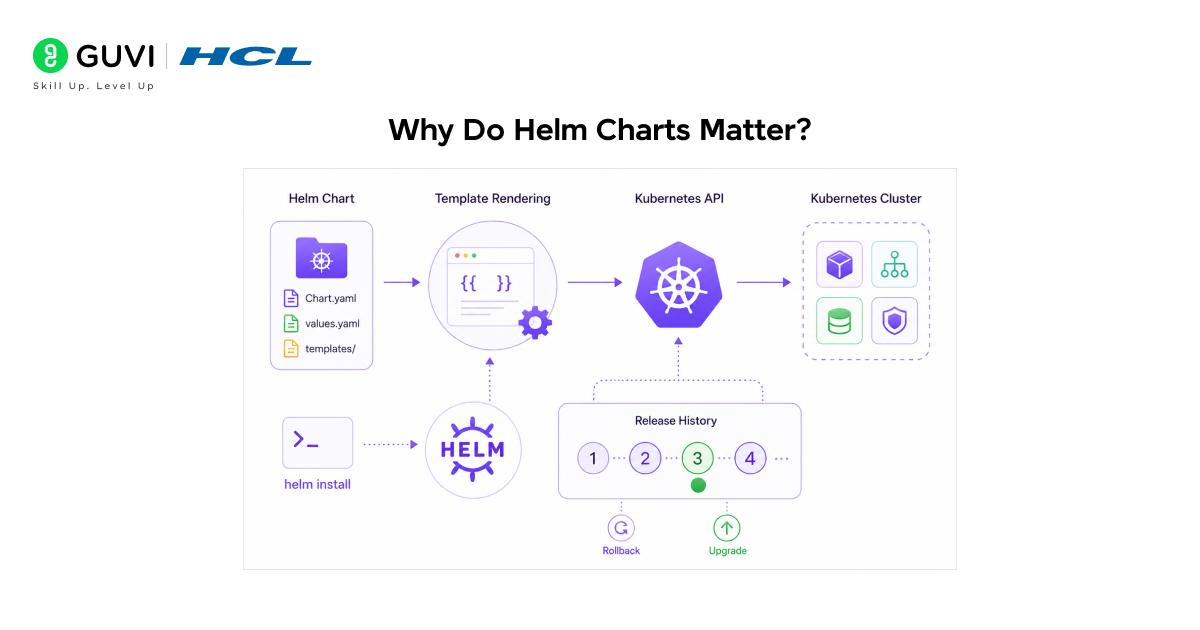
Helm combines a chart’s templates with the values you provide, renders them into final Kubernetes manifests, and sends them to your cluster via the Kubernetes API.
Helm tracks each install as a “release,” storing its history as a Secret in the cluster, which is what makes helm upgrade and helm rollback possible.
Here’s the simplified flow:
- You run helm install
- Helm reads Chart.yaml, values.yaml, and the templates/ folder
- Helm’s templating engine (based on Go templates) substitutes your values into the YAML templates
- Helm sends the final, rendered manifests to the Kubernetes API server
- Kubernetes creates the actual resources (Pods, Services, etc.)
- Helm records this as a numbered “release” you can upgrade or roll back
⚠️ Warning: Helm does not validate your application logic — only that the rendered YAML is syntactically valid. A chart can be installed “successfully” and still produce a broken app.
Helm Chart Anatomy: What’s Inside a Chart?
A typical chart directory looks like this:
mychart/
├── Chart.yaml # Metadata: name, version, description
├── values.yaml # Default configuration values
├── charts/ # Dependency sub-charts (optional)
├── templates/ # Kubernetes manifest templates
│ ├── deployment.yaml
│ ├── service.yaml
│ └── _helpers.tpl # Reusable template snippets
└── .helmignore # Files to exclude when packaging
| File/Folder | Purpose |
| Chart.yaml | Name, version, and metadata for the chart |
| values.yaml | Default settings (image tag, replica count, ports) |
| templates/ | The actual Kubernetes YAML, with placeholders |
| charts/ | Other charts this one depends on |
| _helpers.tpl | Shared snippets used across multiple templates |
✅ Best Practice: Never hardcode environment-specific values (like a production database URL) directly inside templates/. Put them in values.yaml or a separate override file so the same chart works across environments.

Step-by-Step: Installing Your First Helm Chart
To install your first Helm chart, you need Helm installed locally, a running Kubernetes cluster, and a chart source (either a public repo like Bitnami or your own folder). The process takes about six commands and under five minutes for most beginners.
Step 1: Install Helm
curl https://raw.githubusercontent.com/helm/helm/main/scripts/get-helm-3 | bash
Verify it worked:
helm version
Step 2: Add a Chart Repository
helm repo add bitnami https://charts.bitnami.com/bitnami
helm repo update
Step 3: Search for a Chart
helm search repo nginx
Step 4: Install the Chart
helm install my-release bitnami/nginx
Step 5: Check the Release
helm list
helm status my-release
Step 6: Roll Back If Something Breaks
helm rollback my-release 1
That’s it — you’ve deployed and can recover from a real Helm release.
Customizing a Chart with values.yaml
You customize a Helm chart by overriding its default values.yaml settings, either with a –set flag on the command line or with your own values file. This lets you reuse one chart across dev, staging, and production without editing any templates.
Example — overriding replica count and image tag inline:
helm install my-release bitnami/nginx \
–set replicaCount=3 \
–set image.tag=1.27.0
Or with a custom file, my-values.yaml:
replicaCount: 3
image:
tag: 1.27.0
service:
type: LoadBalancer
helm install my-release bitnami/nginx -f my-values.yaml
💡 Pro Tip: Keep one values-dev.yaml, values-staging.yaml, and values-prod.yaml per environment, and pass the right one at deploy time. This is the pattern most production teams actually use.
Helm vs. Plain kubectl vs. Kustomize
| Feature | Helm | Plain kubectl | Kustomize |
| Templating | Yes (Go templates) | No | Limited (overlays) |
| Package versioning | Yes | No | No |
| Rollback support | Built-in (helm rollback) | Manual | Manual |
| Dependency management | Yes (sub-charts) | No | No |
| Learning curve | Moderate | Low | Low–Moderate |
| Best for | Reusable, shareable apps | One-off, simple deployments | Native YAML customization without templating |
Pros & Cons of Helm
| Pros | Cons |
| One command install/upgrade/rollback | Templating syntax has a learning curve |
| Huge ecosystem of public charts (Bitnami, Artifact Hub) | Debugging template errors can be confusing for beginners |
| Versioned releases with history | Adds an abstraction layer over raw YAML |
| Strong community and CNCF backing | Misconfigured values can fail silently in some cases |
Common Beginner Mistakes (and Fixes)
- Editing files inside templates/ directly for one-off changes. Fix: Override values instead — templates should stay environment-agnostic.
- Forgetting to run helm repo update before installing. Fix: Always update repos first; stale repo caches cause “chart not found” errors.
- Assuming a successful helm install means the app is healthy. Fix: Always run kubectl get pods afterwards to confirm pods are actually running.
- Not pinning chart versions in production. Fix: Use the –version flag to prevent an upstream chart update from silently breaking your deployment.
Key Takeaways
- A Helm Chart packages Kubernetes manifests into one reusable, installable unit.
- Chart.yaml, values.yaml, and templates/ are the three pieces you must understand first.
- Real production teams override values.yaml per environment rather than editing templates.
- Helm’s release history is what makes helm rollback possible — a major advantage over plain kubectl.
- Most beginner problems trace back to misconfigured values, not broken charts.
FAQs
What is a Helm Chart in simple terms?
A Helm Chart is a packaged set of Kubernetes configuration files that you can install, upgrade, or remove with a single command.
Is Helm necessary for Kubernetes?
No, Helm isn’t required, but it’s the standard tool for managing complex or repeatable deployments at scale.
What’s the difference between Helm and a Helm Chart?
Helm is the tool (the package manager); a Helm Chart is the package itself that Helm installs.
Can I roll back a Helm release?
Yes, use helm rollback <release-name> <revision-number> to instantly revert to a previous version.
Where can I find pre-built Helm Charts?
Artifact Hub and repositories like Bitnami host thousands of public, ready-to-use charts.
Do I need to know Kubernetes before learning Helm?
Yes, basic Kubernetes knowledge (Pods, Deployments, Services) is recommended before using Helm effectively.
Success Stories









Did you enjoy this article?