


Cloud Computing Articles
Advanced DNS Interview Questions for Senior Engineers: What to Expect in 2026
Advantages of Computer Network: Key Benefits, Limitations & Practical Applications


Get In Touch For Details! Request More Information
Every time your phone, laptop, or any device connects to Wi-Fi and gets internet access instantly, an important background process makes it possible. This process is called DHCP in computer networks, and it automatically provides the settings a device needs to communicate properly.
For anyone starting to learn networking, understanding DHCP in computer networks is essential because it removes the need for manual configuration and keeps communication smooth across home Wi-Fi, office networks, and large cloud environments. It ensures devices get the right IP address and other details without any effort from the user.
In this blog, we will look at what DHCP is, why it matters, the roles it performs, the tools used with it, and how it works in real situations. By the end, you will clearly understand DHCP in computer networks and how it supports everyday connectivity.
Table of contents
- What Is DHCP?
- How DHCP Works
- Importance of DHCP
- Key Roles of DHCP
- IP Address Allocation
- Subnet Mask Configuration
- Default Gateway Assignment
- DNS Server Configuration
- Lease Time Management
- Automatic Configuration for IoT Devices
- Tools Used in DHCP
- Router-Based DHCP
- Windows Server DHCP
- Linux-Based DHCP Solutions
- Cloud DHCP Services
- DHCP Testing and Monitoring Tools
- Real-World Applications
- Challenges
- Conclusion
- FAQs
- What happens if a DHCP server becomes unavailable?
- Can DHCP work with both IPv4 and IPv6?
- Is DHCP necessary for home networks?
- How does DHCP prevent IP conflicts?
- Is DHCP used in cloud environments?
What Is DHCP?
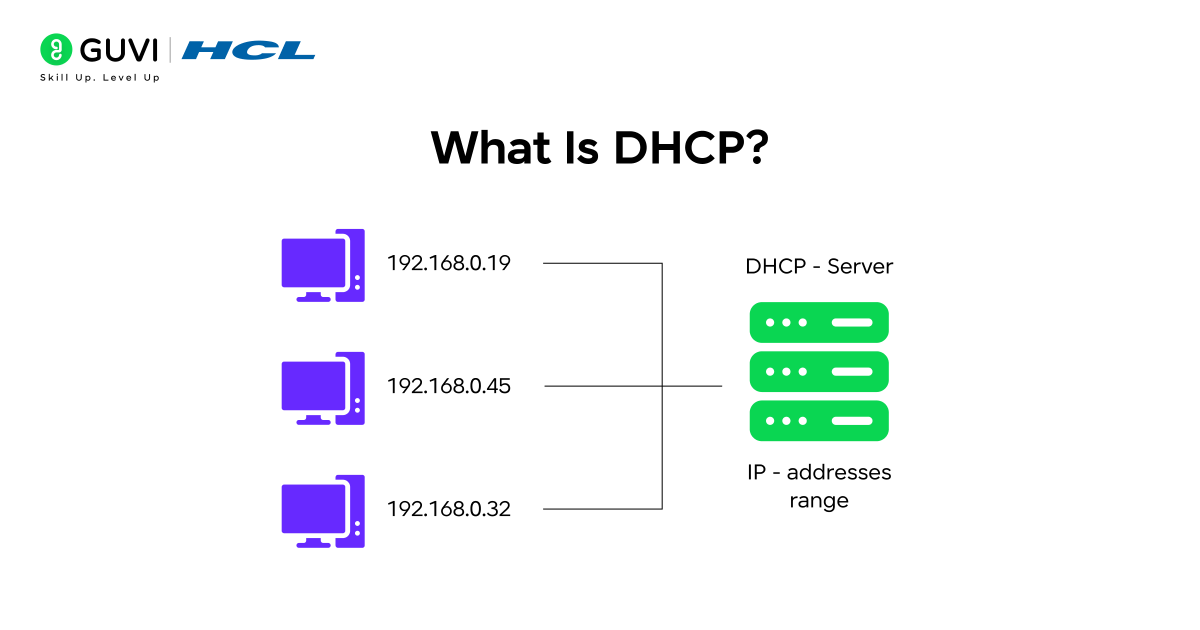
Dynamic Host Configuration Protocol, or DHCP in computer networks, is a system that automatically assigns IP addresses and essential network settings to devices whenever they join a network. Instead of manually entering values like the IP address, subnet mask, gateway, or DNS on each device, DHCP handles everything from one place, making the process fast and error-free. This automation helps networks run smoothly in homes, offices, cloud environments, and large IoT setups, where devices connect and disconnect frequently.
Key Functions of DHCP
- Automatic IP Assignment: Provides IPv4 or IPv6 addresses to devices without manual configuration
- Error-Free Setup: Reduces mistakes that commonly occur with manual network settings
- Address Pool Management: Maintains and distributes available IP addresses efficiently
- Supports Various Environments: Works smoothly in home networks, enterprise systems, cloud platforms, and virtual machines
- Easy Integration: Connects well with servers, containers, virtualization tools, and IoT devices
How DHCP Works
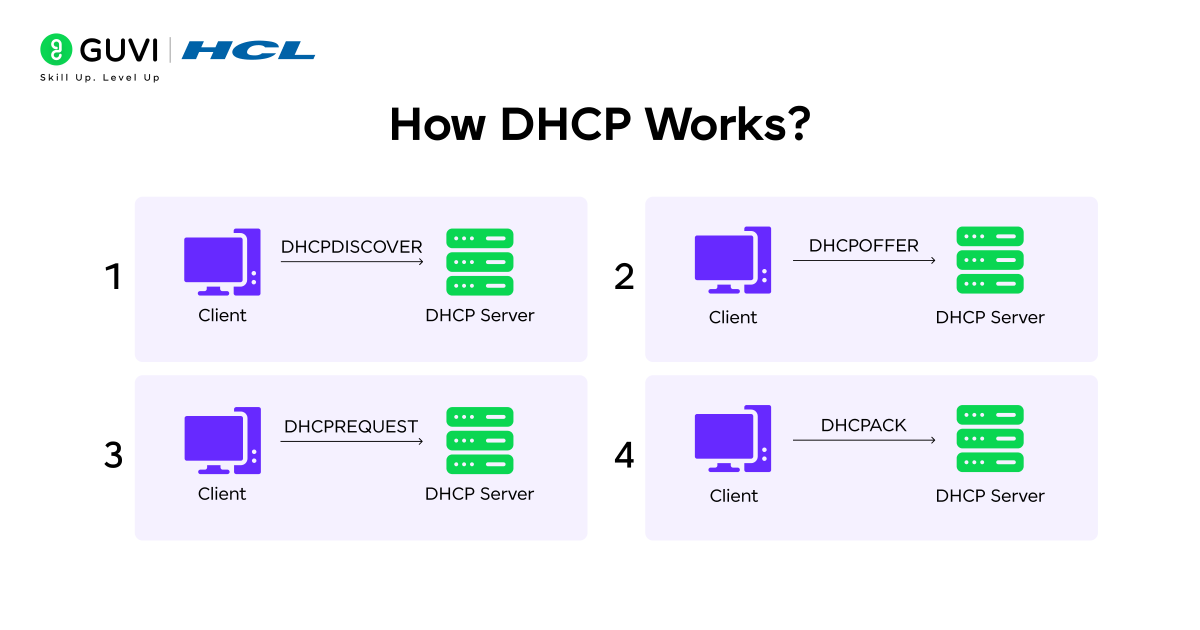
DHCP operates through a simple but powerful four-step communication cycle that automatically assigns IP configurations to any device that joins the network. This process removes the need for manual setup and ensures every device receives a valid, conflict-free configuration within seconds.
Key Steps In The DHCP Process
- DHCP Discover
The device broadcasts a request asking for an IP address and network settings. - DHCP Offer
The DHCP server replies with an available IP address, subnet mask, gateway, DNS, and lease information. - DHCP Request
The device responds by formally requesting the offered IP configuration. - DHCP Acknowledgment
The server confirms the assignment, and the device is officially added to the network.
Example: When a smartphone connects to Wi-Fi, it automatically sends a Discover message. The router (acting as a DHCP server) offers an IP, the phone requests it, and the router acknowledges it. Within milliseconds, the phone receives all the required settings and goes online without any manual configuration.
Importance of DHCP
As networks become larger and more complex, DHCP in computer networks plays a crucial role in keeping everything fast, organized, and error-free. Manual IP assignment is slow and difficult to manage, especially when many devices connect throughout the day. DHCP automates this entire process, ensuring every device gets the correct configuration instantly. It also supports modern networking setups such as VLANs, cloud systems, and virtual machines, where quick and reliable IP distribution is essential.
Key Reasons Why DHCP Is Important
- Removes Manual Setup: Saves time by automating IP assignment
- Avoids IP Conflicts: Ensures each device receives a unique address
- Supports Network Growth: Easily handles large and dynamic environments
- Speeds Up Device Onboarding: Connects devices instantly with correct settings
- Reduces Admin Effort: Cuts down repetitive network configuration tasks

Key Roles of DHCP
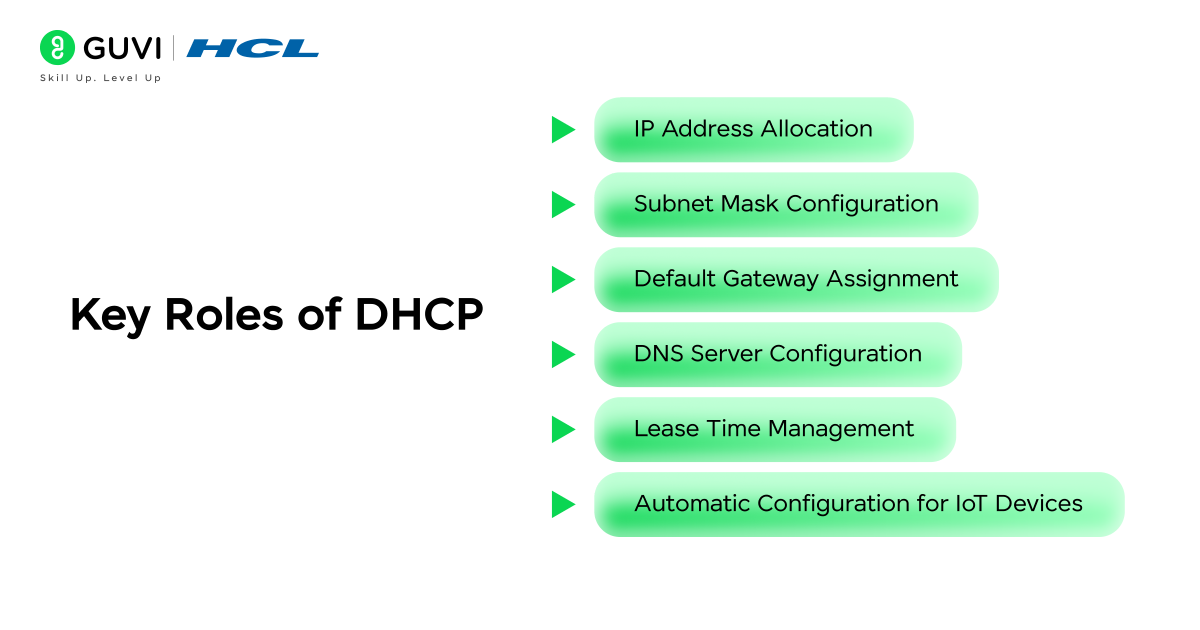
DHCP in computer networks performs several important tasks that keep communication smooth, organized, and automatic. Instead of configuring settings manually, DHCP handles everything in the background so devices can join the network instantly. In this section, we will look at the key roles of DHCP and how each one supports reliable connectivity. The main roles you will learn about are:
- IP Address Allocation
- Subnet Mask Configuration
- Default Gateway Assignment
- DNS Server Configuration
- Lease Time Management
- Automatic Configuration for IoT Devices
1. IP Address Allocation

When a device connects to a network, the first thing it needs is a unique IP address so it can communicate with other devices and access the internet. DHCP in computer networks takes full responsibility for this process by automatically assigning an available IP address from the server’s address pool. This prevents the need for manual entry and ensures every device receives the right configuration instantly. It also helps maintain proper organization across networks with multiple subnets or large user volumes.
Key Functions
- Unique Address Assignment: DHCP assigns unique IPv4 or IPv6 addresses to every device
- Conflict Prevention: Avoids duplicate IP addresses that can disrupt communication
- Supports Allocation Modes: Works with dynamic, automatic, and manual allocation methods
- Multi-Subnet Organization: Distributes IP addresses efficiently across multiple subnets
Example: When you connect your smartphone to café Wi-Fi, DHCP instantly assigns an IP from its pool, allowing you to start browsing or streaming without any delay.
2. Subnet Mask Configuration
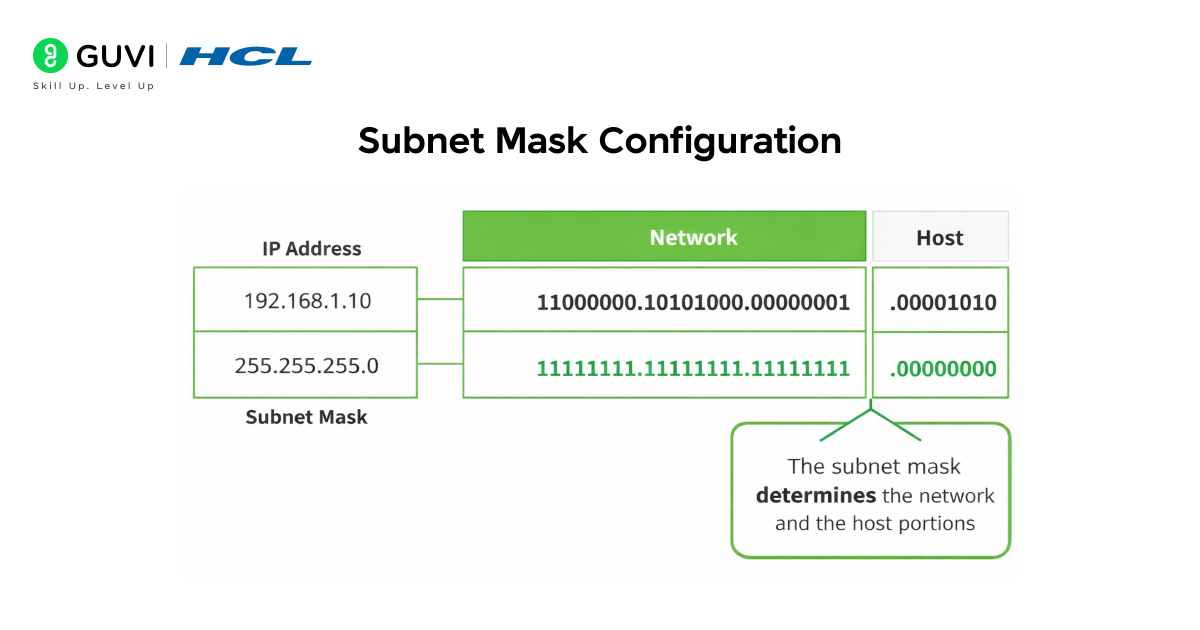
Every network is divided into sections called subnets, and devices must understand which part of their IP address belongs to the network and which part identifies the device. DHCP automatically sends the correct subnet mask along with the IP address, ensuring devices know where they belong within the network. This helps both devices and routers forward data accurately and avoid unnecessary traffic.
Key Functions
- Accurate Network Segmentation: Ensures devices know their network boundaries
- Smooth Internal Communication: Helps devices determine which addresses are local
- Router Efficiency: Enables routers to forward packets correctly
- Reduced Broadcast Traffic: Minimizes congestion caused by unnecessary broadcasts
Example: In an office where finance and HR departments are on different subnets, DHCP ensures each workstation receives the correct subnet mask, enabling accurate communication within each department’s network.
3. Default Gateway Assignment
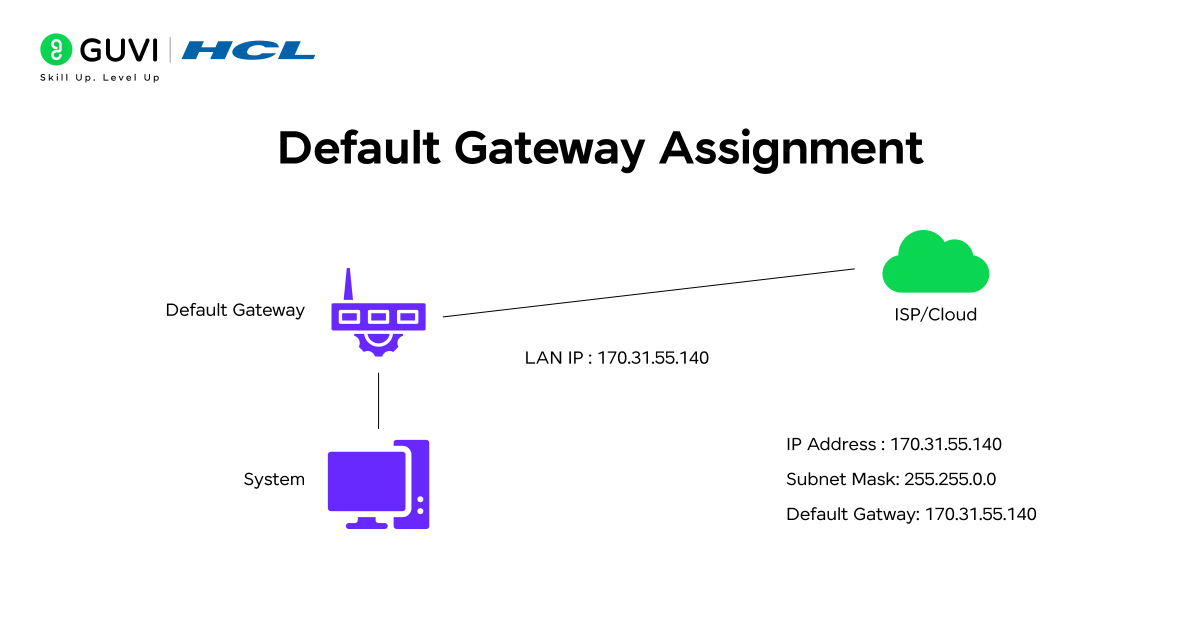
To communicate outside their own network or reach the internet, devices must know which router to send their traffic to. This router address is called the default gateway. DHCP automatically assigns this information, ensuring that devices connect smoothly to external networks without manual setup. It becomes especially useful in environments with multiple routers or layered network structures.
Key Functions
- Automatic Router Assignment: No need to manually enter gateway details
- Reliable External Access: Ensures devices easily reach the internet or other networks
- Multi-Router Support: Works well in setups with multiple routers or segments
- Smooth Mobility: Helps mobile devices reconnect quickly when moving between access points
Example: When your laptop connects to your home Wi-Fi, DHCP assigns the router’s IP as the default gateway so your requests reach the correct device for internet access.
4. DNS Server Configuration
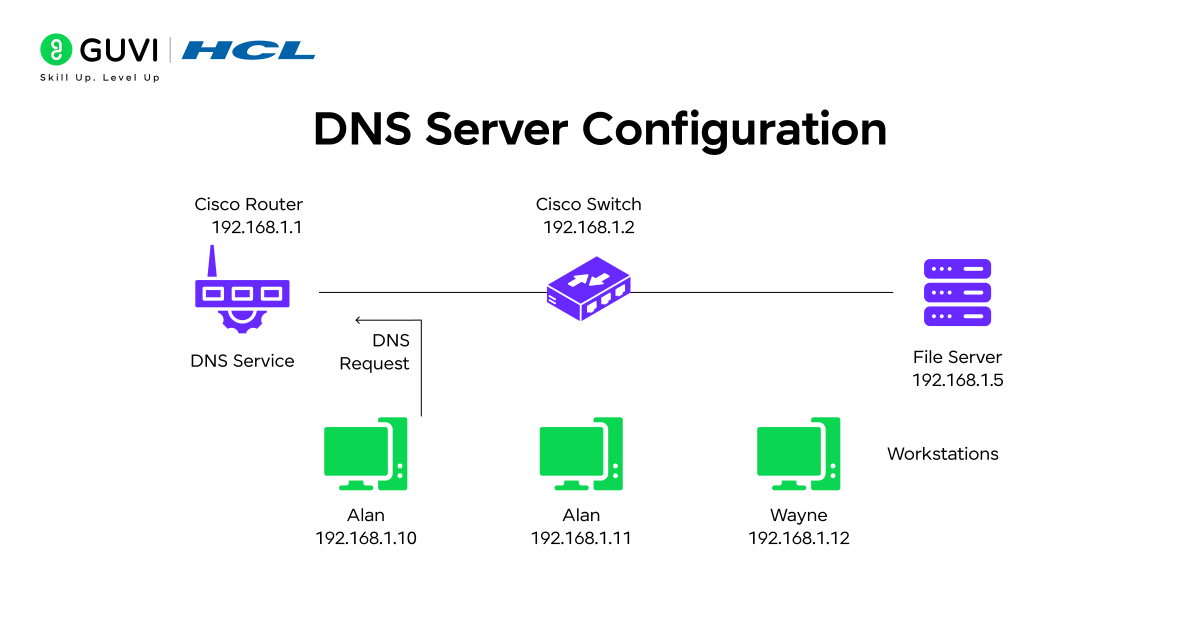
DNS converts website names like google.com into IP addresses. Devices need the correct DNS server information to perform this conversion quickly and accurately. DHCP automatically sends DNS server details to each device joining the network, allowing fast browsing and preventing misconfigurations.
Key Functions
- Primary & Secondary DNS Assignment: Provides accurate DNS servers
- Faster Browsing: Reduces lookup delays for websites and apps
- Supports Custom DNS: Works with cloud DNS, internal DNS, or ISP-based DNS
- Error Prevention: Avoids manual mistakes that can break name resolution
Example: In enterprise networks, DHCP assigns internal DNS servers so employees can access local applications and resources immediately.
5. Lease Time Management
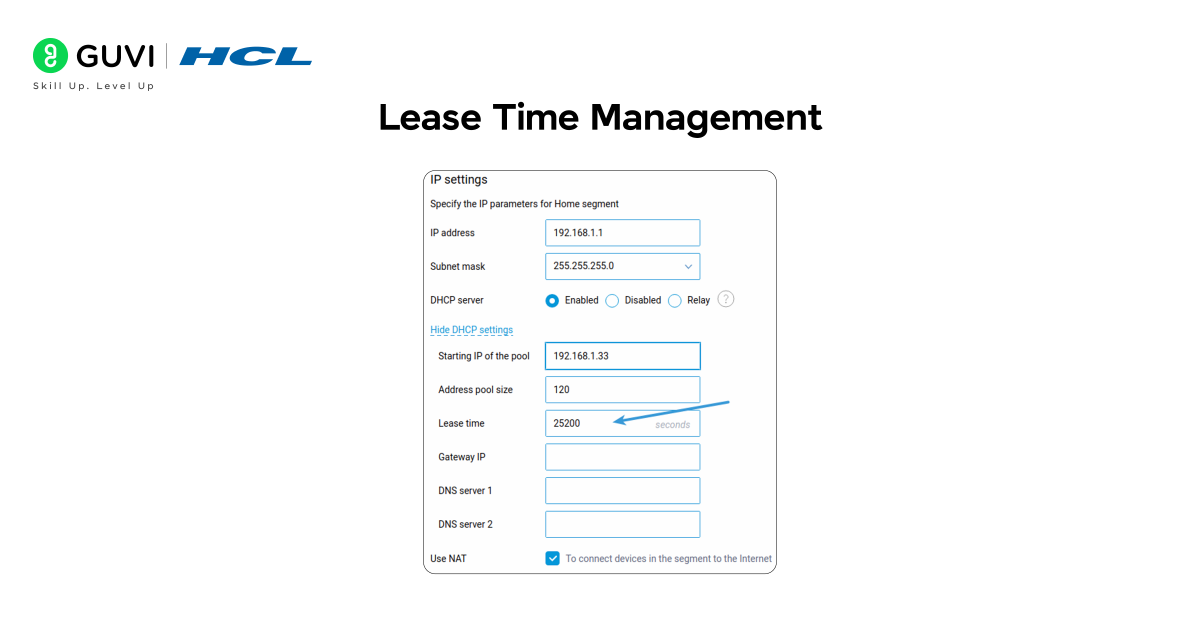
An IP address assigned by DHCP is not permanent. It is given for a specific period known as lease time. This ensures that addresses can be reused efficiently, especially in environments with many devices joining and leaving frequently. DHCP manages the entire lease cycle, updating or reclaiming addresses as needed.
Key Functions
- Efficient Address Recycling: Returns unused IP addresses back to the pool
- Prevents Exhaustion: Makes sure the network never runs out of usable addresses
- Large-Scale Network Support: Handles thousands of active devices smoothly
- Flexible Controls: Allows short leases for temporary users and longer leases for stable devices
Example: In hotels, DHCP uses short lease times so that when guests leave, their assigned IP addresses quickly become available for new visitors.
6. Automatic Configuration for IoT Devices
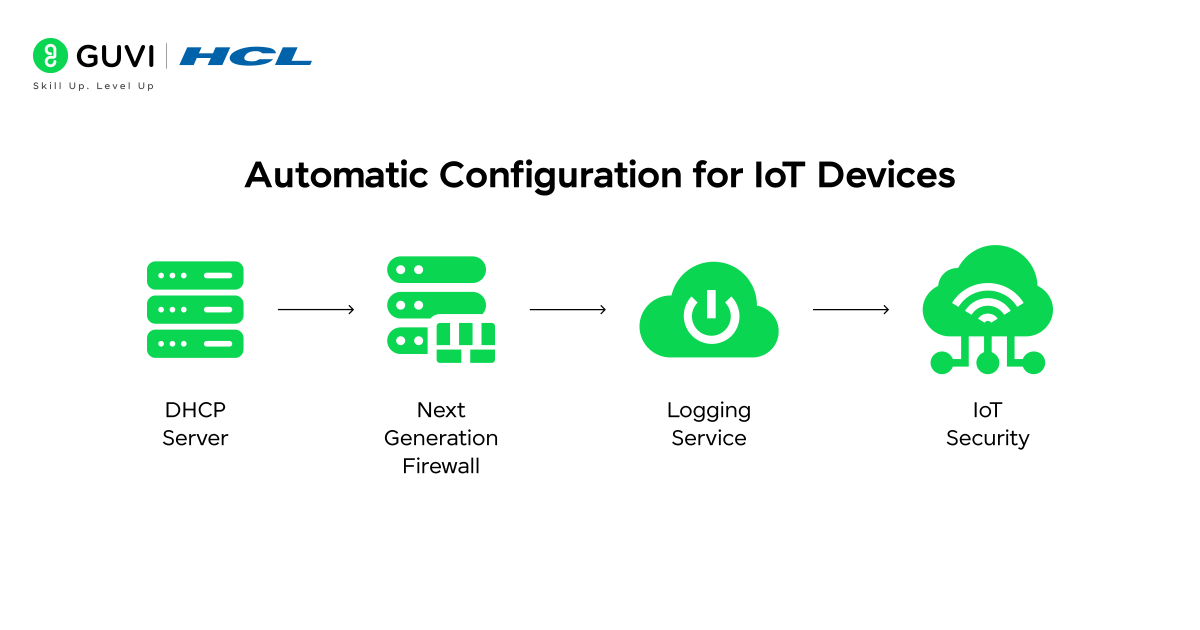
IoT devices like sensors, cameras, and smart appliances usually lack a full interface for manual setup. DHCP allows these devices to connect instantly by sending all required configurations automatically. This makes deploying large smart environments faster and easier while maintaining organized network behavior.
Key Functions
- Simple Plug-and-Play Setup: No need for manual configuration
- Instant IP Assignment: Devices receive IP details as soon as they connect
- Supports Large IoT Networks: Works for sensors, cameras, wearables, and appliances
- Scalable Deployments: Helps smart homes, industries, and cities expand efficiently
Example: Smart bulbs, CCTV cameras, and home sensors start working immediately because DHCP assigns their IP details the moment they join the network.
Tools Used in DHCP
Modern networks depend on several DHCP tools to assign, manage, and troubleshoot IP addresses efficiently. These tools generally fall into five major categories:
- Router-Based DHCP
- Windows Server DHCP
- Linux-Based DHCP Solutions
- Cloud DHCP Services
- DHCP Testing and Monitoring Tools
Each of these tools serves different environments—from small home networks to large cloud infrastructures. Here is a detailed explanation of each.
1. Router-Based DHCP
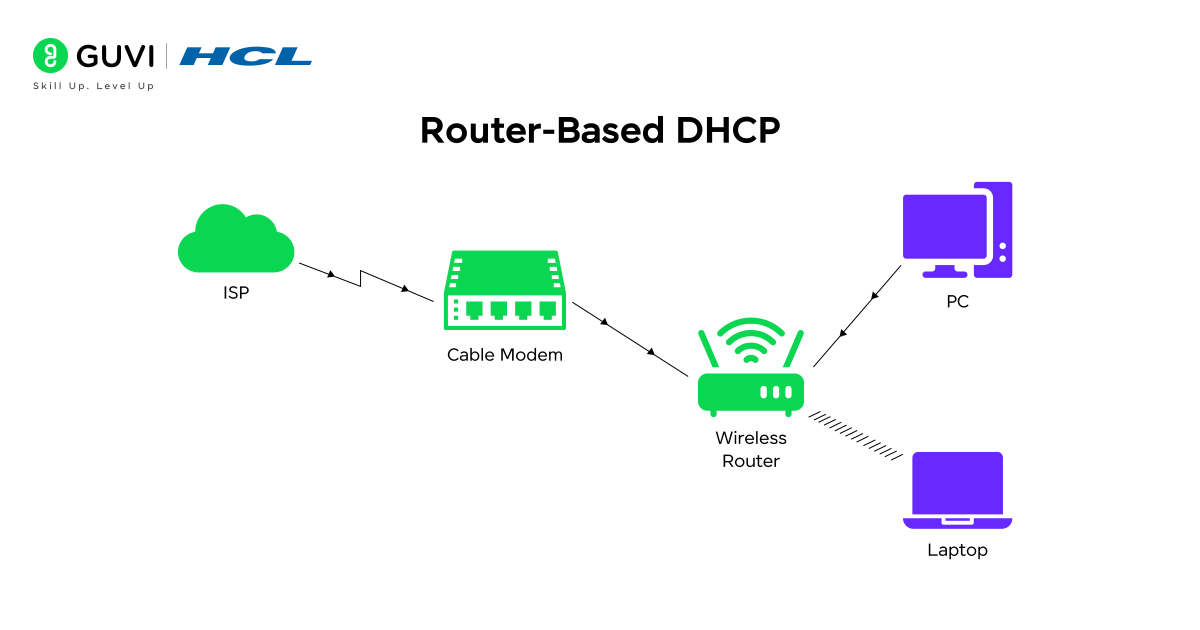
Small offices and home networks rely heavily on routers that include built-in DHCP services. These tools are designed to work automatically with minimal configuration, making IP assignment effortless for everyday users.
Key Features
- Simple User Interface – Allows beginners to configure DHCP without technical expertise.
- Supports IPv4 and IPv6 – Ensures compatibility with older and modern devices.
- Manages Basic Address Pools – Automatically assigns IPs within a small, predefined range.
- Suitable for Non-Enterprise Users – Ideal for homes, cafés, small offices, or small LAN setups.
Example:
Your home Wi-Fi router assigns IPs to your smartphone, laptop, and smart devices the moment they connect—no configuration needed.
2. Windows Server DHCP
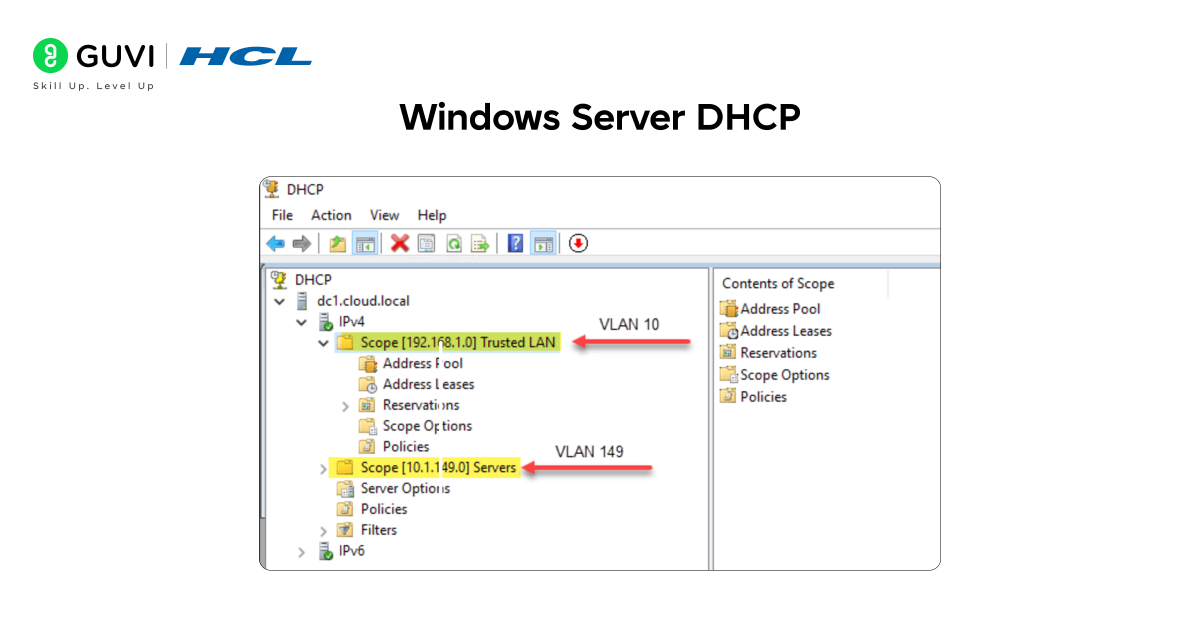
Enterprises managing thousands of devices across multiple subnets rely on Windows Server DHCP. It offers advanced, centralized control over IP distribution with powerful administrative tools.
Key Features
- Advanced Scope Options – Supports policies, reservations, superscopes, and DHCP filters.
- Active Directory Integration – Ensures secure DHCP authorization and management.
- Redundancy and Failover Support – Keeps DHCP functioning even during server outages.
- Built for Corporate Networks – Scales across departments, VLANs, and distributed offices.
Example:
A large organization uses Windows Server DHCP to assign IP addresses differently for employees, guests, and servers based on VLAN segmentation.
3. Linux-Based DHCP Solutions
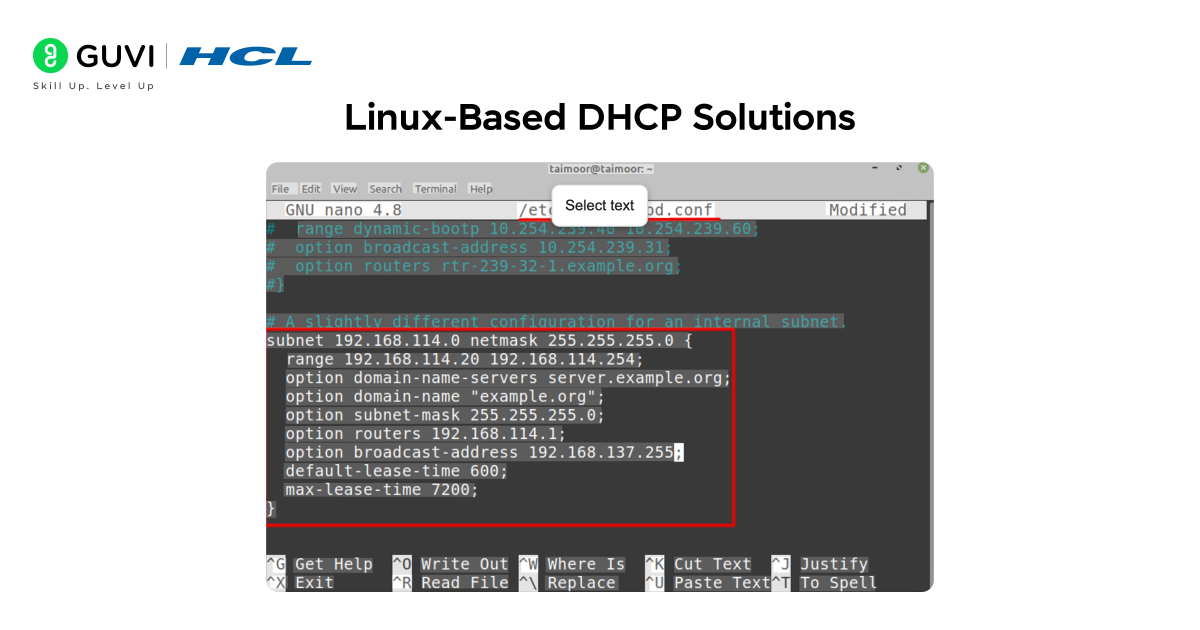
Linux-based DHCP tools like ISC DHCP, Kea DHCP, and Dnsmasq offer flexibility, customization, and high performance for technical and enterprise-level environments.
Key Features
- Highly Configurable – Supports custom scripts, advanced policies, and intricate network setups.
- Lightweight Options for Embedded Systems – Useful in routers, IoT devices, and firewalls.
- Supports IPv4 and IPv6 – Ensures complete compatibility for mixed environments.
- Ideal for Technical Users & Admins – Favored by open-source communities and advanced network engineers.
Example:
A data center uses Kea DHCP for fast, scalable IP allocation across virtual machines and high-traffic servers.
4. Cloud DHCP Services
Cloud platforms such as AWS, Azure, and Google Cloud use virtualized DHCP systems to manage IP assignments in cloud and hybrid environments.
Key Features
- Works with Virtual Machines & Containers – Ensures smooth IP allocation as workloads scale.
- Centralized Cloud-Based Management – Supports global IP control from a single console.
- Supports Hybrid Cloud Models – Keeps on-premise and cloud networks synchronized.
- Reliable for Distributed Systems – Ensures uptime and consistency across multiple regions.
Example:
A company hosting microservices on AWS relies on cloud DHCP to assign internal IPs to EC2 instances and containers automatically.
5. DHCP Testing and Monitoring Tools
These tools help network professionals analyze DHCP traffic, identify issues, and ensure the network runs smoothly.
Key Features
- Wireshark for Packet Analysis – Captures DHCP packets for troubleshooting.
- SolarWinds & OpUtils Monitoring – Tracks IP usage, scope health, and server performance.
- Detects Rogue DHCP Servers – Ensures only authorized DHCP servers operate in the network.
- Resolves IP Conflicts – Helps identify duplicated or overlapping IP assignments.
Example:
A network engineer uses Wireshark to diagnose why certain devices fail to receive IPs and discovers a rogue DHCP server causing conflicts.
Real-World Applications
DHCP powers connectivity across a wide range of environments by automating how devices receive network configurations. In this section, we will explore the major domains where DHCP is used every day: home networks, enterprise networks, data centers, ISP systems, and IoT ecosystems. These applications highlight how DHCP simplifies device onboarding, improves efficiency, and supports both small-scale and massive infrastructures.
1. Home Networks
- Provides plug-and-play connectivity
- Sets up IP addresses for phones, laptops, and smart devices
- Reduces manual router configuration
2. Enterprise Networks
- Handles thousands of dynamic devices
- Supports VLAN-based segmentation
- Coordinates with services like Active Directory
3. Data Centers
- Manages virtual machines efficiently
- Helps in automated server provisioning
- Integrates with virtualization platforms
4. ISP and Broadband Systems
- Assigns IPs to millions of customers
- Supports dynamic IP rotation
- Manages distributed address pools
5. IoT Ecosystems
- Auto-configures smart appliances and sensors
- Works smoothly with large-scale deployments
- Reduces manual onboarding efforts
Challenges
Even though DHCP in computer networks makes IP management simple, it also introduces challenges that require careful planning and security. As networks grow, issues like security threats, IP shortages, and server failures become more common. Here are the major challenges administrators need to handle.
1. DHCP Snooping and Security Risks
- Rogue DHCP servers can mislead devices
- May lead to man-in-the-middle attacks
- Needs strong switch-level protections
2. IP Exhaustion
- Occurs when the IP pool is too small for the number of users
- Long lease times reduce available addresses
- Requires proper subnetting and pool planning
3. Server Dependency
- If the DHCP server fails, new devices cannot join
- Needs redundancy and failover for reliability
4. Dynamic Environment Limitations
- Devices needing static IPs may face issues
- Requires careful reservation planning
5. IPv6 Transition
- Adds configuration complexity
- Dual-stack networks must balance DHCPv6 and SLAAC
As DHCP continues evolving with emerging technologies like AI-driven automation, edge computing, and SDN, many learners may want to deepen their networking knowledge further. If you’re ready to move beyond basics, you might consider HCL GUVI’s Mastering Advanced Networking Concepts course. This program covers advanced topics such as software-defined networking, network virtualization, advanced routing, and security protocols. It helps you build industry-ready skills and prepares you for designing and managing modern, large-scale networks.
Conclusion
DHCP in computer networks remains one of the most crucial components of modern connectivity. By automating essential tasks such as IP assignment, gateway details, DNS configuration, and lease management, it keeps networks efficient, conflict-free, and scalable. From home Wi-Fi setups to enterprise infrastructures, data centers, cloud platforms, and IoT ecosystems, DHCP ensures that devices can communicate seamlessly without manual intervention.
As networking continues to evolve with advancements like 5G, edge computing, automation, and AI-driven network management, DHCP also continues to adapt—bringing improved security, smarter allocation techniques, and better support for large, dynamic environments. Understanding how DHCP works equips learners and professionals with stronger insights into how networks function at their core and prepares them to manage or design systems that can scale confidently into the future.
FAQs
1. What happens if a DHCP server becomes unavailable?
If the DHCP server goes down, devices that already have an IP address will continue working until their lease expires. However, new devices will not receive any network configuration until the server is back online.
2. Can DHCP work with both IPv4 and IPv6?
Yes, DHCP supports both. Traditional DHCP works with IPv4, while DHCPv6 is designed specifically for IPv6 and offers more advanced capabilities for modern networks.
3. Is DHCP necessary for home networks?
Yes. Most home routers have DHCP enabled by default, which allows devices like phones, laptops, and smart TVs to connect to Wi-Fi automatically without manual IP setup.
4. How does DHCP prevent IP conflicts?
DHCP uses a centralized address pool and keeps track of which IP has been assigned to each device. This ensures every connected device receives a unique IP address.
5. Is DHCP used in cloud environments?
Yes. Cloud platforms rely heavily on DHCP-like systems to automatically assign IP addresses to virtual machines, containers, and other cloud resources.
Success Stories

About the Author
Jebasta
I translate the language of data into stories that anyone can understand. As a writer with a data science background, I simplify analytics, AI, and decision-making so beginners and enthusiasts can confidently explore the world of data.
View all posts by Jebasta
Connect with me @







Did you enjoy this article?