


DevOps Articles
Claude for IT Help Desks: Reducing Ticket Volume
From Beginner to DevOps Engineer: How HCL GUVI Zen Class Helps You Get There


Get In Touch For Details! Request More Information
DevOps Secret Management: Vault, AWS Secrets & Best Practices
Jul 29, 2026 4 Min Read 507 Views
(Last Updated)
Many development teams start by storing passwords and API keys directly in code or plain text config files, only realizing the risk once a credential leaks through a public GitHub repository or a compromised server. Secret management in DevOps exists to prevent exactly this, replacing hardcoded credentials with secure, centralized systems that control who can access sensitive data and when.
Table of contents
- TL;DR Summary
- What Is Secret Management?
- Why Is Secret Management Critical in DevOps?
- HashiCorp Vault: Overview and Core Concepts
- AWS Secrets Manager: Overview and Core Concepts
- Vault vs AWS Secrets Manager: Which Should You Use?
- 💡 Did You Know?
- Secret Management Best Practices
- Never Hardcode Secrets in Source Code
- Rotate Secrets Regularly
- Apply the Principle of Least Privilege
- Use Dynamic Secrets Where Possible
- Enable Audit Logging
- Scan Repositories for Leaked Secrets
- 💡 Did You Know?
- Conclusion
- FAQ
- What is secret management in DevOps?
- What is the difference between Vault and AWS Secrets Manager?
- Why shouldn't I store secrets in environment variables?
- What are dynamic secrets in Vault?
- How often should secrets be rotated in DevOps?
- Is AWS Secrets Manager free to use?
- What tools can detect leaked secrets in code repositories?
- What is the principle of least privilege in secret management?
TL;DR Summary
Secret management in DevOps is the practice of securely storing, accessing, and rotating sensitive information like API keys, database passwords, and certificates instead of hardcoding them into source code or config files. Tools like HashiCorp Vault and AWS Secrets Manager automate this process, providing encryption, access control, and audit logging. Proper secret management prevents credential leaks, one of the most common causes of security breaches in production systems.
Want to build practical DevOps and cloud security skills with hands-on tools and real projects? Explore HCL GUVI’s Cloud Computing & DevOps Course, designed to help you build production-ready DevOps skills.
What Is Secret Management?
Secret management refers to the tools and practices used to securely store, distribute, and rotate sensitive credentials such as:
- API keys and tokens
- Database usernames and passwords
- TLS/SSL certificates and private keys
- SSH keys
- Cloud provider access credentials
Instead of storing these directly in code, environment files, or configuration management tools in plain text, secret management systems encrypt them at rest, control access through policies, and provide an audit trail of who accessed what and when.
Read More: The Role of DevOps in Full Stack Development
Why Is Secret Management Critical in DevOps?
Modern DevOps pipelines involve dozens of services, each requiring credentials to communicate securely with databases, APIs, and cloud resources. Without centralized secret management, these credentials end up scattered across code repositories, CI/CD configuration files, and team chat messages.
Key risks of poor secret management:
- Credentials committed accidentally to public Git repositories
- Shared static passwords that never get rotated
- No audit trail showing who accessed a secret or when
- Secrets duplicated across multiple environments, increasing the attack surface
- Difficulty revoking access quickly when a team member leaves or a breach is suspected
A properly implemented secret management system addresses every one of these risks through centralization, encryption, and policy-based access control.
Want to build practical DevOps and cloud security skills with hands-on tools and real projects? Explore HCL GUVI’s Cloud Computing & DevOps Course, designed to help you build production-ready DevOps skills.
HashiCorp Vault: Overview and Core Concepts
HashiCorp Vault is one of the most widely adopted open-source secret management tools, designed for dynamic, policy-driven secret access across diverse infrastructure.
- Core Vault Concepts
- Secrets Engine: Defines how secrets are stored and generated, such as key-value storage, dynamic database credentials, or PKI certificates
- Authentication Methods: Determines how users and applications prove their identity to Vault, including tokens, AppRole, AWS IAM, and Kubernetes service accounts
- Policies: Define exactly which secrets a given identity is allowed to read, write, or manage
- Dynamic Secrets: Vault can generate short-lived, unique credentials on demand instead of relying on long-lived static passwords
- Basic Vault Workflow
Storing and retrieving a secret with Vault’s command-line interface:
vault kv put secret/myapp/database username=admin password=SecurePass123
vault kv get secret/myapp/database
The first command stores the secret at the path secret/myapp/database. The second retrieves it, but only if the requesting identity has a policy granting read access to that path.
- Dynamic Database Credentials Example
vault read database/creds/readonly-role
This generates a temporary database username and password that automatically expires after a configured time-to-live, significantly reducing the risk if the credential is ever exposed.
AWS Secrets Manager: Overview and Core Concepts
AWS Secrets Manager is a fully managed secret storage service built into the AWS ecosystem, ideal for teams already running infrastructure on AWS.
- Storing a Secret
aws secretsmanager create-secret \
--name myapp/database-credentials \

--secret-string '{"username":"admin","password":"SecurePass123"}'- Retrieving a Secret in Application Code
import boto3

import json

client = boto3.client("secretsmanager")

response = client.get_secret_value(SecretId="myapp/database-credentials")

secret = json.loads(response["SecretString"])

db_username = secret["username"]

db_password = secret["password"]- Automatic Secret Rotation
AWS Secrets Manager supports automatic rotation using a Lambda function that updates the secret on a defined schedule, commonly every 30 to 90 days, without requiring manual intervention or application downtime.
Vault vs AWS Secrets Manager: Which Should You Use?
| Feature | HashiCorp Vault | AWS Secrets Manager |
| Hosting | Self-hosted or HCP Vault (managed) | Fully managed by AWS |
| Multi-cloud support | Yes, cloud-agnostic | AWS-focused, limited outside AWS |
| Dynamic secrets | Yes, extensive support | Limited, mainly static secrets |
| Setup complexity | Higher, requires configuration | Lower, integrates directly with AWS |
| Pricing model | Free open-source, paid enterprise tier | Pay per secret per month plus API calls |
| Best for | Multi-cloud or hybrid environments | Teams fully committed to AWS |
Choose Vault when you operate across multiple cloud providers or need advanced dynamic secret generation. Choose AWS Secrets Manager when your infrastructure is entirely within AWS and you want minimal setup overhead.
💡 Did You Know?
According to GitGuardian’s State of Secrets Sprawl reports, millions of hardcoded secrets are detected in public GitHub repositories every year. API keys, cloud credentials, database passwords, and access tokens are among the most frequently exposed secrets, creating significant security risks for organizations.
As cloud-native applications have grown more complex, centralized secret management has evolved from a security best practice into a standard enterprise DevOps requirement. Instead of embedding sensitive credentials directly in source code, modern teams store and manage them using dedicated secret management solutions, reducing the risk of accidental exposure and simplifying credential rotation.

- Prevents hardcoded credentials in source code
- Enables secure storage and controlled access
- Simplifies secret rotation and expiration
- Improves auditing and compliance
- Reduces the risk of credential leaks in repositories
Modern DevOps pipelines treat secrets as managed infrastructure—not as values that belong inside application code.
Secret Management Best Practices
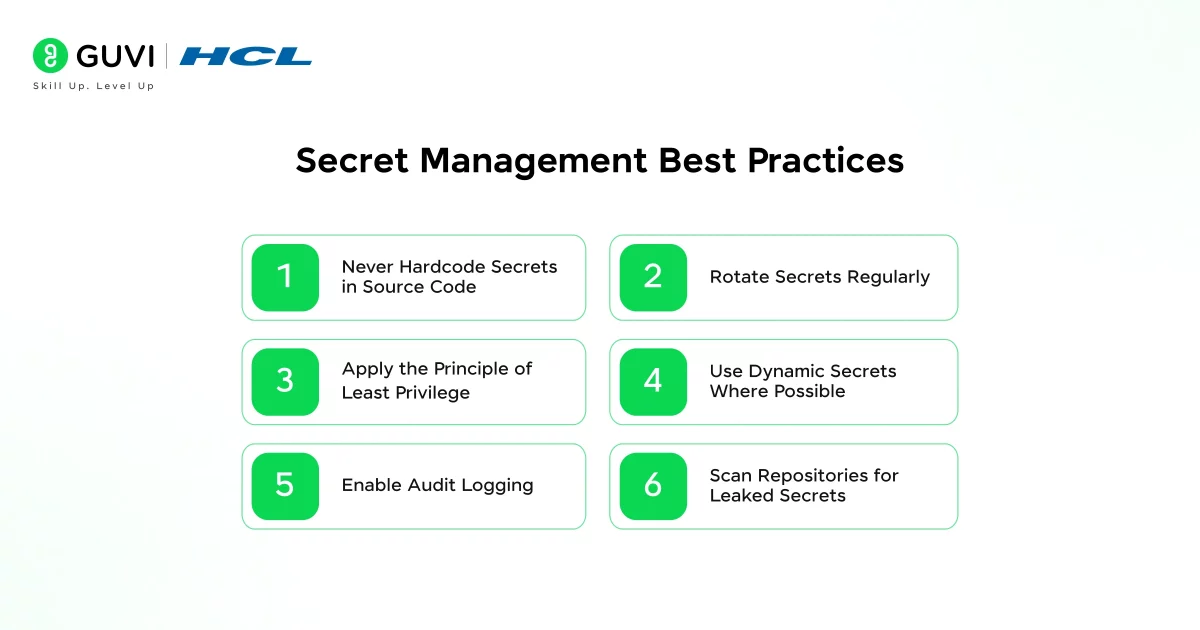
1. Never Hardcode Secrets in Source Code
Even private repositories carry risk if access controls change or a repository is accidentally made public. Always reference secrets through environment variables or a secret management tool, never directly in code.
2. Rotate Secrets Regularly
Static credentials that never change become more dangerous the longer they exist, since any past leak remains exploitable indefinitely. Automate rotation wherever the tool supports it.
3. Apply the Principle of Least Privilege
Grant each service or team member access only to the specific secrets they need, not broad access to every secret in the system. This limits damage if a single identity is compromised.
4. Use Dynamic Secrets Where Possible
Short-lived, automatically expiring credentials significantly reduce the window of exposure compared to long-lived static passwords, especially for database and cloud access.
5. Enable Audit Logging
Every secret access should be logged with who accessed it, when, and from where. This is critical for detecting suspicious activity and for compliance requirements in regulated industries.
6. Scan Repositories for Leaked Secrets
Use tools like GitGuardian or git-secrets to automatically scan commits for accidentally exposed credentials before they reach a public repository.
💡 Did You Know?
HashiCorp Vault can generate dynamic secrets for databases, cloud platforms, and even SSH access instead of relying on long-lived, static credentials. These secrets are created on demand and automatically expire after a predefined lease period, which can be as short as a few minutes.
Because the credentials exist only for the time they are needed, the risk of leaked or stolen secrets is significantly reduced. Once the lease expires, Vault automatically revokes the credentials, eliminating the need for manual cleanup or password rotation.
- Credentials are generated only when requested
- Each secret has a limited lifetime (lease)
- Automatic revocation reduces exposure if credentials are leaked
- Eliminates the need for long-lived shared passwords
- Strengthens zero-trust and least-privilege security practices
Dynamic secrets are often described as “credentials that expire by design”, providing stronger security than traditional static secrets.
Conclusion
Tools like HashiCorp Vault and AWS Secrets Manager remove the need for hardcoded credentials entirely, replacing them with encrypted, access-controlled, and often short-lived secrets.
As your infrastructure grows across more services and environments, this foundation will make security audits, compliance requirements, and incident response significantly easier to manage.
FAQ
What is secret management in DevOps?
It is the practice of securely storing, accessing, and rotating sensitive credentials like API keys and passwords using dedicated tools instead of hardcoding them into code or config files.
What is the difference between Vault and AWS Secrets Manager?
Vault is open-source, cloud-agnostic, and supports advanced dynamic secrets, while AWS Secrets Manager is fully managed, AWS-specific, and simpler to set up for AWS-only infrastructure.
Why shouldn’t I store secrets in environment variables?
Environment variables are often visible in logs, crash reports, or to anyone with server access, making them less secure than a dedicated encrypted secret management tool.
What are dynamic secrets in Vault?
Dynamic secrets are short-lived, automatically generated credentials created on demand for a specific task, expiring after a defined time to reduce exposure risk.
How often should secrets be rotated in DevOps?
This depends on the secret type and compliance requirements, but many organizations rotate database and API credentials every 30 to 90 days, often automated through the secret management tool.
Is AWS Secrets Manager free to use?
No. AWS Secrets Manager charges per secret stored per month plus a fee for API calls, unlike HashiCorp Vault’s open-source version which is free to self-host.
What tools can detect leaked secrets in code repositories?
GitGuardian and git-secrets are widely used tools that scan commits and repositories for accidentally exposed credentials before or after they are pushed.
What is the principle of least privilege in secret management?
It means granting each user or service access only to the specific secrets required for their function, rather than broad access to all available secrets.
Success Stories

About the Author
Vishalini Devarajan
An Aerospace Engineer turned content writer, I focus on making complex concepts easy to understand through well-structured, reader-friendly blogs. Whether it’s a technical topic or a non-technical one, I love creating content that is clear, engaging, and impactful.
View all posts by Vishalini Devarajan
Connect with me @






























Did you enjoy this article?