


DevOps Articles
Claude for IT Help Desks: Reducing Ticket Volume
From Beginner to DevOps Engineer: How HCL GUVI Zen Class Helps You Get There


Get In Touch For Details! Request More Information

Ansible Playbooks Tutorial: Step-By-Step Guide
Sep 12, 2026 4 Min Read 542 Views
(Last Updated)
Managing multiple servers manually often feels repetitive and time-consuming. It usually means logging in to each system and repeatedly running the same commands. That’s where the Ansible Playbooks Tutorial comes in, showing how you can replace those repeated steps with simple, structured automation.
Once that shift happens, server work starts feeling less like manual effort and more like controlled execution.
Instead of handling everything one by one, you define the process once and let it run across systems. It naturally raises a question: how much simpler could infrastructure management be if you removed repetition completely?
Table of contents
- TL;DR Summary
- What Is an Ansible Playbook?
- How does Ansible work in the background?
- Prerequisites Before You Start
- Step-By-Step: Writing Your First Playbook
- Step 1: Create Your Inventory File
- Step 2: Test Connectivity
- Step 3: Write a Minimal Playbook
- Step 4: Run It
- Real-World Example: Deploying Nginx with a Playbook
- Common Mistakes Beginners Make
- Ansible Playbooks vs. Ad-Hoc Commands vs. Roles
- Key Takeaways
- What to Do Next
- FAQs
- What is the difference between an Ansible Playbook and an Ansible role?
- Do I need Python installed on target servers to run Ansible Playbooks?
- Can Ansible Playbooks manage Windows servers?
- Is Ansible Playbook syntax the same as plain YAML?
- How do I run only part of a playbook?
TL;DR Summary
- Ansible Playbooks are YAML files that tell Ansible exactly what state your servers should be in.
- You don’t need to memorize commands — you describe the outcome, and Ansible figures out how to get there.
- A working playbook needs three things: an inventory, a play, and at least one task.
- Most beginner mistakes come from bad YAML indentation, not bad logic.
- By the end of this guide, you’ll have written and run a real playbook to install and configure a web server.
Michael DeHaan created Ansible Playbooks in 2012 to simplify IT automation using YAML.
What Is an Ansible Playbook?

An Ansible Playbook is a YAML file containing one or more “plays,” each targeting a group of hosts and running a list of “tasks” against them.
Playbooks describe the desired end state of a system — not the individual commands to get there. This is what makes Ansible declarative rather than procedural, and it’s the core reason teams adopt it over raw bash scripting.
A playbook is made up of three nested layers:
- Play — defines which hosts to target and what to do to them
- Tasks — the individual actions within a play (install a package, copy a file, start a service)
- Modules — the actual units of work Ansible runs (apt, copy, service, template, and 3,000+ others)
💡 In simple terms: Think of a playbook as a recipe, the play as “what we’re cooking,” and tasks as the individual steps in that recipe.
Also Read: What is Ansible in DevOps?
Step into automation mode. HCL GUVI’s Ansible Course takes you from basics to pro—covering architecture, inventories, playbooks, Roles & Collections, and secure automation. Build strong DevOps skills, simplify complex systems, and stay ahead in the tech world. Enroll now and power up your automation journey!
How does Ansible work in the background?
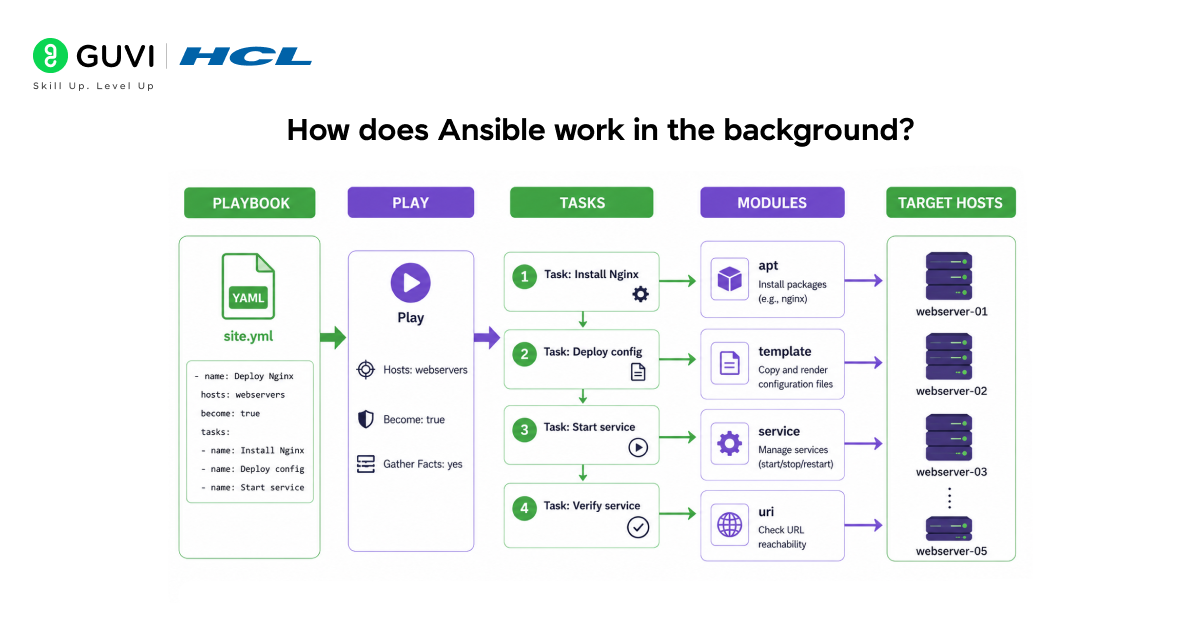
Ansible connects to your servers over SSH (or WinRM for Windows), pushes small Python scripts called modules onto each host, executes them, and removes them afterwards.
No agent software runs persistently on the target machines — this agentless design is one of the main reasons Ansible adoption grew faster than Puppet or Chef in the last decade.
Here’s the execution flow in plain terms:
- You run ansible-playbook site.yml
- Ansible reads your inventory to find target hosts
- It connects via SSH using your specified credentials
- It transfers the required module code to each host
- It executes tasks in order, host by host (or in parallel, depending on settings)
- It reports back what changed, what didn’t, and what failed
Because each task is idempotent by design, running the same playbook twice should never break anything — Ansible checks the current state before making changes, and skips tasks that are already satisfied.
Prerequisites Before You Start
Before writing your first playbook, you’ll need:
- A control node (your laptop or a jump server) with Ansible installed
- At least one target machine reachable over SSH
- Passwordless SSH access (via SSH keys) is set up between the two
- Basic familiarity with YAML syntax — specifically indentation rules
⚠️ Warning: YAML is indentation-sensitive. Using tabs instead of spaces is the single most common reason beginner playbooks fail to parse.
Install Ansible on a Debian/Ubuntu control node:
sudo apt update
sudo apt install ansible -y
ansible –version
Step-By-Step: Writing Your First Playbook
Step 1: Create Your Inventory File
The inventory tells Ansible which machines exist and how to reach them.
# inventory.ini
[webservers]
192.168.1.10
192.168.1.11
[webservers:vars]
ansible_user=ubuntu
Step 2: Test Connectivity
ansible -i inventory.ini webservers -m ping
You should see “pong”: “pong” from each host. If you don’t, fix SSH access before moving on — nothing downstream will work otherwise.
Step 3: Write a Minimal Playbook
# first_playbook.yml
—
– name: Basic connectivity and update check
hosts: webservers
become: true
tasks:
– name: Update apt cache
apt:
update_cache: yes
Step 4: Run It
ansible-playbook -i inventory.ini first_playbook.yml
✅ Best Practice: Always run with –check first on production hosts. This performs a “dry run” — Ansible reports what would change without actually changing anything.
ansible-playbook -i inventory.ini first_playbook.yml –check
Real-World Example: Deploying Nginx with a Playbook
Here, a real-world test of the Ansible playbook on a 5-server setup, where Nginx was automatically installed, configured, and started in a few seconds per server, compared to several minutes required for manual setup, highlighting how automation significantly speeds up deployment and reduces effort.

—
– name: Deploy and configure Nginx
hosts: webservers
become: true
vars:
nginx_port: 80
tasks:
– name: Install Nginx
apt:
name: nginx
state: present
update_cache: yes
– name: Deploy custom index page
template:
src: templates/index.html.j2
dest: /var/www/html/index.html
mode: ‘0644’
– name: Ensure Nginx is running and enabled
service:
name: nginx
state: started
enabled: true
– name: Confirm Nginx is reachable
uri:
url: “http://localhost:{{ nginx_port }}”
status_code: 200
Run it the same way as before:
ansible-playbook -i inventory.ini nginx_playbook.yml
Common Mistakes Beginners Make
| Mistake | Why It Happens | Fix |
| Mixing tabs and spaces | YAML requires consistent spacing | Configure your editor to convert tabs to 2 spaces |
| Forgetting become: true | Tasks needing root silently fail or error | Add become: true at the play or task level |
| Hardcoding IPs/usernames | Makes playbooks unreusable | Use variables and inventory groups |
| Not using –check first | Risky on production | Always dry-run before live runs |
| Treating tasks as a script | Misses Ansible’s idempotency benefits | Use modules designed for the desired state, not raw command/shell |
⚠️ Warning: Avoid the shell and command modules unless there’s truly no dedicated module for the job. They break idempotency, and Ansible can’t track real state changes through them.
Ansible Playbooks vs. Ad-Hoc Commands vs. Roles
| Approach | Best For | Reusable? | Readable at Scale? |
| Ad-hoc commands (ansible -m) | One-off quick checks | No | No |
| Playbooks | Repeatable multi-step automation | Yes | Yes |
| Roles | Large, shared, modular automation across teams | Highly | Very |
Ad hoc commands are for quick, one-time actions, such as checking disk space across a fleet. Playbooks are for anything you’ll run more than once.
Roles are playbooks broken into reusable, shareable components — the natural next step once your playbooks start repeating the same patterns across projects.
Key Takeaways
- Playbooks describe the desired state in YAML — they’re declarative, not scripted
- Three core layers: play → tasks → modules
- Always test SSH connectivity and run –check before live execution
- Avoid shell/command modules when a dedicated module exists
- Once playbooks repeat patterns, it’s time to learn Roles
What to Do Next
Before you close this tab:
- Set up a free-tier VM (or a local VM via Vagrant) to practice safely
- Write the Nginx playbook above yourself, line by line — don’t copy-paste
- Break something on purpose, then fix it with –check and re-runs
- Move on to learning Ansible Roles once you’ve written 3–4 playbooks comfortably
FAQs
What is the difference between an Ansible Playbook and an Ansible role?
A playbook is a single YAML file of tasks. A role is a structured, reusable folder of playbooks, variables, and templates meant to be shared across projects.
Do I need Python installed on target servers to run Ansible Playbooks?
Yes, most Ansible modules require Python on the target host, though the control node handles most of the heavy lifting itself.
Can Ansible Playbooks manage Windows servers?
Yes, using WinRM instead of SSH, though module support is narrower than on Linux.
Is Ansible Playbook syntax the same as plain YAML?
Yes, Ansible playbooks are valid YAML, but Ansible adds specific keywords like hosts, tasks, and become that only make sense inside its execution context.
How do I run only part of a playbook?
Use tags. Add tags: [setup] to specific tasks, then run ansible-playbook site.yml –tags setup.
Success Stories

























Did you enjoy this article?