


Artificial Intelligence and Machine Learning Articles
Claude for Enterprises: ROI Calculator and Business Case
Claude vs. AI21 Jurassic: Which Is Better for Long-Form Content?


Get In Touch For Details! Request More Information
Deploying Claude on AWS: Architecture and Cost Guide
Aug 10, 2026 4 Min Read 43 Views
(Last Updated)
Deploying Claude on AWS enables organizations to build secure, scalable, and production-ready Artificial Intelligence applications. By leveraging AWS infrastructure, developers can integrate Claude into cloud-native workflows while maintaining performance, reliability, and security.
Table of contents
- TL;DR
- Direct Answer Box
- Why Deploy Claude on AWS?
- Claude Deployment Architecture on AWS
- Step 1: Define Your Application Requirements
- Step 2: Access Claude Through Amazon Bedrock
- Step 3: Design Your AWS Architecture
- Step 4: Secure Your AI Environment
- Understanding Claude Deployment Costs on AWS
- Tips to Reduce AWS Costs
- Claude Deployment Best Practices
- Step 5: Monitor Application Performance
- Step 6: Optimize Architecture for Scale
- Step 7: Continuously Improve Your AWS Deployment
- Claude AWS Deployment Tasks You Can Automate
- Tasks Claude Should Not Replace
- Best Practices for Deploying Claude on AWS
- Conclusion
- FAQs
- Can Claude be deployed on AWS?
- What AWS service provides access to Claude?
- What factors affect the cost of deploying Claude on AWS?
- How can I secure Claude deployments on AWS?
- Can Claude help with AWS architecture design?
- How do I optimize AWS costs for Claude applications?
- What are the best practices for deploying Claude on AWS?
TL;DR
- Claude can be deployed on AWS through Amazon Bedrock.
- AWS provides scalable, secure, and highly available infrastructure for AI applications.
- A well-designed architecture improves performance, security, and cost efficiency.
- Monitoring and optimization help control operational expenses.
- Following AWS best practices ensures reliable production deployments.
Data Point: Amazon Bedrock is a fully managed AWS service that provides access to foundation models, including Anthropic Claude, through a unified API. Developers can build and scale generative AI applications without managing underlying infrastructure.
Source: AWS Documentation
Direct Answer Box
| Deploying Claude on AWS involves integrating Claude through Amazon Bedrock while using AWS services for networking, security, storage, monitoring, and scaling. A well-designed architecture helps organizations build secure, cost-effective, and production-ready AI applications with high availability and operational efficiency. |
Why Deploy Claude on AWS?
AWS provides a mature cloud ecosystem that simplifies deploying and managing enterprise AI applications. By combining Claude with AWS services, organizations can build scalable solutions while benefiting from strong security, flexible infrastructure, and pay-as-you-go pricing.
Some key benefits include:
- Scalable cloud infrastructure
- High availability
- Enterprise-grade security
- Flexible deployment options
- Cost optimization
- Easy integration with AWS services
- Centralized monitoring
- Reliable production performance
Claude Deployment Architecture on AWS
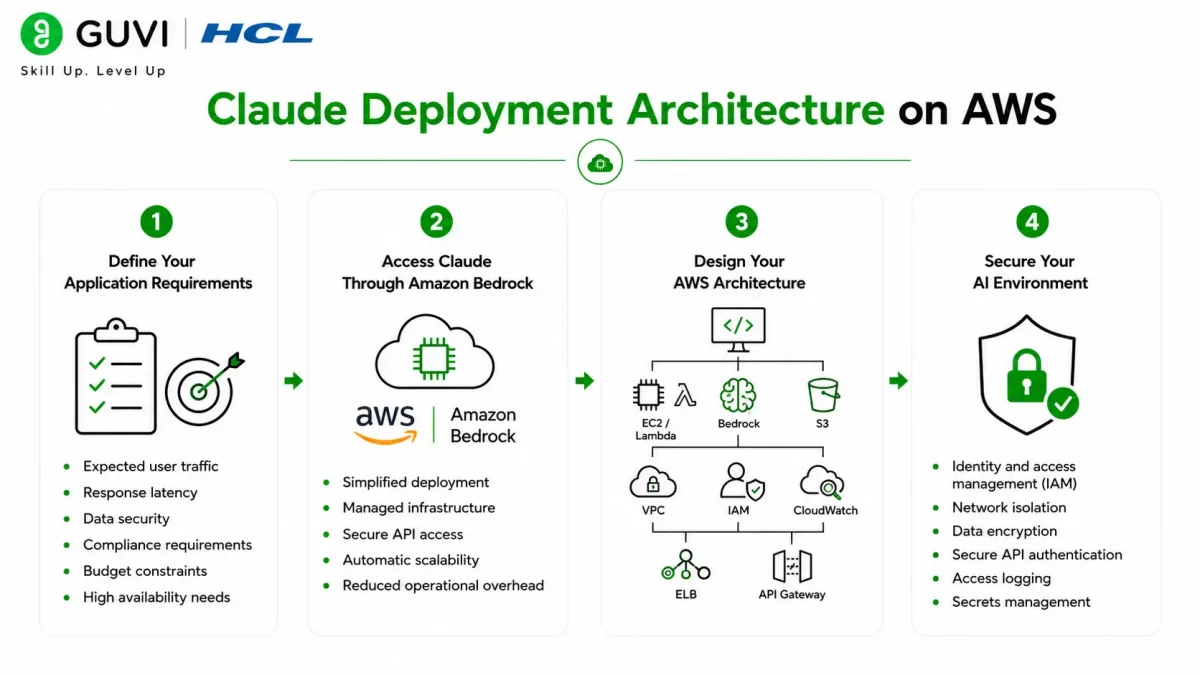
Step 1: Define Your Application Requirements
Start by identifying your application’s objectives, expected traffic, security requirements, and performance goals. Understanding these requirements helps you choose the right AWS services and deployment architecture.
Consider:
- Expected user traffic
- Response latency
- Data security
- Compliance requirements
- Budget constraints
- High availability needs
Step 2: Access Claude Through Amazon Bedrock
Amazon Bedrock provides managed access to Claude without requiring you to host or maintain foundation models. Your application securely sends requests through the Bedrock API while AWS manages the underlying infrastructure.
Benefits include:
- Simplified deployment
- Managed infrastructure
- Secure API access
- Automatic scalability
- Reduced operational overhead
Step 3: Design Your AWS Architecture
Build an architecture that prioritizes scalability, security, and reliability. A typical deployment combines your application with AWS networking, storage, monitoring, and Amazon Bedrock.
Common AWS services include:
- Amazon EC2 or AWS Lambda
- Amazon Bedrock
- Amazon S3
- Amazon VPC
- AWS IAM
- Amazon CloudWatch
- Elastic Load Balancer
- Amazon API Gateway
Step 4: Secure Your AI Environment
Protect your AI application by implementing AWS security best practices. Apply the principle of least privilege and secure access to every component of your architecture.
Focus on:
- Identity and access management (IAM)
- Network isolation
- Data encryption
- Secure API authentication
- Access logging
- Secrets management

Understanding Claude Deployment Costs on AWS
The cost of deploying Claude on AWS depends on the Claude model you use, API request volume, token usage, and the supporting AWS infrastructure. Your monthly bill typically includes Amazon Bedrock charges along with the cloud services that power your application.
Major cost components include:
- Amazon Bedrock: Charges based on the Claude model and the number of input and output tokens processed.
- Compute: Amazon EC2, AWS Lambda, Amazon ECS, or Amazon EKS for running your application.
- Storage: Amazon S3 or databases for storing documents, prompts, logs, and application data.
- Networking: Data transfer, Amazon API Gateway, and Elastic Load Balancer usage.
- Monitoring: Amazon CloudWatch for logs, metrics, and alerts.
Tips to Reduce AWS Costs
You can optimize deployment expenses by:
- Choosing the right Claude model for your workload.
- Reducing unnecessary input and output tokens.
- Using AWS Lambda for variable or low-traffic workloads.
- Enabling Auto Scaling to avoid overprovisioning.
- Monitoring usage with AWS Cost Explorer and Amazon CloudWatch.
- Removing unused resources and storage regularly.
- Caching frequently requested responses to reduce repeated API calls.
By understanding these cost drivers and applying optimization strategies, you can build scalable Claude applications while keeping AWS costs under control.
Claude Deployment Best Practices
Step 5: Monitor Application Performance
Continuously monitor system health after deployment to identify bottlenecks, improve reliability, and optimize resource usage.
Track metrics such as:
- API latency
- Request volume
- Error rates
- Resource utilization
- Response times
- Service availability
Step 6: Optimize Architecture for Scale
As your application grows, optimize infrastructure to maintain performance while controlling cloud costs.
Focus on:
- Auto Scaling
- Caching
- Load balancing
- Resource utilization
- Infrastructure efficiency
- Cost optimization
Step 7: Continuously Improve Your AWS Deployment
Cloud deployments require continuous optimization to maintain security, performance, and cost efficiency. Regularly review your architecture, monitor usage, update security configurations, and refine scaling strategies as business requirements evolve. Professionals who want to master cloud infrastructure, automation, and AI deployment can strengthen these skills through HCL GUVI’s DevOps Course.
Amazon Bedrock allows developers to access foundation models like Claude through a fully managed service, eliminating the need to provision GPU infrastructure or manage model deployments. This enables teams to focus on building AI applications while AWS handles scalability, availability, and infrastructure management.
Claude AWS Deployment Tasks You Can Automate
Claude can assist developers throughout the AWS deployment lifecycle.
It can help with:
- Designing cloud architectures
- Generating Infrastructure as Code
- Explaining AWS services
- Creating deployment documentation
- Optimizing cloud costs
- Reviewing security configurations
- Troubleshooting deployment issues
- Generating monitoring recommendations
- Writing automation scripts
- Documenting DevOps workflows
- Explaining AWS best practices
- Supporting cloud migration planning
The HCL GUVI’s Artificial Intelligence eBook is an excellent starting point for learning practical Artificial Intelligence concepts, cloud AI deployment strategies, prompt engineering, and real-world business applications. It helps learners understand how cloud platforms and AI models work together to build scalable, production-ready solutions.
Tasks Claude Should Not Replace
Claude is a valuable assistant for AWS deployments, but certain responsibilities should remain with cloud engineers and DevOps teams.
Claude should not replace:
- Cloud architecture approvals
- Security audits
- Compliance assessments
- Production deployment approvals
- Infrastructure governance
- Disaster recovery planning
- Cost management decisions
- Performance benchmarking
- Incident response
While Claude can recommend deployment strategies, explain AWS services, and assist with automation, experienced engineers should make the final decisions for production environments.
Warning: Deploying Claude on AWS requires proper security, monitoring, and cost management. Misconfigured permissions, inadequate monitoring, or poor architecture can increase operational costs and create security risks. Always review your AWS configuration, follow security best practices, and test your deployment thoroughly before moving to production.
Best Practices for Deploying Claude on AWS
Follow these best practices to build reliable and cost-effective AI applications:
- Design a scalable cloud architecture.
- Use Amazon Bedrock for managed model access.
- Secure resources using AWS IAM.
- Encrypt data in transit and at rest.
- Monitor performance with Amazon CloudWatch.
- Optimize resource utilization regularly.
- Review cloud costs frequently.
- Automate deployments where possible.
- Test thoroughly before production releases.
Conclusion
Deploying Claude on AWS enables organizations to build scalable, secure, and production-ready Artificial Intelligence applications using managed cloud services. By designing an efficient architecture, implementing strong security practices, monitoring performance, and optimizing cloud costs, teams can deliver reliable AI solutions while maintaining operational efficiency. Continuous improvement and responsible cloud management are essential for long-term success.
FAQs
1. Can Claude be deployed on AWS?
Yes. Claude can be accessed on AWS through Amazon Bedrock, allowing developers to integrate foundation models into cloud applications without managing the underlying infrastructure.
2. What AWS service provides access to Claude?
Amazon Bedrock provides managed access to Claude and other foundation models through a unified API, simplifying AI application development and deployment.
3. What factors affect the cost of deploying Claude on AWS?
Costs depend on Amazon Bedrock usage, compute resources, storage, networking, monitoring services, and overall application traffic.
4. How can I secure Claude deployments on AWS?
Use AWS IAM for access control, encrypt sensitive data, isolate resources with Amazon VPC, monitor activity using CloudWatch, and follow AWS security best practices.
5. Can Claude help with AWS architecture design?
Yes. Claude can explain AWS services, recommend architecture patterns, generate Infrastructure as Code examples, and assist with deployment planning. Final architectural decisions should be made by experienced cloud engineers.
6. How do I optimize AWS costs for Claude applications?
Monitor resource utilization, scale infrastructure based on demand, review Amazon Bedrock usage, eliminate unused resources, and regularly evaluate your cloud spending.
7. What are the best practices for deploying Claude on AWS?
Build a scalable architecture, use managed AWS services, implement strong security controls, monitor application performance, optimize cloud costs, automate deployments, test thoroughly, and continuously improve your infrastructure.
Success Stories

About the Author
Vishalini Devarajan
An Aerospace Engineer turned content writer, I focus on making complex concepts easy to understand through well-structured, reader-friendly blogs. Whether it’s a technical topic or a non-technical one, I love creating content that is clear, engaging, and impactful.
View all posts by Vishalini Devarajan
Connect with me @













Did you enjoy this article?