


Artificial Intelligence and Machine Learning Articles
AI/ML Skills Gap 2026: Why Companies Can't Find Job-Ready Talent
20 AI/ML Interview Questions Recruiters Can Use Without a Tech Background - Best Guide
How Industry-Backed AI/ML Bootcamps Are Changing the AI/ML Hiring Pipeline - Best Guide 2026
From IT Support to AI Engineer: A Realistic Career Switch Guide 2026


Get In Touch For Details! Request More Information

How to Use Claude for Brainstorming Sessions
Aug 13, 2026 3 Min Read 221 Views
(Last Updated)
Brainstorming is a process where teams generate ideas, solve problems, or explore new opportunities. However, standard brainstorming sessions can become repetitive or overlook important alternative perspectives. Claude for brainstorming sessions by providing ideas, organizing concepts, identifying patterns and opportunities, and generating multiple options for business and creative problem-solving.
Table of contents
- TL;DR
- Direct Answer Box
- Benefits of Using Claude for Brainstorming
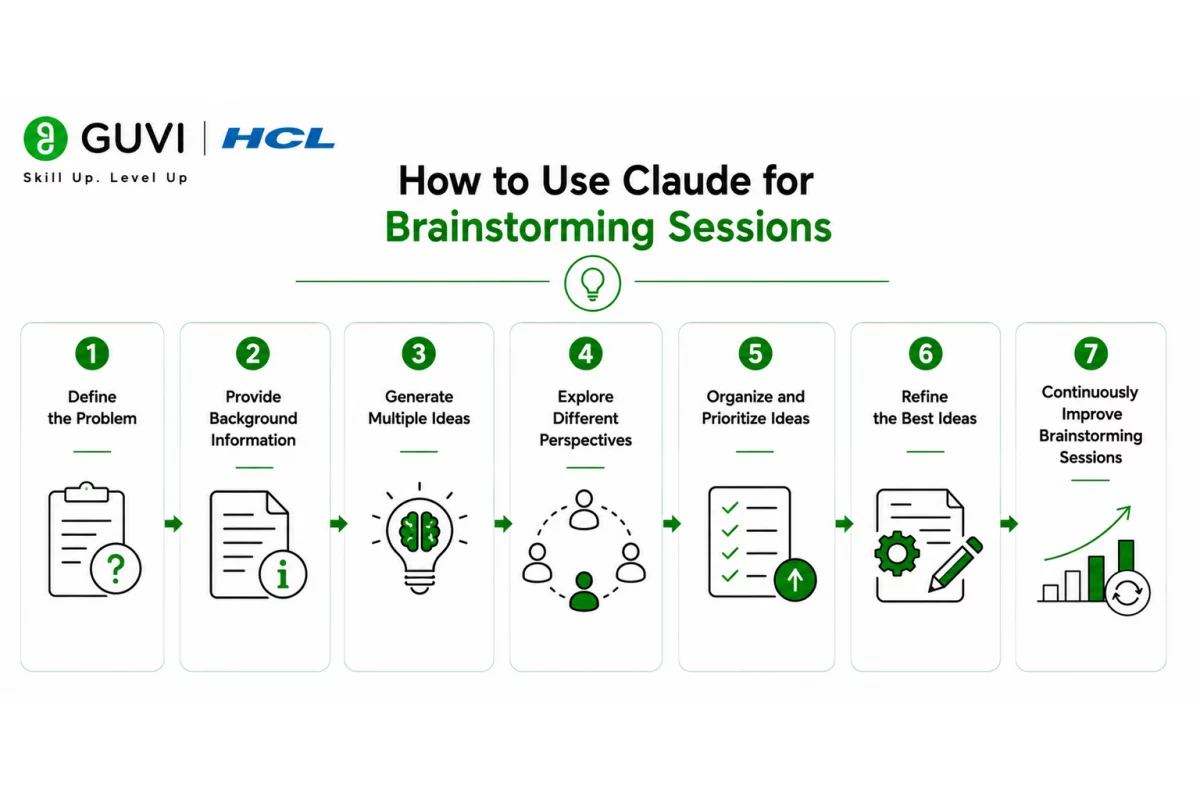
- How to Use Claude for Brainstorming Sessions
- Step 1: Define the Problem
- Step 2: Provide Background Information
- Step 3: Generate Multiple Ideas
- Step 4: Explore Different Perspectives
- Step 5: Organize and Prioritize Ideas
- Step 6: Refine the Best Ideas
- Step 7: Continuously Improve Brainstorming Sessions
- Brainstorming Tasks You Can Automate with Claude
- Tasks Claude Should Not Replace
- Best Practices for Using Claude for Brainstorming
- Conclusion
- FAQs
- How can Claude help with brainstorming?
- Can Claude generate multiple ideas for the same problem?
- Can Claude support business brainstorming?
- Should teams review Claude's ideas?
- What are the benefits of using Claude for brainstorming?
- Can Claude replace brainstorming teams?
- What are the best practices for using Claude for brainstorming?
TL;DR
- Claude can help teams generate ideas, explore alternative solutions, and organize effective brainstorming sessions.
- AI can support human creativity, innovation, and problem-solving in a variety of business applications.
- Structured prompts lead to more specific, useful, and targeted brainstorming results.
- Iterating on multiple solutions helps teams refine concepts and identify stronger ideas.
- Human judgment and collaboration are still required to select and implement the best solutions.
📚 Data Point: Generative AI is now used by many organizations to support ideation, knowledge work, collaboration, and creative problem-solving. Teams explore more ideas in less time and spend less time on early-stage planning and research.
Source: Gartner Research
Direct Answer Box
| Claude can support brainstorming sessions in several ways. It can be used to generate ideas, think through multiple perspectives, explore new solutions, organize concepts, identify opportunities, and refine the strongest results. When combined with human collaboration and evaluation, Claude can help teams brainstorm more creatively and productively, and make better business decisions. |
Benefits of Using Claude for Brainstorming
Brainstorming usually involves the generation of large quantities of ideas to be refined later to select the most useful, creative, or valuable concepts. Claude can assist this process by suggesting new ideas, organizing information, and facilitating structured thinking.
The key benefits include:
- Faster idea generation
- Explore multiple perspectives
- Structured brainstorming
- Creative problem-solving
- Improved collaboration
- Organized ideas
- Productivity
- Innovative solutions
Generative AI is used by many organizations in the early stages of innovation to think through more ideas in less time. AI also helps teams overcome creative blocks, examine problems from different perspectives, and organize brainstorming sessions more productively.
How to Use Claude for Brainstorming Sessions
Step 1: Define the Problem
Provide a clear explanation of the challenge, opportunity, or question that you would like to brainstorm. A well-defined objective will help Claude produce more focused and relevant ideas.
Define the:
- Problem statement
- Business objective
- Target audience
- Constraints
- Desired outcome
Step 2: Provide Background Information
Share some background context so Claude can understand the problem before generating ideas.
Background information includes:
- Business context
- Customer challenge
- Market information
- Existing solutions
- Project goals
- Relevant data
Step 3: Generate Multiple Ideas
Ask Claude to generate multiple ideas instead of a single answer or solution. Iterating on different options will help teams think more broadly.
Request:
- Creative ideas
- Practical solutions
- Alternative solutions
- Innovative concepts
- Short-term ideas
- Long-term opportunities
Step 4: Explore Different Perspectives
Challenge Claude to think through the problem from different perspectives to identify ideas that may otherwise be missed.
Explore the perspectives of:
- Customers
- Employees
- Leaders
- Competitors
- Business partners
- End users
Step 5: Organize and Prioritize Ideas
Once ideas have been generated, instruct Claude to group similar concepts and prioritize the best ideas based on criteria like business value, feasibility, cost, or potential impact.
Criteria to evaluate include:
- Business value
- Feasibility
- Cost
- Implementation effort
- Potential impact
- Risks
Step 6: Refine the Best Ideas
Select the strongest ideas and ask Claude to expand, improve, or combine the concepts into more detailed solutions.
Refine the ideas by:
- Adding more details
- Combining ideas
- Identifying potential risks
- Suggesting improvements
- Creating action plans
- Defining next steps
Step 7: Continuously Improve Brainstorming Sessions
Great brainstorming sessions get better over time through an iterative process of refinement. Review ideas, gather team feedback, test the most promising concepts, and refine your prompts to generate improved ideas over time. Professionals interested in building real-world analytical thinking, problem-solving, business intelligence, and innovation skills can do so by enrolling in HCL GUVI’s Business Analytics Course.

Brainstorming Tasks You Can Automate with Claude
Claude can support a variety of ideation and brainstorming activities.
Claude can help with:
- Idea generation
- Product brainstorming
- Business strategy ideas
- Marketing campaign ideas
- Problem-solving
- Feature suggestions
- Process improvement ideas
- Meeting agenda creation
- Workshop planning
- Project planning
- SWOT brainstorming
- Content idea generation
The HCL GUVI’s Artificial Intelligence eBook is a free guide for professionals and non-technical people to learn Artificial Intelligence concepts, prompt engineering, business use cases, and real-world applications. It covers how AI helps improve productivity and workflows in innovation, business strategy, marketing, customer service, and enterprise operations.
Tasks Claude Should Not Replace
Claude is a powerful brainstorming assistant, but important business and creative decisions should still be made by people.
Claude should not be used for:
- Final business decisions
- Strategic business planning
- Leadership decisions
- Product approvals
- Budget approvals
- Legal reviews
- Risk acceptance
- Executive judgment
- Human creativity
AI can generate ideas and support the organization of a brainstorming session, but the best ideas are selected and implemented through human expertise and collaboration.
⚠️ Warning: Claude can generate creative ideas in large quantities, but not every idea will be practical, accurate, or appropriate for your business. All ideas should be evaluated for feasibility, business impact, cost, risks, and alignment to organizational goals before implementation.
Best Practices for Using Claude for Brainstorming
The following best practices can help improve the quality of brainstorming sessions.
- Define a clear problem statement.
- Provide context about the business, the customers, the market, and the competition.
- Generate multiple ideas before evaluating them.
- Explore alternative perspectives.
- Prioritize ideas using clear criteria.
- Refine promising ideas iteratively.
- Collaborate with team members.
- Validate ideas before implementing them.
Conclusion
Claude can help teams generate new ideas, think through multiple alternative solutions, organize productive brainstorming sessions, and refine concepts. When combined with human creativity, collaboration, and structured evaluation criteria, Claude can help teams improve innovation, problem-solving, and business decision-making.
FAQs
1. How can Claude help with brainstorming?
Claude can generate ideas, organize concepts, explore multiple perspectives, suggest solutions, and help teams structure brainstorming sessions more productively.
2. Can Claude generate multiple ideas for the same problem?
Yes. Claude can generate multiple approaches, creative concepts, alternative solutions, and different perspectives for a single problem.
3. Can Claude support business brainstorming?
Yes. Claude can support business strategy, product ideas, marketing campaigns, process improvements, customer experience, and innovation workshops.
4. Should teams review Claude’s ideas?
Yes. AI-generated ideas should be reviewed and validated for feasibility, business value, cost, risks, and organizational alignment before implementation.
5. What are the benefits of using Claude for brainstorming?
Faster idea generation, structured thinking, multiple perspectives, better collaboration, organized ideas, and increased productivity are some of the key benefits.
6. Can Claude replace brainstorming teams?
No. Claude supports the generation and organization of ideas, but human creativity, collaboration, and decision-making remain essential for successful brainstorming.
7. What are the best practices for using Claude for brainstorming?
Define clear objectives, provide business context, generate multiple ideas, explore different perspectives, refine promising concepts iteratively, validate ideas, and use Claude to support—not replace—human creativity.
Success Stories

About the Author
HCL GUVI
This article was selected and published as part of the HCL GUVI AI Blogathon 2026, an initiative designed to encourage students, AI enthusiasts, and aspiring tech writers to simplify complex AI concepts through impactful technical content. The contest recognized high-quality, original, and insightful AI-focused blogs, with selected authors receiving publication opportunities on the HCL GUVI blog platform along with official author credits and recognition.
View all posts by HCL GUVI
Connect with me @













Did you enjoy this article?