


Artificial Intelligence and Machine Learning Articles
AI/ML Skills Gap 2026: Why Companies Can't Find Job-Ready Talent
20 AI/ML Interview Questions Recruiters Can Use Without a Tech Background - Best Guide
How Industry-Backed AI/ML Bootcamps Are Changing the AI/ML Hiring Pipeline - Best Guide 2026
From IT Support to AI Engineer: A Realistic Career Switch Guide 2026


Get In Touch For Details! Request More Information
How to Get Claude to Write in Your Brand Voice
Aug 17, 2026 4 Min Read 339 Views
(Last Updated)
To get Claude to write in your brand voice, document your tone, vocabulary, and style rules clearly, then load them into a Claude Project or a custom Claude Style along with real writing samples. Claude uses this saved context on every response inside that Project or Style, so you do not have to re-explain your voice each time. Combining both features, a Project for what Claude should know and a Style for how Claude should sound, gives the most consistent results.
Table of contents
- TL;DR
- What Does Brand Voice Mean for AI Generated Content?
- Why Claude's Default Output Can Sound Like Generic AI
- Common signs of unguided AI writing include:
- How to Set Up Claude for Your Brand Voice Step by Step
- Step 1: Document Your Brand Voice First
- Step 2: Use a Claude Project for Long Term Consistency
- Step 3: Create a Custom Claude Style Built From Writing Samples
- Step 4: Feed Claude Real Writing Samples, Not Just Descriptions
- Step 5: Add Voice Reminders for Long Form Content
- How to Check If Claude's Output Still Sounds Like Generic AI
- Watch for these signs that the setup still needs work:
- Common Mistakes That Make AI Content Sound Off-Brand
- Key Takeaways
- Conclusion
- FAQs
- What is Claude brand voice?
- Can Claude actually learn my brand voice over time?
- Should I use a Claude Project or a Claude Style for brand voice?
- Why does my Claude content still sound like generic AI after setup?
- Is one prompt enough to get consistent brand voice from Claude?
TL;DR
- Claude’s default writing style is neutral and can sound like generic AI content if left unguided.
- Brand voice comes from clear documentation of tone, vocabulary, and structure, not from a single clever prompt.
- Claude Projects and Claude Styles are the two features built specifically to hold your voice rules across conversations.
- Feeding Claude real writing samples works better than describing your tone in abstract words.
- Long-form content should be generated in sections with voice reminders in between to prevent drift.
- A short manual review pass is still needed even after setup, since AI output rarely matches a brand voice perfectly on the first try.
Want to build a strong foundation in prompting AI tools for real content and business use cases? Explore HCL GUVI’s Generative AI Course, designed to help you get practical, production-ready output from tools like Claude instead of generic AI text.
What Does Brand Voice Mean for AI Generated Content?
Brand voice is the consistent personality behind everything a company publishes. It covers word choice, sentence rhythm, formality level, and how a brand talks about its own product.
When AI tools generate content without this context, they default to a flat, balanced tone that reads the same regardless of who is asking. This is why so much AI written content across the internet sounds interchangeable.
Getting Claude to match your brand voice is not about tricking the model. It is about giving it the same reference material a new human writer on your team would need before their first assignment.
Read More: What’s New in Claude: Turning Claude into Your Thinking Partner
Why Claude’s Default Output Can Sound Like Generic AI
Claude, like most language models, is trained to produce safe, balanced, broadly readable text. Without direction, this shows up as a few recognizable patterns.
Common signs of unguided AI writing include:
- Overly balanced sentence structure with little rhythm variation.
- Frequent use of transition phrases like “in today’s world” or “it is important to note.”
- Generic openings that restate the topic instead of adding a point of view.
- A tendency to summarize rather than take a clear stance.
- Repeated sentence lengths that make paragraphs feel monotonous.
None of these are flaws in Claude specifically. They happen with any model when it has no brand context to work from.
Data Point: Teams that supply written voice guidelines and sample content to Claude report noticeably fewer editing passes before publishing, compared to teams that rely on a single prompt line like “write in a friendly tone.
How to Set Up Claude for Your Brand Voice Step by Step
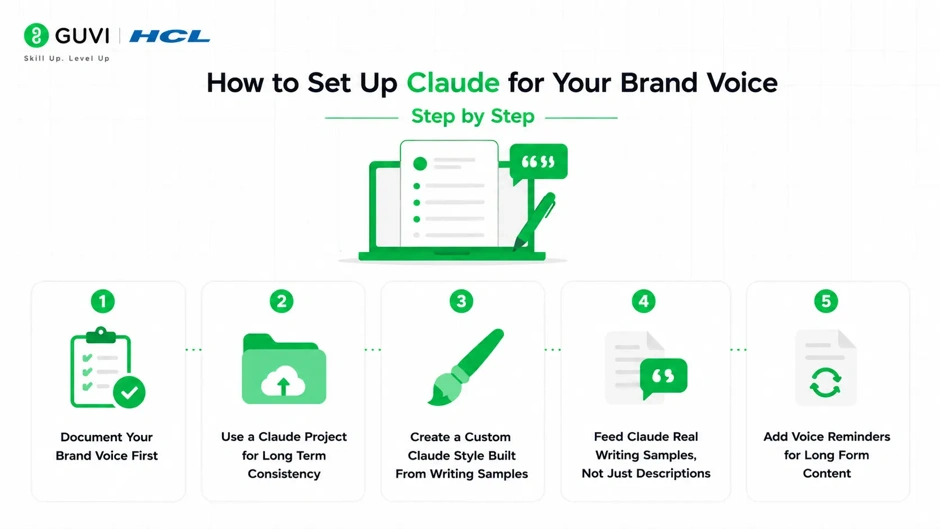
A structured setup gets you closer to your actual brand voice than trial and error prompting.
Step 1: Document Your Brand Voice First
Before touching Claude, write down your voice rules in plain language. Include:
- Tone words, such as confident, warm, or direct.
- Words and phrases your brand avoids.
- Sentence length and formatting preferences.
- Two or three examples of on-brand writing and why they work.
This document becomes the source Claude will reference, so vague input here leads to vague output later.
Step 2: Use a Claude Project for Long Term Consistency
Claude Projects let you set instructions and upload reference documents that apply to every conversation inside that Project.
- Upload your voice document and a few pieces of your best existing content.
- Add project instructions covering structure, formatting, and anything Claude should avoid.
- Every new chat inside that Project starts with this context already loaded.
This removes the need to re-explain your brand voice in every single conversation.
Step 3: Create a Custom Claude Style Built From Writing Samples
Claude Styles control how Claude communicates, separate from what it knows.
- Open the Use Style menu and select Create custom style.
- Add a writing example from your own published content instead of describing the tone in words.
- Review the style Claude generates and adjust it using plain instructions like “less formal” or “shorter sentences.”
Uploading a real sample usually produces a closer match than typing out a tone description from scratch.
Step 4: Feed Claude Real Writing Samples, Not Just Descriptions
Descriptions like “professional but approachable” mean different things to different people, and to the model. A real writing sample removes that ambiguity because Claude can pattern match against actual sentence structure and word choice. Use two or three samples that represent different content types, such as a blog post and a short social caption, if your brand voice shifts slightly by format.
Step 5: Add Voice Reminders for Long Form Content
For longer articles, Claude’s tone can drift as the response gets longer.

- Break long content into sections instead of asking for the full piece at once.
- Repeat a short voice reminder before each section, especially for anything past 800 to 1000 words.
- Review the assembled draft as one piece before publishing, since sections written separately can still read slightly differently side by side.
Pro Tip: Projects and Styles solve different problems. A Project holds your knowledge and instructions. A Style controls tone and structure. Using both together gives Claude the fullest picture of your brand.
Using real writing samples to build your Claude brand voice usually produces more consistent, on-brand content than simply describing your tone with adjectives like “professional” or “friendly.”
How to Check If Claude’s Output Still Sounds Like Generic AI
Even with a Project and Style set up, it is worth reviewing the first few outputs closely.
Watch for these signs that the setup still needs work:
- The opening line restates the topic instead of making a point.
- Every paragraph is close to the same length.
- Transition phrases repeat across multiple pieces of content.
- The tone matches your instructions but the sentence rhythm still feels flat.
If these patterns show up often, go back to Step 3 and add another writing sample, or tighten the voice document from Step 1.
Warning: Do not skip the review pass. AI generated content that sounds close to your brand voice can still carry small generic patterns that readers notice even when they cannot name what feels off.
Claude Projects vs Claude Styles: Which One Should You Use?
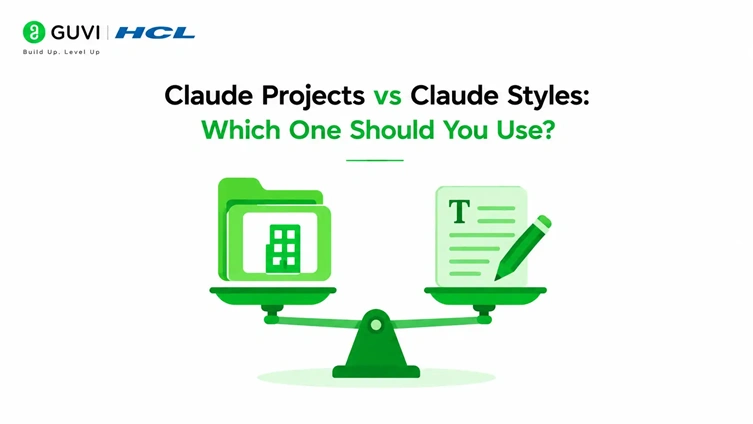
These two features are not competing options, they work best together.
- Claude Projects are better for:
- Long system level instructions.
- Uploaded voice documents and knowledge files.
- Context that needs to persist across many conversations.
- Claude Styles are better for:
- Quick tone and structure control per chat.
- Switching between voices for different content types in the same session.
- Fine-tuning sentence length, formality, and vocabulary.
A Project defines what Claude knows about your brand. A Style defines how Claude sounds while writing about it.
Common Mistakes That Make AI Content Sound Off-Brand
- Writing one vague tone instruction and expecting consistent results across many sessions.
- Never uploading real writing samples, relying only on adjectives to describe voice.
- Generating very long content in a single pass without voice reminders.
- Skipping the review step because the first draft looks acceptable at a glance.
- Using the same Style for content types that actually need different tones, such as technical docs versus social captions.
Key Takeaways
- Brand voice consistency comes from documentation and reference material, not a single prompt.
- Claude Projects hold your voice guidelines and knowledge across every conversation in that Project.
- Claude Styles control tone, formality, and structure, and can be built from real writing samples.
- Long-form content needs section-by-section voice reminders to avoid drift.
- A manual review pass is still necessary, since AI content can carry subtle generic patterns even after setup.
- Projects and Styles work best when used together, not as alternatives to each other.
Conclusion
Getting Claude to write in your brand voice is less about finding the perfect prompt and more about giving it the same groundwork you would give a new writer joining your team. A documented voice guide, a Claude Project for context, and a custom Style built from real samples together close most of the gap between generic AI output and content that actually sounds like your brand. The setup takes some upfront effort, but it pays off every time you need consistent content without re-explaining your voice from scratch.
FAQs
1. What is Claude brand voice?
Claude brand voice refers to configuring Claude’s tone, vocabulary, and structure to match a specific brand instead of its default neutral style.
2. Can Claude actually learn my brand voice over time?
Not through repeated use alone, since Claude does not retain memory across separate conversations by default. Projects and Styles persist the voice context instead.
3. Should I use a Claude Project or a Claude Style for brand voice?
Use both together. Projects hold your knowledge and instructions, while Styles control tone and structure.
4. Why does my Claude content still sound like generic AI after setup?
It usually means the writing samples or voice document need more detail, or long content was generated without section-by-section reminders.
5. Is one prompt enough to get consistent brand voice from Claude?
No, a single prompt rarely holds up across multiple sessions. Documented voice rules and saved context give far more consistent results.
Success Stories

About the Author
Vishalini Devarajan
An Aerospace Engineer turned content writer, I focus on making complex concepts easy to understand through well-structured, reader-friendly blogs. Whether it’s a technical topic or a non-technical one, I love creating content that is clear, engaging, and impactful.
View all posts by Vishalini Devarajan
Connect with me @













Did you enjoy this article?