


Artificial Intelligence and Machine Learning Articles
AI/ML Skills Gap 2026: Why Companies Can't Find Job-Ready Talent
20 AI/ML Interview Questions Recruiters Can Use Without a Tech Background - Best Guide
How Industry-Backed AI/ML Bootcamps Are Changing the AI/ML Hiring Pipeline - Best Guide 2026
From IT Support to AI Engineer: A Realistic Career Switch Guide 2026


Get In Touch For Details! Request More Information
How to Use Claude API in Node.js
Aug 17, 2026 3 Min Read 363 Views
(Last Updated)
The Claude API in Node.js applications to build AI-powered chatbots, content generation tools, coding assistants, and workflow automation. By installing the official Anthropic SDK, configuring your API key, and making API requests, you can quickly connect Claude to your Node.js projects and start generating intelligent responses.
Table of contents
- TL;DR
- What Is the Claude API for Node.js?
- Why Use Claude API in Node.js?
- What Do You Need Before Getting Started?
- How to Use Claude API in Node.js
- Step 1: Create a New Project
- Step 4: Create a Claude Client
- Step 5: Send Your First Request
- What Can You Build with Claude API?
- Best Practices for Using Claude API
- Common Mistakes to Avoid
- Key Takeaways
- Conclusion
- FAQs
- How do I use the Claude API in Node.js?
- Do I need an API key to use Claude in Node.js?
- Which package should I install for Claude API?
- Can I build a chatbot with Claude API and Node.js?
- How should I secure my Claude API key?
TL;DR
- The Claude API allows Node.js applications to interact with Claude models.
- You’ll need a valid Anthropic API key before getting started.
- The official Anthropic SDK simplifies API integration.
- Store API keys securely using environment variables.
- Claude can power chatbots, AI assistants, content generation, and automation tools.
What Is the Claude API for Node.js?
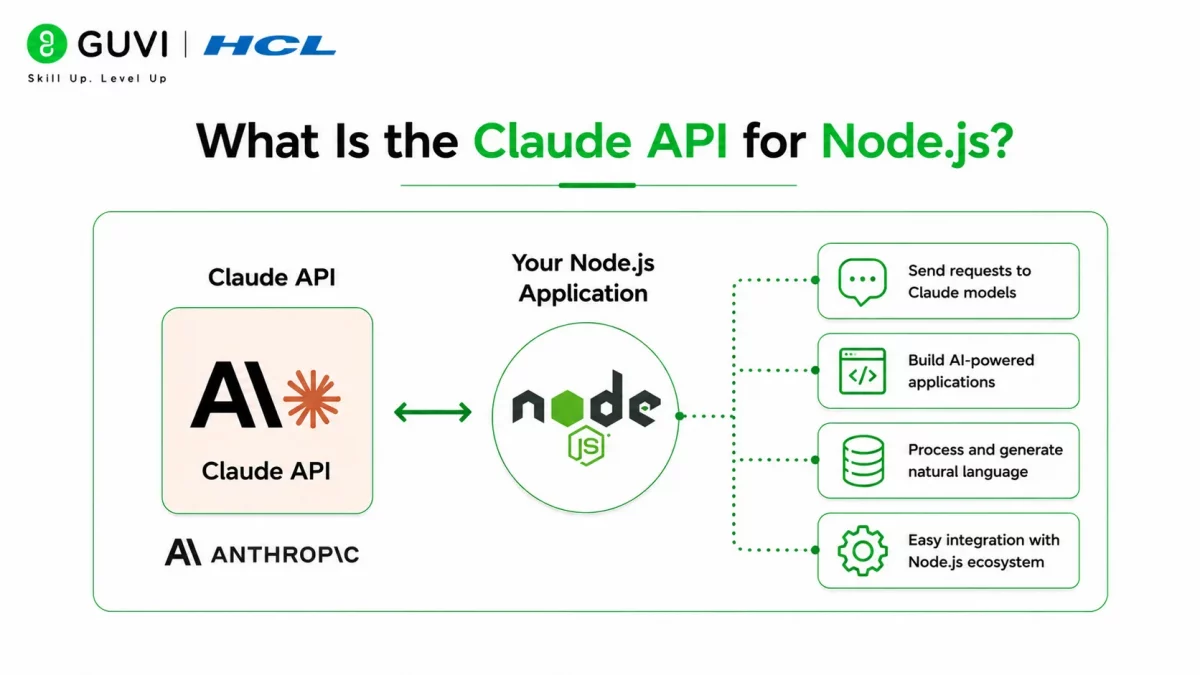
The Claude API enables Node.js developers to integrate Anthropic’s Claude models into web applications, backend services, and automation workflows. Instead of building AI capabilities from scratch, developers can send prompts to Claude and receive natural language responses through simple API calls.
Whether you’re creating a customer support chatbot, an AI writing assistant, or a document analysis tool, the Claude API provides a flexible way to add generative AI features to your Node.js applications.
Common use cases include:
- AI chatbots
- Content generation
- Code assistants
- Document summarization
- Workflow automation
Read More: Claude Code Tutorial: Generate, Debug, and Document Code
Node.js is one of the most popular runtimes for AI-powered web applications because it efficiently handles asynchronous operations and API requests, making it an excellent choice for integrating services like the Claude API.
Why Use Claude API in Node.js?
Node.js makes it easy to build scalable server-side applications, and the Claude API integrates naturally into that workflow. Using the official SDK reduces development time while providing a straightforward interface for sending prompts and receiving responses.
Some key benefits include:
- Simple integration. The official SDK handles much of the API communication for you.
- Fast development. Add AI features without building machine learning models from scratch.
- Scalable applications. Node.js efficiently handles multiple API requests and concurrent users.
- Flexible use cases. Claude can support chat interfaces, automation, analytics, and more.
Data Point: Many AI-powered web applications use Node.js for backend services because of its lightweight architecture and strong ecosystem of packages.
Want to build AI-powered full-stack applications? Explore HCL GUVI’s Full Stack Development Course, where you’ll learn Node.js, Express.js, REST APIs, databases, frontend frameworks, and backend integration through hands-on projects that prepare you for real-world development.
What Do You Need Before Getting Started?
Before integrating Claude into your application, make sure you have the required tools installed.
You’ll typically need:
- Node.js installed
- npm package manager
- A Claude API key
- A code editor such as Visual Studio Code
- Basic JavaScript knowledge
Keeping Node.js and dependencies updated helps ensure compatibility with the latest SDK releases.
Best Practice: Store your API key in an environment variable instead of hardcoding it into your application.
How to Use Claude API in Node.js
Follow these steps to connect your Node.js application to Claude.
Step 1: Create a New Project
Initialize a new Node.js project.

mkdir claude-nodejs

cd claude-nodejs

npm init -y

This creates a basic project with a package.json file.
Step 2: Install the Anthropic SDK
Install the official SDK using npm.

npm install @anthropic-ai/sdk

The SDK simplifies communication with the Claude API.
Step 3: Configure Your API Key
Create a .env file and add your API key.

ANTHROPIC_API_KEY=your_api_key
Using environment variables keeps sensitive credentials out of your source code.
Step 4: Create a Claude Client
Import the SDK and initialize the client.

import Anthropic from "@anthropic-ai/sdk";

const anthropic = new Anthropic({

  apiKey: process.env.ANTHROPIC_API_KEY,

});
The client is now ready to communicate with the Claude API.
Step 5: Send Your First Request
const message = await anthropic.messages.create({

  model: "claude-sonnet-4",

  max_tokens: 300,

  messages: [

    {

      role: "user",

      content: "Explain REST APIs in simple terms.",

    },

  ],

});

console.log(message.content);
Use the client to send a prompt and receive a response.

Claude processes the prompt and returns a generated response.
Warning: Never expose your API key in frontend applications or public Git repositories. Always keep credentials on the server side.
What Can You Build with Claude API?
Claude API supports a wide range of AI-powered applications in Node.js.
Popular projects include:
- Customer support chatbots.
- AI writing assistants.
- FAQ generators.
- Code explanation tools.
- Knowledge base assistants.
- Content summarization systems.
- Business workflow automation.
The API is flexible enough to support both simple prototypes and enterprise applications.
Best Practices for Using Claude API
Following a few best practices helps you build secure and reliable AI applications.
Some recommendations include:
- Store credentials securely.
- Validate user input before sending prompts.
- Handle API errors gracefully.
- Monitor token usage.
- Keep SDK dependencies updated.
These practices improve application security, performance, and maintainability.
Pro Tip: Create reusable functions for API requests instead of repeating the same code throughout your application. This makes future updates much easier.
Common Mistakes to Avoid
Many developers encounter similar issues during their first integration.
Some common mistakes include:
- Hardcoding API keys.
- Forgetting to load environment variables.
- Ignoring API error handling.
- Sending unnecessarily large prompts.
- Using outdated SDK versions.
Avoiding these mistakes helps create more stable and secure applications.
Well-structured prompts often improve response quality more than simply increasing the maximum token limit. Writing clear, specific prompts helps Claude generate more accurate and relevant responses while keeping token usage efficient.
Key Takeaways
- Claude API integrates easily into Node.js applications using the official SDK.
- Environment variables help protect sensitive API credentials.
- Node.js is well suited for AI-powered backend services.
- Claude supports chatbots, automation, content generation, and more.
- Proper error handling improves application reliability.
- Following security best practices protects both your application and your users.
Conclusion
Integrating the Claude API into a Node.js application is a straightforward way to add powerful AI capabilities to modern software. With the official Anthropic SDK, developers can quickly build chatbots, content generators, automation tools, and intelligent assistants without managing complex machine learning infrastructure.
As your application grows, following best practices for security, prompt design, and error handling will help ensure your integration remains reliable and scalable. By combining Node.js with the Claude API, you can create AI-powered applications that deliver fast, intelligent, and engaging user experiences.
FAQs
How do I use the Claude API in Node.js?
Install the official Anthropic SDK, configure your API key using environment variables, initialize the client, and send requests using the messages.create() method.
Do I need an API key to use Claude in Node.js?
Yes, a valid Anthropic API key is required to authenticate requests and access Claude models.
Which package should I install for Claude API?
You should install the official @anthropic-ai/sdk package using npm. It provides a simple interface for working with the Claude API.
Can I build a chatbot with Claude API and Node.js?
Yes, the Claude API is commonly used to build AI chatbots, virtual assistants, and conversational applications in Node.js.
How should I secure my Claude API key?
Store the API key in environment variables or a secure secrets manager, and never expose it in client-side code or public repositories.
Success Stories

About the Author
Vishalini Devarajan
An Aerospace Engineer turned content writer, I focus on making complex concepts easy to understand through well-structured, reader-friendly blogs. Whether it’s a technical topic or a non-technical one, I love creating content that is clear, engaging, and impactful.
View all posts by Vishalini Devarajan
Connect with me @













Did you enjoy this article?