


Artificial Intelligence and Machine Learning Articles
AI/ML Skills Gap 2026: Why Companies Can't Find Job-Ready Talent
20 AI/ML Interview Questions Recruiters Can Use Without a Tech Background - Best Guide
How Industry-Backed AI/ML Bootcamps Are Changing the AI/ML Hiring Pipeline - Best Guide 2026
From IT Support to AI Engineer: A Realistic Career Switch Guide 2026


Get In Touch For Details! Request More Information
Building a RAG App with Claude and Pinecone
Aug 07, 2026 3 Min Read 253 Views
(Last Updated)
Retrieval-Augmented Generation (RAG) enables Artificial Intelligence applications to retrieve relevant information from external knowledge sources before generating responses. By combining Claude with Pinecone, developers can building a RAG applications that deliver more accurate, context-aware, and up-to-date answers using vector search. Whether you’re creating AI chatbots, enterprise search systems, or knowledge assistants, this combination improves response quality while reducing hallucinations.
Table of contents
- TL;DR
- Direct Answer Box
- Why Integrate Claude with Pinecone?
- How to Build a RAG App with Claude and Pinecone
- Step 1: Prepare Your Knowledge Base
- Step 2: Create Vector Embeddings and Store Them in Pinecone
- Step 3: Connect Claude to Your Retrieval Workflow
- Step 4: Retrieve Relevant Context
- Step 5: Generate Context-Aware Responses
- Step 6: Test and Refine Your RAG Application
- Step 7: Scale Your Knowledge Base
- Step 8: Continuously Optimize Your AI System
- Claude Pinecone Tasks You Can Automate
- Tasks Claude Should Not Replace
- Best Practices for Using Claude with Pinecone
- Conclusion
- FAQs
- Can Claude work with Pinecone?
- How does Pinecone improve Claude's responses?
- What is Pinecone used for in RAG applications?
- Can Claude answer questions using my documents?
- Is Pinecone suitable for enterprise AI applications?
- Can Claude build an entire RAG application?
- What are the best practices for using Claude with Pinecone?
TL;DR
- Claude and Pinecone help developers build Retrieval-Augmented Generation (RAG) applications using vector search.
- Use Claude to generate context-aware responses while Pinecone retrieves relevant information from your knowledge base.
- Build scalable AI applications that provide more accurate, reliable, and up-to-date answers.
- Learn how Artificial Intelligence, Machine Learning, and vector databases power modern RAG systems.
- Organize your knowledge base and optimize prompts to maximize Claude and Pinecone performance.
📚 Data Point: Pinecone is a managed vector database designed for similarity search and Retrieval-Augmented Generation (RAG) applications. It enables developers to store, search, and retrieve vector embeddings at scale, making it easier to build production-ready Artificial Intelligence systems.
Source: https://www.pinecone.io/
Direct Answer Box
| Claude and Pinecone help developers build Retrieval-Augmented Generation (RAG) applications by combining intelligent language generation with fast vector search. Pinecone retrieves relevant information from a knowledge base, while Claude uses that context to generate accurate, informed, and context-aware responses. |
Why Integrate Claude with Pinecone?
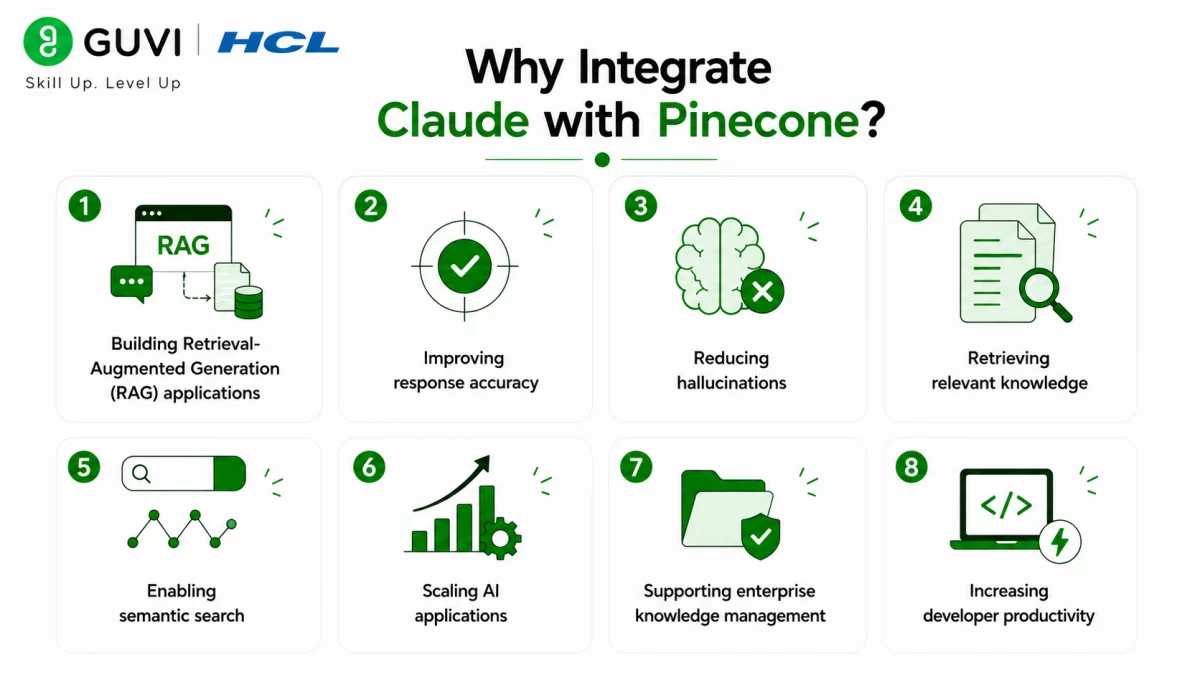
Large language models perform better when they can access relevant external knowledge instead of relying solely on their training data. Integrating Claude with Pinecone enables developers to retrieve accurate information from documents, knowledge bases, and business data before generating responses. This improves answer quality, reduces hallucinations, and supports scalable enterprise Artificial Intelligence applications.
Some key benefits include:
- Building Retrieval-Augmented Generation (RAG) applications
- Improving response accuracy
- Reducing hallucinations
- Retrieving relevant knowledge
- Enabling semantic search
- Scaling Artificial Intelligence applications
- Supporting enterprise knowledge management
- Increasing developer productivity
How to Build a RAG App with Claude and Pinecone
Step 1: Prepare Your Knowledge Base
Collect the documents, PDFs, manuals, support articles, or business data that your RAG application will use. Organize your information clearly so it can be converted into vector embeddings and retrieved accurately during user queries.
Step 2: Create Vector Embeddings and Store Them in Pinecone
Convert your documents into vector embeddings using a compatible embedding model and store them in Pinecone. This enables fast semantic search, allowing the system to retrieve information based on meaning rather than exact keyword matches.
Step 3: Connect Claude to Your Retrieval Workflow
Once Pinecone is integrated with Claude through your application, Claude can retrieve the most relevant information from your vector database before generating responses. This provides additional context for more accurate answers.
Step 4: Retrieve Relevant Context
When a user submits a question, Pinecone performs a similarity search to find the most relevant document chunks from your knowledge base. These retrieved results are then passed to Claude as contextual information.
Step 5: Generate Context-Aware Responses
Using the retrieved context from Pinecone, Claude generates accurate, relevant, and natural responses based on your organization’s knowledge rather than relying only on its pre-trained knowledge.
Step 6: Test and Refine Your RAG Application
Evaluate your application’s responses using different types of user queries. Adjust document chunking, embedding quality, retrieval settings, and prompts to improve response accuracy and overall performance.
Step 7: Scale Your Knowledge Base
As your knowledge base grows, continue adding new documents, updating outdated information, and optimizing vector indexing. Pinecone makes it easier to scale RAG applications while maintaining fast retrieval performance.
Step 8: Continuously Optimize Your AI System
Regularly monitor retrieval accuracy, prompt quality, and application performance to improve user experience. Professionals who want to build intelligent AI systems can strengthen their skills through HCL GUVI’s Artificial Intelligence and Machine Learning Course.
Retrieval-Augmented Generation (RAG) is widely used in enterprise AI applications because it combines the reasoning capabilities of large language models with real-time information retrieval. By using vector databases like Pinecone alongside Claude, organizations can build AI systems that deliver more accurate, trustworthy, and context-aware responses while reducing hallucinations.
Claude Pinecone Tasks You Can Automate
Claude supports developers throughout the Retrieval-Augmented Generation (RAG) application development lifecycle.
It can help with:

- Retrieving relevant documents
- Generating context-aware responses
- Performing a semantic search
- Summarizing retrieved information
- Answering knowledge base questions
- Improving chatbot accuracy
- Supporting enterprise search
- Managing document-based assistants
- Automating knowledge retrieval
- Explaining technical documentation
- Streamlining AI workflows
- Enhancing developer productivity
The HCL GUVI’s Artificial Intelligence eBook is an excellent starting point for learning practical Artificial Intelligence concepts, prompt engineering techniques, Retrieval-Augmented Generation (RAG), and real-world business applications. It helps professionals understand how generative Artificial Intelligence, vector databases, and Machine Learning work together to build intelligent, context-aware applications.
Tasks Claude Should Not Replace
Claude is an excellent RAG application assistant; however, certain responsibilities should remain with developers and business teams.
Claude should not replace:
- System architecture decisions
- Security planning
- Production deployment approvals
- Data governance
- Compliance reviews
- Knowledge base validation
- Performance optimization decisions
- Handling sensitive business data
While Claude can assist with retrieving information, generating responses, and improving developer productivity, developers should make the final technical decisions. Use Claude to accelerate development and automate repetitive tasks, but rely on human expertise for critical system design and business responsibilities.
⚠️ Warning: Claude can generate responses using information retrieved from your Pinecone knowledge base. However, it may occasionally misinterpret retrieved context or produce incomplete or inaccurate responses. Always validate generated outputs, review retrieved documents, and thoroughly test your RAG application before deploying it in production.
Best Practices for Using Claude with Pinecone
Here are some best practices to maximize your results when using Claude with Pinecone:
- Organize your knowledge base.
- Use high-quality document chunks.
- Generate accurate vector embeddings.
- Write clear prompts.
- Regularly update your knowledge base.
- Review Artificial Intelligence-generated responses.
- Protect sensitive business data.
- Test your RAG application regularly.
- Remember that Claude is your RAG assistant, not your replacement.
Conclusion
Combining Claude with Pinecone enables developers to build powerful Retrieval-Augmented Generation (RAG) applications by combining semantic search with intelligent response generation. While generative Artificial Intelligence can significantly improve the accuracy of question answering, enterprise search, and knowledge management, building reliable RAG systems still requires careful data organization, testing, and human oversight. When used responsibly, Claude and Pinecone help developers create scalable, context-aware AI applications that deliver more accurate and trustworthy responses.
FAQs
1. Can Claude work with Pinecone?
Yes. Claude can work with Pinecone through compatible integrations to build Retrieval-Augmented Generation (RAG) applications that retrieve relevant information before generating responses.
2. How does Pinecone improve Claude’s responses?
Pinecone retrieves the most relevant document embeddings from your knowledge base, providing Claude with additional context to generate more accurate and informed answers.
3. What is Pinecone used for in RAG applications?
Pinecone is a vector database that stores and retrieves embeddings using semantic search, making it a core component of many Retrieval-Augmented Generation (RAG) systems.
4. Can Claude answer questions using my documents?
Yes. When integrated with Pinecone, Claude can retrieve relevant information from your documents and use that context to answer user questions more accurately.
5. Is Pinecone suitable for enterprise AI applications?
Yes. Pinecone is designed for scalable vector search and is widely used in enterprise AI applications such as knowledge assistants, semantic search, document retrieval, and intelligent chatbots.
6. Can Claude build an entire RAG application?
No. Claude can assist with code generation, retrieval workflows, prompt design, and documentation, but developers should handle architecture, security, deployment, and production decisions.
7. What are the best practices for using Claude with Pinecone?
Organize your knowledge base, create quality document chunks, generate accurate embeddings, write clear prompts, update your data regularly, review Artificial Intelligence-generated responses, protect sensitive information, test your RAG application thoroughly, and use Claude as a collaborative assistant rather than a replacement for developer expertise.
Success Stories

About the Author
Vishalini Devarajan
An Aerospace Engineer turned content writer, I focus on making complex concepts easy to understand through well-structured, reader-friendly blogs. Whether it’s a technical topic or a non-technical one, I love creating content that is clear, engaging, and impactful.
View all posts by Vishalini Devarajan
Connect with me @











Did you enjoy this article?