


Artificial Intelligence and Machine Learning Articles
Finance Manager to Data Analytics: Career Growth, Salary and Seniority
How to Evaluate LLM Outputs in Production Deployments
AI/ML Skills Gap 2026: Why Companies Can't Find Job-Ready Talent
20 AI/ML Interview Questions Recruiters Can Use Without a Tech Background - Best Guide


Get In Touch For Details! Request More Information
Using the Blackbaud Connector in Claude
Oct 05, 2026 7 Min Read 1176 Views
(Last Updated)
Managing donor data in Blackbaud often involves more manual work than expected. A simple question may require opening Raiser’s Edge NXT, running a query, exporting a CSV and reviewing it in Excel.
The Blackbaud connector Claude integration can make this process more conversational. Instead of navigating multiple reports, authorised users can ask questions about connected Blackbaud data in plain English.
For example, a fundraising team may ask, “Who are our top donors this year?” or “Which major donors have stopped contributing?” Claude can use the connected data to organise relevant information and present it in a readable format.
However, the results still depend on data quality, user permissions and the connector’s available fields. Teams should verify important figures before using them for fundraising or reporting decisions.
This guide explains how to connect Blackbaud to Claude, what information the integration can access and which prompts can support your nonprofit team. It also covers important limitations, privacy considerations and practical best practices.
Quick Answer: The Blackbaud connector Claude integration allows authorised teams to explore supported nonprofit CRM data through natural-language questions.
Here is what you need to know before using the integration:
- Simpler Data Access: Ask questions about donors, gifts and campaigns without manually reviewing several reports.
- Guided Connection: Set up the connector through Claude using the permissions approved by your Blackbaud administrator.
- Practical Fundraising Insights: Summarise giving patterns, identify lapsed donors and review campaign performance.
- SKY API Support: Available information depends on the Blackbaud products and fields supported through the SKY API.
- Responsible Use: Verify important results and protect sensitive donor information when using AI-generated responses.
Table of contents
- What Is the Blackbaud Connector?
- What Are the Benefits of Using the Blackbaud Connector in Claude?
- Prerequisites: What You Need Before You Start
- How to Connect Blackbaud to Claude: Step-by-Step Guide
- Step 1: Connect Blackbaud to Claude
- Step 2: Understanding What Claude Can Access
- Step 3: Running Your First Query With Claude
- Step 4: Practical Prompts for Fundraising and Donor Work
- Step 5: What the Blackbaud Connector Claude Cannot Do
- How Secure Is the Blackbaud Connector Claude Integration?
- How Do You Troubleshoot the Blackbaud Connector in Claude?
- Tips for Getting the Best Results
- Write Clear and Specific Prompts
- Refine Results Through Follow-Up Questions
- Create a Consistent Team Workflow
- Conclusion
- Frequently Asked Questions
- Q1. What is the Blackbaud connector in Claude?
- Q2. Which Blackbaud products does the connector support?
- Q3. Is the Blackbaud connector Claude integration free?
- Q4. Can Claude update or add records in Blackbaud?
- Q5. Is my Blackbaud data secure when connected to Claude?
What Is the Blackbaud Connector?
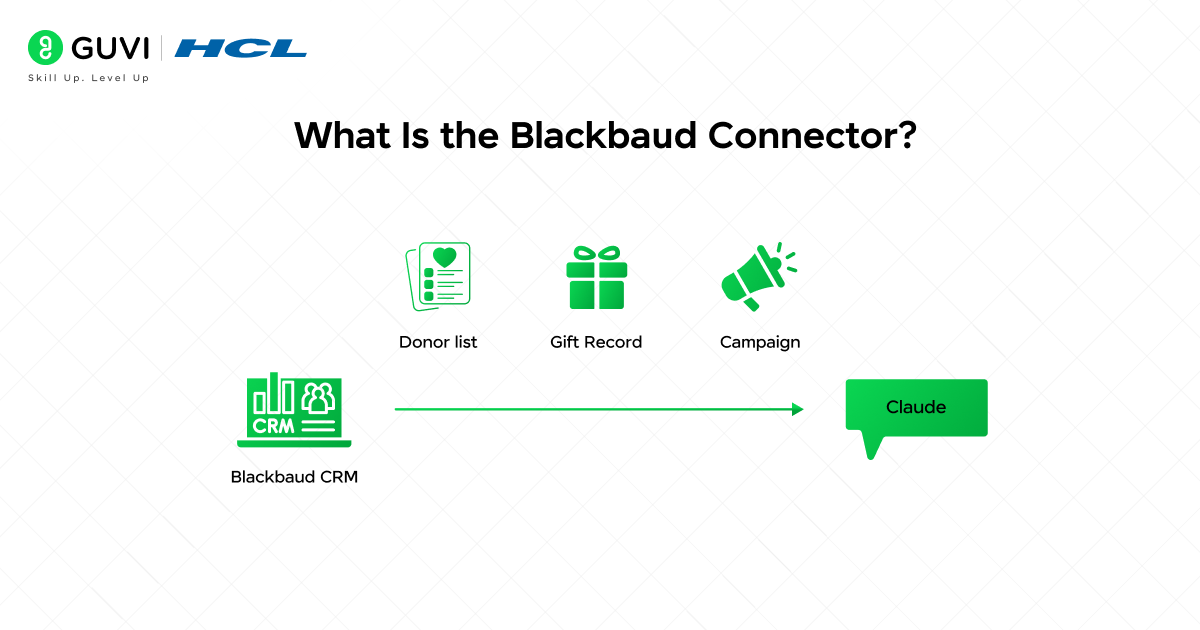
The Blackbaud Connector is a read-only Model Context Protocol integration that connects Claude with supported Blackbaud data through the SKY API. After an administrator installs the Blackbaud for Claude Marketplace application and enables AI features, the connector uses OAuth 2.0 authorization to access permitted records without exposing the user’s Blackbaud credentials to Claude.
It can retrieve supported constituent profiles, giving histories and event records from products such as Raiser’s Edge NXT. Claude then interprets natural-language requests, selects the relevant connector tools and converts the returned structured data into readable answers or draft content.
Access remains restricted by both the connector’s approved scopes and the authenticated user’s existing Blackbaud permissions. Therefore, Claude cannot retrieve records that the user is not already authorized to view. The connector currently provides read access and does not directly edit or delete Blackbaud records.
What Are the Benefits of Using the Blackbaud Connector in Claude?
The Blackbaud connector Claude integration can improve how different nonprofit teams find and use fundraising information:
- Faster Prospect Preparation: Major gift officers can create concise donor briefings before calls, meetings or stewardship activities.
- Easier Portfolio Prioritisation: Fundraisers can compare engagement signals and decide which relationships require immediate attention.
- Quicker Executive Briefings: Development leaders can transform CRM findings into concise updates for executives and board members.
- Stronger Event Planning: Event teams can review participation patterns and prepare more relevant attendee communications.
- Accessible CRM Exploration: Staff members who do not regularly build database queries can investigate approved information through natural-language requests.
- Better Cross-Team Alignment: Development, communications and leadership teams can work from shared definitions and consistently structured summaries.
Prerequisites: What You Need Before You Start
Before you connect Blackbaud to Claude, make sure you have the following requirements in place:
- Eligible Claude Plan: Confirm that your organisation uses a supported Claude Teams or Enterprise plan.
- Blackbaud Account: Use an active account connected to a supported Blackbaud environment.
- Administrator Approval: Ask your Blackbaud administrator to install and approve the Blackbaud for Claude Marketplace application.
- Enabled AI Features: Confirm that AI features are enabled within your organisation’s Blackbaud environment.
- Correct User Permissions: Ensure your account can access the constituent, gift or event records you want to query.
- Connector Authorization: Complete the OAuth authorization process and approve the requested access scopes.
- Data-Privacy Review: Check your organisation’s policies before allowing Claude to process sensitive donor information.
You only need to complete the initial connection once. However, an administrator may need to reauthorize access if permissions or connector scopes change.
Blackbaud’s SKY API offers over 250 endpoints across constituents, gifts, events, lists, and more. The Claude connector accesses this same API layer, meaning it can work with the same data available in Raiser’s Edge NXT — all while respecting your organization’s permission settings.
How to Connect Blackbaud to Claude: Step-by-Step Guide
Step 1: Connect Blackbaud to Claude
The connection process takes about five minutes and does not require any technical setup on your end. Here is exactly how to do it.
How to Connect
1. Open Claude and click the connector icon (the plug symbol) in the left sidebar or tools menu.
2. Search for Blackbaud in the connector directory and click on it.
3. Click Connect, and you will be redirected to a Blackbaud login page.
4. Log in with your Blackbaud credentials and authorize Claude to access your data.
5. Once authorized, you will be returned to Claude. The connector will show as Connected.
6. Start a new chat, and Claude will now have access to your Blackbaud data.
The connection uses OAuth 2.0, the same secure authorization standard used by tools like Google and Salesforce integrations. Claude does not store your Blackbaud password.
Step 2: Understanding What Claude Can Access
Before you start asking Claude questions, it helps to know what data is available through the connector. Not everything in Blackbaud is exposed; only the records covered by the SKY API.
What the Connector Can Reach
- Constituent records donor names, contact details, giving history, and relationships.
- Gift records individual donations, gift dates, amounts, funds, and payment methods.
- Campaigns and funds campaign names, goals, progress, and linked gifts.
- Lists constituent lists you have already built and saved in Raiser’s Edge NXT.
- Events, event registrations and attendance data linked to constituent records.
What the Connector Cannot Reach
• Custom database views or reports built outside the SKY API.
• Data in Blackbaud products that do not support the SKY API (some legacy modules).
• Attachments, scanned documents, or files stored against records.
If your organization has restricted API access to certain record types, Claude will only see what your permissions allow, within the same boundary as your Blackbaud users.
Step 3: Running Your First Query With Claude
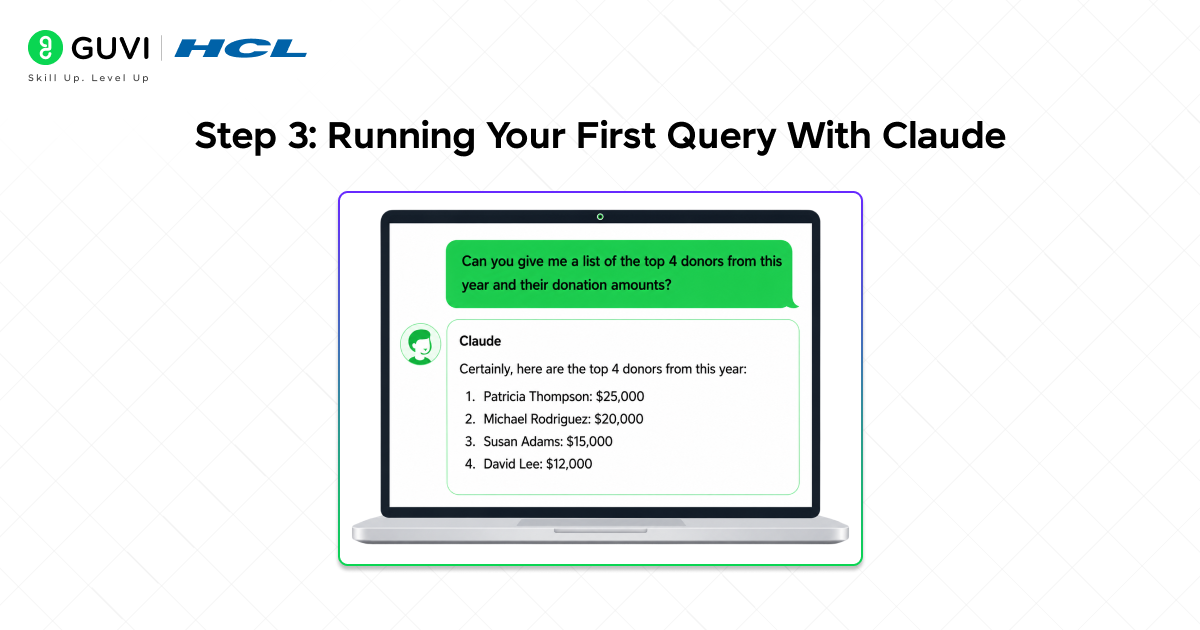
Once the connector is active, you can start asking questions straight away. You do not need to specify field names or know the API structure. Write the way you would ask a colleague.
Simple Queries to Start With
- “Show me the top 10 donors by total giving in the last 12 months.”
- “List all constituents who gave in 2023 but have not given in 2024.”
- “What is the current total raised for the Annual Fund campaign?”
- “How many new donors did we acquire last quarter?”
Claude will call the Blackbaud connector, retrieve the relevant records, and return the answer in a readable format, a table, a summary, or a plain-English response, depending on what you asked.
If the query returns a large number of results, Claude will summarise them and offer to show more detail on any specific record or segment.
Step 4: Practical Prompts for Fundraising and Donor Work
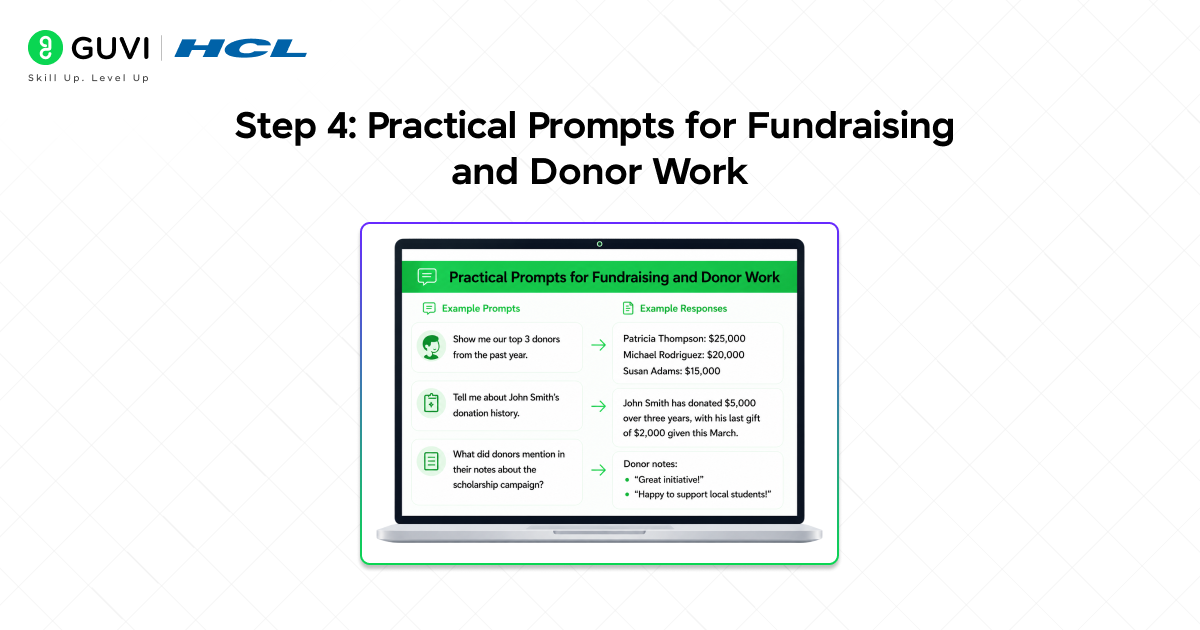
This is where the Blackbaud connector Claude combination earns its place in a real fundraising workflow. Below are prompts organized by the tasks your team actually handles.
Donor Research
- “Pull the giving history for [Donor Name] and summarise their total contributions by year.”
- “Show me all major donors’ gifts above $10,000 who have not been contacted in the last six months.”
- “Which donors gave to the Capital Campaign but have never given to the Annual Fund?”
Lapsed Donor Recovery
- “List all donors who gave between two and five years ago but have made no gift since.”
- “How many lapsed donors in our database gave more than $500 in their last gift?”
- “Segment lapsed donors by their last gift amount into three tiers: under $100, $100 to $999, and $1,000 plus.”
Campaign Reporting
- “What is the gift count and total amount raised for each fund this fiscal year?”
- “Compare total gifts received in Q1 this year versus Q1 last year.”
- “Which campaign has the highest average gift size this calendar year?”
Nonprofits spend an average of 12–15 hours per week on donor reporting tasks, including pulling, cleaning, and formatting CRM data. With the Blackbaud connector in Claude, standard queries can be completed in minutes, allowing fundraisers to focus more on relationship-building instead of manual reporting.

Step 5: What the Blackbaud Connector Claude Cannot Do
It is worth being clear about the limits. The connector is a powerful query and summarisation tool, but it is not a full Blackbaud replacement or a data entry system.
Current Limitations
- Claude cannot write back to Blackbaud. It is read-only. You cannot update a donor record, log a contact, or add a gift through Claude.
- Claude cannot run custom BBNC queries or Raiser’s Edge reports that exist outside the SKY API layer.
- Large bulk exports pulling tens of thousands of records at once may hit API rate limits and need to be broken into smaller queries.
- Claude cannot replace your Blackbaud training. If your data is incomplete or inconsistently entered, the answers will reflect that.
Think of it this way: Claude reads and explains your Blackbaud data extremely well. Any action that changes data still happens inside Raiser’s Edge NXT itself.
Blackbaud’s SKY API includes over 250 endpoints covering constituents, gifts, events, lists, and more. The Claude connector integrates directly with this API, giving access to the same Raiser’s Edge NXT data your team uses — while strictly following your organization’s permission controls.
How Secure Is the Blackbaud Connector Claude Integration?
The integration uses several technical controls to govern how Blackbaud information becomes available inside Claude:
- OAuth-Based Consent: The authorization process grants access through tokens instead of sending account passwords to the connected application.
- Scoped Authorization: Administrators can limit the application to specific capabilities supported by the SKY API scope framework.
- Permission Inheritance: Available records remain subject to the security rights assigned to the authenticated Blackbaud user.
- Read-Only Operation: The current integration retrieves supported information without performing update or deletion operations.
- Least-Privilege Configuration: Organisations should grant each employee only the access required for their responsibilities.
- Internal Governance: Teams should establish rules covering prompt content, output sharing, approval responsibilities and the handling of personally identifiable information.
How Do You Troubleshoot the Blackbaud Connector in Claude?
Most connection or response problems can be narrowed down by checking access, authorization and request size:
- Connector Does Not Appear: Confirm that the user has an eligible Claude plan and that the Marketplace application is available within the organisation.
- Authorization Fails: Check whether the Blackbaud session is active and whether an administrator has approved the required application access.
- Expected Records Are Missing: Review the user’s product permissions and confirm that the requested record type is supported by an available SKY API endpoint.
- Results Look Incomplete: Add precise dates, identifiers and campaign names before running the request again.
- Large Requests Time Out: Divide broad database questions into smaller segments based on period, fund, appeal or constituent group.
- Access Stops After a Change: Reauthorization may be required when application scopes or organisational permissions are updated.
- Figures Do Not Match: Compare the filters used in Claude with those applied inside Blackbaud and escalate unresolved differences to the database administrator.
Tips for Getting the Best Results
1. Write Clear and Specific Prompts
Claude produces better results when each request includes the exact filters your team needs:
- Add a Date Range: Ask for gifts received “during the last 12 months” instead of using a broad term such as “recently.”
- Define Gift Thresholds: Specify an amount such as “donors who contributed more than $500” when creating segments.
- Name the Campaign or Fund: Include the exact campaign, appeal or fund name to reduce ambiguity.
- Request a Preferred Format: Ask Claude to present the results as a table, summary or grouped donor list.
- State the Intended Purpose: Explain whether the information will support campaign reporting, donor outreach or an internal meeting.
2. Refine Results Through Follow-Up Questions
You can continue working with the retrieved Blackbaud data within the same Claude conversation:
- Narrow the Segment: After viewing lapsed donors, ask, “Of these donors, how many previously gave more than $1,000?”
- Compare Time Periods: Ask Claude to compare this quarter’s giving with the same quarter last year.
- Request Additional Detail: Ask for gift frequency, total contributions or the most recent donation date.
- Create Outreach Drafts: Ask Claude to draft a re-engagement email based on the identified donor segment.
- Verify Important Figures: Confirm financial totals and donor records inside Blackbaud before taking action.
3. Create a Consistent Team Workflow
A standardised approach helps team members receive more comparable and reliable outputs:
- Create Reusable Prompt Templates: Develop approved prompts for donor research, campaign reporting and lapsed-donor analysis.
- Use Consistent Definitions: Agree on terms such as “major donor,” “active donor” and “lapsed donor.”
- Prepare Meeting Briefs: Ask Claude to turn approved donor summaries into concise talking points or agenda notes.
- Review Connector Permissions: Ensure each user has only the Blackbaud access required for their role.
- Follow Data-Privacy Policies: Avoid copying sensitive donor information into unrelated chats, files or external tools.
If you want to learn more about building skills for Claude Code and automating your procedural knowledge, do not miss the chance to enroll in HCL GUVI’s Intel & IITM Pravartak Certified Artificial Intelligence & Machine Learning courses. Endorsed with Intel certification, this course adds a globally recognized credential to your resume, a powerful edge that sets you apart in the competitive AI job market.
Conclusion
The Blackbaud connector Claude integration gives fundraising teams direct access to their CRM data without navigating reports, exporting spreadsheets, or waiting for someone to run a query.
It is read-only, works through plain English, and connects securely using the same SKY API your Blackbaud users already rely on. Setup takes five minutes and requires no technical knowledge.
For teams spending hours each week on donor data tasks, the Blackbaud connector Claude combination is the fastest way to get from a question about your donors to a clear, usable answer.
Frequently Asked Questions
Q1. What is the Blackbaud connector in Claude?
The Blackbaud connector is a native integration in Claude that lets you query your Blackbaud CRM data, including donor records, gift history, campaigns, and lists, using plain English inside the Claude chat interface. It connects via Blackbaud’s SKY API and requires no coding to set up.
Q2. Which Blackbaud products does the connector support?
The connector works with any Blackbaud product that supports the SKY API, which includes Raiser’s Edge NXT. Legacy Raiser’s Edge (the desktop version without NXT) does not support SKY API and is not compatible with the connector.
Q3. Is the Blackbaud connector Claude integration free?
The connector itself is included with the Claude Pro, Team, and Enterprise plans. You do need an active Blackbaud account with SKY API access, which is standard on Raiser’s Edge NXT subscriptions. There is no additional connector fee.
Q4. Can Claude update or add records in Blackbaud?
No. The connector is read-only. Claude can retrieve and summarise your Blackbaud data, but it cannot create, edit, or delete any records. All data entry and record updates must still be done directly inside Raiser’s Edge NXT or your Blackbaud product.
Q5. Is my Blackbaud data secure when connected to Claude?
Yes. The integration uses OAuth 2.0, the same secure authorization standard used by major platforms. Claude does not store your Blackbaud password. Access is governed by your existing Blackbaud permission settings, so Claude can only see what your user account is allowed to see.a
Success Stories

About the Author
Vaishali
I'm a seasoned writer with four years of experience across technical, non-technical, and just about every genre or niche you can imagine. Adaptable and curious, I enjoy exploring new topics and making information engaging and easy to understand. Fueled by a steady stream of tea, I approach each project with creativity, reliability, and genuine enthusiasm for storytelling.
View all posts by Vaishali
Connect with me @













Did you enjoy this article?