


CSS Articles
Visual Editors & Page Builders: Are They Useful for Learning CSS? (2026 Guide)
How to Practice CSS with Real Projects: From Zen Garden to CodePen (2026 Guide)
CSS File Readability: Tools & Techniques to Navigate Large Stylesheets


Get In Touch For Details! Request More Information

Best Interactive CSS Challenges and Playgrounds to Sharpen Your Skills
Jan 30, 2026 4 Min Read 925 Views
(Last Updated)
Have you ever tried styling a page and wondered why the layout still breaks? That’s where css challenges become game-changers. They turn confusing concepts into simple, hands-on tasks that make you think like a real front-end developer while learning at your own pace.
In this blog, you’ll discover the best css challenges and interactive playgrounds that help you practice layouts, animations, and responsive design. It’s written for beginners, students, and anyone who wants to sharpen their skills and feel confident building real web designs.
Quick Answer
CSS challenges like CSSBattle, Flexbox Froggy, Grid Garden, and Frontend Mentor let you practice layouts, animations, and responsive design directly in the browser. They provide instant feedback while you recreate real designs and solve styling puzzles. By completing these challenges, you sharpen your CSS skills quickly and effectively.
Table of contents
- Best Interactive CSS Challenges And Playgrounds
- CSSBattle
- Flexbox Froggy
- Grid Garden
- Frontend Mentor
- CodePen
- Scrimba
- Codier
- 💡 Did You Know?
- Conclusion
- FAQs
- What are CSS Challenges?
- Who can benefit from CSS Challenges?
- Are CSS Challenges only for beginners?
- Which platform is best for learning Flexbox?
- Can CSS Challenges help build a portfolio?
Best Interactive CSS Challenges And Playgrounds
Practicing CSS is much more effective when you learn by doing, and CSS Challenges make this possible. They turn abstract concepts like layouts, Flexbox, Grid, and animations into interactive tasks where you can experiment and see instant results. These challenges help learners understand how different properties interact and develop problem-solving skills in real-world scenarios. They are perfect for beginners, students, and anyone wanting to sharpen their CSS abilities while building practical projects.
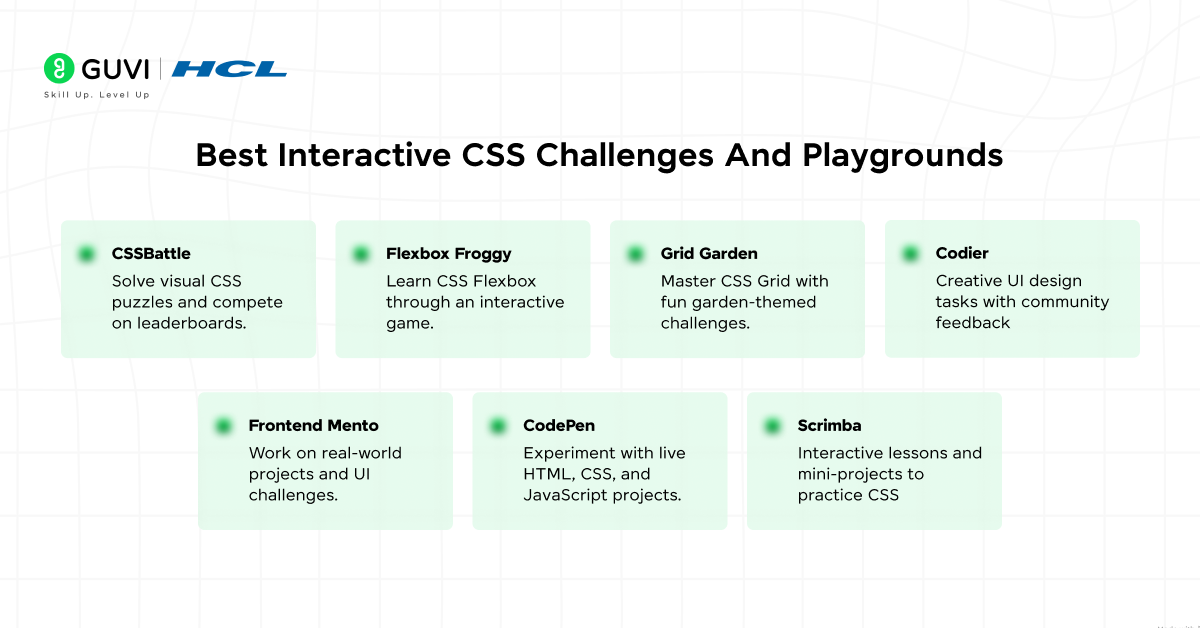
Here are the top platforms we will cover:
- CSSBattle – Solve visual CSS puzzles and compete on leaderboards.
- Flexbox Froggy – Learn CSS Flexbox through an interactive game.
- Grid Garden – Master CSS Grid with fun garden-themed challenges.
- Frontend Mentor – Work on real-world projects and UI challenges.
- CodePen – Experiment with live HTML, CSS, and JavaScript projects.
- Scrimba – Interactive lessons and mini-projects to practice CSS.
- Codier – Creative UI design tasks with community feedback.
If you want to reinforce your learning beyond the specific css challenges mentioned above, try HCL GUVI’s WebKata platform. It offers a series of front-end practice tasks covering HTML, CSS, JavaScript, and Bootstrap with instant feedback and a cloud-based environment, so you can sharpen your layout and styling skills without any setup. The task-based problems make learning practical and build confidence as you apply concepts from css challenges in real coding workflows.
1. CSSBattle
CSSBattle is a platform for solving CSS challenges by replicating target designs using the shortest possible code. It encourages creative thinking, precision, and efficient coding while letting you experiment with shapes, colors, and layouts. The platform adds a competitive edge with global leaderboards, making practice both fun and motivating. It’s excellent for those who want to improve their problem-solving skills and write cleaner, optimized CSS.
Key Features:
- Visual Puzzles: Recreate specific designs to practice accuracy.
- Efficiency Practice: Write concise and optimized CSS code.
- Leaderboard: Compare solutions with other developers globally.
- Instant Feedback: See live results while coding.
Tips:
- Start with simpler challenges to understand common patterns.
- Experiment creatively rather than memorizing solutions.
Link: CSSBattle
2. Flexbox Froggy
Flexbox Froggy teaches CSS Flexbox using a game where you move frogs to lily pads by writing CSS code. Each level gradually introduces alignment, spacing, and layout properties, building intuition for responsive layouts. It helps learners understand how Flexbox controls element positioning in real-world designs. This interactive, step-by-step approach keeps beginners engaged while practicing CSS challenges effectively.
Key Features:
- Interactive Game: Solve puzzles by writing Flexbox code.
- Step-by-Step Levels: Difficulty increases gradually.
- Visual Feedback: Immediate results reinforce learning.
- Beginner-Friendly: Ideal for newcomers learning layouts.
Tips:
- Replay levels to strengthen Flexbox understanding.
- Focus on understanding each property deeply.
Link: Flexbox Froggy

3. Grid Garden
Grid Garden teaches CSS Grid using a garden-themed game where you water carrots by writing code. Each level introduces new grid properties and layout techniques in a fun, interactive way. It helps learners master columns, rows, and grid areas while building confidence for complex layouts. Regular practice on Grid Garden improves both speed and accuracy in real-world CSS challenges.
Key Features:
- Themed Challenges: Learn Grid concepts while watering carrots.
- Stepwise Levels: Difficulty increases gradually.
- Hands-On Practice: Apply grid properties interactively.
- Immediate Feedback: See corrections and effects in real time.
Tips:
- Take notes on commonly used grid patterns.
- Combine Grid with Flexbox for advanced layouts.
Link: Grid Garden
4. Frontend Mentor
Frontend Mentor provides real-world projects where you recreate websites and components from provided mockups. It emphasizes responsive design, accessibility, and clean coding practices. By completing these CSS challenges, learners gain hands-on experience that simulates professional work and gradually build a portfolio. Community feedback enhances learning and encourages improvement with each project.
Key Features:
- Real-World Projects: Build portfolio-ready designs.
- Guided Assets: Use mockups, images, and starter files.
- Community Feedback: Receive constructive reviews.
- Responsive Challenges: Learn mobile-first and adaptive design.
Tips:
- Begin with beginner-level projects before tackling advanced ones.
- Focus on semantic, clean code for professional practice.
Link: Frontend Mentor
5. CodePen
CodePen is a live playground for experimenting with HTML, CSS, and JavaScript. Learners can explore thousands of community projects, remix designs, and test their own CSS challenges. It’s ideal for practicing animations, layouts, and components while drawing inspiration from others. Sharing your work also encourages feedback and continuous improvement.
Key Features:
- Live Preview: See updates instantly while coding.
- Community Inspiration: Explore thousands of shared projects.
- Custom Experiments: Test animations, layouts, and effects freely.
- Sharing Capabilities: Showcase CSS challenges to others.
Tips:
- Follow top creators to learn best practices.
- Recreate existing designs to strengthen problem-solving skills.
Link: CodePen
6. Scrimba
Scrimba provides interactive screencasts where you can pause and edit code directly inside the tutorial. It combines guided mini-projects with CSS challenges, teaching layouts, animations, and components hands-on. Beginners gain practical experience that reinforces concepts better than watching passive tutorials. Scrimba’s interactive approach makes learning engaging and effective.
Key Features:
- Interactive Screencasts: Edit code directly during lessons.
- Guided Projects: Step-by-step exercises reinforce learning.
- Beginner-Friendly: Ideal for newcomers to CSS.
- Practice-Based: Hands-on coding improves retention.
Tips:
- Pause lessons and try exercises before checking solutions.
- Revisit mini-projects to reinforce understanding.
Link: Scrimba
7. Codier
Codier focuses on creative UI challenges with open-ended tasks. Learners experiment with layouts, colors, and animations, combining CSS practice with visual design thinking. Community feedback helps refine designs and coding efficiency. This platform develops both technical and creative skills while allowing learners to try innovative approaches to common CSS challenges.
Key Features:
- Creative Tasks: Build unique layouts and UI components.
- Community Feedback: Receive reviews and improvement tips.
- Open-Ended Challenges: Encourages experimentation and problem-solving.
- Skill Building: Combine coding practice with design thinking.
Tips:
- Take inspiration from others but apply your own style.
- Balance aesthetics with code efficiency for best results.
Link: Codier
Do check out the HCL GUVI HTML & CSS course if you want to build a strong foundation before jumping into CSS challenges. It helps you understand layouts, Flexbox, Grid, selectors, and responsive design through hands-on practice, so solving CSS challenges becomes easier and more meaningful as you apply real concepts.
💡 Did You Know?
- The first CSS Challenge platforms appeared in 2011, transforming how beginners learn styling concepts interactively.
- Using CSS Challenges regularly can improve your understanding of layouts, Flexbox, Grid, and responsive design faster than tutorials alone.
- Platforms like CSSBattle and Codier not only teach CSS but also enhance problem-solving and efficiency, which is critical for real-world front-end development.
Conclusion
CSS Challenges are an engaging and effective way to sharpen your styling skills while building practical, real-world projects. Platforms like CSSBattle, Flexbox Froggy, and Grid Garden make learning layouts, Flexbox, and Grid interactive and fun. By regularly practicing these challenges, beginners and experienced developers alike can improve efficiency, creativity, and problem-solving abilities in CSS.
With consistent practice on platforms like Frontend Mentor, CodePen, Scrimba, and Codier, you can strengthen both technical and design skills, gain confidence in responsive design, and create polished projects ready for professional portfolios. Embracing CSS Challenges is a smart approach to mastering CSS enjoyably and practically.
FAQs
1. What are CSS Challenges?
CSS Challenges are interactive exercises or games that help learners practice CSS concepts like layouts, Flexbox, Grid, and animations in a hands-on way.
2. Who can benefit from CSS Challenges?
Beginners, students, and even intermediate developers can benefit, as these challenges improve both understanding and practical CSS skills.
3. Are CSS Challenges only for beginners?
No, advanced developers can also use them to refine efficiency, creativity, and problem-solving in complex CSS scenarios.
4. Which platform is best for learning Flexbox?
Flexbox Froggy is ideal for learning Flexbox through fun, interactive levels and immediate visual feedback.
5. Can CSS Challenges help build a portfolio?
Yes, platforms like Frontend Mentor and CodePen allow you to create real projects that can be showcased in a professional portfolio.
Success Stories

About the Author
Jebasta
I translate the language of data into stories that anyone can understand. As a writer with a data science background, I simplify analytics, AI, and decision-making so beginners and enthusiasts can confidently explore the world of data.
View all posts by Jebasta
Connect with me @














Did you enjoy this article?