


Artificial Intelligence and Machine Learning Articles
Finance Manager to Data Analytics: Career Growth, Salary and Seniority
How to Evaluate LLM Outputs in Production Deployments
AI/ML Skills Gap 2026: Why Companies Can't Find Job-Ready Talent
20 AI/ML Interview Questions Recruiters Can Use Without a Tech Background - Best Guide


Get In Touch For Details! Request More Information
AutoML Explained: Automating Model Selection
Aug 27, 2026 3 Min Read 218 Views
(Last Updated)
Building a machine learning model often requires choosing algorithms, preprocessing methods, hyperparameters, and evaluation strategies. AutoML automates many of these steps, helping users develop effective machine learning models with less manual experimentation. It can simplify model selection and accelerate the development process while still requiring appropriate data preparation and evaluation. This guide explains how AutoML works, what it automates, and where it can be useful.
Table of contents
- TL;DR
- Quick Answer
- Why AutoML Matters
- What Is AutoML?
- How AutoML Model Selection Works
- Step 1: Prepare the Dataset
- Step 2: Preprocess the Data
- Step 3: Select Candidate Models
- Step 4: Tune Hyperparameters
- Step 5: Train Models
- Step 6: Evaluate Performance
- Step 7: Select a Promising Model
- What Can AutoML Automate?
- Model Selection
- Hyperparameter Optimization
- Feature Engineering
- Data Preprocessing
- Model Evaluation
- AutoML Workflow
- Common Applications
- Business Analytics
- Customer Churn
- Sales Forecasting
- Classification
- Benefits of AutoML
- Faster Experimentation
- Reduced Repetitive Work
- Accessibility
- Systematic Model Search
- When Should You Use AutoML?
- Model Selection
- Hyperparameter Tuning
- Business Analytics
- Rapid Prototyping
- Classification and Prediction
- Key Concepts to Remember
- A Practical AutoML Workflow
- Define the Problem
- Prepare the Dataset
- Configure the Search
- Train Candidate Models
- Tune Hyperparameters
- Evaluate Results
- Select and Test the Model
- Real-World Applications
- Customer Churn
- Sales Forecasting
- Fraud Detection
- Business Classification
- Best Practices
- Conclusion
- FAQs
- What is AutoML?
- What does AutoML automate?
- Does AutoML select the best model?
- Can beginners use AutoML?
- Is AutoML useful for business analytics?
- Does AutoML replace data scientists?
- What is the main benefit of AutoML?
TL;DR
- AutoML automates parts of the machine learning workflow.
- It can evaluate multiple algorithms automatically.
- Hyperparameter tuning can improve model performance.
- Automated pipelines reduce repetitive experimentation.
- Human judgment is still important for data quality and model evaluation.
Quick Answer
| AutoML is a set of techniques and tools that automate parts of the machine learning development process, including model selection, preprocessing, and hyperparameter tuning. Instead of manually testing many algorithms and configurations, an AutoML system evaluates different approaches and identifies promising models based on a chosen evaluation metric. This can make machine learning development faster and more accessible. |
Why AutoML Matters
Selecting an appropriate model can require substantial experimentation. Different datasets may perform better with different algorithms and configurations.
AutoML can help with:
- Algorithm selection
- Data preprocessing
- Feature engineering
- Hyperparameter tuning
- Model evaluation
- Pipeline creation
What Is AutoML?
Automated Machine Learning (AutoML) refers to methods that automate parts of the machine learning workflow.
A traditional workflow might require a developer or data scientist to manually:
- Prepare the data.
- Select an algorithm.
- Configure hyperparameters.
- Train the model.
- Evaluate performance.
- Repeat the process with other approaches.
AutoML automates some of these repetitive steps and searches for promising combinations.
How AutoML Model Selection Works
A typical AutoML process follows several stages.
Step 1: Prepare the Dataset
Provide a suitable dataset and identify the target variable for the machine learning task.
Step 2: Preprocess the Data
The AutoML system may apply appropriate preprocessing techniques depending on the data and task.
Step 3: Select Candidate Models
The system evaluates different algorithms that could be suitable for the problem.
Step 4: Tune Hyperparameters
AutoML searches for configurations that improve model performance.
Step 5: Train Models
Candidate models are trained using the available training data.
Step 6: Evaluate Performance
Models are evaluated using appropriate metrics and validation strategies.
Step 7: Select a Promising Model
The system identifies models that perform well according to the chosen evaluation criteria.
What Can AutoML Automate?
Model Selection
AutoML can test different algorithms rather than requiring users to select one manually.
Hyperparameter Optimization
It can search for useful combinations of hyperparameters.
Feature Engineering
Some AutoML systems can automatically create or select useful features.
Data Preprocessing
Certain systems can automate transformations such as encoding, scaling, or handling missing values.
Model Evaluation
AutoML can compare candidate models using selected evaluation metrics.
AutoML Workflow
A simplified AutoML pipeline looks like:
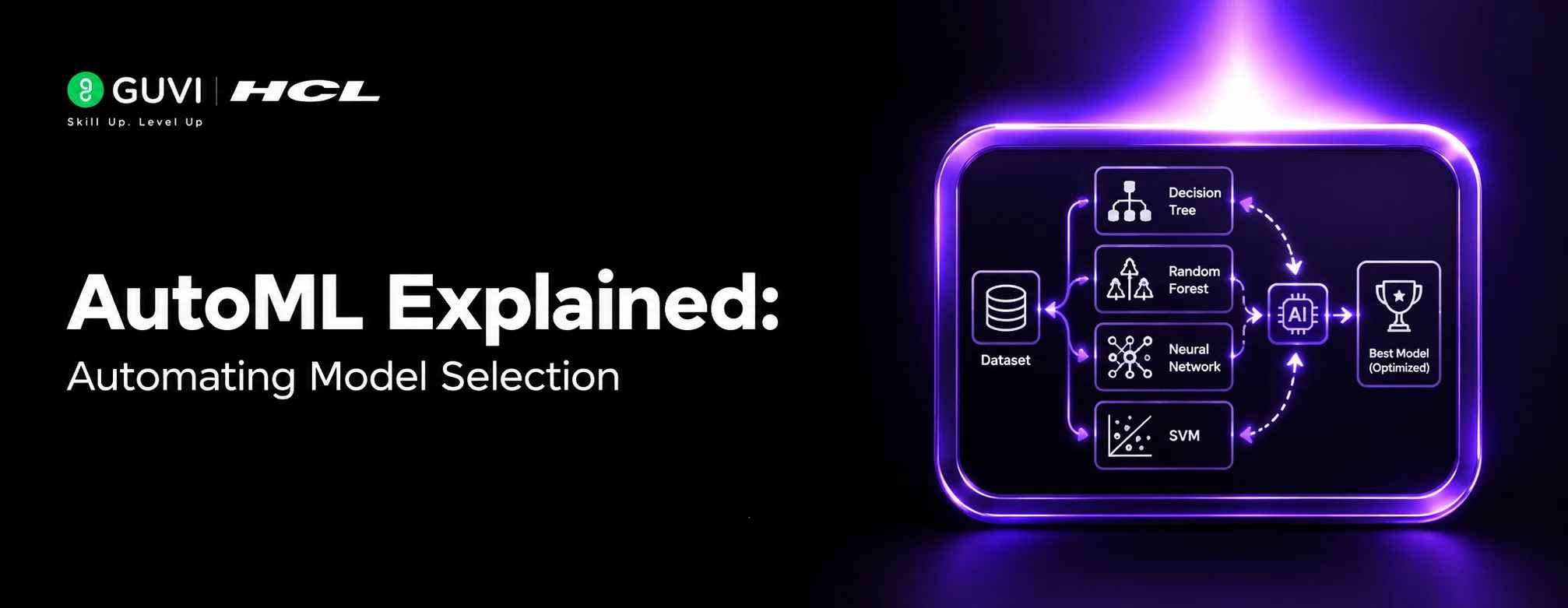
Data → Preprocessing → Feature Engineering → Model Selection → Hyperparameter Tuning → Evaluation → Best Model
The exact stages depend on the AutoML framework and the type of machine learning problem.
Common Applications
Business Analytics
Use AutoML to develop predictive models for business datasets.
Customer Churn
Automatically evaluate models for predicting which customers may leave.
Sales Forecasting
Test different machine learning approaches for predicting future sales.
Classification
Automate model selection for tasks such as fraud detection or customer classification.
AutoML does not eliminate the need for understanding the problem. The system can optimize against the metric you provide, but choosing the right target, evaluation metric, validation strategy, and dataset remains important.
Benefits of AutoML
Faster Experimentation
AutoML can evaluate many model configurations without requiring each experiment to be performed manually.
Reduced Repetitive Work
Automation handles parts of preprocessing, training, tuning, and evaluation.
Accessibility
AutoML can make machine learning workflows easier for users with limited model-development experience.
Systematic Model Search
Automated searches can explore combinations that might not be tested during manual experimentation.
When Should You Use AutoML?
AutoML is useful when you want to automate repetitive parts of machine learning development while still maintaining control over the overall problem and evaluation process.
Model Selection
Use AutoML when you need to test multiple algorithms and identify promising candidates efficiently.
Hyperparameter Tuning
AutoML is useful when manually testing different hyperparameter combinations would take significant time.

Business Analytics
Use AutoML to develop predictive models from structured business datasets with less manual experimentation.
Rapid Prototyping
AutoML can help quickly establish a baseline model before investing in more customized development.
Classification and Prediction
It can automate model evaluation for tasks such as customer churn, fraud detection, and sales prediction.
Professionals interested in artificial intelligence, machine learning, and automated model development can strengthen their expertise through HCL GUVI’s Artificial Intelligence and Machine Learning Course.
Key Concepts to Remember
- AutoML automates parts of the machine learning workflow.
- Model selection identifies promising algorithms.
- Hyperparameter optimization searches for effective configurations.
- Feature engineering can be automated by some AutoML systems.
- Evaluation metrics determine how candidate models are compared.
- Human judgment is still needed for data preparation and problem definition.
A Practical AutoML Workflow
1. Define the Problem
Identify the prediction target, machine learning task, and appropriate evaluation metric.
2. Prepare the Dataset
Clean and organize the data before providing it to the AutoML system.
3. Configure the Search
Specify constraints such as the evaluation metric, time limits, or models to consider.
4. Train Candidate Models
The AutoML system evaluates different algorithms and configurations.
5. Tune Hyperparameters
The system searches for configurations that improve model performance.
6. Evaluate Results
Compare candidate models using an appropriate validation strategy and metric.
7. Select and Test the Model
Choose a suitable model and evaluate it on data that was not used during model selection.
Real-World Applications
Customer Churn
Automatically test models for predicting customers who may leave a service.
Sales Forecasting
Evaluate machine learning approaches for predicting future sales.
Fraud Detection
Search for suitable models and configurations for identifying potentially fraudulent transactions.
Business Classification
Automate model selection for categorizing customers, transactions, or other business data.
The HCL GUVI’s Artificial Intelligence eBook introduces artificial intelligence, machine learning, generative AI, and intelligent automation concepts, helping learners understand modern AI technologies and their practical applications.
Best Practices
- Define the right target and evaluation metric first.
- Use appropriate validation strategies.
- Keep test data separate from model selection.
- Check the quality of the input data.
- Review the selected model rather than blindly accepting the top result.
- Consider interpretability and deployment requirements.
- Monitor model performance after deployment.
Conclusion
AutoML simplifies machine learning development by automating tasks such as model selection, preprocessing, feature engineering, and hyperparameter tuning. It can reduce repetitive experimentation and help teams find promising models faster. However, AutoML does not replace problem definition, data-quality checks, or sound evaluation. Combining automation with human judgment leads to more reliable machine learning workflows.
FAQs
1. What is AutoML?
AutoML (Automated Machine Learning) automates parts of the machine learning workflow, including model selection, preprocessing, and hyperparameter tuning.
2. What does AutoML automate?
Depending on the tool, AutoML can automate data preprocessing, feature engineering, model selection, hyperparameter optimization, training, and evaluation.
3. Does AutoML select the best model?
AutoML searches for models that perform well according to the specified evaluation criteria. The result is not automatically the best choice for every real-world requirement.
4. Can beginners use AutoML?
Yes. AutoML can simplify model development and reduce the amount of manual experimentation required.
5. Is AutoML useful for business analytics?
Yes. It can help automate predictive modeling for applications such as churn prediction, sales forecasting, and classification.
6. Does AutoML replace data scientists?
No. Data scientists and other experts are still needed to define the problem, prepare data, choose appropriate evaluation methods, interpret results, and deploy models responsibly.
7. What is the main benefit of AutoML?
The main benefit is faster and more systematic experimentation by automating repetitive parts of model development and evaluation.
Success Stories

About the Author
HCL GUVI
This article was selected and published as part of the HCL GUVI AI Blogathon 2026, an initiative designed to encourage students, AI enthusiasts, and aspiring tech writers to simplify complex AI concepts through impactful technical content. The contest recognized high-quality, original, and insightful AI-focused blogs, with selected authors receiving publication opportunities on the HCL GUVI blog platform along with official author credits and recognition.
View all posts by HCL GUVI
Connect with me @












Did you enjoy this article?